



Magical Posts Display – Elementor Advanced Posts widgets
Show your site posts, pages, custom post types & theme builder templates with advanced Elementor widgets.

Solid choice
Magical Posts Display is a solid plugin choice in 2026, with a few things worth checking first. It runs on 3K+ sites, is rated 4.4/5 and was last updated 3 weeks ago, and scores 70/100 on our health check.
- Actively developed — last update 3 weeks ago
- Tested with the latest WordPress (7.1)
- Momentum — downloads up 160.2% vs the previous 30 days
How does it stack up?
Side-by-side on installs, updates, ratings & support



Daily downloads
Download spikes usually follow a new release — each site that auto-updates counts as a download.
Rankings
Where Magical Posts Display stands todayWordPress.org search rankings
Live position in the plugin search, top 100| Keyword | Position |
|---|---|
| custom post | >100 |
| elementor widget | >100 |
| post display | #6 |
| post slider | #98 |
| theme builder | >100 |
Version adoption
Share of active sites per release.
Rating breakdown
★★★★★★★★★★ 4.4 from 10 reviews
About Magical Posts Display
From the official readme · v1.3.0Description
With just one click, you can easily generate posts Slider, posts carousels, posts Grids, posts accordions, posts tabs, posts tickers, and Categories & Tags Filters for Posts, Pages, and Custom Post Types. This addon helps you showcase your content in various formats, providing an engaging user experience for your visitors. Magical Posts Display is an Elementor addon that simplifies the creation of interactive content displays. Magical Posts Display is compatible with all custom post types.
✨ – Your All-in-One Tool for News, Magazines, and Blogs
Magical Posts Display is your ultimate solution for creating amazing News, Magazine, and Blog websites. Think of it as a supercharged plugin that does it all, whether you’re building a blog or a news and magazine site.
With Magical Posts Display, you get fantastic features like the Dynamic Site Builder, Popular Posts, Related Posts, Ajax Filter and Pagination, Post Carousel, Post slider, and much more. Now, with added support for Pages and Custom Post Types, it’s your secret weapon for unlocking your website’s full potential.
See live preview
Live preview Magical Posts Display
Upgrade Pro For All Features
See Short video
🎨 Theme Builder Widgets (Build Custom Single Post & Archive Templates)
Magical Posts Display powers your Elementor Theme Builder with a dedicated suite of dynamic widgets for single posts and archive templates. Design custom single post layouts, blog archives, category pages, author pages, search results, and custom post type templates with complete design freedom:
📄 Post Single Template Widgets:
- Post Title — Dynamically output the title of the current post, page, or custom post type with HTML tag selection (H1-H6, p, span), alignment, custom colors, typography, and optional link.
- Post Content — Renders the complete post or page content with full typography styling, text color, link color, blockquote styles, and complete Elementor inner-layout support.
- Post Excerpt — Display custom excerpts or auto-generated post summaries with custom word/character limits and customizable “Read More” button/text.
- Featured Image — Display the current post’s featured image with size controls (thumbnail, medium, large, full), custom aspect ratio, border radius, box shadow, overlay, and click-to-link options.
- Post Meta — Display author (with avatar), date (published/modified), categories, tags, comments count, and reading time. Includes customizable icons, badges, dividers, and inline or stacked layouts.
- Author Box — Showcase author biographical info, profile picture/avatar, social links, author role/name, and a direct link to the author’s post archive.
- Post Comments — Embed a fully styled WordPress comments section including comment list, avatar styling, comment reply form, submit button styling, and threaded comments.
- Post Navigation — Add previous and next post pagination links with customizable arrows/icons, post title preview, and taxonomy-restricted filtering (same category/tag).
🗂️ Post Archive Template Widgets:
- Archive Title — Dynamically display the title of the current archive (Category, Tag, Author, Date, or Search Results) with optional prefix inclusion/removal (“Category:”, “Tag:”), custom prefix text, and responsive typography.
- Archive Posts — A powerful, dynamic archive loop query widget that automatically displays the posts belonging to the current archive query. Features multiple layout modes (Grid, List, Magazine), column settings, thumbnail sizes, excerpt length, meta tags, and read more buttons.
- Post Pagination — Add numeric, Prev/Next, or Ajax-powered pagination to your archive templates, ensuring seamless browsing across multiple pages of posts.
Magical Posts Display comes with a range of awesome Elementor widgets that make it easy to display your posts in unique and visually appealing ways. The latest addition includes the powerful News/Magazine Image Grid widget, featuring 5 distinct layout styles perfect for news, magazine, and blog websites.
Magical Posts Display is a user-friendly addon that offers many different ways to display your site posts. Our Elementor widgets allow you to customize and set new options for each Magical Posts item, giving you complete control over your content display. In addition, our addon supports post meta, categories, tags, comments, timestamps, and more, making it easy to create a personalized and engaging user experience for your visitors.
Most powerful features:
- Easily display posts, pages, and custom posts anywhere.
- Drag & Drop Elementor page builder Widgets.
- You can edit every single item
- Posts Group Grid
- Posts Categories Filter Live preview
- Posts Tags Filter Live preview
- Posts Slider Live preview
- Posts Ticker (Latest News) Live preview
- Posts carousel. Live preview | Video Tutorial
- Posts grid card. Live preview | Video Tutorial
- News/Magazine Image Grid – Modern magazine-style layouts with image overlays and 5 unique styles (Classic Magazine, Grid Layout, Compact Grid, Featured Focus, Equal Heights)
- News/Magazine Grid – Modern News-style layouts with image and 4 unique styles
- Posts Accordion. Live preview | Video Tutorial
- Posts Tab. Live preview | Video Tutorial
- Awesome Posts list. Live preview | Video Tutorial
- Posts list card. Live preview | Video Tutorial
- Categories gird.
- Popular posts widget with image.
- Recent posts widget with image.
- Posts grid show by shortcode.
- Posts time show.
- Posts category show.
- Posts tag show.
- All options show hide features.
- User-friendly Editor.
- Ajax Loadmore button.
- Ajax Categories filter.
- Post Position Control – Select specific posts (1st, 2nd, 3rd, 4th) or offset from any position for grid layouts.
Translations
- English
Privacy Policy
Magical Posts Display – Elementor Advanced Posts widgets uses Appsero SDK to collect some telemetry data upon user’s confirmation. This helps us to troubleshoot problems faster & make product improvements.
Appsero SDK does not gather any data by default. The SDK only starts gathering basic telemetry data when a user allows it via the admin notice. We collect the data to ensure a great user experience for all our users.
Integrating Appsero SDK DOES NOT IMMEDIATELY start gathering data, without confirmation from users in any case.
Learn more about how Appsero collects and uses this data.
Installation
This section describes how to install the plugin and get it working.
e.g.
First things first, thank you for choosing our Magical Posts Display plugin!
You can install the plugin one of two ways:
Install using FTP
- Unzip the magical-posts-display.zip file locally to your machine
- Connect to your FTP area using your preferred FTP package
- Upload the magical-posts-display.zip folder that you extracted from the zip file to the plugin folder of your WordPress installation (wp-content -> plugin)
- Go to plugin and activate Magical Posts Display.
Install by WordPress (recommended)
- Login to your WordPress admin area.
- Navigate to plugin and click the Add New button at the top.
- Click the Upload plugin button at the top.
- Click the Choose File button and locate the magical-posts-display.zip file on your machine and click the Install Now button.
- On the basis the plugin installs correctly, click the Activate link.
Frequently asked questions
How Can I use Magical Posts Display Plugin?
You can easily use the plugin by Elementor page builder editor. If you go add new or edit page then you will get all Elementor widgets for use.
How do I display Pages and Custom Post Types using Magical Posts Display?
To display Pages and Custom Post Types, simply select the desired content type from the settings within the Elementor editor. You can then customize the display options just as you would for Posts.
Can I customize the look and feel of my content displays with Magical Posts Display?
Yes, you can customize the look and feel of your content displays using the various Elementor widgets that come with the addon. You can change the layout, colors, fonts, and more to create a unique and visually appealing content display
Can I display posts from a specific category with Magical Posts Display?
Yes, Magical Posts Display supports posts categories, allowing you to display posts from a specific category. You can use the Elementor widgets to filter posts based on categories and tags and create a more personalized user experience for your visitors
Do I need any coding skills to use Magical Posts Display?
No, you don’t need any coding skills to use Magical Posts Display. The addon comes with various Elementor widgets that allow you to create stunning content displays without any coding knowledge. Simply select the widget you want to use, customize it to your liking, and publish your content display.
Can I use Magical Posts Display on multiple websites?
Yes, you can use Magical Posts Display on multiple websites with a single license. The addon offers a flexible licensing system that allows you to use it on an unlimited number of websites, making it an excellent choice for web developers and agencies who create websites for multiple clients.
Changelog
1.3.0
- Added: Dedicated Theme Builder widgets suite for Single Post/Page and Archive templates
- Added: Post Title, Post Content, Post Excerpt, Featured Image, Post Meta, Author Box, Post Comments, Post Navigation widgets
- Added: Archive Title, Archive Posts dynamic loop, and Post Pagination widgets
- Fixed: Minor bug fixes and improvements
- Updated: Compatibility checks and optimizations
1.2.59
- Fixed: AJAX nonce failure now returns proper JSON error instead of HTML
- Fixed: AJAX settings array sanitized with sanitize_text_field before merge
- Fixed: mpd_get_option() now correctly retrieves stored options via get_option()
- Fixed: Removed duplicate post view counter that counted views twice per page load
- Fixed: Instagram share button removed (platform discontinued web sharing endpoint)
- Fixed: Production JavaScript no longer exposes server config to browser console
- Fixed: Bootstrap tab shim no longer throws TypeError on .tab(‘show’) call
- Fixed: Corrupted emoji characters in admin banner replaced with proper Unicode
- Fixed: Duplicate wp_reset_postdata() calls removed across 9 widget files
- Fixed: esc_attr() replaced with sanitize_text_field() for WP_Query arguments
- Fixed: Added isset() guards on dynamic settings keys to prevent PHP 8.x warnings
- Fixed: XSS-safe error message rendering in premium features JavaScript
- Removed: Empty magical-loop-grid.php widget stub file
1.2.58
- Fixed Posts Grid “Show Posts Per Row” not applying selected column count
- Added Tablet and Mobile responsive column controls to Posts Grid, Posts Tab, Posts Category, and Advanced Image Grid widgets
- Fixed Masonry layout visibility issue in Elementor editor
- Fixed Masonry layout height calculation on frontend
- Fixed Masonry column width CSS selectors
- Masonry layout is now a Pro-only feature
- Improved responsive grid CSS with proper media query breakpoints
1.2.57
- Added Post Position Control feature to all query-based widgets
- New dropdown to select specific posts (1st, 2nd, 3rd, 4th) or offset from specific positions
- Supports “All Posts”, individual post selection, and “Posts from 2nd/3rd/4th/5th/6th” options
- Implemented using PHP Trait for better code maintainability
- Updated 10 Elementor widgets with the new post position feature
1.2.56
- updtae widges style
- fixed php error
- update posts query id to slug
1.2.55
- Fixed security issue
- Removed Bootstrap dependency
- Removed cmb2 dependency
- Removed carbon fields dependency
Screenshots
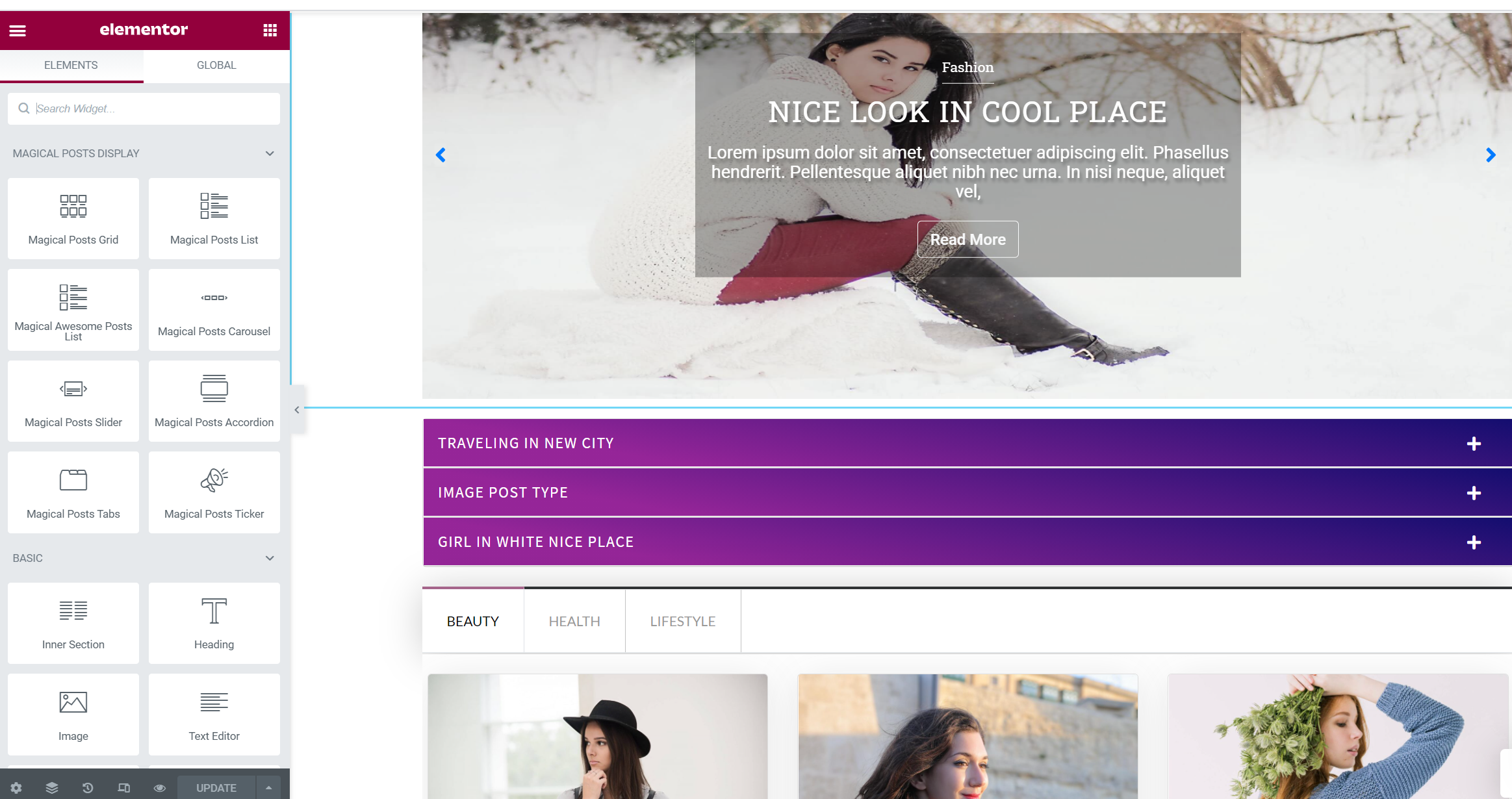


For developers
Is this your plugin? Show off the numbers.
Add a live badge to your site, docs or GitHub README. It updates on its own — no account needed.
Best Magical Posts Display alternatives
All custom post plugins →




FAQ
Magical Posts Display: quick answers
Straight answers, pulled from live WordPress.org data.
Live data from WordPress.org · checked Sep 27, 2026
Is Magical Posts Display free?
Yes. Magical Posts Display is free to download and use from the official WordPress.org plugin directory. The developer also sells premium add-ons or a Pro version with extra features.
Is Magical Posts Display safe to use in 2026?
Magical Posts Display is a solid plugin choice in 2026, with a few things worth checking first. It runs on 3K+ sites, is rated 4.4/5 and was last updated 3 weeks ago, and scores 70/100 on our health check.
How many websites use Magical Posts Display?
Magical Posts Display is active on 3K+ WordPress websites and has been downloaded 221,791 times since it launched in May 2019. It was downloaded 2,839 times in the last 30 days.
Does Magical Posts Display work with WordPress 7.1?
Yes. The developer has tested Magical Posts Display up to WordPress 7.1.2, the latest release. It requires WordPress 6.0 or newer.
What PHP version does Magical Posts Display need?
Magical Posts Display requires PHP 7.4 or higher. Most hosts run PHP 8.x today, so it works on any modern WordPress hosting.
When was Magical Posts Display last updated?
The latest version, 1.3.0, was released on September 7, 2026 (3 weeks ago).
Who makes Magical Posts Display?
Magical Posts Display is developed and maintained by Noor Alam.
What are the best alternatives to Magical Posts Display?
The most popular alternatives to Magical Posts Display are Content Blocks (Custom Post… (10K+ installs), Advanced Post Manager (4K+ installs) and CSV Import and Exporter (1K+ installs).
Powered by PageForge
Want thousands of pages that rank like these? Build them in an afternoon.
This directory runs on the same engine as PageForge. Turn any spreadsheet, CSV or API into thousands of fast, SEO-ready WordPress pages — with schema, internal links and AI-written copy baked in.
- CSV, Google Sheets & API data sources
- AI content, schema & internal links per page
- Works with Elementor, Gutenberg, Yoast & Rank Math
- Free on WordPress.org — no credit card


