



Content Blocks (Custom Post Widget)
This plugin enables you to edit and display Content Blocks in a sidebar widget or using a shortcode.

Safe pick
Yes — Content Blocks (Custom Post Wid… is a safe, well-maintained plugin to use in 2026. It runs on 10K+ sites, is rated 4.9/5 and was last updated 5 days ago, and scores 90/100 on our health check.
- Proven at scale on 10K+ active sites
- Loved by users — 4.9/5 from 80 reviews
- Actively developed — last update 5 days ago
- Tested with the latest WordPress (7.1)
- Momentum — downloads up 132.4% vs the previous 30 days
How does it stack up?
Side-by-side on installs, updates, ratings & support



Daily downloads
Download spikes usually follow a new release — each site that auto-updates counts as a download.
Rankings
Where Content Blocks (Custom Post… stands todayWordPress.org search rankings
Live position in the plugin search, top 100| Keyword | Position |
|---|---|
| block | >100 |
| content block | #10 |
| custom post | #13 |
| shortcode | >100 |
| widget | #37 |
Version adoption
Share of active sites per release.
Rating breakdown
★★★★★★★★★★ 4.9 from 80 reviews
About Content Blocks (Custom Post Widget)
From the official readme · v3.4.4Description
The Content Blocks allows you to display the contents of a custom post type in a sidebar widget or using a shortcode.
Even though you could use the text widget that comes with the default WordPress install, this plugin has some major benefits:
- The Content Blocks plugin enables users to use the WYSIWYG editor for editing the content and adding images.
- If you are using the standard WordPress text widgets to display content on various areas of your template, this content can only be edited by users with administrator access. If you would like to give content editors access without exposing them to the whole WordPress admin, this plugin solves that problem.
- You can even use the featured image functionality to display them in a widget.
- The Content Blocks plugin is compatible with the WPML Multi-Language plugin and automatically shows the correct language in the widget area.
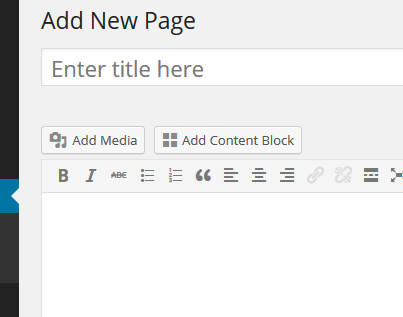
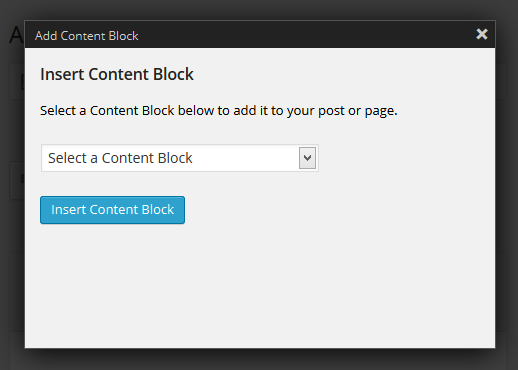
- The Content Blocks can be included in posts and pages using the built-in shortcode functionality.
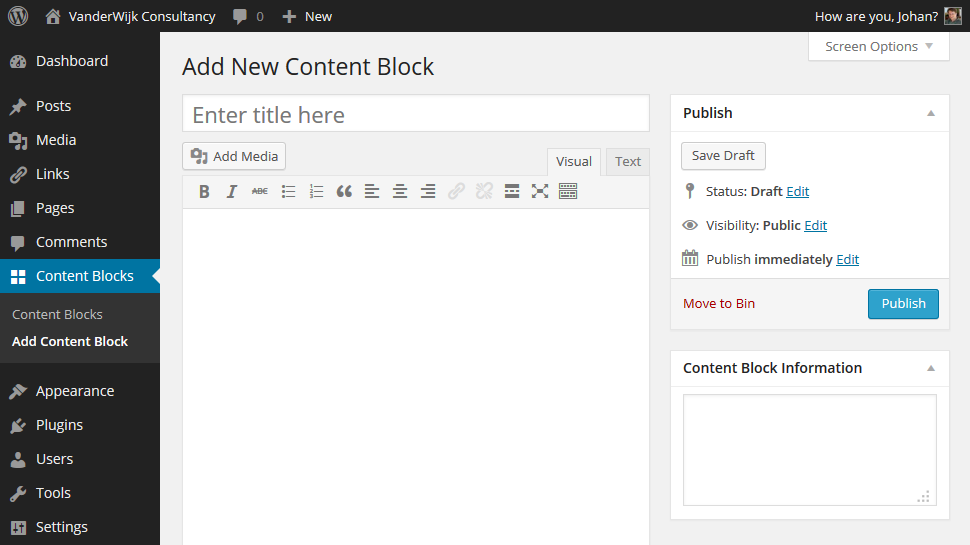
This plugin creates a ‘content_block’ custom post type. You can choose to either display the title on the page or use it to describe the contents and widget position of the content block. Note that you can easily hide the title if you want a cleaner layout.
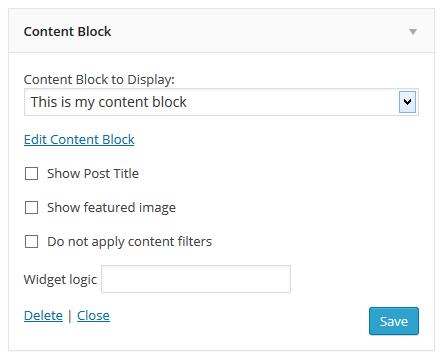
To add content to a widget, drag it to the required position in the sidebar and select the title of the custom post in the widget configuration.
Includes the following translations:
- Swedish (sv_SE) by Andreas Larsson
- Spanish (es_ES) by IBIDEM GROUP
- Portuguese (pt_BR) by Ronaldo Chevalier
- Polish (pl_PL) by Kuba Skublicki
- Dutch (nl_NL) by Johan van der Wijk
- Czech (cs_CZ) by Martin Kucera
Installation
- First you will have to upload the plugin to the
/wp-content/plugins/folder. - Then activate the plugin in the plugin panel.
You will see that a new custom post type has been added called Content Block. - Type some content for the widget. You can choose to either use the title to describe the content on the page, or to display it. Check ‘Show Post Title’ to display the title on the page.
- Go to ‘Appearance’ > ‘Widgets’ and drag the Content Block widget to the required position in the sidebar.
- Select a Content Block from the drop-down list.
- Check the ‘Show Post Title’ checkbox if you would like to display the title of your Content Block
- If you are experiencing issues with content being added automatically to your posts (Social media sharing buttons for instance), check the ‘Do not apply content filters’ checkbox. Use this with caution as it disables WordPress content filtering for this block.
- Click save.
Frequently asked questions
Why can’t I use the default text-widget?
Of course you can always use the default text widget, but if you prefer to use the WYSIWYG editor or if you have multiple editors and you don’t want to give them administrator rights, it is recommended to use this plugin instead.
How can I show the content bock on a specific page?
It is recommended to install the Widget Logic plugin, this will give you complete flexibility on widget placement.
How can I display the featured image in the widget?
This plugin has built-in support for the featured image functionality on the edit screen. Note that featured image will not be resized, so you will have to make sure it is the right size when uploading it.
My social sharing plugin adds buttons to all the Content Block areas
If your social media sharing plugin adds buttons to the widget areas you could check the ‘Do not apply content filters’ checkbox. Note that when this is done, WordPress will also stop adding paragraph tags automatically.
The featured image is not displayed when using the shortcode
Currently the shortcode function only outputs the post content and title of the content block, future support for displaying the attached featured image is being considered.
Can I change the output of the content blocks?
Yes, you can create your own template for the content blocks, you can do so by adding a file named custom-post-widget.php to your theme folder. In these Gists you can find examples of templates for shortcodes and for widgets.
I have a feature request
Please post your feature request on the support forum These new features are on the to-do list: Display the content block featured image when using the shortcode Front-end editing of the content blocks Visual Composer integration Show the shortcode on the “View all Content Blocks” list view
How can I make advanced changes to the widget layout?
You can create your own widget template and upload this to your theme folder. See this support topic for more information.
Can I make the post type public?
You can make the post type public by adding the following code to your theme’s functions.php file: function filter_content_block_init() { $content_block_public = true; return $content_block_public; } add_filter(‘content_block_post_type’,’filter_content_block_init’); Alternatively you can use this third-party plugin.
Post ID’s confuse me, can I use the post slug for embedding a content block?
Yes, v2.6 now gives you the option to use the content block’s url slug in the shortcode. Use the following syntax for doing this: [content_block slug=my-content-block]. Note that if you ever change the slug of a content block, the embedding no longer works. Therefore I recommend using the post ID instead (which never changes).
Can I specify a custom class for the embedded content blocks?
By default the shortcode adds a div around the content block with the class content_block. If you like, you can change this class by adding it to the shortcode: [content_block id=198 slug=our-wordpress-content-block class=custom-block]`.
How can I embed a content block in my template file using php code?
You can use the do_shortcode function for this: echo do_shortcode('[content_block id= ]'); See https://codex.wordpress.org/Function_Reference/do_shortcode for more information on this function.
The plugin is not working for me
Please create a support topic in the forum: https://wordpress.org/support/plugin/custom-post-widget
I love your plugin! What can I do to help?
Creating and supporting this plugin takes up a lot of my free time, therefore I would highly appreciate it if you could take a couple of minutes to write a review.
Changelog
3.4.4
WordPress 7.1 compatibility tested and confirmed
3.4.3
Fixed PHP 8+ fatal errors when a widget references a deleted content block or a shortcode references a missing template. Missing templates now fall back to the standard shortcode output.
3.4.2
WP 7.0 compatibility tested and confirmed
3.4.1
Security fix: Added allowlist validation for the shortcode markup attribute to prevent XSS attacks (CVE-2026-0894).
3.3.9
WP 6.9 compatibility tested and confirmed
3.3.8
WP 6.8 compatibility tested and confirmed
Screenshots
For developers
Is this your plugin? Show off the numbers.
Add a live badge to your site, docs or GitHub README. It updates on its own — no account needed.
Best Content Blocks (Custom Post W… alternatives
All block plugins →





FAQ
Content Blocks (Custom Post Widget): quick answers
Straight answers, pulled from live WordPress.org data.
Live data from WordPress.org · checked Sep 26, 2026
Is Content Blocks (Custom Post Wid… free?
Yes. Content Blocks (Custom Post Wid… is free to download and use from the official WordPress.org plugin directory.
Is Content Blocks (Custom Post Wid… safe to use in 2026?
Yes — Content Blocks (Custom Post Wid… is a safe, well-maintained plugin to use in 2026. It runs on 10K+ sites, is rated 4.9/5 and was last updated 5 days ago, and scores 90/100 on our health check.
How many websites use Content Blocks (Custom Post Wid…?
Content Blocks (Custom Post Wid… is active on 10K+ WordPress websites and has been downloaded 762,116 times since it launched in November 2010. It was downloaded 8,693 times in the last 30 days.
Does Content Blocks (Custom Post Wid… work with WordPress 7.1?
Yes. The developer has tested Content Blocks (Custom Post Wid… up to WordPress 7.1.2, the latest release. It requires WordPress 4.6 or newer.
When was Content Blocks (Custom Post Wid… last updated?
The latest version, 3.4.4, was released on September 21, 2026 (5 days ago).
Who makes Content Blocks (Custom Post Wid…?
Content Blocks (Custom Post Wid… is developed and maintained by Johan van der Wijk.
What are the best alternatives to Content Blocks (Custom Post Wid…?
The most popular alternatives to Content Blocks (Custom Post Wid… are Spectra Legacy (1M+ installs), Breadcrumb NavXT (800K+ installs) and PDF Embedder (300K+ installs).
Powered by PageForge
Want thousands of pages that rank like these? Build them in an afternoon.
This directory runs on the same engine as PageForge. Turn any spreadsheet, CSV or API into thousands of fast, SEO-ready WordPress pages — with schema, internal links and AI-written copy baked in.
- CSV, Google Sheets & API data sources
- AI content, schema & internal links per page
- Works with Elementor, Gutenberg, Yoast & Rank Math
- Free on WordPress.org — no credit card


