


LoginHush – Private Login URL & Access Guard
Conceal the standard WordPress login endpoints behind a tested private URL with reliable recovery controls.

Use with caution
LoginHush works, but test it on a staging site before relying on it in 2026. Was last updated 2 months ago, and scores 55/100 on our health check.
- Small user base (<10 active installs)
- Very few reviews so far
How does it stack up?
Side-by-side on installs, updates, ratings & support



Daily downloads
Download spikes usually follow a new release — each site that auto-updates counts as a download.
Rankings
Where LoginHush stands todayWordPress.org search rankings
Live position in the plugin search, top 100| Keyword | Position |
|---|---|
| custom login url | >100 |
| hide login | >100 |
| login | >100 |
| security | >100 |
| wp-admin | >100 |
About LoginHush
From the official readme · v1.5.1Description
LoginHush replaces the public WordPress login address with a private path without renaming core files. Its optional security layer uses transients for active rate limits and one compact indexed table for the activity log. On Apache sites using Plain permalinks, it maintains one narrowly scoped rule inside a dedicated LoginHush section of .htaccess.
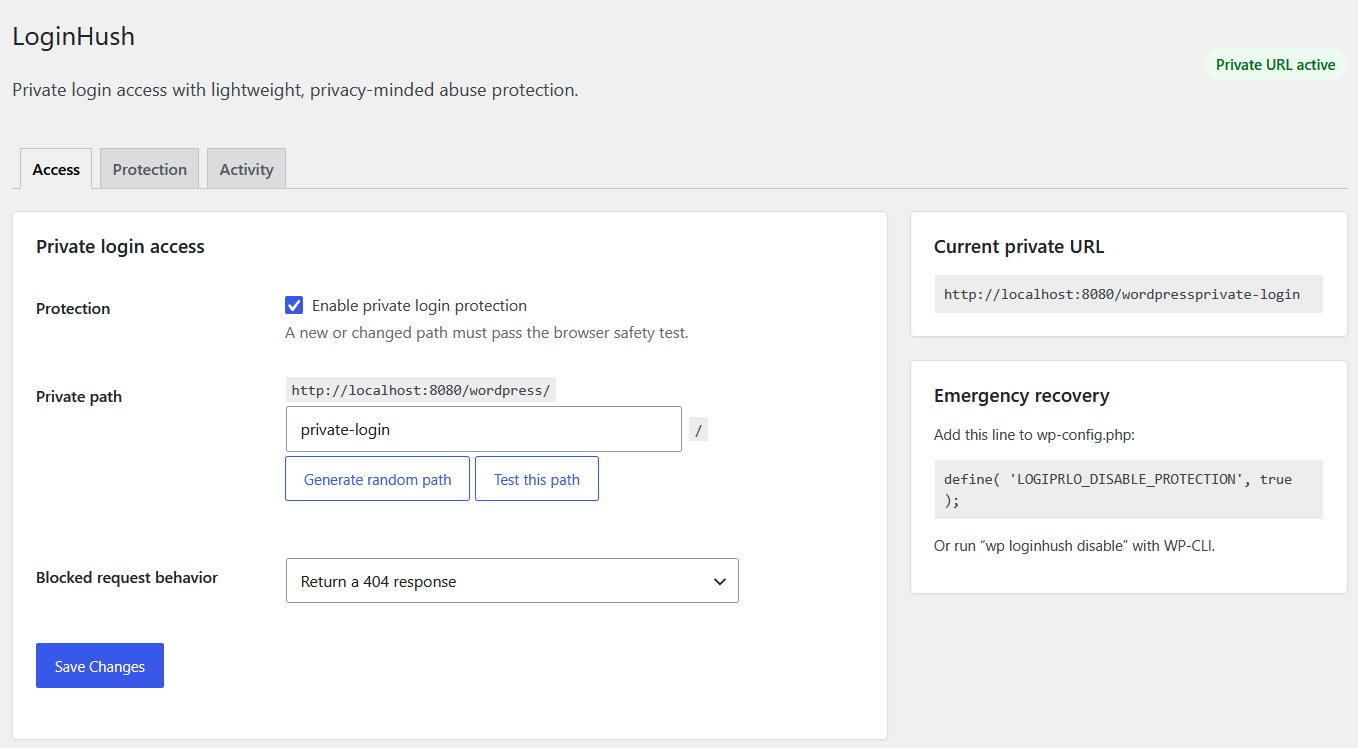
The plugin starts disabled after activation. An administrator must test the candidate path successfully in the browser before protection can be enabled. This prevents the most common accidental lockout scenario.
Features
- Custom private login path.
- Clean login paths on Apache even when WordPress Plain permalinks are selected.
- Safe query-string fallback when a clean-path rule cannot be installed.
- Blocks direct access to wp-login.php and logged-out access to wp-admin.
- Choose a real 404 response or a safe local redirect for blocked requests.
- Browser-based safety test before enabling a new path.
- Random path generator and collision checks.
- Preserves AJAX, admin-post, cron, REST, XML-RPC, WP-CLI, post-password, and WordPress recovery-mode requests.
- Rewrites WordPress-generated login, logout, registration, and password-reset URLs.
- WP-CLI status, URL, path-change, enable, and disable commands.
- wp-config.php emergency bypass.
- Page-cache detection warning.
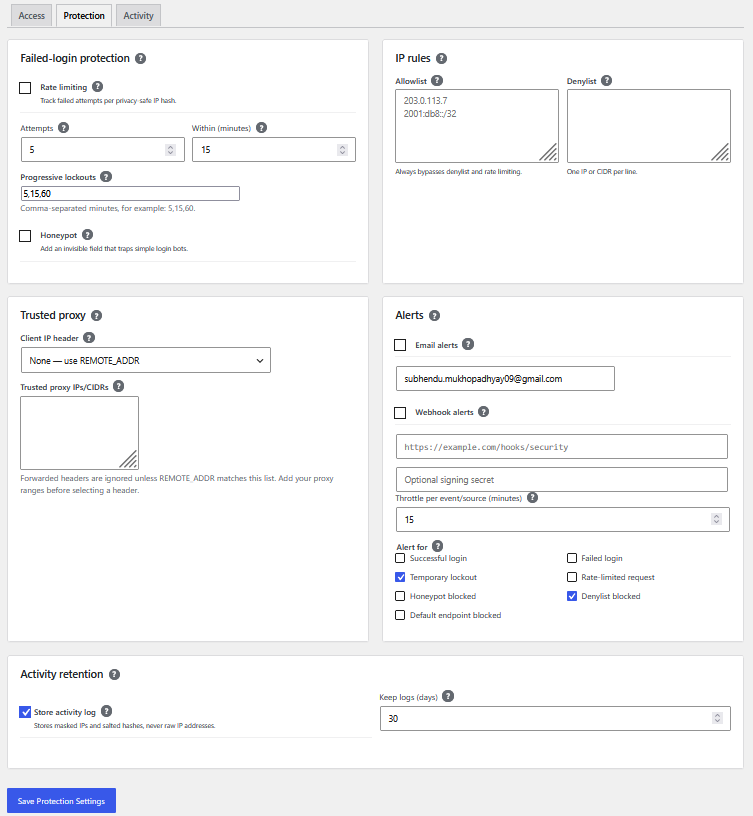
- Configurable failed-login rate limiting with progressive temporary lockouts.
- Optional login honeypot.
- Throttled email and signed generic webhook alerts.
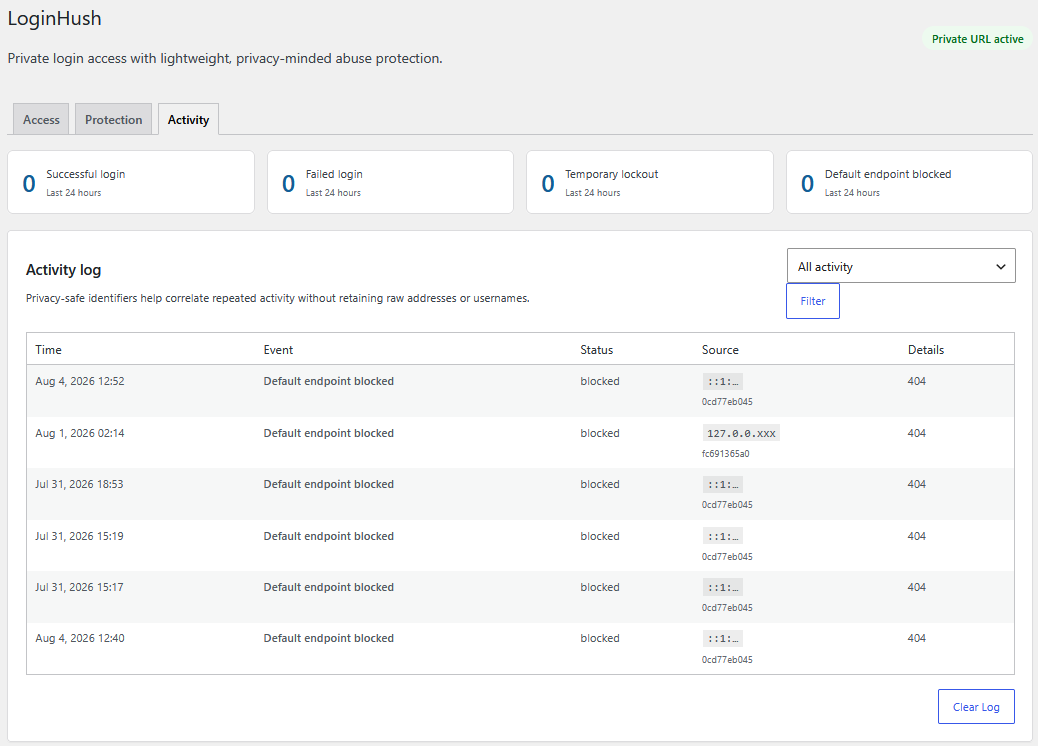
- Privacy-friendly activity log with automatic retention cleanup.
- Trusted-proxy configuration for Cloudflare and other reverse proxies.
- IPv4/IPv6 allowlist, denylist, and CIDR support.
- Clean uninstall.
Security scope
Changing the login URL and limiting failed attempts reduce common automated login traffic. They are defensive layers, not replacements for strong passwords, software updates, or two-factor authentication.
LoginHush does not block XML-RPC authentication. When activity logging is enabled, it stores masked IP addresses, site-salted hashes, event metadata, and hashed login identities for the configured retention period. Raw IP addresses and usernames are not stored in the log. Email and webhook connections occur only when explicitly enabled.
WP-CLI
wp loginhush statuswp loginhush urlwp loginhush set-slug new-private-pathwp loginhush enablewp loginhush disable
Installation
- Upload the
loginhush-private-login-url-access-guardfolder to/wp-content/plugins/or install the ZIP from Plugins > Add New. - Activate LoginHush.
- Open Settings > LoginHush.
- Choose or generate a private path.
- Select “Test this path” and wait for the success message.
- Enable protection, save, and bookmark the private URL.
- If page caching is active, exclude the private path from the page cache.
Frequently asked questions
I forgot the private URL. How do I recover access?
Use wp loginhush url with WP-CLI. To disable protection, run wp loginhush disable. Without WP-CLI, add this line above the “stop editing” line in wp-config.php: define( 'LOGIPRLO_DISABLE_PROTECTION', true ); The standard wp-login.php URL will work while that constant is true. You can also deactivate the plugin by renaming its folder.
Does LoginHush modify WordPress files or .htaccess?
It never modifies WordPress core files. On Apache sites using Plain permalinks, it adds a dedicated LoginHush marker containing only the configured private-path rule. The marker is updated when the path changes and removed on deactivation or uninstall.
Does this stop every brute-force attack?
No. It reduces traffic aimed at the standard browser login URL. Use it with strong passwords, rate limiting, and two-factor authentication where appropriate.
Does it work with caching plugins?
The private login path must not be page-cached. LoginHush displays a warning when it detects common page-caching configurations, but cache exclusions remain provider-specific.
Changelog
1.5.1
- Prefixed all variables assigned in included templates and multisite uninstall scope for Plugin Check compliance.
1.5.0
- Matched the text domain and package folder to the assigned WordPress.org slug.
- Replaced all collision-prone declarations, stored-data keys, hooks, handles, and request parameters with the unique
logiprlo_prefix. - Updated the WordPress.org contributor username to
jayanta77.
1.4.0
- Prepared the plugin branding and packaging for WordPress.org submission.
1.3.4
- Added the declared translation directory for plugin-header validation.
- Removed the obsolete manual translation loader on modern WordPress.
- Safely prepared the custom-table identifier during uninstall.
1.3.3
- Moved all toggle checkboxes to the left of their labels and descriptions.
1.3.2
- Added consistent spacing between standalone setting labels and their controls.
Screenshots
For developers
Is this your plugin? Show off the numbers.
Add a live badge to your site, docs or GitHub README. It updates on its own — no account needed.
Best LoginHush alternatives
All custom login url plugins →





FAQ
LoginHush: quick answers
Straight answers, pulled from live WordPress.org data.
Live data from WordPress.org · checked Oct 1, 2026
Is LoginHush free?
Yes. LoginHush is free to download and use from the official WordPress.org plugin directory.
Is LoginHush safe to use in 2026?
LoginHush works, but test it on a staging site before relying on it in 2026. Was last updated 2 months ago, and scores 55/100 on our health check.
How many websites use LoginHush?
LoginHush is active on <10 WordPress websites and has been downloaded 172 times since it launched in August 2026. It was downloaded 62 times in the last 30 days.
Does LoginHush work with WordPress 7.1?
LoginHush is officially tested up to WordPress 7.0.6, while the latest release is 7.1.2. It may still work, but try it on a staging site first.
What PHP version does LoginHush need?
LoginHush requires PHP 7.4 or higher. Most hosts run PHP 8.x today, so it works on any modern WordPress hosting.
When was LoginHush last updated?
The latest version, 1.5.1, was released on August 7, 2026 (2 months ago).
Who makes LoginHush?
LoginHush is developed and maintained by jayanta77.
What are the best alternatives to LoginHush?
The most popular alternatives to LoginHush are WPS Hide Login (2M+ installs), Rename wp-admin login (9K+ installs) and Login Page Styler (2K+ installs).
Powered by PageForge
Want thousands of pages that rank like these? Build them in an afternoon.
This directory runs on the same engine as PageForge. Turn any spreadsheet, CSV or API into thousands of fast, SEO-ready WordPress pages — with schema, internal links and AI-written copy baked in.
- CSV, Google Sheets & API data sources
- AI content, schema & internal links per page
- Works with Elementor, Gutenberg, Yoast & Rank Math
- Free on WordPress.org — no credit card


