



Listdom KML Addon – Display KML Layers
Easily add KML (and GPX) map layers to your Listdom directory maps, highlighting specific areas, routes, or boundaries.

Use with caution
Listdom KML Addon works, but test it on a staging site before relying on it in 2026. It runs on 40+ sites and was last updated 4 months ago, and scores 52/100 on our health check.
- Small user base (40+ active installs)
- Very few reviews so far
Daily downloads
Download spikes usually follow a new release — each site that auto-updates counts as a download.
Rankings
Where Listdom KML Addon stands todayWordPress.org search rankings
Live position in the plugin search, top 100| Keyword | Position |
|---|---|
| google earth | #6 |
| Google Maps | >100 |
| GPX | #17 |
| kml | #7 |
| Listdom | #3 |
Version adoption
Share of active sites per release.
About Listdom KML Addon – Display KML Layers
From the official readme · v2.3.0Description
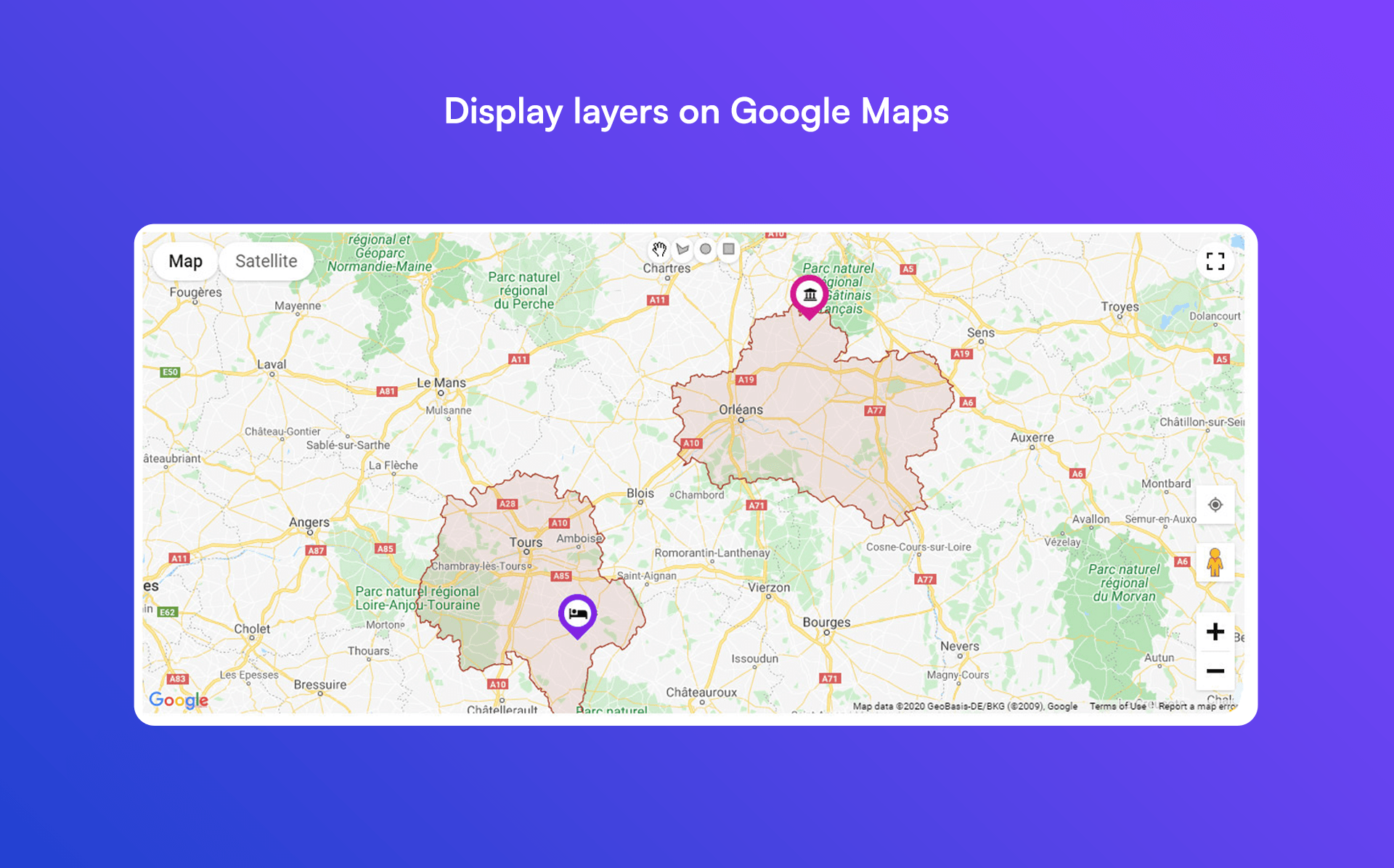
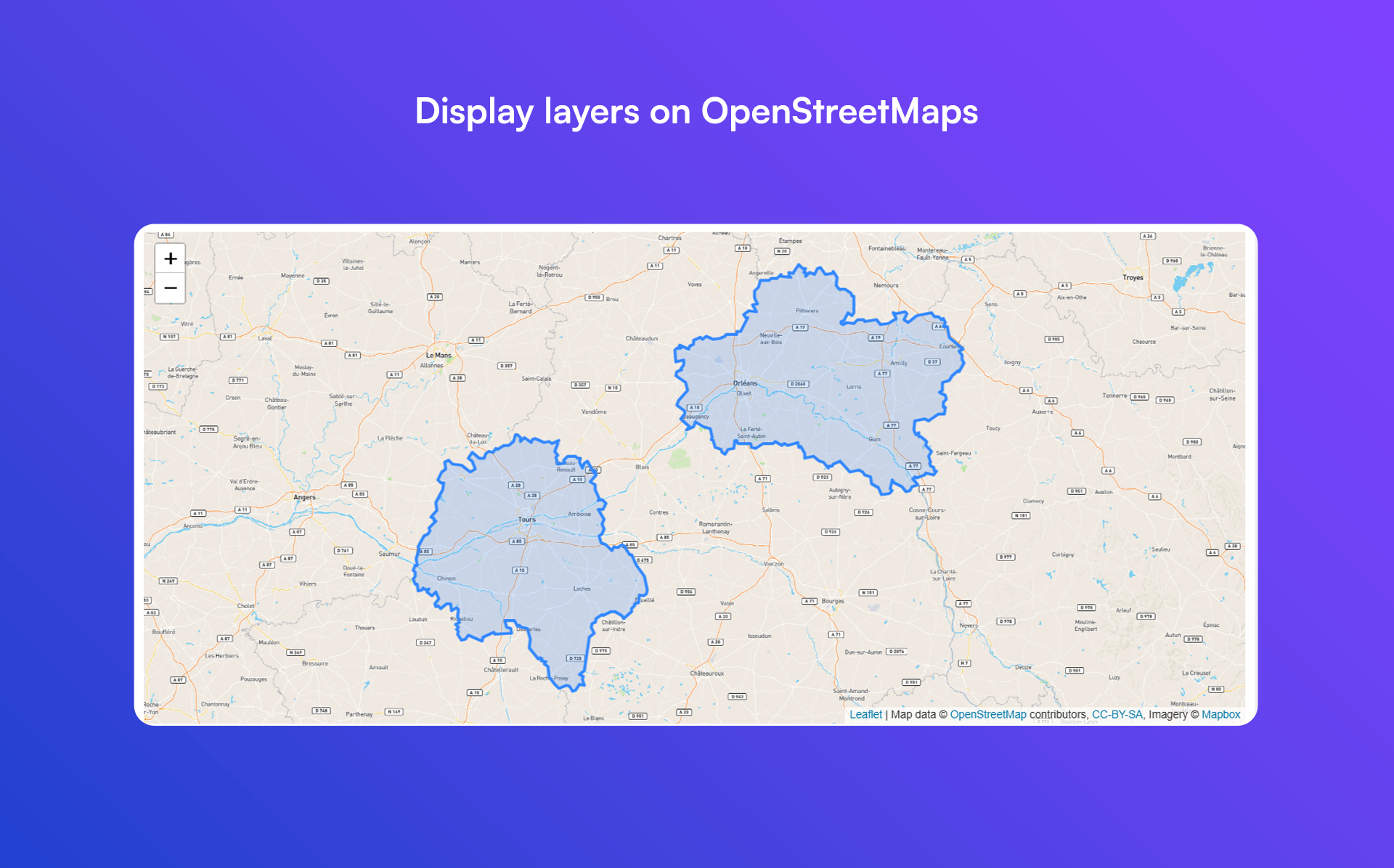
Listdom KML Addon extends the Listdom directory plugin by allowing you to overlay custom map layers using KML or GPX files. This means you can draw boundaries, routes, and shapes on your listing maps to highlight specific areas (like neighborhoods or service zones). Use this add-on to define regions or paths on maps – perfect for real estate listings, travel directories, delivery coverage maps, and more.
Once installed, a Map Layers section will be added to Listdom’s admin panel. There you can create new layers by either uploading .kml/.kmz or .gpx files, or by linking to external KML/GPX file URLs. You can create multiple layers and assign them to any Listdom map view or shortcode, allowing you to display one or several KML/GPX overlays on your maps. The add-on supports all map providers that Listdom works with (Google Maps, OpenStreetMap/Leaflet, etc.), so your KML overlays will display regardless of the chosen map engine. You can also toggle whether these custom layers appear on individual listing detail page maps or only on broader directory maps, giving you control over where the overlays are shown.
Key Features:
- Upload KML files and display them as custom map layers
- Link to external KML or KMZ file URLs (no need to upload if already hosted)
- Support for GPX files (upload GPS tracks or link to GPX URLs as layers)
- Create multiple map layers and assign any combination of layers to Listdom maps
- Highlight areas, boundaries, routes, or shapes on Google Maps or OpenStreetMap seamlessly
- No coding required – simply add your KML/GPX files and Listdom handles the rest
✅ Live Demo – See Listdom in action (including add-ons)
✅ Listdom Documentation – Step-by-step guides for Listdom & add-ons
✅ Listdom Website – Learn more about Listdom, support, and additional add-ons
Installation
- Upload the plugin folder to
/wp-content/plugins/(or install via Plugins → Add New in WordPress by searching “Listdom KML Addon”). - Activate the Listdom KML Addon through the Plugins menu in WordPress.
- Make sure the Listdom directory plugin is installed and active (this add-on requires Listdom to function).
- Navigate to Listdom → Map Layers in your WordPress dashboard to add your KML/GPX layers. Create a new layer by uploading a KML/KMZ or GPX file, or by entering the URL to an external file. Save the layer and assign it to your Listdom map shortcodes as needed.
Frequently asked questions
Does this add-on require the Listdom plugin?
Yes – you must have the core Listdom plugin installed and active for this add-on to work.
What map providers are supported for the KML layers?
The KML/GPX overlay will display on any map provider supported by Listdom (e.g. Google Maps, OpenStreetMap/Leaflet, etc.). The add-on integrates with Listdom’s map system, so your custom layers appear just like native map features.
Can I use GPX files with this add-on?
Absolutely. You can upload .gpx files or provide a URL to a GPX file just like KML files, and the GPX data (such as routes or waypoints) will be displayed as a layer on the map.
Can I add multiple KML layers to the same map?
Yes. You can create multiple layers in the Map Layers admin section. When configuring a Listdom map (via shortcode or widget), you can select which layers to include. This allows you to overlay several KML/GPX layers on one map if needed.
Can I link to a KML file instead of uploading it?
Yes. When adding a new layer, you have the option to provide an external URL for the KML (or GPX) file. If a URL is provided in the layer settings, Listdom will use that and ignore any uploaded file. This is useful if your KML file is hosted elsewhere or is too large to upload.
How do I control the KML layers on single listing pages?
You can disable KML layers by visiting Listdom → Settings → Addons → KML Addon, then disabling the Display in Single Listing section.
Changelog
2.3.0 – May 13th, 2026
- Added Italian translation.
2.2.0 – February 25th, 2026
- Maintenance updates.
2.1.0 – November 28th, 2025
- Maintenance updates.
- Minimum required PHP updated to 7.4.
2.0.0 – November 9th, 2025
- Fixed some issues.
1.9.1 – October 5th, 2025
- Addressed some background issues.
1.8.0
- Initial public release on WordPress.org
- Add and manage custom map layers using KML, KMZ, and GPX files
- Upload files directly or provide external file URLs
- Full support for GPX routes and waypoints
- Display custom shapes, boundaries, and paths on Listdom maps
- Works with all Listdom-supported map providers (Google Maps, OpenStreetMap, etc.)
- Create unlimited map layers and assign them to shortcodes and map views
- Assign multiple layers to the same map for advanced overlays
- Integrated “Map Layers” admin menu in Listdom dashboard
- Compatible with all official Listdom addons
- Manage the layers visibility on the maps of the single listing page
- No coding required – fully handled via WordPress admin
Screenshots
For developers
Is this your plugin? Show off the numbers.
Add a live badge to your site, docs or GitHub README. It updates on its own — no account needed.
FAQ
Listdom KML Addon: quick answers
Straight answers, pulled from live WordPress.org data.
Live data from WordPress.org · checked Oct 2, 2026
Is Listdom KML Addon free?
Yes. Listdom KML Addon is free to download and use from the official WordPress.org plugin directory.
Is Listdom KML Addon safe to use in 2026?
Listdom KML Addon works, but test it on a staging site before relying on it in 2026. It runs on 40+ sites and was last updated 4 months ago, and scores 52/100 on our health check.
How many websites use Listdom KML Addon?
Listdom KML Addon is active on 40+ WordPress websites and has been downloaded 1,036 times since it launched in August 2025. It was downloaded 86 times in the last 30 days.
Does Listdom KML Addon work with WordPress 7.1?
Listdom KML Addon is officially tested up to WordPress 7.0.6, while the latest release is 7.1.2. It may still work, but try it on a staging site first.
What PHP version does Listdom KML Addon need?
Listdom KML Addon requires PHP 7.4 or higher. Most hosts run PHP 8.x today, so it works on any modern WordPress hosting.
When was Listdom KML Addon last updated?
The latest version, 2.3.0, was released on May 21, 2026 (4 months ago).
Who makes Listdom KML Addon?
Listdom KML Addon is developed and maintained by Webilia Inc..
Powered by PageForge
Want thousands of pages that rank like these? Build them in an afternoon.
This directory runs on the same engine as PageForge. Turn any spreadsheet, CSV or API into thousands of fast, SEO-ready WordPress pages — with schema, internal links and AI-written copy baked in.
- CSV, Google Sheets & API data sources
- AI content, schema & internal links per page
- Works with Elementor, Gutenberg, Yoast & Rank Math
- Free on WordPress.org — no credit card


