


Listdom: AI-powered Business Directory with Classifieds Ads Listings
Build any WordPress directory or classifieds site with AI. 80+ skins, search builder, user profile, frontend dashboard, Google Maps & reCAPTCHA.

Safe pick
Yes — Listdom: AI-powered Business Di… is a safe, well-maintained plugin to use in 2026. It runs on 1K+ sites, is rated 4.9/5 and was last updated 3 weeks ago, and scores 91/100 on our health check.
- Loved by users — 4.9/5 from 60 reviews
- Actively developed — last update 3 weeks ago
- Tested with the latest WordPress (7.1)
How does it stack up?
Side-by-side on installs, updates, ratings & support



Daily downloads
Download spikes usually follow a new release — each site that auto-updates counts as a download.
Rankings
Where Listdom: AI-powered Busines… stands todayWordPress.org search rankings
Live position in the plugin search, top 100| Keyword | Position |
|---|---|
| business directory | #6 |
| classifieds | #8 |
| directory plugin | #25 |
| listings | #21 |
| local business directory | #6 |
Version adoption
Share of active sites per release.
Rating breakdown
★★★★★★★★★★ 4.9 from 60 reviews
About Listdom: AI-powered Business Directory…
From the official readme · v6.4.0Description
Listdom is a directory system builder for WordPress, built for real directory projects rather than just listing cards.
Create business directories, real estate portals, service directories, local guides, and classified listing websites with structured listings, maps, search and filters, frontend submissions, dashboards, monetization options, layouts, and add-ons.
Fast Listdom Review
Here are the key features of Listdom and how to use them with your WordPress directory plugin or classifieds ads setup:
Listdom includes 80+ responsive skins and views for business directories, store locators, and classifieds.
✅ Demo
✅ Documentation
✅ Support
✅ Live Chat
How to import Demo with Listdomer Theme 👇
Listdom has a dedicated theme called Listdomer that helps you to import full website demos for business directory layouts or classifieds ads setups:
Listdom; The WordPress Directory Plugin by Webilia
Listdom is Webilia’s AI-powered WordPress classified plugin for publishing listings, managing classifieds, and customizing directories or store locators.
Free WordPress Listing Plugin Features
Listdom Free includes the core features needed to launch a searchable directory, classifieds, store locator, service, or local portal. Improvements include richer fields, flexible search forms, frontend workflows, stronger import tools, and structured content.
👉 Display and Layout Tools
- Native WordPress blocks for saved directory layouts, search, dashboard, authentication, checkout, and listing content, with editor previews
- Wonderful 80 different skins for listing cards and archives
- Display listings in List + Grid view (Contains a switch button)
- Display listings in List view
- Display listings in Grid view
- Display listings in Carousel view
- Display listings in Table view with customizable skins
- Display listings in Masonry view
- Display listings in Cover view
- Display listings in Slider view
- Different styles for views and skins
- Elements display options for each skin and style (Excerpt length, elements deactivation, etc.)
- Display views anywhere with a powerful shortcode generator
- Use shortcodes in all page builders
- Assign multiple shortcodes to one page
- Practical sort options (Title, Publish Date, Update Date, Comments, ID, Author, Random, Price, Most Viewed)
- Ability to change default sort parameters
- Dropdown and List sorting style
- Powerful appearance customizer
- Helpful dummy data to boost the start
- Override archive page design
- Font Awesome icons
- Define colors for the skins as you wish
- Use predefined colors
- Font manager
- Several skins and views on one page
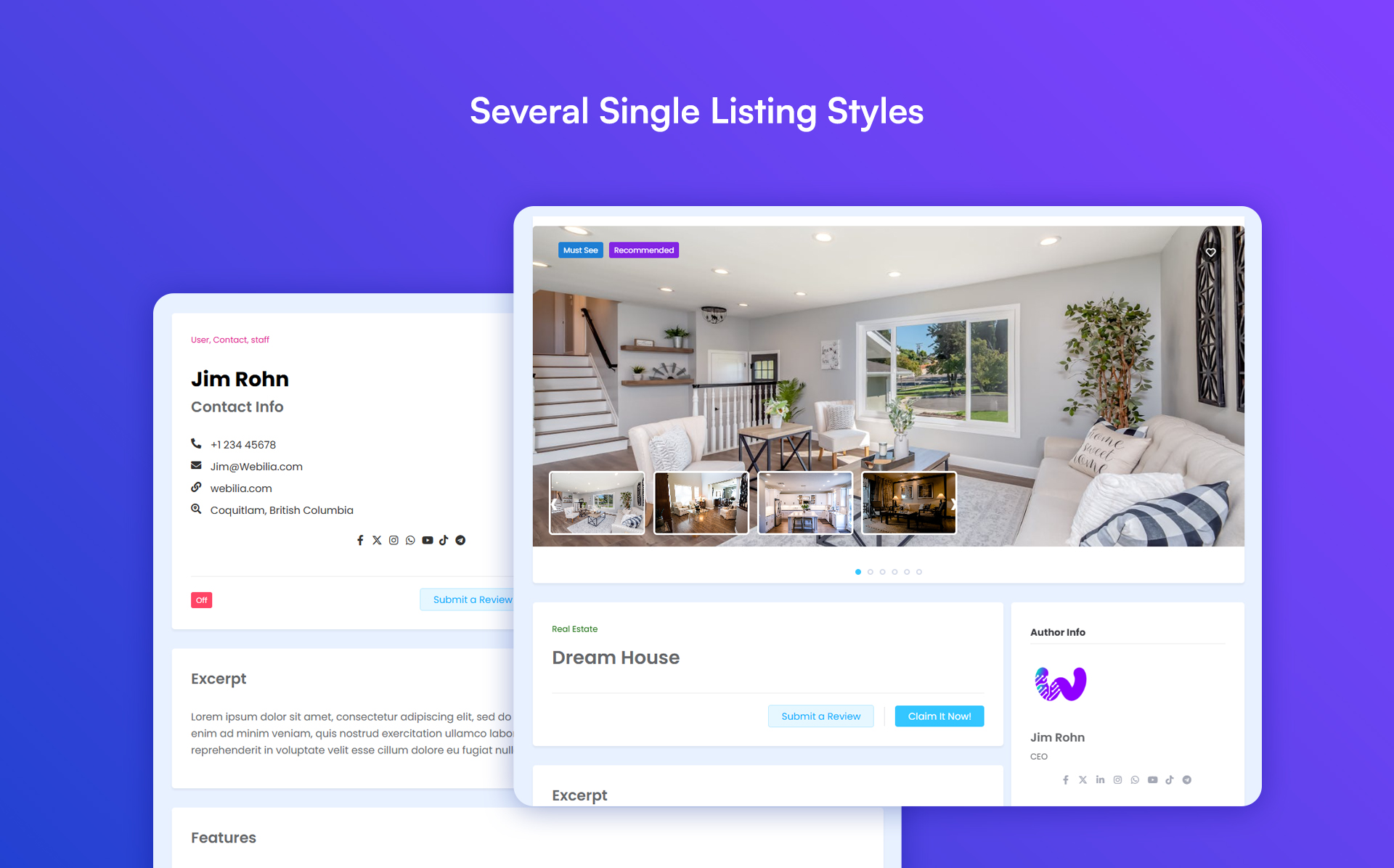
- 4 Different pre-made styles for single listing page
- A built-in Design Builder to design the single listing page
- Template Builder for reusable single listing and listing card layouts
- Custom color for settings
- Single listing elements manager (Enable/disable listing elements)
- FAQ element for the single listing
- FAQ schema support for richer structured listing content
- Configurable RSS feed for publishing listing updates
- Available widgets for sidebars
- Show shortcodes with widgets
- Show listing owner data
- Contact listing owner
- Social network buttons manager
👉 Map and Location Features
- Google Maps
- OpenStreetMap (Leaflet)
- Display listings on the map with various styles
- Add a map to each directory list
- Position the map on top, bottom, right, or left of the directories
- Display listings in Half Map / Split views
- Show listings on maps based on their location with full map module options
- Advanced marker clustering
- Show single listing as a modal box on the map
- Stunning map styles (Apple, Ultralight, Dark, etc.)
- Address module and Google map support
- Address to location conversion feature
- Address autosuggest in admin Add Listing form
- Option to enable or disable autocomplete for address suggestions
- Locate Me option for address-based location searches
- Map infowindow trigger and mouse wheel zoom controls in shortcodes
👉 Search and Filter Options of Listdom WordPress Directory Plugin
- Complete search form builder
- Responsive settings for each search form
- Display search fields in popup
- Fully customizable different filters to show listings
- Hidden values and fields
- Search form shortcode
- Flexible field display options, including widths, hidden fields, popup, and responsive forms
- Optional listing counts beside taxonomy choices
- Per-field search buttons for more intentional filter updates
- Search clear button
👉 AI Tools
- Several AI providers support including: OpenAI, Claude, and Gemini
- Multiple AI profiles for different directory tasks
- Structured and semantic AI search for natural-language listing discovery
- Optional AI Visibility feed and discovery hints for public, machine-readable directory content
- CSV import auto mapping, with support for compatible import add-ons
- Native WordPress abilities on WordPress 6.9+ for authorized listing operations, supported settings, read-only diagnostics, and explicitly approved bounded repairs; active add-on and permission requirements still apply
- Text generation
- Work hours generation
👉 Frontend Dashboard and Listing Essentials
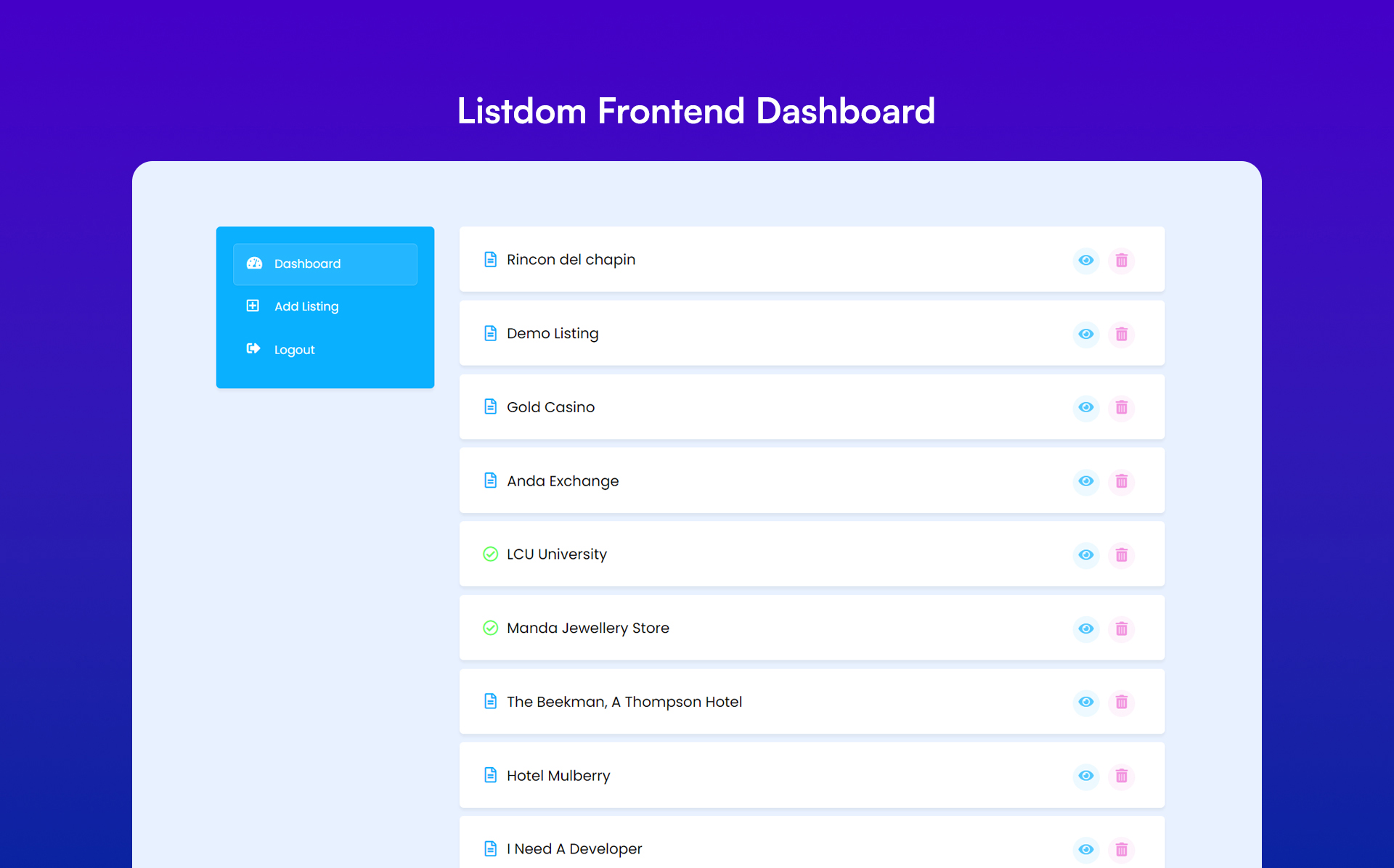
- Listing submission via frontend dashboard
- Add listing form’s modules management (Visibility & Requirement)
- Maximum gallery images restriction
- Image size limits on frontend listing submission
- Maximum description length restriction
- Maximum number of tags restriction
- Directory author profile (User profile)
- Public user profiles and a user directory shortcode
- Subscriber-safe profile image upload from the frontend dashboard
- Listing status controls and status filters for frontend listing management
- Unlimited number of directories
- Custom fields with text, number, email, telephone, URL, date, time, date/time, image, file, dropdown, textarea, radio, checkbox, and separator types
- Filter the listings displayed in each skin by custom fields/attributes
- Search and filter by custom fields/attributes
- Image gallery element with several styles
- Advanced availability time module (Work hours and off days)
- Import and export working hours through supported import/export tools for bulk directory management
- Related or Nearby listings on the single listing page
- Advanced price module
- Global and per listing currency manager
- Define contact information for each listing
- Contact form
- Report Abuse form
- Nice remark module
- Categories in unlimited levels
- Locations
- Labels
- Tags
- Features
- Practical shortcodes to show taxonomies
- Listing owner module
- Contact owner
- Social share module
- WordPress block editor compatibility
- Page builders compatibility
- Listing image
- Listing-specific alt text for featured and gallery images
- Comment for listings
- Numeric, Load more button, and infinite scroll pagination methods
- Advanced components system to disable unused Listdom Core features
👉 Monetization and Payments
- Built-in payment system used by paid addons, with tax handling, invoices, pricing tiers, and checkout flows.
- Frontend payment views for compatible order, subscription, billing, invoice, and Stripe workflows.
- Global and region-based tax options for directory monetization workflows.
👉 Advanced Management and Security
- Powerful login, register, and forgot password shortcodes
- Separate login forms for different user roles
- Block access of different user roles to WordPress dashboard
- CSV importer and exporter
- Webilia Business Data to discover businesses, import drafts, and review enrichment or refresh changes field by field using Webilia Credits
- Directory-wide Analytics with the Stats add-on for listing activity, submitted searches, categories, locations, and conversions
- Import and export listings, working hours, custom fields, and listing taxonomies (categories, locations, tags, features, and labels) with CSV files
- Hierarchical category and location import support for larger directories
- Create missing custom fields during CSV listing import mapping
- Map multiple CSV columns into listing taxonomies and import repeatable FAQ data
- Directory Health and Launch Checklist to review setup, search, submission, monetization, and SEO readiness before launch
- Powerful notifications manager (Admin and user notification emails)
- Custom CSS styles
- Google reCAPTCHA
- Multi-Site compatibility
- Advanced configuration options
- Mailchimp Integration
- Visual Composer support
- King Composer support
- Compatible with Membership plugins
- Settings backup
👉 Performance and Compatibility
- JS and CSS load management (Speed optimization)
- Easy online plugin update (no FTP required)
- Cache plugins compatibility
- Disable Font Awesome package
👉 Localization and Translation Ready
- RTL-ready!
- Translation ready (WPML and PolyLang support for building a multilingual directory)
👉 Seo Ready
* Structured data output for SEO-friendly listing pages
* Public AI feed controls for published listing, category, and location discovery
* Friendly slug manager (Change the slug of listings, categories, features, tags, attributes, labels, locations)
* Compatible with popular SEO plugins e.g. Yoast SEO, RankMath, AIOSEO
👉 Developer Features
- Full developers-friendly
- Support changing the archive page and single page structure in the active theme
- 100% use of WordPress structure
- Override the skins and styles in the active theme
- Define different filters for shortcodes to show different views
- Ability to trigger custom functions using WordPress actions API
- Use Listdom APIs
- Customize features
The Premium Version of Listdom Classified Listing Plugin
For users seeking additional features and capabilities for a WordPress directory plugin, Webilia offers Listdom Pro. It provides advanced functionalities, enhancing the user experience and offering more control and customization options. It’s a solid option for teams that want their business directory site or store locator to grow steadily while keeping the familiar WordPress listing plugin workflow.
👉 Pro Add-on of The Listdom Classified Listing Plugin
- Display listings in Side-by-Side view with great responsive view
- Display listings in Gallery, Timeline, beautiful Mosaic, and modern Accordion views
- Schema option for advanced structured data controls
- Stripe payment gateway support for paid directory workflows
- Recurring payments for memberships and subscriptions
- Listing status controls for expired, on-hold, and offline listings
- Map GPS search
- Frontend dashboard menus customization, including custom menus and ordering
- Guest posting without user registration
- Separate shortcode for Add listing form
- Exclusion filter for the listings displayed in each skin
- Hierarchy Categories
- Embed elements in listings
- Featured video for each listing
- Price options management
- Advanced interactive map search feature
- Singlemap skin sync with other shortcodes
- Radius search field
- Hierarchical dropdowns search field
- Range slider search method
- Drawing tools on the map for search
- Listing cards link options and image status
- Change style and modules per category
- Change style and modules per listing
- Listing slugs with hierarchical categories and locations
- Bulk edit the listings styles
- JSON importer and exporter for listings, custom fields, and listing taxonomies
- API support
WordPress Business Directory Plugin Addons
Listdom offers around 30 add-ons to extend your WordPress directory, business directory, listing, classified, or store locator website. These add-ons include Claim, Topup Listings, Bookmarks, Rank, Reviews, Subscriptions, Labelize, Advanced Map, and more. They add extra interactivity, customization, and workflow-specific features, helping you tailor your directory website to your exact needs.
- Bridge Addon
- Pro Addon
- Claim Listings
- Connect Addon
- Topup Listings
- Bookmarks and Favorite
- Excel Addon
- CSV Auto Importer
- Rank Addon
- Reviews Addon
- Membership
- Labelize Addon
- Booking Addon
- Team Addon
- Multiple Categories
- Advanced Icon
- KML Addon
- Auction Addon
- Stats Addon
- APS Addon
- Compare Addon
- Franchise Addon
- Jobs Addon
- SMS Addon
- ADS Addon
- Divi Addon
- Elementor Addon
- Bricks Addon
- Advanced Map
- BuddyPress Integration
- Advanced Custom Fields (ACF) Addon
- PMS (Paid Member Subscriptions plugin) Addon
- Memberpress plugin Addon
You can see the details of the addons on Listdom website.
Listdomer: The Compatible WordPress Directory Theme by Webilia
In addition to Listdom, Webilia offers Listdomer, a WordPress directory theme designed to complement the functionality of the Listdom listing plugin. This theme provides a visually appealing and user-friendly layout for your WordPress directory site or store locator. It includes a variety of design options, enabling you to customize your directory’s aesthetics to match your brand identity.
PRO Versions Pricing
While Listdom and Listdomer offer free versions, their Pro versions and Listdom Pro add-ons are paid. Webilia’s All-Pass plans provide a cost-effective alternative, giving access to all products at up to 85% off with a 30-day money-back guarantee. This lets users fully leverage the WordPress directory and listing plugins while keeping costs low.
👉 Official Facebook Page: Follow on Facebook
👉 Official X Account: Follow on X
👉 Official LinkedIn: Follow on LinkedIn
Listdom combines structured listing data with configurable directory and store-locator workflows.
Bring Ideas in Action with Listdom WordPress Listing Plugin
Listdom can be used for everything from restaurant listings to local directories and classified ads sites. It enhances user engagement, boosts customer retention, and generates revenue. Beyond business listings, this WordPress directory plugin allows for the creation of any type of WordPress directory, including team or employee directories, company directories, medical directories, and more.
- Local Business Directory (like Yelp, Yellow Pages, Justdial)
- Classified Ads Listing (like ebay)
- Hotels and Apartments (like Airbnb)
- Medical Directory (like ZocDoc)
- Lawyer & Consultation (like Avvo, Justia)
- Services Directory (like HomeAdvisor, Needto)
- Real Estate Directory (like Zillow, Trulia, Realtor)
- Book Review Sites (like Goodreads)
- Software Review Site (like Capterra, TrustPilot, G2)
- Event Ticket Booking (like EventBookings)
- Restaurant Directory (like Yelp, Zomato, Foursquare)
- Provider Directory
- Yellow-Pages-Style Directory
- Staff Directory or Employee Directory
- Address Book or Contact Manager
- Store Locator or Dealer Locator
- Nightlife Directory
- Spa Directory
- Beauty Salon Directory
- Shop Directory or Mall Directory
- Church Directory
- Schools Directory
- College Directory
- Services Directory
- Public Services Directory
- Automotive Directory
- Pet Shop Directory
- and More…
Our WordPress directory plugin is actively utilized by our community to build relationships, support communities, and enhance web traffic in a variety of ways. For instance,
- Help people find local resources, such as sports clubs, churches, farms, and Chamber of Commerce listings.
- Create listing services for therapists, electricians, plumbers, cleaners, locksmiths, wedding vendors, veterinarians, consultants, photographers, artists, authors, etc.
- Build a review-based site like Yelp for travelers, local businesses, hotels, tours, and attractions.
- Promote businesses and sell listings to business owners.
- Offer listings as a membership benefit.
- Connect students with study groups and academic staff.
- Create a niche directory and become a trusted resource in your market.
Some use cases may require Listdom Pro or additional addons.
Support for the WordPress Listing Plugin
Listdom offers support via AI agent, online chat, email, and tickets to help users resolve questions quickly. We aim to provide a smooth experience for business directory plugin setups, store locator projects, and other directory websites.
Documentation
Listdom, a powerful WordPress directory plugin, includes comprehensive documentation. The step-by-step guides cover setup, core features, and advanced options, helping users build classifieds, listing, and directory websites at their own pace.
Commercial
This plugin is free but offers additional paid commercial upgrades and support. Learn more
Installation
Follow these steps to install Listdom on your WordPress website:
✅ Method 1: Install via WordPress Dashboard
- Log in to your WordPress admin dashboard.
- Go to Plugins > Add New.
- In the search bar, type Listdom and press Enter.
- Click the Install Now button next to the Listdom plugin.
- Once installed, click Activate.
✅ Method 2: Upload the Plugin Manually
- Download the Listdom plugin
.zipfile from the current page. - Log in to your WordPress admin dashboard.
- Go to Plugins > Add New > Upload Plugin.
- Click Choose File, select the downloaded
.zipfile, and click Install Now. - After installation, click Activate Plugin.
🎉 What’s Next?
– Once activated, a new Listdom menu will appear in your WordPress dashboard.
– Use the Setup Wizard to start configuring your directory.
– Start adding listings under the Listings menu.
Changelog
6.4.0
- Added native WordPress abilities for listing search, contact, taxonomy management, and complete draft-to-publish listing workflows.
- Added administrator abilities to inspect and update supported settings, diagnose directory issues, adjust saved display settings, and generate selected missing thumbnails.
- Added an optional compact admin menu and separate padding controls for checkbox, radio, and range search fields.
- Improved admin icons, notifications, dashboard spacing, and frontend form styling.
- Fixed Mapbox tiles, listing editor map resizing, and map infowindow styling and dimensions.
- Fixed map, search dropdown, and dialog stacking, rating star order, and authentication notice spacing.
- Fixed Table skin spacing and rounded corners, Timeline empty results, and Accordion listing buttons.
- Fixed primary category synchronization when listing categories are changed through the REST API.
6.3.0
- Added native WordPress blocks for directory layouts, search, the frontend dashboard, authentication, checkout, and listing content, with editor previews.
- Added an Analytics dashboard for listing activity, search performance, popular categories and locations, and conversion reports with the Stats addon.
- Added Business Data enrichment and refresh tools with business matches and field-by-field review before applying changes.
- Added native WordPress abilities for inspecting and updating supported settings and checking directory setup and dashboard readiness.
- Improved Business Data history, selections across pages, progress and completion messages, searches up to 50 km, and fractional credit balance display.
- Improved frontend form spacing, keyboard accessibility, mobile profile layouts, Timeline colors, and map cluster contrast.
- Improved PHP 8.4 compatibility.
- Fixed repeated searches to preserve saved filters and archive scope and show accurate empty result totals.
6.2.0
- Added Webilia Business Data to discover businesses worldwide and import selected results as Listdom draft listings, with taxonomy assignment, duplicate protection, and optional enrichment of missing business details.
- Added native Divi 5 integration for all Listdom Divi modules, while preserving support for existing Divi 4 layouts.
- Added Listdom records to the WordPress admin Command Palette, making it faster to find and edit listings, shortcodes, taxonomy terms, and supported add-on content.
- Added reversible switches for Remark, Embed & Featured Video, and FAQ components, allowing them to be disabled without deleting saved data and re-enabled at any time.
- Improved paid checkout with configurable required billing fields, Business Data map preference saving, listing editor forms, comparison table styling, and Frontend Dashboard widget settings.
- Fixed file validation for JSON, CSV, and Excel imports and resolved several listing workflow, dashboard, and interface issues.
6.1.2
- Improved Webilia Connect system.
- Improved user interface of taxonomy editing screens.
- Fixed listing creation permissions in the frontend dashboard.
- Fixed unsafe listing remarks in the frontend dashboard and Template Builder.
6.1.1
- Improved compatibility with installed add-ons when their versions differ.
- Fixed guest dashboard listing changes to honor guest-submission permissions.
6.1.0
- Added an interactive setup wizard to help launch a directory site.
- Added Comparison and Frontend Dashboard widgets for Elementor.
- Added configurable alt text for listing images.
- Enhanced claim ownership, payment, and dashboard workflows.
- Fixed scheduled jobs with missing intervals.
- Fixed an issue in Google Places address copying.
- Fixed some user interface issues.
Screenshots


For developers
Is this your plugin? Show off the numbers.
Add a live badge to your site, docs or GitHub README. It updates on its own — no account needed.
Best Listdom: AI-powered Business… alternatives
All business directory plugins →





FAQ
Listdom: AI-powered Business Direct…: quick answers
Straight answers, pulled from live WordPress.org data.
Source: WordPress.org
Is Listdom: AI-powered Business Di… free?
Yes. Listdom: AI-powered Business Di… is free to download and use from the official WordPress.org plugin directory.
Is Listdom: AI-powered Business Di… safe to use in 2026?
Yes — Listdom: AI-powered Business Di… is a safe, well-maintained plugin to use in 2026. It runs on 1K+ sites, is rated 4.9/5 and was last updated 3 weeks ago, and scores 91/100 on our health check.
How many websites use Listdom: AI-powered Business Di…?
Listdom: AI-powered Business Di… is active on 1K+ WordPress websites and has been downloaded 93,283 times since it launched in August 2019. It was downloaded 4,068 times in the last 30 days.
Does Listdom: AI-powered Business Di… work with WordPress 7.1?
Yes. The developer has tested Listdom: AI-powered Business Di… up to WordPress 7.1.5, the latest release. It requires WordPress 5.0 or newer.
What PHP version does Listdom: AI-powered Business Di… need?
Listdom: AI-powered Business Di… requires PHP 7.4 or higher. Most hosts run PHP 8.x today, so it works on any modern WordPress hosting.
When was Listdom: AI-powered Business Di… last updated?
The latest version, 6.4.0, was released on November 1, 2026 (3 weeks ago).
Who makes Listdom: AI-powered Business Di…?
Listdom: AI-powered Business Di… is developed and maintained by Webilia Inc..
What are the best alternatives to Listdom: AI-powered Business Di…?
The most popular alternatives to Listdom: AI-powered Business Di… are Directorist: AI-Powered Bus… (20K+ installs), GeoDirectory (10K+ installs) and HivePress (10K+ installs).
Powered by PageForge
One template and a spreadsheet. A real page for every search.
PageForge turns each row of a CSV into a WordPress page with its own title, URL, SEO fields and schema, built on the layout you already designed. Free on WordPress.org.
- CSV and XLSX, plus Google Sheets on Professional and Enterprise
- Its own title, URL, SEO fields and schema for every page
- Works with the block editor, Elementor, Divi and Avada
- Free on WordPress.org, no credit card