



Lean GA4 Tracker
Lightweight Google Analytics 4 (GA4) plugin for WordPress with WooCommerce tracking, Consent Mode, and Google Tag Manager support.

Consider an alternative
Lean GA4 Tracker shows warning signs in 2026 — compare the alternatives below before installing. Was last updated 9 months ago, and scores 36/100 on our health check.
- Small user base (<10 active installs)
- Very few reviews so far
- Only tested up to WordPress 6.9 (latest is 7.1)
- Needs PHP 8.2 or newer
How does it stack up?
Side-by-side on installs, updates, ratings & support



Daily downloads
Download spikes usually follow a new release — each site that auto-updates counts as a download.
Rankings
Where Lean GA4 Tracker stands todayWordPress.org search rankings
Live position in the plugin search, top 100| Keyword | Position |
|---|---|
| ecommerce tracking | >100 |
| ga4 | >100 |
| google tag manager | >100 |
| Tags: google analytics | >100 |
| woocommerce analytics | >100 |
About Lean GA4 Tracker
From the official readme · v1.2.0Description
Lean GA4 Tracker is a lightweight, developer-friendly plugin that integrates Google Analytics 4 (GA4) with WordPress.
Unlike heavy analytics plugins, Lean GA4 Tracker focuses on performance, privacy, and simplicity, while still offering advanced features like WooCommerce eCommerce tracking, Consent Mode, and Google Tag Manager (GTM) support.
Perfect for WooCommerce Stores
Lean GA4 Tracker includes built-in GA4 eCommerce event tracking — no coding or add-ons required.
Track the full shopping journey:
– Product detail views (view_item)
– Product list views (view_item_list) – shop, category, search pages
– Product clicks from lists (select_item)
– Add to cart actions (add_to_cart)
– View cart (view_cart)
– Remove from cart (remove_from_cart)
– Checkout steps (begin_checkout)
– Shipping method selection (add_shipping_info)
– Payment method selection (add_payment_info)
– Purchases (purchase)
– Includes product categories and brands for richer GA4 reports
Why Choose Lean GA4 Tracker?
- Lightweight: No bloat, performance-first architecture
- WooCommerce Ready: Track product views, carts, checkout, and purchases
- Developer-Friendly: PSR-4 autoloading, hooks, and JSON event support
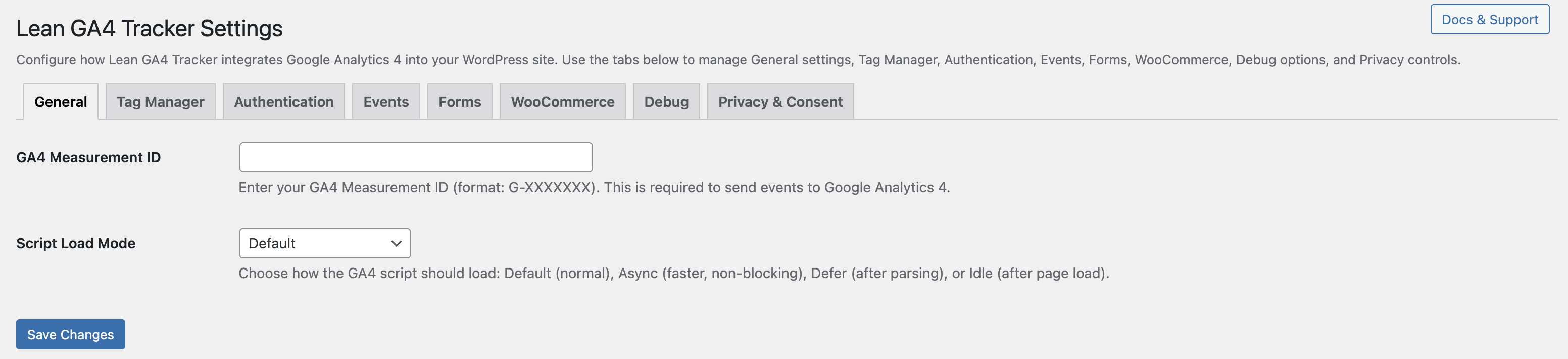
- Flexible Script Loading: Standard, async, defer, or idle
- Consent Mode Integration: Works with Complianz, CookieYes, and Cookiebot
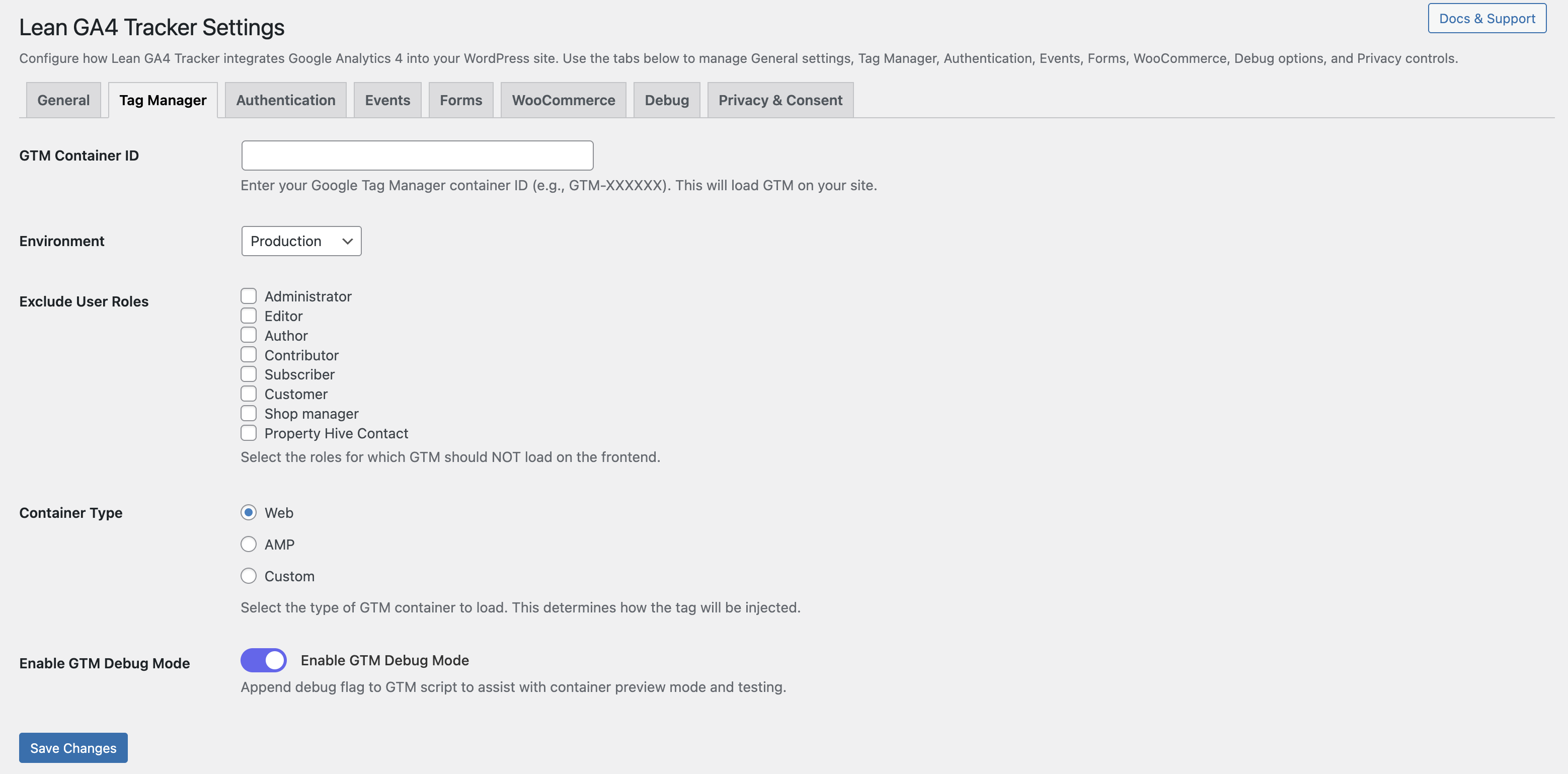
- Google Tag Manager (GTM): Inject GTM containers for Web, AMP, or custom
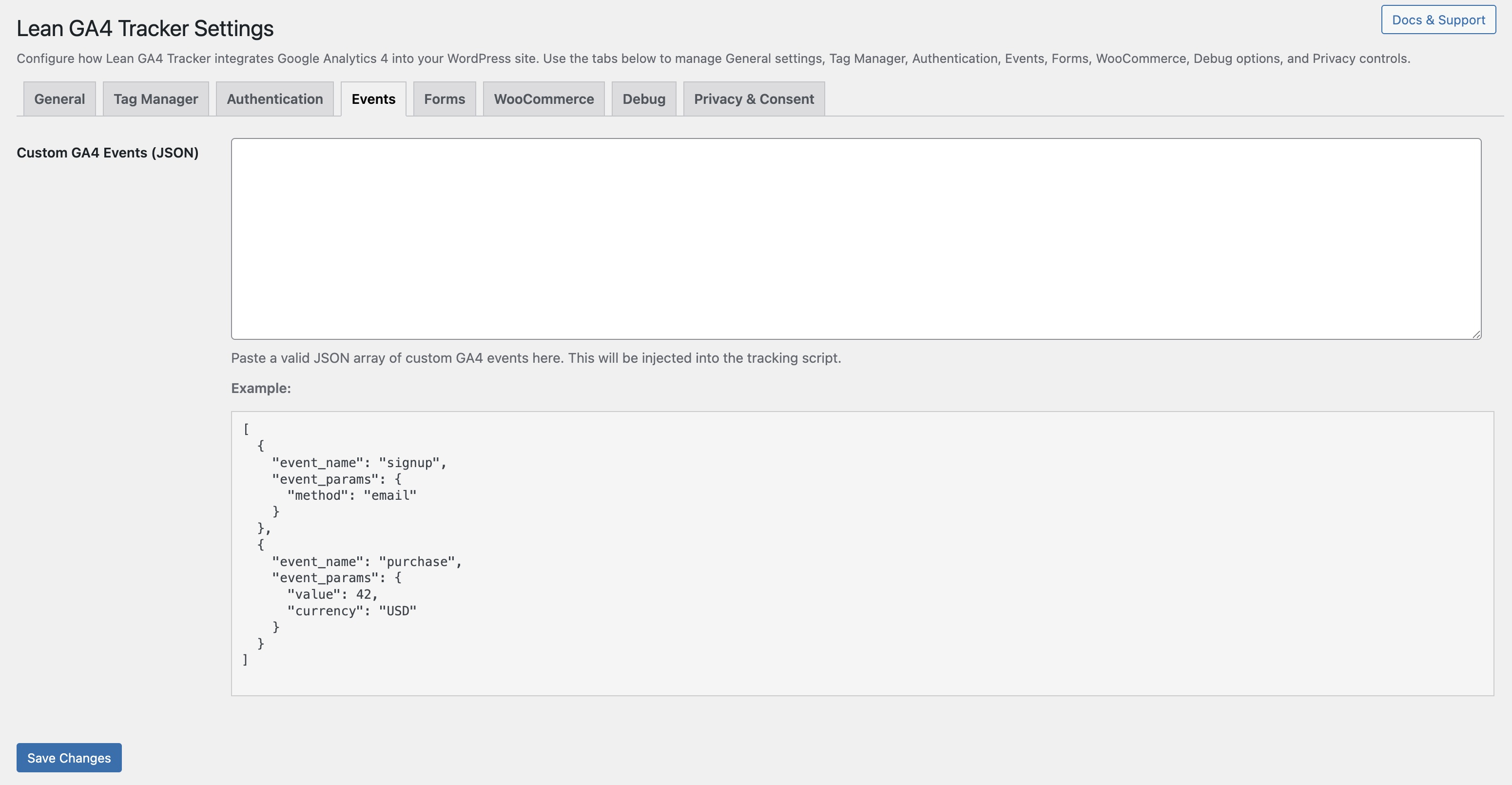
- Custom Events: Dispatch your own GA4 events via JSON — no JavaScript required
- Tabbed Settings UI: Clean, organized settings panel
- Multisite Support: Network-wide GA4 settings with optional enforcement
Resources
Whether you’re a WooCommerce store owner or a developer building custom sites, Lean GA4 Tracker gives you exactly what you need — nothing more, nothing less.
Privacy
This plugin does not collect, store, or transmit any personal data by itself.
It integrates your site with Google Analytics 4 (GA4) and/or Google Tag Manager (GTM).
Please review and configure your GA4 and GTM accounts in accordance with your local privacy laws (such as GDPR, CCPA).
Consent Mode
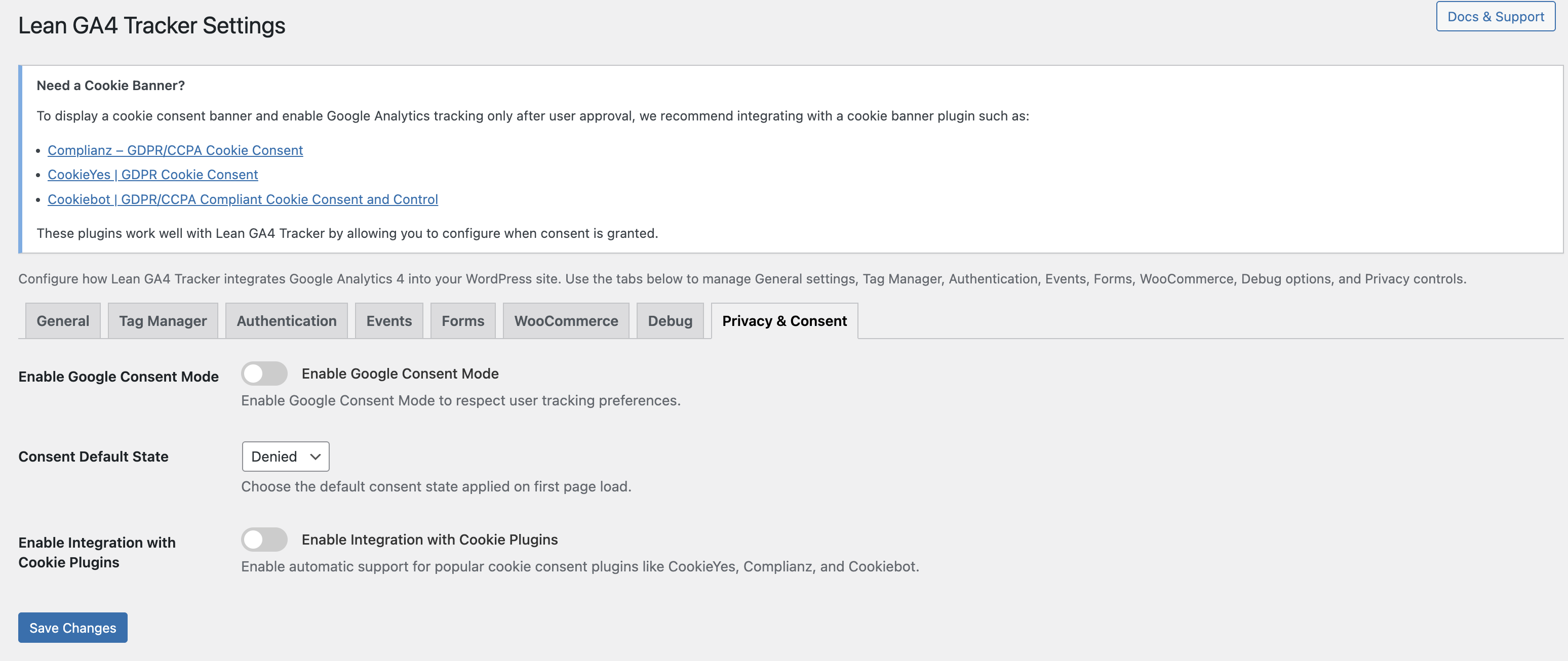
If enabled, Lean GA4 Tracker respects user tracking preferences via Google Consent Mode.
You can also integrate with third-party cookie banner plugins (Complianz, CookieYes, Cookiebot) to ensure visitor choices are honored.
WooCommerce Data
When WooCommerce tracking is enabled, the plugin sends product and order information to GA4, such as product name, category, brand, price, and quantity.
No personally identifiable information (PII) such as customer names or emails is collected or transmitted.
Recommended
We recommend that site owners:
– Update their site’s Privacy Policy to mention Google Analytics 4 and data sharing with Google
– Provide clear information to visitors about analytics tracking
– Use a consent management plugin to comply with GDPR/CCPA and other regulations
Installation
- Upload the plugin files to
/wp-content/plugins/lean-ga4-tracker - Activate the plugin from your WordPress dashboard
- Go to Settings → Lean GA4 Tracker to configure your Measurement ID, WooCommerce tracking, and GTM settings
Frequently asked questions
Does this plugin support WooCommerce eCommerce tracking?
Yes. Lean GA4 Tracker tracks product views, add to cart, checkout, and purchases using GA4’s official eCommerce schema — including product category and brand data.
Can I track custom GA4 events without writing code?
Yes. You can define a JSON array of custom events in the Events tab, and the plugin will dispatch them automatically.
Does the plugin support Consent Mode?
Yes. Enable it in the Privacy tab to integrate with cookie banner plugins like Complianz, CookieYes, and Cookiebot.
Can I use Google Tag Manager (GTM) instead of the GA4 script?
Yes. You can inject GTM containers (Web, AMP, or Custom) and even enable GTM Debug Mode for testing.
Does it work in multisite?
Yes. Network admins can enforce GA4 settings across all sites or allow site-level overrides.
Where is the GA4 script loaded?
You can load it as standard, async, defer, or idle (using requestIdleCallback) to optimize performance.
Does this plugin support product categories and brands in WooCommerce?
Yes. From version 1.1.5, WooCommerce eCommerce tracking automatically includes product category and brand attributes in GA4 event payloads.
Can I disable tracking for logged-in administrators or editors?
Yes. You can exclude specific user roles from tracking in the Tag Manager settings tab.
Does Lean GA4 Tracker slow down my website?
No. The plugin is designed to be lightweight and optimized for performance. You can choose async, defer, or idle script loading to minimize impact on page speed.
How is this plugin different from other GA4 plugins?
Lean GA4 Tracker focuses on performance and WooCommerce support without unnecessary bloat. It is developer-friendly, privacy-focused, and provides just the right features for GA4 and GTM integration.
Changelog
1.2.0
- Enhanced eCommerce Tracking: Complete GA4 eCommerce funnel support
- Added
view_item_listevent – Track product list views on shop, category, tag, and search pages - Added
select_itemevent – Track product clicks from lists with item position tracking - Added
view_cartevent – Track when customers view their shopping cart - Added
remove_from_cartevent – Track item removals from cart (server-side and AJAX) - Added
add_shipping_infoevent – Track shipping method selection during checkout - Added
add_payment_infoevent – Track payment method selection during checkout - Improved category name display in all eCommerce events (shows category name instead of ID)
- Updated WooCommerce settings tab with 6 new tracking toggles
- Enhanced product tracking with
item_list_name,item_list_id, andindexparameters
1.1.6
- Added Recommended GA4 Events section in Events tab with toggles for generate_lead, sign_up, and purchase
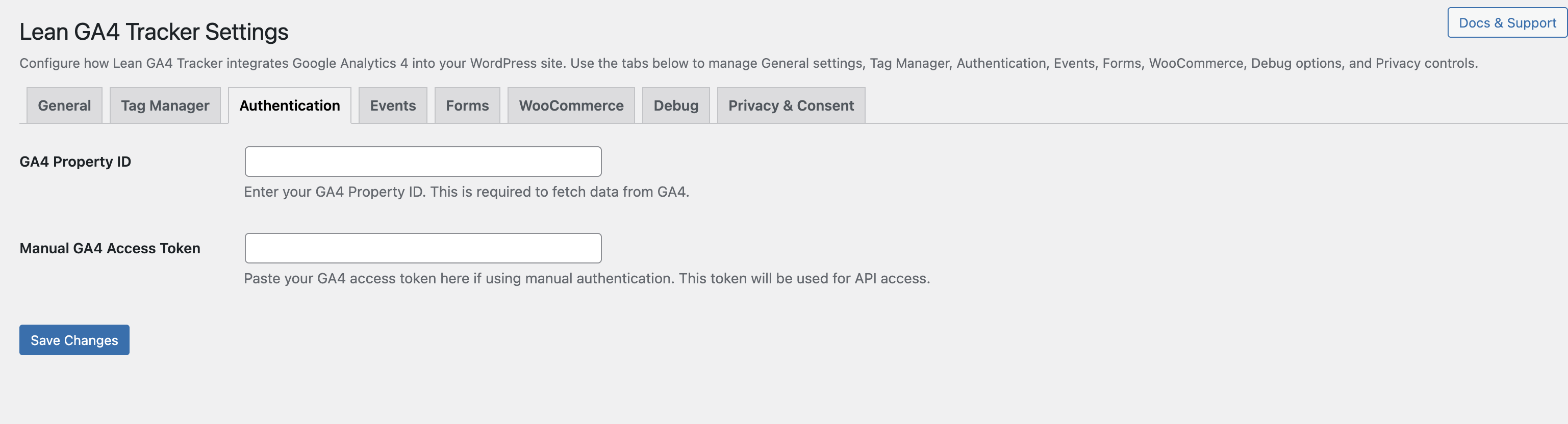
- Improved GA4 Property ID field with better placeholder, validation, and help text in Authentication tab
- Added Manual GA4 Access Token support for dashboard charts
- Added initial DashboardPage class with basic GA4 metrics and Chart.js visualization
1.1.5
- Improved admin UI with modern toggle switch design for settings
- Added scoped admin CSS file for cleaner styling
- Enhanced WooCommerce tracking descriptions with GA4 event names
- Updated settings header with Docs & Support and Upgrade to Pro buttons
- Improved help texts and tooltips for better user guidance
- Codebase refactored to use LEAN_GA4_TRACKER_URL constant for assets
1.1.4
- Added new Script Load Mode option: “Idle (after page load)” using requestIdleCallback with fallback
- Improved admin settings UI for script placement options
- Enhanced sanitization to support new load mode
- Minor code refactoring and documentation updates
1.1.3
- Improved Consent Mode compatibility with WordPress and third-party consent plugins
- Added listener for WordPress’s wp_consent_granted event
- Confirmed WooCommerce support with product, cart, checkout, and order tracking
- Enhanced leanGA4ConsentGranted()
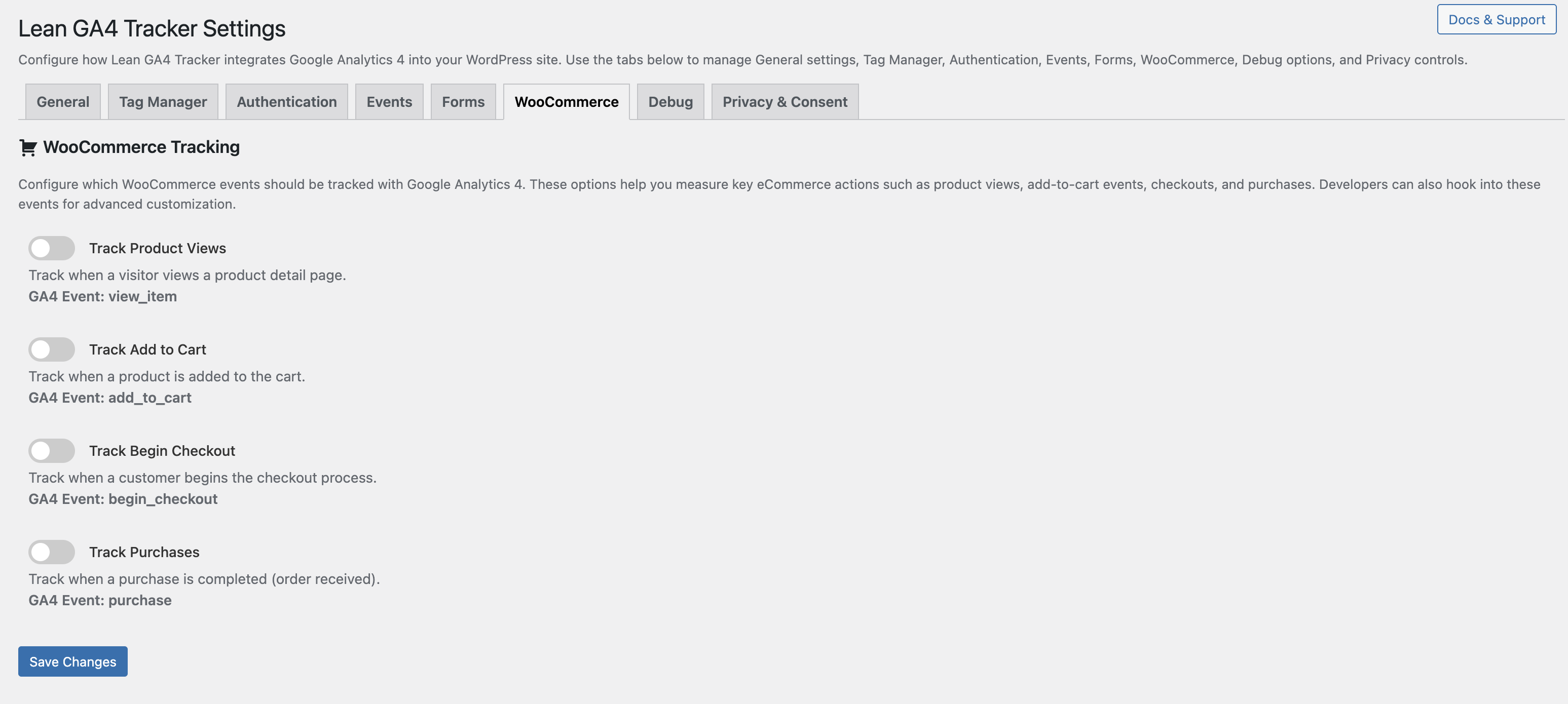
- Added WooCommerce tab for toggling GA4 event tracking
- Supports product views, add to cart, begin checkout, and purchase events
- Events dispatched using gtag() with product ID, name, price, and order data
- Enhanced WooCommerce tracking security and GA4 payload accuracy — added JSON-encoded event payloads, quantity/currency support, duplicate purchase prevention, and front-end-only tracking hooks
1.1.1
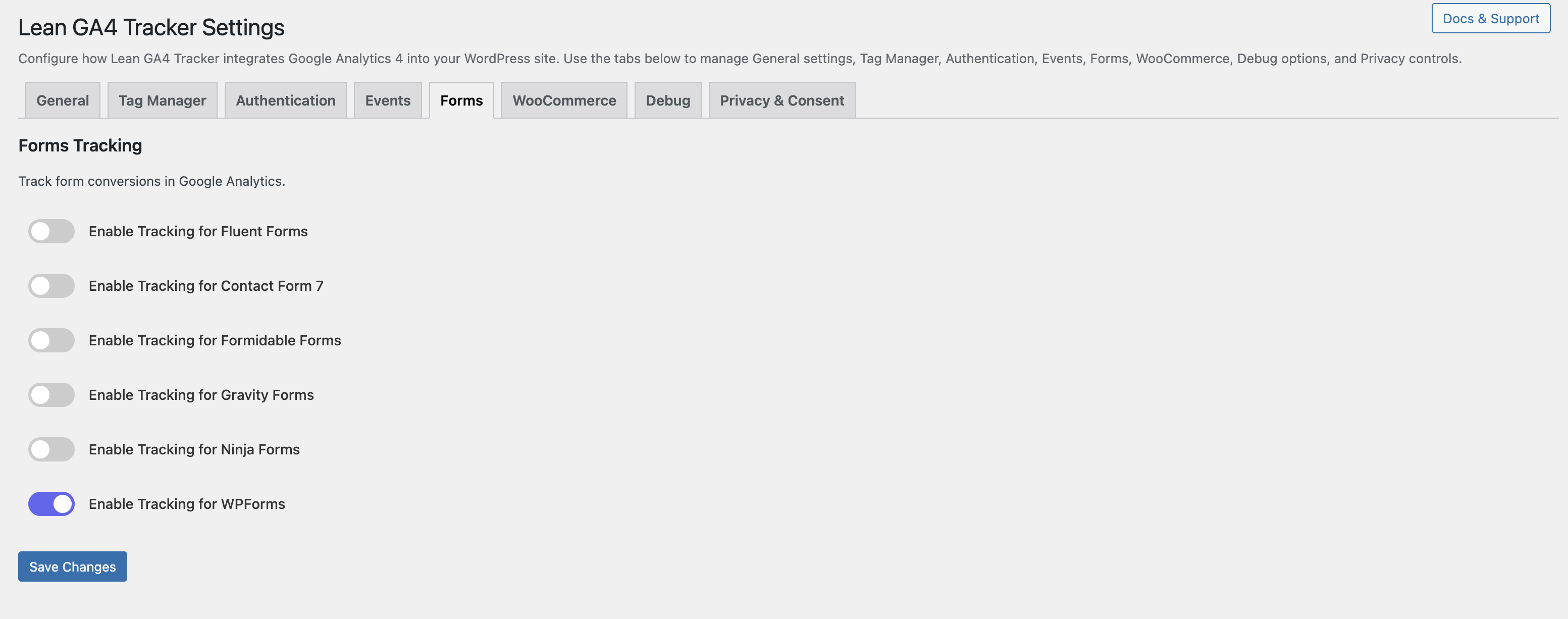
- Added Forms tab with toggles for form submission tracking
- Supports Contact Form 7, WPForms, Gravity Forms, Ninja Forms, Formidable Forms, and Fluent Forms
- GA4 events include form title and form ID using gtag()
Screenshots
For developers
Is this your plugin? Show off the numbers.
Add a live badge to your site, docs or GitHub README. It updates on its own — no account needed.
Best Lean GA4 Tracker alternatives
All ecommerce tracking plugins →



FAQ
Lean GA4 Tracker: quick answers
Straight answers, pulled from live WordPress.org data.
Live data from WordPress.org · checked Oct 5, 2026
Is Lean GA4 Tracker free?
Yes. Lean GA4 Tracker is free to download and use from the official WordPress.org plugin directory.
Is Lean GA4 Tracker safe to use in 2026?
Lean GA4 Tracker shows warning signs in 2026 — compare the alternatives below before installing. Was last updated 9 months ago, and scores 36/100 on our health check.
How many websites use Lean GA4 Tracker?
Lean GA4 Tracker is active on <10 WordPress websites and has been downloaded 1,135 times since it launched in April 2025. It was downloaded 53 times in the last 30 days.
Does Lean GA4 Tracker work with WordPress 7.1?
Lean GA4 Tracker is officially tested up to WordPress 6.9.9, while the latest release is 7.1.2. It may still work, but try it on a staging site first.
What PHP version does Lean GA4 Tracker need?
Lean GA4 Tracker requires PHP 8.2 or higher. Most hosts run PHP 8.x today, so it works on any modern WordPress hosting.
When was Lean GA4 Tracker last updated?
The latest version, 1.2.0, was released on January 3, 2026 (9 months ago).
Who makes Lean GA4 Tracker?
Lean GA4 Tracker is developed and maintained by Maidul.
What are the best alternatives to Lean GA4 Tracker?
The most popular alternatives to Lean GA4 Tracker are ArrayCodes Datalayer for Wo… (700+ installs), Meta Pixel Event Tracker fo… (70+ installs) and GIA (40+ installs).
Powered by PageForge
Want thousands of pages that rank like these? Build them in an afternoon.
This directory runs on the same engine as PageForge. Turn any spreadsheet, CSV or API into thousands of fast, SEO-ready WordPress pages — with schema, internal links and AI-written copy baked in.
- CSV, Google Sheets & API data sources
- AI content, schema & internal links per page
- Works with Elementor, Gutenberg, Yoast & Rank Math
- Free on WordPress.org — no credit card


