



Share Cart and Save Cart for Later for WooCommerce by LeanPlugins
Share cart via link in one click. Save cart for later. Keeps variations, add-on options and prices. Works with classic and block carts.

Solid choice
Share Cart and Save Cart for La… is a solid plugin choice in 2026, with a few things worth checking first. It runs on 10+ sites, is rated 5/5 and was last updated 3 days ago, and scores 73/100 on our health check.
- Actively developed — last update 3 days ago
- Tested with the latest WordPress (7.1)
- Small user base (10+ active installs)
- Very few reviews so far
How does it stack up?
Side-by-side on installs, updates, ratings & support



Daily downloads
Download spikes usually follow a new release — each site that auto-updates counts as a download.
Rankings
Where Share Cart and Save Cart fo… stands todayWordPress.org search rankings
Live position in the plugin search, top 100| Keyword | Position |
|---|---|
| save cart | #34 |
| save for later | #21 |
| share cart | #23 |
| Wishlist | >100 |
| woocommerce | >100 |
Version adoption
Share of active sites per release.
Rating breakdown
★★★★★★★★★★ 5 from 1 reviews
About Share Cart and Save Cart for Later for…
From the official readme · v1.2.0Description
Share cart in one click and save cart for later.
Shoppers often leave a full cart because they aren’t ready yet, or need someone else to say yes. Lean Cart Share & Save keeps that WooCommerce cart alive, so “later” still ends in a sale:
- Share cart with a link: one click creates a unique URL that loads the exact cart contents on any device. Works for everyone, including guests.
- Save cart for later: logged-in users save unlimited carts with custom names, like “Birthday Wishlist” or “Monthly Reorder”, ready for later purchase.
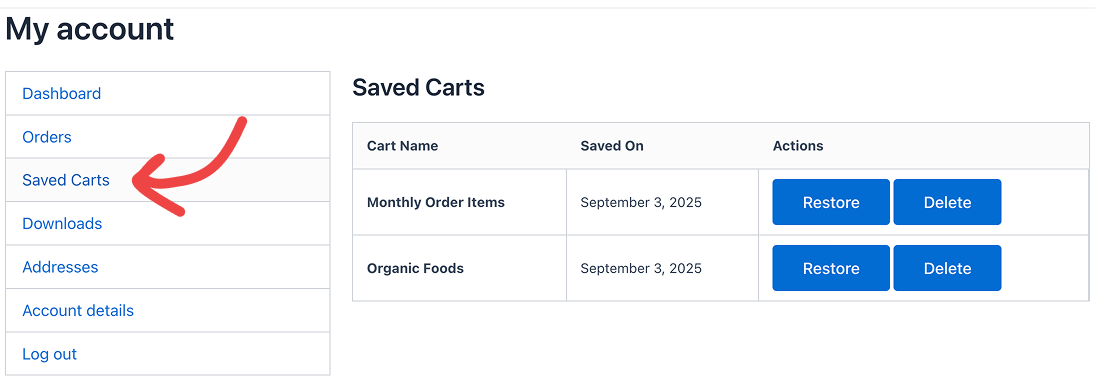
- Restore in one click: saved carts wait in My Account → Saved Carts, where customers restore or delete them anytime.
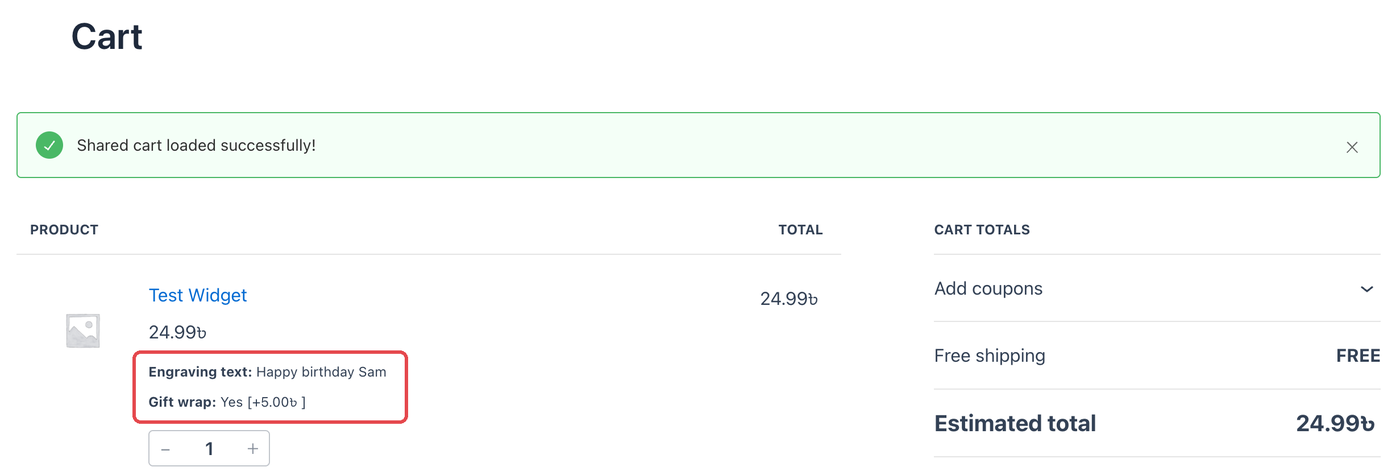
- Custom and personalized products: shared and saved carts keep every option the shopper picked, like engraving text, gift wrap or print sizes, at the right price.
- Fewer abandoned carts: shoppers who aren’t ready to buy save for later instead of leaving, which cuts cart abandonment.
- Cross-device shopping: start on mobile, finish on desktop, no need to rebuild the cart.
- Approval and product recommendations: send a share cart link to a partner, a manager or a client to get a yes. Natural product sharing, no screenshots.
- Lightweight: works with classic themes and modern FSE Cart Blocks.
🌐 Visit Official Website | ⚡ Upgrade to Pro
Try it live, no install needed:
- Share a cart: Open a pre-loaded shared cart → (no login)
- Save a cart: Auto-login with a cart ready →, then click “Save Cart”. Manual login:
demo/demo - View saved carts: My Account → Saved Carts →
- Custom message (Pro): Shared cart with a personal note →
- Password protection (Pro): Password-protected cart →, password
demo
Works with product add-on plugins:
Shared and saved carts keep the options shoppers choose with these plugins, and the price that goes with them:
- PPOM (Product Addons & Custom Fields)
- Advanced Product Fields (Product Addons)
- Extra Product Options (ThemeHigh)
- Product Addons for WooCommerce (Acowebs)
Tested with the free versions. Using another add-on plugin? Most work out of the box. If yours doesn’t, tell us and we’ll check it.
Real Business Scenarios Where This Plugin Shines:
- Custom & Personalized Products: Print shops, engraving, personalized gifts. A shared or saved cart keeps every option and the right price, so nobody has to configure the product twice.
- B2B Sales & Consultations: Share product quotes and recommendations with clients instantly
- Gift Shopping & Wishlists: Let customers create and share wishlists with family and friends
- Abandoned Cart Recovery: Customers can save their cart for later and return instead of losing their selections
- Team Purchasing & Approvals: Enable team members to collaborate on group orders and bulk purchases
- Cross-Device Shopping: Let customers start shopping on mobile, save, and complete on desktop
- Event Planning & Bulk Orders: Share product lists for weddings, parties, or seasonal restocking
- Recurring Purchases & Subscriptions: Create and share weekly/monthly item packages – customers can save these lists to their profile and easily reorder or modify quantities or products
Key Features:
- Cart Sharing: Generate unique shareable URLs for any cart
- One-Click Cart Links: Every cart link preloads the exact products and quantities, ready to send to customers or use in promotions and campaigns
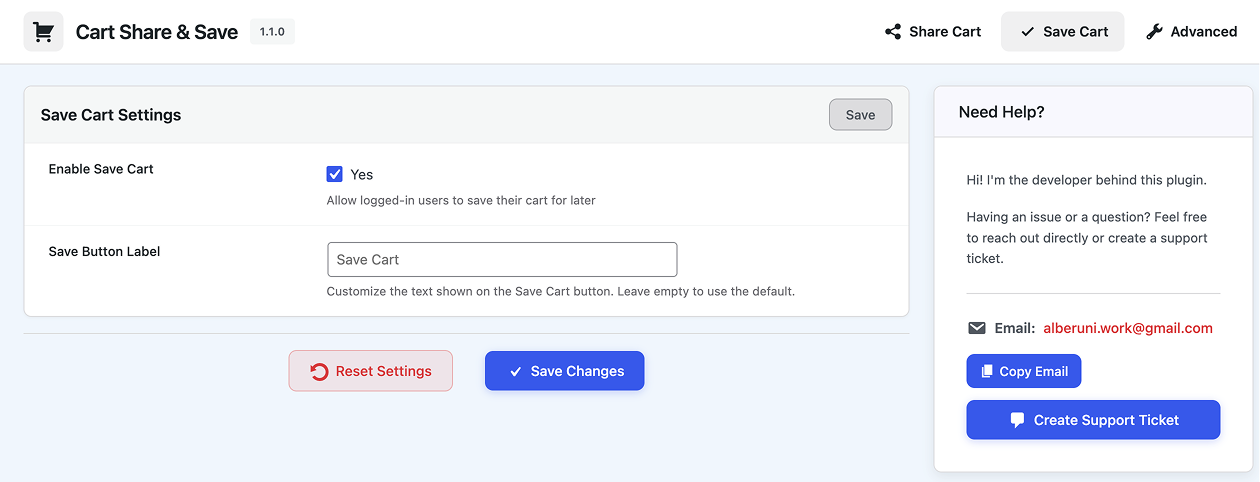
- Cart Saving: Allow logged-in users to save carts with custom names
- Add-on Options Kept: Options from product add-on plugins (text, choices, extra fees) come back with the cart, at the right price
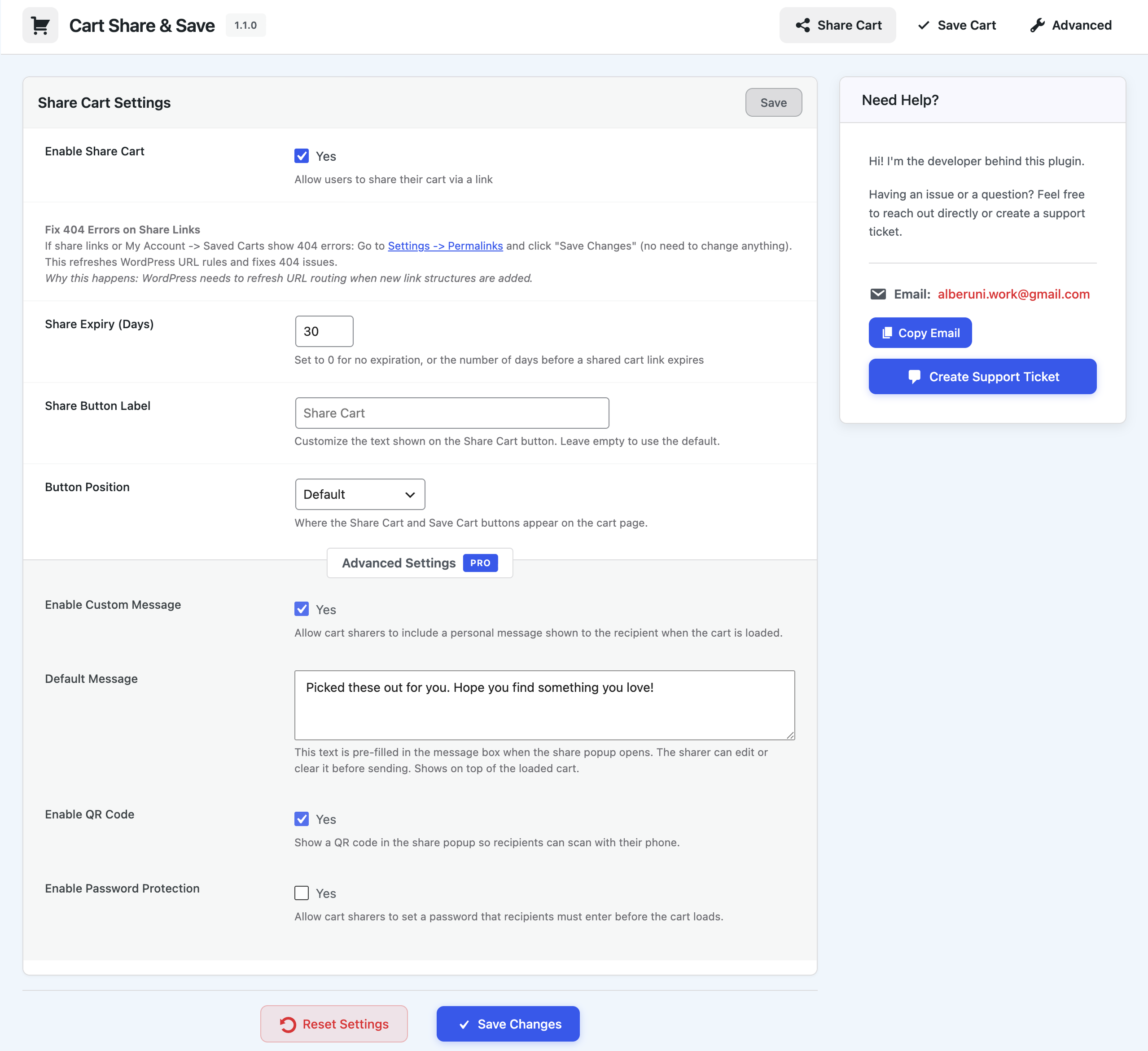
- Custom Message: Let sharers include a personal note shown to the recipient when the cart loads [PRO]
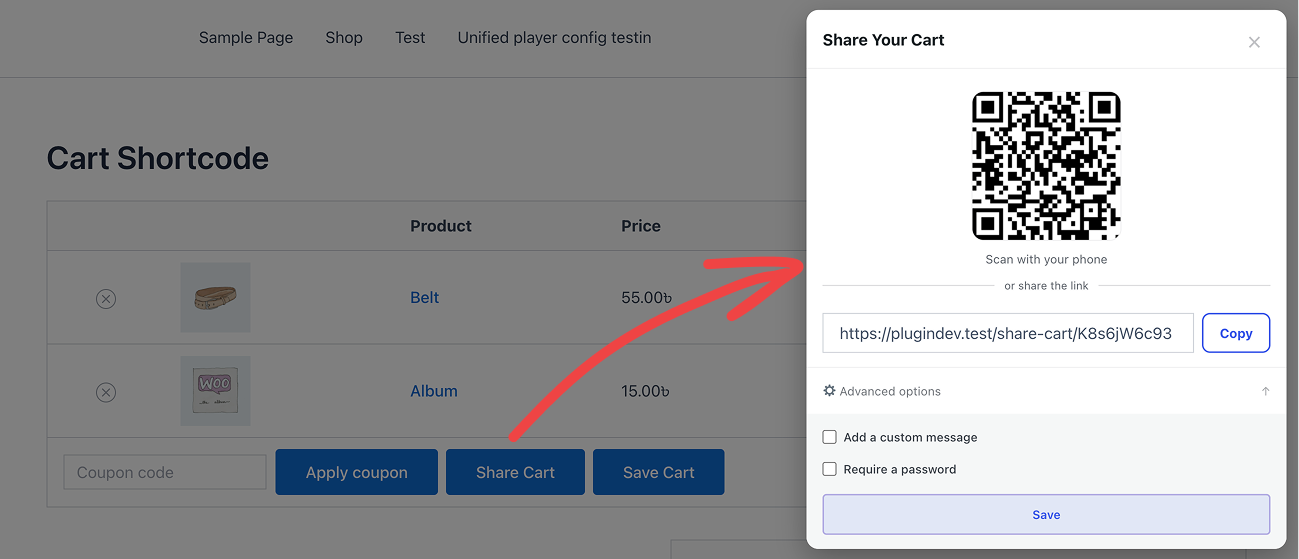
- QR Code: Show a scannable QR code in the share popup so recipients can open the cart on their phone [PRO]
- Password Protection: Let sharers set a password recipients must enter before the cart loads [PRO]
- WooCommerce Integration: Seamlessly integrates with your existing WooCommerce store
- FSE & Block Cart Support: Works perfectly with both classic themes and modern Full Site Editing (FSE) themes with WooCommerce Cart Blocks
- My Account Integration: Saved carts appear in customer My Account area
- Flexible Settings: Configure share expiry, button label, button position
- Data Management: Optional data cleanup on plugin uninstall
- Security First: Proper nonce verification and input sanitization
- Lightweight: Minimal impact on site performance
Cart Sharing Features:
* Generate unique share URLs for any cart
* Configurable expiration (or never expire)
* Custom button label and position
* Product variation support (size, color, etc. preserved on the shared link)
* Quantities preserved exactly as the sharer selected them
* Product add-on options and their prices preserved
* Personal message to recipient [PRO]
* Pre-filled default message text [PRO]
* QR code in share popup [PRO]
* Password-protect share links [PRO]
Cart Saving Features:
* Save cart for later with a custom name
* View all saved carts in My Account area
* Restore any saved cart with one click
* Delete saved carts when no longer needed
* Perfect for wishlist functionality
Upgrade to Pro
Custom Message – Allow sharers to write a personal note shown to the recipient when the shared cart loads. Set a default pre-filled message so sharers always have a starting point.
QR Code – Display a scannable QR code inside the share popup. Recipients can open the shared cart instantly on any phone camera, no typing required.
Password Protection – Let sharers set a password for their cart link. Recipients must enter the correct password before the cart loads, keeping private shares truly private.
Usage
Sharing a Cart:
1. Add products to your WooCommerce cart
2. Go to the cart page
3. Click the “Share Cart” button
4. Copy the generated URL and share it
5. Recipients can click the URL to load the cart
Saving a Cart:
1. Add products to your WooCommerce cart
2. Go to the cart page
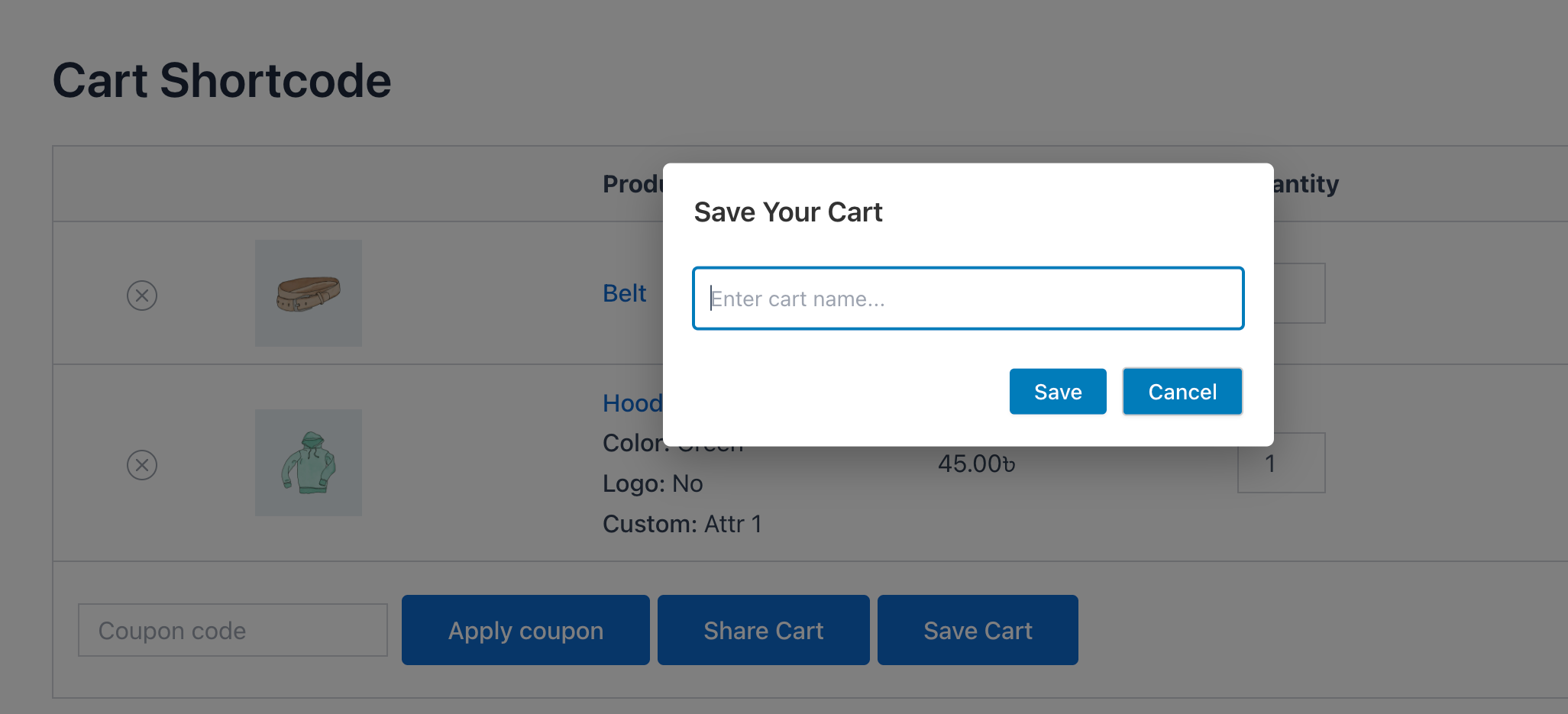
3. Click the “Save Cart” button (requires login)
4. Enter a name for your saved cart
5. Access saved carts from My Account → Saved Carts
Plugin Settings:
* Enable/disable cart sharing
* Enable/disable cart saving
* Set share link expiration (days)
* Choose button position: After cart table (default), Default (coupon row), Before cart, Before cart totals, Use shortcode
* Choose whether to delete data on uninstall
Shortcode:
Place the buttons anywhere on your website: any page, post, widget, page builder (Elementor, Divi, etc.) or anywhere in WordPress that renders shortcodes.
[lean_cart_share_save]shows both buttons[lean_cart_share_save display="share"]shows only the Share Cart button[lean_cart_share_save display="save"]shows only the Save Cart button
To show buttons only where you place the shortcode, set Button Position to “Use shortcode” in the plugin settings.
Installation
- Upload the plugin files to the
/wp-content/plugins/lean-cart-share-and-savedirectory, or install the plugin through the WordPress plugins screen directly. - Activate the plugin through the ‘Plugins’ screen in WordPress.
- Important: Make sure WooCommerce is installed and activated first.
- Go to “Cart Share & Save” in your WordPress admin menu to configure settings.
- Visit Settings → Permalinks and click “Save Changes” to refresh URL rules (fixes 404 errors).
Frequently asked questions
How do customers share cart contents?
They click the “Share Cart” button on the cart page. The plugin generates a unique share cart URL they can copy and send via email, chat, or social media. Anyone opening the link gets the exact same cart loaded.
Can customers save their cart for later?
Yes. Logged-in customers click “Save Cart”, give the cart a custom name, and it appears under My Account → Saved Carts where they can restore it with one click at any time.
Does share cart work with variable products?
Yes. Product variations (size, color, etc.) and quantities are preserved exactly as the sharer selected them, both on shared links and saved carts.
Does it keep options from product add-on plugins like PPOM?
Yes. Options a shopper picks with add-on plugins (engraving text, gift wrap, sizes, extra fees) are saved with the shared or saved cart and come back at the right price. Tested with PPOM, Advanced Product Fields, Extra Product Options (ThemeHigh) and Product Addons (Acowebs). Developers can fine-tune what is saved with two filters: lean_csns_cart_item_data_to_save and lean_csns_cart_item_data_to_restore.
Can I use the shortcode and the automatic button position at the same time?
Yes. They work independently. The Button Position setting controls the automatic buttons on the cart page, and [lean_cart_share_save] renders wherever you place it. If you put the shortcode on the cart page itself, you will see the buttons twice, so set Button Position to “Use shortcode” there to keep only your manual placement.
Does this plugin require WooCommerce?
Yes, this plugin is built specifically for WooCommerce and requires WooCommerce to be installed and activated.
Do shared cart links expire?
By default, shared cart links never expire, but you can configure an expiry (in days) in the plugin settings if you want links to stop working after a set time.
Can guest users share carts?
Yes! Any user can share a cart, including guest users who haven’t created an account.
Can guest users save carts?
No, saving carts requires users to be logged in. However, guest users can still share carts via URLs.
What happens if a product is no longer available?
If a shared or saved cart contains products that are no longer available or purchasable, those items are automatically skipped during cart restoration.
Will this plugin slow down my site?
No, the plugin is designed to be lightweight and only loads assets when needed. It uses efficient database queries and follows WordPress best practices.
Does it work with FSE (Full Site Editing) themes and WooCommerce Cart Blocks?
Yes! The plugin fully supports both classic WooCommerce themes and modern FSE themes using WooCommerce Cart Blocks. The buttons automatically appear in both classic and block cart pages.
Can I customize the appearance of the share/save buttons?
The plugin uses standard WooCommerce styling by default. You can customize the appearance using CSS by targeting the .lean-csns-buttons-wrapper class.
Is the plugin translation ready?
Yes, the plugin is fully translation ready with the text domain ‘lean-cart-share-and-save’.
What data is stored when sharing or saving carts?
The plugin stores product IDs, quantities, variations, product options added by other plugins (such as engraving text), applied coupons, and basic details like creation dates. Shared carts don’t store who the shopper is, but any text a shopper types into a product option is saved with the link.
How do I fix 404 errors on shared links?
Go to Settings → Permalinks in your WordPress admin and click “Save Changes” (no need to change anything). This refreshes WordPress URL rules.
Does this plugin use any third-party services?
Yes. This plugin uses the Freemius SDK for licensing, seamless upgrades, and optional insights that help us improve the plugin. Freemius does not collect any data by default. On activation you will see an opt-in screen where you can choose to share non-sensitive diagnostic data. Opting in helps us understand the environments the plugin runs in, catch compatibility issues early, and prioritize the features that matter most. If you opt in, Freemius collects: Site URL, WordPress version, PHP version Plugin version and activation/deactivation events Your admin name and email address Skipping the…
Changelog
1.2.0
- New: Shared and saved carts now keep options from product add-on plugins (engraving text, gift wrap, print sizes and more) and their prices. Tested with PPOM, Advanced Product Fields, Extra Product Options (ThemeHigh) and Product Addons (Acowebs)
- Fix: Products with custom options no longer come back at 0.00 when a shared or saved cart is restored
- Developer: New filters
lean_csns_cart_item_data_to_saveandlean_csns_cart_item_data_to_restore - Updated: Freemius SDK to 2.13.4
1.1.9
- Fix: Share links and QR codes now load the cart on sites behind page caches such as Cloudflare, instead of opening an empty cart
- Fix: Expired or missing share links now show a message explaining why, instead of a silent empty cart
1.1.8
- New: My Account menu now shows how many carts you have saved, for example “Saved Carts (3)”
1.1.7
- Updated: Minimum requirements are now WordPress 6.0 and PHP 7.4, declared in the plugin header so incompatible sites are stopped before activation
- Updated: Language translation template (.pot) regenerated with the latest strings
- Updated: Deactivation feedback tool
1.1.6
- New: [lean_cart_share_save] shortcode, place the Share Cart and Save Cart buttons on any page or post
- New: “Use shortcode” button position that turns off automatic buttons on the cart page
- Updated: Language translation template (.pot) regenerated with the latest strings
1.1.5
- New: “Before cart” button position, shows the Share/Save buttons above the cart on both classic and block (FSE) carts
- Changed: “Before cart” is now the default button position for new installs
Screenshots


For developers
Is this your plugin? Show off the numbers.
Add a live badge to your site, docs or GitHub README. It updates on its own — no account needed.
Best Share Cart and Save Cart for… alternatives
All save cart plugins →FAQ
Share Cart and Save Cart for Later…: quick answers
Straight answers, pulled from live WordPress.org data.
Live data from WordPress.org · checked Oct 20, 2026
Is Share Cart and Save Cart for La… free?
Yes. Share Cart and Save Cart for La… is free to download and use from the official WordPress.org plugin directory.
Is Share Cart and Save Cart for La… safe to use in 2026?
Share Cart and Save Cart for La… is a solid plugin choice in 2026, with a few things worth checking first. It runs on 10+ sites, is rated 5/5 and was last updated 3 days ago, and scores 73/100 on our health check.
How many websites use Share Cart and Save Cart for La…?
Share Cart and Save Cart for La… is active on 10+ WordPress websites and has been downloaded 1,403 times since it launched in September 2025. It was downloaded 232 times in the last 30 days.
Does Share Cart and Save Cart for La… work with WordPress 7.1?
Yes. The developer has tested Share Cart and Save Cart for La… up to WordPress 7.1.3, the latest release. It requires WordPress 6.0 or newer.
What PHP version does Share Cart and Save Cart for La… need?
Share Cart and Save Cart for La… requires PHP 7.4 or higher. Most hosts run PHP 8.x today, so it works on any modern WordPress hosting.
When was Share Cart and Save Cart for La… last updated?
The latest version, 1.2.0, was released on October 17, 2026 (3 days ago).
Who makes Share Cart and Save Cart for La…?
Share Cart and Save Cart for La… is developed and maintained by LeanPlugins.
What are the best alternatives to Share Cart and Save Cart for La…?
The most popular alternatives to Share Cart and Save Cart for La… are Multiple Carts, Persistent… (40+ installs), Unagui Save Cart for WooCom… (10+ installs) and WPGenie Save & Clear Cart f… (<10 installs).
Powered by PageForge
Want thousands of pages that rank like these? Build them in an afternoon.
This directory runs on the same engine as PageForge. Turn any spreadsheet, CSV or API into thousands of fast, SEO-ready WordPress pages — with schema, internal links and AI-written copy baked in.
- CSV, Google Sheets & API data sources
- AI content, schema & internal links per page
- Works with Elementor, Gutenberg, Yoast & Rank Math
- Free on WordPress.org — no credit card


