



Photogallery
Create galleries with ease.

Consider an alternative
Photogallery shows warning signs in 2026 — compare the alternatives below before installing. It runs on 40+ sites and was last updated 9 years ago, and scores 24/100 on our health check.
- Small user base (40+ active installs)
- Very few reviews so far
- No update in 9 years
- Only tested up to WordPress 4.8 (latest is 7.1)
How does it stack up?
Side-by-side on installs, updates, ratings & support



Daily downloads
Download spikes usually follow a new release — each site that auto-updates counts as a download.
Rankings
Where Photogallery stands todayWordPress.org search rankings
Live position in the plugin search, top 100| Keyword | Position |
|---|---|
| album | >100 |
| gallery | >100 |
| image | >100 |
| photo | >100 |
| picture | >100 |
Version adoption
Share of active sites per release.
About Photogallery
From the official readme · v1.4Description
This plugin is meant primarily for theme developers.
This plugin allows to collect photos from the the Media Manager and arrange them into albums.
These albums can be combined into galleries.
Both albums and galleries can be added to a theme’s navigation menu.
Note that this plugin does not provide any CSS formatting and JavaScript for frontend presentation of galleries and albums. You have to format them yourself and integrate necessary JavaScript libraries, e.g Lightbox, yourself. This plugin merely gives a framework for gallery and album creation via custom post types and registration of designs for a frontend presentation.
If you found a bug or have any questions, complains or suggestions please feel free to contact me.
Theme Integration
You have to write post type template files for your theme in order for an album or gallery to work.
This gives Theme developers the most control over a frontend presentation and users a convenient way to create galleries through the WordPress dashboard.
If you install this plugin, create albums and galleries and include them into your theme’s menu, you will be disappointed, since nothing will happen.
- Create two php files inside your theme’s directory:
single-photogallery.phpandsingle-photoalbum.php.single-photogallery.phpgets called everytime a gallery is about to be viewedsingle-photoalbum.phpgets called everytime a album is about to be viewed
- Now you have two options.
- You can register a custom design inside your theme’s
function.phpvia e.g$kt_Photogallery->register_gallery_design()and call$kt_Photogallery->render()at an appropriated place inside yoursingle-photogallery.phpto render it depending on the user’s choice. - You fetch albums, images and thumbnail details, and render consistent HTML for all albums and galleries.
- You can register a custom design inside your theme’s
- Refere to the PHP API section for further details on how to retrieve album IDs, image IDs and thumbnail details.
Example
A basic example for a custom gallery design
# functions.php

$kt_Photogallery->register_gallery_design ('my_gallery_design', array(
  'label' => __('My Gallery Design', 'my-textdomain'),
  'icon' => 'dashicons-format-gallery',
  'title' => __('This is my custom gallery design', 'my-textdomain'),
  'render' => 'render_my_gallery_design'
));

$kt_Photogallery->register_album_design ('my_album_design', array(
  'label' => __('My Album Design', 'my-textdomain'),
  'icon' => 'dashicons-format-image',
  'title' => __('This is my custom album design', 'my-textdomain'),
  'render' => 'render_my_album_design'
));

function render_my_gallery_design ($post) {
  global $kt_Photogallery;
  $album_IDs = $kt_Photogallery->get_albums($post);
  if ($album_IDs) {
    foreach ($album_IDs as $album_ID) {
      $album_thumbnail = $kt_Photogallery->get_thumbnail_src($album_ID);
      echo '<a href="' . get_permalink($album_ID) . '">';
      if ($album_thumbnail) {
        echo '<img src="' . $album_thumbnail[0] . '" alt />';
      }
      echo '</a>';
    }
  } else {
    printf(__('The gallery %s does not contain any albums', 'my-textdomain'), esc_html($post->post_title));
  }
}

function render_my_album_design ($post) {
  global $kt_Photogallery;
  $image_IDs = $kt_Photogallery->get_images($post);
  if ($image_IDs) {
    foreach ($image_IDs as $image_ID) {
      $image = get_post($image_ID);
      if ($image) {
        $image_src = wp_get_attachment_image_src($image_ID, 'medium');
        if (!$image_src) {
          $image_src = wp_get_attachment_image_src($image_ID, 'full');
        }
        echo '<img src="' . $image_src[0] . '" alt />';
      }
    }
  } else {
    printf(__('The album %s does not contain any images', 'my-textdomain'), esc_html($post->post_title));
  }
}
Basic integration into Twenty Fifteen:
# single-photogallery.php or single-photoalbum.php
get_header();
?>
<div id="primary" class="content-area">
  <main id="main" class="site-main" role="main">
  <?php
  while (have_posts()) {
    the_post();
    ?>
    <article class="hentry">
      <header class="entry-header">
      <?php
        the_title('<h1 class="entry-title">', '</h1>');
      ?>
      </header>
      <div class="entry-content">
      <?php
        $kt_Photogallery->render();
      ?>
      </div>
    </article>
    <?php
  }
  ?>
  </main>
</div>
<?php
get_footer();
Language & Translation
This plugin is in English (en_US) by default but comes with a German (de_DE) po-file.
There is also a pot file containing untranslated strings so you can use it if you wish to translate this plugin.
See also Using Localizations.
And especially WordPress – Poedit: Translation Secrets.
If you want your translation included in the next version of Photogallery, don’t hesitate and let me know.
- Get Poedit.
- Open the the pot file with Poedit and translate it.
- Save a copy as e.g
kt-photogallery-fr_FR.poin/wp-content/plugins/kt-photogallery/language. The mo-file will be created automatically by Poedit if you ticked the checkbox in the preferences.
PHP API
I have included a number of functions for fetching album, image and thumbnail IDs associated with a gallery or album.
Please note that all methods starting with an underscore are considered internal and are not documented here. Although some are publicly accessible you should not use them directly unless you know what you are doing.
You do not have to create a new kt_Photogallery instance, there is already one in the global namespace.
Access all public methods via $kt_Photogallery.
-
$kt_Photogallery->get_album_count ( [$gallery_ID] )
Returns the number of albums associated with a gallery
Argumentint|null $gallery_IDOptional – ID of a gallery. Defaults to the current ID if used inside the Loop
Returnsinteger|boolean– Returns an integer on success, orfalseif$gallery_IDyields no gallery -
$kt_Photogallery->get_albums ( [$gallery_ID] )
Returns an array of album IDs associated with a gallery.
Argumentint|null $gallery_IDOptional – ID of a gallery. Defaults to the current ID if used inside the Loop
Returnsarray|boolean– Returns an array of IDs on success,falseif$gallery_IDyields no gallery -
$kt_Photogallery->get_image_count ( [$album_ID] )
Returns the number of images associated with an album
Argumentint|null $album_IDOptional – ID of an album. Defaults to the current ID if used inside the Loop
Returnsinteger|boolean– Returns an integer on success, orfalseif$album_IDyields no album -
$kt_Photogallery->get_images ( [$album_ID] )
Returns an array of image IDs associated with an album.
Argumentint|null $album_IDOptional – ID of an album. Defaults to the current ID if used inside the Loop
Returnsarray|boolean– Returns an array of IDs on success,falseif$album_IDyields no album -
$kt_Photogallery->get_thumbnail ( [$album_ID, [$fallback] ] )
Returns the ID of the image (attachment) used as thumbnail for an album
Argumentint|null $album_IDOptional – ID of an album. Defaults to the current ID if used inside the Loop
Argumentboolean $fallbackOptional – iftrueand$album_IDyields no album the method returns the ID of the first image associated with the album. Default istrue
Returnsinteger|false– Returns an integer on success,falseif$album_IDyields no album, no thumbnail is set or a fallback could not been resolved -
$kt_Photogallery->get_thumbnail_src ( [$album_ID, [$fallback] ] )
Returns an ordered array with values corresponding to the (0) url, (1) width, (2) height and (3) scale of the thumbnail associated with an album.
Argumentint|null $album_IDOptional – ID of an album. Defaults to the current ID if used inside the Loop
Argumentboolean $fallbackOptional – iftrueand$album_IDyields no album the method returns the ID of the first image associated with the album. Default istrue
Returnsarray|false– Returns an array on success,falseif$album_IDyields no album, no thumbnail is set or a fallback could not been resolved -
$kt_Photogallery->register_album_design ( $key, $options ) -
$kt_Photogallery->register_gallery_design ( $key, $options )
Registers a custom design for albums and galleries respectively.
The design will be available in the Design metabox during editing
Returnsboolean– returnstrueif the design was registered successfully,falseon failure.
Argumentstring $keyRequired – A key used as id inside HTML/CSS and for general identification
Argumentcallable|array $optionsRequired – A callback rendering the design on the frontend or an associative array:string label– The text for the labelstring icon– The image shown next to the label. Can bedashicons-*, an URL to an image or a base 64 encoded imagestring title– Text used inside the HTML title attribute, usually containing a descriptioncallback render ($post, $options)– Callback rendering the design on the frontend. The arguments passed are the current post as a WP_Post instance and an associative array of the options straight from the databasecallback options ($current_options, $defaults, $post)– Callback for additional form fields, should echo HTML. The arguments passed are an associative array of the options straight from the database, the default options as second argument and the current post as a WP_Post instance as third.array defaults– Associative array containing default values for options. Its keys are used during saving so you should generate HTML form fields using its keys and provide a callback for filtering.callback filter ($current_options, $defaults, $post)– Callback for filtering the options before they are saved. This callback is called every time a post is saved. The arguments passed are the default options merged with the values from the current request, the default options as second argument and the current post as a WP_Post instance as third. The callback must return an associative array otherwise no options are stored.
-
$kt_Photogallery->render( [$auto_design] )
Main output method. Depending on the current post type the method prints out a design for a gallery or an album.
Argumentboolean auto_designoptional – If settrueand no design is found, take the first registered one and proceed. Default istrue
Returnsboolean– Returnstrueon success,falseotherwise
Installation
Through WordPress’ Plugin Repository
- Goto wordpress.org/plugins/kt-photogallery and download the zip
- Goto your WordPress. You can upload a zip-archive via
/wp-admin/plugin-install.php?tab=upload - Refere to the API section for further details on how to integrate this plugin into a theme
Manual installation
- Upload all files found inside the zip archive to /wp-content/plugins/photogallery
- Activate the plugin through the ‘Plugins’ menu in WordPress
- Refere to the API section for further details on how to integrate this plugin into a theme
Changelog
Removed deprecated functions Fixed a JavaScript bug UI improvements
1.4
- Removed deprecated functions
- Fixed a JavaScript bug
- UI improvements
1.3
- Render now optionally falls back to the first registered design
1.2.1
- Fixes some overzealous esc_html
- Fixes jQuery UI Dialog sizing issue
- Add a spinning animation to the album dialog while loading
1.2
- Fixes a security issue
- Fixed a JavaScript bug which can break the page
- Updated help tabs
1.1
- Design Metabox will be hidden if no designs are registered
- Fixed
get_albums(): protected and private albums are now properly included or excluded - Fixed
get_meta() - Fixed SQL query inside
get_photoalbum() - Updated SortSelect.js to version 1.2
- Merged
gallery.jsandalbum.js
1.0.1
- Removed dead code
- Reduced redundancies
- Fixed some translation strings
- Improved examples inside readme.txt
Screenshots
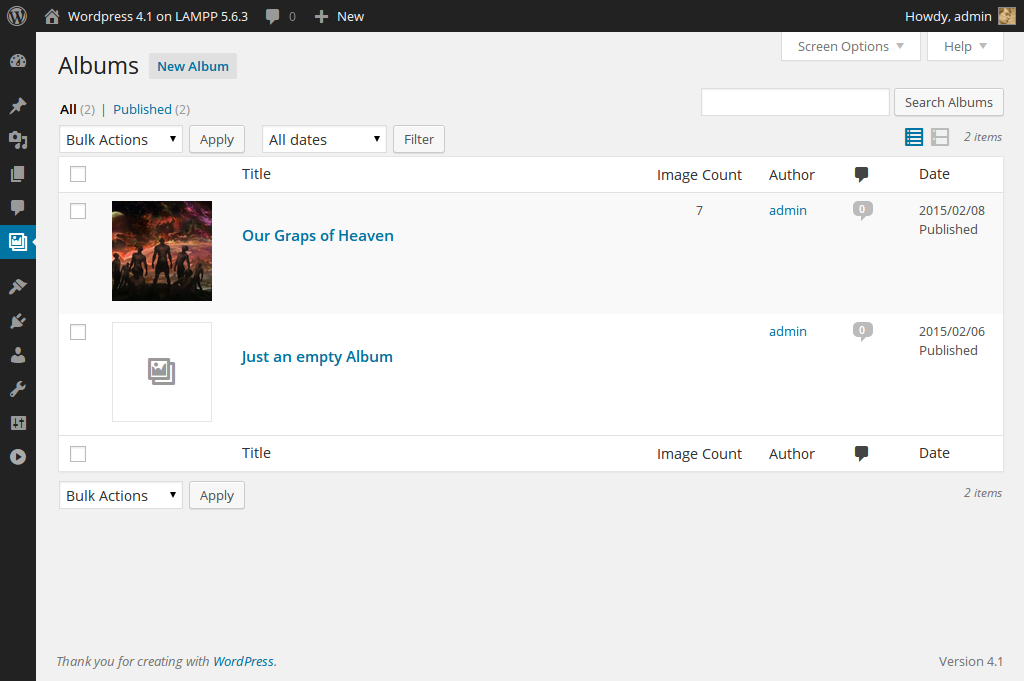


For developers
Is this your plugin? Show off the numbers.
Add a live badge to your site, docs or GitHub README. It updates on its own — no account needed.
Best Photogallery alternatives
All album plugins →





FAQ
Photogallery: quick answers
Straight answers, pulled from live WordPress.org data.
Live data from WordPress.org · checked Sep 30, 2026
Is Photogallery free?
Yes. Photogallery is free to download and use from the official WordPress.org plugin directory.
Is Photogallery safe to use in 2026?
Photogallery shows warning signs in 2026 — compare the alternatives below before installing. It runs on 40+ sites and was last updated 9 years ago, and scores 24/100 on our health check.
How many websites use Photogallery?
Photogallery is active on 40+ WordPress websites and has been downloaded 5,434 times since it launched in November 2014. It was downloaded 53 times in the last 30 days.
Does Photogallery work with WordPress 7.1?
Photogallery is officially tested up to WordPress 4.8.32, while the latest release is 7.1.2. It may still work, but try it on a staging site first.
When was Photogallery last updated?
The latest version, 1.4, was released on August 20, 2017 (9 years ago).
Who makes Photogallery?
Photogallery is developed and maintained by Daniel Menȝies.
What are the best alternatives to Photogallery?
The most popular alternatives to Photogallery are rtMedia for WordPress, Budd… (7K+ installs), Audio Album (4K+ installs) and WoowGallery (1K+ installs).
Powered by PageForge
Want thousands of pages that rank like these? Build them in an afternoon.
This directory runs on the same engine as PageForge. Turn any spreadsheet, CSV or API into thousands of fast, SEO-ready WordPress pages — with schema, internal links and AI-written copy baked in.
- CSV, Google Sheets & API data sources
- AI content, schema & internal links per page
- Works with Elementor, Gutenberg, Yoast & Rank Math
- Free on WordPress.org — no credit card


