



JSON API Auth
Extends the JSON API Plugin for RESTful user authentication

Safe pick
Yes — JSON API Auth is a safe, well-maintained plugin to use in 2026. It runs on 600+ sites, is rated 4.7/5 and was last updated 1 week ago, and scores 81/100 on our health check.
- Actively developed — last update 1 week ago
- Tested with the latest WordPress (7.1)
- Momentum — downloads up 194.6% vs the previous 30 days
- Small user base (600+ active installs)
How does it stack up?
Side-by-side on installs, updates, ratings & support



Daily downloads
Download spikes usually follow a new release — each site that auto-updates counts as a download.
Rankings
Where JSON API Auth stands todayWordPress.org search rankings
Live position in the plugin search, top 100| Keyword | Position |
|---|---|
| api | #22 |
| authenticate user | #3 |
| json api | #1 |
| wordpress user authentication | #52 |
Version adoption
Share of active sites per release.
Rating breakdown
★★★★★★★★★★ 4.7 from 11 reviews
About JSON API Auth
From the official readme · v3.1.3Description
Important: use RESTful JSON API for new integrations
JSON API Auth is retained for existing sites that still depend on the original JSON API plugin and its cookie-authentication workflow. For a new mobile app, headless site, external service, or AI-assisted integration, install RESTful JSON API instead.
RESTful JSON API provides plugin-issued JWT bearer authentication, requires HTTPS by default for requests that handle passwords or tokens, and includes a broader set of endpoints organized into Core, Posts, User, Respond, and Widgets controllers. Its User controller includes signup, JWT login, token validation, profiles, avatars, password-reset requests, safe user meta, and authenticated comments, while the other controllers expose content, custom post type, taxonomy, media, menu, search, comment, and widget workflows.
Existing JSON API Auth integrations can continue using this plugin. Because JWT bearer tokens replace the legacy cookie format and endpoint paths differ, test your client migration before deactivating the legacy JSON API stack.
JSON API Auth extends the JSON API Plugin to allow RESTful user authentication.
JSON API Plugin, that is required, was closed on August 7, 2019 from WordPress repository. You can download JSON API Plugin from https://github.com/PI-Media/json-api until it is republished and available on WordPress.
Features include:
-
Generate Auth Cookie for user authentication
-
Validate Auth Cookie
-
Get Current User Info
For documentation: See ‘Other Notes’ tab above for usage examples.
Credits: http://www.parorrey.com/solutions/json-api-auth/
Installation
First you have to install the JSON API for WordPress Plugin (https://wordpress.org/extend/plugins/json-api/installation/). or You can download JSON API Plugin from https://github.com/PI-Media/json-api
To install JSON API Auth just follow these steps:
-
upload the folder “json-api-auth” to your WordPress plugin folder (/wp-content/plugins)
-
activate the plugin through the ‘Plugins’ menu in WordPress or by using the link provided by the plugin installer
-
activate the controller through the JSON API menu found in the WordPress admin center (Settings -> JSON API)
Frequently asked questions
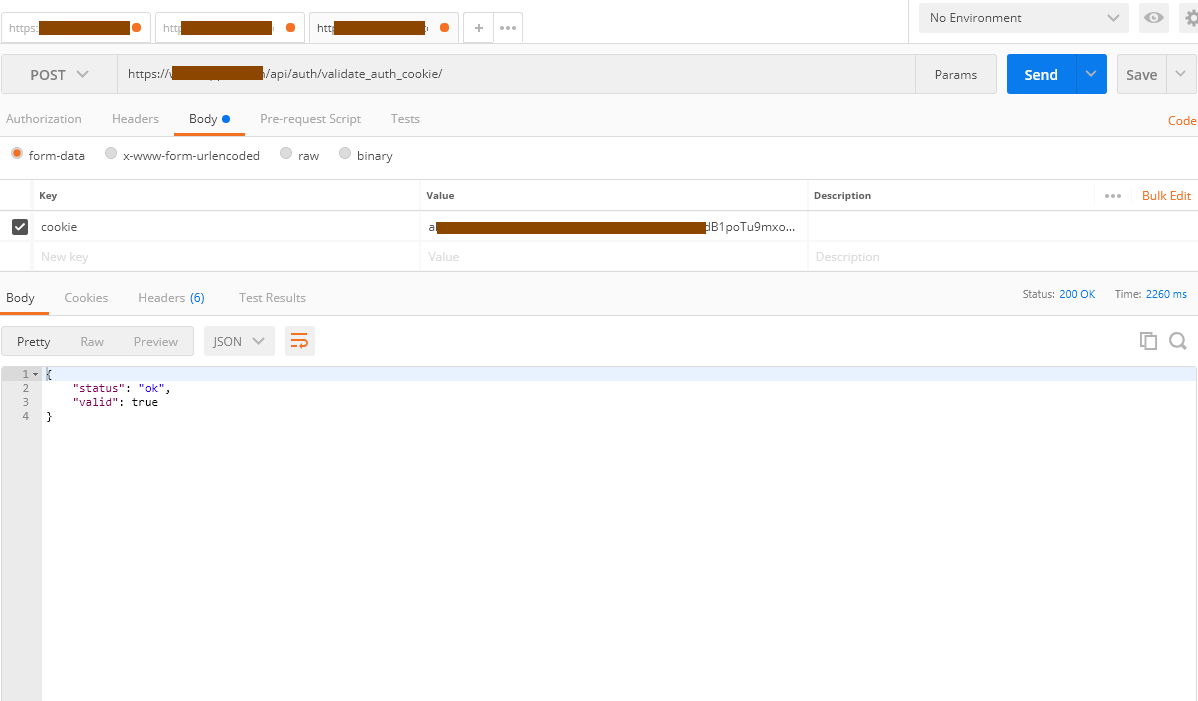
Method: validate_auth_cookie
It needs ‘cookie’ var. curl -X POST https://example.com/api/auth/validate_auth_cookie/ --data-urlencode 'cookie=COOKIE-HERE'
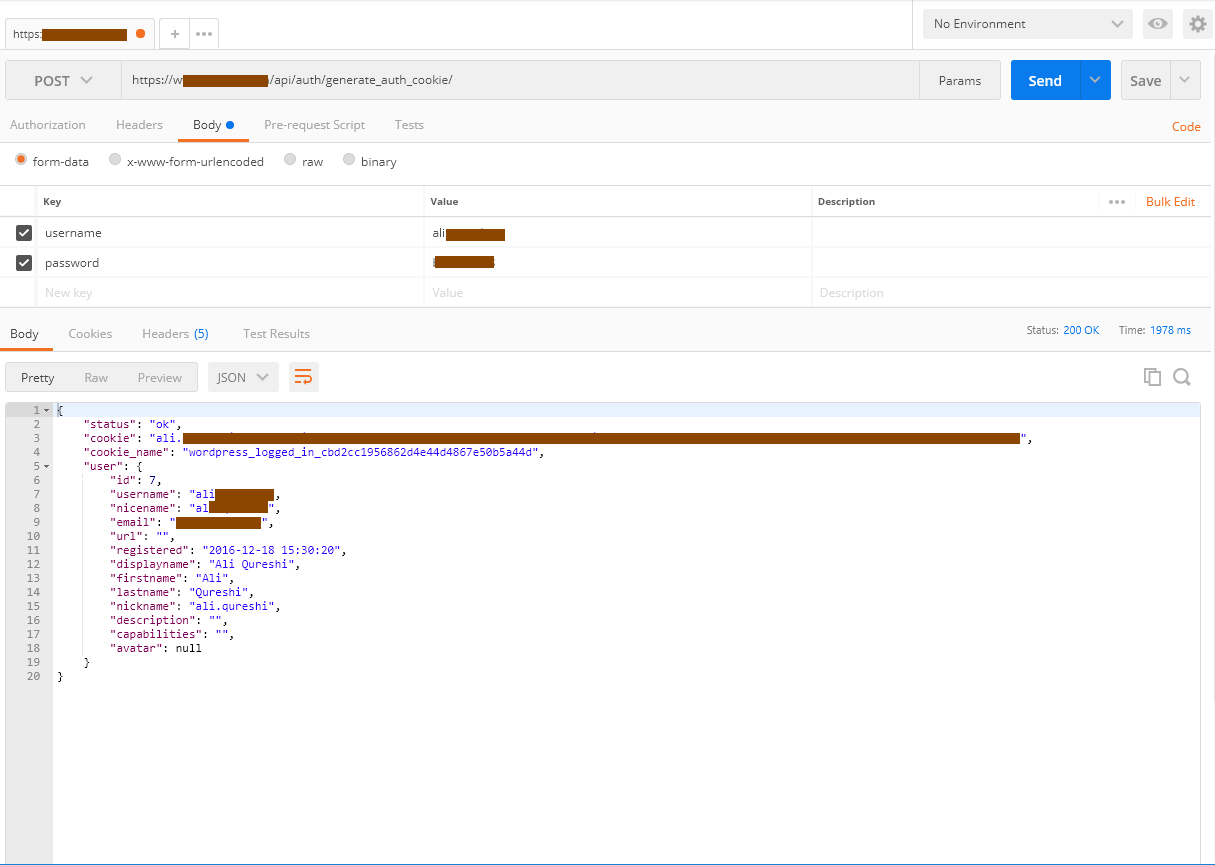
Method: generate_auth_cookie
It needs username, password vars. seconds is optional. Generate a cookie over HTTPS: curl -X POST https://example.com/api/auth/generate_auth_cookie/ --data-urlencode 'username=john' --data-urlencode 'password=PASSWORD-HERE' Optional ‘seconds’ var. It provided, generated cookie will be valid for that many seconds, otherwise default is for 14 days. Generate a cookie for 1 minute: curl -X POST https://example.com/api/auth/generate_auth_cookie/ --data-urlencode 'username=john' --data-urlencode 'password=PASSWORD-HERE' --data-urlencode 'seconds=60' 60 means 1 minute.
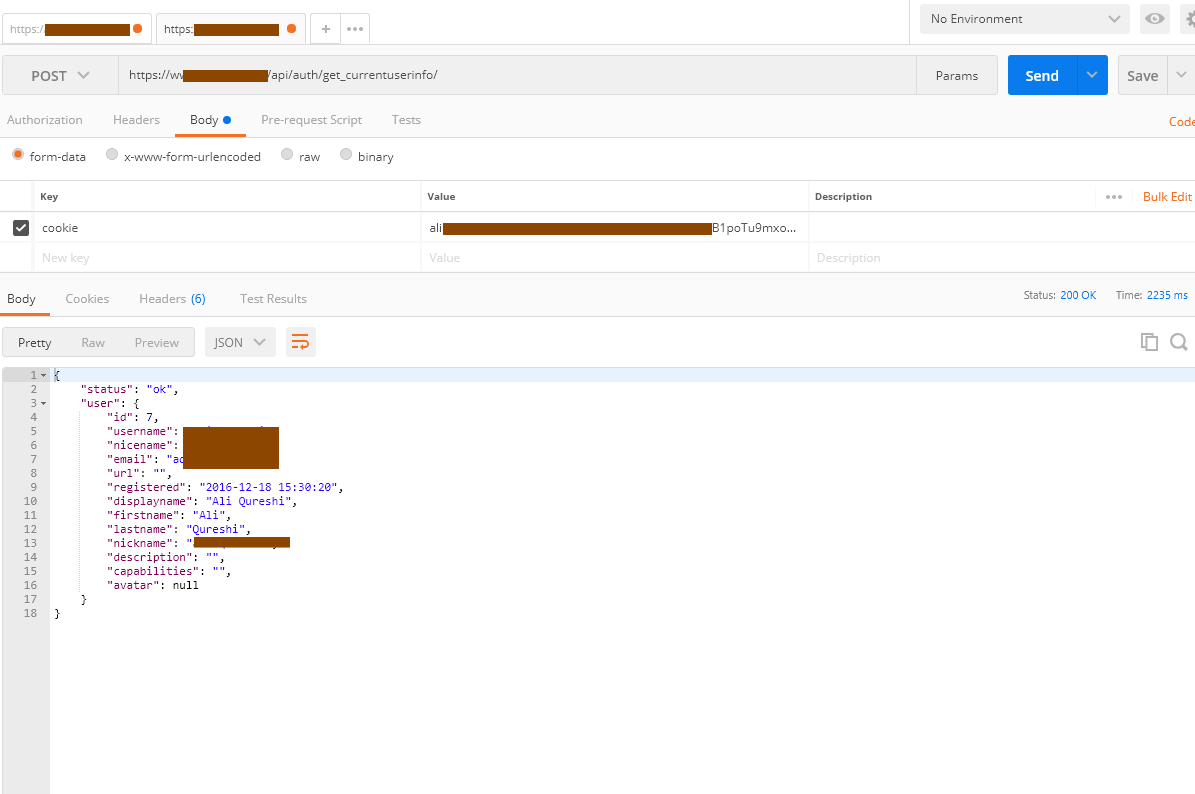
Method: get_currentuserinfo
It needs ‘cookie’ var. curl -X POST https://example.com/api/auth/get_currentuserinfo/ --data-urlencode 'cookie=COOKIE-HERE'
Changelog
3.1.3
- Security: Mark every Auth controller response non-cacheable at the application and HTTP layers.
- Security: Require POST for cookie generation, validation, and current-user authentication methods.
- Security: Require JSON API 2.3.1 or later and purge legacy JSON API response transients during the upgrade.
- Security: Accept credentials and authentication cookies only in the POST body, not in URL parameters.
- Security: Remove the public
insecure=coolHTTPS bypass. Local HTTP testing now requires the explicitJSON_API_AUTH_ALLOW_INSECUREconstant. - Improved HTTPS detection for trusted reverse-proxy requests using
X-Forwarded-Proto.
3.1.2
- Tested and confirmed compatible with WordPress 7.1.
- Confirmed the secure Parorrey donation link.
3.1.1
- Added a migration notice recommending the newer RESTful JSON API plugin for new projects.
- Documented its JWT bearer authentication, HTTPS-by-default protection, and broader controller-based endpoint set.
- Added secure WordPress.org and donation links.
3.1.0
- Tested and confirmed working with WordPress 7.0
- Bumped minimum PHP requirement to 7.4
- Replaced deprecated
wp_capabilitiesuser meta key with$user->rolesfor reliable role retrieval - Switched avatar retrieval to
get_avatar_url()(WP 4.2+) with regex fallback, fixing broken avatar URLs in modern WordPress - Added
sanitize_text_field()to POST parameter handling for improved input security - Fixed
isset()check onjson_api->query->cookiein cookie auth hook to avoid PHP notices
3.0.0
- Updated for WordPress version 6.8
2.9.1
- Fixed a bug for generate_auth_cookie, get_currentuserinfo endpoints for avatar
- Updated for WordPress version 6.4.1
Screenshots
For developers
Is this your plugin? Show off the numbers.
Add a live badge to your site, docs or GitHub README. It updates on its own — no account needed.
Best JSON API Auth alternatives
All api plugins →





FAQ
JSON API Auth: quick answers
Straight answers, pulled from live WordPress.org data.
Live data from WordPress.org · checked Oct 4, 2026
Is JSON API Auth free?
Yes. JSON API Auth is free to download and use from the official WordPress.org plugin directory.
Is JSON API Auth safe to use in 2026?
Yes — JSON API Auth is a safe, well-maintained plugin to use in 2026. It runs on 600+ sites, is rated 4.7/5 and was last updated 1 week ago, and scores 81/100 on our health check.
How many websites use JSON API Auth?
JSON API Auth is active on 600+ WordPress websites and has been downloaded 82,032 times since it launched in December 2013. It was downloaded 1,090 times in the last 30 days.
Does JSON API Auth work with WordPress 7.1?
Yes. The developer has tested JSON API Auth up to WordPress 7.1.2, the latest release. It requires WordPress 3.0.1 or newer.
What PHP version does JSON API Auth need?
JSON API Auth requires PHP 7.4 or higher. Most hosts run PHP 8.x today, so it works on any modern WordPress hosting.
When was JSON API Auth last updated?
The latest version, 3.1.3, was released on September 25, 2026 (1 week ago).
Who makes JSON API Auth?
JSON API Auth is developed and maintained by Ali Qureshi.
What are the best alternatives to JSON API Auth?
The most popular alternatives to JSON API Auth are WP Consent API (200K+ installs), Disable REST API (80K+ installs) and Mailgun for WordPress (80K+ installs).
Powered by PageForge
Want thousands of pages that rank like these? Build them in an afternoon.
This directory runs on the same engine as PageForge. Turn any spreadsheet, CSV or API into thousands of fast, SEO-ready WordPress pages — with schema, internal links and AI-written copy baked in.
- CSV, Google Sheets & API data sources
- AI content, schema & internal links per page
- Works with Elementor, Gutenberg, Yoast & Rank Math
- Free on WordPress.org — no credit card


