


JokeShogun – Random Jokes in Admin Dashboard
Displays a random joke on selected WordPress admin pages on every refresh to brighten your day.

Use with caution
JokeShogun works, but test it on a staging site before relying on it in 2026. Was last updated 3 months ago, and scores 49/100 on our health check.
- Small user base (<10 active installs)
- Very few reviews so far
How does it stack up?
Side-by-side on installs, updates, ratings & support



Daily downloads
Download spikes usually follow a new release — each site that auto-updates counts as a download.
Rankings
Where JokeShogun stands todayWordPress.org search rankings
Live position in the plugin search, top 100| Keyword | Position |
|---|---|
| admin | >100 |
| dashboard | >100 |
| humor | #4 |
| jokes | #3 |
| utility | >100 |
About JokeShogun
From the official readme · v1.0Description
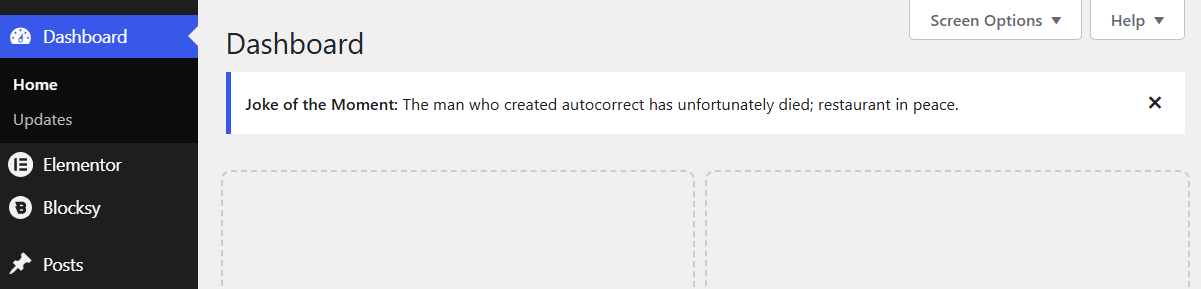
JokeShogun – Random Jokes in Admin Dashboard is a lightweight, fun plugin that displays a random joke at the top of your WordPress admin area on every refresh. Designed to keep the workspace fun without being intrusive, it comes with a dedicated settings page to customize where and how the jokes appear.
Jokes are loaded from a clean, separate jokes.php file, making it incredibly fast and easy to maintain or expand your joke collection.
Features
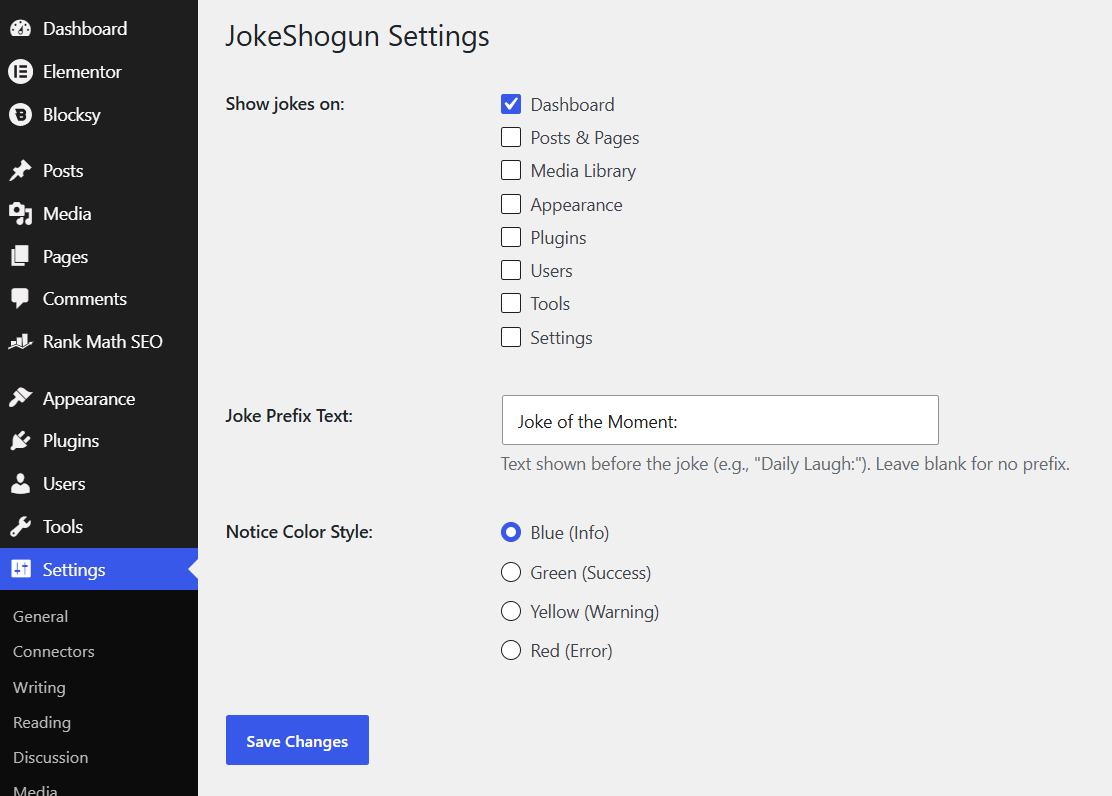
- Customizable Locations: Choose exactly which admin pages (Dashboard, Posts, Settings, etc.) display the jokes.
- Visual Styling: Select from WordPress’s native notice colors (Blue, Green, Yellow, Red) to match your vibe.
- Custom Prefix: Change the default “Joke of the Moment:” text to anything you like, or remove it entirely.
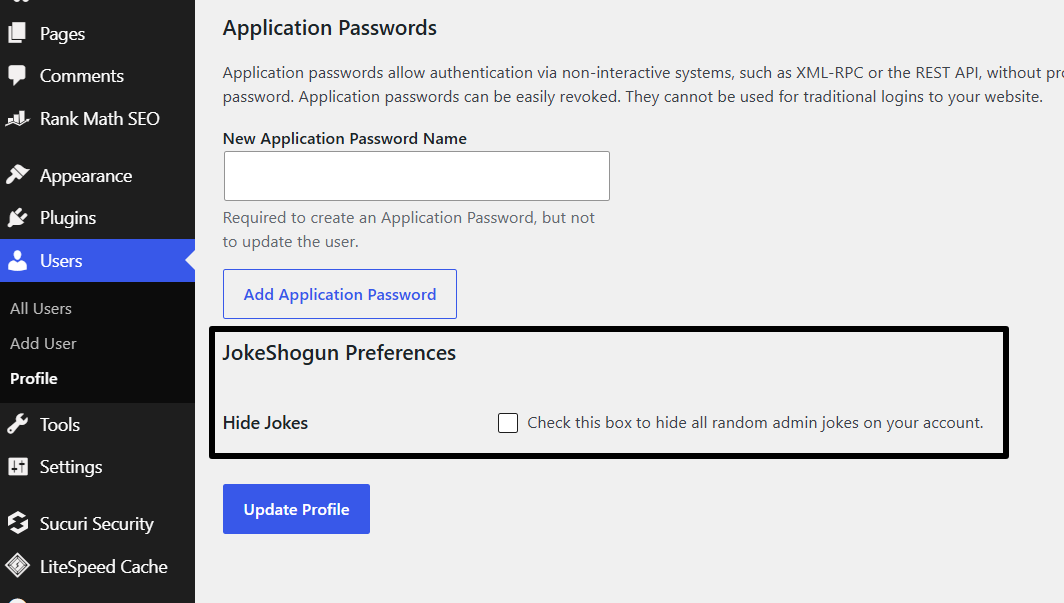
- Per-User Opt-Out: Respects individual preferences! Any user can disable jokes for their own account via their User Profile page.
- Developer Friendly: Jokes are cleanly separated into a
jokes.phpfile, ensuring lightning-fast performance.
Installation
- Upload the
jokeshogunfolder to the/wp-content/plugins/directory. - Activate the plugin through the ‘Plugins’ menu in WordPress.
- Navigate to Settings > JokeShogun to configure your display preferences, styling, and custom prefix.
- To add more jokes, access your site via FTP/File Manager, open the plugin folder, and add your text strings to the array inside
jokes.php.
Frequently asked questions
How do I add my own jokes?
Open the jokes.php file located in the plugin folder. You will see an array of strings. Simply add a new string wrapped in quotation marks and end the line with a comma. You can add as many jokes as you want!
Can I hide the jokes without disabling the plugin?
Yes! If you want to hide the jokes just for yourself, go to Users > Profile and check the “Hide Jokes” box under the “JokeShogun Preferences” section.
Can I change the color of the joke box?
Absolutely. Go to Settings > JokeShogun and select your preferred Notice Color Style (Blue, Green, Yellow, or Red).
Screenshots
For developers
Is this your plugin? Show off the numbers.
Add a live badge to your site, docs or GitHub README. It updates on its own — no account needed.
Best JokeShogun alternatives
All admin plugins →




FAQ
JokeShogun: quick answers
Straight answers, pulled from live WordPress.org data.
Live data from WordPress.org · checked Oct 5, 2026
Is JokeShogun free?
Yes. JokeShogun is free to download and use from the official WordPress.org plugin directory.
Is JokeShogun safe to use in 2026?
JokeShogun works, but test it on a staging site before relying on it in 2026. Was last updated 3 months ago, and scores 49/100 on our health check.
How many websites use JokeShogun?
JokeShogun is active on <10 WordPress websites and has been downloaded 192 times since it launched in June 2026. It was downloaded 53 times in the last 30 days.
Does JokeShogun work with WordPress 7.1?
JokeShogun is officially tested up to WordPress 7.0.6, while the latest release is 7.1.2. It may still work, but try it on a staging site first.
What PHP version does JokeShogun need?
JokeShogun requires PHP 7.4 or higher. Most hosts run PHP 8.x today, so it works on any modern WordPress hosting.
When was JokeShogun last updated?
The latest version, 1.0, was released on June 29, 2026 (3 months ago).
Who makes JokeShogun?
JokeShogun is developed and maintained by Sankalp Bhagat (WP Shogun).
What are the best alternatives to JokeShogun?
The most popular alternatives to JokeShogun are Loginizer (1M+ installs), Redux Framework (900K+ installs) and Admin Menu Editor (300K+ installs).
Powered by PageForge
Want thousands of pages that rank like these? Build them in an afternoon.
This directory runs on the same engine as PageForge. Turn any spreadsheet, CSV or API into thousands of fast, SEO-ready WordPress pages — with schema, internal links and AI-written copy baked in.
- CSV, Google Sheets & API data sources
- AI content, schema & internal links per page
- Works with Elementor, Gutenberg, Yoast & Rank Math
- Free on WordPress.org — no credit card


