



Jamie’s Header Effects
Sticky header effects for block themes: a Chameleon header that recolours to match each section, frosted blur, hide-on-scroll and overlay.

Solid choice
Jamie’s Header Effects is a solid plugin choice in 2026, with a few things worth checking first. It runs on 10+ sites and was last updated 1 week ago, and scores 66/100 on our health check.
- Actively developed — last update 1 week ago
- Tested with the latest WordPress (7.1)
- Small user base (10+ active installs)
- Very few reviews so far
How does it stack up?
Side-by-side on installs, updates, ratings & support


Daily downloads
Download spikes usually follow a new release — each site that auto-updates counts as a download.
Rankings
Where Jamie’s Header Effects stands todayWordPress.org search rankings
Live position in the plugin search, top 100| Keyword | Position |
|---|---|
| block-theme | >100 |
| header | >100 |
| scroll effects | >100 |
| sticky header | >100 |
| transparent header | #28 |
Version adoption
Share of active sites per release.
About Jamie’s Header Effects
From the official readme · v1.0.0Description
Jamie’s Header Effects makes your block theme’s header feel alive. Turn it on, pick an effect, and your header follows the visitor down the page — gracefully.
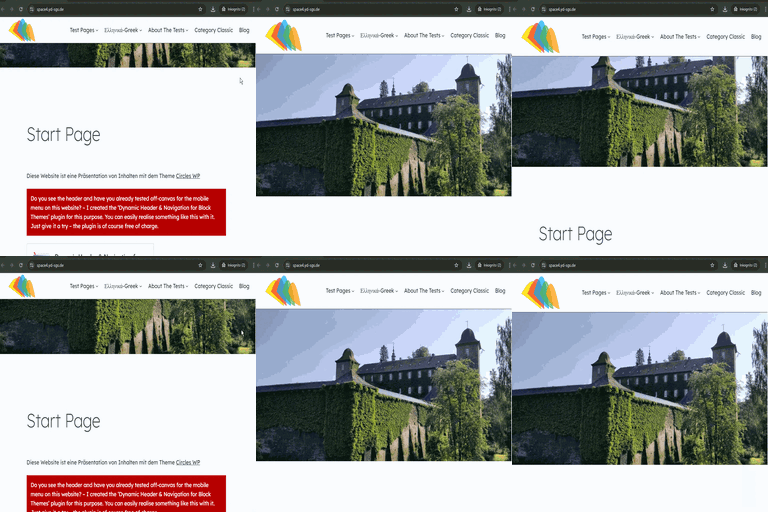
Chameleon — the headline feature. As you scroll, the header samples the colour of the section underneath it and recolours itself to match, automatically switching its text between light and dark for contrast. Scroll from a navy hero into a cream section into a forest-green footer and the header changes with you. No configuration per section; it just works.
Frosted blur — a translucent, blurred header that lets the page show through, like frosted glass. Set the colour, opacity and blur amount.
Solid colour — a classic sticky header with your chosen colour and opacity, and a soft shadow when stuck.
Hide on scroll down, reveal on scroll up — the header slips away while you read and comes back the moment you scroll up. Tune the sensitivity and delay.
Transparent overlay header — float the header over your first section for the full-bleed hero look, with no layout jump.
Everything else you’d expect is here too: an automatic admin-bar offset, z-index control, a “push content down” option, a mobile breakpoint to disable the effect on small screens, and the ability to switch it off for particular post types or templates. Transitions respect prefers-reduced-motion.
It’s theme-agnostic (it finds your header automatically, with an override selector for unusual themes), accessible, and ships no jQuery.
Settings: Appearance → Header Effects.
Installation
- Upload the
jamies-header-effectsfolder to/wp-content/plugins/, or install it from the Plugins screen. - Activate the plugin.
- Go to Appearance → Header Effects, tick Enable sticky header, choose a background style (try Chameleon), and save.
Frequently asked questions
Which themes does it work with?
Any block theme. By default it looks for the header template part (header.wp-block-template-part, then the first header inside the site wrapper). If your theme is unusual, enter your own CSS selector in the Header selector field.
How does Chameleon decide the colour?
As you scroll, it looks at the section directly beneath the header, finds that section’s background colour (including Cover blocks and their overlays), and applies it to the header at your chosen opacity. It then picks black or white text based on the colour’s brightness so the header stays readable. Sections with no solid background (an image-only section, say) make the header transparent.
Does it work with the WordPress admin bar?
Yes. Offset for admin bar (on by default) positions the sticky header just below the admin bar when you’re logged in.
Can I turn it off on mobile, or on certain pages?
Yes. Set a mobile breakpoint to disable it on small screens, and untick it for specific post types or templates (home, front page, blog, single, page, archive, 404, search) under Disable on.
What’s the difference between “Push content down” and “Overlay page content”?
“Push content down” adds space below the header so content starts beneath it. “Overlay page content” does the opposite: it floats the header over the first section, the classic transparent-hero look. If both are ticked, overlay wins.
Does it respect reduced-motion preferences?
Yes. If a visitor has asked their system to reduce motion, transitions are disabled and the hide-on-scroll animation is turned off.
Changelog
1.0.0
- Initial release: Chameleon, frosted blur and solid sticky backgrounds; hide on scroll down / reveal on scroll up; transparent overlay and push-content-down layouts; admin-bar offset; mobile breakpoint; disable by post type or template; reduced-motion support.
Screenshots


For developers
Is this your plugin? Show off the numbers.
Add a live badge to your site, docs or GitHub README. It updates on its own — no account needed.
Best Jamie’s Header Effects alternatives
All block-theme plugins →


FAQ
Jamie’s Header Effects: quick answers
Straight answers, pulled from live WordPress.org data.
Live data from WordPress.org · checked Oct 16, 2026
Is Jamie’s Header Effects free?
Yes. Jamie’s Header Effects is free to download and use from the official WordPress.org plugin directory.
Is Jamie’s Header Effects safe to use in 2026?
Jamie’s Header Effects is a solid plugin choice in 2026, with a few things worth checking first. It runs on 10+ sites and was last updated 1 week ago, and scores 66/100 on our health check.
How many websites use Jamie’s Header Effects?
Jamie’s Header Effects is active on 10+ WordPress websites and has been downloaded 149 times since it launched in October 2026. It was downloaded 158 times in the last 30 days.
Does Jamie’s Header Effects work with WordPress 7.1?
Yes. The developer has tested Jamie’s Header Effects up to WordPress 7.1.3, the latest release. It requires WordPress 6.2 or newer.
What PHP version does Jamie’s Header Effects need?
Jamie’s Header Effects requires PHP 7.4 or higher. Most hosts run PHP 8.x today, so it works on any modern WordPress hosting.
When was Jamie’s Header Effects last updated?
The latest version, 1.0.0, was released on October 9, 2026 (1 week ago).
Who makes Jamie’s Header Effects?
Jamie’s Header Effects is developed and maintained by jamiemarsland.
What are the best alternatives to Jamie’s Header Effects?
The most popular alternatives to Jamie’s Header Effects are Create Block Theme (20K+ installs), Dynamic Header & Navigation… (200+ installs) and Enable bbPress for Block Th… (100+ installs).
Powered by PageForge
Want thousands of pages that rank like these? Build them in an afternoon.
This directory runs on the same engine as PageForge. Turn any spreadsheet, CSV or API into thousands of fast, SEO-ready WordPress pages — with schema, internal links and AI-written copy baked in.
- CSV, Google Sheets & API data sources
- AI content, schema & internal links per page
- Works with Elementor, Gutenberg, Yoast & Rank Math
- Free on WordPress.org — no credit card


