



Ingenio Notice Inbox – Hide Admin Notices & Dashboard Notifications
Hide admin notices, plugin upsells and review nags from the WordPress dashboard. Every hidden notice waits in an inbox, grouped by plugin.

Solid choice
Ingenio Notice Inbox is a solid plugin choice in 2026, with a few things worth checking first. It runs on 10+ sites and was last updated 6 days ago, and scores 66/100 on our health check.
- Actively developed — last update 6 days ago
- Tested with the latest WordPress (7.1)
- Small user base (10+ active installs)
- Very few reviews so far
How does it stack up?
Side-by-side on installs, updates, ratings & support



Daily downloads
Download spikes usually follow a new release — each site that auto-updates counts as a download.
Rankings
Where Ingenio Notice Inbox stands todayWordPress.org search rankings
Live position in the plugin search, top 100| Keyword | Position |
|---|---|
| Admin notices | >100 |
| admin notifications | >100 |
| dashboard notifications | >100 |
| hide admin notices | >100 |
| nags | #51 |
Version adoption
Share of active sites per release.
About Ingenio Notice Inbox
From the official readme · v1.0.0Description
Every plugin wants a slice of your dashboard: “Rate us 5 stars”, “Upgrade to PRO”, “Help us improve by sharing usage data”. Ingenio Notice Inbox moves all of that out of the way and keeps it in one place, so the screen you open is about your work again.
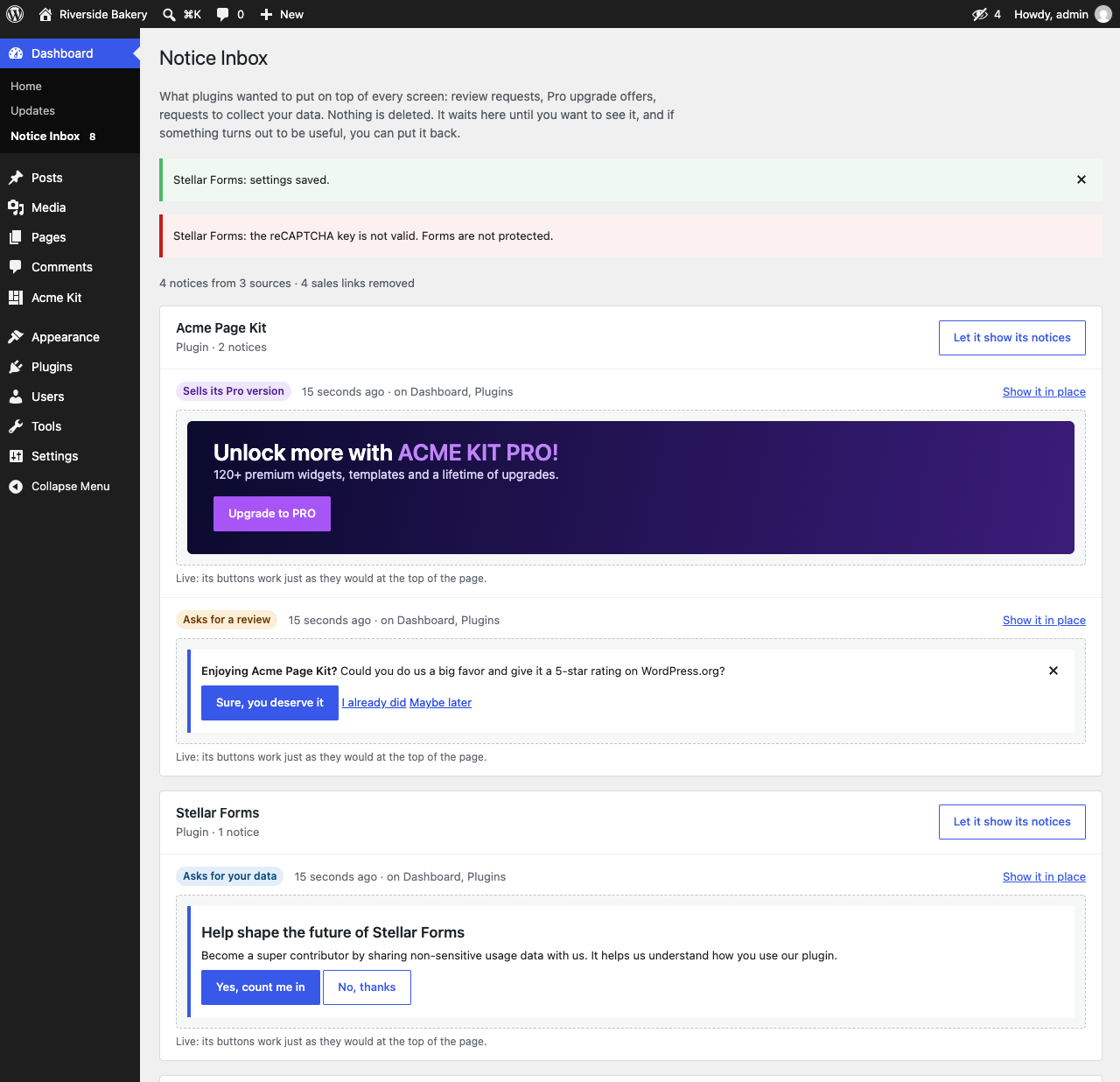
Nothing is deleted. Hidden notices go to Dashboard → Notice Inbox, grouped by the plugin that sent them. Open it whenever you like, and put back anything you actually want to see.
What it hides
- Admin notices from plugins and themes: review requests, Pro upgrade banners, data-collection opt-ins and other dashboard notifications.
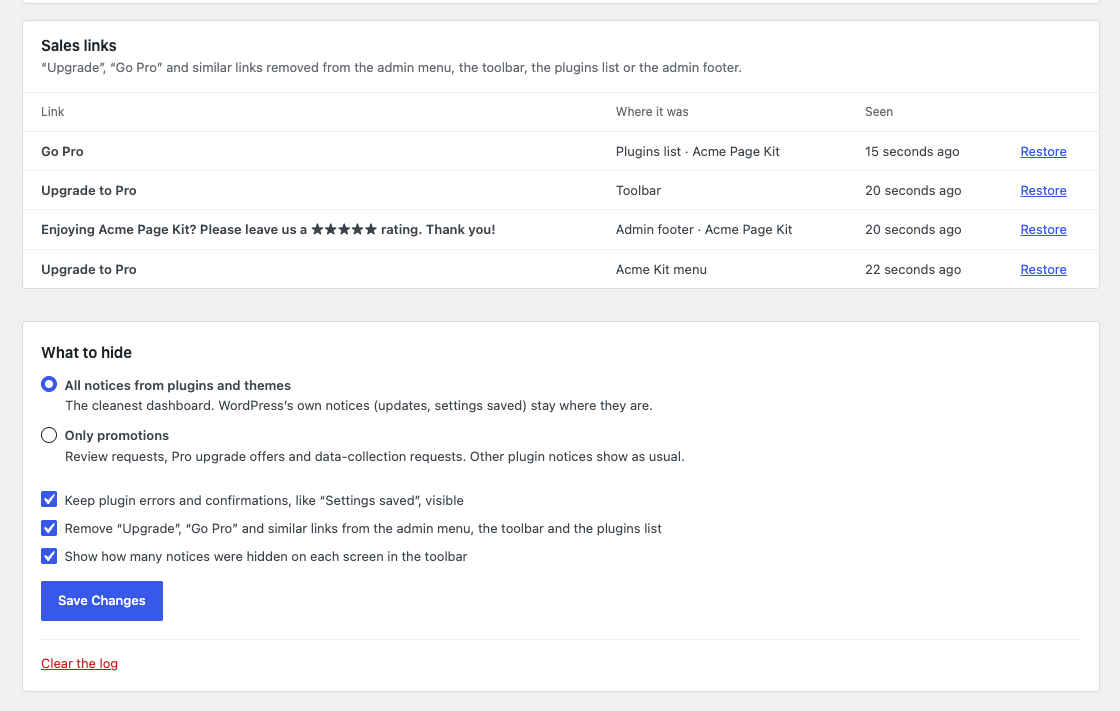
- Upsell links: “Upgrade to Pro” in the toolbar, “Go Pro” in the admin menu and in the plugins list.
- Footer nags such as “Please leave us a ★★★★★ rating”.
- Notices added with JavaScript after the page loads, when they look like promotions.
What it never hides
- WordPress core notices, such as updates.
- Errors and confirmations from plugins, like “Settings saved” (you can change this).
- Code from your own site, such as snippets added with Code Snippets.
It works on its own
There is nothing to click notice by notice. Ingenio Notice Inbox reads what each notice says and recognizes the usual promotions (review requests, Pro upsells, data-collection opt-ins), so a new plugin’s banner is caught the first time it shows up. The same goes for “Upgrade” and “Go Pro” links in the toolbar, the admin menu and the plugins list.
It knows which plugin sent each notice
Ingenio Notice Inbox checks the file each notice comes from, so the inbox can tell you “this came from ElementsKit” instead of showing an anonymous list. That also lets you allow a single plugin to keep showing its notices while the rest stay quiet.
Two modes
- All notices from plugins and themes (default): the cleanest dashboard. Errors and confirmations still show.
- Only promotions: hides review requests, Pro upsells and data-collection requests. Other plugin notices show as usual.
Privacy
Ingenio Notice Inbox does not connect to any external service and does not collect any data. The inbox is stored in a single option on your own site, and it is removed when you delete the plugin.
Installation
- Go to Plugins → Add New, search for “Ingenio Notice Inbox” and click Install Now. You can also upload the ZIP file.
- Activate the plugin. There is nothing to set up: notices start going to the inbox right away.
- Open Dashboard → Notice Inbox to see what was hidden and to change the settings.
Frequently asked questions
Will I miss important messages?
WordPress core notices are never touched, and plugin errors and confirmations stay visible by default. Everything else is kept in the inbox, and a counter in the toolbar shows how many notices were hidden on the current screen.
Can I let one plugin keep showing its notices?
Yes. In the inbox, click “Let it show its notices” next to the plugin, or “Show it in place” next to a single notice.
Do the buttons inside a hidden notice still work?
Notices caught while loading the inbox are shown live, so their buttons work, including “Dismiss” or “I already rated”. Notices seen earlier on other screens are shown as a saved copy.
Does it work with Elementor add-ons, WooCommerce and other popular plugins?
It works with any plugin that shows its notices through the standard admin_notices hook, which is almost all of them. It has been tested with the notices shown by Elementor, ElementsKit, Jeg Kit and Skyboot Custom Icons.
Does it slow down the admin area?
No. It only runs on admin screens, and the inbox is written to the database only when something new appears.
Is it translated?
It is ready to be translated at translate.wordpress.org, and a Spanish translation is on the way.
Screenshots

For developers
Is this your plugin? Show off the numbers.
Add a live badge to your site, docs or GitHub README. It updates on its own — no account needed.
Best Ingenio Notice Inbox alternatives
All Admin notices plugins →





FAQ
Ingenio Notice Inbox: quick answers
Straight answers, pulled from live WordPress.org data.
Live data from WordPress.org · checked Oct 6, 2026
Is Ingenio Notice Inbox free?
Yes. Ingenio Notice Inbox is free to download and use from the official WordPress.org plugin directory.
Is Ingenio Notice Inbox safe to use in 2026?
Ingenio Notice Inbox is a solid plugin choice in 2026, with a few things worth checking first. It runs on 10+ sites and was last updated 6 days ago, and scores 66/100 on our health check.
How many websites use Ingenio Notice Inbox?
Ingenio Notice Inbox is active on 10+ WordPress websites and has been downloaded 127 times since it launched in September 2026. It was downloaded 119 times in the last 30 days.
Does Ingenio Notice Inbox work with WordPress 7.1?
Yes. The developer has tested Ingenio Notice Inbox up to WordPress 7.1.3, the latest release. It requires WordPress 6.4 or newer.
What PHP version does Ingenio Notice Inbox need?
Ingenio Notice Inbox requires PHP 7.4 or higher. Most hosts run PHP 8.x today, so it works on any modern WordPress hosting.
When was Ingenio Notice Inbox last updated?
The latest version, 1.0.0, was released on September 30, 2026 (6 days ago).
Who makes Ingenio Notice Inbox?
Ingenio Notice Inbox is developed and maintained by ingeniola.
What are the best alternatives to Ingenio Notice Inbox?
The most popular alternatives to Ingenio Notice Inbox are Disable Admin Notices (100K+ installs), Admin Notices Manager (10K+ installs) and WP Notification Center (1K+ installs).
Powered by PageForge
Want thousands of pages that rank like these? Build them in an afternoon.
This directory runs on the same engine as PageForge. Turn any spreadsheet, CSV or API into thousands of fast, SEO-ready WordPress pages — with schema, internal links and AI-written copy baked in.
- CSV, Google Sheets & API data sources
- AI content, schema & internal links per page
- Works with Elementor, Gutenberg, Yoast & Rank Math
- Free on WordPress.org — no credit card


