


Admin Notices Manager
Better manage admin notices & never miss important developer messages!

Solid choice
Admin Notices Manager is a solid plugin choice in 2026, with a few things worth checking first. It runs on 10K+ sites, is rated 4.9/5 and was last updated 4 days ago, and scores 79/100 on our health check.
- Proven at scale on 10K+ active sites
- Loved by users — 4.9/5 from 21 reviews
- Actively developed — last update 4 days ago
- Tested with the latest WordPress (7.1)
- Momentum — downloads up 60% vs the previous 30 days
How does it stack up?
Side-by-side on installs, updates, ratings & support



Daily downloads
Download spikes usually follow a new release — each site that auto-updates counts as a download.
Rankings
Where Admin Notices Manager stands todayWordPress.org search rankings
Live position in the plugin search, top 100| Keyword | Position |
|---|---|
| Admin notices | #3 |
| dashboard notices | #4 |
| hide admin notices | #3 |
| manage admin notices | #3 |
| notices | #3 |
Version adoption
Share of active sites per release.
Rating breakdown
★★★★★★★★★★ 4.9 from 21 reviews
About Admin Notices Manager
From the official readme · v1.6.2Description
Better manage admin notices & never miss an important message!
WordPress core, themes and plugins developers use admin notices to send you important messages about your website and their software that you use. However, more often than not a cry wolf situation is created due to the overwhelming number of notices and the nature of these messages.
Use the Admin Notices Manager plugin to better manage your WordPress website admin notices – read them at your own convenience and not miss any important WordPress core and developer messages.
The problem
Pretty much anyone who uses WordPress knows about admin notices. Unfortunately though, they have a negative connotation of them. Very often users are overwhelmed by the number of admin notices that pop up on their WordPress dashboard. Sometimes there are so many that the WordPress dashboard is below the scroll.
This has resulted in users ignoring the admin notices and not reading important messages and information from WordPress core, plugins and also themes developers.
The Solution
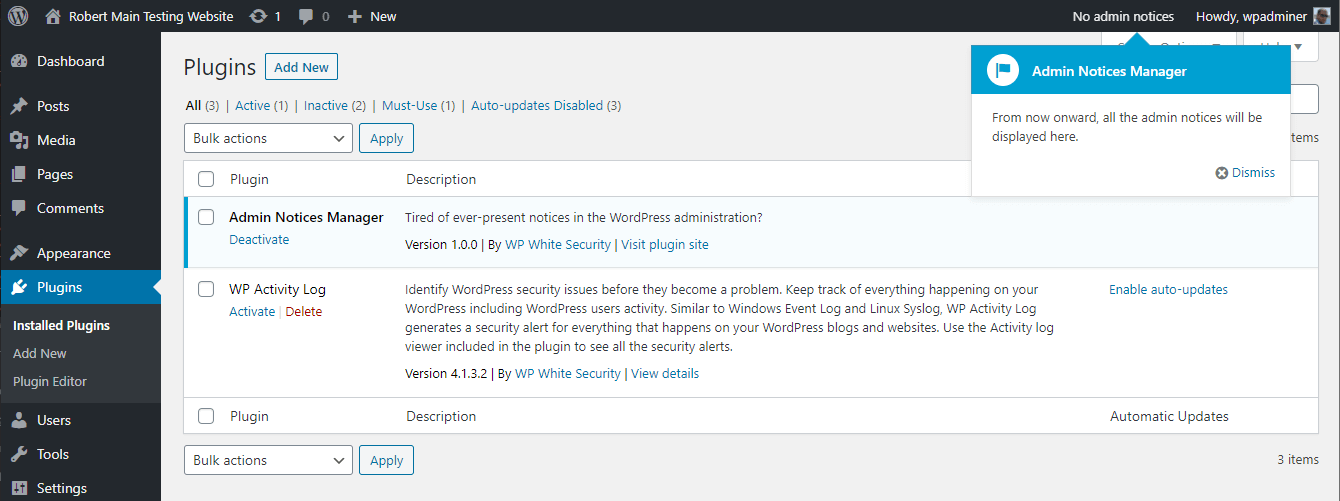
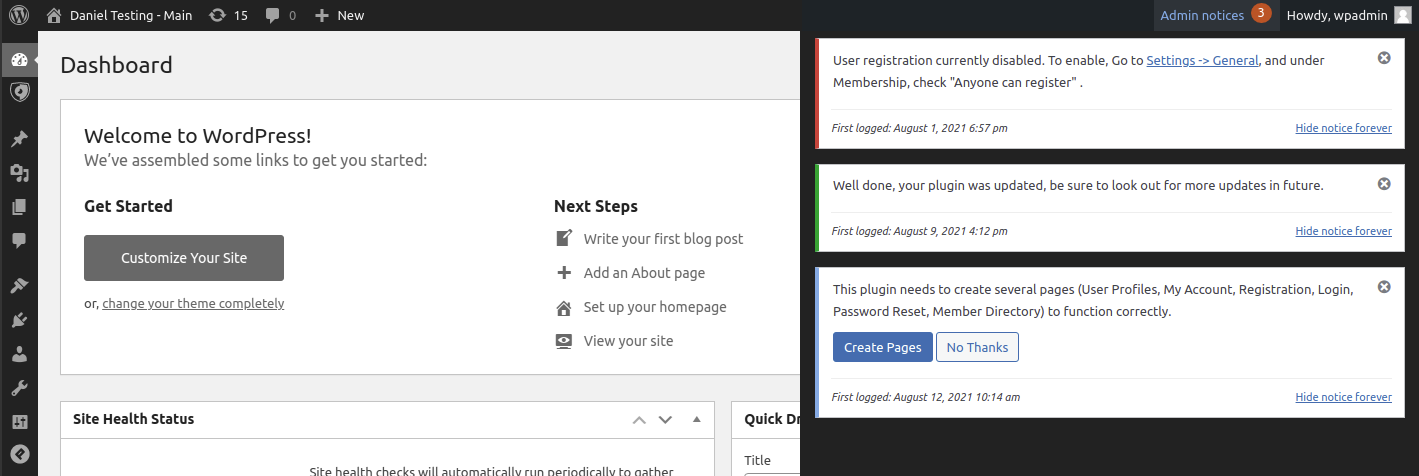
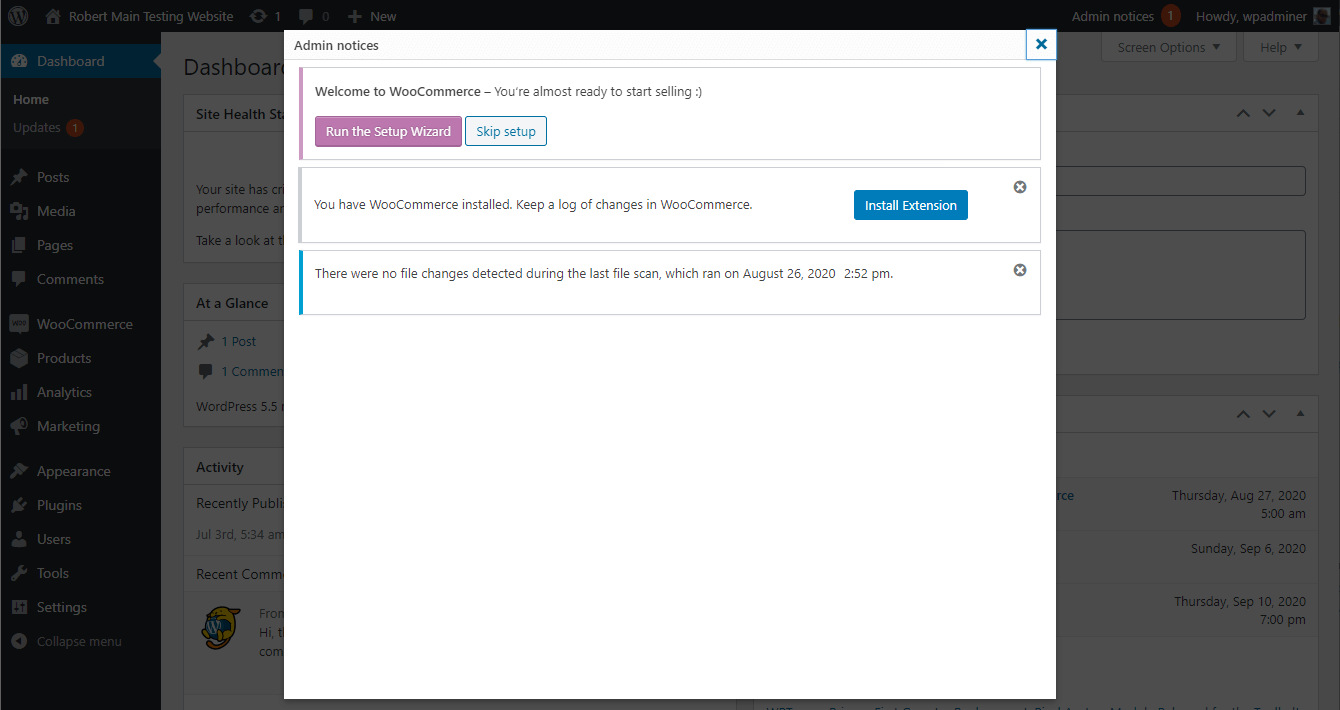
The Admin Notices Manager plugin solves this problem by moving the admin notices out of the main dashboard view to a central place, so you are not disrupted.
This allows you to keep on working and read the notices at your convenience at a later time, without missing any important WordPress core, plugins and themes messages.
How it works
The Admin Notices Manager plugin is very easy to use; simply install and activate it on your WordPress website and it will automatically capture all the notifications.
The plugin solves this problem by moving the admin notices out of the main dashboard view to a central place, so you are not disrupted.
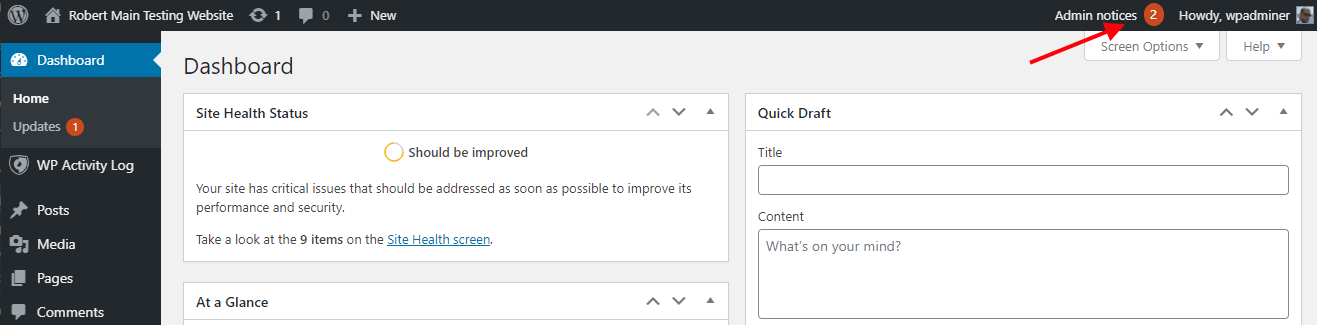
The plugin notifies you of new notices by highlighting the number of new notices in the WordPress toolbar next to your username.
Benefits & features
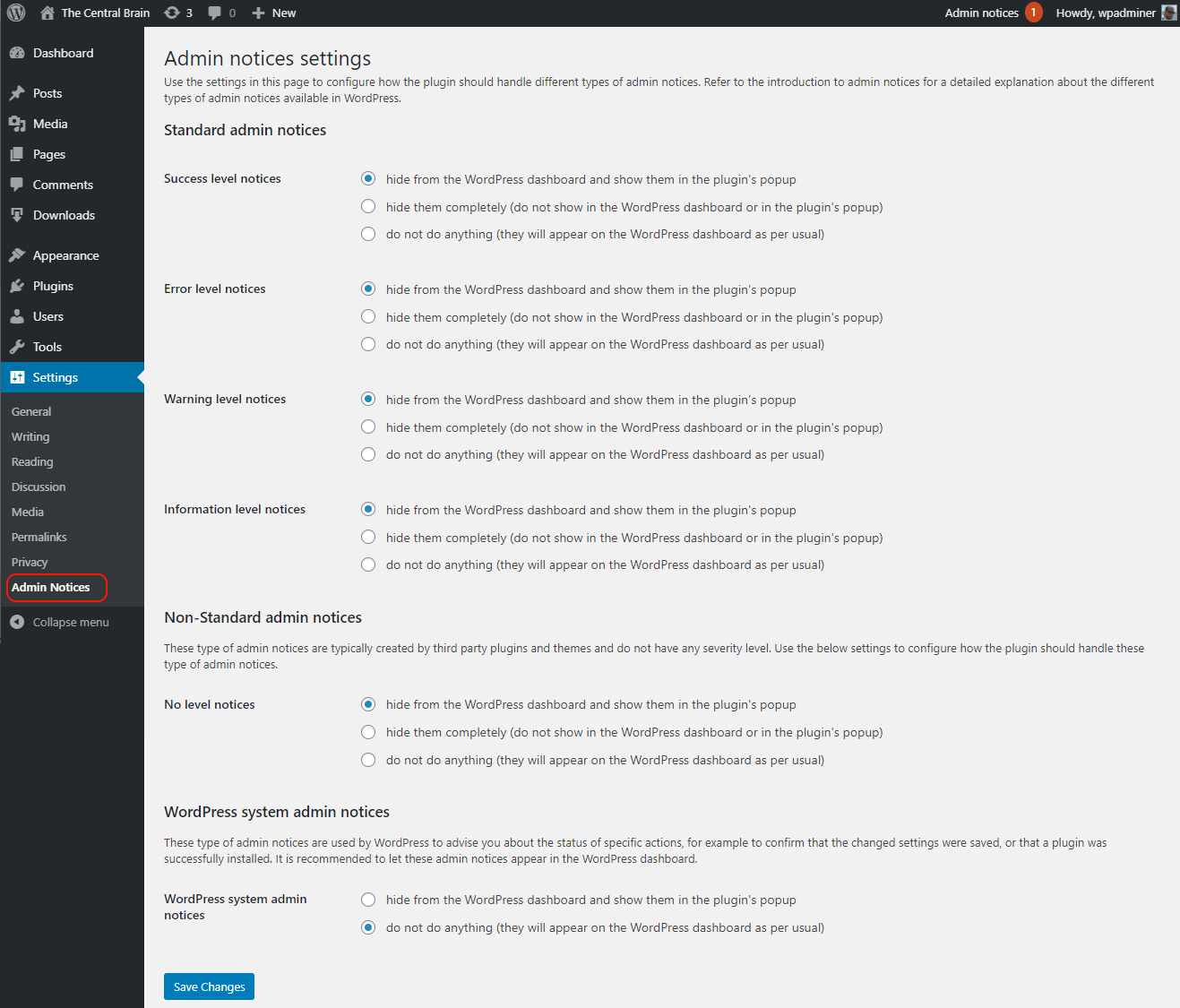
- Easily customize how & where the admin notices are displayed
- Customize what action should be taken for every different admin notices type
- Capture any type of admin notices, including ones with custom types
- Easily manage admin notices for a clutter-free admin area
- WordPress system admin notices are shown in the WordPress dashboard
FREE Plugin Support
Support for Admin Notices Manager is available for free via:
Maintained & Supported by Melapress
Melapress builds high-quality niche WordPress security & management plugins. It’s suite of plugins consists of:
Visit the Melapress website for more information about the company and the plugins it develops.
Related Links and Documentation
- What are WordPress admin notices & how do they work?
- Why WordPress admin notices matter & how to manage them effectively
- Admin Notices Manager plugin page
From within WordPress
- Visit ‘Plugins > Add New’
- Search for ‘Admin Notices Manager’
- Install & activate the plugin from your Plugins page.
Manually
- Download the plugin from the WordPress plugins repository
- Unzip the zip file and upload the
admin-notices-managerfolder to the/wp-content/plugins/directory - Activate the Admin Notices Manager plugin through the ‘Plugins’ menu in WordPress
Changelog
1.6.2 (2026-11-17)
-
Functionality & plugin improvements
- Raised the minimum required PHP version from 7.2 to 7.4.
- Added a dismissible Black Friday banner, scheduled to appear from November 17th through December 1st.
-
Bug fixes
- Fixed an issue where notices excluded by CSS selector disappeared completely. These notices now appear normally in the WordPress dashboard.
1.6.1 (2026-09-17)
-
Security patch
- Administrator SQL Injection reported by Ananda Dhakal.
1.6.0 (2025-02-24)
-
New functionality
- Added an option to allow specific notifications to appear in the dashboard as usual.
-
Improvements
- Improved the handling of translations, ensuring that strings within JavaScript code are translated correctly.
- Improved how notifications are hidden, significantly reducing the visual flash that could occur when a notification disappeared.
-
Bug fixes
- Fixed an issue where site notifications were not hidden correctly on Simple History plugin pages.
- Resolved a conflict with the Admin Site Enhancements plugin that could cause its main page to appear blank.
- Fixed a compatibility issue with Gravity Forms that could cause some Gravity Forms pages to appear blank.
- Fixed an issue where the plugin incorrectly hid the H5P plugin consent notice.
- Fixed an issue where some notices were missing the Hide Forever button.
- Fixed the Reset List of Hidden Notices functionality.
- Fixed an issue where success notices were not excluded from being hidden according to the plugin settings.
- Improved the counting of hidden notifications.
1.5.0 (2024-06-05)
-
Improvements
- Updated URLs and links to point to the Melapress website.
- Updated the license file.
- Added additional sanitization and improved the general code structure.
- Added a Settings link to the plugin listing on the Plugins page.
-
Bug fixes
- Fixed an issue where WordPress system notifications were captured as third-party notifications and hidden when they should have remained visible.
- Fixed a missing authorization vulnerability that could allow authenticated subscribers to retrieve a list of user email addresses.
1.4.0 (2023-02-15)
-
New features and functionality
- Hidden notices can now be purged from the plugin settings.
-
Improvements
- Added various UI improvements.
- Improved support for third-party plugins.
-
Bug fixes
- Fixed a conflict with Loco Translate caused by the use of
noticeCSS classes.
- Fixed a conflict with Loco Translate caused by the use of
1.3.0 (2022-03-08)
Release notes: Admin Notices Manager 1.3: Better support for custom admin notices
-
New features and functionality
- Added the ability to capture and manage custom admin notices using a specific CSS selector.
- Added the ability to specify which users should have admin notices hidden.
-
Improvements
- Improved PHP 8 compatibility.
- Applied the WordPress Coding Standards throughout the plugin.
- Standardized the translation domain used in the plugin.
- Improved the process that deletes plugin data during uninstall.
-
Bug fixes
- Fixed a conflict with WP Mail SMTP that could break the plugin settings pages.
- Fixed a fatal error that could occur with specific themes.
Screenshots
For developers
Is this your plugin? Show off the numbers.
Add a live badge to your site, docs or GitHub README. It updates on its own — no account needed.
Best Admin Notices Manager alternatives
All Admin notices plugins →





FAQ
Admin Notices Manager: quick answers
Straight answers, pulled from live WordPress.org data.
Source: WordPress.org
Is Admin Notices Manager free?
Yes. Admin Notices Manager is free to download and use from the official WordPress.org plugin directory.
Is Admin Notices Manager safe to use in 2026?
Admin Notices Manager is a solid plugin choice in 2026, with a few things worth checking first. It runs on 10K+ sites, is rated 4.9/5 and was last updated 4 days ago, and scores 79/100 on our health check.
How many websites use Admin Notices Manager?
Admin Notices Manager is active on 10K+ WordPress websites and has been downloaded 71,951 times since it launched in August 2020. It was downloaded 6,715 times in the last 30 days.
Does Admin Notices Manager work with WordPress 7.1?
Yes. The developer has tested Admin Notices Manager up to WordPress 7.1.5, the latest release. It requires WordPress 5.3 or newer.
What PHP version does Admin Notices Manager need?
Admin Notices Manager requires PHP 7.4 or higher. Most hosts run PHP 8.x today, so it works on any modern WordPress hosting.
When was Admin Notices Manager last updated?
The latest version, 1.6.2, was released on November 17, 2026 (4 days ago).
Who makes Admin Notices Manager?
Admin Notices Manager is developed and maintained by Melapress.
What are the best alternatives to Admin Notices Manager?
The most popular alternatives to Admin Notices Manager are Disable Admin Notices (100K+ installs), WP Notification Center (1K+ installs) and Notice Vault (200+ installs).
Powered by PageForge
One template and a spreadsheet. A real page for every search.
PageForge turns each row of a CSV into a WordPress page with its own title, URL, SEO fields and schema, built on the layout you already designed. Free on WordPress.org.
- CSV and XLSX, plus Google Sheets on Professional and Enterprise
- Its own title, URL, SEO fields and schema for every page
- Works with the block editor, Elementor, Divi and Avada
- Free on WordPress.org, no credit card