



Index WP Users For Speed
Do you have thousands of users on your WordPress site? Look them up fast. Find authors more easily. Speed up your laggy dashboard.

Safe pick
Yes — Index WP Users For Speed is a safe, well-maintained plugin to use in 2026. It runs on 1K+ sites, is rated 5/5 and was last updated 3 weeks ago, and scores 81/100 on our health check.
- Actively developed — last update 3 weeks ago
- Tested with the latest WordPress (7.1)
- Momentum — downloads up 31.6% vs the previous 30 days
- Very few reviews so far
How does it stack up?
Side-by-side on installs, updates, ratings & support



Daily downloads
Download spikes usually follow a new release — each site that auto-updates counts as a download.
Rankings
Where Index WP Users For Speed stands todayWordPress.org search rankings
Live position in the plugin search, top 100| Keyword | Position |
|---|---|
| database | #72 |
| index | #2 |
| largesite | #1 |
| performance | >100 |
| users | #6 |
Version adoption
Share of active sites per release.
Rating breakdown
★★★★★★★★★★ 5 from 4 reviews
About Index WP Users For Speed
From the official readme · v1.4.1Description
This plugin speeds up the handling of your WordPress registered users, especially when your site has many thousands of them. (Congratulations! Building a successful site with thousands of users is an accomplishment.) With optimized MySQL / MariaDB database techniques, it finds and displays your users more quickly. Your All Users panel on your dashboard displays faster and searches faster. Your All Posts and All Pages panels no longer lag when displaying. And, you can edit your posts to change authorship more efficiently.
Without this plugin WordPress sites with many users slow down drastically on Dashboard pages. It can take many seconds each time you display your Users dashboard panel. It takes just about the same large amount of time to display your Posts or Pages panels. While those slow displays are loading, WordPress is hammering on your site’s MySQL or MariaDB database server. That means your site serves your visitors slowly too, not just your dashboard users.
And, versions of WordPress since 6.0.1 have dealt with this performance problem by preventing changes to the authors of posts and pages in the Gutenberg editor, the classic editor, and the Quick Edit feature. Those recent versions also suppress the user counts shown at the top of the Users panel. This plugin restores those functions.
This plugin helps speed up the handling of those large numbers of users. It does so by indexing your users by adding metadata that’s easily optimized by MySQL or MariaDB. For example, when your site must ask the database for your post-author users, the database no longer needs to examine every user on your system. (In database jargon, it no longer needs to do notoriously slow full table scans to find users.)
When slow queries are required to make sure the metadata indexes are up to date, this plugin does them in the background so nobody has to wait for them to complete. You can set the plugin to do this background work at a particular time each day. Many people prefer to do them overnight or at some other off-peak time.
WP-CLI commands
You can use WP-CLI commands built in to this plugin.
-
wp index-users statusshows the status of user index creation. -
wp index-users removeremoves the user index information. This includes usermeta rows and options rows. -
wp index-users rebuildrebuilds the user index information. Notice that activating the plugin always begins building the user index information.
How can I learn more about making my WordPress site more efficient?
This is a companion plugin to Index WP MySQL for Speed. If that plugin is in use, this plugin will perform better. But they are in no way dependent on one another; you may use either, both, or of course neither.
I offer several plugins to help with your site’s database efficiency. You can read about them here.
Installation
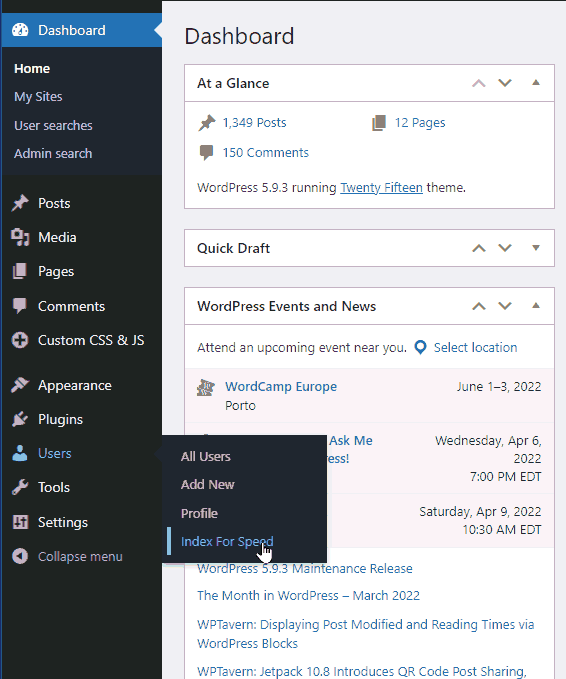
Install and activate this plugin in the usual way via the Plugins panel in your site’s dashboard. Once you have activated it, configure it via the Index for Speed menu item under Users.
WP-CLI
wp plugin install index-wp-users-for-speed
wp plugin activate index-wp-users-for-speed
Composer
If you configure your WordPress installation using composer, you may install this plugin into your WordPress top level configuration with this command.
composer require "wpackagist-plugin/index-wp-users-for-speed":"^1.1"
Credits
- “Crowd”, a photo by James Cridland, in the banner and icon. CC BY 2.0
- Japreet Sethi for advice, and for testing on his large installation.
- Stéphane Boisvert for testing on his large installations.
- Rick James for everything.
Frequently asked questions
Should I back up my site before using this?
Yes. Backups are good practice. Still, this plugin makes no changes to your site or database layout. It adds a few non-autoloaded options, and adds rows to wp_usermeta.
My WordPress host offers MariaDB, not MySQL. Can I use this plugin?
Yes.
I have a multi-site WordPress installation. Can I use this plugin?
Yes.
I see high CPU usage (load average) on my MariaDB / MySQL database server during user index building or refresh. Is that normal?
Yes. Indexing your registered users requires us to insert a row in your wp_usermeta table for each of them. We do this work in batches of 5000 users to avoid locking up your MariaDB / MySQL server. Each batch takes server time. Once all index building or refresh batches are complete, your CPU usage will return to normal.
Can I use this if I have disabled WP_Cron and use an operating system cronjob instead?
Yes
What if I assign multiple roles to some users?
Plugins like Vladimir Garagulya’s User Role Editor let you assign multiple roles to users. This plugin handles those users correctly.
How does it work? (Geeky!)
Standard WordPress puts a wp_capabilities row in the wp_usermeta table for each user. Its meta_value contains a small data structure. For example, an author has this data structure. array("author") In order to find all the authors WordPress must issue a database query containing a filter like this one, that starts and ends with the SQL wildcard character %. meta_key = 'wp_capabilities' AND meta_value LIKE '%author%' Filters like that are notoriously slow: they cannot exploit any database keys, and so MySQL or MariaDB must examine that wp_usermeta row for every user in your site. This plugin…
How does the plugin handle large numbers of users without timing out?
It performs the indexing for batches of users, each in a separate WP_Cron task. The number of users in a batch defaults to 5000 and can be set, if need be, with the INDEX_WP_USERS_FOR_SPEED_BATCHSIZE variable in wp-config.php. It breaks each batch into chunks of 50 users, by default. That can be set with the INDEX_WP_USERS_FOR_SPEED_CHUNKSIZE variable in wp-config.php.
What is the background for this plugin?
WordPress’s trac (defect-tracking) system has this ticket # 38741.
Why use this plugin?
Three reasons (maybe four): to save carbon footprint. to save carbon footprint. to save carbon footprint. to save people time. Seriously, the microwatt hours of electricity saved by faster web site technologies add up fast, especially at WordPress’s global scale.
Changelog
This corrects an author search problem in Gutenberg. Props to @hrood. Thanks to my loyal users who have reported problems.
1.4.1
Handle pagination correctly for REST user search queries, remove deprecated ‘who’ parameter.
1.4.0
Rework query for unions of multiple user roles to avoid a combinatorial explosion.
1.3.1
Correct defect when handling user queries with multi-role role_in() clauses. Props to @za12bt.
1.3.0
Remediate slow queries when creating and refreshing wp_usermeta user-indexing items. Props to @nandotess for the PR.
Add wp-cli support. Props to @faisalahammad for the PR.
1.2.0
Handle non-consecutive wp_user.ID values with large gaps.
Control of batch and chunk size is possible in wp-config.php.
1.1.12
Fix incompatibility with https://wordpress.org/plugins/advanced-ads/ . Props to @carlos978.
Screenshots


For developers
Is this your plugin? Show off the numbers.
Add a live badge to your site, docs or GitHub README. It updates on its own — no account needed.
Best Index WP Users For Speed alternatives
All database plugins →




FAQ
Index WP Users For Speed: quick answers
Straight answers, pulled from live WordPress.org data.
Live data from WordPress.org · checked Sep 27, 2026
Is Index WP Users For Speed free?
Yes. Index WP Users For Speed is free to download and use from the official WordPress.org plugin directory.
Is Index WP Users For Speed safe to use in 2026?
Yes — Index WP Users For Speed is a safe, well-maintained plugin to use in 2026. It runs on 1K+ sites, is rated 5/5 and was last updated 3 weeks ago, and scores 81/100 on our health check.
How many websites use Index WP Users For Speed?
Index WP Users For Speed is active on 1K+ WordPress websites and has been downloaded 34,293 times since it launched in April 2022. It was downloaded 2,750 times in the last 30 days.
Does Index WP Users For Speed work with WordPress 7.1?
Yes. The developer has tested Index WP Users For Speed up to WordPress 7.1.2, the latest release. It requires WordPress 5.3 or newer.
What PHP version does Index WP Users For Speed need?
Index WP Users For Speed requires PHP 5.6 or higher. Most hosts run PHP 8.x today, so it works on any modern WordPress hosting.
When was Index WP Users For Speed last updated?
The latest version, 1.4.1, was released on September 4, 2026 (3 weeks ago).
Who makes Index WP Users For Speed?
Index WP Users For Speed is developed and maintained by OllieJones.
What are the best alternatives to Index WP Users For Speed?
The most popular alternatives to Index WP Users For Speed are Search Regex (100K+ installs), WP-Sweep (100K+ installs) and Advanced Database Cleaner (100K+ installs).
Powered by PageForge
Want thousands of pages that rank like these? Build them in an afternoon.
This directory runs on the same engine as PageForge. Turn any spreadsheet, CSV or API into thousands of fast, SEO-ready WordPress pages — with schema, internal links and AI-written copy baked in.
- CSV, Google Sheets & API data sources
- AI content, schema & internal links per page
- Works with Elementor, Gutenberg, Yoast & Rank Math
- Free on WordPress.org — no credit card


