



Blogger Import Wizard – Blogger to WordPress Importer
Migrate Blogger to WordPress with preview-first import, live progress, retry failed items, and SEO-friendly 301 redirects.

Solid choice
Blogger Import Wizard is a solid plugin choice in 2026, with a few things worth checking first. It runs on 60+ sites, is rated 5/5 and was last updated 3 weeks ago, and scores 70/100 on our health check.
- Actively developed — last update 3 weeks ago
- Small user base (60+ active installs)
- Very few reviews so far
How does it stack up?
Side-by-side on installs, updates, ratings & support



Daily downloads
Download spikes usually follow a new release — each site that auto-updates counts as a download.
Rankings
Where Blogger Import Wizard stands todayWordPress.org search rankings
Live position in the plugin search, top 100| Keyword | Position |
|---|---|
| blogger | #11 |
| Blogger to wordpress | #8 |
| blogspot | #3 |
| importer | #74 |
| migration | >100 |
Version adoption
Share of active sites per release.
Rating breakdown
★★★★★★★★★★ 5 from 2 reviews
About Blogger Import Wizard
From the official readme · v3.7.8Description
A guided Blogger to WordPress migration workflow
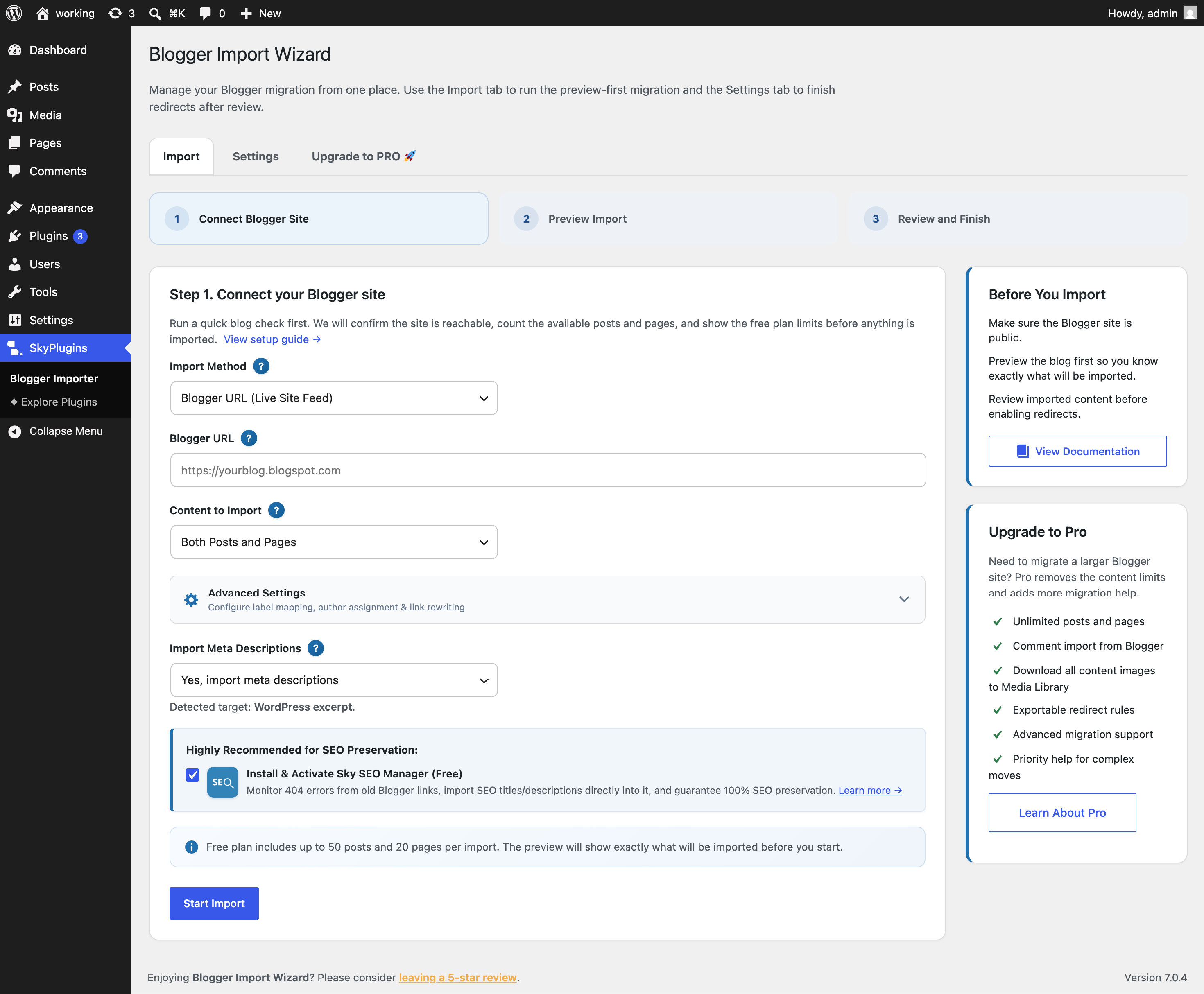
Import Wizard for Blogspot helps you move a Blogger site into WordPress without API setup or manual copy-paste. You can import directly using your public Blogger URL or by uploading an exported Blogger XML backup file (feed.atom or blog-*.xml). Preview what the plugin finds, and import with live progress so you can see exactly what is happening. For setup instructions, please see the Blogger Import Wizard Documentation.
Version 3.7.2 improves the migration experience with flexible import options and a clear flow:
- Import via Blogger URL or XML Backup File (
feed.atom) - Check the blog/file first to confirm the feed content and structure
- Preview the content counts before the import starts
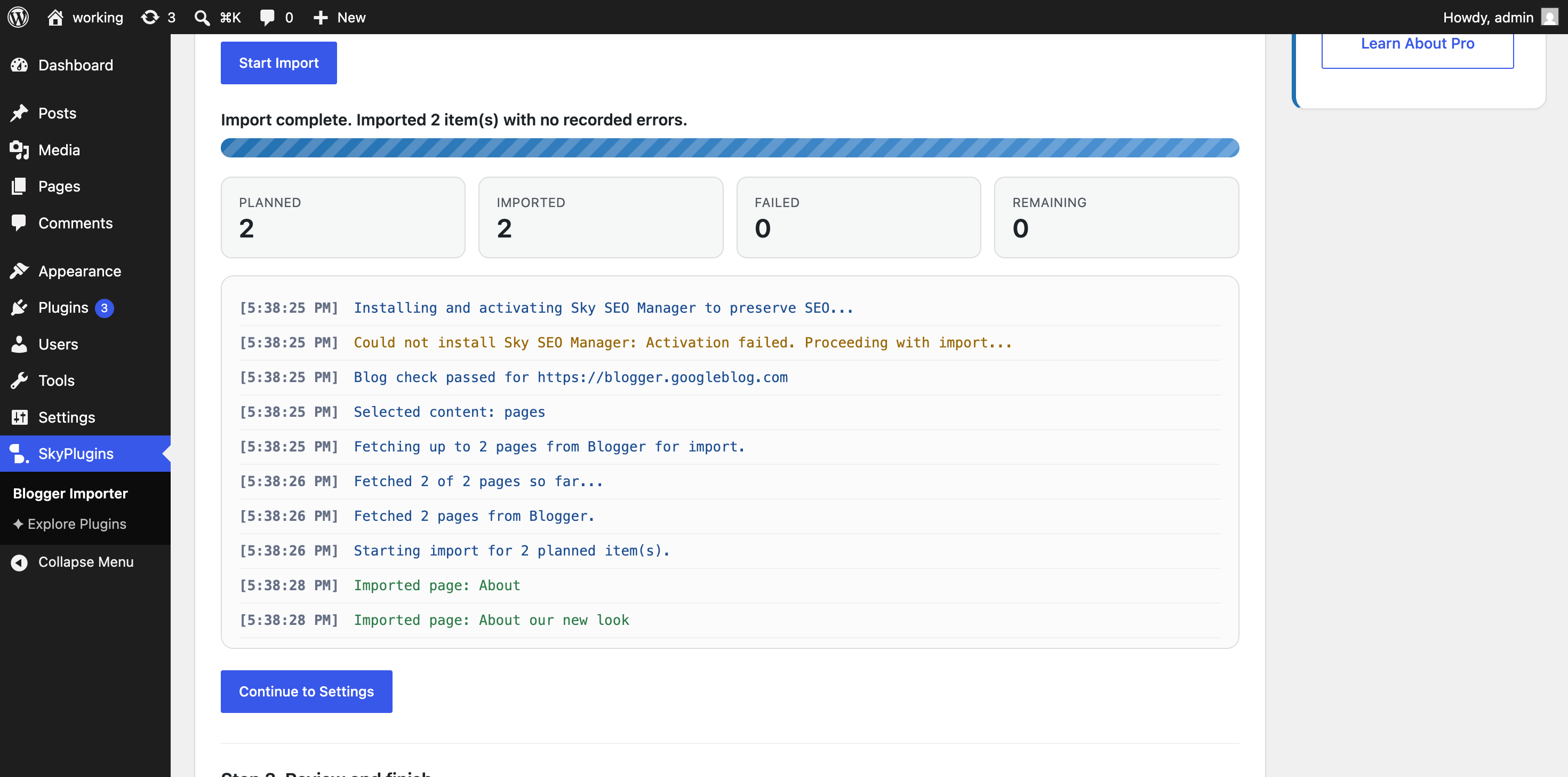
- Import with live progress and retry tools if a few items need attention
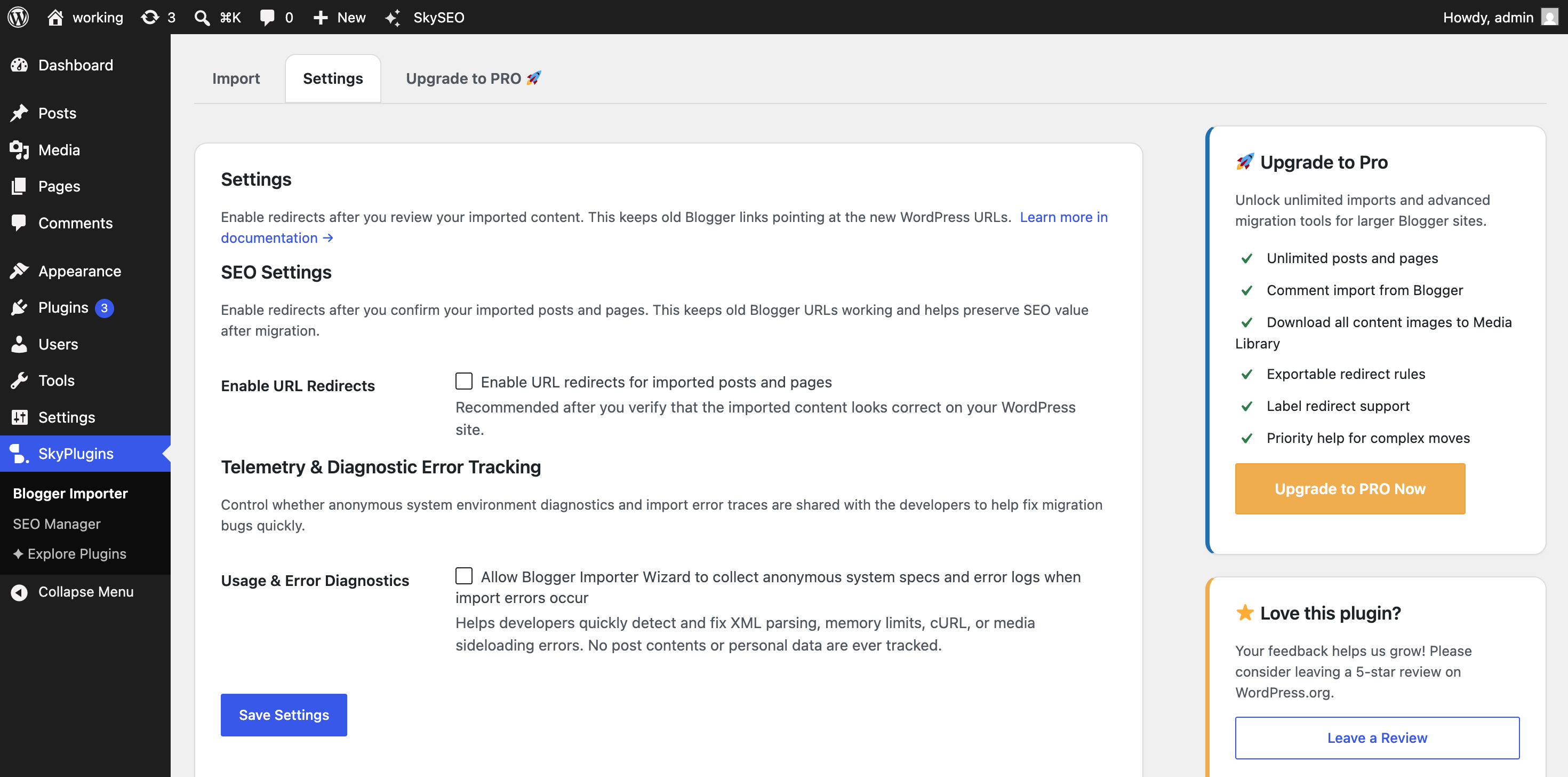
- Follow a post-import checklist before enabling redirects
Why site owners choose this plugin
- Flexible import options: import live via your Blogger URL or offline via your Blogger XML export file (
feed.atom) - Preview-first migration so the import never starts blindly
- Posts and pages support with separate counts before the run begins
- Live progress log during the import
- Retry failed items without starting from scratch
- Redirect settings to preserve old Blogger links after migration
- No Blogger API credentials required
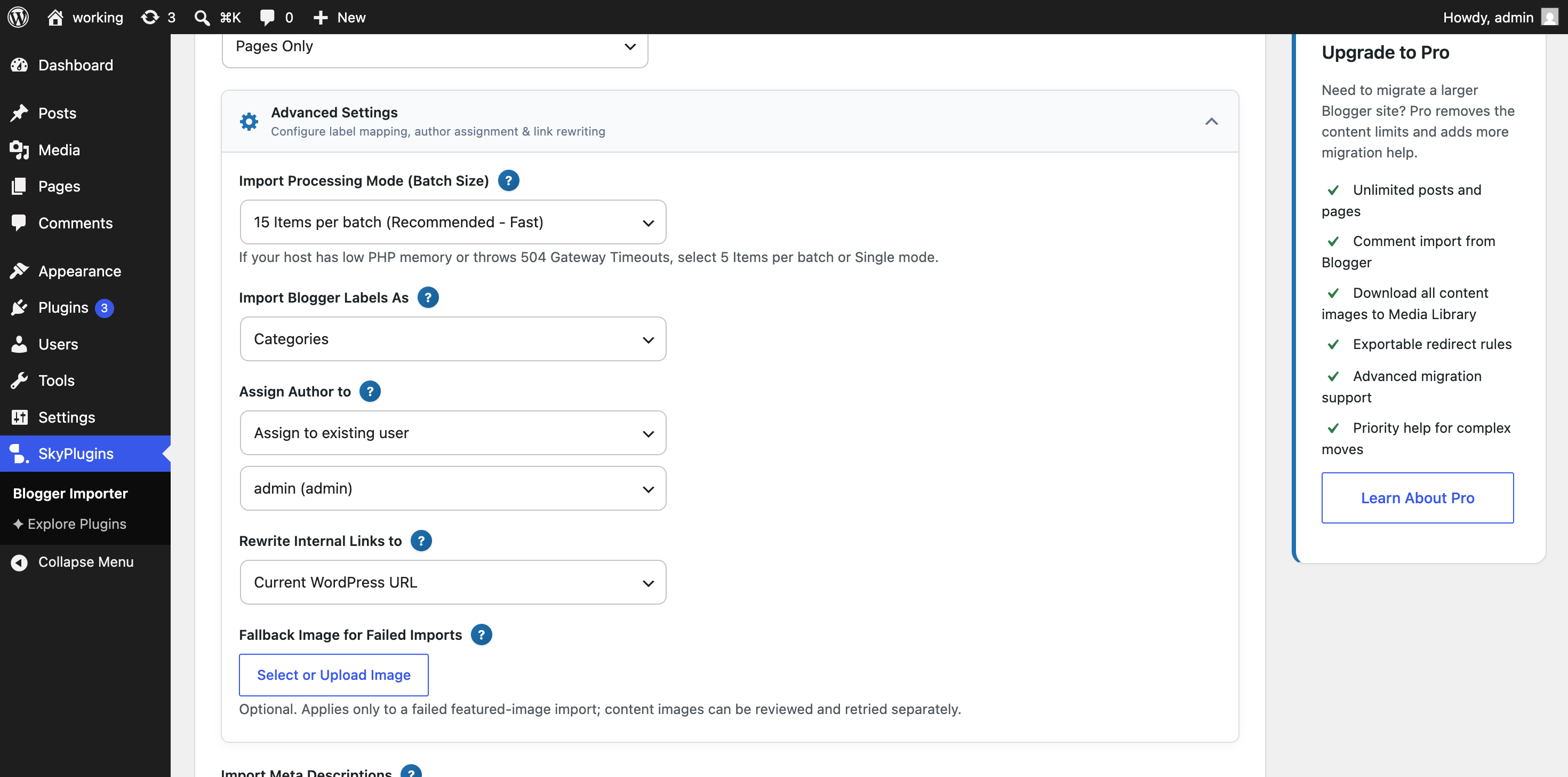
- Blogger labels become WordPress categories
- Featured image support from the first image in the content
- Original publish dates and status preserved (future-dated posts are scheduled, not back-dated)
- Choose who gets credit as author: assign every imported post to a specific WordPress user, or import the Blogger author for each post (a new WordPress user is created when the Blogger author does not already exist on your site)
- Choose where internal links go: keep Blogger URLs, use the new WordPress URL, or point at a different URL of your choice
- Scrape and import SEO meta descriptions to Yoast SEO, Rank Math, or Sky SEO (highly recommended with Sky SEO Manager plugin to preserve 100% SEO value)
Free version limits
The free version imports up to 50 posts and 20 pages per run. The preview screen shows the exact number of items that will be imported before you start.
Upgrade to Pro
The Pro version is a better fit for larger migrations and includes:
- Unlimited posts and pages
- Comment import from Blogger
- Download all post and page content images to the Media Library
- Standalone Media Downloader tab to batch download/retry media
- Advanced migration support
Demo Video
See the plugin in action:
Support & Reviews
If the plugin helped you migrate your Blogger site to WordPress, please leave a review — it helps others find the plugin and keeps us improving it.
Need help first? Visit the support forum or read the documentation.
External services
This plugin connects to public Blogger feeds (typically on blogspot.com or custom domains mapped to Blogger) to fetch the content you wish to import.
- Blogger Feed API: Fetches posts, pages, and metadata from your public Blogger site. No user data from your WordPress site is sent to this service; it is a read-only request to fetch the content for your migration.
- SiteSkyline Plugin Catalog API: When you open the “Explore Plugins” tab, the plugin requests the plugin catalog from
support.siteskyline.comto display available SiteSkyline plugins. This request is read-only and sends no personal data; the response is cached locally for 7 days. Privacy: SiteSkyline Privacy Policy. - Terms & Privacy: Use of Blogger/Google feeds is subject to the Google Terms of Service and Google Privacy Policy.
Frequently asked questions
Can I import using a Blogger XML backup file (feed.atom)?
Yes. You can select “Blogger XML Backup File” as your import method in Step 1 and upload your feed.atom or blog-*.xml file downloaded directly from Blogger Settings > Back up content.
How does the new import flow work?
Enter your Blogger URL or select your Blogger XML backup file, choose whether to import posts, pages, or both, then run the preview. The plugin checks the feed/file, counts the available content, and shows how many items will be imported before the actual migration begins.
Does my Blogger site need to be public?
If you choose the URL import method, your Blogger site needs to be public. If you use a Blogger XML backup file (feed.atom), your site does not need to be public.
How many items can I import with the free version?
The free version imports up to 50 posts and 20 pages in a run. If the preview finds more than that, it will clearly show the difference before you click Start Import.
What happens if a few items fail during import?
The importer keeps a live log, finishes the rest of the run, and lets you retry failed items directly from the importer screen.
Can I import only posts or only pages?
Yes. You can import posts only, pages only, or both.
Will this help preserve SEO after moving from Blogger to WordPress?
Yes. After you review the imported content, you can enable the redirect setting so old Blogger URLs point to the new WordPress URLs.
Do I need Blogger API credentials?
No. The plugin works with the public Blogger feed and does not require API credentials.
Where should I go if I need help?
If the import finishes with issues, the plugin now nudges users toward support instead of asking for a review. You can read the official documentation or visit the support forum.
Changelog
This update adds a preview-first migration flow, retry support for failed items, a smarter review prompt, and a cleaner post-import checklist.
3.7.6
- New: Added experimental setting in Advanced Settings to clean Blogger
line breaks and convert them into WordPress-compatible
<
p> paragraphs
* Improvement: Automatically collapses multiple redundant
breaks while preserving pre, code, table, and blockquote formatting
3.7.2
- New: Import via Blogger XML Backup File (feed.atom or blog-*.xml) exported directly from Blogger
- New: Import Method selector in Step 1 to choose between live Blogger URL site feed and offline Atom XML backup file upload
3.6.7
- Improvement: Added warning when feed is not set to Full in Blogger settings
3.6.6
- New: Added deactivation feedback form to understand user migration needs
- Improvement: Automated media mapping table cleanup and cron scheduling
- Fix: Added license validation integration to plugin updates feed
3.6.5
- New: Import Meta Description into SEO plugin (Yoast SEO, Rank Math, or Sky SEO Manager)
3.6.4
- New: Preserve original publish dates and original status (posts dated in the future are now scheduled instead of back-dated as published)
- New: “Assign Author to” selector with two clear choices: assign every imported post to a specific WordPress user (with a user dropdown that appears), or import the Blogger author for each post (a new WordPress user is created for any Blogger author that is not already on the site)
- New: “Rewrite Internal Links to” selector with three choices: keep Blogger URLs, use the new WordPress URL, or point at a custom URL (with a text field that appears when you pick the custom option)
- New: Friendly “?” tooltips next to every import field that explain each option in plain language, with click-to-pin and hover support
- New: Pause and resume imports to safely stop the queue at any point and pick up right where you left off
Screenshots
For developers
Is this your plugin? Show off the numbers.
Add a live badge to your site, docs or GitHub README. It updates on its own — no account needed.



Best Blogger Import Wizard alternatives
All blogger plugins →




FAQ
Blogger Import Wizard: quick answers
Straight answers, pulled from live WordPress.org data.
Live data from WordPress.org · checked Sep 29, 2026
Is Blogger Import Wizard free?
Yes. Blogger Import Wizard is free to download and use from the official WordPress.org plugin directory.
Is Blogger Import Wizard safe to use in 2026?
Blogger Import Wizard is a solid plugin choice in 2026, with a few things worth checking first. It runs on 60+ sites, is rated 5/5 and was last updated 3 weeks ago, and scores 70/100 on our health check.
How many websites use Blogger Import Wizard?
Blogger Import Wizard is active on 60+ WordPress websites and has been downloaded 6,286 times since it launched in January 2023. It was downloaded 507 times in the last 30 days.
Does Blogger Import Wizard work with WordPress 7.1?
Blogger Import Wizard is officially tested up to WordPress 7.0.6, while the latest release is 7.1.2. It may still work, but try it on a staging site first.
What PHP version does Blogger Import Wizard need?
Blogger Import Wizard requires PHP 7.0 or higher. Most hosts run PHP 8.x today, so it works on any modern WordPress hosting.
When was Blogger Import Wizard last updated?
The latest version, 3.7.8, was released on September 10, 2026 (3 weeks ago).
Who makes Blogger Import Wizard?
Blogger Import Wizard is developed and maintained by Sky Plugins.
What are the best alternatives to Blogger Import Wizard?
The most popular alternatives to Blogger Import Wizard are Blogger Importer (50K+ installs), Blogger Importer Extended (4K+ installs) and Blogger To WordPress (3K+ installs).
Powered by PageForge
Want thousands of pages that rank like these? Build them in an afternoon.
This directory runs on the same engine as PageForge. Turn any spreadsheet, CSV or API into thousands of fast, SEO-ready WordPress pages — with schema, internal links and AI-written copy baked in.
- CSV, Google Sheets & API data sources
- AI content, schema & internal links per page
- Works with Elementor, Gutenberg, Yoast & Rank Math
- Free on WordPress.org — no credit card


