



Image Picker – Image Choices for Elementor Forms
Demo: https://demo.add-ons.org/demo-image-picker-image-choices/ Document: https://add-ons.org/document-image-choices-image-picker-for-elementor-form/ Pro Version…

Solid choice
Image Picker is a solid plugin choice in 2026, with a few things worth checking first. It runs on 100+ sites and was last updated 1 week ago, and scores 68/100 on our health check.
- Actively developed — last update 1 week ago
- Tested with the latest WordPress (7.1)
- Small user base (100+ active installs)
- Very few reviews so far
How does it stack up?
Side-by-side on installs, updates, ratings & support



Daily downloads
Download spikes usually follow a new release — each site that auto-updates counts as a download.
Rankings
Where Image Picker stands todayWordPress.org search rankings
Live position in the plugin search, top 100| Keyword | Position |
|---|---|
| checkbox | >100 |
| elementor | >100 |
| Image Choices | #16 |
| Image Picker | #11 |
| select | >100 |
Version adoption
Share of active sites per release.
About Image Picker
From the official readme · v1.0.1Description
Demo: https://demo.add-ons.org/demo-image-picker-image-choices/
Document: https://add-ons.org/document-image-choices-image-picker-for-elementor-form/
Pro Version: https://add-ons.org/plugin/image-picker-for-elementor-forms/
Image Picker for Elementor Forms transforms boring, standard form inputs into highly engaging, visual experiences. It allows you to replace traditional Radio Buttons, Checkboxes, and Select Dropdowns with clickable images.
Visual choices (Image Choices) drastically improve user experience, reduce cognitive load, and increase form conversion rates because users can “see” what they are selecting.
Perfect For
- E-Commerce & Products: Let customers visually select product variations like colors, materials, styles, or sizes.
- Service Selection: Show preview images of the services you offer (e.g., haircut styles, car wash tiers, photography packages).
- Quizzes & Polls: Build highly interactive voting systems or visual questionnaires.
- Any application where a picture speaks louder than a line of text!
Features
- Works Natively: Seamlessly attaches to Elementor’s native Select, Radio, and Checkbox fields. No weird third-party widgets to learn.
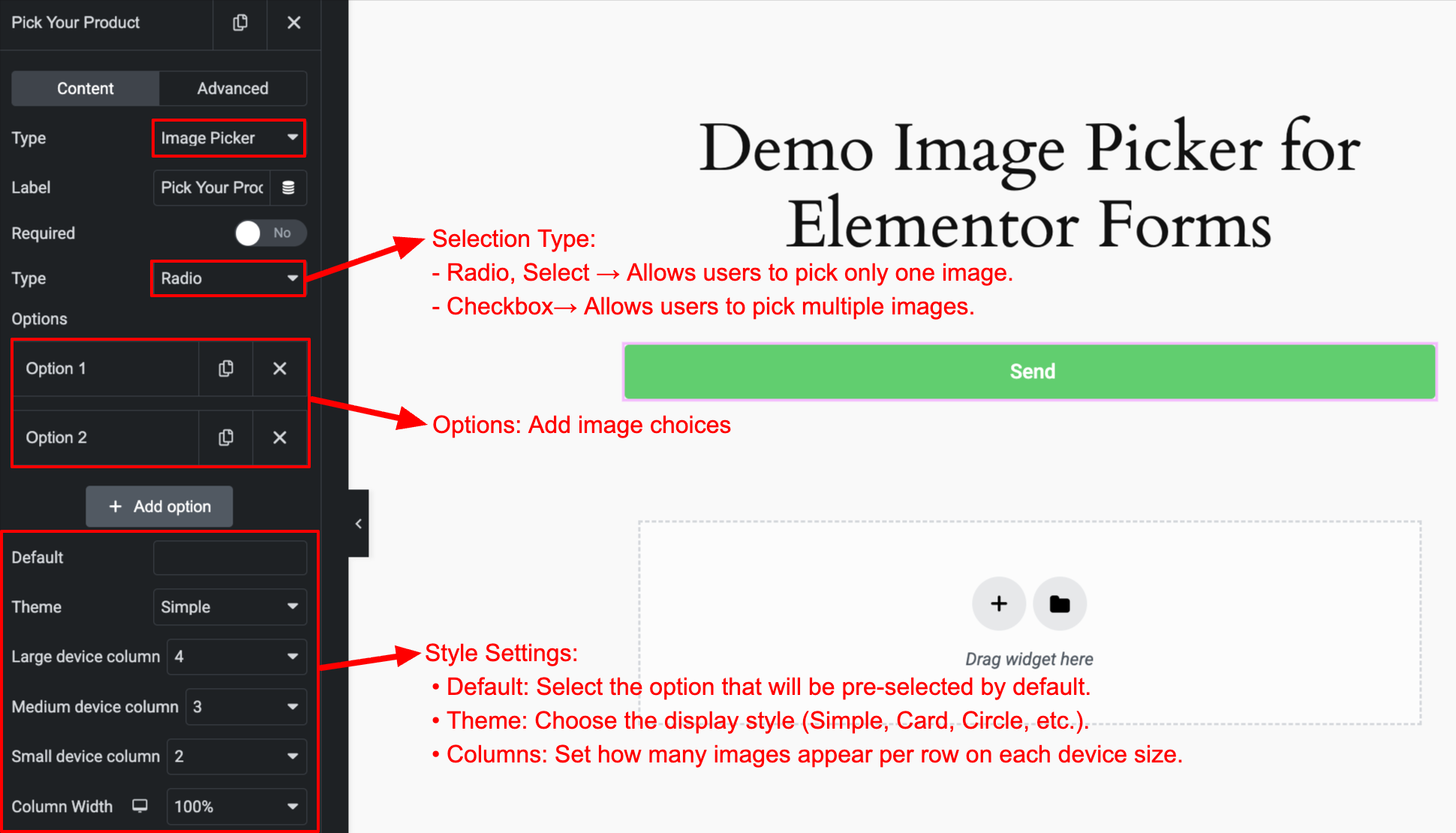
- Beautiful Built-in Layouts: Choose from multiple free layout styles: Simple, Card, Circle, Polar, Box, Cover.
- Smart Interactions: Visually indicates selected items with highlight borders, checkmark icons, and smooth CSS transitions.
- Fully Responsive: Displays perfectly on Desktop, Tablet, and Mobile.
- 100% Customizable: Easily tweak sizes, spacing, and border colors directly within Elementor.
Pro Features
- 10+ Premium Layouts (Pro): Unlock over 10 additional, highly-polished layout styles to match any creative brand identity instantly!
- Advanced Styling Controls (Pro): Deep visual customization directly in the Elementor Style tab.
Usage
- Edit a form with Elementor Pro.
- Add a Select, Radio, or Checkbox field.
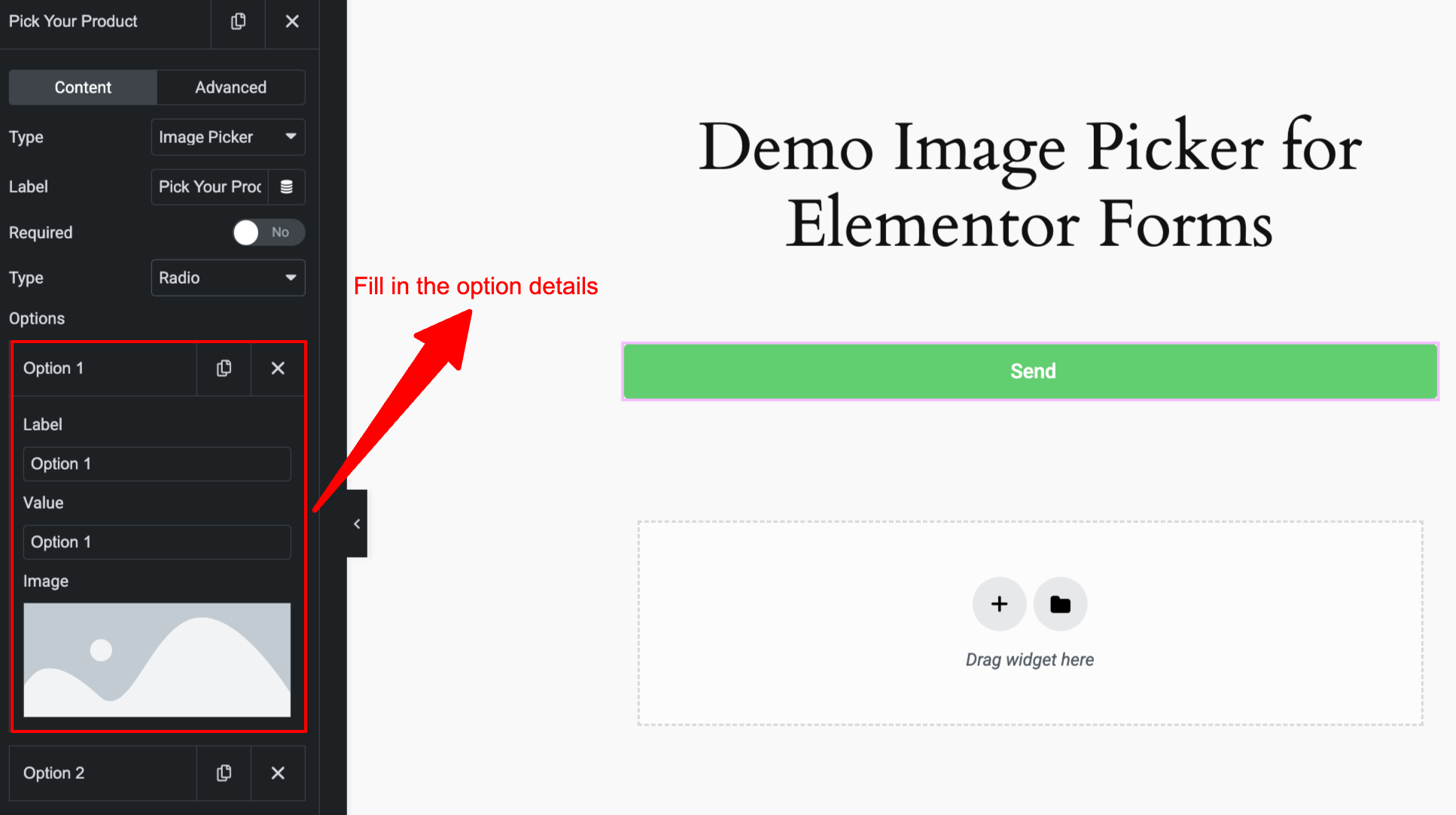
- In the field settings, toggle Enable Image Picker.
- Enter your image URLs alongside your choice values.
Installation
Normal Installation:
- Download the
image-picker-for-elementor-forms.zipfile to your computer. - Unzip the file.
- Upload the
image-picker-for-elementor-formsdirectory to your/wp-content/plugins/directory. - Activate the plugin through the ‘Plugins’ menu in WordPress.
Screenshots
For developers
Is this your plugin? Show off the numbers.
Add a live badge to your site, docs or GitHub README. It updates on its own — no account needed.
Best Image Picker alternatives
All checkbox plugins →





FAQ
Image Picker: quick answers
Straight answers, pulled from live WordPress.org data.
Live data from WordPress.org · checked Oct 3, 2026
Is Image Picker free?
Yes. Image Picker is free to download and use from the official WordPress.org plugin directory.
Is Image Picker safe to use in 2026?
Image Picker is a solid plugin choice in 2026, with a few things worth checking first. It runs on 100+ sites and was last updated 1 week ago, and scores 68/100 on our health check.
How many websites use Image Picker?
Image Picker is active on 100+ WordPress websites and has been downloaded 1,168 times since it launched in October 2025. It was downloaded 170 times in the last 30 days.
Does Image Picker work with WordPress 7.1?
Yes. The developer has tested Image Picker up to WordPress 7.1.2, the latest release. It requires WordPress 2.0 or newer.
When was Image Picker last updated?
The latest version, 1.0.1, was released on September 24, 2026 (1 week ago).
Who makes Image Picker?
Image Picker is developed and maintained by add-ons.org.
What are the best alternatives to Image Picker?
The most popular alternatives to Image Picker are WP Comment Policy Checkbox (5K+ installs), Rel Nofollow Checkbox (4K+ installs) and Select All Categories and T… (3K+ installs).
Powered by PageForge
Want thousands of pages that rank like these? Build them in an afternoon.
This directory runs on the same engine as PageForge. Turn any spreadsheet, CSV or API into thousands of fast, SEO-ready WordPress pages — with schema, internal links and AI-written copy baked in.
- CSV, Google Sheets & API data sources
- AI content, schema & internal links per page
- Works with Elementor, Gutenberg, Yoast & Rank Math
- Free on WordPress.org — no credit card


