



Custom Checkbox Ultimate for WooCommerce
Custom Checkbox Ultimate for Woocommerce is a powerful WooCommerce extension that allows store owners to offer additional services and charges to customers through customizable checkboxes on product pages. Enhance your…

Consider an alternative
Custom Checkbox Ultimate for Wo… shows warning signs in 2026 — compare the alternatives below before installing. Is rated 5/5 and was last updated 2 years ago, and scores 31/100 on our health check.
- Small user base (<10 active installs)
- Very few reviews so far
- No update in over a year
- Only tested up to WordPress 6.7 (latest is 7.1)
Daily downloads
Download spikes usually follow a new release — each site that auto-updates counts as a download.
Rankings
Where Custom Checkbox Ultimate fo… stands todayWordPress.org search rankings
Live position in the plugin search, top 100| Keyword | Position |
|---|---|
| additional services | >100 |
| checkbox | >100 |
| customizable options | >100 |
| e-commerce | >100 |
| woocommerce | >100 |
Rating breakdown
★★★★★★★★★★ 5 from 1 reviews
About Custom Checkbox Ultimate for WooCommerce
From the official readme · v1.3Description
Custom Checkbox Ultimate for Woocommerce is a powerful WooCommerce extension that allows store owners to offer additional services and charges to customers through customizable checkboxes on product pages. Enhance your product offerings by enabling customers to select extra features, services, or options, seamlessly integrating additional costs into their purchases.
Key Features
Customizable Checkbox Options: Easily add multiple checkbox fields to your WooCommerce product pages for additional services.
Dynamic Pricing: Automatically adjust product prices based on selected additional services.
Service Descriptions: Provide detailed descriptions for each additional service using tooltips for better customer understanding.
Admin-Friendly Interface: Manage and configure additional services directly from the product edit screen with an intuitive meta box.
Order Integration: Ensure that selected services and their costs are accurately reflected in the cart, checkout, and order details.
Flexible Field Management: Add as many custom service fields as needed with ease.
Check out our Documentation, Support Ticket, and Contact us.
Quick Start
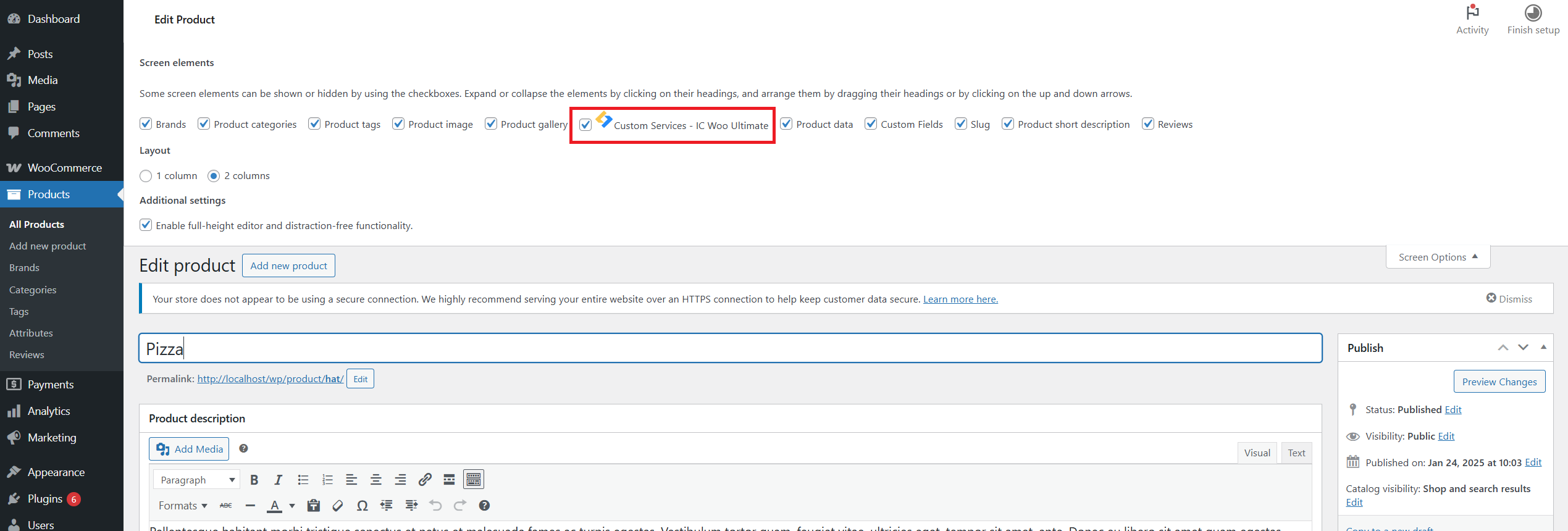
- Adding Custom Services to a Product
Navigate to Products:
- In your WordPress dashboard, go to Products > All Products.
- Click on the product you want to add additional services to, or create a new product.
- Locate the Custom Services Meta Box:
- Scroll down to find the Custom Services – IC Woo Ultimate meta box.
Configure the Services
Custom Services Title: Enter a title that will appear above the checkbox options on the product page (e.g., “Add-Ons”, “Extra Services”).
Service Fields: By default, five service fields are available. For each service, provide:
Service Name: The label for the checkbox (e.g., “Gift Wrapping”).
Service Price: The additional cost associated with the service.
Service Description: (Optional) A brief description that appears as a tooltip for more information.
Add More Fields: Click the +Add More Fields button to add additional service options beyond the default five.
Save the Product: Once configured, click Update or Publish to save your changes.
Displaying Custom Services on the Frontend
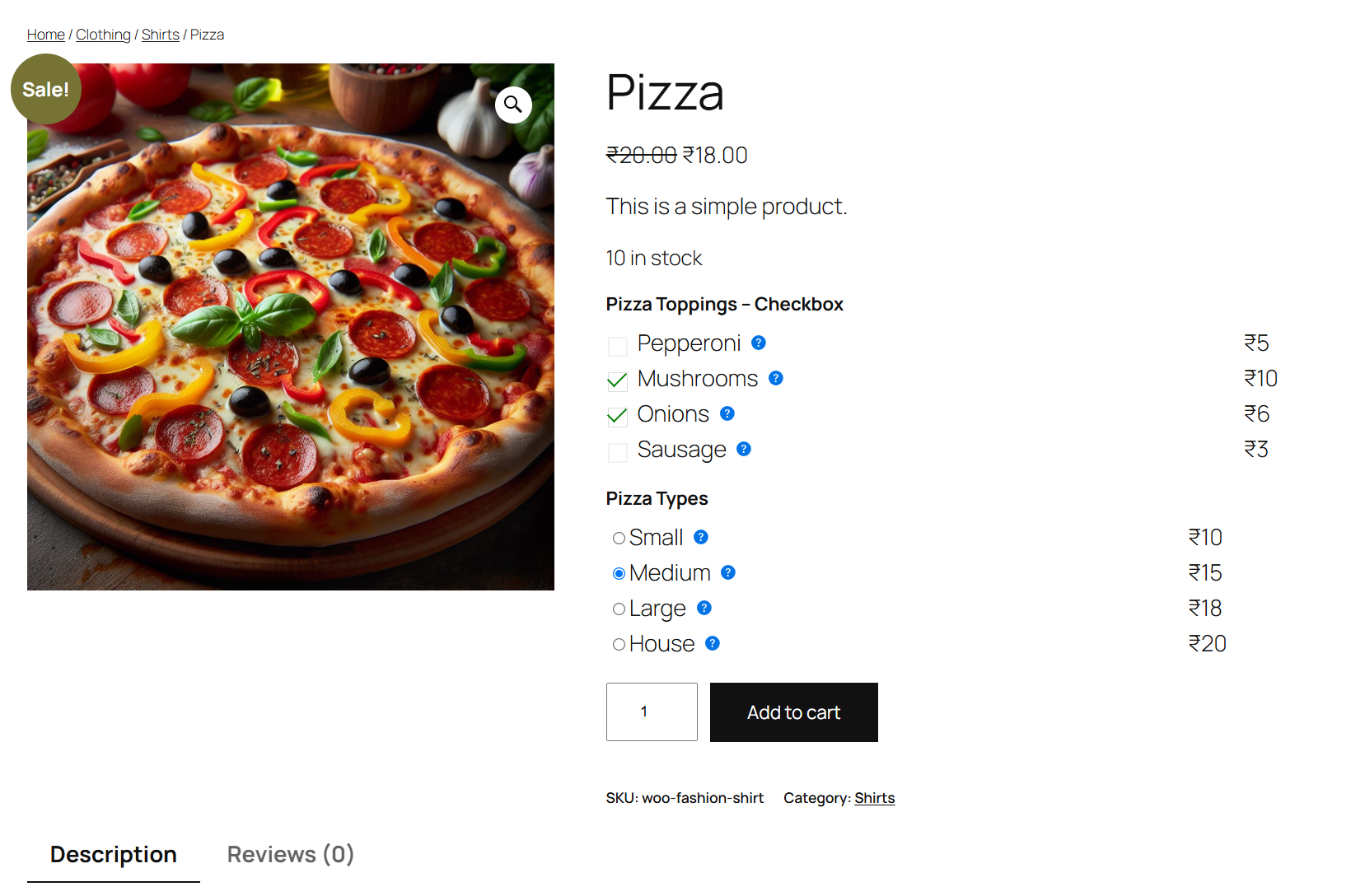
On the product page, customers will see the Custom Services Title followed by a list of checkbox options with their respective prices.
Selecting a checkbox will automatically update the product price in the cart to include the additional service cost.
Service descriptions are available as tooltips for more detailed information.
Managing Orders
Selected additional services and their costs are displayed in the cart, checkout, and order details, ensuring transparency and accurate billing.
Installation
Upload the Plugin:
- Download the plugin zip file.
- In your WordPress dashboard, navigate to Plugins > Add New.
- Click on the Upload Plugin button at the top.
- Choose the downloaded zip file and click Install Now.
- Activate the Plugin:
- After installation, click on Activate Plugin.
- Ensure WooCommerce is Active:
This plugin requires WooCommerce to be installed and activated.
If WooCommerce is not active, you will receive an admin notice prompting you to activate it.
Frequently asked questions
Does this plugin work with all WooCommerce themes?
Yes, the plugin is designed to be compatible with most WooCommerce-compatible themes. However, styling may vary based on your theme. You can use custom CSS to adjust the appearance as needed.
Can I add more than five custom service fields?
Absolutely! While the plugin initializes with five fields by default, you can add as many additional service fields as required using the + Add More Fields button in the meta box.
Is it possible to set different prices for different user roles?
By default, the plugin does not support role-based pricing. However, with custom development or additional extensions, this functionality can be achieved.
How are the additional service costs handled during checkout?
Selected additional services are added to the cart item data, ensuring that the total price reflects the added costs. These details are visible in the cart, checkout, and order summaries.
What happens if WooCommerce is deactivated?
If WooCommerce is not active, the plugin will display an admin notice prompting you to activate WooCommerce, as it is a required dependency.
More Features
Working on more features and settings like Shortcodes, Styling options etc & more. Contact us for more requests.
Changelog
No major requirements
1.3
Initial release of Custom Checkbox Ultimate for WooCommerce.
Features include adding customizable checkbox options, dynamic pricing adjustments, service descriptions with tooltips, and order integration.
Upgrade Notice
1.0
Initial release.
License
This plugin is licensed under the GPL v2 or later. You can redistribute it and/or modify it under the terms of the GNU General Public License as published by the Free Software Foundation, either version 2 of the License, or any later version.
Screenshots


For developers
Is this your plugin? Show off the numbers.
Add a live badge to your site, docs or GitHub README. It updates on its own — no account needed.
FAQ
Custom Checkbox Ultimate for WooCom…: quick answers
Straight answers, pulled from live WordPress.org data.
Live data from WordPress.org · checked Oct 3, 2026
Is Custom Checkbox Ultimate for Wo… free?
Yes. Custom Checkbox Ultimate for Wo… is free to download and use from the official WordPress.org plugin directory.
Is Custom Checkbox Ultimate for Wo… safe to use in 2026?
Custom Checkbox Ultimate for Wo… shows warning signs in 2026 — compare the alternatives below before installing. Is rated 5/5 and was last updated 2 years ago, and scores 31/100 on our health check.
How many websites use Custom Checkbox Ultimate for Wo…?
Custom Checkbox Ultimate for Wo… is active on <10 WordPress websites and has been downloaded 737 times since it launched in March 2025. It was downloaded 37 times in the last 30 days.
Does Custom Checkbox Ultimate for Wo… work with WordPress 7.1?
Custom Checkbox Ultimate for Wo… is officially tested up to WordPress 6.7.9, while the latest release is 7.1.2. It may still work, but try it on a staging site first.
What PHP version does Custom Checkbox Ultimate for Wo… need?
Custom Checkbox Ultimate for Wo… requires PHP 7.2 or higher. Most hosts run PHP 8.x today, so it works on any modern WordPress hosting.
When was Custom Checkbox Ultimate for Wo… last updated?
The latest version, 1.3, was released on March 30, 2025 (2 years ago).
Who makes Custom Checkbox Ultimate for Wo…?
Custom Checkbox Ultimate for Wo… is developed and maintained by Sandy.
Powered by PageForge
Want thousands of pages that rank like these? Build them in an afternoon.
This directory runs on the same engine as PageForge. Turn any spreadsheet, CSV or API into thousands of fast, SEO-ready WordPress pages — with schema, internal links and AI-written copy baked in.
- CSV, Google Sheets & API data sources
- AI content, schema & internal links per page
- Works with Elementor, Gutenberg, Yoast & Rank Math
- Free on WordPress.org — no credit card


