


If Widget – Visibility control for Widgets
With If Widget you can control on which pages widgets are shown. Show or hide widgets with custom visibility rules (no PHP or technical knowledge required).

Consider an alternative
If Widget shows warning signs in 2026 — compare the alternatives below before installing. It runs on 1K+ sites, is rated 4.4/5 and was last updated 6 years ago, and scores 37/100 on our health check.
- No update in 5 years
- Only tested up to WordPress 5.6 (latest is 7.1)
How does it stack up?
Side-by-side on installs, updates, ratings & support



Daily downloads
Download spikes usually follow a new release — each site that auto-updates counts as a download.
Rankings
Where If Widget stands todayWordPress.org search rankings
Live position in the plugin search, top 100| Keyword | Position |
|---|---|
| hide | >100 |
| roles | >100 |
| rules | >100 |
| visibility | >100 |
| widget | >100 |
Version adoption
Share of active sites per release.
Rating breakdown
★★★★★★★★★★ 4.4 from 9 reviews
About If Widget
From the official readme · v0.5Description
With If Widget you can control on which pages widgets are shown. Show or hide widgets with custom visibility rules (no PHP or technical knowledge required).
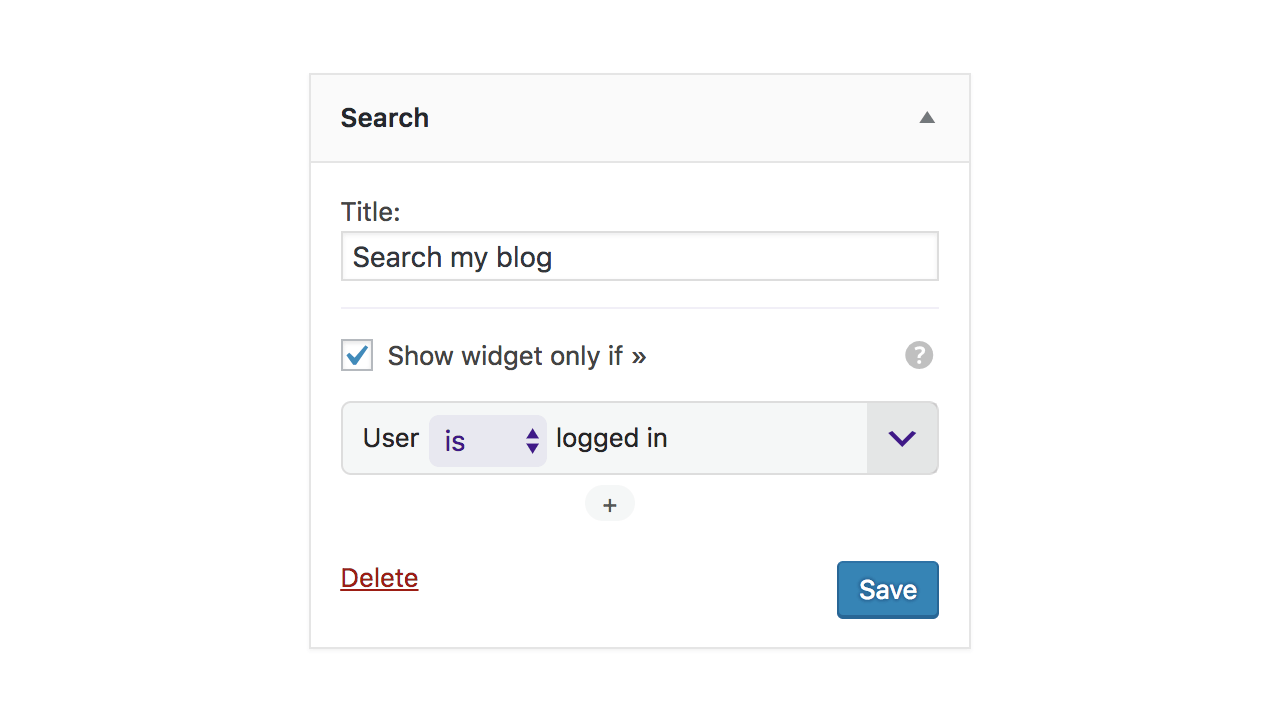
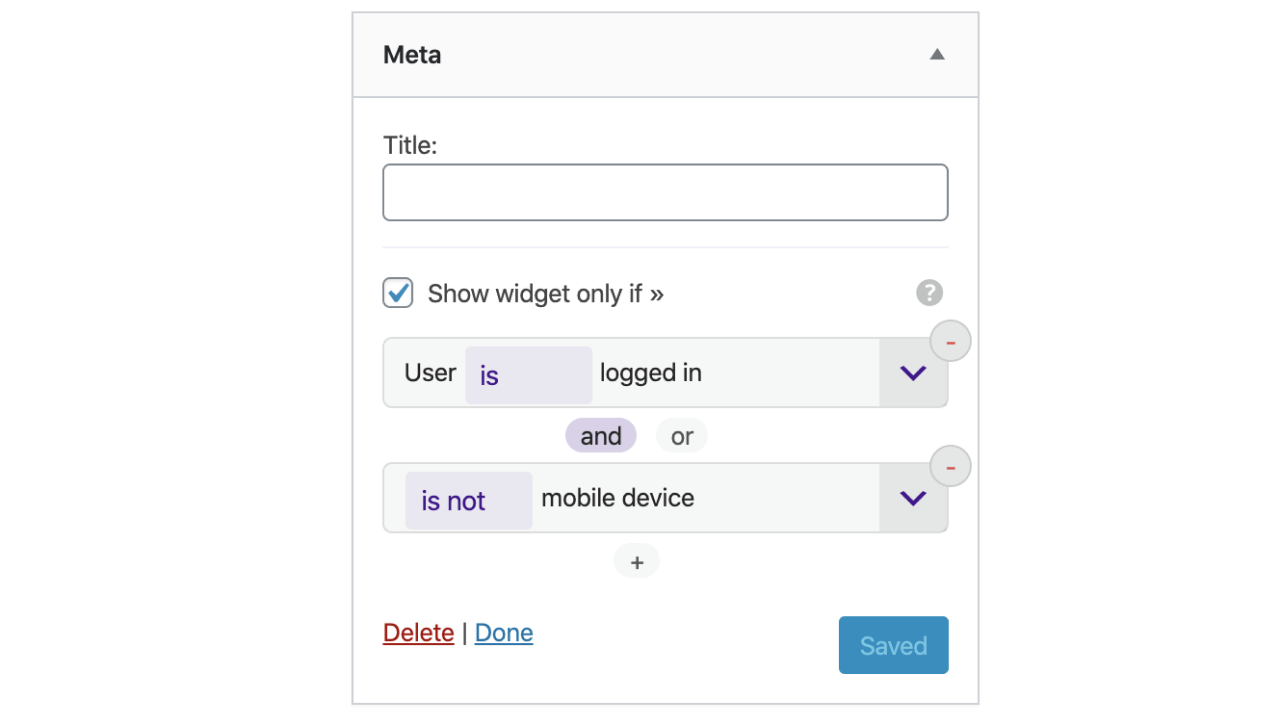
The plugin is easy to use, each widget will have a new option “Show widget only if” which will enable the selection of visibility rules (example in Screenshots). Visibility rules can be combined with AND/OR to create even more personalised visibility options.
Examples
- Display a widget only if User is logged in
- Hide widgets if Is mobile device
ORVisitor is from US - Display widgets only for Admins and Editors
- Hide Login or Register widgets for Logged in Users
- Show widget only for Admins
ANDIs not mobile device
Visibility Rules
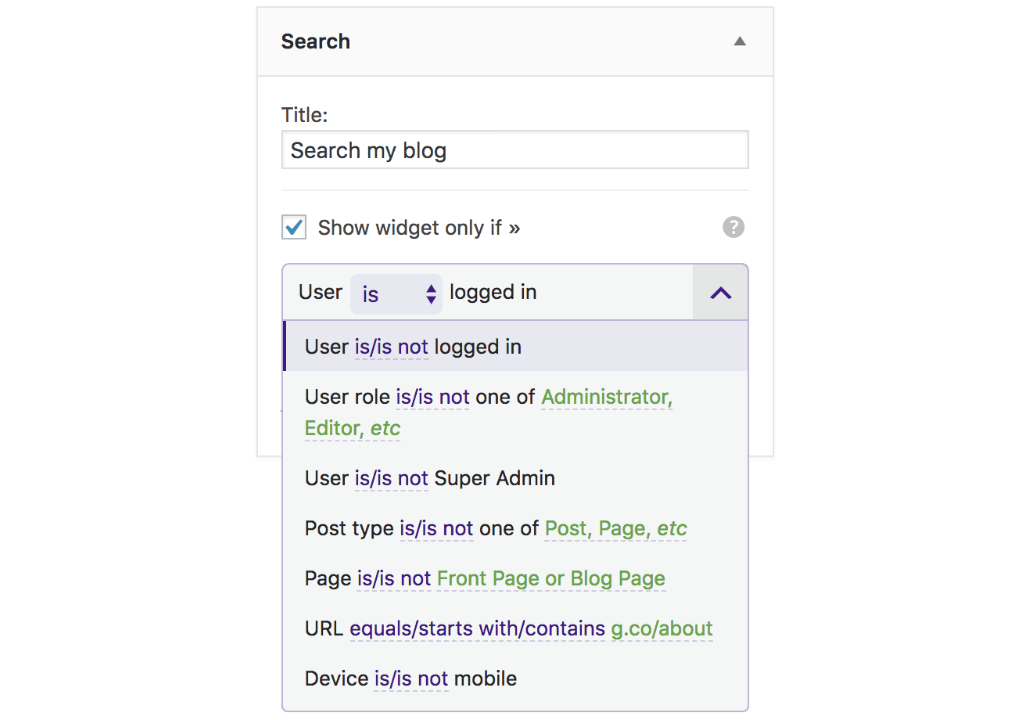
These are the visibility rules you can add for widgets:
- User state:
User is logged in - User role:
User is Admin or Editor(plus all the available roles) - User registration:
User registration is allowed - Post type:
Current post type is Post or Product - Page type:
Current page is Front Page or Blog Page - URL:
Current URL starts/ends with "this-page" - URL:
Current URL contains with "keyword" - Device detection:
Is mobile device - Visitor location:
Visitor is from US or Spain✱ - Visitor language:
Visitor language is English or Spanish✱ - Third-party plugin integrations:
Show if user is in Group "Group Name",Show if user has Subscription "Example Subscription"and more ✱
More Visibility Rules Add-on
The paid Add-on provides more visibility rules and priority support.
Visibility Rules: unlock all visibility rules like: visitor location, membership status, user groups and more. A few examples are marked with ✱ above.
Support: get one-on-one email support for any questions you may have about installing and configuring our plugins.
Get More Visibility Rules.
Frequently asked questions
How can I enable custom visiblity for a widget?
On Widgets editing page, each widget will have a section for controlling visibility. Enable the option “Show widget only if” to reveal and configure visibility rules (Example in screenshots).
How can I add a custom visibility rule for menu items?
New rules can be added by code in any other plugin or theme. Example of adding a new custom rule for displaying/hiding a widget when current page is a custom-post-type. // theme's functions.php or plugin file add_filter('if_visibility_rules', 'my_new_visibility_rule'); function my_new_visibility_rule(array $rules) { $rules['single-my-custom-post-type'] = array( 'name' => __('Single my-CPT', 'i18n-domain'), // name of the condition 'callback' => function() { // callback - must return Boolean return is_singular('my-custom-post-type'); } ); return $rules; }
Where can I find conditional functions?
WordPress provides a lot of functions which can be used to create custom rules for almost any combination that a theme/plugin developer can think of.
Changelog
0.5 – 7 March 2020
- Added – Visibility rule – Is Archive page (checks for year/month/category archive page)
- Updated – Ensure compatibility with WordPress 5.4
- Fixed – Vsibility rules control in Customizer
0.4 – 24 October 2019
- Updated – Text Visibility rule option: Text doesn’t contain
- Updated – Ensure compatibility with WordPress 5.3
0.3 – 5 July 2019
- Added – Visibility rule – Users can register
- Added – Support for paid Addon, which adds more visibility rules
0.2 – 2 March 2019
- Updated – Plugin texts
- Updated – Compatibility with WordPress 5.1
0.1
- Plugin release. Includes basic visibility rules
Screenshots

For developers
Is this your plugin? Show off the numbers.
Add a live badge to your site, docs or GitHub README. It updates on its own — no account needed.
Best If Widget alternatives
All hide plugins →





FAQ
If Widget: quick answers
Straight answers, pulled from live WordPress.org data.
Live data from WordPress.org · checked Sep 27, 2026
Is If Widget free?
Yes. If Widget is free to download and use from the official WordPress.org plugin directory.
Is If Widget safe to use in 2026?
If Widget shows warning signs in 2026 — compare the alternatives below before installing. It runs on 1K+ sites, is rated 4.4/5 and was last updated 6 years ago, and scores 37/100 on our health check.
How many websites use If Widget?
If Widget is active on 1K+ WordPress websites and has been downloaded 15,807 times since it launched in August 2018. It was downloaded 248 times in the last 30 days.
Does If Widget work with WordPress 7.1?
If Widget is officially tested up to WordPress 5.6.21, while the latest release is 7.1.2. It may still work, but try it on a staging site first.
What PHP version does If Widget need?
If Widget requires PHP 5.6 or higher. Most hosts run PHP 8.x today, so it works on any modern WordPress hosting.
When was If Widget last updated?
The latest version, 0.5, was released on January 18, 2021 (6 years ago).
Who makes If Widget?
If Widget is developed and maintained by Andrei.
What are the best alternatives to If Widget?
The most popular alternatives to If Widget are Email Encoder (90K+ installs), If Menu (50K+ installs) and WP Hide & Security Enhancer (50K+ installs).
Powered by PageForge
Want thousands of pages that rank like these? Build them in an afternoon.
This directory runs on the same engine as PageForge. Turn any spreadsheet, CSV or API into thousands of fast, SEO-ready WordPress pages — with schema, internal links and AI-written copy baked in.
- CSV, Google Sheets & API data sources
- AI content, schema & internal links per page
- Works with Elementor, Gutenberg, Yoast & Rank Math
- Free on WordPress.org — no credit card


