


If Menu – Visibility control for Menus
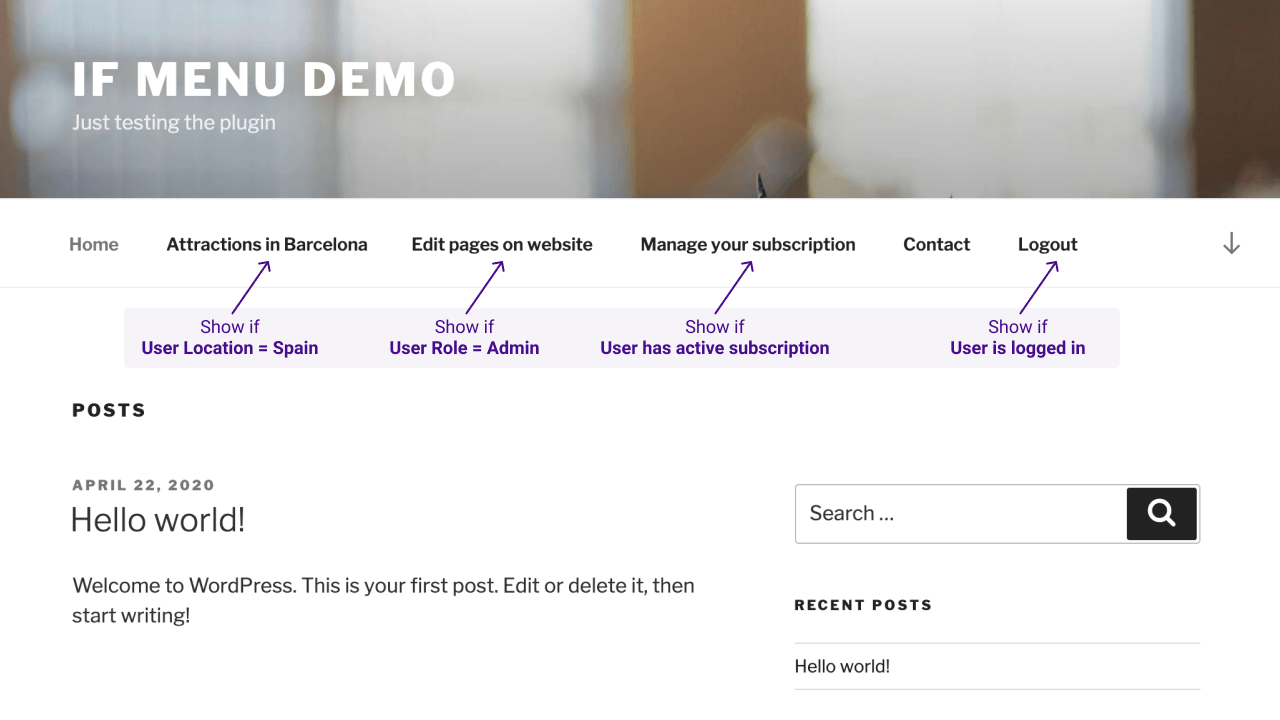
Control what menu items your site’s visitors see, with visibility rules. Here are a few examples:

Use with caution
If Menu works, but test it on a staging site before relying on it in 2026. It runs on 50K+ sites, is rated 4.1/5 and was last updated 2 years ago, and scores 47/100 on our health check.
- Proven at scale on 50K+ active sites
- Momentum — downloads up 24.9% vs the previous 30 days
- No update in over a year
- Only tested up to WordPress 6.7 (latest is 7.1)
How does it stack up?
Side-by-side on installs, updates, ratings & support


Daily downloads
Download spikes usually follow a new release — each site that auto-updates counts as a download.
Rankings
Where If Menu stands todayWordPress.org search rankings
Live position in the plugin search, top 100| Keyword | Position |
|---|---|
| hide | >100 |
| menu | >100 |
| roles | >100 |
| rules | >100 |
| visibility | #86 |
Version adoption
Share of active sites per release.
Rating breakdown
★★★★★★★★★★ 4.1 from 130 reviews
About If Menu – Visibility control for Menus
From the official readme · v0.19.2Description
Control what menu items your site’s visitors see, with visibility rules. Here are a few examples:
- Display a menu item only if
User is logged in - Hide menus if
Device is mobile - Display menus only for
Admins and Editors - Hide Login or Register links for
Logged in Users - Display menus for
Users from US or UK - Display menus only for
Customers with active membership - Display menus for visitors browsing with
Language English or Spanish
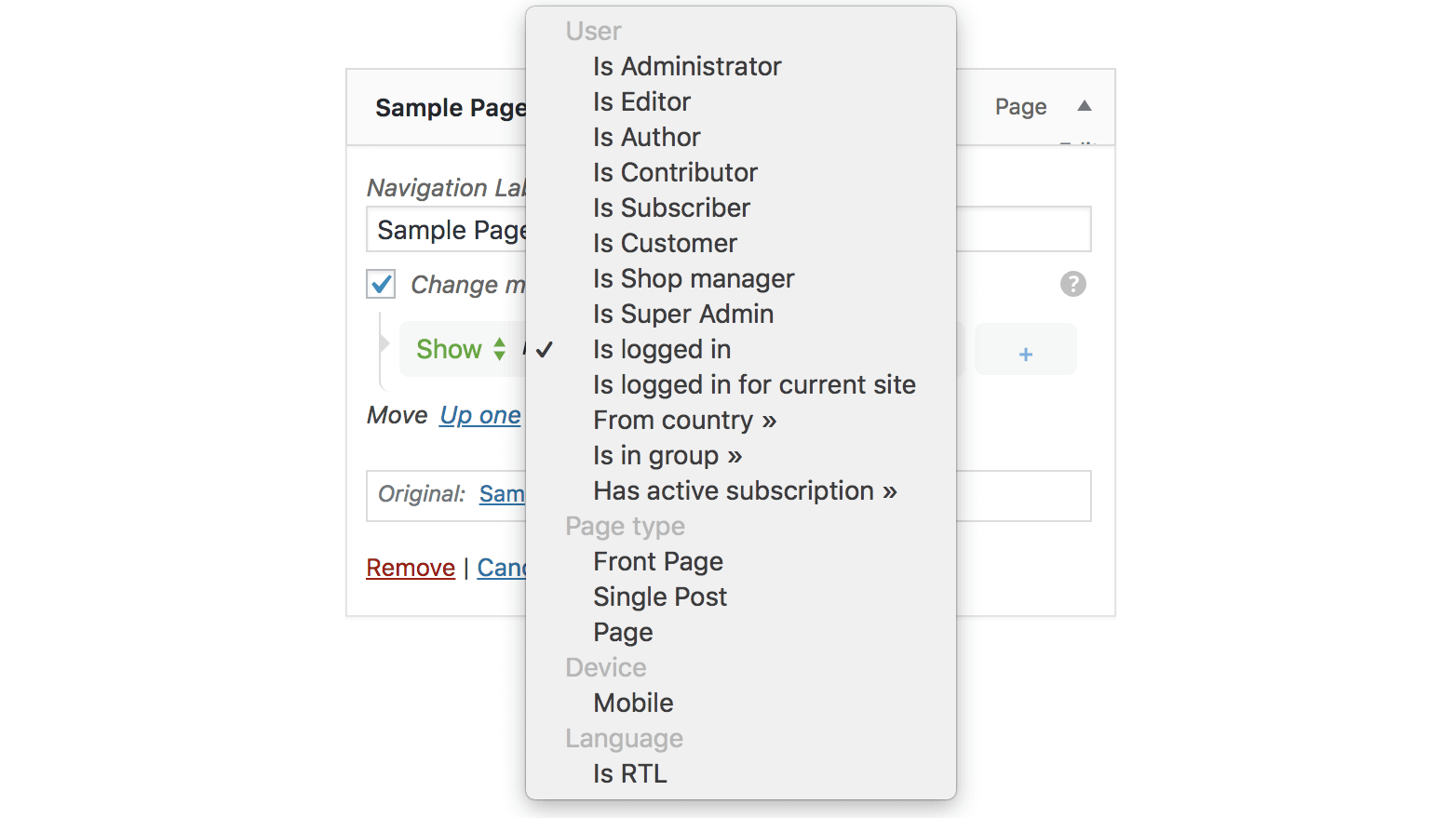
After the plugin is enabled, each menu item will have a new option “Change menu item visibility” which will enable the selection of visibility rules.
Check the examples in screenshots or try it here → demos.layered.store
Features
- Basic set of visibility rules
- User state
User is logged in - User roles
AdminEditorAuthoretc - Page type
Front pageSingle pageSingle post - Is Archive page (year, category, search results, etc)
- Visitor device
Is Mobile
- User state
- Advanced visibility rules – requires More Visibility Rules Add-on
- Visitor location – detect visitor’s Country
- Visitor language – detect visitor’s selected Language
- WooCommerce Subscriptions – Display menus for users with active subscription
- WooCommerce Memberships – Display menus for customers with active membership plans
- Groups – Detect if users are in specific groups
- WishList Member – Detect the users’ membership level
- Restrict Content Pro – Detect the users’ subscription level
- Multiple rules – mix multiple rules for a menu item visibility
- show if
User is logged inANDDevice is mobile - show if
User is AdminANDIs front page
- show if
- Support for adding your custom rules
Changelog
0.19.2 – 5 Dec 2024
- Updated – Improved WordPress v6.7 compatibility
0.19.0 – 4 Mar 2024
- Updated – Improved WordPress v6.6 compatibility
- Fixed – Integration with Restrict Content Pro plugin
0.18.0 – 4 Mar 2024
- Updated – WordPress v6.4 compatibility
- Updated – Improved check for IP geolocation
0.17.0 – 26 Mar 2023
- Fixed – Broken Access Control
- Fixed – Check if callbacks are valid for Conditions
0.16.3 – 26 June 2022
- Added – More usage examples in plugin FAQs section
- Updated – WordPress v6 compatibility
- Updated – Integration with Restrict Content Pro plugin is improved
0.16.2 – 17 January 2020
- Fixed – Error shown about the registered REST Api endpoint
- Updated – Ensure compatibility with WordPress 5.6
Screenshots

For developers
Is this your plugin? Show off the numbers.
Add a live badge to your site, docs or GitHub README. It updates on its own — no account needed.
Best If Menu alternatives
All hide plugins →



FAQ
If Menu: quick answers
Straight answers, pulled from live WordPress.org data.
Source: WordPress.org
Is If Menu free?
Yes. If Menu is free to download and use from the official WordPress.org plugin directory.
Is If Menu safe to use in 2026?
If Menu works, but test it on a staging site before relying on it in 2026. It runs on 50K+ sites, is rated 4.1/5 and was last updated 2 years ago, and scores 47/100 on our health check.
How many websites use If Menu?
If Menu is active on 50K+ WordPress websites and has been downloaded 1,108,916 times since it launched in October 2012. It was downloaded 2,986 times in the last 30 days.
Does If Menu work with WordPress 7.1?
If Menu is officially tested up to WordPress 6.7.12, while the latest release is 7.1.5. It may still work, but try it on a staging site first.
What PHP version does If Menu need?
If Menu requires PHP 6.0 or higher. Most hosts run PHP 8.x today, so it works on any modern WordPress hosting.
When was If Menu last updated?
The latest version, 0.19.2, was released on December 5, 2024 (2 years ago).
Who makes If Menu?
If Menu is developed and maintained by Andrei.
What are the best alternatives to If Menu?
The most popular alternatives to If Menu are Email Encoder (90K+ installs), WP Hide & Security Enhancer (50K+ installs) and Dynamic Visibility for Elem… (50K+ installs).
Powered by PageForge
One template and a spreadsheet. A real page for every search.
PageForge turns each row of a CSV into a WordPress page with its own title, URL, SEO fields and schema, built on the layout you already designed. Free on WordPress.org.
- CSV and XLSX, plus Google Sheets on Professional and Enterprise
- Its own title, URL, SEO fields and schema for every page
- Works with the block editor, Elementor, Divi and Avada
- Free on WordPress.org, no credit card