


HTML Page Sitemap (Block and Shortcode)
Adds an HTML (Not XML) sitemap of your pages (not posts) by using the HTML Sitemap Block or shortcode, perfect for those who use WordPress as a CMS.

Safe pick
Yes — HTML Page Sitemap (Block and Sh… is a safe, well-maintained plugin to use in 2026. It runs on 10K+ sites, is rated 4.4/5 and was last updated 3 months ago, and scores 83/100 on our health check.
- Proven at scale on 10K+ active sites
- Tested with the latest WordPress (7.1)
How does it stack up?
Side-by-side on installs, updates, ratings & support



Daily downloads
Download spikes usually follow a new release — each site that auto-updates counts as a download.
Rankings
Where HTML Page Sitemap (Block an… stands todayWordPress.org search rankings
Live position in the plugin search, top 100| Keyword | Position |
|---|---|
| block | >100 |
| html sitemap | #7 |
| page | >100 |
| shortcode | #32 |
| sitemap | #11 |
Version adoption
Share of active sites per release.
Rating breakdown
★★★★★★★★★★ 4.4 from 24 reviews
About HTML Page Sitemap (Block and Shortcode)
From the official readme · v2.2.1Description
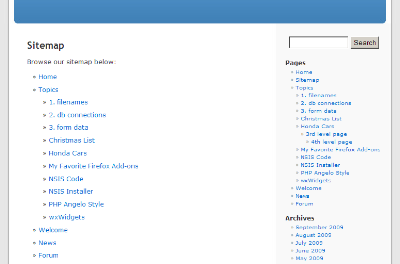
This simple plugin adds an HTML (Not XML) sitemap of your pages (not posts) by using the shortcode [html_sitemap]. This plugin can display a sitemap with specific depths, from a specific parent page and include/exclude specific pages by ID. The sitemap uses the unordered HTML list tags <ul> and <li>.
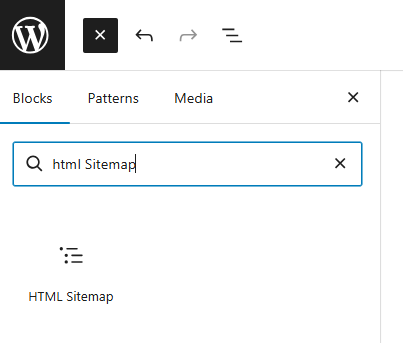
New for 2.0 is the HTML Sitemap Block, now you can add a HTML Sitemap using the WordPress Block Editor.
Attributes include sort_column, sort_order, exclude, include, depth, child_of, meta_key, meta_value, authors, number, offset, post_type, and post_status parameters from the wp_list_pages function. In addition you can also set class, id, and ordered_list_type to further customize the html page sitemap.
This plugin is perfect for those who use WordPress as a CMS.
Block / Shortcode Tag Attribute Options
The following wp_list_pages tag attribute options are supported:
authors— Comma-separated list of author IDs. Default empty (all authors).child_of— ID of child page, ‘CURRENT’, or ‘PARENT’. The value ‘CURRENT’ will use the current page ID. The value ‘PARENT’ will use the current page parent ID.depth— -1 (any depth), 0 (all pages), 1 (top-level pages only), 2 (top-level and 2nd level pages only), etc.date_format— e.g. ‘l, F j, Y’. See WordPress Date Formatexclude— Comma-separated list of page IDs to exclude.include— Comma-separated list of page IDs to include.item_spacing— Whether to preserve whitespace within the menu’s HTML. Accepts ‘preserve’ or ‘discard’.meta_key— Limits output to pages having a specific custom field key.meta_value— Limits output to pages having a specific custom field value.number— Limits the number of links displayed (SQL LIMIT).offset— Skips a specific number of pages before displaying the list.post_type— Post type to query for. Default ‘page’post_status— Comma-separated list or array of post statuses to include. Default ‘publish’show_date— Whether to display the page publish or modified date for each page. Accepts ‘modified’ or any other value. An empty value hides the date.sort_column— Comma-separated list of column names to sort the pages by. Accepts ‘post_author’, ‘post_date’, ‘post_title’, ‘post_name’, ‘post_modified’, ‘post_modified_gmt’, ‘menu_order’, ‘post_parent’, ‘ID’, ‘rand’, or ‘comment_count’. Default ‘menu_order, post_title’.sort_order— ‘ASC’ or ‘DESC’. Default ‘ASC’.
Please see documentation for the wp_list_pages function for reference.
Demos
In addition the following tag attributes are available exclusively for this plugin:
class— Specify class values for the initial HTML Page Sitemap<ul>list tag.id— Specify ID values for the initial HTML Page Sitemap<ul>list tag.ordered_list_type— Specify the ordered list type. Accepts ”, ‘1’, ‘A’, ‘a’, ‘I’, and ‘i’. Default empty value will display an unordered list.
The ordered_list_type attribute options in more detail:
ordered_list_type=""— The list items will be unorderedordered_list_type="1"— The list items will be numbered with numbersordered_list_type="A"— The list items will be numbered with uppercase lettersordered_list_type="a"— The list items will be numbered with lowercase lettersordered_list_type="I"— The list items will be numbered with uppercase roman numbersordered_list_type="i"— The list items will be numbered with lowercase roman numbers
Note: This plugin only works with Hierarchical Custom Post Types such as pages. This plugin will not work if your post type is not hierarchical. Not setting an ordered_list_type will use an unordered list (default).
Examples
First example shows how to add a sitemap for the entire site.
[html_sitemap]
Example shortcode will add a sitemap to a page displaying a depth limit of 3 and exclude page ID 708.
[html_sitemap depth=3 exclude=708]
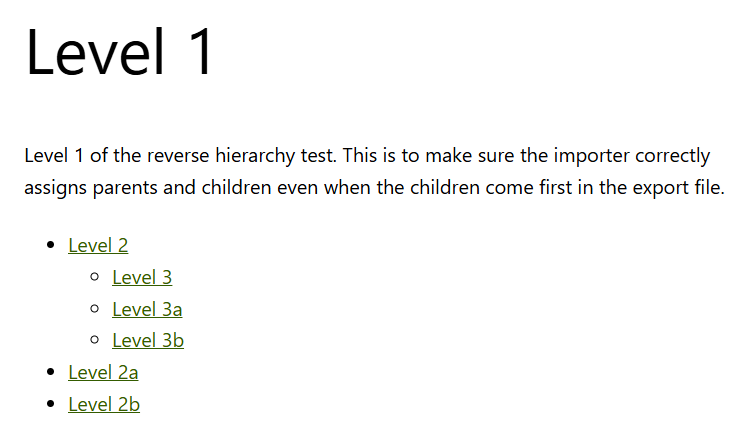
Example shortcode will add a sitemap to a page displaying only children and grandchildren of the current page.
[html_sitemap depth=2 child_of=CURRENT]
Example shortcode will add a sitemap to a page displaying children and grandchildren of the parent page (would include the curent page as well).
[html_sitemap depth=2 child_of=PARENT]
Example shortcode will add a sitemap displaying the page modified date with the pages sorted by the menu order number.
[html_sitemap show_date=modified sort_column=menu_order]
Example shortcode excluding multiple pages with ids 708, 1024 and 42.
[html_sitemap exclude="708,1024,42"]
Example shortcode will add a class attribute to the <ul> tag.
[html_sitemap class="custom-class"]
Example shortcode will add an id attribute to the <ul> tag.
[html_sitemap id="custom-element-id"]
Example shortcode will display an ordered list using lowercase letters with a depth of 1.
[html_sitemap ordered_list_type="a" depth=1]
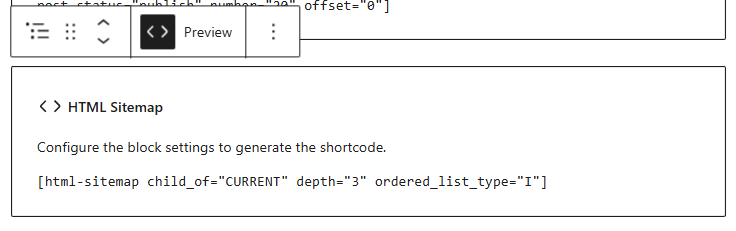
Example shortcode with roman numbering in capitalization, with custom field “featured-list” and custom value “yes”
[html_sitemap ordered_list_type="I" meta_key=featured-list meta_value=yes sort_column=post_date]
For the latest information visit the website.
http://www.pluginspodcast.com/plugins/html-page-sitemap/
Contributors
Angelo Mandato, founder of Painless Analytics and FrontPup – Plugin author
Installation
Automatic Plugin Installation
Install using the built-in plugin installer:
- Go to Plugins > Add New.
- Type in “HTML Page Sitemap” in Search Plugins box.
- Find “HTML Page Sitemap” in the search results.
- Click Install Now to install the WordPress Plugin.
- Click Activate to activate it.
- Add the shortcode [html_sitemap] to the page(s) of your choice.
Manual Plugin Installation
- Download this plugin to your desktop.
- Extract the plugin zip file (or compressed folder) to your desktop.
- With your FTP program, upload the plugin folder to the wp-content/plugins folder in your WordPress directory online.
- Go to Plugins screen and find “HTML Page Sitemap” plugin in the list.
- Click Activate to activate it.
- Add the shortcode [html_sitemap] to the page(s) of your choice.
Changelog
None at this time.
2.2.1
- Released on 2026-08-31
- Added a setting that stores the date/time when the plugin was first installed/activated.
- The review prompt notice now only appears after the plugin has been installed for 14 days.
- Raised the minimum supported WordPress version to 4.2.
- Tested with WordPress 7.1.
2.2
- Released on 2026-07-19
- Added a dismissible review prompt notice on the WordPress dashboard for administrators.
2.1.3
- Released on 2026-05-24
- Tested with WordPress 7.0.
2.1.2
- Released on 2026-04-24
- Updated typo documenting the
sort_orderdefault.
2.1.1
Release skipped.
2.1
- Released on 2026-03-30
- Preview functionality added for WordPress.org plugin directory.
Screenshots
For developers
Is this your plugin? Show off the numbers.
Add a live badge to your site, docs or GitHub README. It updates on its own — no account needed.
Best HTML Page Sitemap (Block and… alternatives
All block plugins →




FAQ
HTML Page Sitemap (Block and Shortc…: quick answers
Straight answers, pulled from live WordPress.org data.
Live data from WordPress.org · checked Nov 16, 2026
Is HTML Page Sitemap (Block and Sh… free?
Yes. HTML Page Sitemap (Block and Sh… is free to download and use from the official WordPress.org plugin directory.
Is HTML Page Sitemap (Block and Sh… safe to use in 2026?
Yes — HTML Page Sitemap (Block and Sh… is a safe, well-maintained plugin to use in 2026. It runs on 10K+ sites, is rated 4.4/5 and was last updated 3 months ago, and scores 83/100 on our health check.
How many websites use HTML Page Sitemap (Block and Sh…?
HTML Page Sitemap (Block and Sh… is active on 10K+ WordPress websites and has been downloaded 437,506 times since it launched in September 2009. It was downloaded 2,435 times in the last 30 days.
Does HTML Page Sitemap (Block and Sh… work with WordPress 7.1?
Yes. The developer has tested HTML Page Sitemap (Block and Sh… up to WordPress 7.1.4, the latest release. It requires WordPress 4.2 or newer.
What PHP version does HTML Page Sitemap (Block and Sh… need?
HTML Page Sitemap (Block and Sh… requires PHP 5.4 or higher. Most hosts run PHP 8.x today, so it works on any modern WordPress hosting.
When was HTML Page Sitemap (Block and Sh… last updated?
The latest version, 2.2.1, was released on August 31, 2026 (3 months ago).
Who makes HTML Page Sitemap (Block and Sh…?
HTML Page Sitemap (Block and Sh… is developed and maintained by Angelo Mandato.
What are the best alternatives to HTML Page Sitemap (Block and Sh…?
The most popular alternatives to HTML Page Sitemap (Block and Sh… are Spectra Legacy (1M+ installs), Breadcrumb NavXT (700K+ installs) and PDF Embedder (300K+ installs).
Powered by PageForge
Want thousands of pages that rank like these? Build them in an afternoon.
This directory runs on the same engine as PageForge. Turn any spreadsheet, CSV or API into thousands of fast, SEO-ready WordPress pages — with schema, internal links and AI-written copy baked in.
- CSV, Google Sheets & API data sources
- AI content, schema & internal links per page
- Works with Elementor, Gutenberg, Yoast & Rank Math
- Free on WordPress.org — no credit card


