


Happyforms – Form Builder for WordPress: Drag & Drop Contact Forms, Surveys, Payments & Multipurpose Forms
Happyforms is the simplest way for you to manage and respond to conversations with your website visitors. With over 10 years of experience here at The Theme Foundry, we’ve heard from nearly 1,000,000 businesses what…

Solid choice
Happyforms is a solid plugin choice in 2026, with a few things worth checking first. It runs on 20K+ sites, is rated 4.4/5 and was last updated 3 days ago, and scores 76/100 on our health check.
- Proven at scale on 20K+ active sites
- Actively developed — last update 3 days ago
- Tested with the latest WordPress (7.1)
- Momentum — downloads up 210.7% vs the previous 30 days
How does it stack up?
Side-by-side on installs, updates, ratings & support



Daily downloads
Download spikes usually follow a new release — each site that auto-updates counts as a download.
Rankings
Where Happyforms stands todayWordPress.org search rankings
Live position in the plugin search, top 100| Keyword | Position |
|---|---|
| contact form | >100 |
| custom form | #59 |
| form builder | #46 |
| forms | #86 |
| WordPress form plugin | #34 |
Version adoption
Share of active sites per release.
Rating breakdown
★★★★★★★★★★ 4.4 from 433 reviews
About Happyforms
From the official readme · v1.26.16Description
Happyforms is the simplest way for you to manage and respond to conversations with your website visitors. With over 10 years of experience here at The Theme Foundry, we’ve heard from nearly 1,000,000 businesses what they need from a contact form builder plugin! We’ve heard about the wasted time trying to set up tricky forms; the frustration of emails not being delivered; and the let down of not hearing from leads. That’s why we created Happyforms: Your free and friendly drag and drop form builder for creating contact forms and other custom forms in WordPress. Happyforms is optimized to increase conversations with your website visitors. Have peace of mind knowing messages to-and-from are getting delivered without the hassle of spam. You’ll be set up and going in 5 minutes or less.
Discover all the benefits of upgrading. 🚀
Happyforms solves these struggles:
- 💬 Start more conversations.
- 📫 Reliable message delivery.
- 💌 Skip the hassle of spam messages.
- 😍 Free expert support and feedback.
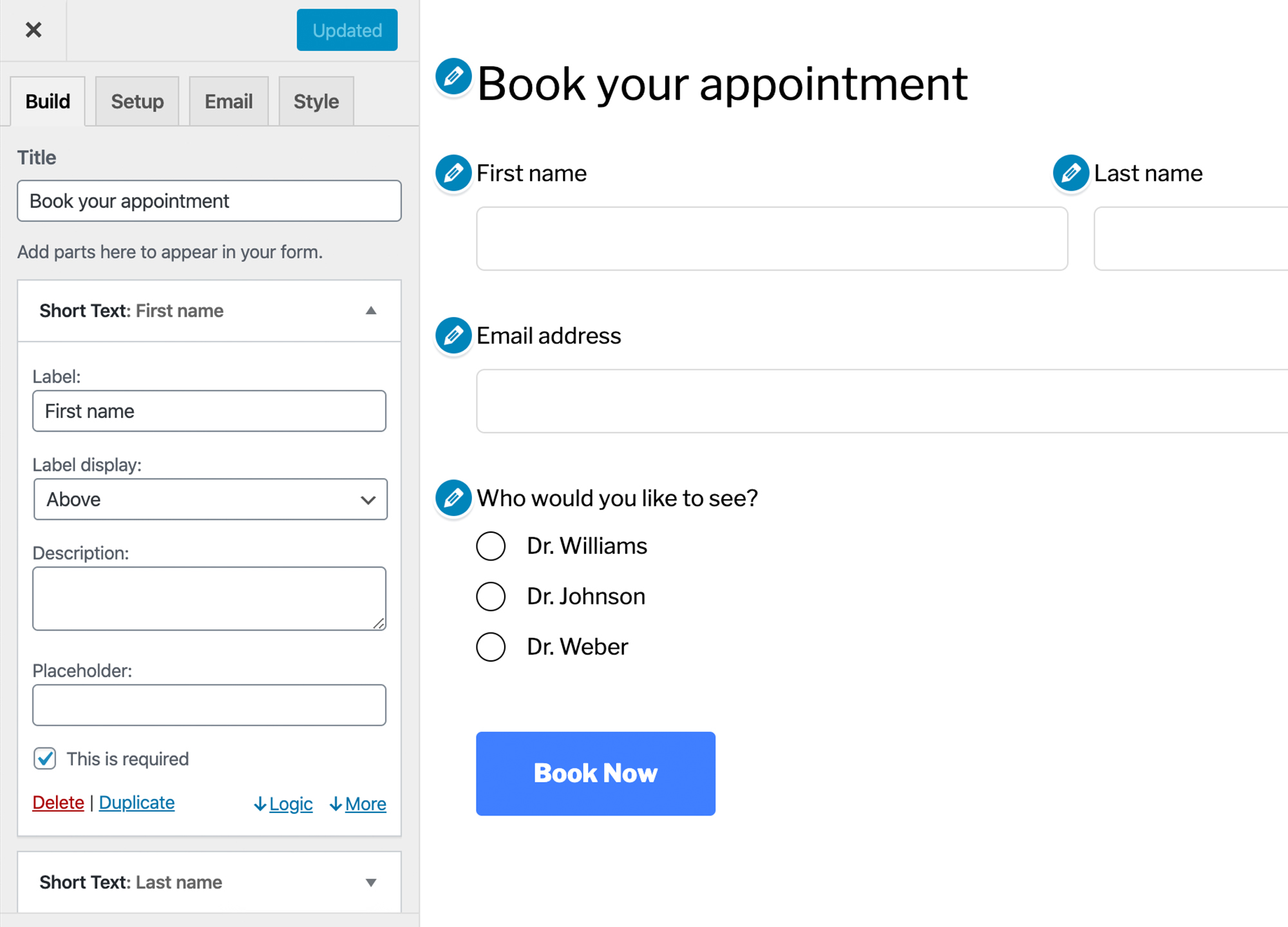
- 🎨 Live preview form builder.
Popular Happyforms Features:
- Drag and drop form builder (Gutenberg ready).
- Live preview forms as you create them.
- Ability to create any type of custom forms.
- Easily add forms anywhere to your pages, posts and widget areas.
- Add multiple forms to the same page.
- Completely mobile responsive forms.
- Unlimited forms, fields, emails and submissions.
- Create multi-column layouts with a single click.
- Easily duplicate forms.
- Confirmation message on submission.
- Confirmation email sent to submitter.
- One-click HoneyPot spam prevention.
- Over 50 styles controls built-in.
- GDPR and 508 compliant forms and secure forms.
Included Happyforms Form Fields:
- Short Answer — For fields like ‘First Name’ and ‘Last Name’.
- Long Answer — For longer messages and feedback.
- Email Address — Validate users email addresses before submission.
- Multiple Choice — Checkboxes for multiple selections.
- Single Choice — Radio buttons for single selection.
- Dropdown — For long lists and single selection.
- Number — For formatted numeric fields, like phone and price.
Upgraded Happyforms Features:
- Access to all 20+ form fields.
- Manage unlimited submissions easily in the dashboard.
- Let submitters upload files to your forms.
- Redirect to any webpage after the form is submitted.
- Multi-page forms with step indicator.
- Limit the number of submissions per form.
- Google ReCaptcha spam prevention integration.
- Enable people to save and resume their submission.
- Preview submission before submitting.
- Log IP address automatically.
- Shuffle form fields and choices to avoid biases.
- Unlimited personal and client use plans.
- No-nonsense support team, happy to help over email.
Discover all the benefits of upgrading. 🚀
General Pourpose Forms
- Contact Form
- Feedback Form
- Registration Form
- Survey Form
- Poll Form
- Application Form
- Inquiry Form
- Request Form
- Signup Form
- Order Form
- Quote Request Form
Lead Generation & Marketing
- Lead Capture Form
- Newsletter Signup Form
- Downloadable Resource Form
- Webinar Registration Form
- Demo Request Form
- Price Estimate Form
- Consultation Booking Form
- Event Registration Form
- Contest Entry Form
- Giveaway Form
- Popup Form
E-commerce & Payments
- Checkout Form
- Payment Form
- Donation Form
- Product Order Form
- Invoice Form
- Subscription Form
- Coupon Code Form
- Refund Request Form
- Pre-order Form
- Waitlist Form
Business & HR
- Job Application Form
- Employee Onboarding Form
- Timesheet Submission Form
- Expense Reimbursement Form
- Vendor Registration Form
- Client Intake Form
- Contractor Agreement Form
- Feedback Survey Form
- Performance Review Form
- Training Registration Form
Education & Courses
- Course Registration Form
- Scholarship Application Form
- Volunteer Registration Form
- Membership Application Form
- Grant Application Form
- Workshop Enrollment Form
- Alumni Survey Form
- Fundraising Donation Form
- Tutoring Request Form
- Research Participation Form
Medical & Legal
- Patient Intake Form
- Medical History Form
- Consent Form
- HIPAA Compliance Form
- Legal Consultation Form
- Incident Report Form
- Insurance Claim Form
- Privacy Policy Agreement Form
- Release of Liability Form
Real Estate & Hospitality
- Property Inquiry Form
- Rental Application Form
- Guest Booking Form
- Vacation Rental Form
- Open House Registration Form
- Maintenance Request Form
- Room Reservation Form
- Event Venue Inquiry Form
- Feedback Form for Guests
Technical & Creative
- Bug Report Form
- Feature Request Form
- Beta Tester Application Form
- Design Brief Form
- Content Submission Form
- Portfolio Review Form
- Creative Contest Entry Form
- API Access Request Form
Niche & Specialty Forms
- Wedding RSVP Form
- Event Registration Form
- Pet Adoption Form
- Fitness Class Signup Form
- Recipe Submission Form
- Art Commission Form
- Car Rental Form
- Equipment Rental Form
- Voting Ballot Form
Form Features (Modifiers)
- Drag & Drop Form
- Multi-Step Form
- Conditional Logic Form
- Mobile Responsive Form
- GDPR Compliant Form
- Spam-Protected Form
- File Upload Form
- Payment-Enabled Form
- Popup Form
- Embeddable Form
- Automated Email Form
Does it work with my favorite theme and plugins?
Abso-freakin-lutely! We’re always checking to make sure Happyforms plays nicely with popular themes like Divi, Astra, Avada, Genesis, GeneratePress, Enfold, Flatsome and OceanWP, and popular plugins like Yoast SEO, Elementor, WooCommerce, Jetpack, Wordfence, UpdraftPlus, MonsterInsights, WP Super Cache, Smush, W3 Total Cache, Loco Translate, SiteOrigin and Popup Maker.
Note: you’ll need to upgrade to our paid contact form builder plugin to get some of the best goodies mentioned here.
What are your brand guidelines?
Aw, honestly, the thought that you’re writing about our contact form builder is making us blush. That’s very kind of you! If we can be picky, please stick by these guidelines:
- Happyforms (correct)
- HappyForms (incorrect)
- Happyform (incorrect)
- Happy Forms (incorrect)
- Happy Form (incorrect)
Installation
Getting your plugin up and working takes just a few clicks:
- Head over to Plugins in WordPress dashboard and click Add New.
- In the “Search plugins…” field, type “Happyforms”.
- Find Happyforms in the search results, hover over it, and click Install.
- Once it is installed, click Activate.
That’s it! It’s ready to go. Nicely done.
WordPress is also really bad a sending emails. So if you haven’t already, we always recommend you set up a free SMTP plugin.
If you ever have questions, just ask us. We’ve swept the nacho crumbs from our keyboards, refilled our ginger beers and are ready to help.
And so you know, we don’t outsource support. You can expect plain-talkin’ help from someone who has a hand in making Happyforms.
Frequently asked questions
Can you read my replies?
Heck nah! No one likes peepers. All submissions are saved in your WordPress database or sent to your inbox. Note: you’ll need to upgrade to our paid contact form builder plugin to get some of the best goodies mentioned here.
Can I translate forms into my language?
Absolutely! Every last word read by your submitters can be translated — just type and replace. No extra plugins. No code changes. No fuss. Note: you’ll need to upgrade to our paid contact form builder plugin to get some of the best goodies mentioned here.
Is Happyforms GDPR and CCPA ready?
Yep! We have a special field for collecting submitters’ consent for things just like this. Note: you’ll need to upgrade to our paid contact form builder plugin to get some of the best goodies mentioned here.
Is my data safe? Is Happyforms HIPAA compliant?
Our competitors claim to be HIPAA compliant, but that’s misleading. Those dodgy buggers! Why have a compliant form if your site’s server, connected services and chosen inbox aren’t? To keep things simple, we say to disable Happyforms from saving submissions and instead point replies to an email address hosted by an end-to-end encrypted email service like ProtonMail. It’s easier than it sounds. Promise. Hit us up if you have questions.
Does it work on a site not using WordPress?
Nope. Sorry! We’re for all things WordPress ‘round here.
Do I need to know how to code?
Nope. Happyforms has a fancy drag-n-drop form builder. But if you find yourself needing to code something, email us. We can help you out with the nerdy stuff.
Does Happyforms work on all devices?
Yep! We always recommend building forms on a desktop, but you can fill out a form anywhere — mobile, tablet and desktop. Sadly no longer compatible with your 90s Tamagotchi.
Can I connect Happyforms to my favorite services?
Yep! Happyforms directly connects with reCaptcha, Google Analytics, ActiveCampaign, AWeber, Constant Contact, ConvertKit, Mailchimp, MailerLite, MailPoet, SendFox, SendGrid, Sendinblue, Stripe, PayPal, Zapier, Integrately and Integromat. Through Zapier, Integrately and Integromat, you can connect with services like Shopify, Kajabi, QuickBooks, Xero, WooCommerce, FreshBooks, Gumroad, Gmail, Slack, Discord, Twilio, Google Drive, Dropbox, Google Docs, Evernote, OneDrive, Airtable, Teachable, GitHub, ClickFunnels, Facebook Pages, Google Calendar, Trello, Calendly, Klaviyo, Asana, Basecamp…
What types of forms can I build?
Just about anything. A contact form, intake form, registration form, survey form, quiz form, payment form, newsletter form, giveaway form, fundraising form, donation form, nomination form, order form, questionnaire form, onboarding form, contract form, estimate form, research form, qualitative form, quantitative form, membership form, mobile form, feedback form, release form, inquiry form, request form, evaluation form, RSVP form, reservation form, sales lead form, popup form, quote form, event form, booking form, application form, agreement form, safety form, compliance form, assessment…
Changelog
Update: Compatibility with WordPress 7.1.2 Fixed: Reflected XSS vulnerability in the "other" choice field.
September 23, 2026
Version 1.26.16 changelog:
- Update: Compatibility with WordPress 7.1.2
- Fixed: Reflected XSS vulnerability in the “other” choice field.
July 14, 2026
Version 1.26.15 changelog:
- Fixed: Unauthenticated HTML injection in email notifications via the referral link and IP address fields. Reported by minaruzzaman shovon and dyingman.
May 27, 2026
Version 1.26.14 changelog:
- Update: Compatibility with WordPress 7.0
- Fixed: Unauthenticated PHP Object Injection vulnerability in form submission values.
March 30, 2026
Version 1.26.13 changelog:
- Update: Compatibility with WordPress 6.9.4.
- Fixed: Translation loading notice triggered on WordPress 6+.
November 18, 2025
Version 1.26.12 changelog:
- Update: Happyforms core functionality.
November 12, 2025
Version 1.26.11 changelog:
- Update: Compatibility with WordPress 6.8.3
- Fixed: Local File Inclusion vulnerability.
Screenshots


For developers
Is this your plugin? Show off the numbers.
Add a live badge to your site, docs or GitHub README. It updates on its own — no account needed.
Best Happyforms alternatives
All contact form plugins →





FAQ
Happyforms: quick answers
Straight answers, pulled from live WordPress.org data.
Live data from WordPress.org · checked Sep 26, 2026
Is Happyforms free?
Yes. Happyforms is free to download and use from the official WordPress.org plugin directory.
Is Happyforms safe to use in 2026?
Happyforms is a solid plugin choice in 2026, with a few things worth checking first. It runs on 20K+ sites, is rated 4.4/5 and was last updated 3 days ago, and scores 76/100 on our health check.
How many websites use Happyforms?
Happyforms is active on 20K+ WordPress websites and has been downloaded 2,033,064 times since it launched in February 2018. It was downloaded 12,234 times in the last 30 days.
Does Happyforms work with WordPress 7.1?
Yes. The developer has tested Happyforms up to WordPress 7.1.2, the latest release. It requires WordPress 5.0 or newer.
What PHP version does Happyforms need?
Happyforms requires PHP 7.0 or higher. Most hosts run PHP 8.x today, so it works on any modern WordPress hosting.
When was Happyforms last updated?
The latest version, 1.26.16, was released on September 23, 2026 (3 days ago).
Who makes Happyforms?
Happyforms is developed and maintained by Happyforms.
What are the best alternatives to Happyforms?
The most popular alternatives to Happyforms are Contact Form 7 (10M+ installs), Akismet Anti-spam: Spam Pro… (5M+ installs) and WPForms (5M+ installs).
Powered by PageForge
Want thousands of pages that rank like these? Build them in an afternoon.
This directory runs on the same engine as PageForge. Turn any spreadsheet, CSV or API into thousands of fast, SEO-ready WordPress pages — with schema, internal links and AI-written copy baked in.
- CSV, Google Sheets & API data sources
- AI content, schema & internal links per page
- Works with Elementor, Gutenberg, Yoast & Rank Math
- Free on WordPress.org — no credit card


