



Gutenify – Visual Site Builder Blocks & Starter Templates
Gutenify is a free WordPress plugin with 40+ Gutenberg blocks and ready-made starter templates for building your site visually, without code.

Solid choice
Gutenify is a solid plugin choice in 2026, with a few things worth checking first. It runs on 5K+ sites, is rated 4.5/5 and was last updated 3 weeks ago, and scores 77/100 on our health check.
- Actively developed — last update 3 weeks ago
How does it stack up?
Side-by-side on installs, updates, ratings & support



Daily downloads
Download spikes usually follow a new release — each site that auto-updates counts as a download.
Rankings
Where Gutenify stands todayWordPress.org search rankings
Live position in the plugin search, top 100| Keyword | Position |
|---|---|
| block-editor | >100 |
| full-site-editing | #11 |
| gutenberg blocks | >100 |
| page builder | >100 |
| site-builder | #21 |
Version adoption
Share of active sites per release.
Rating breakdown
★★★★★★★★★★ 4.5 from 11 reviews
About Gutenify
From the official readme · v1.7.0Description
Gutenify – Visual Site Builder & Starter Templates is a free collection of advanced Gutenberg blocks and starter templates, fully compatible with WordPress Full Site Editing, to help you build the website you’ve always wanted.
With 40+ page-building blocks for the WordPress block editor — including WooCommerce blocks, interactive blocks like Popup and Hover Card, and layout blocks like Container and Grid — you can build a complete site quickly, without touching code.
🏆 Starter Templates
Starter Templates are pre built demo that can help setup your site within few clicks in minutes. To use our demo you will have to import our pre-build demos with few simple clicks, after that you will get set of sample pages that can be easily edited by using default WordPress editor. For more info on Starter Templates, checkout our documentation🎉 Patterns
Patterns are in built section which can be easily added on page/posts. You can also create your own patterns and add sections accordingly for future use. With the help of patterns, you can easily add pre-built sections to your page in few clicks. For more info on patterns, checkout our documentation📚 Pattern Manager
You can manage your custom patterns in once place and reuse them whenever you want. You can save sections as pattern while you are building page/ posts and categorise them. This gives you ability to filter patterns and reuse them in other posts/ pages.
Each block from Gutenify offers many customizable flexible option to create unique looking block. Most of the blocks have customizable color options, spacing option, design, border option, margin-padding, additional CSS and much more.
With Starter Templates, you will be able to import pre built demos that can setup pages in your site instantly.
💁 Block We Offer
We currently offer the following blocks in our free plugin. A few (noted below) require Gutenify PRO or a supporting theme to activate — everything else is free to use.
👉 Stacking Cards
Stacking Cards block allows you to create an engaging, interactive layout where cards dynamically stack on top of each other as the user scrolls down the page. It includes customizable offset, spacing, and multiple stacking animation modes like scale and fade.
👉 Countdown Timer
Countdown Timer block helps you create urgency and drive conversions by displaying a dynamic countdown clock. Features include customizable styles, evergreen timers (PRO), smart sync, and precise control over the layout and expiration actions.
👉 Hover Card
Hover Card block lets you build highly interactive cards that reveal more information when users hover or tap over them, with several entrance animations. Perfect for showcasing team members, services, or portfolios with full design control. Available with Gutenify PRO, or unlocked automatically if your theme supports it.
👉 Popup
Popup block adds a trigger button that opens a modal with any blocks inside — great for showing extra content, forms, or offers without leaving the page. Fully customizable trigger button, animations, and modal position. Available with Gutenify PRO, or unlocked automatically if your theme supports it.
👉 WooCommerce Product Carousel
WooCommerce Product Carousel block allows to display products in slider format. You can control which product to display based on category, tags and other parameters. Also you can do customization on the look.
👉 WooCommerce Product List
The WooCommerce Product List block displays products in a grid layout. Based on category, tags, and other parameters, you may choose which products to display. You can also personalize the appearance.
👉 WooCommerce Product Images Slider
Showcase a single product’s full image gallery as a rich slider on the product page, with zoom, fullscreen lightbox, thumbnails, and automatic syncing when a shopper picks a different variation. Available with Gutenify PRO, or unlocked automatically if your theme supports it.
👉 Advance Slider
Showcase beautiful slider on your homepage or any other pages using Slider Block. You can add any block as slider element so you can have almost any type of element as slider. Currently you will only be able to view the slider contents after addition in front end due to limitations of the Block Editor.
👉 Post Carousel
Post Carousel is another great option offered by Gutenify. Showcase your Posts in pretty carousel mode using Post Carousel Block. . You can add columns up to 3, filter orders like A to Z, Z to A, Newest to Oldest or Oldest to newest. Tinker with different settings to achieve unique look.
👉 Post List
Post List block gives your blog page a unique look. With Post List block you can have advanced functionality in backend and frontend. You can also change design as per requirement.
👉 Icon
Want to show an icon in your post/ page or anywhere? Simply add this block and choose from a wide variety of icons, or upload your own image.
👉 FAQs
FAQs block helps you display questions and answers on your website. With accordion functionality you can easily add as many FAQs as you need, and it’s also very customizable.
👉 Team
Team is another useful option to introduce your team members. You can add a picture, name, position, and introduction for your team member along with their social media links. You can edit blocks in Styles: Default, Rounded, Borders and Frame, Image Settings: Alt Text, Advanced option for Padding, Margin, HTML Anchor, Additional CSS.
👉 Maps
Maps is a very handy option, you can add your business location just by entering a location or address to drop a pin on a Google map, which will be very convenient for your visitors.
👉 Testimonials
Gutenify offers an option to add testimonials to your website. Testimonials are a great marketing technique to establish trust in your products or services. Adding a testimonial section helps verify your credibility by showing that real people have had a positive experience with your business. You can share your customer’s positive feedback along with their photo, and edit layout, image dimensions, text color, and background color of each section.
👉 Services
Services option in Gutenify can be used to show service you offer to your audience. You can customize this section with different settings like Icon Option, Button Options, Text Color, Background Color, Border Color, Border thickness and much more options to make it unique.
👉 Buttons
Buttons is another exciting option offered by Gutenify — add your own uniquely styled button to your page or post. Here you’ll find options for colors, typography, and advanced options like padding and margins. Customize it as desired and link your button to any page or post you want to redirect to.
👉 Section Title
Section Title option in Gutenify can be used to create customized section title. You will get 3 title options with many customizable features like Prefix title tag, Title Tag, Suffix Title Tag enable/disable title, color option, Advanced option like padding margin. Additionally you can add you own Additional CSS.
👉 Star Rating
Star Rating option can be used to show rating or review for certain product or service, it will make positive impact towards customers. You can add rating under testimonials too. There are many flexible options like layout, colors border, dimension, padding, block spacing, Additional CSS.
👉 Info Box
Info Box is another option offered by Gutenify, you can add any sort of information along with the picture and description. It also have many flexible customizable features like color, typography, Additional CSS.
👉 Grid
With Grid block you can display any block in grid format. You want to add icons, text, post in grid format? This block will help in very easy way.
👉 Container
Container block is a flexible layout wrapper for grouping any other blocks together, with options to control max width and full-width stretching — a simple building block for structuring your page sections.
👉 Gallery Carousel
Gallery Carousel block turns a set of images into a smooth, customizable carousel — control columns, spacing, autoplay, loop, navigation arrows, and pagination to fit your page.
👉 Notice Bar
Notice Bar block displays a customizable notification or announcement bar on your site — useful for promotions, alerts, or important messages you want every visitor to see.
👉 Count Up
“Count up” block allows numbers incrementally increase from a starting value to an ending value, often animated to highlight statistics or achievements on websites and digital platforms.
✨ Gutenify Pro
If you want more advance features in blocks, Premium Starter Templates and Patterns then checkout our Gutenify Pro, its packed with dozens of cool features inside. With Gutenify Pro you will get:
– Access to all Pro Starter Templates
– Access to all Pro Patterns
– Advanced Blocks
– Advanced Options
– & Many more.
Supported Themes
All blocks offered by Gutenify plugin should work with all themes that support core blocks. Our Starter Templates are fully supported by all Full Site Editing themes. For best results, please use themes listed here: https://gutenify.com/themes/
Currently, following themes fully support Gutenify Plugin:
- Hello Gutenify
- Gutenify University
- Gutenify Store
- Gutenify Template Kit
- Gutenify Magazine
- Gutenify Business Dark
- Gutenify Photography
- Gutenify Corporate
- Gutenify Agency
- Gutenify Finance
- Gutenify Photoshot
Release Notes:
Before updating plugin please check our latest release notes.
Support
For support, go to our support page.
Installation
Using The WordPress Dashboard
- Navigate to the ‘Add New’ in the plugins dashboard
- Search for “Gutenify”
- Click Install Now
- Activate the plugin on the Plugin dashboard
Uploading in WordPress Dashboard
- Navigate to the ‘Add New’ in the plugins dashboard
- Navigate to the ‘Upload’ area
- Select gutenify.zip from your computer
- Click ‘Install Now’
- Activate the plugin in the Plugin dashboard
Using FTP
- Download gutenify.zip
- Extract the gutenify directory to your computer
- Upload the gutenify directory to the /wp-content/plugins/ directory
- Activate the plugin in the Plugin dashboard
Frequently asked questions
Where do I report security bugs found in this plugin?
Please report security bugs found in the source code of the Gutenify plugin through the Patchstack Vulnerability Disclosure Program. The Patchstack team will assist you with verification, CVE assignment, and notify the developers of this plugin.
How to add Blocks in your theme using Gutenify?
Gutenify Plugin allows you to create your own block sections in your page or post. Here are the steps to add it: Install and Activate Gutenify Click on the Page or Post the place where you want to add Gutenify Blocks In Page/Post click on “+” sign, there you will find default blocks option along with Gutenify’s options. Gutenify’s option is highlighted by Blue color Click on the blocks you want to add in your Page/Post, Click on “Browse All” to see all the blocks and scroll all the way down Select the block you want to add and edit accordingly Finally, click publish to save More info…
What Are Patterns? How Do We Add Patterns In Our Page/Posts?
Patterns are in built section which can be easily added on page/posts. You can also create your own patterns and add sections accordingly for future use. With the help of patterns, you can easily add pre-built sections to your page in few clicks. Use following steps to add Patterns to your Page/Post. * Install and Activate Gutenify * Click on any page or post you want to add patterns * On top you will find “Import Pattern”, you will see lists of patterns * Click to choose the patterns you want to add in your pages * Click “Publish” to Save * More info…
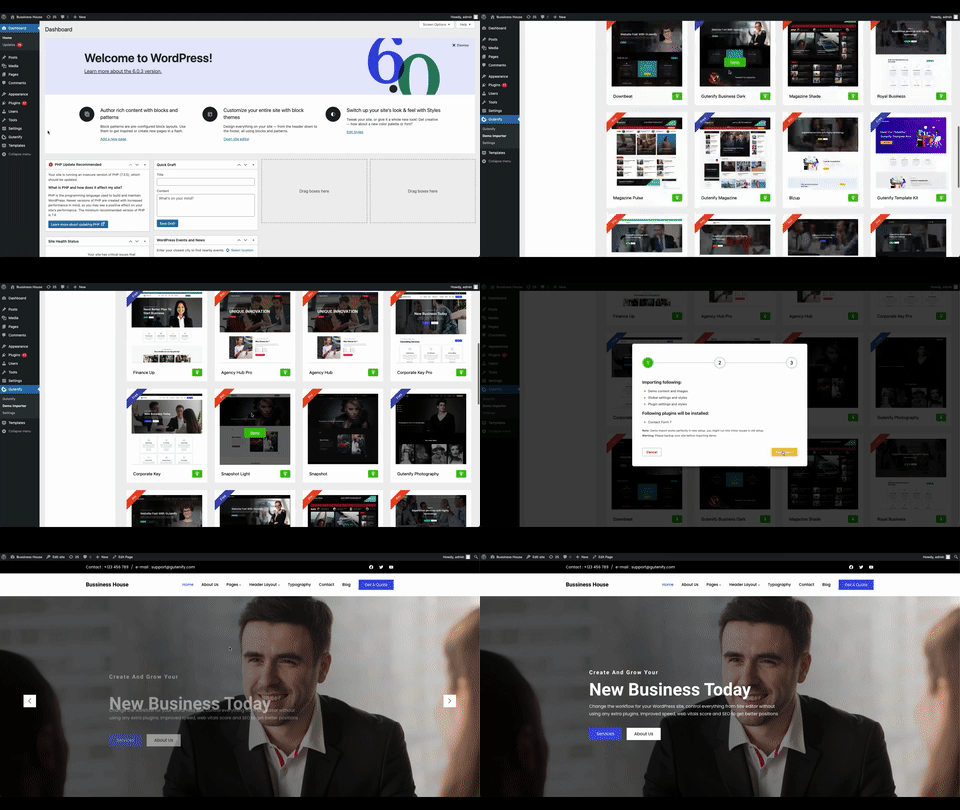
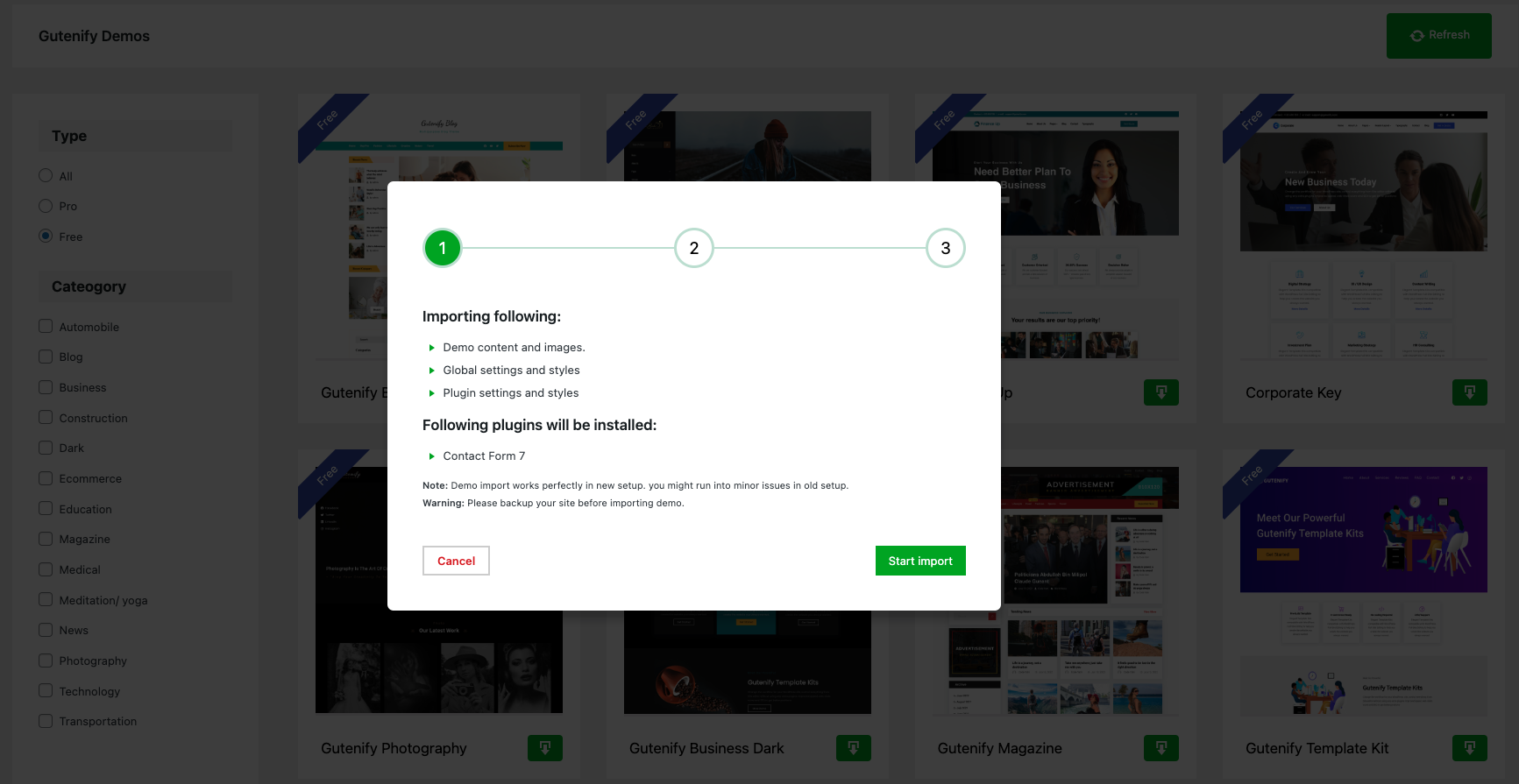
What are Starter Templates and how to import Starter Templates
Gutenify has pre-build Starter Templates for your site which will give your website a base structure. To use our Starter Template you will have to import our pre-build templates with few simple clicks as shown below, after that you will get set of sample pages that can be easily edited by using default WordPress editor. Before importing a template to your site, you can preview it to see how your website will look. More templates are available in the premium version, but you can preview those premium templates from the free version too. Note: Please take a backup of your site before importing…
Do I need Gutenify PRO to use the Popup, Hover Card, and Product Images Slider blocks?
These blocks are PRO features, but you don’t need to purchase Gutenify PRO to use them if your active theme declares support for them — many Gutenify-compatible themes unlock these blocks automatically. Otherwise, they require an active Gutenify PRO license. FAQs and documentations
Changelog
Before updating plugin please check "our latest release notes".
2026-08-24 – version 1.7.0
- Added a “rate us” admin notice shown after 7+ days of active use, dismissible or snoozable for another 7 days.
- Added Popup block: a trigger button that opens a modal with any blocks inside. Requires Gutenify PRO, or a theme that declares support for it.
- Added Hover Card block: reveal extra content on hover or tap, with several entrance animations. Requires Gutenify PRO, or a theme that declares support for it.
- Added WooCommerce Product Images Slider block: a gallery slider with zoom, lightbox, thumbnails, and variation sync. Requires Gutenify PRO, or a theme that declares support for it.
- Fixed WooCommerce Product Images Slider: Border Color, Width, and Radius settings had no visible effect on the frontend.
- Count Up block: improved accessibility (screen reader support, reduced-motion) and SEO-friendly rendering. Added decimal value support.
- Added block transition controls (duration, timing, delay) with responsive support.
- Synced updated block icons and custom panel styles.
2026-07-29 – version 1.6.6
- Remove extra scripts on widget.
- Optimized Stacking Cards scroll performance with linear interpolation (Lerp) animation loop.
- Updated Section Title block sanitization and fixed style/class attribute spacing.
- Sanitized header/footer global custom code using safe tag allowlist.
- Sanitized global CSS styles in REST API update endpoints.
- Enhanced demo importer settings sanitization and template validation.
- Secured SVG notice-bar close icon markup validation.
- Escaped dynamic block style attributes (colors, gradients, borders, spacing, shadows) across Button, Post List, Post Carousel, and other blocks to prevent unsafe CSS output.
- Escaped post and image title output in Gallery Carousel, Post Carousel, and Post List blocks.
- Hardened post excerpt text extraction in Post Carousel and Post List block editors.
2026-05-26 – version 1.6.5
- Major style and layout updates to Demo Importer V2.
- Added search, pagination, categories filtering sidebar, and skeleton loading card animation to Demo Importer.
- Updated Getting Started page styling.
2026-05-20 – version 1.6.4
- Added Stacking Cards block.
- Fixed Styling issues.
2026-04-29 – version 1.6.3
- Added Countdown Timer block.
- Improve plugin header compliance with License and License URI declarations.
- Enhance security by adding ABSPATH protection to framework PHP files.
2026-03-18 – version 1.6.2
- Update block API version to 3 and standardize script/style declarations.
- Exclude specific blocks from custom CSS functionality and add usage instructions.
- Improve className merging in custom list wrapper.
- Minor bug fixes and code optimization.
Screenshots



For developers
Is this your plugin? Show off the numbers.
Add a live badge to your site, docs or GitHub README. It updates on its own — no account needed.
Best Gutenify alternatives
All block-editor plugins →





FAQ
Gutenify: quick answers
Straight answers, pulled from live WordPress.org data.
Live data from WordPress.org · checked Sep 26, 2026
Is Gutenify free?
Yes. Gutenify is free to download and use from the official WordPress.org plugin directory. The developer also sells premium add-ons or a Pro version with extra features.
Is Gutenify safe to use in 2026?
Gutenify is a solid plugin choice in 2026, with a few things worth checking first. It runs on 5K+ sites, is rated 4.5/5 and was last updated 3 weeks ago, and scores 77/100 on our health check.
How many websites use Gutenify?
Gutenify is active on 5K+ WordPress websites and has been downloaded 280,107 times since it launched in January 2020. It was downloaded 4,685 times in the last 30 days.
Does Gutenify work with WordPress 7.1?
Gutenify is officially tested up to WordPress 7.0.6, while the latest release is 7.1.2. It may still work, but try it on a staging site first.
What PHP version does Gutenify need?
Gutenify requires PHP 7.4 or higher. Most hosts run PHP 8.x today, so it works on any modern WordPress hosting.
When was Gutenify last updated?
The latest version, 1.7.0, was released on September 2, 2026 (3 weeks ago).
Who makes Gutenify?
Gutenify is developed and maintained by CodeYatri.
What are the best alternatives to Gutenify?
The most popular alternatives to Gutenify are Classic Editor (8M+ installs), Advanced Editor Tools (1M+ installs) and Disable Gutenberg (500K+ installs).
Powered by PageForge
Want thousands of pages that rank like these? Build them in an afternoon.
This directory runs on the same engine as PageForge. Turn any spreadsheet, CSV or API into thousands of fast, SEO-ready WordPress pages — with schema, internal links and AI-written copy baked in.
- CSV, Google Sheets & API data sources
- AI content, schema & internal links per page
- Works with Elementor, Gutenberg, Yoast & Rank Math
- Free on WordPress.org — no credit card


