



GSheetConnector – Forminator Google Sheets Connector, Export Forminator Submissions
Send your Forminator Forms data directly to your Google Sheet in a real-time.

Solid choice
GSheetConnector is a solid plugin choice in 2026, with a few things worth checking first. It runs on 1K+ sites, is rated 5/5 and was last updated 6 days ago, and scores 66/100 on our health check.
- Actively developed — last update 6 days ago
- Tested with the latest WordPress (7.1)
- Momentum — downloads up 107.5% vs the previous 30 days
- Very few reviews so far
How does it stack up?
Side-by-side on installs, updates, ratings & support



Daily downloads
Download spikes usually follow a new release — each site that auto-updates counts as a download.
Rankings
Where GSheetConnector stands todayWordPress.org search rankings
Live position in the plugin search, top 100| Keyword | Position |
|---|---|
| forminator | #3 |
| forminator forms google sheet | #4 |
| forminator google sheet | #3 |
| google sheet forminator | #3 |
| wordpress google sheet | #18 |
Version adoption
Share of active sites per release.
Rating breakdown
★★★★★★★★★★ 5 from 2 reviews
About GSheetConnector
From the official readme · v2.0.0Description
GSheetConnector for Forminator Forms is an addon plugin,
A bridge between your WordPress based Forminator Forms and Google Sheets.
✔🚀 Quick and Simple to use WordPress Plugin.
If you’re using Forminator Forms by WPMU DEV to collect data from your website visitors , it’s important to have a streamlined process for managing that data. One way to do this is to send Forminator form entry data directly to a Google Sheet. This integration can save your time and effort by eliminating the need to manually transfer data from your form submissions to your spreadsheet.
When a visitor submits their information on your website using GSheetConnector for Forminator Forms, the data they provide is automatically sent to Google Sheets upon form submission in real-time.
Homepage | Documentation | Support | Demo | Forminator Forms Google Sheet PRO
= 📝 Forminator Forms ➜ ✍️Google Sheet=
Get rid of making mistakes while adding the sheet settings or adding the headers ( Mail Tags ) to the sheet column. We have Launched the Forminator Forms Google Sheet Connector PRO version with more automated features.
✨PRO Features✨
➜ Custom Google API Integration Settings
➜ Allowing to Create a New Sheet from Plugin Settings
➜ Custom Ordering Feature / Manage Fields to Display in Sheet using Enable-Disable / Edit the Fields/ Headers Name to display in Google Sheet.
➜ Syncronize Existing Entries for Forminator Forms PRO users
➜ Freeze Header Settings
➜ Header Color and Row Odd/Even Colors.
Refer to the features and benefits page for more detailed information on the features of the Forminator Forms Google Sheet PRO Addon Plugin
⚡️ Check Live Demo
Demo URL: Forminator Google Sheet
Google Sheet URL to Check submitted Data
⚡️ How to Use this Plugin
-
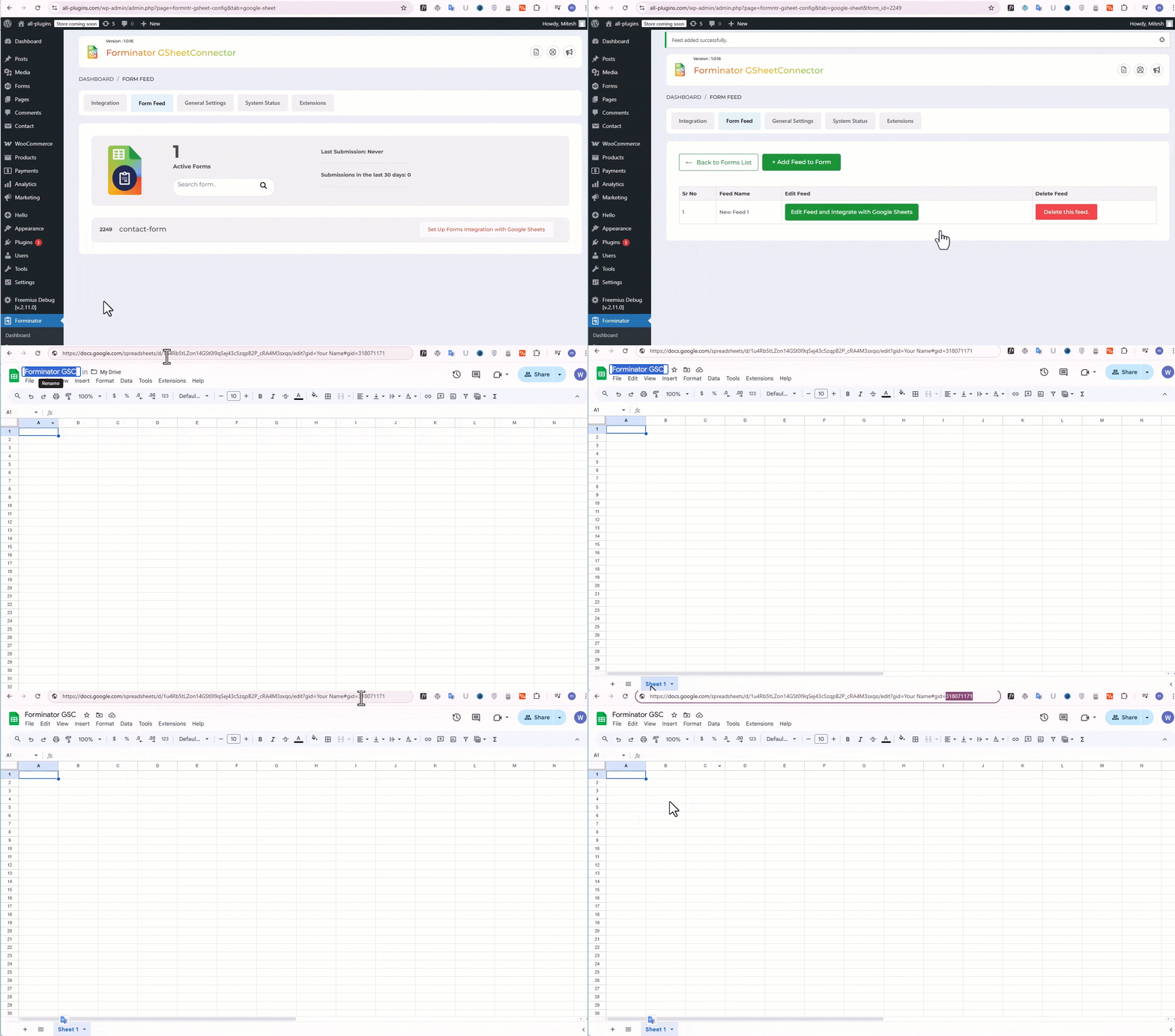
Step: 1 – In Google Sheets
➜ Log into your Google Account and visit Google Sheets.
➜ Create a New Sheet and Name it.
➜ Rename or keep default name of the tab on which you want to capture the data.
➜ Copy Sheet Name, Sheet ID, Tab Name and Tab ID (Refer Screenshots) -
Step: 2 – In WordPress Admin
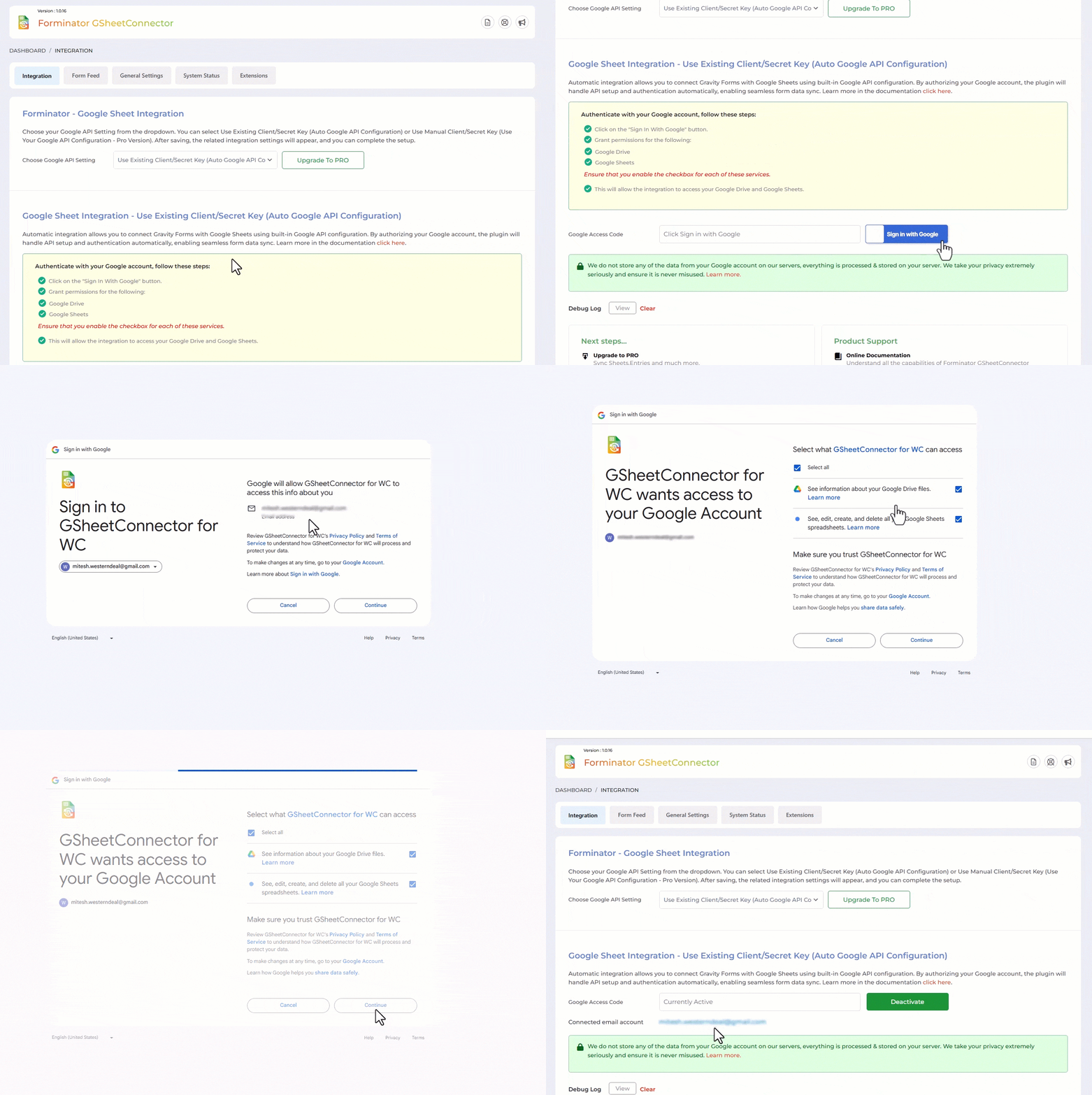
➜ Navigate to Forminator Forms > Google Sheet > Integration Tab
➜ Authenticate with Google using new “Google Access Code” while clicking on “Get Code”
➜ Make Sure to ALLOW Google Permissions for Google Drive and Google Sheets and then copy the code and paste in Google Access Code field, and Hit Save & Authenticate.
➜ Now fetch the sheet details by clicking “Click here to fetch Sheet details to be set at Forminator Forms settings. -
Step: 3 – Form integrate with Google Sheet
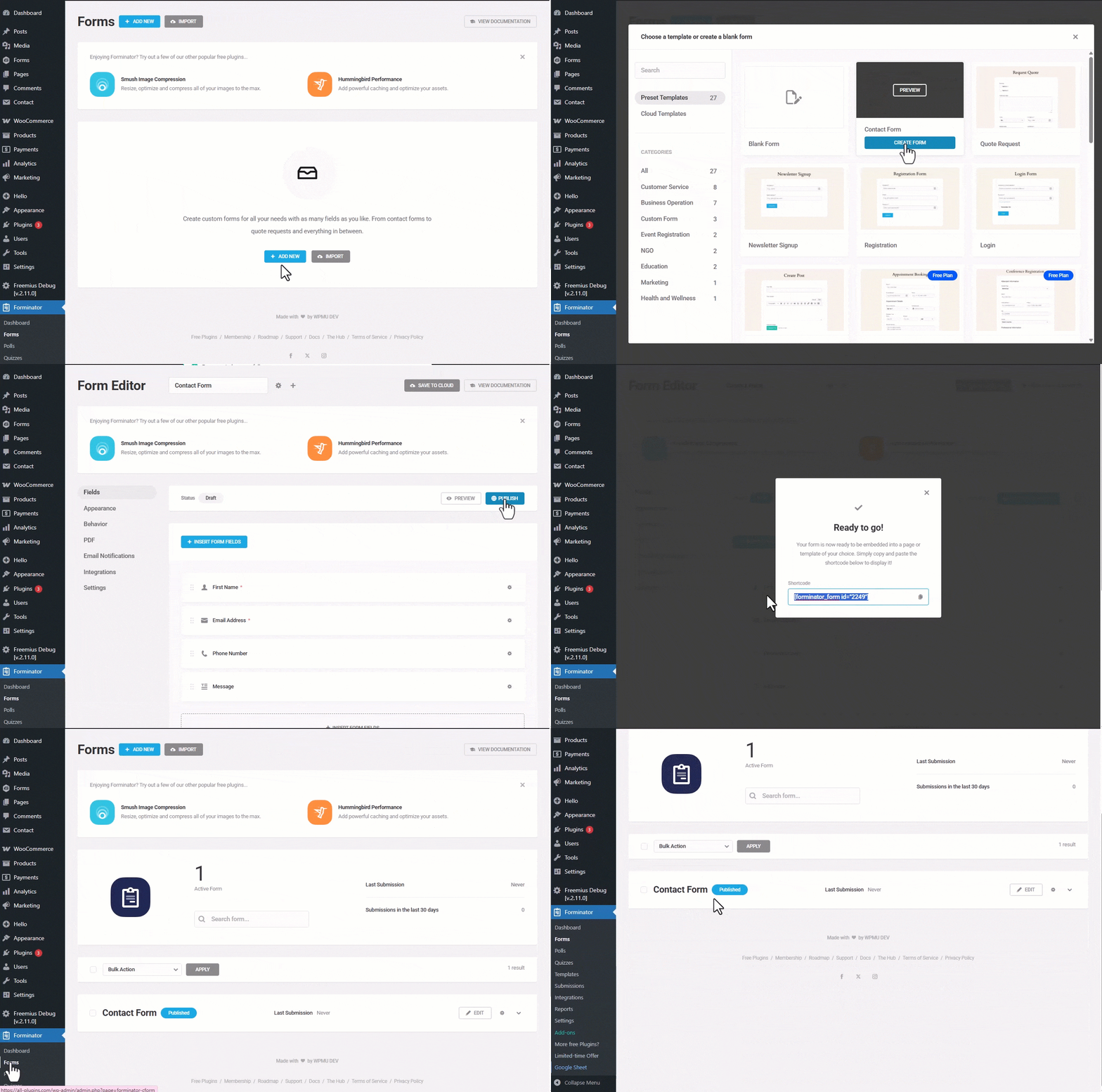
➜ Go to Forminator > Google Sheet > Form Feed tabs
➜ Here Display add Form List and Click on Connect to Google Sheet.
➜ Click on Add Feed . -
Step: 3 – Arranging Columns in Sheet
➜ In the Google sheets tab, provide column names in row 1. The first column should be “date”. For each further column, copy paste mail tags from the Forminator Forms form (e.g. “your-name”, “your-email”, “your-subject”, “your-message”, etc).
➜ Test your form submit and verify that the data shows up in your Google Sheet.
External Services
This plugin connects your Forminator Forms with Google Sheets. To work properly, it relies on the following external services:
-
Google APIs (https://www.googleapis.com)
- Used to send the form submission data to your connected Google Sheets.
- Data sent: Only the form/entry data that you choose to map in the plugin settings.
- Data is sent when a form is submitted or when the integration is triggered.
- Terms of Service: https://policies.google.com/terms
- Privacy Policy: https://policies.google.com/privacy
-
Google Accounts OAuth (https://accounts.google.com)
- Used for authentication and authorization to connect your Google account.
- Data sent: During authentication, the plugin requests OAuth 2.0 access tokens with permissions to access your Google Sheets.
- Terms of Service: https://policies.google.com/terms
- Privacy Policy: https://policies.google.com/privacy
-
GSheetConnector Authentication Service
- Used to simplify the OAuth connection process between your Forminator Forms and Google APIs.
- This service does not store your form entries or personal data; it only facilitates authentication with Google.
- Terms of Service: https://www.gsheetconnector.com/terms-of-service/
- Privacy Policy: https://www.gsheetconnector.com/privacy-policy/
Important Notes
➜ You must pay very careful attention to your naming. This plugin will not send submissions, if names and spellings do not match between your Google Sheets and form fields.
Installation
- Upload
GSheetConnector for Forminator Formsto the/wp-content/plugins/directory and Install it. - Activate the plugin through the ‘Plugins’ screen in WordPress.
- Use the
Admin Panel > Forms > Google Sheetscreen to connect toGoogle Sheetsby clicking on signin with Google button. Allow the Sheets and Drive permissions and Hit Save, you will see code copied into the plugin settings and simply save authentication. - Configure with the appropriate sheet and hit save and you are done.
Enjoy!
Changelog
2.0.0 (24-09-2026)
- Added: Introduced a refreshed and more intuitive user interface for an improved user experience.
- Added: Introduced a new Dashboard tab for quick access to plugin information and key details.
- Added: Added a Notification Bar to display important updates, alerts, and relevant information.
- Added: Introduced dedicated forminatorgs_feeds and forminatorgs_feedmeta database tables for improved feed data management.
- Enhanced: Redesigned and improved the Feed Settings interface for better usability and navigation.
- Enhanced: Migrated existing feed settings from WordPress posts and postmeta tables to the newly introduced dedicated feed tables.
- Fixed: Resolved a compatibility issue related to PCP.
- Removed: Removed the unused lib directory from the plugin package.
1.0.18 (12-06-2026)
- Fixed: Multi-select field data synchronization with Google Sheets.
- Fixed: Name field mapping for Prefix, First Name, Middle Name, and Last Name fields.
- Fixed: Group and Repeater field handling to store values in both individual columns and a combined field.
- Fixed: Post Data field mapping to correctly sync Post Title, Post Content, and Post Excerpt to Google Sheets.
- Fixed: Group and single Calculation field value synchronization with Google Sheets.
1.0.17 (21-11-2025)
- Added: Added new CSS and updated the UI.
1.0.16 (02-09-2025)
- Fixed: CSS and HTML UI — removed extra images, resolved responsive issues, updated FontAwesome files, and included missing fonts.
1.0.15 (12-08-2025)
- Fixed: Warnings and errors reported by Plugin Check.
- Fixed: Missing function comments for better code readability.
- Fixed: Duplicate feed name check to ensure unique entries with error feedback.
- Added: Old extension page replaced with new design.
- Added: General Settings tab in plugin settings.
- Changed: Moved logs to the uploads folder for better file organization.
1.0.14 (22-04-2025)
- Added: Moved saving of credentials to database for Auto API Integration.
Screenshots


For developers
Is this your plugin? Show off the numbers.
Add a live badge to your site, docs or GitHub README. It updates on its own — no account needed.
Best GSheetConnector alternatives
All forminator plugins →



FAQ
GSheetConnector: quick answers
Straight answers, pulled from live WordPress.org data.
Live data from WordPress.org · checked Sep 30, 2026
Is GSheetConnector free?
Yes. GSheetConnector is free to download and use from the official WordPress.org plugin directory. The developer also sells premium add-ons or a Pro version with extra features.
Is GSheetConnector safe to use in 2026?
GSheetConnector is a solid plugin choice in 2026, with a few things worth checking first. It runs on 1K+ sites, is rated 5/5 and was last updated 6 days ago, and scores 66/100 on our health check.
How many websites use GSheetConnector?
GSheetConnector is active on 1K+ WordPress websites and has been downloaded 20,726 times since it launched in May 2023. It was downloaded 1,197 times in the last 30 days.
Does GSheetConnector work with WordPress 7.1?
Yes. The developer has tested GSheetConnector up to WordPress 7.1.2, the latest release. It requires WordPress 5.6 or newer.
What PHP version does GSheetConnector need?
GSheetConnector requires PHP 7.4 or higher. Most hosts run PHP 8.x today, so it works on any modern WordPress hosting.
When was GSheetConnector last updated?
The latest version, 2.0.0, was released on September 24, 2026 (6 days ago).
Who makes GSheetConnector?
GSheetConnector is developed and maintained by WesternDeal.
What are the best alternatives to GSheetConnector?
The most popular alternatives to GSheetConnector are wpDataTables integration fo… (1K+ installs), Honeypot Anti Spam for Form… (1K+ installs) and Forminator Add-on (100+ installs).
Powered by PageForge
Want thousands of pages that rank like these? Build them in an afternoon.
This directory runs on the same engine as PageForge. Turn any spreadsheet, CSV or API into thousands of fast, SEO-ready WordPress pages — with schema, internal links and AI-written copy baked in.
- CSV, Google Sheets & API data sources
- AI content, schema & internal links per page
- Works with Elementor, Gutenberg, Yoast & Rank Math
- Free on WordPress.org — no credit card


