



Gravity Forms Directory
We set out to make a better Directory plugin, and we did it: GravityView takes displaying your form entries to the next level. It is easier, more powerful and more customizable than the Directory plugin. You’ll love…

Consider an alternative
Gravity Forms Directory shows warning signs in 2026 — compare the alternatives below before installing. It runs on 500+ sites, is rated 3.2/5 and was last updated 6 years ago, and scores 35/100 on our health check.
- Small user base (500+ active installs)
- Mixed reviews — 3.2/5 from 34 ratings
- No update in 5 years
- Only tested up to WordPress 5.6 (latest is 7.1)
How does it stack up?
Side-by-side on installs, updates, ratings & support


Daily downloads
Download spikes usually follow a new release — each site that auto-updates counts as a download.
Rankings
Where Gravity Forms Directory stands todayWordPress.org search rankings
Live position in the plugin search, top 100| Keyword | Position |
|---|---|
| form | >100 |
| forms | >100 |
| gravity | >100 |
| gravity form | >100 |
| gravity forms | >100 |
Version adoption
Share of active sites per release.
Rating breakdown
★★★★★★★★★★ 3.2 from 34 reviews
About Gravity Forms Directory
From the official readme · v4.2Description
This plugin requires Gravity Forms
GravityView is the best way to display Gravity Forms entries
We set out to make a better Directory plugin, and we did it: GravityView takes displaying your form entries to the next level. It is easier, more powerful and more customizable than the Directory plugin. You’ll love GravityView.
Check out GravityView or try a demo today!
Turn Gravity Forms into a Directory plugin
Gravity Forms is already the easiest form plugin…now, the Gravity Forms Directory & Addons plugin turns Gravity Forms into a great directory.
- Completely shortcode based, using the
[directory]shortcode - Includes built-in searching
- Allow logged-in users to edit their directory listings
- Choose to show entries to only the users who created them
- Sort by column
- Easily re-organize the columns inside Gravity Forms
- Has an option to show only approved listings with an easy approval process
- Show or hide any column
- Display directory & entries as a table (default), list (
<ul>), or definition list (<dl>) - Directory features pagination
- Define custom styles inside the shortcode
- Includes lightbox support for uploaded images
- Option to view single entries in their own page or in a lightbox
- Bulk Approve & Disapprove entries
Insert a totally configurable table using the editor
There are tons of configurable options for how you want the directory to display.
Improve Gravity Forms Functionality and Usability
- Expand the Add Fields boxes to view all the boxes at once.
- Edit form entries directly from the Entries page (saving two clicks)
- Easily access form data to use in your website with PHP functions – Learn more on the plugin’s website
Have an idea or issue with this Gravity Forms add-on plugin?
Installation
- Upload this plugin to your blog and Activate it
- Set it up following instructions below:
To integrate a form with Directory:
- Go to the post or page where you would like to add the directory.
- Click the “Add Directory” button above the content area.
- Choose a form from the drop-down menu and configure settings as you would like them.
- Click “Insert Directory”. A “shortcode” should appear in the content editor that looks similar to
[directory form="#"] - Save the post or page
How do I select what columns I want to display in the Directory?
- Edit the Gravity Forms form you’d like to configure a Directory for
- Click “Directory Columns” In the Form Editor toolbar (near the top-center of the page)
- Drag & drop the fields in the order you’d like them to appear in the directory
- Drag from the right (“Hidden Columns”) side to the left (“Visible Columns”) side.
- Click the “Save” button
- Voila!
More Configuring of Fields & Columns
When editing a form, click on a field to expand the field. Next, click the “Directory” tab. There, you will find options to:
- Choose whether you would like the field to be a link to the Single Entry View;
- Hide the field in Directory View; and
- Hide the field in Single Entry View
Changelog
Fixed: Compatibility with Gravity Forms 2.0 Entries screen The "Directory Columns" menu returns to the toolbar Show the "Directory Columns" link when displaying the default form in the admin The "Approved" checkbox now does not break entries layout Fixed: PHP warnings shown when configuring directory columns
4.2 on December 7, 2020
New:
- Compatible with WordPress 5.6
- Compatible with Gravity Forms 2.5
- Activation check to verify if Gravity Forms is active
- Requires WordPress 4.4 or newer
Fixed:
- Directory Columns window now displays properly
- Search by substring on directory view works
- PHP warnings
Improvements:
- Security improvements
- Restructured classes and templates
- Removed redundant code
- Refactored folder structure
4.1.2 & 4.1.3 on April 2, 2018
- Fixed: Check whether a function exists that was introduced in Gravity Forms 2.2
4.1.1 on March 30, 2018
- Fixed: Searching entries using the global search would not filter entries
- Fixed: Searches with a value of
0would not filter entries
4.1.0.1 on March 8, 2018
- Removed test folders containing JSHint files, as suggested by WordPress.org
4.1 on March 8, 2018
- Fixed: No entries are visible when using Smart Approval
- The Directory may return inaccurate entry counts, but this will be fixed automatically once Gravity Forms 2.3 is released and installed on your site
- Sorry, but this was necessary!
- Fixed: Approval column not showing when there was no Approval fields in the form
- Bulk Approval updates
- This feature now requires Gravity Forms 2.2.4 (released August 8, 2017)
- Fixed: Approval now works when selecting all entries in a form
- Fixed: Creating unreachable database rows when there are no Approval fields in a form
4.0 on March 6, 2018
A big update to make Gravity Forms Directory compatible with Gravity Forms 2.3, and to fix entry approval.
Gravity Forms Directory is not under active development. We’re focusing on GravityView, which is a way better plugin! Try it out for 30 days, if you don’t like it, we’ll give you your money back.
New:
- Compatible with Gravity Forms 2.3
- Now requires Gravity Forms 2.2.3.12 or newer
- Uses Gravity Forms API to fetch entries, instead of direct queries
- Prevent access to unapproved single entries for users without permission
Fixed:
- “Edit” action links for entries work again
- The ability to see the IDs for each field in an entry
- Bulk Approve and Bulk Disapprove
- Allow users with
gravityforms_edit_entriescapabilities to edit entries (previously, only users withgravityforms_directorycapability) - Searching for
0values
Improvements:
- Update code to use
GF_Fieldinstead of array - Remove calls to deprecated
get_currentuserinfo()function - Remove unused code
- Removed use of global variables
- Added additional text & URL escaping
- Update Google Maps links to use HTTPS
- Security improvements
Screenshots
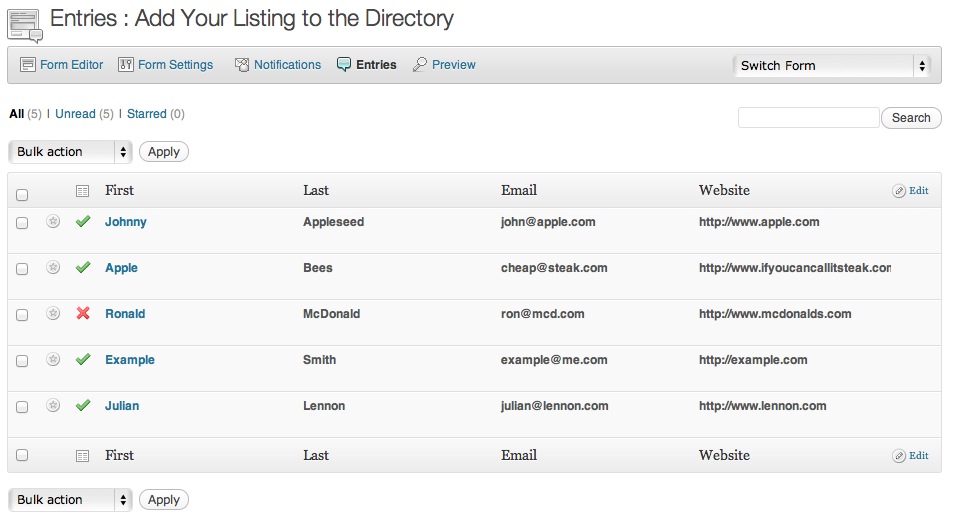


For developers
Is this your plugin? Show off the numbers.
Add a live badge to your site, docs or GitHub README. It updates on its own — no account needed.
Best Gravity Forms Directory alternatives
All form plugins →





FAQ
Gravity Forms Directory: quick answers
Straight answers, pulled from live WordPress.org data.
Live data from WordPress.org · checked Oct 5, 2026
Is Gravity Forms Directory free?
Yes. Gravity Forms Directory is free to download and use from the official WordPress.org plugin directory.
Is Gravity Forms Directory safe to use in 2026?
Gravity Forms Directory shows warning signs in 2026 — compare the alternatives below before installing. It runs on 500+ sites, is rated 3.2/5 and was last updated 6 years ago, and scores 35/100 on our health check.
How many websites use Gravity Forms Directory?
Gravity Forms Directory is active on 500+ WordPress websites and has been downloaded 186,482 times since it launched in November 2009. It was downloaded 205 times in the last 30 days.
Does Gravity Forms Directory work with WordPress 7.1?
Gravity Forms Directory is officially tested up to WordPress 5.6.21, while the latest release is 7.1.2. It may still work, but try it on a staging site first.
When was Gravity Forms Directory last updated?
The latest version, 4.2, was released on December 7, 2020 (6 years ago).
Who makes Gravity Forms Directory?
Gravity Forms Directory is developed and maintained by Zack Katz.
What are the best alternatives to Gravity Forms Directory?
The most popular alternatives to Gravity Forms Directory are MC4WP: Mailchimp for WordPr… (1M+ installs), MW WP Form (200K+ installs) and Conditional Fields for Cont… (100K+ installs).
Powered by PageForge
Want thousands of pages that rank like these? Build them in an afternoon.
This directory runs on the same engine as PageForge. Turn any spreadsheet, CSV or API into thousands of fast, SEO-ready WordPress pages — with schema, internal links and AI-written copy baked in.
- CSV, Google Sheets & API data sources
- AI content, schema & internal links per page
- Works with Elementor, Gutenberg, Yoast & Rank Math
- Free on WordPress.org — no credit card


