



GoWishCart – Wishlist for FluentCart
Wishlist management for FluentCart stores with guest wishlists, variation support, and optional notification and FluentCRM integration.

Use with caution
GoWishCart works, but test it on a staging site before relying on it in 2026. Was last updated 5 months ago, and scores 49/100 on our health check.
- Small user base (<10 active installs)
- Very few reviews so far
How does it stack up?
Side-by-side on installs, updates, ratings & support



Daily downloads
Download spikes usually follow a new release — each site that auto-updates counts as a download.
Rankings
Where GoWishCart stands todayWordPress.org search rankings
Live position in the plugin search, top 100| Keyword | Position |
|---|---|
| ecommerce | >100 |
| favorites | >100 |
| fluentcart | #33 |
| shopping | >100 |
| Wishlist | >100 |
About GoWishCart – Wishlist for FluentCart
From the official readme · v2.0.3Description
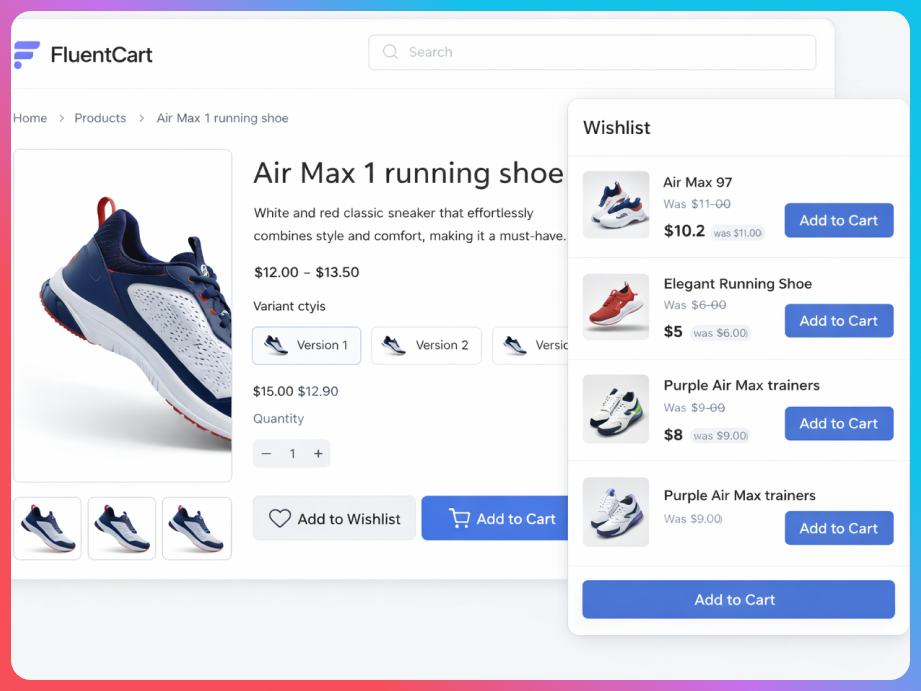
GoWishCart adds wishlist functionality to FluentCart-powered stores.
Customers can:
* Save products for later
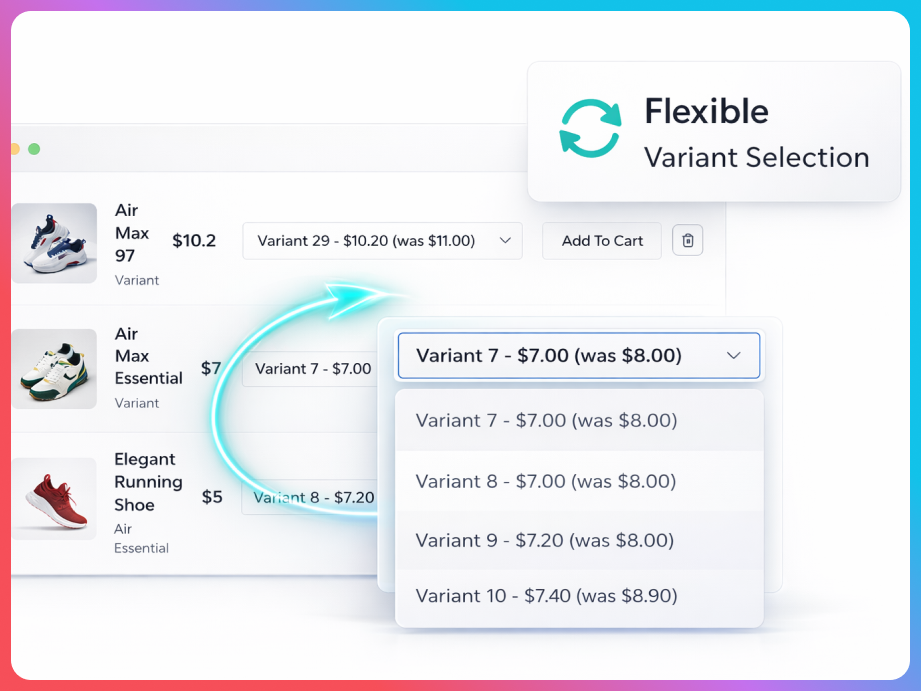
* Save selected product variations
* Manage wishlists as logged-in or guest users
* Receive optional notifications for price drops and back-in-stock updates
Store admins can:
* Choose or create a wishlist page
* Control button placement on product and shop/archive pages
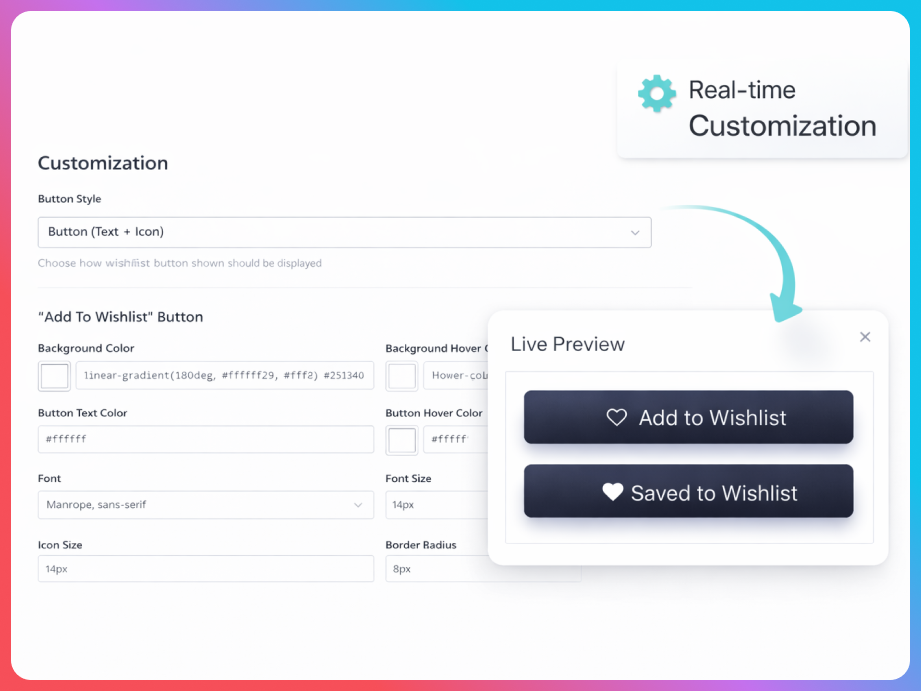
* Customize button text and icons
* Connect optional FluentCRM automation triggers
Why Choose GoWishCart?
- 💯 GoWishCart is FREE! – Core features available at no cost
- 🛒 Built for FluentCart – Native integration with FluentCart products and checkout
- 👥 Guest Support – Customers can create wishlists without creating an account
- 🎨 Product Variations – Saves specific product variants (color, size, etc.)
- 📧 Smart Notifications – Price drop alerts and back-in-stock notifications
- 🔗 FluentCRM Integration – Automate marketing campaigns based on wishlist activity
- ⚙️ Fully Customizable – Customize button position, icons, and text labels
- 📱 Shop Page Integration – Add wishlist buttons on product archive pages
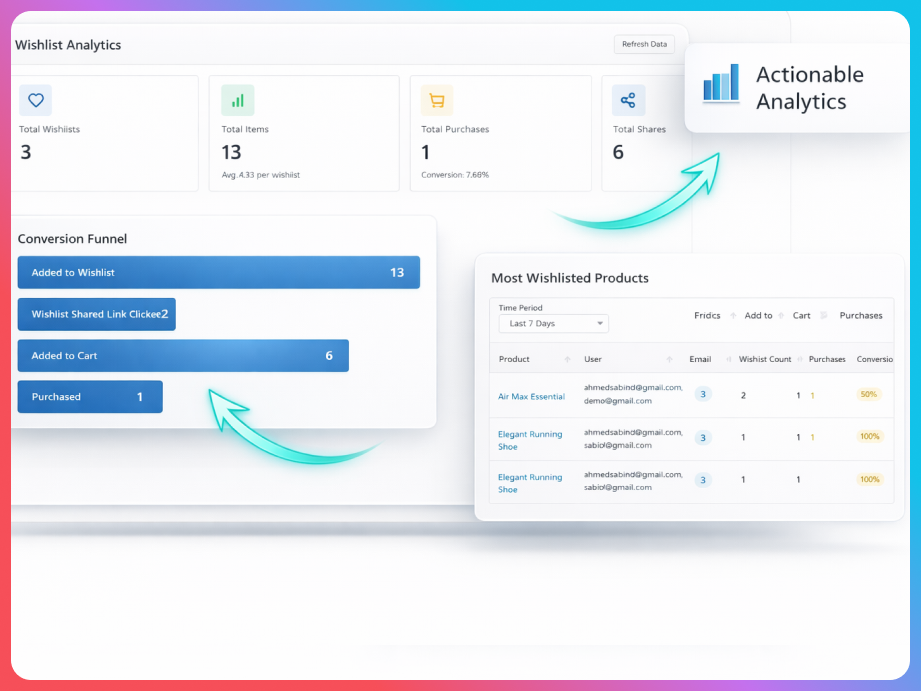
- 🎯 Conversion Tracking – Track wishlist-to-cart conversions (Pro feature)
FluentCart Integration
GoWishCart is built from the ground up for FluentCart stores:
* Native Product Support: Seamlessly integrates with FluentCart products, variations, and pricing
* Cart Integration: Easy add-to-cart functionality directly from wishlist
* Order Tracking: Track conversions from wishlist to purchase
* FluentCRM Automation: Trigger email campaigns when products are added, removed, or when prices drop
Basic Features
- Select a page for your wishlist – Choose any page to display the wishlist or use the built-in wishlist page
- Customize “Add to wishlist” button position – Place the button at the top or bottom of product pages
- Show “Remove from wishlist” button – Display remove button when product is already in the wishlist
- Show “Add to wishlist” button on Shop page – Enable wishlist buttons on product archive/shop pages
- Product variation support – If the user selects a specific color or size and then adds it to the wishlist, these details will be saved
- Guest wishlist support – Customers can create and manage wishlists without creating an account (session-based with optional email capture)
- FluentCRM integration – Automate email campaigns with triggers for item added, item removed, price drop, and back in stock events
- Price drop alerts – Automatically notify customers when wishlist items go on sale
- Back in stock notifications – Alert customers when out-of-stock wishlist items become available
- Customizable button icons and text – Customize the appearance of wishlist buttons with custom icons and text labels
- Wishlist page with shortcode support – Display wishlist using shortcodes:
[gowishcart_wishlist]and[gowishcart_wishlist_button] - Privacy settings – Control wishlist visibility (private by default, shared/public available in Pro)
- Multiple wishlists – Create and manage multiple wishlists (Pro feature)
- Social sharing – Share wishlists on Facebook, Twitter, Pinterest, WhatsApp, and via email (Pro feature)
- Analytics tracking – Track wishlist performance and conversion metrics (Pro feature)
📞 Support
For free plugin support, please visit the WordPress.org support forum. Commercial support for GoWishCart Pro is available at gowishcart.com.
📝 License
This project is licensed under the GPL-2.0+ License – see the LICENSE file for details.
Developed with ❤️ by gowishcart.com Team
Third-Party Services
This plugin uses the following third-party libraries and services:
-
FluentCRM – Email marketing automation (optional integration)
- Plugin: https://wordpress.org/plugins/fluent-crm/
- Terms of Service: https://fluentcrm.com/terms/
-
FluentCart – Ecommerce platform (required dependency)
- Plugin: https://wordpress.org/plugins/fluent-cart/
- Terms of Service: https://fluentcart.com/terms/
Support
For free plugin support, please visit the WordPress.org support forum. Commercial support for GoWishCart Pro is available at gowishcart.com.
Privacy Policy
GoWishCart – Wishlist for FluentCart uses Appsero SDK to collect some telemetry data upon user’s confirmation. This helps us to troubleshoot problems faster & make product improvements.
Appsero SDK does not gather any data by default. The SDK only starts gathering basic telemetry data when a user allows it via the admin notice. We collect the data to ensure a great user experience for all our users.
Integrating Appsero SDK DOES NOT IMMEDIATELY start gathering data, without confirmation from users in any case.
Learn more about how Appsero collects and uses this data.
Installation
- Upload the plugin files to the
/wp-content/plugins/gowishcart-wishlist-for-fluentcartdirectory, or install the plugin through the WordPress plugins screen directly. - Activate the plugin through the ‘Plugins’ screen in WordPress
- Ensure FluentCart is installed and activated (GoWishCart requires FluentCart to function)
- Navigate to Settings->GoWishCart to configure the plugin
- Configure your wishlist settings:
- Select wishlist page or use the default wishlist page
- Customize button position (top or bottom)
- Enable shop page buttons if desired
- Customize button icons and text labels
- Configure FluentCRM integration (optional) – Connect with FluentCRM to enable automation triggers
- Set up notifications (optional) – Configure price drop and back-in-stock email notifications
Frequently asked questions
How much does GoWishCart cost?
GoWishCart offers a free version with core wishlist features including guest support, product variations, basic notifications, and FluentCRM integration. Advanced features like multiple wishlists, social sharing, and analytics are available in GoWishCart Pro.
Do I need FluentCart to use GoWishCart?
Yes, GoWishCart is built specifically for FluentCart and requires FluentCart to be installed and activated. GoWishCart integrates seamlessly with FluentCart products, variations, pricing, and checkout functionality.
How does guest wishlist work?
Guest users can create and manage wishlists without creating an account. Wishlists are stored using session-based cookies. You can optionally capture guest email addresses to enable email notifications and convert guest wishlists to user accounts when they register.
Can I customize the wishlist button?
Yes! GoWishCart offers extensive customization options. You can customize the button position (top or bottom of product pages), choose custom icons or use predefined icons, and customize the text labels for both “Add to Wishlist” and “Remove from Wishlist” states. You can also add custom CSS for advanced styling.
Does GoWishCart support product variations?
Yes, GoWishCart fully supports product variations. When a customer selects a specific color, size, or other variation and adds it to their wishlist, those specific variant details are saved. When they view their wishlist later, they’ll see the exact variation they selected.
How does FluentCRM integration work?
GoWishCart integrates with FluentCRM to provide automation triggers. You can set up email campaigns that trigger when: * A product is added to a wishlist * A product is removed from a wishlist * A wishlist item’s price drops * An out-of-stock wishlist item comes back in stock These triggers can be used in FluentCRM automation funnels to send targeted marketing emails.
What notifications are available?
GoWishCart supports price drop alerts and back-in-stock notifications. When a product in a customer’s wishlist goes on sale or comes back in stock, they’ll automatically receive an email notification (if they’ve provided their email address).
Can I show the wishlist button on shop/archive pages?
Yes, you can enable the “Show Button on Shop Page” option in the GoWishCart settings. This will display the wishlist button on product archive pages, making it easy for customers to add products to their wishlist while browsing.
How do I display the wishlist page?
You can use the [gowishcart_wishlist] shortcode on any page, or GoWishCart will automatically create a wishlist page. You can also use the [gowishcart_wishlist_button] shortcode to display the add-to-wishlist button anywhere on your site.
Changelog
Add: Integrated Appsero to track plugin installs, uninstalls, and collect uninstall feedback.
2.0.4
- Improved: Updated the readme file
- Improved: Compatibility with WordPress v7
2.0.3
- Improved: Readme file
2.0.1
- Improved: Appsero update
2.0.0
- Improved: Core functionality and overall performance.
- Updated: Codebase for enhanced stability.
- Updated: Left menu system for better usability
1.2.0
- Add: Integrated Appsero to track plugin installs, uninstalls, and collect uninstall feedback.
1.1.5
Changed
- Banner, logo update
- Readme update
Screenshots
For developers
Is this your plugin? Show off the numbers.
Add a live badge to your site, docs or GitHub README. It updates on its own — no account needed.
Best GoWishCart alternatives
All ecommerce plugins →





FAQ
GoWishCart – Wishlist for FluentCart: quick answers
Straight answers, pulled from live WordPress.org data.
Live data from WordPress.org · checked Oct 10, 2026
Is GoWishCart free?
Yes. GoWishCart is free to download and use from the official WordPress.org plugin directory.
Is GoWishCart safe to use in 2026?
GoWishCart works, but test it on a staging site before relying on it in 2026. Was last updated 5 months ago, and scores 49/100 on our health check.
How many websites use GoWishCart?
GoWishCart is active on <10 WordPress websites and has been downloaded 714 times since it launched in March 2026. It was downloaded 62 times in the last 30 days.
Does GoWishCart work with WordPress 7.1?
GoWishCart is officially tested up to WordPress 7.0.7, while the latest release is 7.1.3. It may still work, but try it on a staging site first.
What PHP version does GoWishCart need?
GoWishCart requires PHP 7.4 or higher. Most hosts run PHP 8.x today, so it works on any modern WordPress hosting.
When was GoWishCart last updated?
The latest version, 2.0.3, was released on May 24, 2026 (5 months ago).
Who makes GoWishCart?
GoWishCart is developed and maintained by azizultex.
What are the best alternatives to GoWishCart?
The most popular alternatives to GoWishCart are WooCommerce (7M+ installs), Popup Builder & Popup Maker… (1M+ installs) and WooCommerce PayPal Payments (800K+ installs).
Powered by PageForge
Want thousands of pages that rank like these? Build them in an afternoon.
This directory runs on the same engine as PageForge. Turn any spreadsheet, CSV or API into thousands of fast, SEO-ready WordPress pages — with schema, internal links and AI-written copy baked in.
- CSV, Google Sheets & API data sources
- AI content, schema & internal links per page
- Works with Elementor, Gutenberg, Yoast & Rank Math
- Free on WordPress.org — no credit card


