


Insights from Google PageSpeed
Use Insights from Google PageSpeed to improve your site's performance, Core Web Vitals, search engine ranking and your visitors' browsing experience.

Safe pick
Yes — Insights from Google PageSpeed is a safe, well-maintained plugin to use in 2026. It runs on 10K+ sites, is rated 4.8/5 and was last updated 1 month ago, and scores 85/100 on our health check.
- Proven at scale on 10K+ active sites
- Loved by users — 4.8/5 from 28 reviews
- Tested with the latest WordPress (7.1)
How does it stack up?
Side-by-side on installs, updates, ratings & support



Daily downloads
Download spikes usually follow a new release — each site that auto-updates counts as a download.
Rankings
Where Insights from Google PageSp… stands todayWordPress.org search rankings
Live position in the plugin search, top 100| Keyword | Position |
|---|---|
| core web vitals | #23 |
| Page Speed | #73 |
| pagespeed insights | #2 |
| performance | >100 |
| seo | >100 |
Version adoption
Share of active sites per release.
Rating breakdown
★★★★★★★★★★ 4.8 from 28 reviews
About Insights from Google PageSpeed
From the official readme · v5.0.0Description
Google PageSpeed Insights is a tool that empowers you to make decisions that increase the performance of your website. Recommendations from Google PageSpeed are based upon current industry best practices for desktop and mobile web performance.
Through the addition of advanced data visualization, tagging, filtering, and snapshot technology, Insights from Google PageSpeed provides a comprehensive solution for any webmaster looking to increase their site performance, their search engine ranking, and their visitors’ browsing experience.
Version 5 brings the plugin up to date with the PageSpeed Insights you know from pagespeed.web.dev: every page now gets all Lighthouse scores and real-user Core Web Vitals, in a new and faster dashboard in wp-admin.
Detailed Page Reporting
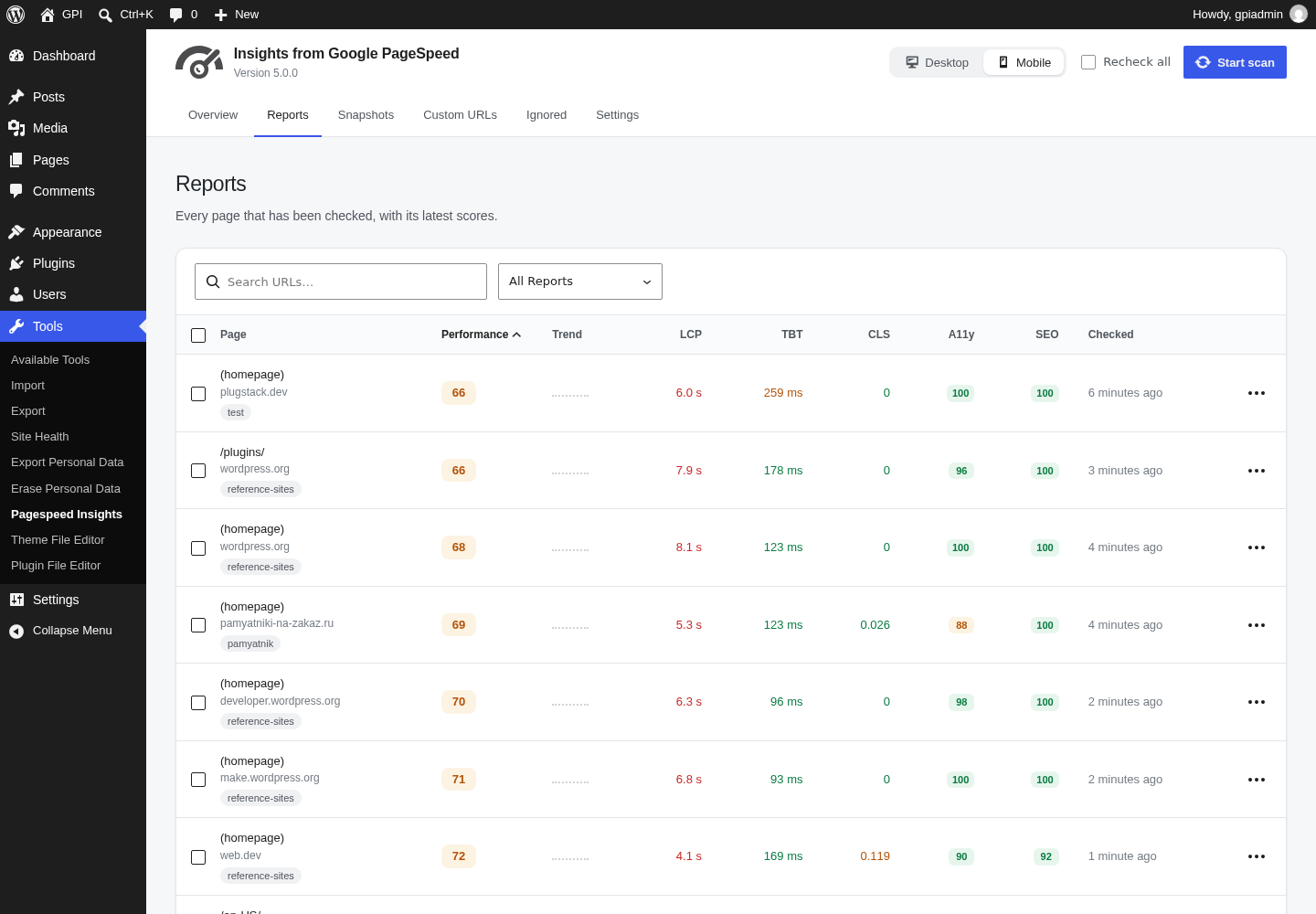
Sort your page reports by their PageSpeed score to prioritize the largest areas of opportunity on your site. Page reports utilize easy to read visualizations that allow you to quickly focus in on the most important data to improve your site’s performance.
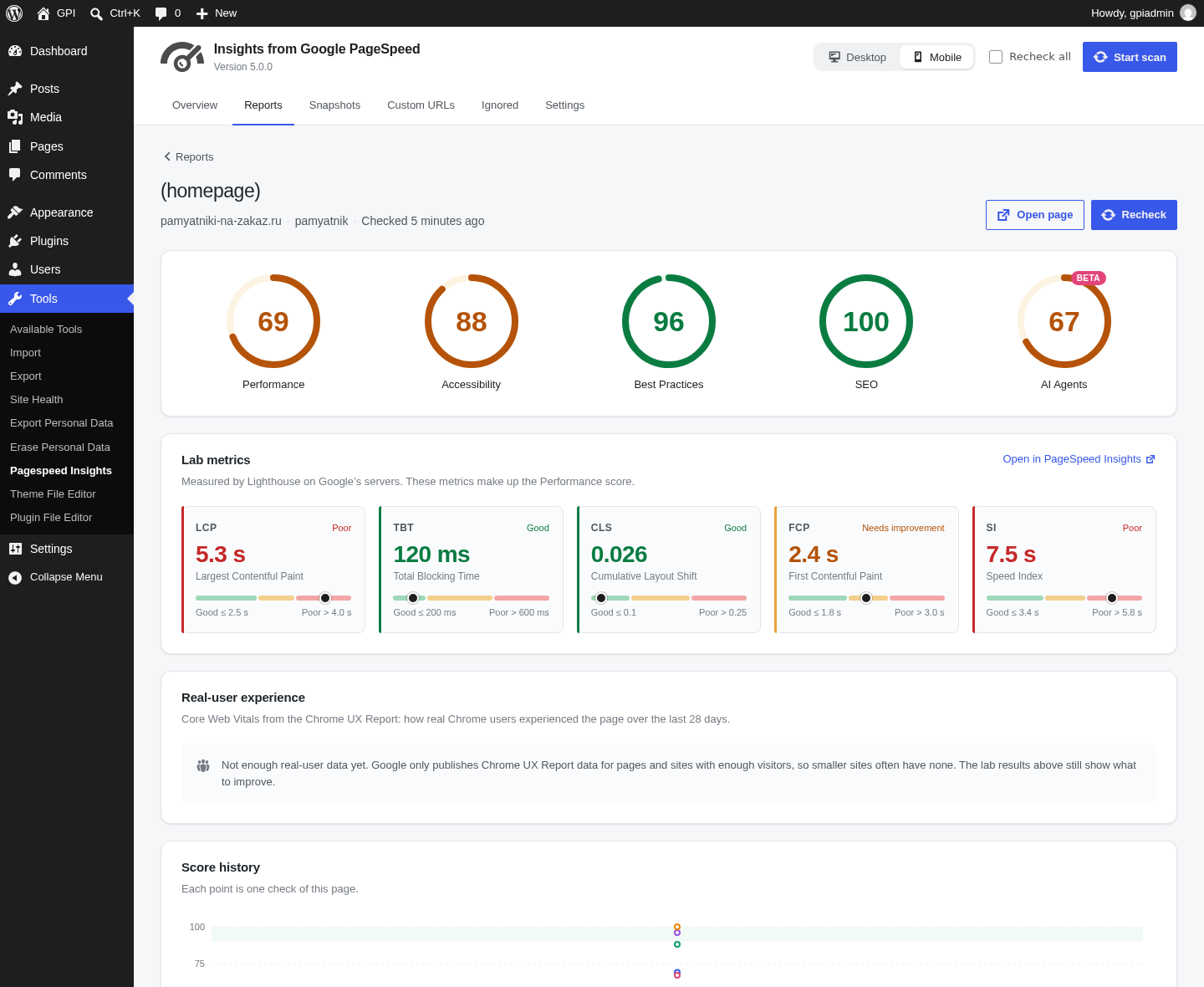
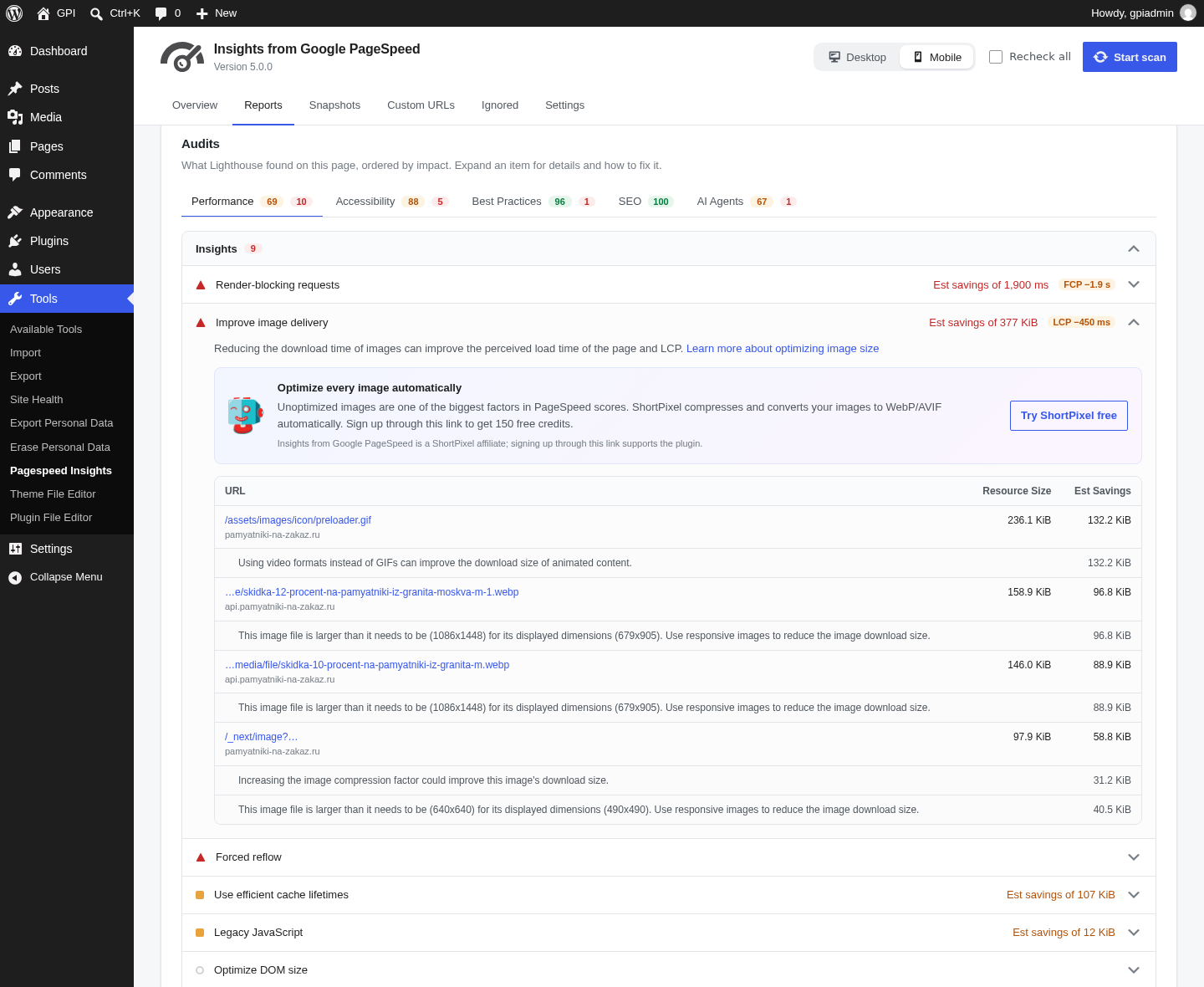
Each report lists the insights and diagnostics Google found, with the estimated savings, the resources involved and WordPress specific tips. You can also see the page’s score history, a screenshot and a filmstrip of how it loads.
Performance, Accessibility, Best Practices, SEO and AI Agents
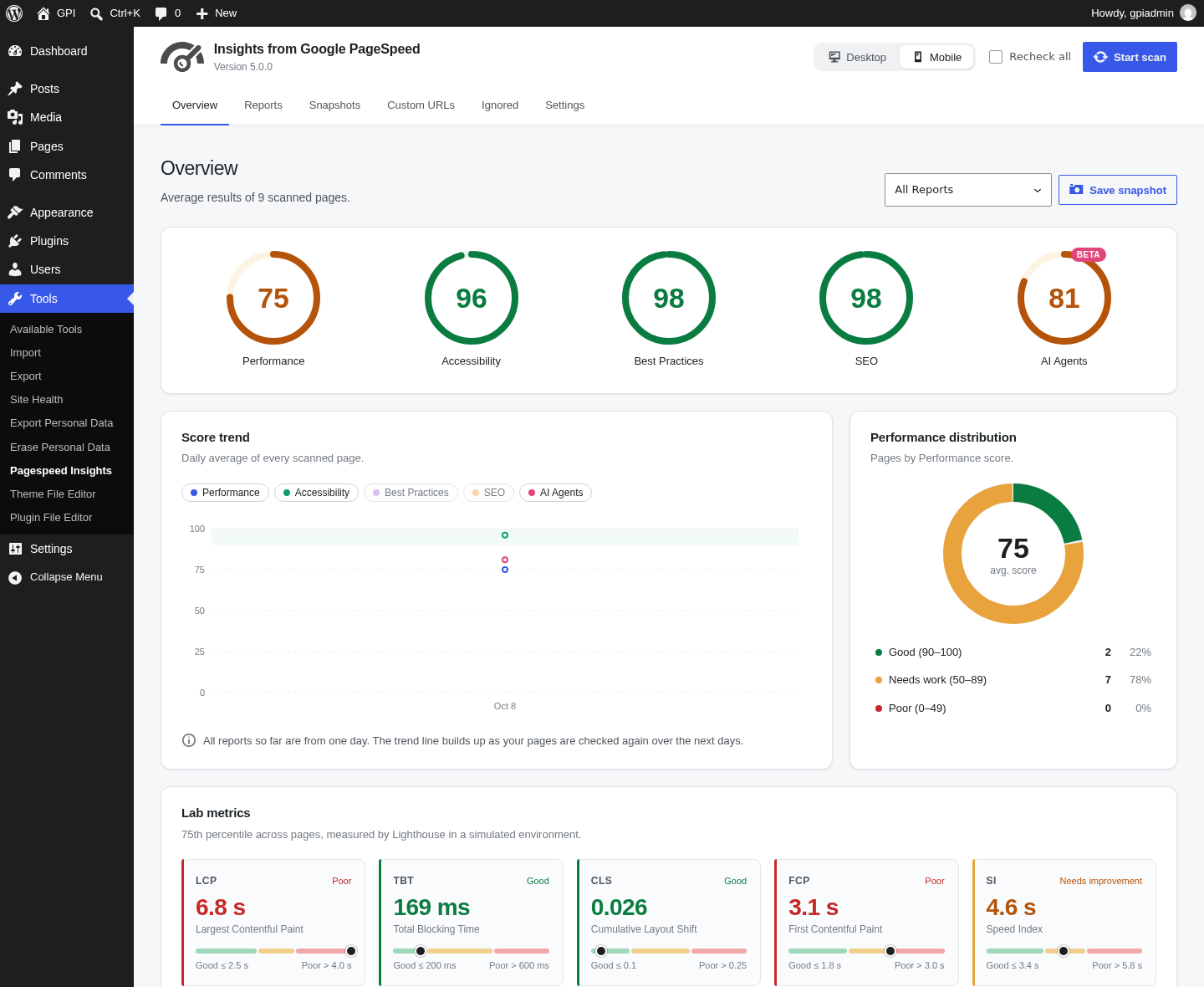
Every page is scored in all five Lighthouse categories, the same ones you see on pagespeed.web.dev. Performance comes with the lab metrics behind it: Largest Contentful Paint, Total Blocking Time, Cumulative Layout Shift, First Contentful Paint and Speed Index.
The AI Agents category (Lighthouse “Agentic Browsing”) checks how well AI agents and answer engines can read and use your pages, for example whether you have a valid llms.txt file. Google still marks it as experimental.
Core Web Vitals from Real Users
When Google has enough Chrome UX Report data for a page or for your whole site, reports show how real visitors experienced it: LCP, INP and CLS, the share of good, average and poor visits, and whether the page passes the Core Web Vitals assessment.
Report Summaries
Report Summaries are a powerful and exclusive feature of Insights from Google PageSpeed. Summaries display your average scores, the largest areas for improvement across ALL reports, as well as your best and lowest performing pages. Report Summaries can be filtered to narrow results by: Pages, Posts, Categories, Custom URLs, and Custom Post Types.
Using Report Summaries allows you to ‘zoom out’ from the page level and better understand the big picture of your site’s performance. Charts show how your scores change over time and how many of your pages are good, need work or are poor.
Desktop and Mobile Page Reports
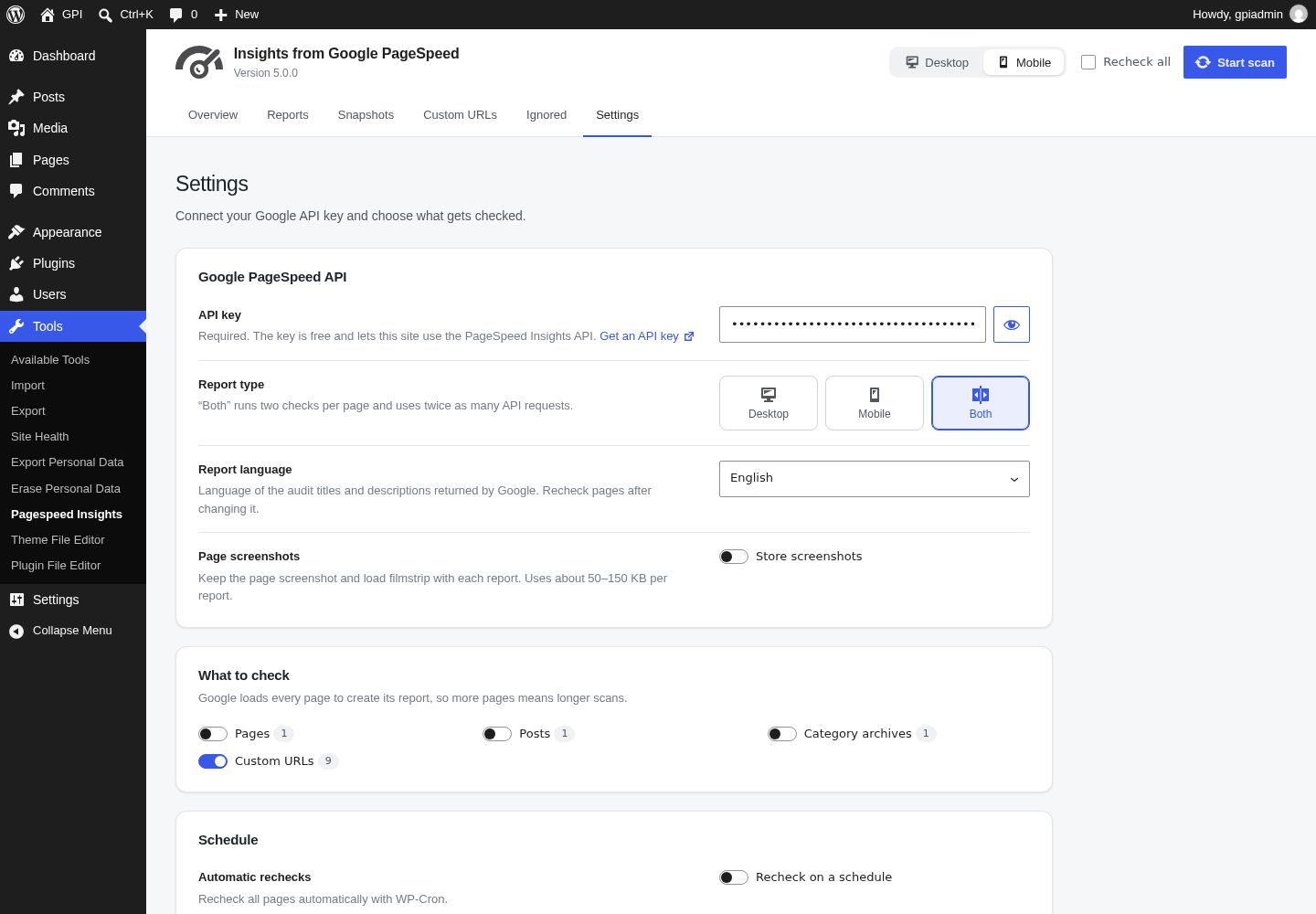
Best practices for site performance differ greatly between Desktop and Mobile device usage. Configure Insights from Google PageSpeed to generate Desktop reports, Mobile reports, or both!
Toggle back and forth between report types to see specific suggestions for improving the performance and experience on each platform.
Report Snapshots
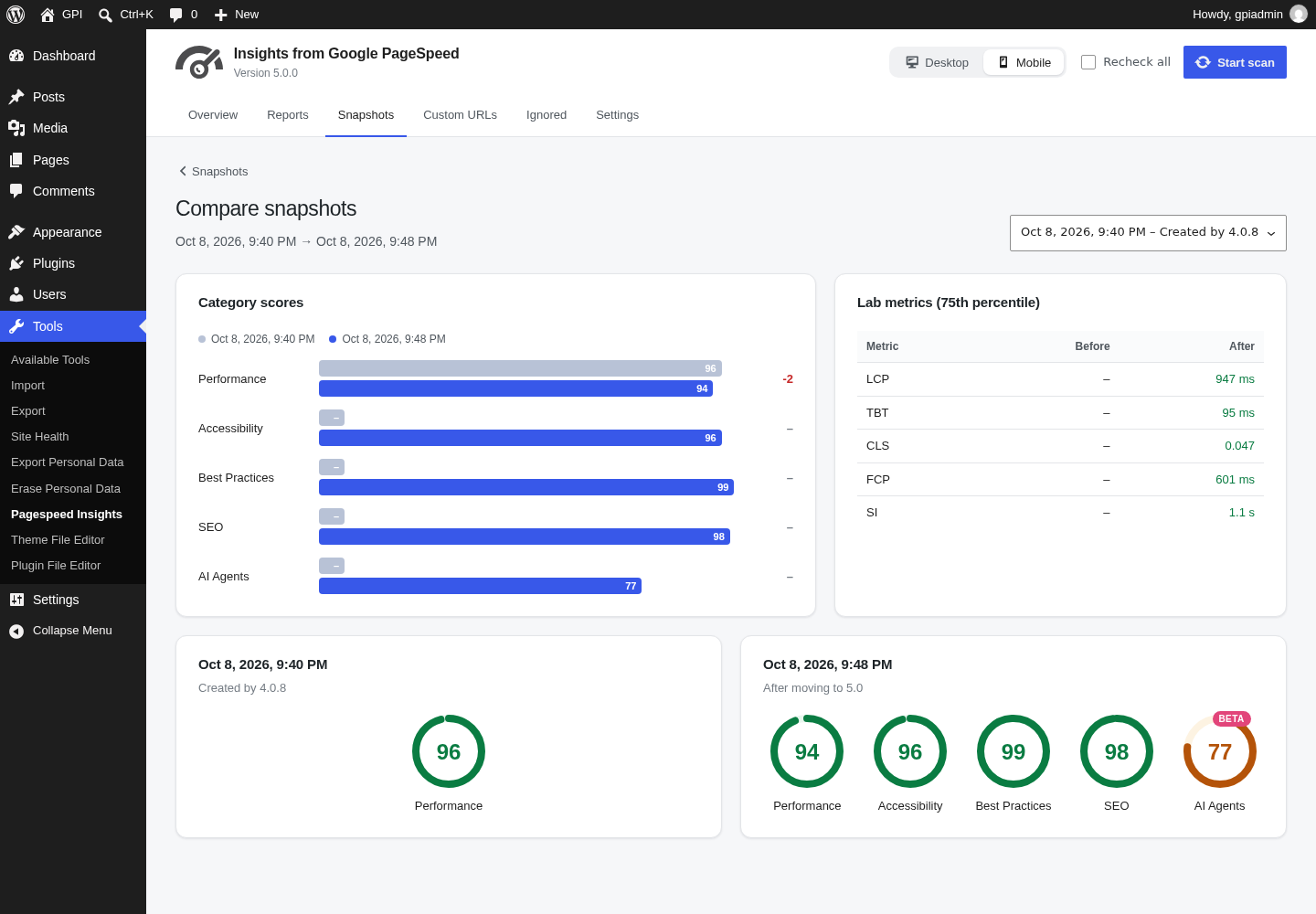
The Report Snapshot tool builds on the power of Report Summaries, to provide historical “Point In Time” data about your website.
Take a snapshot of any Report Summary screen to store that data for future retrieval. Add comments to your snapshots to provide additional meaning, such as “Before Installing W3 Total Cache.” Additionally, filter a Report Summary before taking a Snapshot to save a summary of the filtered data.
Snapshot Comparison Tool
The Snapshot Comparison Tool is an amazing utility that lets you visualize side-by-side results from any two similar Report Snapshots.
Take a Report Snapshot before installing new plugins, or before implementing performance recommendations. Take another snapshot when you are finished and compare your results to measure the effect of your changes.
Add/Import Custom URLs
Easily add additional URLs for inclusion in PageSpeed Reports. Even add URLs for non-WordPress sites, even if they are not hosted on your server. URLs can be added manually, imported from a CSV file (such as a Search Console export), or you can upload a properly formatted XML sitemap to add multiple pages at once.
Custom URLs can be tagged and filtered in Report Summaries. Take Report Snapshots of your Custom URLs just like you would with any other report type.
Scheduled Report Checks
Configure Insights from Google PageSpeed to automatically recheck your site on a Daily, Weekly, Bi-Monthly, or Monthly basis.
With each scan, any new pages or posts will be discovered, and existing reports will be updated to reflect any changes to your site, as well as any changes in the PageSpeed recommendations.
Additional Languages
Translations are managed on translate.wordpress.org, and WordPress installs the one for your site’s language automatically. Thanks to the translators of earlier versions:
- Russian Translation provided by: Ivanka from coupofy.com
- Spanish Translation provided by: Ogi Djuraskovic from firstsiteguide.com
- Serbian Translation provided by: Ogi Djuraskovic from firstsiteguide.com
External services
This plugin connects to the following third-party service.
Google PageSpeed Insights API
Used to generate the reports shown by this plugin. Nothing is sent to this API until you enter your own Google API key.
- What is sent: the URL of each page being checked, your Google API key, the report type (desktop or mobile), the report language and the Lighthouse categories to check.
- When: every time a page is checked. This happens when you start a scan or recheck a report, after adding custom URLs or reactivating ignored URLs, and during scheduled scans if automatic rechecks are on. When you click “Check key” in the Settings, only the API key is sent, to confirm it works.
- Endpoint: https://www.googleapis.com/pagespeedonline/v5/runPagespeed
- Google APIs Terms of Service
- Google Terms of Service
- Google Privacy Policy
The charts in wp-admin are drawn by the plugin itself; no chart library is loaded from a third-party server.
The ShortPixel suggestion shown next to image audits is an affiliate link and is only loaded when you click it.
Installation
- In wp-admin, go to Plugins > Add New, search for “Insights from Google PageSpeed” and click “Install Now”, then “Activate”.
- Go to Tools > Pagespeed Insights > Settings and enter your Google API key.
- Click “Start scan”.
Full documentation: plugstack.dev/docs/google-pagespeed-insights
Getting an API key
The plugin uses the free Google PageSpeed Insights API, which needs an API key from your Google account.
- Open the PageSpeed Insights API in the Google Cloud Console, create or pick a project and click “Enable”.
- Go to APIs & Services > Credentials and create an API key.
- Paste the key into Tools > Pagespeed Insights > Settings, click “Check key” and save.
If you restrict the key, allow requests from your server’s IP address. HTTP referrer restrictions do not work, because the requests are sent by your server.
A step-by-step guide with screenshots is in the documentation.
Requirements
- WordPress 6.6 or newer
- PHP 7.2 or newer
- A Google API key
- Pages must be publicly reachable, because Google loads them from its own servers
Changelog
New interface with all Lighthouse categories, Core Web Vitals and score history. Requires WordPress 6.6 and PHP 7.2. Recheck your pages after updating to fill in the new data.
5.0.0
- New admin interface built with React and the WordPress components, with charts and trends
- Reports now include all Lighthouse categories: Performance, Accessibility, Best Practices, SEO and AI Agents (Agentic Browsing)
- Current Lighthouse metrics (LCP, TBT, CLS, FCP, Speed Index) and Core Web Vitals from real users (LCP, INP, CLS)
- Score history for every page and a daily site trend
- Audits are grouped like on pagespeed.web.dev, with estimated savings and WordPress tips
- Import custom URLs from a CSV file (for example a Search Console or crawler export)
- Fixed: XML sitemap import was rejected on sites that do not allow XML uploads
- Fixed: rechecking a page now updates its mobile report too, not only the desktop one
- Fixed: an invalid API key is reported clearly again with the current Google API
- New “Check key” button: a new API key is verified before the settings are saved
- Fixed: a PHP notice when a checked page has no real-user (Chrome UX Report) data
- A clear warning when a scan cannot start because the site blocks requests to itself (maintenance mode, a login wall or the host), with a link to Site Health
- When the daily API quota is used up, the scan stops with a clear message instead of sending a failing request for every page; a per-minute limit is waited out and the page is tried again
- The ShortPixel image suggestion works again with current Lighthouse image audits
- Charts are drawn locally; the admin no longer loads Google Charts
- If a screen fails to load, it now shows a message with Reload and Try again buttons instead of a blank page
- Requires WordPress 6.6 and PHP 7.2
4.1.0
- Tested with WordPress 7.1
- Security hardening: database queries, input validation, output escaping, capability and nonce checks
- Translations: text domain now matches the plugin slug, so WordPress.org language packs work
- Fixed: plugin settings no longer change when the plugin is updated
- Minor code quality fixes
- Removed the NitroPack promotion box (the partner offer is no longer active)
4.0.8
- Fix PHP 8 warnings
4.0.7
- Add support for XML sitemaps of type text/xml
- Bugfix some error messages not appearing when they should
- Add additional nonce checks for Cross-Site Request Forgery (CSRF) protection
4.0.6
- Additional validating, sanitizing, and escaping the plugin codebase
4.0.5
- Bugfix some validation rule reports not showing properly (some results may need to be rechecked to see the fixes)
- Better styling for readability in report details
- Additional validating, sanitizing, and escaping the plugin codebase
Screenshots
For developers
Is this your plugin? Show off the numbers.
Add a live badge to your site, docs or GitHub README. It updates on its own — no account needed.
Best Insights from Google PageSpeed alternatives
All core web vitals plugins →





FAQ
Insights from Google PageSpeed: quick answers
Straight answers, pulled from live WordPress.org data.
Live data from WordPress.org · checked Nov 16, 2026
Is Insights from Google PageSpeed free?
Yes. Insights from Google PageSpeed is free to download and use from the official WordPress.org plugin directory.
Is Insights from Google PageSpeed safe to use in 2026?
Yes — Insights from Google PageSpeed is a safe, well-maintained plugin to use in 2026. It runs on 10K+ sites, is rated 4.8/5 and was last updated 1 month ago, and scores 85/100 on our health check.
How many websites use Insights from Google PageSpeed?
Insights from Google PageSpeed is active on 10K+ WordPress websites and has been downloaded 660,298 times since it launched in October 2013. It was downloaded 7,215 times in the last 30 days.
Does Insights from Google PageSpeed work with WordPress 7.1?
Yes. The developer has tested Insights from Google PageSpeed up to WordPress 7.1.4, the latest release. It requires WordPress 6.6 or newer.
What PHP version does Insights from Google PageSpeed need?
Insights from Google PageSpeed requires PHP 7.2 or higher. Most hosts run PHP 8.x today, so it works on any modern WordPress hosting.
When was Insights from Google PageSpeed last updated?
The latest version, 5.0.0, was released on October 14, 2026 (1 month ago).
Who makes Insights from Google PageSpeed?
Insights from Google PageSpeed is developed and maintained by Matt Keys.
What are the best alternatives to Insights from Google PageSpeed?
The most popular alternatives to Insights from Google PageSpeed are WP Fastest Cache (1M+ installs), Autoptimize (800K+ installs) and NitroPack (80K+ installs).
Powered by PageForge
Want thousands of pages that rank like these? Build them in an afternoon.
This directory runs on the same engine as PageForge. Turn any spreadsheet, CSV or API into thousands of fast, SEO-ready WordPress pages — with schema, internal links and AI-written copy baked in.
- CSV, Google Sheets & API data sources
- AI content, schema & internal links per page
- Works with Elementor, Gutenberg, Yoast & Rank Math
- Free on WordPress.org — no credit card


