



Simple Calendar – Google Calendar Plugin
Add Google Calendar events to your WordPress site in minutes. Beautiful calendar displays. Mobile responsive.

Solid choice
Simple Calendar is a solid plugin choice in 2026, with a few things worth checking first. It runs on 50K+ sites, is rated 3.8/5 and was last updated 2 days ago, and scores 74/100 on our health check.
- Proven at scale on 50K+ active sites
- Actively developed — last update 2 days ago
- Needs PHP 8.1 or newer
How does it stack up?
Side-by-side on installs, updates, ratings & support



Daily downloads
Download spikes usually follow a new release — each site that auto-updates counts as a download.
Rankings
Where Simple Calendar stands todayWordPress.org search rankings
Live position in the plugin search, top 100| Keyword | Position |
|---|---|
| events | #40 |
| google calendar | #3 |
| Website calendar | #5 |
| wp calendar | #4 |
| wp calendar widget | #4 |
Version adoption
Share of active sites per release.
Rating breakdown
★★★★★★★★★★ 3.8 from 397 reviews
About Simple Calendar – Google Calendar Plugin
From the official readme · v4.2.2Description
Simple Calendar is the easiest way to add Google Calendar events to your WordPress site. Quick to setup. Fine tune to your needs. Mobile responsive. Beautifully designed.
Simple Calendar Features
- Display events from any public Google Calendar.
- Keep managing events in Google Calendar. No need to create events in WordPress.
- Out-of-the-box designs that match your theme’s look and feel.
- Fully responsive and mobile-friendly monthly grid and list views.
- Customize event content display using simple tags. No coding required.
- Combine multiple calendars into single displays explicitly or using categories.
- Intuitive, simple display configuration changes for fine tuning.
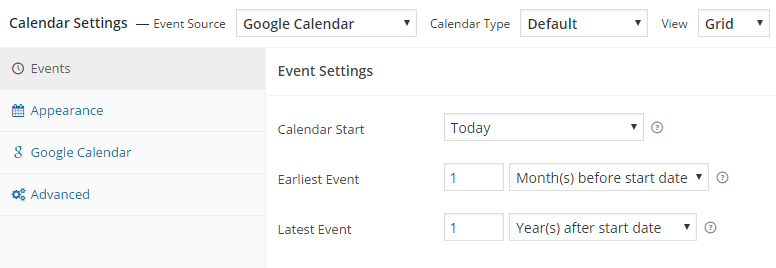
- Advanced settings to adjust time zones, date/time formats and start of the week.
- Integration with Event Calendar Newsletter for quickly turning your events into a newsletter-friendly format.
- Additional functionality offered with add-ons.
- Translations available with more being added on a regular basis. Translations welcome!
- Open source with code hosted on GitHub. Contributions welcome!
Love using Simple Calendar? Consider purchasing a Premium Add-on
FullCalendar Add-on Features
- Week and day views added alongside the month view.
- Display event titles and start times directly on your calendar.
- Faster load times when navigating through months, weeks or days.
- Configure header navigation buttons to allow site visitors to easily switch between views.
- Intuitive design for multi-day events.
- Customizable calendar heights with optional scroll bars.
- Set default start time for week and day views.
- Limit display times for week and day views.
- Works with our Google Calendar Pro add-on to display color-coded events within each view.
- Priority email support with a 24-hour response time during weekdays backed by a top-notch team.
Google Calendar Pro Add-on Features
- Display events from both private and public Google Calendars.
- Highlight events with colors that match assigned Google Calendar event colors.
- Display attendee names, avatars and RSVP status for any private or public event.
- Display event organizer information.
- Display a list of attachments with links to their original source.
- Secure connection established between your site and Google using the OAuth standard.
- Works with our FullCalendar add-on to display beautiful month, week and day views with color-coded events.
- Priority email support with a 24-hour response time during weekdays backed by a top-notch team.
Want to take Simple Calendar for a spin first? Try out a Live Demo
Installation
Plugin installation instructions
Setup guide and video at WP Beginner (updated March 14, 2016)
Frequently asked questions
Where’s your plugin documentation?
Find our docs at docs.simplecalendar.io
Can I get notified by email of new releases?
Subscribe here to be notified by email of major features or updates.
How do I contribute to Simple Calendar?
We’d love your help! Here’s a few things you can do: Rate our plugin and help spread the word! Help answer questions in our community support forum. Report bugs (with steps to reproduce) or submit pull requests on GitHub. Help add or update a plugin translation.
Changelog
4.2.2
- Dev: Use the add-on’s version for cache busting.
4.2.1
- Fix: Resolved timezone handling issues for all-day events in ICS feeds.
4.2.0
- Dev: Add option to automatically display List View on mobile devices when the screen width is below 768px when Grid View is selected as the default view.
- Dev: Add an administrator and editor-only frontend notice when a calendar has no events or a feed error, with a link to Google Calendar privacy prerequisites.
- Fix: Events were displayed in the incorrect order in List View when “Expand Multi-day Events” was set to “No.”
- Fix: Event bubbles stopped working after cancelling the print action.
- Fix: TypeError in bulk actions when the ids parameter was passed as an array instead of a comma-separated string. Bulk actions now correctly support both formats.
- Fix: Missing fields in the Event Schema Markup to resolve search schema warnings.
- Fix: “Add to Google Calendar” link was broken when event details contained Cyrillic or other non-Latin characters.
- Fix: Accessibility to provide a more ADA-compliant experience.
4.1.0
- Dev: ICS Feed Upload: Added support for importing local
.icsfiles to import calendar events. - Dev: ICS Event Export: Added the ability to download/export calendar events as a static
.icsfile. - Fix: Print issue fixed: An issue where clicking the Print button on secondary calendar instances on the same page was unresponsive.
4.0.7
- Fix: Removed unnecessary Google API key/OAuth requirement when creating a Grouped Calendar.
4.0.6
- Fix: Optimize admin & fronend performance, throttle OAuth token checks, and reduce redundant API calls.
Screenshots




For developers
Is this your plugin? Show off the numbers.
Add a live badge to your site, docs or GitHub README. It updates on its own — no account needed.
Best Simple Calendar alternatives
All events plugins →





FAQ
Simple Calendar: quick answers
Straight answers, pulled from live WordPress.org data.
Live data from WordPress.org · checked Sep 26, 2026
Is Simple Calendar free?
Yes. Simple Calendar is free to download and use from the official WordPress.org plugin directory.
Is Simple Calendar safe to use in 2026?
Simple Calendar is a solid plugin choice in 2026, with a few things worth checking first. It runs on 50K+ sites, is rated 3.8/5 and was last updated 2 days ago, and scores 74/100 on our health check.
How many websites use Simple Calendar?
Simple Calendar is active on 50K+ WordPress websites and has been downloaded 3,821,772 times since it launched in July 2010. It was downloaded 55,496 times in the last 30 days.
Does Simple Calendar work with WordPress 7.1?
Simple Calendar is officially tested up to WordPress 7.0.6, while the latest release is 7.1.2. It may still work, but try it on a staging site first.
What PHP version does Simple Calendar need?
Simple Calendar requires PHP 8.1 or higher. Most hosts run PHP 8.x today, so it works on any modern WordPress hosting.
When was Simple Calendar last updated?
The latest version, 4.2.2, was released on September 24, 2026 (2 days ago).
Who makes Simple Calendar?
Simple Calendar is developed and maintained by SimpleCalendar.
What are the best alternatives to Simple Calendar?
The most popular alternatives to Simple Calendar are The Events Calendar (600K+ installs), Events Manager (60K+ installs) and WP Events Manager (30K+ installs).
Powered by PageForge
Want thousands of pages that rank like these? Build them in an afternoon.
This directory runs on the same engine as PageForge. Turn any spreadsheet, CSV or API into thousands of fast, SEO-ready WordPress pages — with schema, internal links and AI-written copy baked in.
- CSV, Google Sheets & API data sources
- AI content, schema & internal links per page
- Works with Elementor, Gutenberg, Yoast & Rank Math
- Free on WordPress.org — no credit card


