


Event Organiser
Event Organiser adds event management that integrates well with your WordPress site. By using WordPress’ in-built ‘custom post type’, this plug-in allows you to create events that have the same functionality as posts…

Safe pick
Yes — Event Organiser is a safe, well-maintained plugin to use in 2026. It runs on 20K+ sites, is rated 4.6/5 and was last updated 4 weeks ago, and scores 80/100 on our health check.
- Proven at scale on 20K+ active sites
- Loved by users — 4.6/5 from 140 reviews
- Actively developed — last update 4 weeks ago
- Tested with the latest WordPress (7.1)
- Momentum — downloads up 54.7% vs the previous 30 days
- Slow support — only 20% of recent threads resolved
How does it stack up?
Side-by-side on installs, updates, ratings & support



Daily downloads
Download spikes usually follow a new release — each site that auto-updates counts as a download.
Rankings
Where Event Organiser stands todayWordPress.org search rankings
Live position in the plugin search, top 100| Keyword | Position |
|---|---|
| Event | #8 |
| event categories | #3 |
| event organizer | #6 |
| events | #23 |
| events calendar | #28 |
Version adoption
Share of active sites per release.
Rating breakdown
★★★★★★★★★★ 4.6 from 140 reviews
About Event Organiser
From the official readme · v3.12.12Description
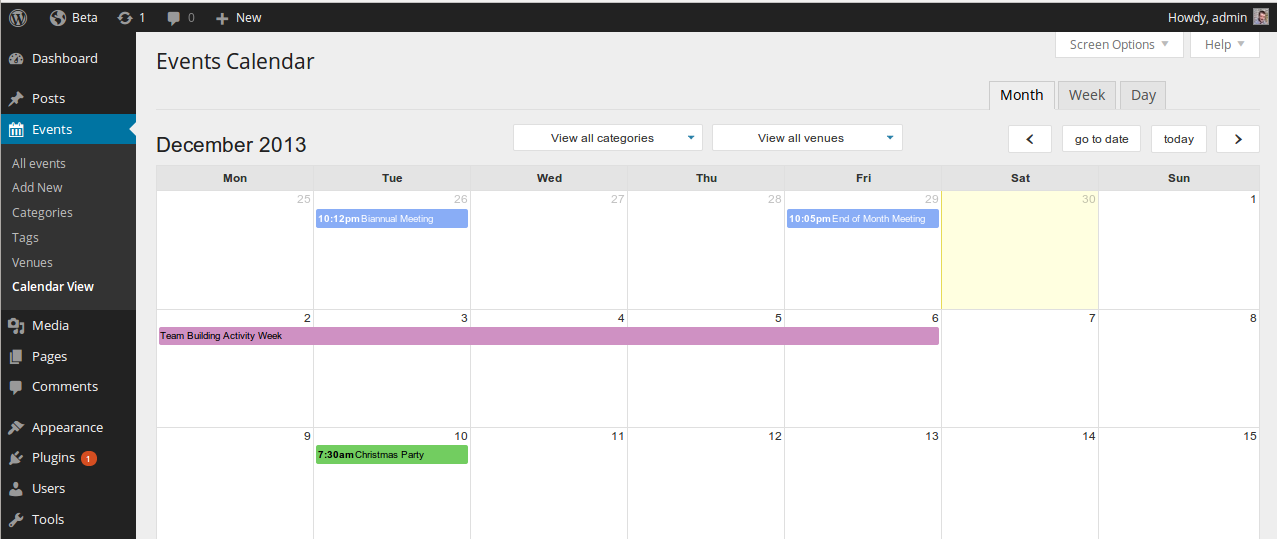
Event Organiser adds event management that integrates well with your WordPress site. By using WordPress’ in-built ‘custom post type’, this plug-in allows you to create events that have the same functionality as posts, while adding further features that allow you to manage your events. This includes the possibility of repeating your event according to complex schedules and assign your events to venues. This can all be done through an intuitive user interface, which allows you to view your events in the familiar WordPress list or in a calendar page in the admin area.
User Docs
| Function Reference
| Forums
| Demo
| Booking Add-on
Available Extensions
- Event Organiser Pro
- Event Organiser Frontend Submissions
- Discount Codes
- Stripe Gateway
- Posterboard (free)
- CSV export (free)
- iCal Sync
A full list of available extensions can be found here.
Features
For the user
- Create one-time events or recurring events.
- Allows complex recurring patterns for events. You can create events that last an arbitrary time, and repeat over a specified period. Supports complex schedules such as On the third Tuesday of every fourth month or Every month on the 16th.
- Ability to add or remove specific dates to an event
- Event functions available which extend the post functions (e.g.
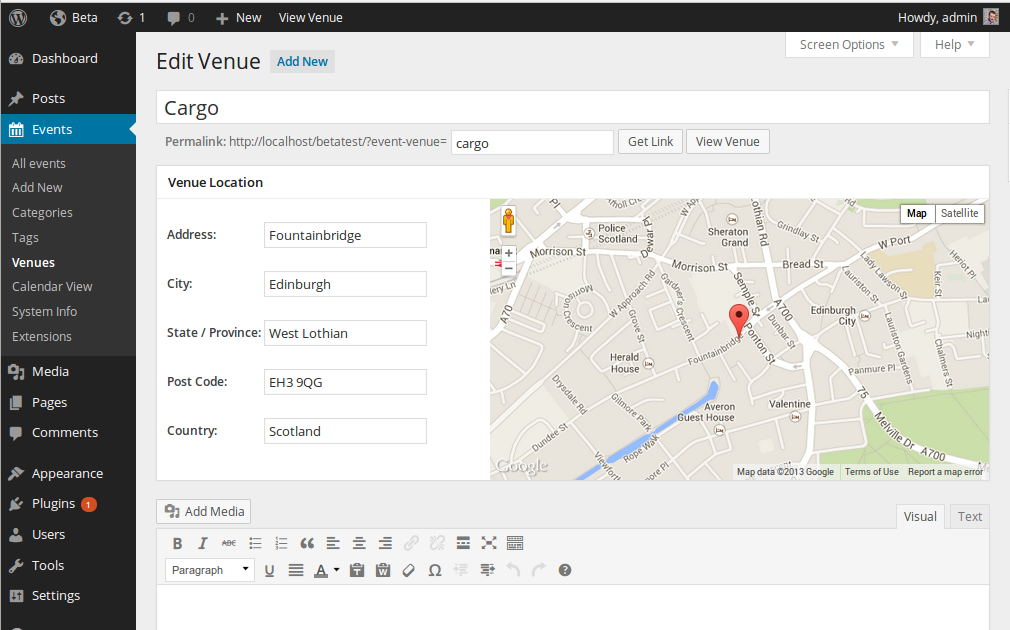
the_title(),get_the_author(),the_author()) to output or return event data (the start date-time, the venue etc). For examples of their use see the documentation or the included template files. - Create and maintain venues for your events, with Google maps support and a fully-featured content editor.
- Widgets:
- Calendar widget – displays a calendar (identical to the standard WordPress Calendar)
- Event List widget – displays a list of events, with options to specify the number of events, restrict by categories or venues etc.
- Event Agenda widget
- Year, month and day archive pages
- Shortcodes:
- (full)Calendar, includes optional category & venue filters.
- (widget) Calendar
- Event List (similar to Event List widget)
- Event Agenda (similar to Event Agenda widget)
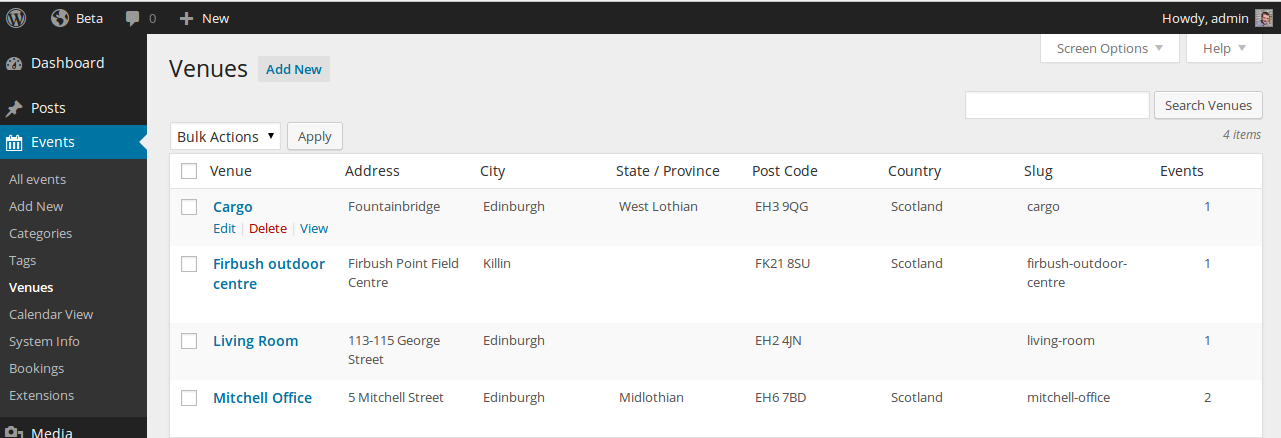
- Venue map
- Subscribe to event feeds
- Relative date queries (for example, query events that finished in the last 24 hours, or events starting in the coming week).
- Assign events to categories and tags, and view events by category or tag.
- Colour-coded event categories.
- Custom permissions allow to specifiy which roles have the ability to create, edit and delete events or manage venues.
- Venue pages, to view events by venue.
- Export/import events to and from ICAL files.
- Delete individual occurrences of events.
- Public events feed: allow visitors to subscribe to your events, or a particular venue / category.
- Supports ‘pretty permalinks’ for event pages, event archives, event category and venue pages.
- (Optionally) automatically delete expired events.
For the developer
- Adds an event custom post type that fits naturally into WordPress and allows for all the functionality of ‘posts’.
- Respects the template hierarchy. Default templates can be over-ridden by including the appropriately named template files in your theme folder.
- Plug-in actions and filters are provided to modify the behaviour of the plug-in (hook reference
- Extensive function API & documentation
- Javascript actions and filters to modify interaction with the calendars and maps
- Provide custom templates for shortcodes, widgets and ICAL export
- Custom metaboxes and meta data support for venues (see tutorial).
- Minified javascript files are used, with the originals provided for ease of developing
- Booking add-on available
Localisation
A big thank you to those who have provided translations for Event Organiser. If you wish to help out with translating the plug-in, you can do so here.
- Arabic – Layla, Mohamed Nazir
- Bulgarian – Parvan Voynov
- Catalan – jordioniric, marc.antje
- Chinese – sdsunqian
- Czech – Jan Kupsa
- Croatian – Branimir
- Danish – Intox Studio, Malthe, Morten Lyng
- Dutch – Ingrid Ekkers, Roel
- English (Canada) – GhostToast
- Estonian – Kristjan Roosipuu
- Finnish – Kari Tolonen, Juhani Marttila
- French – Remy Perona, Arnaud
- German – Martin Grether & Henning Matthaei
- Greek – Vasilis, Panagiotis
- Hebrew (Israel) – heli
- Hungarian – Csaba Erdei
- Icelandic – HrHagedorn
- Indonesian – Daniel Tampubolon
- Italian – Emilio Frusciante, Pio Muto, Daniele Piccoli
- Japanese – ogawa, tkj, takeshi terai, haya.
- Latvian – Kristaps
- Lithuaniun – Stephan Siegi
- Macedonian – Aleksandar
- Norwegian – Erlend Birkedal
- Norweign (Bokmål) – DagC
- Persian (Iran, Islamic Republic of) –
- Polish – Bartosz Arendt
- Portuguese (Brazil) – Rafael Wahasugui, rafaelkvidal
- Portuguese (Portugal) – Emanuel Teixeira
- Romanian – raduanastasedev
- Russian – Sergei
- Slovak – ViRPo
- Slovenian – Matej
- Spanish (Spain)- Joseba Sanchez, jagarre, jelena kovacevic, courtesy of WebHostingHub
- Spanish (Peru) – Pedro Valverde
- Swedish РSofia Br̴vander, Urban Norlander
- Thai – Nibhon, Wuttichai Songprapai
- Turkish – Gökhan DAMGACI
- Ukranian – Максим Кобєлєв
Installation
Installation is standard and straight forward.
- Upload
event-organiserfolder (and all it’s contents!) to the/wp-content/plugins/directory - Activate the plugin through the ‘Plugins’ menu in WordPress
- Check Settings > Event Organiser
Changelog
This fixes a bug with the event list widget on WordPress 4.4 Advance notice: As of 3.0.0 Event Organiser shall require WordPress 3.8 or better.
= 3.12.12 – 30th October 2026
* Bugfix: Limit HTML that can be used in event list shortcode placeholders.
* Bugfix: Gracefully handle events without dates: https://wordpress.org/support/topic/getting-fatal-error-when-vesting-all-events-page-in-the-backend/#topic-19049060-replies
= 3.12.11 – 25th October 2026
* Bugfix: Limit attributes that can passed to img for event thumbnail in event list shortcode/widget.
= 3.12.10 – 28th June 2026
* Bugfix: Escape ID attribute on event list shortcode
= 3.12.9 – 26th June 2026
* Bugfix: Fixes XSS vulnerability with event list
= 3.12.8 – 26th August 2024
* Bugfix: Fixes interoperability with Real Consent banner
* Bugfix: Fixes PHP 8 warning messages
= 3.12.7 – 26th August 2024
* Security patch: Bump version of moment.js
= 3.12.6 – 14th July 2024
* Fixed PHP 8.1 deprecation notices
= 3.12.5 – 24th February 2024
* Security patch: Disables cache of public calendars (can be re-enabled with the following code)
    `
add_filter('eventorganiser_cache_expiration_eo_widget_calendar', function(){
  return DAY_IN_SECONDS;
});

add_filter('eventorganiser_cache_expiration_eo_widget_agenda', function(){
    return DAY_IN_SECONDS;
});

add_filter('eventorganiser_cache_expiration_eo_full_calendar_public', function(){
    return DAY_IN_SECONDS;
});
    `
3.12.4 – 2nd October 2023
- fix: php 8.2 warnings
3.12.3 – 11th March 2023
- fix: integer overflow bug with theme compatbility template handling
3.12.2 – 15th November 2022
- fix: bug with admin calendar not rendering correctly in WordPress 6.1
3.12.1 – 28th September 2022
- fix: static method called dynamically
3.12.0 – 30th March 2022
- feat: Add %event_organiser_url% placeholder for event list shortcode (url of the event’s organiser)
3.11.1 – 30th March 2022
- bugfix: Fix “InvalidValueError: setIcon: not a string…” error with Google Maps
Screenshots




For developers
Is this your plugin? Show off the numbers.
Add a live badge to your site, docs or GitHub README. It updates on its own — no account needed.
Best Event Organiser alternatives
All Event plugins →





FAQ
Event Organiser: quick answers
Straight answers, pulled from live WordPress.org data.
Source: WordPress.org
Is Event Organiser free?
Yes. Event Organiser is free to download and use from the official WordPress.org plugin directory.
Is Event Organiser safe to use in 2026?
Yes — Event Organiser is a safe, well-maintained plugin to use in 2026. It runs on 20K+ sites, is rated 4.6/5 and was last updated 4 weeks ago, and scores 80/100 on our health check.
How many websites use Event Organiser?
Event Organiser is active on 20K+ WordPress websites and has been downloaded 1,819,821 times since it launched in December 2011. It was downloaded 18,205 times in the last 30 days.
Does Event Organiser work with WordPress 7.1?
Yes. The developer has tested Event Organiser up to WordPress 7.1.5, the latest release. It requires WordPress 3.8.0 or newer.
When was Event Organiser last updated?
The latest version, 3.12.12, was released on October 30, 2026 (4 weeks ago).
Who makes Event Organiser?
Event Organiser is developed and maintained by Stephen Harris.
What are the best alternatives to Event Organiser?
The most popular alternatives to Event Organiser are The Events Calendar (600K+ installs), Timetable and Event Schedul… (30K+ installs) and WP Events Manager (20K+ installs).
Powered by PageForge
One template and a spreadsheet. A real page for every search.
PageForge turns each row of a CSV into a WordPress page with its own title, URL, SEO fields and schema, built on the layout you already designed. Free on WordPress.org.
- CSV and XLSX, plus Google Sheets on Professional and Enterprise
- Its own title, URL, SEO fields and schema for every page
- Works with the block editor, Elementor, Divi and Avada
- Free on WordPress.org, no credit card