



GoldT WebMCP Bridge
Bridge for 8 AI agents (Claude, ChatGPT, Grok, more) — powered by the Servio Protocol (aka WebMCP) with OAuth 2.0

Solid choice
GoldT WebMCP Bridge is a solid plugin choice in 2026, with a few things worth checking first. It runs on 10+ sites and was last updated 4 weeks ago, and scores 66/100 on our health check.
- Actively developed — last update 4 weeks ago
- Tested with the latest WordPress (7.1)
- Momentum — downloads up 96.9% vs the previous 30 days
- Small user base (10+ active installs)
- Very few reviews so far
How does it stack up?
Side-by-side on installs, updates, ratings & support



Daily downloads
Download spikes usually follow a new release — each site that auto-updates counts as a download.
Rankings
Where GoldT WebMCP Bridge stands todayWordPress.org search rankings
Live position in the plugin search, top 100| Keyword | Position |
|---|---|
| AI | >100 |
| AI agent | >100 |
| oauth | >100 |
| rest-api | >100 |
| servio | #1 |
Version adoption
Share of active sites per release.
About GoldT WebMCP Bridge
From the official readme · v1.2.4Description
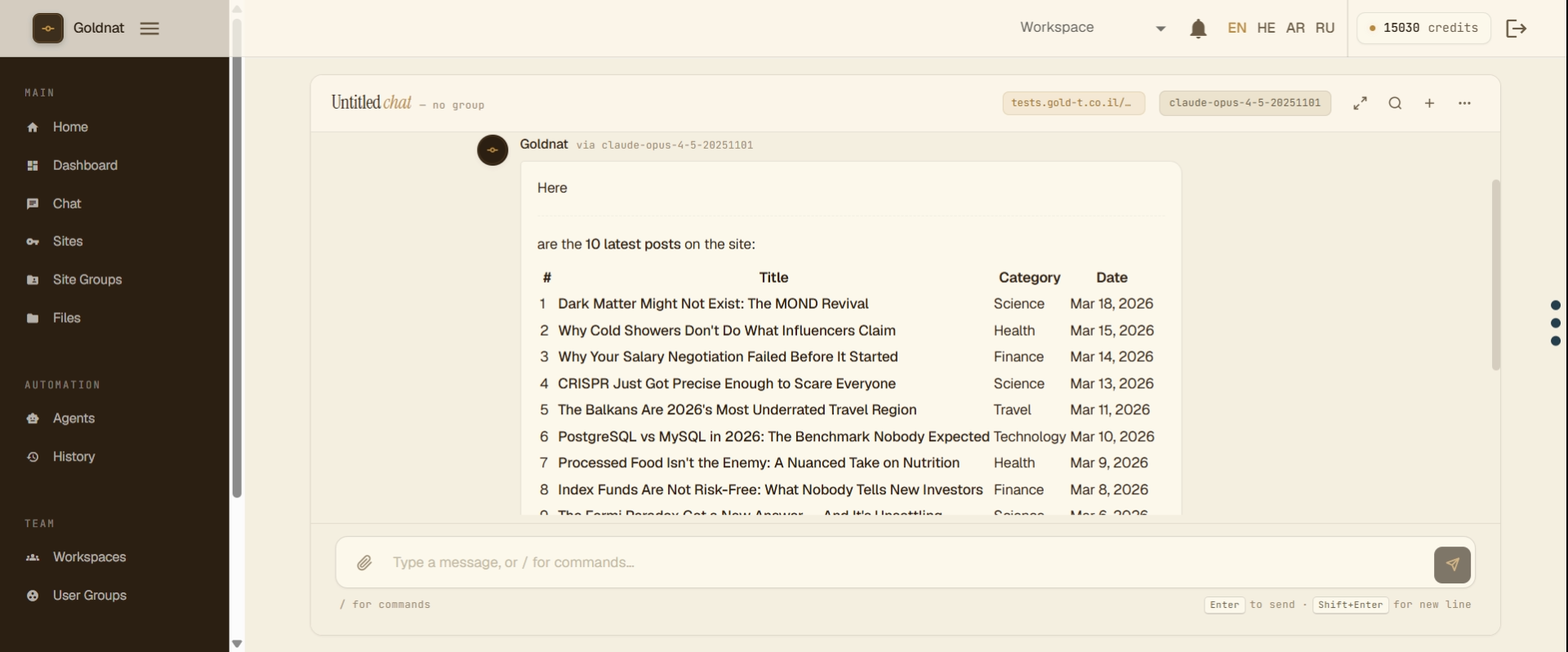
GoldT WebMCP Bridge (also branded as Goldnat AI Connect) enables AI agents to interact with your site through secure OAuth 2.0 authentication using the Servio Protocol.
Perfect for AI-powered customer support, automated content analysis, intelligent search, and custom AI integrations.
✨ Features
- Servio Protocol Support – Industry-standard AI integration
- Secure OAuth 2.0 – Same security standard as Google, Facebook, GitHub – your passwords stay safe
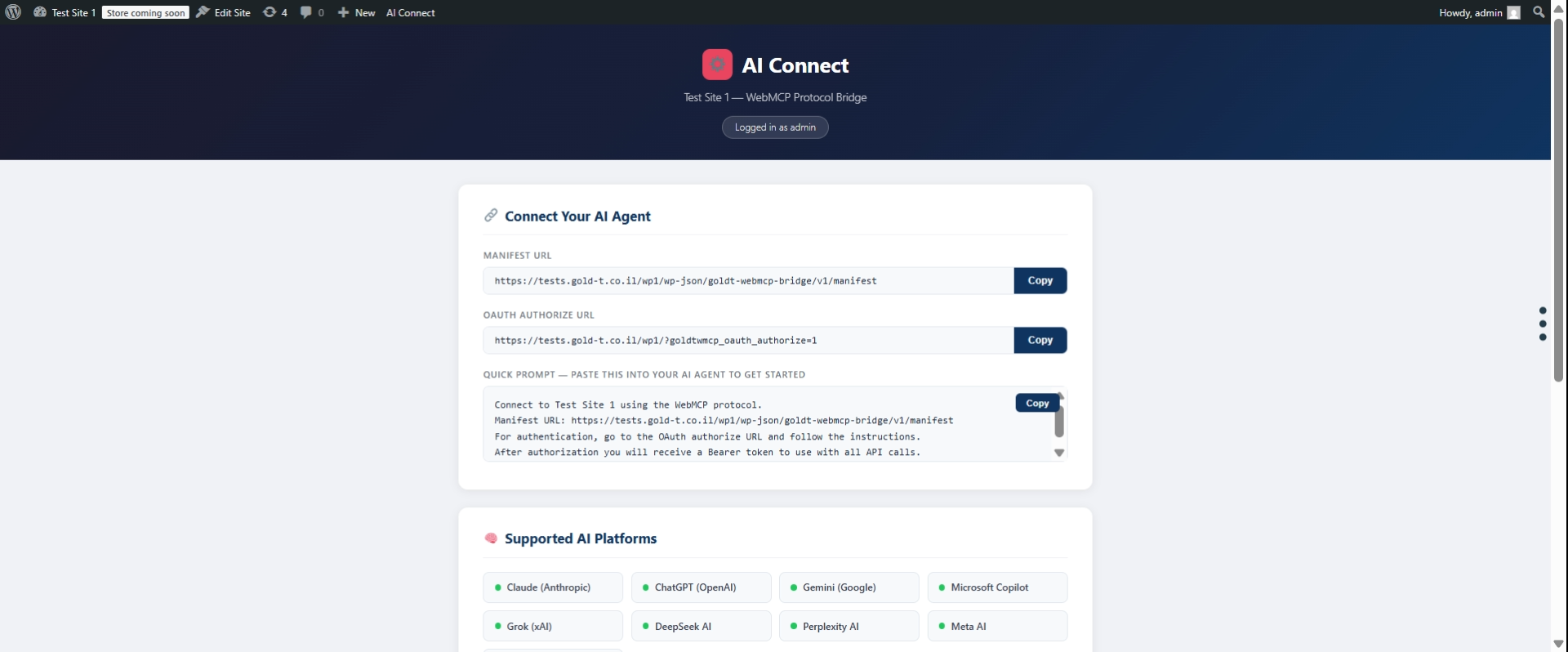
- 8 Pre-registered AI Clients – Claude, ChatGPT, Gemini, Grok, Perplexity, Copilot, Meta AI, DeepSeek
- 7 Tools – WordPress content tools plus optional translation via MyMemory API
- Translation Provider – Choose AI self-translate, MyMemory API, or disabled
- Dynamic Manifest – Instructions adapt to your settings so AI agents don’t invent capabilities
- Rate Limiting – Prevent abuse (50 req/min default)
- Security Controls – Token management, block specific users
- Zero Configuration – Works out of the box
- Extensible – Add custom tools via developer hooks
🎯 Quick Start for AI Users
Using ChatGPT or Claude?
Tell your AI agent:
“I want to connect you to my WordPress site at https://mysite.com using the Goldnat AI Connect for WordPress plugin. The manifest is at /api/aiconnect-manifest. Use OAuth 2.0 with client_id: claude-ai”
The AI will guide you through OAuth authorization – you’ll approve access in your browser.
🤖 Supported AI Agents
Pre-registered and ready to connect:
- Claude AI – Use
client_id: claude-ai(Anthropic) - ChatGPT – Use
client_id: chatgpt(OpenAI) - Gemini – Use
client_id: gemini(Google) - Grok – Use
client_id: grok(xAI) - Perplexity AI – Use
client_id: perplexity - Microsoft Copilot – Use
client_id: copilot - Meta AI – Use
client_id: meta-ai(Facebook) - DeepSeek – Use
client_id: deepseek
All clients use OAuth 2.0 with PKCE and redirect_uri: urn:ietf:wg:oauth:2.0:oob (out-of-band).
🛠️ Available Tools
- wordpress.searchPosts – Search posts with filters
- wordpress.getPost – Get single post by ID or slug
- wordpress.searchPages – Search pages
- wordpress.getPage – Get single page by ID or slug
- wordpress.getCurrentUser – Get authenticated user info
- translation.translate – Translate text via MyMemory API (when Translation Provider = mymemory)
- translation.getSupportedLanguages – List supported language codes (when Translation Provider = mymemory)
🔒 How Authentication Works
Secure OAuth 2.0 Authentication:
Uses the same security standard trusted by Google, Facebook, and GitHub:
- AI agent initiates OAuth flow with code challenge (PKCE)
- User approves in browser (consent screen)
- Agent receives one-time authorization code
- Agent exchanges code for access token using code verifier
- Agent uses token for API calls
The AI agent operates as the user who authorized:
* The agent receives an OAuth token linked to that user’s ID
* All API requests run with that user’s permissions
* The agent respects WordPress user capabilities
Examples:
If Administrator authorizes:
* ✅ Sees all posts (including drafts, private)
* ✅ Full access based on admin capabilities
If Subscriber authorizes:
* ✅ Sees only published content
* ❌ Cannot see drafts or private content
Security: Authorization codes are one-time use (10 min expiry). Access tokens expire after 1 hour. Refresh tokens valid for 30 days. PKCE ensures tokens can’t be stolen.
⚙️ Admin Settings
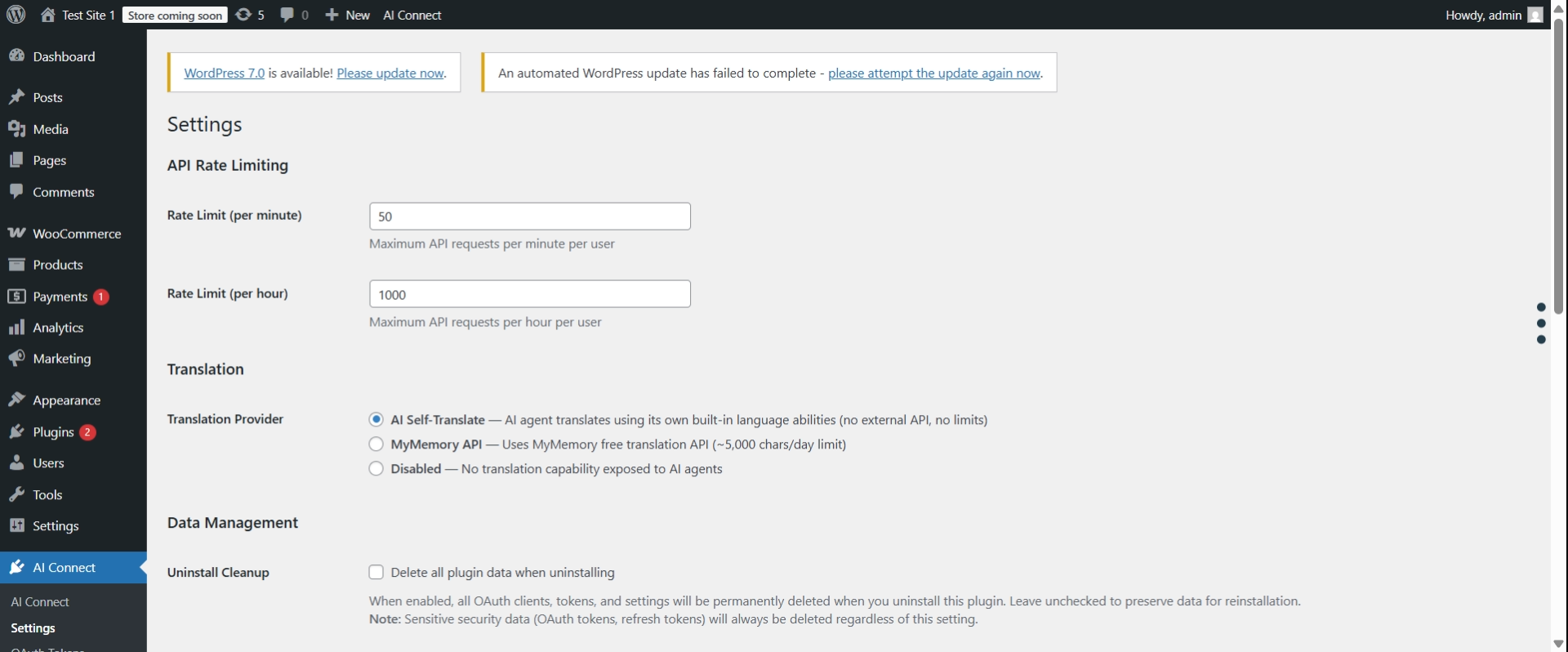
Configure the plugin at AI Connect → Settings:
Translation Provider:
- AI Self-Translate (default) – The AI agent handles translation on its own; no translation tools appear in the manifest
- MyMemory API – Plugin calls MyMemory and returns translated text;
translation.translateandtranslation.getSupportedLanguagestools are added to the manifest - Disabled – Translation tools are hidden from the manifest entirely
Rate Limiting:
- Default: 50 requests per minute, 1,000 per hour (per user)
- Adjust both values in AI Connect → Settings
🔐 Admin Controls
For Site Administrators:
Manage security from the WordPress admin panel:
- Revoke OAuth Tokens – Go to AI Connect → OAuth Tokens to view and revoke active tokens
- Block Users – Go to AI Connect → Settings → scroll to “Manage User Access” section
- Rate Limits – Configure request limits in AI Connect → Settings (default: 50/min, 1000/hour)
💬 We Need Your Feedback!
Help us build what YOU need:
- 💡 What tools would be most useful? Tell us which WordPress features you’d like AI agents to access
- 🐛 Found a bug? Report it so we can fix it quickly
- ⭐ Feature requests – We prioritize based on community feedback
How to provide feedback:
* GitHub: https://github.com/chgold/goldt-wp-webmcp-bridge/issues
* WordPress.org: Support forum
Your feedback directly shapes the future of this plugin!
Troubleshooting
Missing Dependencies Error
Symptoms:
* Red error notice in WordPress admin
* Plugin appears active but doesn’t work
* REST API endpoints return 404
Solutions:
-
Download complete plugin (Recommended)
- Get the full ZIP with dependencies from GitHub Releases
- Delete the incomplete plugin folder
- Upload and activate the complete version
-
Manual composer install (Advanced)
- SSH into your server
- Run:
cd /path/to/wp-content/plugins/goldt-webmcp-bridge && composer install --no-dev
Common causes:
* exec() function disabled on server
* Composer not available on shared hosting
* Plugin directory not writable
How to diagnose:
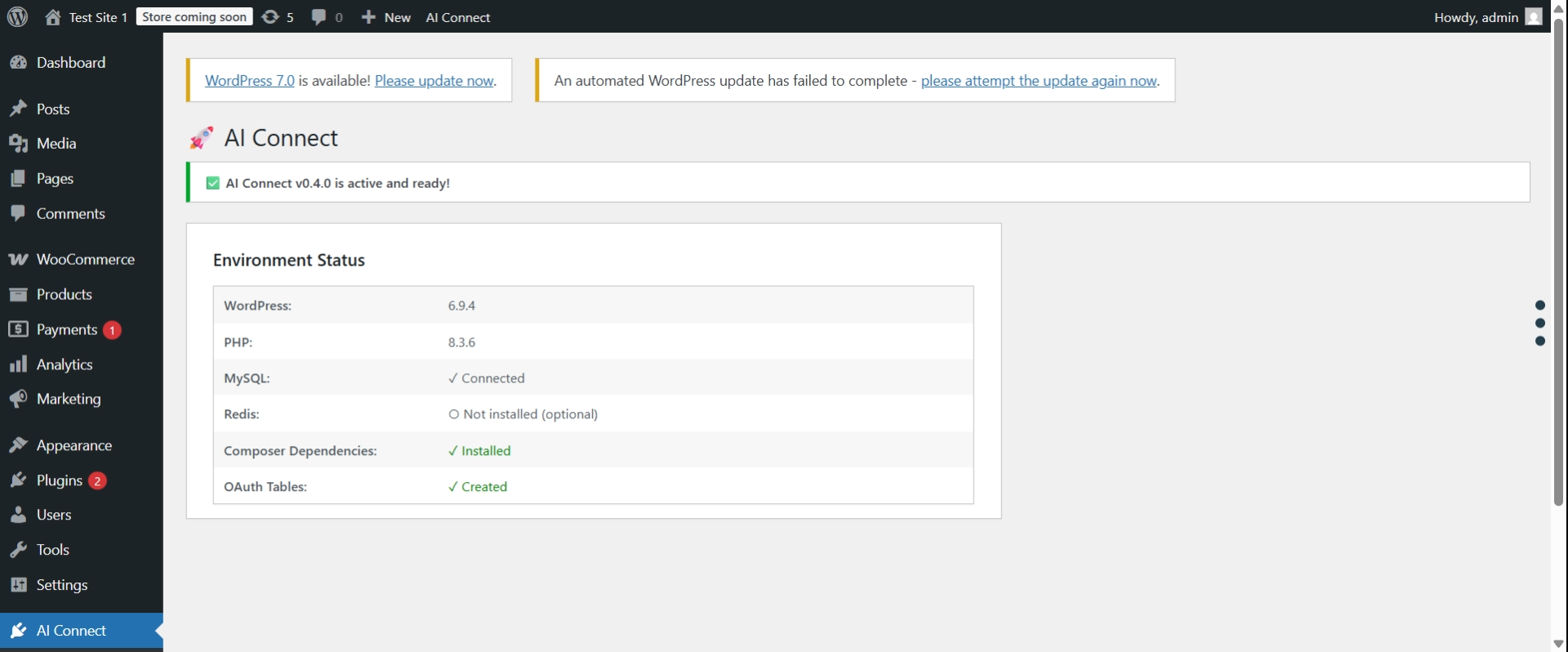
* Go to AI Connect → Settings in WordPress admin
* Check the “Environment Status” table
* Look for red ✗ marks showing the exact issue
Database Tables Missing Error
Symptoms:
* Red error notice: “OAuth database tables were not created”
* OAuth authorization fails
Solution:
1. Deactivate the plugin
2. Reactivate the plugin
3. Check AI Connect → Settings to verify “OAuth Tables: ✓ Created”
If problem persists:
* Your database user may not have CREATE TABLE permissions
* Contact your hosting provider or check wp-config.php
OAuth Authorization Fails
Symptoms:
* Clicking “Authorize” button does nothing
* Redirect loop during OAuth flow
* “invalid_client” or “invalid_request” errors
Solutions:
-
Clear WordPress rewrite rules:
- Go to Settings → Permalinks
- Click “Save Changes” (flushes rewrite rules)
-
Verify OAuth tables exist:
- Go to AI Connect → Settings
- Check “OAuth Tables: ✓ Created”
-
Verify client exists:
- Default clients (claude-ai, chatgpt, etc.) are auto-created
- If missing, deactivate and reactivate plugin
REST API Returns 404
Symptoms:
* /api/aiconnect-manifest returns 404
* Tools API calls fail with 404
Solutions:
-
Flush permalinks:
- Go to Settings → Permalinks
- Click “Save Changes”
-
Reactivate plugin:
- Go to Plugins page
- Deactivate and reactivate “Goldnat AI Connect for WordPress”
-
Check WordPress REST API:
- Visit:
http://yoursite.com/wp-json/ - If this also returns 404, your REST API is disabled or blocked
- Check for conflicting security plugins
- Review .htaccess rules
- Visit:
Still Having Issues?
Before asking for help, gather this information:
- Go to AI Connect → Settings
- Take screenshot of “Environment Status” table
- Check browser console for errors (F12 → Console)
- Check WordPress debug log (if enabled)
Get support:
* GitHub: https://github.com/chgold/goldt-wp-webmcp-bridge/issues
* WordPress.org: Support forum
External Services
This plugin optionally uses the MyMemory Translation API when the “Translation Provider” setting is set to “MyMemory API” in the plugin settings.
MyMemory API
- What it is: A free machine translation service
- When it is used: Only when an AI agent calls the
translation.translatetool AND the plugin settings have “MyMemory API” selected as the translation provider - What data is sent: The text to be translated and the target/source language codes
- Default: Disabled by default. The default provider is “AI Self-Translate” (no external requests)
- Terms of Service: https://mymemory.translated.net/terms-and-conditions
- Privacy Policy: https://mymemory.translated.net/terms-and-conditions
If “MyMemory API” is not selected, no data is sent to any external service.
Privacy Policy
Goldnat AI Connect for WordPress does not collect, store, or transmit any personal data to external services. All API requests are handled locally on your WordPress installation.
Data stored locally:
* OAuth clients (pre-registered: claude-ai, chatgpt, gemini)
* OAuth authorization codes (temporary, 10 min expiry, one-time use)
* OAuth access tokens (temporary, 1 hour expiry)
* Rate limiting counters
* User blacklist (WordPress user IDs only)
No data leaves your WordPress installation. This applies when using the default settings. If you enable the MyMemory API translation provider, text content will be sent to mymemory.translated.net. See “External Services” section for details.
Requirements
Component
Required
Notes
WordPress
✅ 6.0+
Core requirement
PHP
✅ 7.4+
With json, openssl
Composer
✅ Yes
For dependencies
HTTPS
⚠️ Production
Required for security
Redis
⭕ Optional
For high traffic
Credits
- Optional predis/predis support for rate limiting
- Compliant with the Servio Protocol specification
Made with ❤️ for the WordPress & AI community
Installation
Automatic Installation
- Go to Plugins → Add New in WordPress admin
- Search for “Goldnat AI Connect for WordPress”
- Click Install Now and then Activate
Manual Installation
- Download the plugin zip file
- Go to Plugins → Add New → Upload Plugin
- Upload the zip file and click Install Now
- Activate the plugin
Note: All required dependencies are included. No manual setup required!
Setup
No setup required! The plugin works immediately after activation.
Optional: Configure rate limits in AI Connect → Settings
For detailed setup and testing examples, see the plugin documentation on GitHub.
Frequently asked questions
What is the Servio Protocol?
The Servio Protocol is a standardized protocol for connecting AI agents to web services. It defines how AI assistants discover, authenticate with, and execute tools on web platforms. Goldnat AI Connect implements Servio across every supported platform (WordPress, XenForo, Drupal, Shopify, and more) so the same AI agent can talk to any of them with identical semantics.
Does this work with ChatGPT and Claude?
Yes! Goldnat AI Connect for WordPress works with any AI platform that supports REST APIs. This includes ChatGPT (OpenAI), Claude (Anthropic), Make.com, Zapier, and custom applications.
Why does reading public content require authentication?
All API calls require authentication for security: * Rate Limiting – Prevents spam and abuse * Monitoring – Track who uses your API * Security – Protects against data scraping and DDoS attacks This is the industry standard (Twitter, GitHub, Google APIs all require auth). Exception: The manifest endpoint is public (no auth needed).
How does the AI agent authentication work?
OAuth 2.0 Authorization: The AI agent operates as the WordPress user who authorized it. When a user approves access through the OAuth consent screen: * The agent receives an access token linked to that user’s ID * All API requests run with that user’s permissions * The agent inherits the user’s capabilities Security: * No passwords are transmitted – only authorization codes * PKCE prevents authorization code interception * Tokens are time-limited (1 hour) and can be revoked * The agent respects WordPress user capabilities
Is Redis required?
No, Redis is optional. The plugin works perfectly with WordPress transients. However, Redis is recommended for high-traffic sites (>1,000 requests/day) as it provides better rate limiting performance.
Can I add custom tools?
Yes! Goldnat AI Connect for WordPress is extensible. Use WordPress hooks to add custom tools: `php add_action(‘goldtwmcp_register_modules’, function($goldtwmcp_plugin) { $manifest = $goldtwmcp_plugin->get_manifest_instance(); $manifest->register_tool(‘mysite.getStats’, […]); }); ` Important: Place your custom tools in your theme’s functions.php or a separate plugin – they will be preserved during plugin updates. See the plugin documentation for more details.
How long do tokens last?
Access Token: 1 hour (3600 seconds) Refresh Token: 30 days (2,592,000 seconds) Use the refresh token to get a new access token without re-authentication.
Can I revoke access?
Yes! Multiple options: Revoke specific OAuth token: * Go to AI Connect → OAuth Tokens * Find the token and click “Revoke” Block specific user: * Go to AI Connect → Settings * Enter user ID in “Block User” section * User cannot authenticate or use existing tokens
How do I troubleshoot authentication errors?
Common issues: “invalid_client” – Check client_id (use: claude-ai, chatgpt, or gemini) “invalid_grant” – Authorization code expired or already used (codes are one-time, 10 min expiry) “access_denied” – User is blocked (check AI Connect → Settings → Manage User Access) “Token expired” – Access token expired after 1 hour, use refresh token to get new access token “Rate limit exceeded” – Wait for retry period or increase limits in Settings Enable WordPress debug mode and check wp-content/debug.log for details.
Where can I get support?
Community: WordPress.org support forums
Changelog
Reverts the plugin display name back to the original "GoldT WebMCP Bridge" (the 1.2.0 rename triggered a wp.org trademark warning). Removes the custom plugin updater (wp.org disallows self-updaters) and cleans up minor code warnings.
1.2.4 – 2026-08-31
- Fixed: reverted plugin display name back to the original GoldT WebMCP Bridge (matches the plugin slug
goldt-webmcp-bridge). 1.2.0 renamed it to a longer form that included the term “WordPress”; the wp.org Plugin Check flags that as a restricted term and it also no longer matched the slug. The Goldnat / Servio Protocol rebrand still lives everywhere it makes sense — description tagline, manifest, admin subtitle, quick-prompt template, OAuth client display — but the Plugin Name header stays stable. - Removed:
includes/core/class-plugin-updater.php. WordPress.org’s Plugin Check rejects custom update systems (Plugin Updater detected), and the Free plugin was already served via wp.org’s built-in updater; the custom checker was only used by external Pro plugins that must ship their own update code from here on. - Fixed: SQL warnings in
upgrade_to_2_0_5andupgrade_to_2_0_6(interpolated table names) suppressed with the samephpcs:disable/enableblock the older migrations use — behaviour unchanged. - Fixed:
parse_url()→wp_parse_url()(only usage was inside the removed updater). - Fixed: 1.2.1 upgrade notice trimmed under the 300-character wp.org limit.
1.2.3 – 2026-08-31
- Rebrand completion (OAuth client identifier): the built-in master OAuth client’s
client_idis renamed fromwebmcp-mastertogoldnat-master, so the plugin no longer exposes any “webmcp” string to AI agents via the OAuth authorize/token flows. New DB schema upgrade2.0.5performs the rename in three tables atomically:oauth_clientsgets a newgoldnat-masterrow (config copied from the legacy row), thenoauth_tokensandaiconnect_token_registryare re-pointed at the new identifier, then the legacywebmcp-masterrow is deleted. Existing agents keep working — their tokens now referencegoldnat-master(which exists), so bearer-auth continues to succeed without any user action. New authorize requests that hard-code the legacy identifier will getinvalid_clientand need to reconnect usinggoldnat-master. Idempotent — re-running the migration is a no-op on already-migrated sites. - Rebrand follow-up (prompt generator UI): the master client’s label in
get_agent_clients()no longer reads “Goldnat (webmcp)”; it now reads “Goldnat Master”, matching the display name in the DB and on the OAuth consent screen.
1.2.2 – 2026-08-31
- Rebrand follow-up (OAuth consent screen): the built-in
webmcp-masterOAuth client hadclient_name = 'WebMCP Master'in the database, which is the name users saw on the “Authorize this application?” consent screen every time they connected an AI agent with full-access scope. New DB schema upgrade2.0.4renames the display name toGoldnat Masteron existing sites. Theclient_iditself stayswebmcp-master— active tokens and integrations reference that identifier and would break if it changed. Fresh installs also get the new display name viainsert_default_clients().
1.2.1 – 2026-08-30
- Fixed: rewrite rules are now auto-flushed on plugin upgrade. WordPress caches compiled rewrite rules in
wp_options.rewrite_rules. The activation hook flushes that cache — but activation doesn’t run on plugin update, wp-cli update, or auto-update, so any new or renamed route (like/api/aiconnect-manifest) returned the homepage instead of the handler until someone manually visited Settings → Permalinks. The plugin now checksgoldtwmcp_versionon every init; when it lagsGOLDTWMCP_VERSIONthe flush is scheduled onwp_loaded(priority 999) and the version option is bumped. Zero-config for site admins — the first request after an upgrade repairs the cache. (See gold-t.co.il thread #700.) - Rebrand follow-up: three user-facing strings that 1.2.0 missed are now updated too. The Servio manifest now advertises “Goldnat AI Connect bridge for WordPress (Servio Protocol)” as its description (was: “WebMCP bridge for WordPress”). The
/ai-connect/info-page subtitle reads “Goldnat AI Connect · Servio Protocol” (was: “WebMCP Protocol Bridge”). The manual quick-prompt template opens with “Connect to using the Servio Protocol” (was: “using the WebMCP protocol”), so users no longer paste stale branding into their AI agent. - Fixed: the “Documentation” link on the
/ai-connect/page pointed tohttps://ai-connect.gold-t.co.il/wordpress, which returns 404. Updated to the live docs athttps://plugins.goldnat.ai/wordpress.
1.2.0 – 2026-08-30
- Rebrand: user-facing name changed from “GoldT WebMCP Bridge” to “Goldnat AI Connect for WordPress” to match the rest of the Goldnat AI Connect plugin family (XenForo, Drupal, Ghost, Moodle, NodeBB, PrestaShop, Shopify, Discourse). The underlying protocol is now called “Servio Protocol” (was: “WebMCP protocol”).
- Rebrand: readme description, features, FAQ, troubleshooting and installation copy updated to reflect the new name and protocol. Plugin URI updated to https://plugins.goldnat.ai/wordpress/goldt-webmcp-bridge.
- Rebrand: admin menu already reads “AI Connect” (since 0.4.0); readme now matches. All documentation references corrected to
/api/aiconnect-manifest,/api/aiconnect-tools,/api/aiconnect-oauth— the old/wp-json/goldt-webmcp-bridge/v1/*paths were removed in 0.5.8 but the readme still showed them. - Compat: plugin folder slug (
goldt-webmcp-bridge), text domain (goldt-webmcp-bridge), PHP namespace (GoldtWebMCP\), option keys (goldtwmcp_*), database tables, PHP constants (GOLDTWMCP_VERSION) and every REST endpoint are UNCHANGED. Existing OAuth tokens, custom tools registered viagoldtwmcp_register_modules, and AI agent integrations continue to work with no reconfiguration.
1.1.0 – 2026-08-21
- New:
wordpress.listCategoriestool — resolve category id from name or slug via case-insensitive substring search. Supportsparent,orderby, andlimitparameters. Fixes the gap where AI agents had to guess category IDs before calling createPost. - New:
wordpress.listTagstool — same interface for post tags. - Compliance: readme headers refreshed (Stable tag + Tested up to 7.1) to satisfy WordPress Plugin Check.
- Version numbering: internal dev branch (0.5.x) resynced to public release track (1.x). No breaking changes vs 1.0.0 — pure additions.
Screenshots
For developers
Is this your plugin? Show off the numbers.
Add a live badge to your site, docs or GitHub README. It updates on its own — no account needed.
Best GoldT WebMCP Bridge alternatives
All AI plugins →





FAQ
GoldT WebMCP Bridge: quick answers
Straight answers, pulled from live WordPress.org data.
Live data from WordPress.org · checked Sep 28, 2026
Is GoldT WebMCP Bridge free?
Yes. GoldT WebMCP Bridge is free to download and use from the official WordPress.org plugin directory.
Is GoldT WebMCP Bridge safe to use in 2026?
GoldT WebMCP Bridge is a solid plugin choice in 2026, with a few things worth checking first. It runs on 10+ sites and was last updated 4 weeks ago, and scores 66/100 on our health check.
How many websites use GoldT WebMCP Bridge?
GoldT WebMCP Bridge is active on 10+ WordPress websites and has been downloaded 978 times since it launched in June 2026. It was downloaded 575 times in the last 30 days.
Does GoldT WebMCP Bridge work with WordPress 7.1?
Yes. The developer has tested GoldT WebMCP Bridge up to WordPress 7.1.2, the latest release. It requires WordPress 6.0 or newer.
What PHP version does GoldT WebMCP Bridge need?
GoldT WebMCP Bridge requires PHP 7.4 or higher. Most hosts run PHP 8.x today, so it works on any modern WordPress hosting.
When was GoldT WebMCP Bridge last updated?
The latest version, 1.2.4, was released on August 31, 2026 (4 weeks ago).
Who makes GoldT WebMCP Bridge?
GoldT WebMCP Bridge is developed and maintained by chagold.
What are the best alternatives to GoldT WebMCP Bridge?
The most popular alternatives to GoldT WebMCP Bridge are Elementor Website Builder (10M+ installs), All in One SEO (2M+ installs) and AI Agent by SiteGround (1M+ installs).
Powered by PageForge
Want thousands of pages that rank like these? Build them in an afternoon.
This directory runs on the same engine as PageForge. Turn any spreadsheet, CSV or API into thousands of fast, SEO-ready WordPress pages — with schema, internal links and AI-written copy baked in.
- CSV, Google Sheets & API data sources
- AI content, schema & internal links per page
- Works with Elementor, Gutenberg, Yoast & Rank Math
- Free on WordPress.org — no credit card


