


Global Javascript
Allows the user to create custom javascript for their WordPress powered site on a global level.

Consider an alternative
Global Javascript shows warning signs in 2026 — compare the alternatives below before installing. It runs on 100+ sites, is rated 3.5/5 and was last updated 14 years ago, and scores 28/100 on our health check.
- Small user base (100+ active installs)
- Very few reviews so far
- No update in 13 years
- Only tested up to WordPress 3.5 (latest is 7.1)
How does it stack up?
Side-by-side on installs, updates, ratings & support


Daily downloads
Download spikes usually follow a new release — each site that auto-updates counts as a download.
Rankings
Where Global Javascript stands todayWordPress.org search rankings
Live position in the plugin search, top 100| Keyword | Position |
|---|---|
| appearance | >100 |
| editor | >100 |
| global | >100 |
| javascript | >100 |
| ubc | #4 |
Version adoption
Share of active sites per release.
Rating breakdown
★★★★★★★★★★ 3.5 from 2 reviews
About Global Javascript
From the official readme · v1.0Description
Allows the user to create custom javascript for their WordPress powered site on a global level.
The Javascript made by the user of the plugin will be loaded after any other Javascript that is used by other plugins and/or themes.
PLUGIN FEATURES:
Some of the features that are included in this plugin are:
-
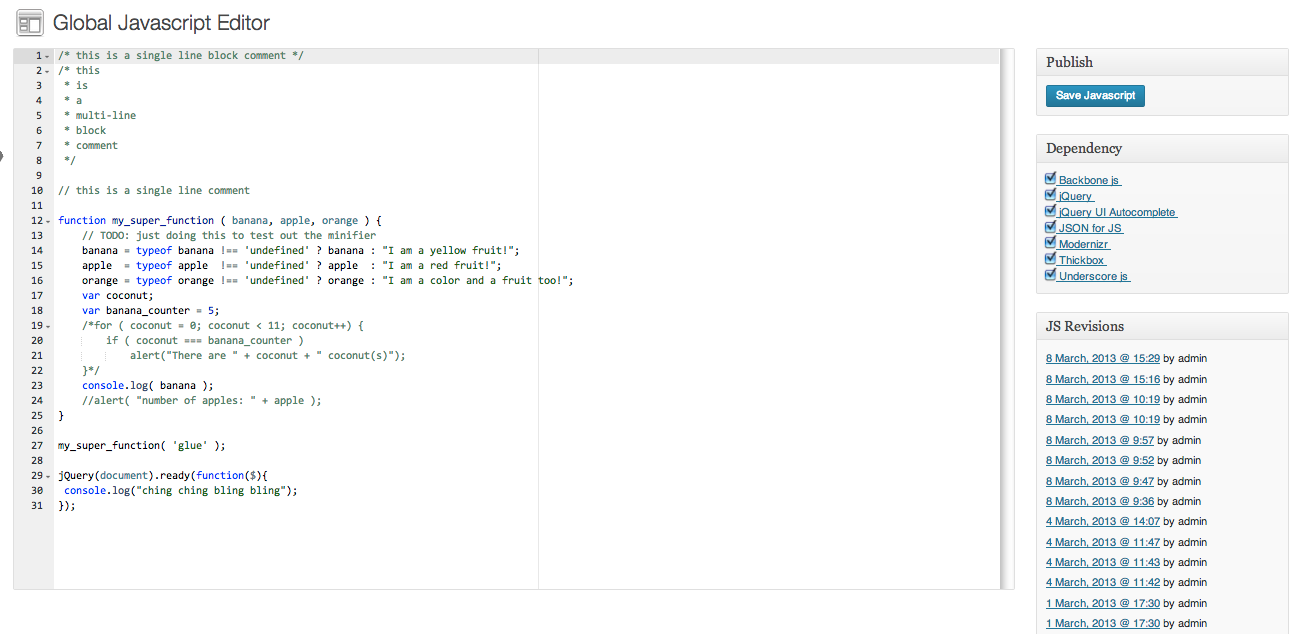
syntax highlighting
-
code minification
-
revisions
-
grouping blocks of code
-
including dependencies (libraries such as jQuery and backbone.js)
-
elegant editor interface courtesy of ACE
FUTURE ADDITIONS:
Here are some of the things that I will be adding sometime in the future as the plugin grows 🙂 :
-
ability to choose your minifier of choice from the minify library
-
ability to load different javascript files for each page/post as decided by the plugin user
-
ability to save additional javascript files and create tabs to organize the files
-
a separate button to completely delete the javascript files from the server
Acknowledgements
This plugin uses the minify library package by Steve Clay (steve@mrclay.org) and Ryan Grove (ryan@wonko.com).
More info at http://code.google.com/p/minify/
Installation
- Upload ‘global-javascript’ folder to the ‘/wp_content/plugins’ directory. Or alternatively install through the WordPress admin dashboard.
- Activate the plugin through the ‘Plugins’ menu in the WordPress admin dashboard.
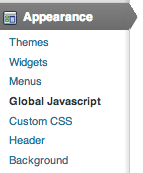
- Navigate to the ‘Appearance’ tab in the WordPress admin dashboard sidebar.
- Click on the link titled ‘Global Javascript’
Changelog
v.1.0 – release version
v0.16 – dependencies such as jQuery are now included in the plugin
– the current libraries can be included by ticking the checkbox in the editor
– included a function call to clear cache on save if supercache is enabled
v0.15 – plugin now minifies the javascript using the Google Closure Compiler at simple settings included in the PHP minifier library
* Julien’s note: if you want to change which minifier to use go to the filter function in the code
– changed the way files are saved and loaded to account for the extra time to minify the javascript
v0.14 – plugin no longer does anything on activation and deactivation (not necessary to)
– no longer creates a separate directory
– changed the way older files are deleted
v0.13 – changed the behavior of the deactivate function. (does not depend on the host being UNIX based)
– added a recursive function that handles removing directories and the contents inside the directories
v0.12 – added 2 additional hooks that will add and delete directories upon activation or deactivation respectively
– defined the uninstall function though at the moment nothing calls it (need to do additional testing and research before enabling it)
v0.11.1 – added a conditional to only load the javascript if the files exist
v0.11 – added a conditional to check if WP_DEBUG is set to true
* if WP_DEBUG is true plugin will load the non stripped version of the javascript
* no other additional changes to the plugin if in debug mode
v0.10.3 – cleaned up some of the code as well as changing the editor name to be more descriptive and similar to plugin name
– fixed some typos that caused javascript to not load properly
v0.10.2 – fixed a bug where previously uploaded files are not deleted
v0.10.1 – fixed a bug where single line comments were not being replaced
– plugin now saves external javascript to a custom directory in uploads by site and creates one if not available
v0.10 – added a regex replacer to prepare for minification in next release
– added additional saving that utilizes unix timestamping to prep for future loading method
v0.9.2 – changed the behaviour of the Javascript saving and loading
v0.9.1 – fixed a bug where files were not being saved properly using the new method
– fixed a bug where the redirect was giving a permissions error
v0.9 – changed the way javascript is saved
* previous method of saving was producing unintended results
* new method still requires some testing on multisites
* new method involves the use of the wp_filesystem
* codex.wordpress.org/Filesystem_API
– changed the way the paths work
* this new method should work regardless of what the parent directory is called
v0.8 – changed the way javascript is injected to the page
* javascript is now injected from an external file
– javascript is now saved to an external javascript file as well
– current handling of saving needs to be updated; may be security issues
v0.7 – changed the code to a class instead
v0.6.1 – fixed some typos
v0.6 – updated default text and info for global-javascript.php
v0.5 – added stylesheets to the editor
– changed the names of some style class tags inside codemirror.js
v0.4 – codemirror javascript mode code should have more meaning now
v0.3 – beautified the codemirror javascript mode code
v0.2 – changed code to edit javascript instead of css
v0.1 – core code created from the improved simpler css plugin by CTLT
Screenshots


For developers
Is this your plugin? Show off the numbers.
Add a live badge to your site, docs or GitHub README. It updates on its own — no account needed.
Best Global Javascript alternatives
All appearance plugins →




FAQ
Global Javascript: quick answers
Straight answers, pulled from live WordPress.org data.
Live data from WordPress.org · checked Sep 27, 2026
Is Global Javascript free?
Yes. Global Javascript is free to download and use from the official WordPress.org plugin directory.
Is Global Javascript safe to use in 2026?
Global Javascript shows warning signs in 2026 — compare the alternatives below before installing. It runs on 100+ sites, is rated 3.5/5 and was last updated 14 years ago, and scores 28/100 on our health check.
How many websites use Global Javascript?
Global Javascript is active on 100+ WordPress websites and has been downloaded 12,364 times since it launched in March 2013. It was downloaded 79 times in the last 30 days.
Does Global Javascript work with WordPress 7.1?
Global Javascript is officially tested up to WordPress 3.5.2, while the latest release is 7.1.2. It may still work, but try it on a staging site first.
When was Global Javascript last updated?
The latest version, 1.0, was released on March 12, 2013 (14 years ago).
Who makes Global Javascript?
Global Javascript is developed and maintained by ctltwp.
What are the best alternatives to Global Javascript?
The most popular alternatives to Global Javascript are Editor Menu and Widget Acce… (7K+ installs), Faster Appearance – Menus (200+ installs) and Styles: TwentyFifteen (100+ installs).
Powered by PageForge
Want thousands of pages that rank like these? Build them in an afternoon.
This directory runs on the same engine as PageForge. Turn any spreadsheet, CSV or API into thousands of fast, SEO-ready WordPress pages — with schema, internal links and AI-written copy baked in.
- CSV, Google Sheets & API data sources
- AI content, schema & internal links per page
- Works with Elementor, Gutenberg, Yoast & Rank Math
- Free on WordPress.org — no credit card


