



Editor Menu and Widget Access
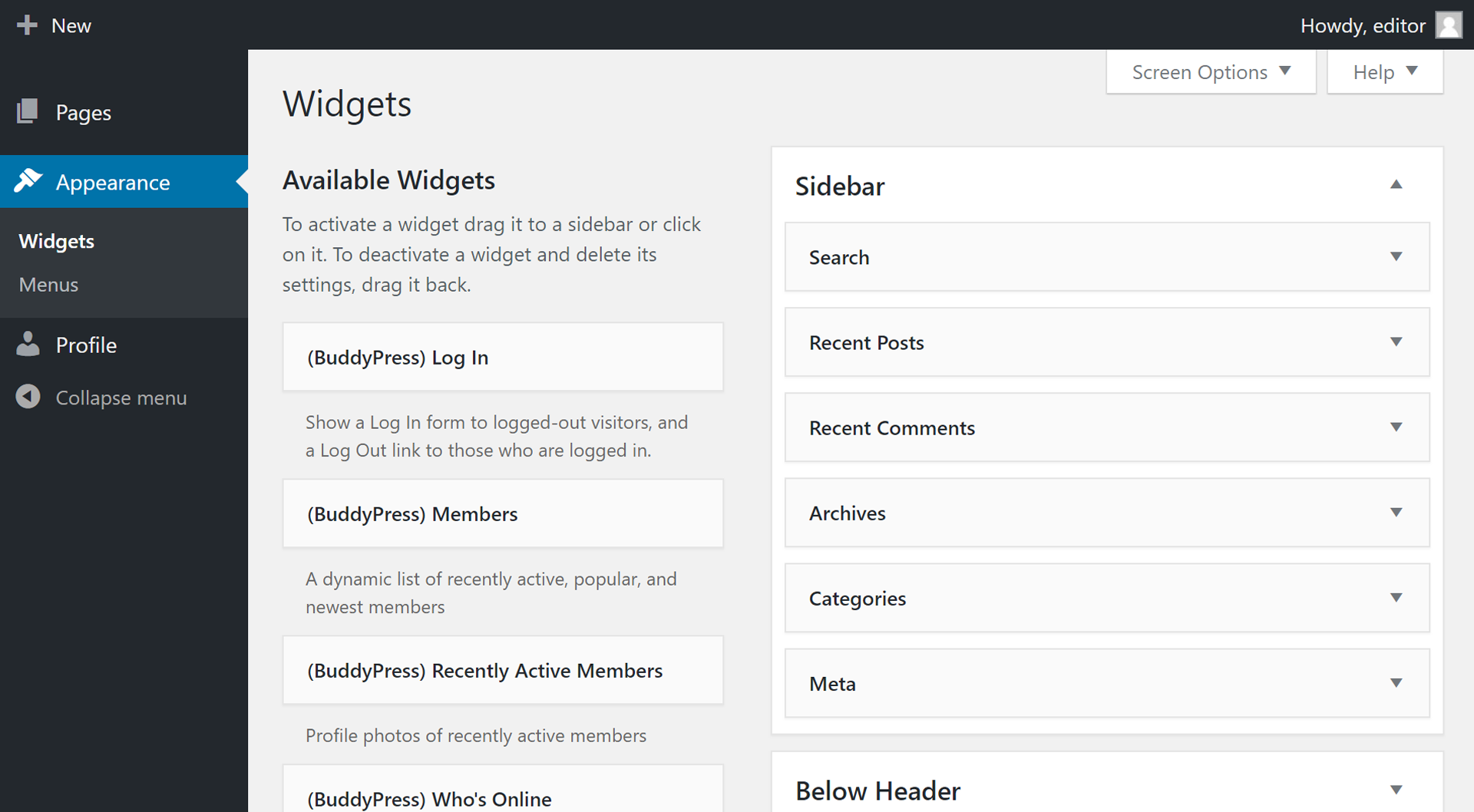
This open source and lightweight plugin allows users with the role Editor or Shop Manager to access the Menus and Widgets areas of the Appearance menu in WordPress’ admin area.

Use with caution
Editor Menu and Widget Access works, but test it on a staging site before relying on it in 2026. It runs on 7K+ sites, is rated 4.8/5 and was last updated 5 years ago, and scores 45/100 on our health check.
- Loved by users — 4.8/5 from 24 reviews
- No update in 5 years
- Only tested up to WordPress 5.7 (latest is 7.1)
How does it stack up?
Side-by-side on installs, updates, ratings & support


Daily downloads
Download spikes usually follow a new release — each site that auto-updates counts as a download.
Rankings
Where Editor Menu and Widget Acce… stands todayWordPress.org search rankings
Live position in the plugin search, top 100| Keyword | Position |
|---|---|
| appearance | >100 |
| menu | >100 |
| menus | >100 |
| widget | >100 |
| widgets | >100 |
Version adoption
Share of active sites per release.
Rating breakdown
★★★★★★★★★★ 4.8 from 24 reviews
About Editor Menu and Widget Access
From the official readme · v3.1.2Description
This open source and lightweight plugin allows users with the role Editor or Shop Manager to access the Menus and Widgets areas of the Appearance menu in WordPress’ admin area.
This is a common task that would be useful for clients to manage themselves to give them more control over their website’s content.
This plugin also gives access to the Customize submenu and other theme options, but these can be hidden through the options page at Appearance > Editor Access if you wish.
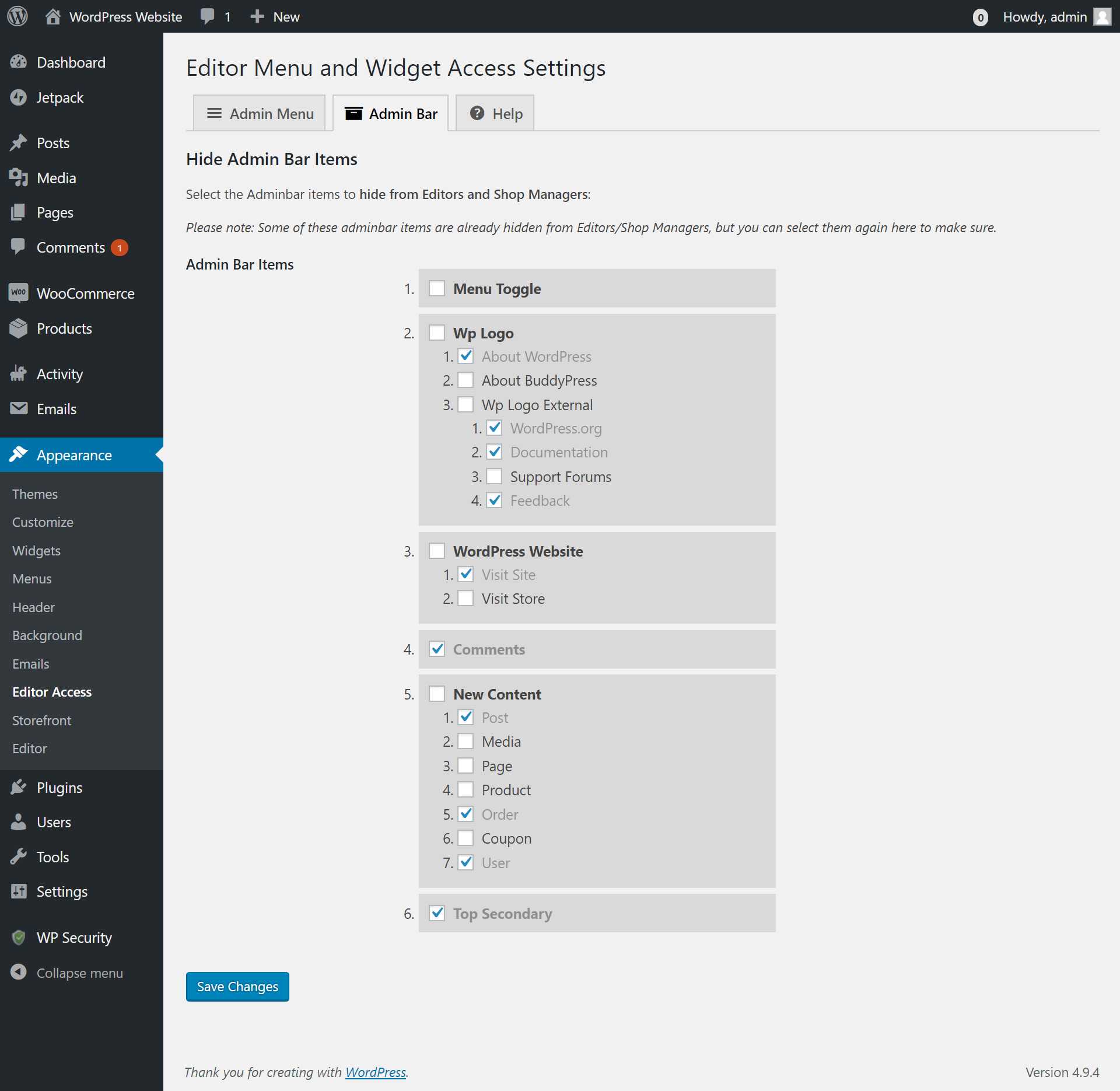
You can also select other menus to hide from Editors and Shop Managers (e.g. custom theme or plugin options pages), as well as hiding any elements on the Admin Bar.
Features
- Allow access to Customize, Menus and Widgets for Editors and Shop Managers.
- Theme Options remain hidden from these user roles.
- Hide custom options pages from these users (if your theme/plugin has a custom settings page you wish to hide).
- Hide any other menus or submenus. Simply select which menus you wish to hide.
- Hide admin bar menus and elements. Choose which elements you wish to hide.
Installation
Via FTP
- Upload editor-menu-and-widget-access to the /wp-content/plugins/ directory.
- Activate Editor Menu and Widget Access through the ‘Plugins’ menu in WordPress.
- That’s it! The default settings are applied automatically, and you can hide other pages in the options page at Appearance > Editor Access if you wish.
Via WordPress Admin
- Go to Plugins > Add New.
- Search for Editor Menu and Widget Access and click Install.
- Click Activate once installation is complete.
- That’s it! The default settings are applied automatically, and you can hide other pages in the options page at Appearance > Editor Access if you wish.
Frequently asked questions
Do I need to configure this plugin or change any settings?
No. The default settings are applied automatically once the plugin is activated, but you can choose exactly which pages you’d like to hide through the options page (in the “Appearance” menu whilst logged in as an Admin) if you wish.
Can I hide my theme’s custom options page?
Yes. Go to Appearance > Editor Access and select any other menu items that you’d like to hide.
Changelog
Capabilities now reset on plugin deactivation.
3.1.2
- Capabilities now reset on plugin deactivation.
3.1.1
- Bug fixed for WooCommerce shop_manager role.
3.1
- Code refactor.
- Fixed some PHP errors.
- Updated to latest WordPress version.
- Updated stable tag.
3.0.2
- Updated stable tag and WP version.
3.0.1
- CSS tweak for admin checkboxes.
3.0
- Added Admin Bar support for removing adminbar nodes/menus.
- Tabbed options page and redesign.
- Now allows hiding of menus with higher capabilities, in case another plugin has modified the permissions for Editors or Shop Managers.
- MVC model implemented into code.
- “Help” tab added to report and resolve issues more efficiently.
- Text-domain updated to match WP repo.
- Fixed localization issues.
- Re-added some Italian language support.
Screenshots



For developers
Is this your plugin? Show off the numbers.
Add a live badge to your site, docs or GitHub README. It updates on its own — no account needed.
Best Editor Menu and Widget Access alternatives
All appearance plugins →




FAQ
Editor Menu and Widget Access: quick answers
Straight answers, pulled from live WordPress.org data.
Live data from WordPress.org · checked Sep 26, 2026
Is Editor Menu and Widget Access free?
Yes. Editor Menu and Widget Access is free to download and use from the official WordPress.org plugin directory.
Is Editor Menu and Widget Access safe to use in 2026?
Editor Menu and Widget Access works, but test it on a staging site before relying on it in 2026. It runs on 7K+ sites, is rated 4.8/5 and was last updated 5 years ago, and scores 45/100 on our health check.
How many websites use Editor Menu and Widget Access?
Editor Menu and Widget Access is active on 7K+ WordPress websites and has been downloaded 86,015 times since it launched in June 2015. It was downloaded 443 times in the last 30 days.
Does Editor Menu and Widget Access work with WordPress 7.1?
Editor Menu and Widget Access is officially tested up to WordPress 5.7.19, while the latest release is 7.1.2. It may still work, but try it on a staging site first.
When was Editor Menu and Widget Access last updated?
The latest version, 3.1.2, was released on June 2, 2021 (5 years ago).
Who makes Editor Menu and Widget Access?
Editor Menu and Widget Access is developed and maintained by GuyPrimavera.
What are the best alternatives to Editor Menu and Widget Access?
The most popular alternatives to Editor Menu and Widget Access are Faster Appearance – Menus (200+ installs), Styles: TwentyFifteen (100+ installs) and Global Javascript (100+ installs).
Powered by PageForge
Want thousands of pages that rank like these? Build them in an afternoon.
This directory runs on the same engine as PageForge. Turn any spreadsheet, CSV or API into thousands of fast, SEO-ready WordPress pages — with schema, internal links and AI-written copy baked in.
- CSV, Google Sheets & API data sources
- AI content, schema & internal links per page
- Works with Elementor, Gutenberg, Yoast & Rank Math
- Free on WordPress.org — no credit card


