



Glimbyte Starter Sorter
Sort plugins by name, author, install date, or activation date. Includes an Extensions menu in the admin bar for instant plugin access from any page.

Consider an alternative
Glimbyte Starter Sorter shows warning signs in 2026 — compare the alternatives below before installing. Was last updated 7 months ago, and scores 36/100 on our health check.
- Small user base (<10 active installs)
- Very few reviews so far
- Only tested up to WordPress 6.9 (latest is 7.1)
How does it stack up?
Side-by-side on installs, updates, ratings & support



Daily downloads
Download spikes usually follow a new release — each site that auto-updates counts as a download.
Rankings
Where Glimbyte Starter Sorter stands todayWordPress.org search rankings
Live position in the plugin search, top 100| Keyword | Position |
|---|---|
| admin | >100 |
| organization | >100 |
| plugins | >100 |
| sort | >100 |
| toolbar | >100 |
About Glimbyte Starter Sorter
From the official readme · v1.4.0Description
Glimbyte Starter Sorter adds three productivity features to the WordPress Plugins screen: a sort toolbar, date tracking columns, and a persistent Extensions menu in the admin bar.
Extensions Menu in the Admin Bar
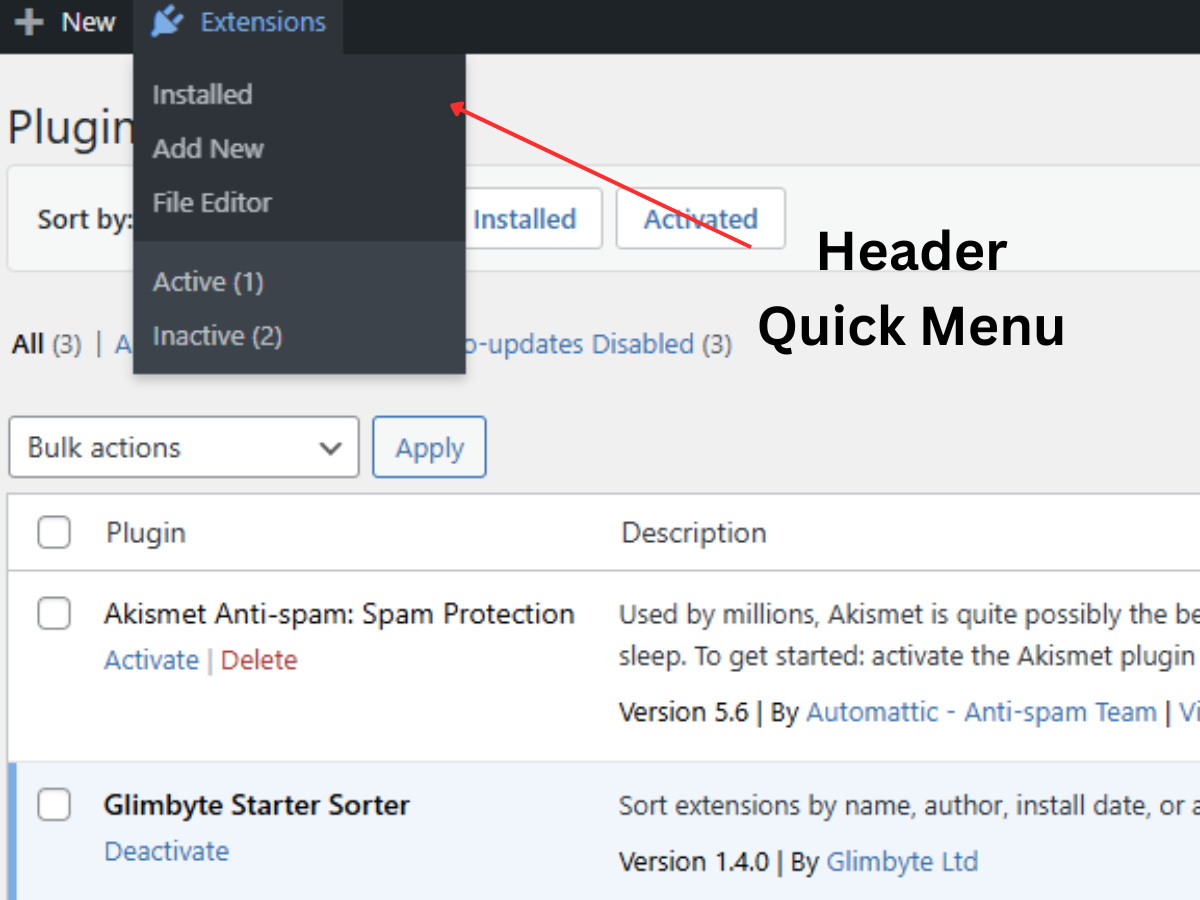
An Extensions item is added to your WordPress admin bar and stays visible on every page — including the front end of your site when you are logged in as an administrator. This means you can jump straight to plugin management without navigating through the sidebar, from wherever you are on the site.
The dropdown includes:
- Installed — go straight to your plugins list
- Add New — jump directly to the plugin installer (shown only to users with the install_plugins capability)
- File Editor — open the plugin file editor (shown only when file editing is enabled)
- Active (N) — filtered view of active plugins, with a live count
- Inactive (N) — filtered view of inactive plugins, with a live count
- Update Available (N) — shown only when updates exist, with a live count
Sort Toolbar
A toolbar appears above your plugins list with one-click sort buttons for Name, Author, Installed Date, and Activated Date. Click once to sort ascending, click again to reverse. Sort preferences are saved per user and persist across sessions.
Date Tracking Columns
Two new columns — Installed and Activated — are added to the plugins list table. Plugins installed after activating this plugin show exact timestamps. Pre-existing plugins fall back to their file modification date, marked with a tilde (~) to indicate the date is approximate.
Key Features
- Extensions menu in the admin bar, accessible from any admin page or the front end of the site
- Live plugin counts for Active, Inactive, and Updates Available shown in the dropdown
- Capability-aware links — Add New and File Editor only appear to users with the relevant permissions
- One-click sorting by Name, Author, Install Date, or Activation Date
- Ascending and descending toggle with a second click on any sort button
- Sort preference saved per user, persists between sessions
- Installed Date and Activated Date columns in the plugins list
- Accurate timestamp tracking for plugin activations, deactivations, and new installs
- File modification date fallback for pre-existing plugins, marked with ~
- No external scripts, no database tables, no configuration required
- Fully translatable (text domain: glimbyte-starter-sorter)
Installation
- Upload the
glimbyte-starter-sorterfolder to the/wp-content/plugins/directory, or install directly via the WordPress plugin installer. - Activate the plugin through the Plugins screen in your WordPress admin.
- The Extensions menu will appear in your admin bar immediately. Visit Plugins to see the sort toolbar and date columns.
No configuration is needed. Sort preferences are stored automatically per user when you click a sort button.
Frequently asked questions
Where does the Extensions menu appear?
The Extensions menu is added to the WordPress admin bar. It appears on every admin screen and also on the front end of your site for logged-in users with the activate_plugins capability. This lets you access plugin management from anywhere without going through the sidebar.
What links are in the Extensions dropdown?
The dropdown always includes Installed, Active (with count), and Inactive (with count). Add New is shown for users with the install_plugins capability. File Editor is shown for users with the edit_plugins capability when DISALLOW_FILE_EDIT is not defined. Update Available (with count) is only shown when updates are pending.
How do I sort my plugins?
After activation, visit the Plugins screen. A toolbar with four buttons — Name, Author, Installed, Activated — appears above the list. Click a button to sort by that field. Click it again to toggle between ascending and descending order. Your preference is saved automatically.
How are install dates determined for existing plugins?
Plugins installed after activating Glimbyte Starter Sorter will have their exact install timestamp recorded. Plugins that were already installed use the file modification date as an approximation. Approximate dates are displayed with a ~ symbol.
What does “Before tracking” mean in the Activated column?
This label appears for plugins that were already active when Glimbyte Starter Sorter was installed. Their activation date was not yet being tracked. Once you deactivate and reactivate them, the exact date will be recorded.
Does this plugin work on WordPress Multisite?
The admin bar menu, sort toolbar, and date columns all work on individual sites within a Multisite network. The network-level admin area (wp-admin/network/) is not currently supported.
Will this plugin slow down my site or admin?
No. The admin bar menu uses data WordPress already loads and caches. The sort toolbar and date columns only run on the Plugins screen. No external files are loaded and no additional database tables are created.
Is the sort preference shared between users?
No. Each WordPress user has their own sort preference stored in their own user meta, independently of other users.
Can I turn off individual features such as the admin bar menu?
Not through a settings page in this version. A settings page with toggleable features is planned for a future release. To remove all features, deactivate the plugin.
Changelog
Security and compliance update. Adds nonce verification to all sort operations. All users are encouraged to update.
1.4.0
- Security: Added nonce verification to all sort operations
- Security: Added wp_unslash() before all sanitization calls
- Compliance: Moved all CSS output to wp_add_inline_style via registered style handles
- Compliance: Updated all function, class, and option prefixes to the unique glmbso_ namespace
- Added: readme.txt for WordPress.org Plugin Directory
- Improved: Admin bar secondary group uses native WordPress ab-sub-secondary styling
1.3.0
- Added: Extensions menu in the admin bar with quick-access links and live plugin counts
- Fixed: Sort reliability improved by resorting list table items after prepare_items() completes
1.2.0
- Fixed: Sorting approach rewritten to work correctly with WordPress list table internals
1.1.0
- Added: Installed Date and Activated Date columns on the Plugins screen
- Added: Sort toolbar with Name, Author, Installed, and Activated sort options
- Added: Timestamp tracking for plugin activation, deactivation, and installation events
1.0.0
- Initial release
Screenshots


For developers
Is this your plugin? Show off the numbers.
Add a live badge to your site, docs or GitHub README. It updates on its own — no account needed.
Best Glimbyte Starter Sorter alternatives
All admin plugins →




FAQ
Glimbyte Starter Sorter: quick answers
Straight answers, pulled from live WordPress.org data.
Live data from WordPress.org · checked Sep 29, 2026
Is Glimbyte Starter Sorter free?
Yes. Glimbyte Starter Sorter is free to download and use from the official WordPress.org plugin directory.
Is Glimbyte Starter Sorter safe to use in 2026?
Glimbyte Starter Sorter shows warning signs in 2026 — compare the alternatives below before installing. Was last updated 7 months ago, and scores 36/100 on our health check.
How many websites use Glimbyte Starter Sorter?
Glimbyte Starter Sorter is active on <10 WordPress websites and has been downloaded 373 times since it launched in February 2026. It was downloaded 45 times in the last 30 days.
Does Glimbyte Starter Sorter work with WordPress 7.1?
Glimbyte Starter Sorter is officially tested up to WordPress 6.9.9, while the latest release is 7.1.2. It may still work, but try it on a staging site first.
What PHP version does Glimbyte Starter Sorter need?
Glimbyte Starter Sorter requires PHP 7.4 or higher. Most hosts run PHP 8.x today, so it works on any modern WordPress hosting.
When was Glimbyte Starter Sorter last updated?
The latest version, 1.4.0, was released on February 18, 2026 (7 months ago).
Who makes Glimbyte Starter Sorter?
Glimbyte Starter Sorter is developed and maintained by Glimbyte.
What are the best alternatives to Glimbyte Starter Sorter?
The most popular alternatives to Glimbyte Starter Sorter are Loginizer (1M+ installs), Redux Framework (900K+ installs) and Admin Menu Editor (300K+ installs).
Powered by PageForge
Want thousands of pages that rank like these? Build them in an afternoon.
This directory runs on the same engine as PageForge. Turn any spreadsheet, CSV or API into thousands of fast, SEO-ready WordPress pages — with schema, internal links and AI-written copy baked in.
- CSV, Google Sheets & API data sources
- AI content, schema & internal links per page
- Works with Elementor, Gutenberg, Yoast & Rank Math
- Free on WordPress.org — no credit card


