


Live Chat by Formilla – Real-time Chat & Chatbots Plugin
Live chat software with real-time visitor monitoring and chatbots! Live chat with your visitors for free or use a chatbot to automate self-help.

Safe pick
Yes — Live Chat by Formilla is a safe, well-maintained plugin to use in 2026. It runs on 2K+ sites, is rated 4.8/5 and was last updated 1 month ago, and scores 83/100 on our health check.
- Loved by users — 4.8/5 from 116 reviews
- Tested with the latest WordPress (7.1)
- Momentum — downloads up 18.8% vs the previous 30 days
How does it stack up?
Side-by-side on installs, updates, ratings & support



Daily downloads
Download spikes usually follow a new release — each site that auto-updates counts as a download.
Rankings
Where Live Chat by Formilla stands todayWordPress.org search rankings
Live position in the plugin search, top 100| Keyword | Position |
|---|---|
| chat | #16 |
| chat bot | #4 |
| chatbot | #34 |
| live chat | #6 |
| livechat | #11 |
Version adoption
Share of active sites per release.
Rating breakdown
★★★★★★★★★★ 4.8 from 116 reviews
About Live Chat by Formilla
From the official readme · v1.4Description
Formilla Live Chat Software offers FREE and Premium services for your WordPress site. Allow your visitors to chat with you live if they have any questions or need support.
Formilla Live Chat Features:
-
Installs Instantly: Use the out-of-the-box Formilla Live Chat web interface to begin chatting immediately. The live chat button will appear on your WordPress or WooCommerce site upon installation/activation of this plugin.
-
Mobile Apps for iPhone, iPad, and Android Devices: Reply via your mobile device or tablet by using our iPhone/iPad or Android apps! Install our app and simply login to your Formilla account to chat with customers from anywhere!
-
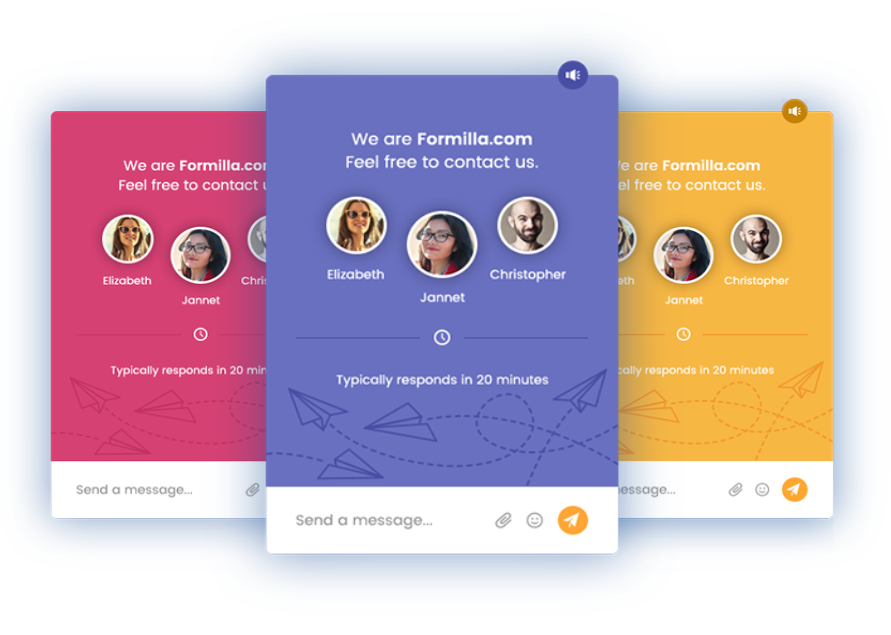
Mobile Ready Chat Widget: The Formilla Live Chat widget has a responsive design that adapts to smartphones of any size, making it easy for your website visitors to interact with.
-
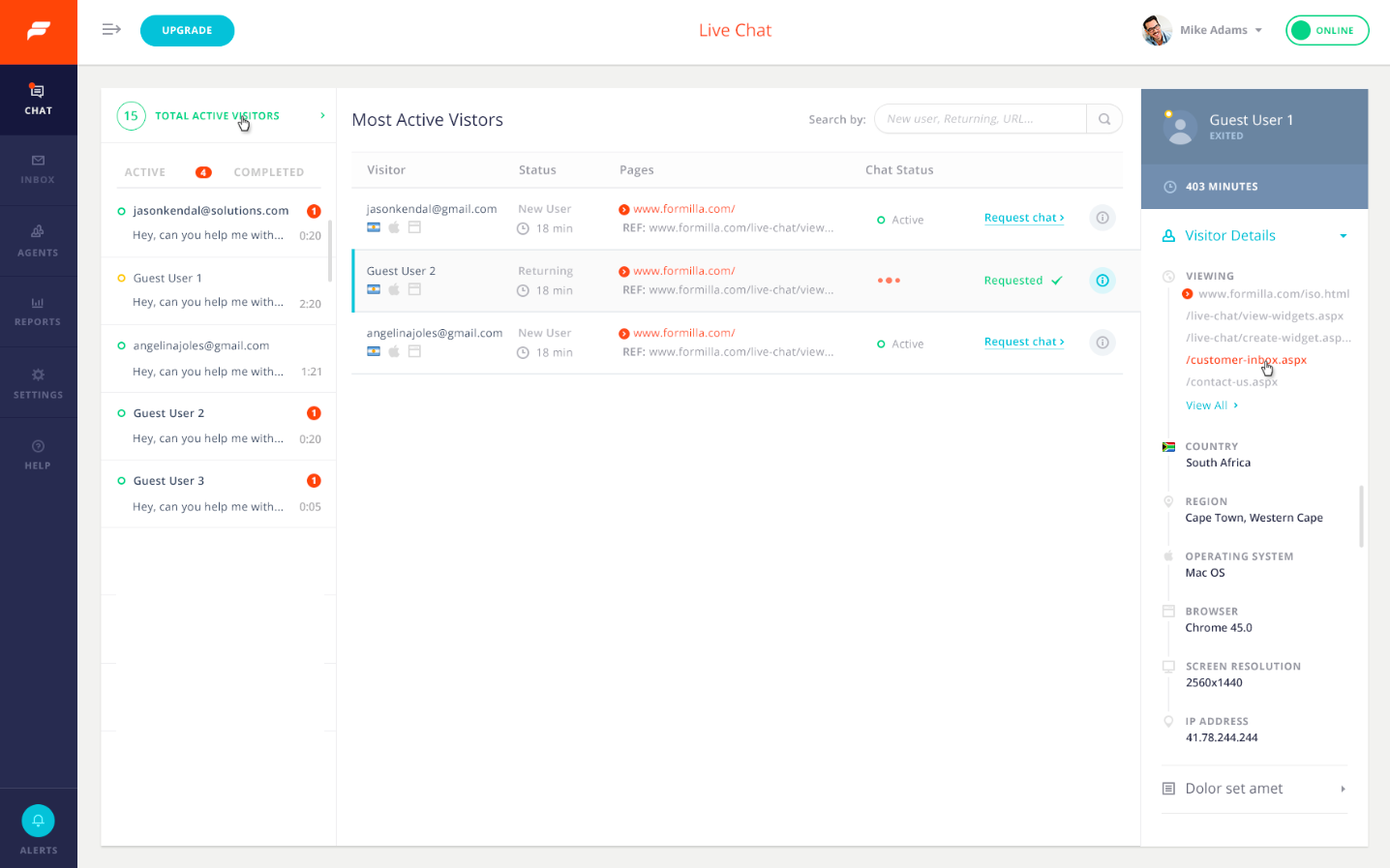
Real-time Visitor Monitoring: Formilla real-time visitor monitoring/tracking allows you to see the number of active visitors on your website, and initiate live chats with them. View what country the visitor is accessing your site from, their recently viewed web pages, operating system in use (Windows, Mac, iOS, Android, etc.), internet browser, referring site, new user vs. returning, IP address, and more. Formilla Live Chat visitor monitoring is a paid feature and comes with our Professional package or higher.
-
Language Support (International): Our Language support option allows you to customize the text of the live chat widget in online and offline form. All of our packages allow you to customize your widget in any language, including Spanish, French, German, Dutch, Portuguese, Chinese, Hindi, Italian, and much more!
-
Custom Chat Bots: Chatbots work around the clock to automatically qualify leads, book meetings, and provide information about your products or services to customers, even without having to chat with a live person! Chatbots can be added to any Premium package as a paid feature add-on. Check out our Custom Chat Bot tutorial to learn more.
-
A.I. ChatGPT Bots: ChatGPT Chatbots leverage ChatGPT’s incredible Artificial Intelligence technology to respond to visitor questions 24/7 (paid feature add-on). You’ll see a huge improvement in your staff’s efficiency and dramatically boost customer satisfaction too. Check out our ChatGPT Bots tutorial to learn more.
-
Pro-active Chat: Enable pro-active chat to trigger automatically after a defined number of seconds (Premium packages). You can also configure a chatbot to do the same, with even more control over the user flow. For example, a chatbot can proactively popup to engage visitors and qualify them as leads before speaking with a live agent. This works with multiple types of custom chatbots you can create for your business.
-
Smart Messages: Target visitors like never before! With Smart Messages, you can automatically display custom messages to your website visitors in many different scenarios (Premium packages).
-
Marketing Automation (Email Messaging): Keep customers coming back to your website with Formilla automatic email messaging. Use the “Personal” template so it looks like you’re contacting your customer directly, or use the “Professional” branded template when sending a company announcement, blog update, etc. (Growth package).
-
Marketing Automation (In-App Messaging): Display In-App/website popup messages using multiple display types on your website (popups, corner widgets, website bars). Announce a limited time offer or sale, offer a coupon code, or market virtually anything to your visitors (Growth package).
-
Canned (Saved) Replies: Use simple keyboard shortcuts to access saved replies and quickly respond to commonly asked questions . Our Premium plans allow for unlimited Canned Replies and our free chat package allows for up to 5.
-
File Sharing: Allow site visitors and agents to securely share files during a chat. File sharing helps you resolve customer issues more quickly. You also have the power to disable file sharing for visitors, agents, or both (Professional package).
-
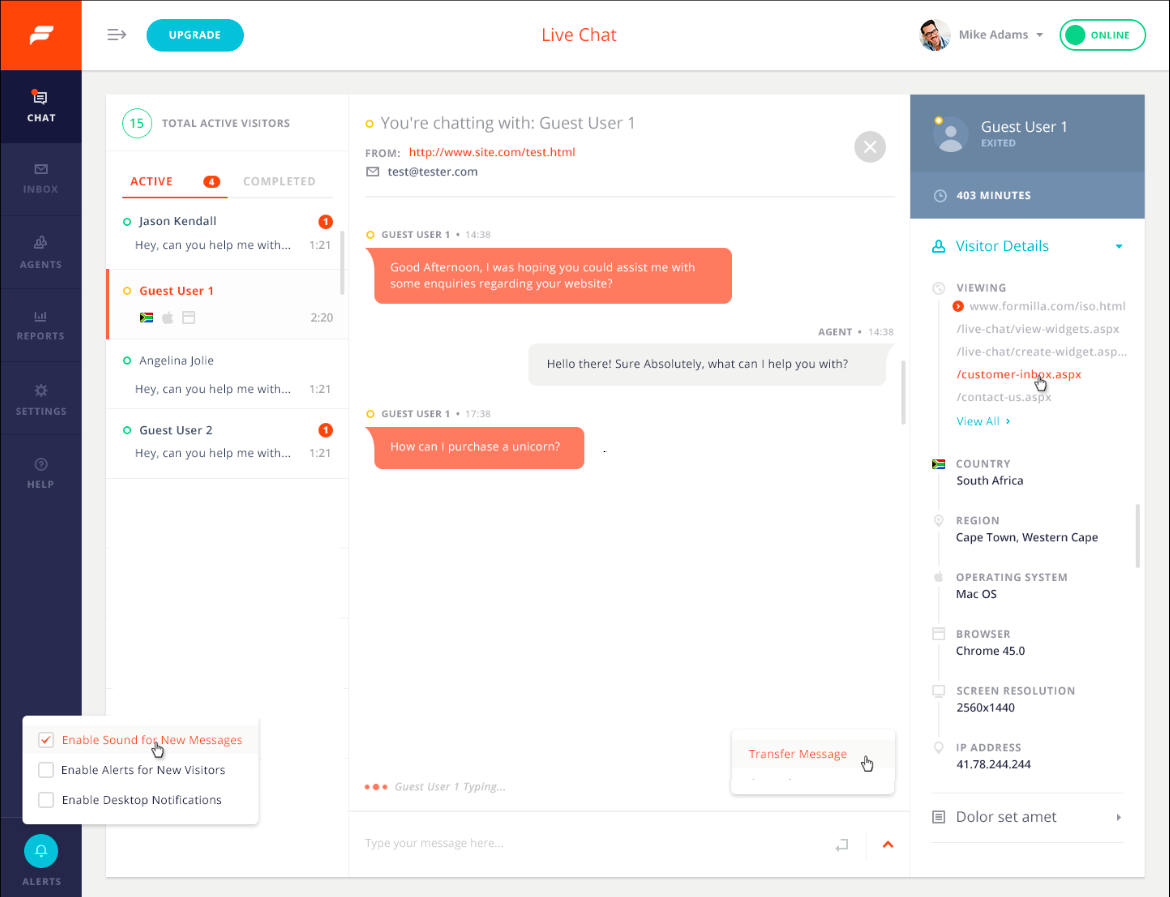
User/Agent is Typing a Message…: Now you don’t need to wonder if the person you’re chatting with is even on the other end! Formilla Live Chat keeps visitors and agents informed if the User or Agent is typing a message. This improves usability and makes live chat more enjoyable.
-
Desktop Notifications: Make sure you don’t miss any chats by enabling Desktop Notifications to see an alert box displayed every time you receive a chat. This feature currently works with Chrome, Firefox, and Safari.
-
Chat Broadcast: With Chat Broadcast, all your online chat agents are notified of an incoming chat and can accept or decline the chat based on their immediate availability.
-
Chat Transfer: Transfer a chat message back and forth with other available online chat agents and provide a private message to provide additional details with the transfer.
-
Custom Banners, Colors, and Themes: Formilla Live Chat software allow you to customize your chat widgets to match your site. Change the color of the livechat button/widget, chat message and font color, backgrounds, etc.
-
Advanced Customization: Formilla Live Chat software gives you the ability to stretch the width and height of the live chat button, and control the location down to the pixel. You get access to the CSS for your widget to make it look perfect. Upload your own online and offline images to use in your header, footer, etc. to encourage customers to start a conversation! (Premium option)
-
Require Email Address: Before visitors start a conversation, you can require them to supply their email address first.
-
Contacts Management: We’ll store your contacts in Formilla whenever you have a conversation, or receive one while offline. You can segment contacts automatically into separate groups to target them effectively. You can also tag high-value prospects for follow-up, as VIP customers, or really anything else. Use our super fast search and filtering options to find your contacts quickly.
-
Chat Button Location: Easily move the position of the live chat box & button to the bottom left or right of your website with our customization options.
-
Multiple Agents: Our Premium packages start with two live chat agents, and you can add additional live chat agents to support incoming conversations from your customers.
-
Offline Chats: Formilla Live Chat software automatically displays as an offline version of the chat box on your site when you’re unavailable to livechat. You can manage offline messages via email as Formilla will send you a transcript of the message.
-
Integrate with hundreds of apps using Zapier: Automatically post livechat transcripts directly to your favorite apps using Zapier. Hundreds of apps are supported, including email marketing tools, CRMs, ticket systems, and a lot more (e.g. Mailchimp, Constant Contact, Pipedrive, Infusionsoft, Zendesk, etc.). This is a Premium package option.
-
Help Desk: The Conversation History/helpdesk allows you to search by customer email address, priority, status (new, read, pending, complete), flagged vs. unflagged, and also assign an item to another user of your Formilla Live Chat account.
-
Export Email Data: Formilla Live Chat software allows you to export your customers’ email addresses from the Conversation History inbox.
-
Add Private Comments: Formilla gives you the ability to add private comments to any historical record in your Conversation History.
-
Visitor Technical Info: Formilla Conversation History includes the customer’s technical details such as operating system, browser, screen resolution, etc. Also, view visitor technical info during a live chat.
-
Custom Attributes: Pass in custom data fields from your website to Formilla for easier tracking such as account IDs, customer IDs, name, phone, and more.
-
Robust APIs: Push your data to Formilla to track advanced customer behavior with our Javascript and REST APIs. Track last order date, member signup date, total amount spent, or anything else.
-
Get started immediately with our free live chat package that comes with 15 days of premium services as well.
Popular Use Cases for Live Chat:
There are a variety of reasons you might be interested in adding a live chat feature to your site. Most commonly, site owners are looking to chat in real-time with visitors in order to offer better customer service or to generate sales.
Live Chat for Customer Service
Data from ecommerce platform Shopify shows that “businesses that respond to a customer’s chat within five minutes are 69% more likely to get a sale.” Customers don’t like hunting around for information or waiting for responses, and live chat offers the best possible customer experience. A live chat customer service agent can speak directly to a customer, providing a personal experience leading to increased customer satisfaction.
One of the benefits of live chat that businesses often overlook is the ability to learn directly from customers. Speaking to a customer who came to your site looking to solve a problem or answer a question gives you valuable insight into how real people interact with your website. Live chat customer service also helps keep customer interactions on-site, rather than seeing frustrated customers take their complaints to a public forum like social media.
Live Chat for Marketing
Live chat can help in multiple ways throughout the purchase funnel for your business. Talking to real human beings is one of the ways we are all most comfortable learning about new products and services, and a skilled marketer communicating to site visitors via a live chat widget can provide great opportunities to educate and engage potential customers.
A live chat widget is an effective way to increase your visitor-to-lead conversion rate. By engaging potential customers right away, you’re reducing the number of visitors who “bounce” off your site. And you can also use live chat to pre-qualify leads, determining a visitor’s actual interest level in what you have to offer.
Live Chat for Sales
Using live chat to help convert site visitors into customers is often referred to as “conversational sales.” Your live chat sales team can help visitors find the products or services they are looking for quickly, can nurture leads brought to the site by marketing programs, and can answer ordering or billing questions as needed to offer a smooth transaction experience.
Live chat is also a great opportunity for a sales agent to schedule a product demonstration or training session, which can be especially helpful for sites that provide things like business software. And agents can also encourage satisfied customers to share their contact information as part of the chat, in order to continue the personalized interaction in the future.
Read more about live chat use cases on our blog.
How can live chat bots help businesses?
The uses of live chat bots on business websites are varied, but can be broadly categorized into customer service, marketing, and sales tasks. Automated chat bots can staff the live chat feature on your site when live chat agents aren’t available. The flexibility provided by custom bots makes them an efficient solution for handling common sales and support tasks, while freeing up your team to handle more complex inquiries. For example, you can configure multiple bots across your website based on key landing pages, learn where visitors are at in the sales process by asking them questions and collecting input, and perform specific actions based on visitor selection.
Some of the popular chat bot use cases include:
-
Triage: A live chat bot can greet site visitors and ask them to choose from several pre-defined answer buttons to guide them down a given path, similar to an automated phone system. For example, the bot can show options such as ‘I’m new & want to learn more’, ‘Track my order’, ‘Change my password’, ‘Technical help’, along with ‘Other’ if nothing matches the reason for their visit, along with a multitude of other button options based on your business needs.
-
Lead Qualification: To collect contact information from site visitors as a means to generate leads, and ask additional qualifying questions to determine the size of the opportunity, gauge the customer’s interest and where they are at in the buying cycle, or route them right to your sales team or even book a demo on your calendar.
-
Scheduling: With the Calendly scheduling feature, a live chat bot can be configured to display your Calendly calendar directly inside the live chat widget for the visitor to choose from any available dates and times for a demo or phone consultation.
-
Frequently Asked Questions: A custom menu-based bot can be used to preemptively answer frequently asked questions from site visitors. For example, let’s say you have a conference event coming up and configure a live chat bot with pre-defined buttons where the visitor can quickly choose from topics such as ticket costs, directions to the event, parking tips, event schedule, guest speakers participating, nearby hotels, and more. This can work for a virtual conference as well.
-
ChatGPT Chatbot: A ChatGPT Bot dramatically reduces support time by automatically responding to visitor questions at any time — day or night — using the power of ChatGPT’s Artificial Intelligence. A ChatGPT Bot is different from the other bot types since it allows visitors to enter a free-form question, and replies with the most relevant answer based on how it has been trained over time.
Installation
Follow our WordPress Live Chat Plugin tutorial to get started. To manually install the plugin zip file, see below:
- Download and unzip the formilla-live-chat.zip to your wordpress
/wp-content/plugins/directory - Activate the plugin through the ‘Plugins’ menu in WordPress
- Choose the Get Started link from the plugins page or navigate to the ‘Formilla Chat’ menu item that appears on your WordPress Admin upon activating the plugin to complete registration
- That’s it! Once registered, your live chat widget is created instantly and is available on your site for customers to chat with you.
Frequently asked questions
How do I install Formilla Live Chat software to my WordPress site?
Follow our WordPress Live Chat Plugin tutorial to get started.
Does Formilla work with WooCommerce?
Yes, our live chat software easily installs with WooCommerce sites. Install and activate the plugin from within your WordPress/WooCommerce admin panel for the chat button to appear on your site.
How do I start a test chat after installing Formilla on my WordPress site?
Watch our video tutorial to learn how.
What is the Formilla ‘Chat ID’ (or Plugin ID) under the WordPress plugin settings?
The Chat ID is the unique identifier for your particular account. Your live chat widget won’t display on your WordPress website unless you have a Chat ID entered on the settings page. You will receive this ID via email upon registering with Formilla.com via the Formilla Chat link on your WordPress admin panel.
Can I specify my hours of operation or simply that I am unavailable to chat?
Yes. Start by logging in to your Formilla account, then mouse over Settings and select Widgets from the submenu that appears. On the next page, click the edit/pencil icon under Actions for your chat widget. You can modify the hours of operation from the Widget Details tab and click Save Changes.
Will I receive an email notification when my customers contact me while I’m offline from chat?
Yes, the Email Notifications option is enabled by default for every Formilla Live Chat widget you create. Removing the email address(es) on the Widget Details tab of the live chat widget configuration page disables the feature. Alternatively, you may add additional email recipients by simply comma-separating each email address. You can respond to emails using your preferred email client, or directly from the Formilla Conversation History.
How do I setup a chat bot to automatically respond to customers?
The Formilla Helper Bot can be setup and trained to answer questions from your customers automatically. To configure a chatbot (paid feature add-on), you can simply mouse over Automation in the left menu, then select Helper Bots from the sub-menu that appears. At the top of the next screen, click Create Helper Bot to get started.
How do I qualify leads by using a chatbot?
Chatbots can be used to collect contact information from site visitors as a means to generate leads, and ask additional qualifying questions to determine the size of the opportunity, gauge the customer’s interest and where they are at in the buying cycle, or route them right to your sales team or even book a demo on your calendar.
How do I automatically book demos by using a chatbot?
Formilla offers a Calendly scheduling feature. Chatbots can be configured to display your Calendly calendar directly inside the widget for the visitor to choose from any available dates and times for a demo or phone consultation. Chatbots can first qualify the visitor, and then decide whether to offer them a demo if they’re a valuable lead.
I’ve followed all the instructions but I still appear offline to customers. How do I go online?
If you’re using the web interface, it behaves just like any chat client; you must login to Formilla.com (the chat client) via your WordPress Admin Panel –> Formilla Chat menu item, or directly at Formilla.com in a new browser window. Once you’ve logged in and navigated to the dashboard (Dashboard from the main menu), you’re considered online and ready to accept chats. Ensure your status indicator says Online in the header bar, of course. If you log off, your chat will go to offline mode. If you’re using our iPhone/Android apps instead of the web interface, simply log in to the mobile app and…
Is there a way for me to deactivate Formilla momentarily without removing the plugin?
Yes. Access your WordPress admin panel and select Plugins from the left menu. Find the Formilla Live Chat plugin and click the ‘Deactivate’ link to hide the widget from your WordPress site. If you’re using either of our Premium plans, you can also hide the live chat button and widget from inside your widget settings. To do this, start by logging in to your Formilla account, then mouse over Settings and select Widgets from the submenu that appears. On the next page, click the edit/pencil icon under Actions for your chat widget. You should now be in the settings area, where you can select the…
Can I proactively initiate a conversation with my customers?
Yes, we call these Smart Messages. Simply login to your Formilla account, mouse over Automation in the left menu, then choose Smart Messages from the sub-menu that appears. We normally create your first Smart Message when you sign up, however, you can delete (or edit) it and create your own by clicking the Create Smart Message button and choosing Chat Message to get started. This feature comes with any of our Premium plans and you get unlimited Smart Messages.
Can I enable an auto-responder when I don’t respond to an incoming conversation on time?
Yes. To enable this setting, start by logging in to your Formilla account, then mouse over Settings and select Widgets from the submenu that appears. On the next page, click the edit/pencil icon under Actions for your chat widget. You should now be in the settings area, where you can select the Advanced Options tab. Simply check the box for the feature “Enable Auto Response”, and enter your desired auto-response text in the field that appears, along with how long (for example, 60 seconds) before it should trigger. Also, be sure to Save Changes when complete. Going forward, any time a website…
Can I require my site visitors to provide their email address before starting a conversation?
Yes. For free chat accounts, enable this setting by logging in to your Formilla account, then mouse over Settings and select Widgets from the submenu that appears. On the next page, click the edit/pencil icon under Actions for your chat widget. You should now be in the settings area, where you can select the Advanced Options tab. Our free chat plan allows you to require visitors to enter an email address or a message before starting a chat. If you are using either of our Premium packages, you will notice the ability to add pre-chat form fields near the top of the Advanced Options tab instead…
Does Formilla work with my mobile phone (e.g. iPhone, Android, etc.)?
Yes. Use our mobile apps for iPhone/iPad, or Android devices to chat from your mobile phone on the go! For those using the web interface, it is currently not optimized for your mobile phone.
How do I create an in-app or email message to announce a sale, market a new product or service, etc.?
To create a new in-app or email message, or to find your existing Smart Messages, just mouse over Automation and select Smart Messages from the left menu in your Formilla account. Here you can view the status of your existing messages and their performance, or simply create a new message by clicking the Create Smart Message button and choosing your desired type of message from the flydown menu. Note: to send email messages, you’ll need to ensure your email address is verified with Formilla from the Settings –> Users page, and also setup your business email with Formilla. Once you create your…
My in-app message only displayed once when testing, although it will not appear again. What can I do to continue testing?
The default setting for in-app messages is to display Once after 5 seconds. With this configuration, the message will not display again. In this case, you can test with a different browser, or modify the settings from the Advanced Options to display the widget more frequently. For instance, we recommend setting the message to display Always and to set the “Display if user has already interacted with it?” option to Yes when testing. This way, you’ll continuously see the message. To find the settings mentioned, mouse over Automation and click Smart Messages from the left menu, then click the…
What happens when I choose the ‘Request Chat’ action from the visitor monitoring dashboard?
Formilla will pop-up the live chat box to the corresponding visitor of your web site after a few seconds or on the next page load.
Can I modify the message displayed to my website visitors when I request a chat with them via the visitor monitoring page?
Yes. To do this, start by logging in to your Formilla account, then mouse over Settings and select Widgets from the submenu that appears. On the next page, click the edit/pencil icon under Actions for your chat widget. You should now be in the settings area, where you can select the Advanced Options tab to find the “Request Chat Text” field. Be sure to Save Changes when complete.
Is real time visitor monitoring only available to paid accounts?
Yes. Currently the real time visitor monitoring/tracking feature of Formilla comes with our Professional package tier or higher.
Changelog
1.4
Minor release to remove one deprecated function call.
1.3.1
Minor release to improve security.
1.2
Minor release to load the chat widget after most scripts for optimal performance.
1.1
Due to WordPress guidelines, we’ve modified our plugin to launch Formilla outside of the WordPress admin panel.
1.0.2
Officially WP 3.8 compliant. Fixed minor bug, updated readme text as well.
1.0.1
Updated readme.txt to add more FAQ, installation video tutorial, new screenshots. No other changes.
Screenshots




For developers
Is this your plugin? Show off the numbers.
Add a live badge to your site, docs or GitHub README. It updates on its own — no account needed.
Best Live Chat by Formilla alternatives
All chat plugins →





FAQ
Live Chat by Formilla: quick answers
Straight answers, pulled from live WordPress.org data.
Live data from WordPress.org · checked Sep 26, 2026
Is Live Chat by Formilla free?
Yes. Live Chat by Formilla is free to download and use from the official WordPress.org plugin directory.
Is Live Chat by Formilla safe to use in 2026?
Yes — Live Chat by Formilla is a safe, well-maintained plugin to use in 2026. It runs on 2K+ sites, is rated 4.8/5 and was last updated 1 month ago, and scores 83/100 on our health check.
How many websites use Live Chat by Formilla?
Live Chat by Formilla is active on 2K+ WordPress websites and has been downloaded 196,006 times since it launched in November 2013. It was downloaded 785 times in the last 30 days.
Does Live Chat by Formilla work with WordPress 7.1?
Yes. The developer has tested Live Chat by Formilla up to WordPress 7.1.2, the latest release. It requires WordPress 2.7 or newer.
When was Live Chat by Formilla last updated?
The latest version, 1.4, was released on August 17, 2026 (1 month ago).
Who makes Live Chat by Formilla?
Live Chat by Formilla is developed and maintained by zgilyana.
What are the best alternatives to Live Chat by Formilla?
The most popular alternatives to Live Chat by Formilla are Joinchat (700K+ installs), Floating Chat Widget: Conta… (300K+ installs) and Tidio (70K+ installs).
Powered by PageForge
Want thousands of pages that rank like these? Build them in an afternoon.
This directory runs on the same engine as PageForge. Turn any spreadsheet, CSV or API into thousands of fast, SEO-ready WordPress pages — with schema, internal links and AI-written copy baked in.
- CSV, Google Sheets & API data sources
- AI content, schema & internal links per page
- Works with Elementor, Gutenberg, Yoast & Rank Math
- Free on WordPress.org — no credit card


