



Fluid Space Forge
Generate responsive spacing systems using CSS clamp() functions. Perfect companion to Fluid Font Forge for creating fluid design systems.

Use with caution
Fluid Space Forge works, but test it on a staging site before relying on it in 2026. Was last updated 2 months ago, and scores 60/100 on our health check.
- Tested with the latest WordPress (7.1)
- Small user base (<10 active installs)
- Very few reviews so far
- Needs PHP 8.2 or newer
How does it stack up?
Side-by-side on installs, updates, ratings & supportDaily downloads
Download spikes usually follow a new release — each site that auto-updates counts as a download.
Rankings
Where Fluid Space Forge stands todayWordPress.org search rankings
Live position in the plugin search, top 100| Keyword | Position |
|---|---|
| clamp | #11 |
| css | >100 |
| design system | >100 |
| responsive | >100 |
| spacing | >100 |
About Fluid Space Forge
From the official readme · v1.3.0Description
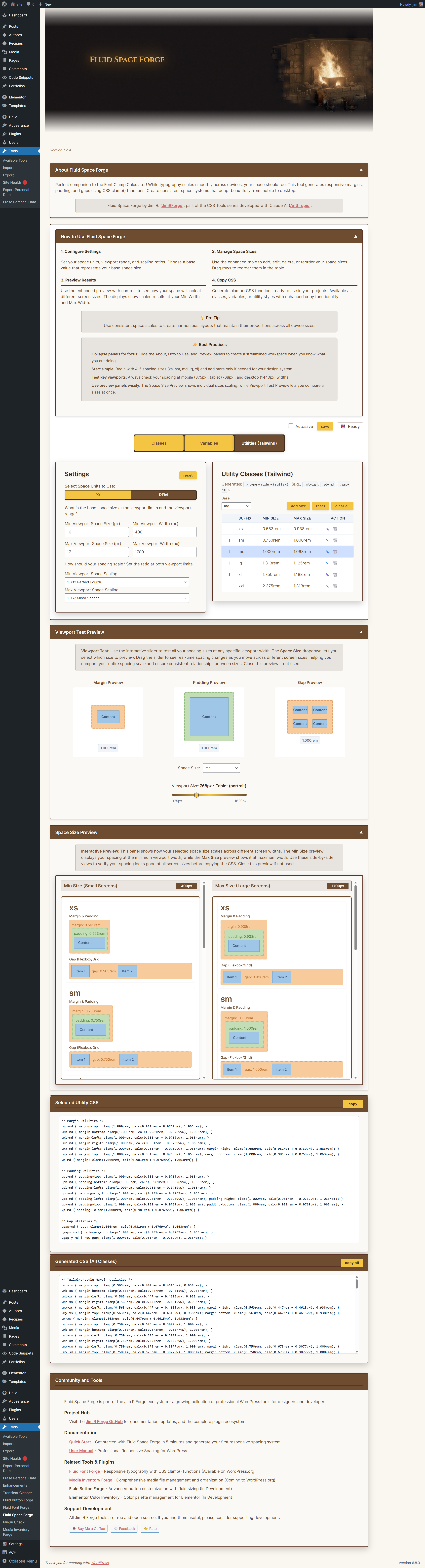
Fluid Space Forge is a professional WordPress plugin that generates responsive spacing systems using modern CSS clamp() functions. Create consistent, scalable margins, padding, and gaps that adapt beautifully from mobile to desktop.
Why Fluid Space Forge?
- Responsive Spacing – Generate CSS
clamp()functions for fluid spacing across all device sizes - Three Output Formats – Choose between CSS Classes, CSS Custom Properties, or Tailwind-style Utilities
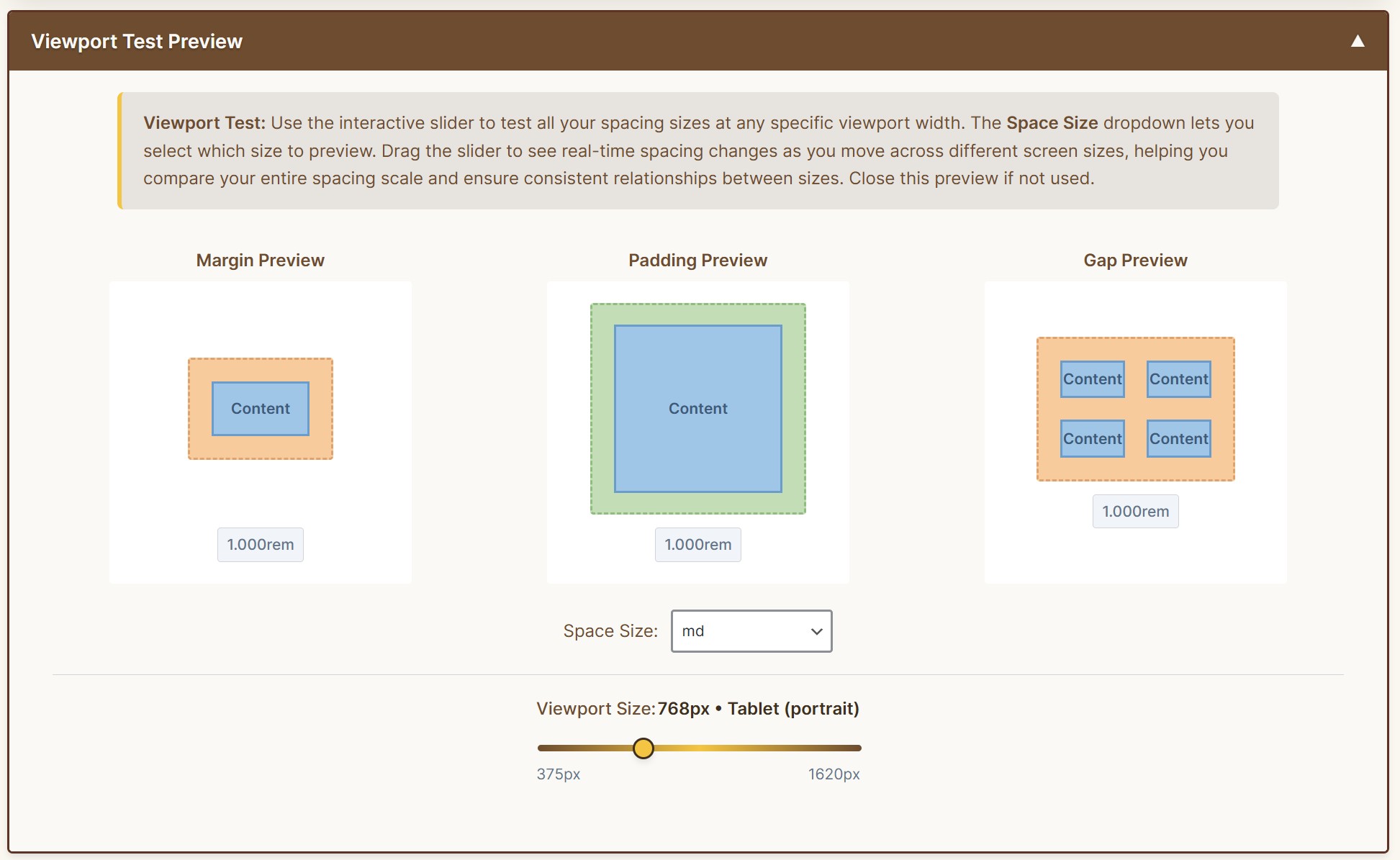
- Live Preview – See your spacing at different screen sizes in real-time
- Drag & Drop – Reorder your spacing scale with intuitive drag-and-drop interface
- Mathematical Scaling – Use proven typographic ratios (Minor Second, Major Third, Perfect Fourth, etc.)
- Dual Units – Full support for both
pxandremunits - Autosave – Automatic saving with manual save option for complete control
- Export Ready – Copy generated CSS code with one click
Perfect Companion
Fluid Space Forge is the perfect companion to Fluid Font Forge! While typography scales smoothly across devices, your spacing should too. Together, they create cohesive, responsive design systems that work beautifully on any screen size.
Output Formats
CSS Classes
Generate margin, padding, and gap classes:
.space-m-lg { margin: clamp(0.75rem, calc(0.7rem + 0.2vw), 1rem); }
.space-p-md { padding: clamp(0.6rem, calc(0.55rem + 0.18vw), 0.75rem); }
.space-g-sm { gap: clamp(0.4rem, calc(0.35rem + 0.15vw), 0.5rem); }
CSS Custom Properties
Create reusable CSS variables:
:root {
–space-lg: clamp(0.75rem, calc(0.7rem + 0.2vw), 1rem);
–space-md: clamp(0.6rem, calc(0.55rem + 0.18vw), 0.75rem);
}
Tailwind-style Utilities
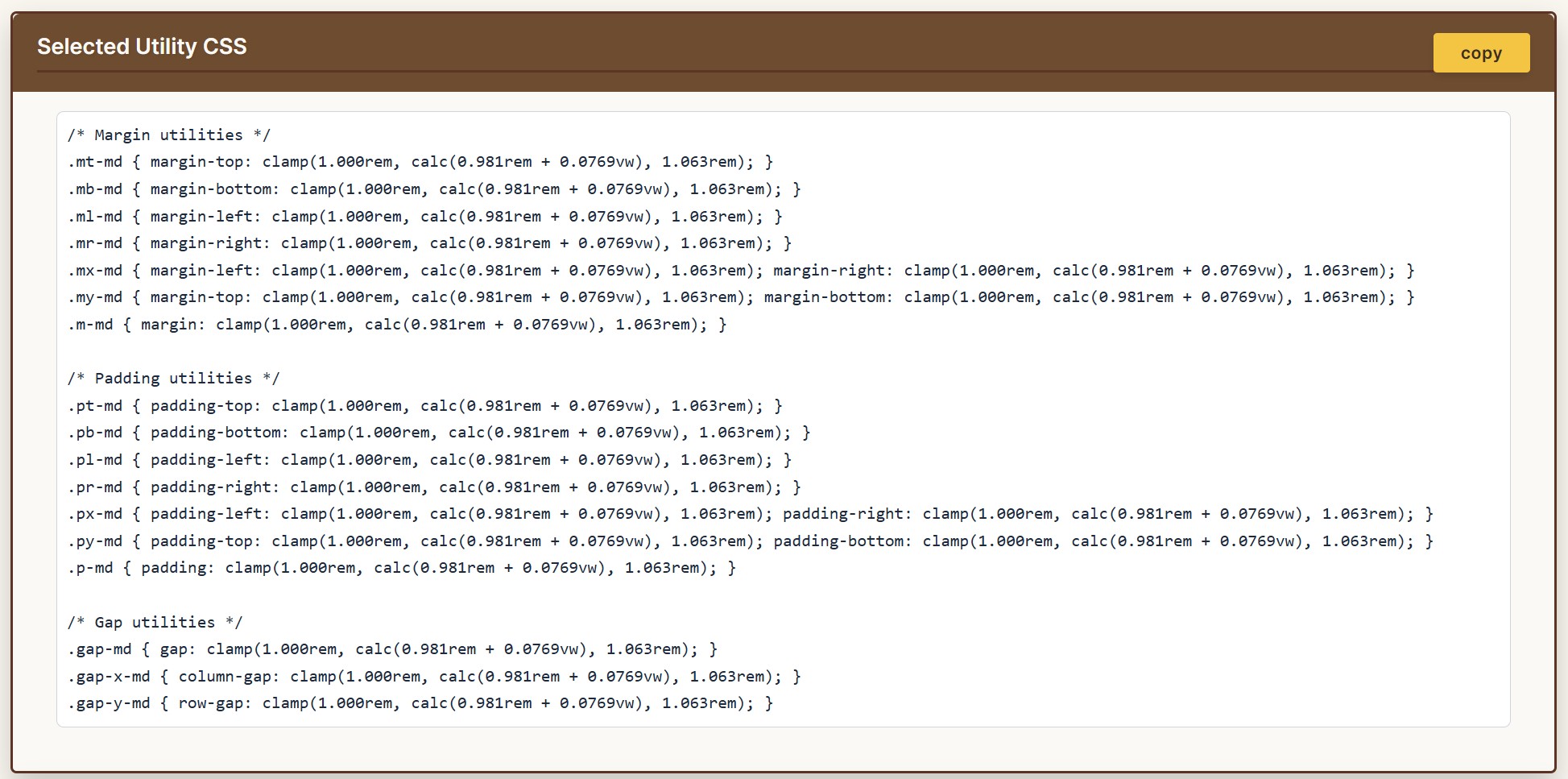
Generate complete utility class sets:
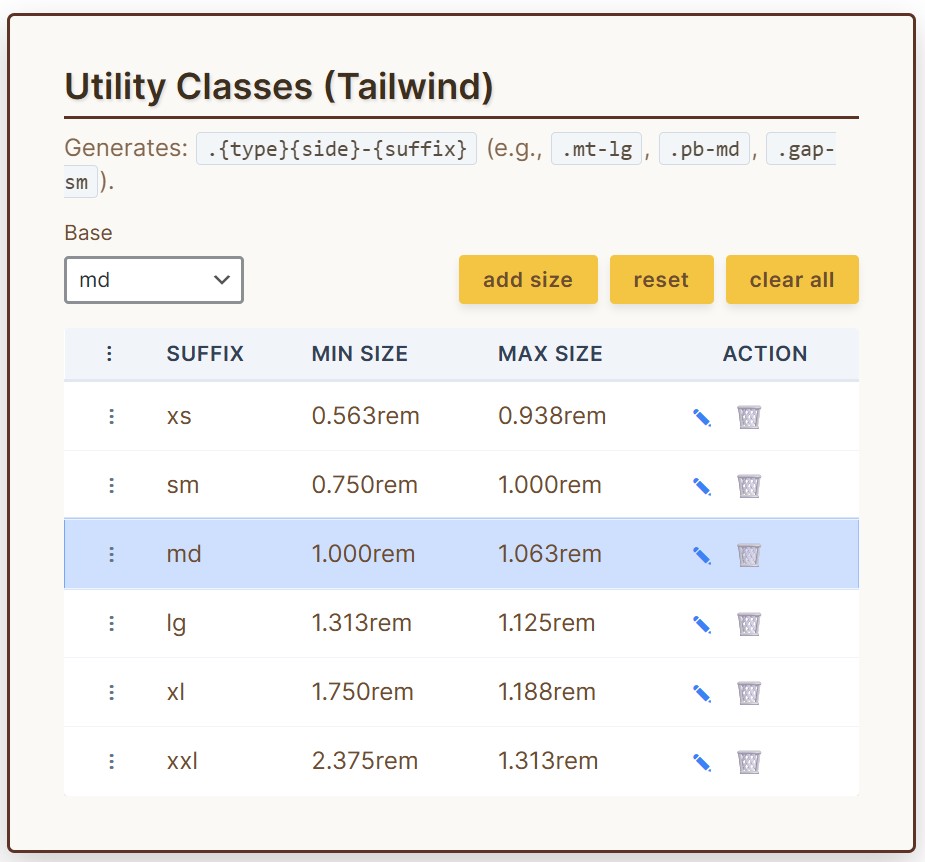
.mt-lg { margin-top: clamp(…); }
.px-md { padding-left: clamp(…); padding-right: clamp(…); }
.gap-y-sm { row-gap: clamp(…); }
Key Features
- Customizable Spacing Scale – Add, edit, remove, and reorder spacing sizes
- Base Value System – Calculate relative spacing from any size in your scale
- Musical Ratios – Use proven scaling ratios: 1.067, 1.125, 1.200, 1.250, 1.333
- Visual Feedback – Live preview showing spacing at min and max viewport widths
- Modal Editing – Clean interface for editing size names and properties
- Professional UI – Beautiful, intuitive admin interface with drag-and-drop support
- WordPress Integration – Located in Tools menu for easy access
Use Cases
- Building responsive WordPress themes
- Creating design system components
- Establishing spacing tokens for custom blocks
- Maintaining consistent spacing across projects
- Developing fluid, accessible layouts
Browser Support
CSS clamp() is supported in all modern browsers:
* Chrome 79+
* Firefox 75+
* Safari 13.1+
* Edge 79+
Additional Information
Credits
- Developer: Jim R. – JimRForge.com
- Development Assistant: Claude AI by Anthropic
Support
- Documentation:
- User’s Guide – Complete reference documentation
- Quick Start – Get started in 5 minutes
- GitHub Repository
- Issues: Report bugs via GitHub Issues
- Website: JimRForge.com
Privacy
This plugin does not collect, store, or transmit any user data. All calculations and settings are stored locally in your WordPress database.
Contributing
Contributions are welcome! Visit the GitHub repository to contribute to the project.
Installation
Automatic Installation
- Log into your WordPress admin panel
- Navigate to Plugins → Add New
- Search for “Fluid Space Forge”
- Click “Install Now” and then “Activate”
- Access the plugin via Tools → Fluid Space Forge
Manual Installation
- Download the plugin zip file
- Log into your WordPress admin panel
- Navigate to Plugins → Add New → Upload Plugin
- Choose the downloaded zip file and click “Install Now”
- Click “Activate Plugin”
- Access via Tools → Fluid Space Forge
After Activation
- Navigate to Tools → Fluid Space Forge in your WordPress admin
- Configure your base spacing values and viewport range in the Settings panel
- Choose your output format: Classes, Variables, or Utilities
- Customize your spacing scale by adding, editing, or reordering sizes
- Preview your spacing at different screen sizes
- Copy the generated CSS code and add it to your theme
Frequently asked questions
What is CSS clamp()?
The clamp() CSS function calculates a value between a minimum and maximum, with a preferred value that scales fluidly. It’s perfect for responsive spacing that adapts smoothly across all screen sizes.
Do I need the Fluid Font Forge plugin?
No! While Fluid Space Forge works beautifully alongside Fluid Font Forge, they are independent plugins. Each can be used separately or together for a complete fluid design system.
Can I use this with any WordPress theme?
Yes! Fluid Space Forge generates standard CSS that works with any WordPress theme, page builder, or block editor.
What’s the difference between the three output formats?
Classes – Traditional CSS classes with full names (.space-m-lg) Variables – CSS custom properties for reusable values (--space-lg) Utilities – Tailwind-style utilities with shorthand names (.mt-lg, .px-md)
Can I customize the spacing scale?
Absolutely! You can add unlimited spacing sizes, edit their names, delete sizes, and drag-and-drop to reorder them. The plugin comes with 6 default sizes (xs, sm, md, lg, xl, xxl) that you can customize or replace.
Does this work with rem units?
Yes! You can switch between px and rem units at any time. The plugin recalculates all values when you switch units.
Is the generated CSS compatible with older browsers?
The clamp() function is supported in modern browsers (Chrome 79+, Firefox 75+, Safari 13.1+, Edge 79+). For older browser support, you may need to provide fallback values.
Can I reset to defaults?
Yes! Each tab has a “Reset” button that restores the original 6 default sizes. Your custom settings are also preserved and can be restored.
Does it save automatically?
Yes! The plugin includes autosave functionality that saves your changes every 10 seconds. You can also manually save at any time using the Save button.
Changelog
Initial release of Fluid Space Forge. Start creating responsive spacing systems today!
1.3.0 – 2026-08-25
- Added: Tooltips throughout the interface, including all expand/collapse section buttons
- Added: Sticky Min Size/Max Size headers while scrolling the Space Size Preview
- Added: Accessibility labels for icon-only Edit/Delete buttons
- Changed: Preview panels now collapsed by default on a fresh install
- Changed: Updated Community and Tools links (Jim R Forge, documentation, Media Inventory Forge, Atomic Framework Forge for Elementor)
- Fixed: Horizontal scroll bar caused by hidden tooltip content pushing the page wider than the viewport
- Fixed: Hero banner overflowing past the content edge into the scrollbar area
- Fixed: Save button and Autosave could stack duplicate saves the longer a session ran
- Fixed: Deleting the size used as a tab’s base no longer breaks calculations for the rest of that tab
- Fixed: Autosave no longer corrupts the other tabs’ base size selection when saving
- Fixed: Selected CSS panel now clears correctly when the selected size is deleted
- Fixed: Viewport Test preview card colors and Space Size dropdown now refresh correctly
- Fixed: Viewport range validation now accepts the full supported 200-5000px range
- Fixed: Add Size/Reset/Clear All buttons no longer wrap awkwardly at normal widths
1.2.4 – 2025-11-21
- Fixed: Modal button colors – cancel button now slate gray with white text, confirm button gold
- Fixed: Reset functionality now properly resets base to “md” and prefixes per tab
- Fixed: Settings Reset now uses Perfect Fourth (1.333) as default Max Scale
- Added: New secondary button CSS class for modal dialogs
1.2.3 – 2025-11-20
- UI Improvements: Removed decorative icons from all panel headers for cleaner appearance
- UI Improvements: Updated tab button font size to 16px for better readability
- UI Improvements: Reorganized Community panel with Documentation section (User’s Guide and Quick Start)
- Critical Fix: Fixed uninstall.php to use correct Space Forge constants (was using Font Forge constants)
- Critical Fix: Added PHPCS ignore comments for intentional direct database queries
- Critical Fix: Resolved all WordPress Plugin Checker warnings
- Documentation: Enhanced Support section with direct links to User’s Guide and Quick Start
1.2.2 – 2025-11-08
- Fixed: WordPress.org compliance – replaced inline script tag with wp_add_inline_script()
- Fixed: All JavaScript now properly enqueued using WordPress standards
- Resolves WordPress.org plugin review feedback from November 5, 2025
1.2.1 – 2025-10-29
- Initial WordPress.org release with compliance updates
1.0 (2025-01-06)
- Initial release
- Generate responsive spacing using CSS clamp() functions
- Three output formats: Classes, CSS Variables, and Utility classes
- Drag and drop reordering of spacing sizes
- Autosave functionality with visual status indicators
- Live preview showing spacing at min and max viewport widths
- Modal dialog for editing and adding spacing sizes
- Musical harmony scale ratios for consistent spacing progression
- Support for both pixel and rem units
- Base value selector for relative spacing calculations
- Classes tab generates margin, padding, and gap variants
- Utilities tab includes Tailwind-style margin, padding, and gap utilities
- Professional admin UI with organized CSS and modular JavaScript
- Plugin located in WordPress Tools menu
Screenshots
For developers
Is this your plugin? Show off the numbers.
Add a live badge to your site, docs or GitHub README. It updates on its own — no account needed.
Best Fluid Space Forge alternatives
All clamp plugins →| Rank | Plugin | Active installs |
|---|---|---|
| 1 |
 Fluid Font Forge
Advanced fluid typography calculator with CSS clamp() generation for responsive font…
Fluid Font Forge
Advanced fluid typography calculator with CSS clamp() generation for responsive font…
|
10+ |
FAQ
Fluid Space Forge: quick answers
Straight answers, pulled from live WordPress.org data.
Live data from WordPress.org · checked Oct 16, 2026
Is Fluid Space Forge free?
Yes. Fluid Space Forge is free to download and use from the official WordPress.org plugin directory.
Is Fluid Space Forge safe to use in 2026?
Fluid Space Forge works, but test it on a staging site before relying on it in 2026. Was last updated 2 months ago, and scores 60/100 on our health check.
How many websites use Fluid Space Forge?
Fluid Space Forge is active on <10 WordPress websites and has been downloaded 487 times since it launched in November 2025. It was downloaded 61 times in the last 30 days.
Does Fluid Space Forge work with WordPress 7.1?
Yes. The developer has tested Fluid Space Forge up to WordPress 7.1.3, the latest release. It requires WordPress 5.0 or newer.
What PHP version does Fluid Space Forge need?
Fluid Space Forge requires PHP 8.2 or higher. Most hosts run PHP 8.x today, so it works on any modern WordPress hosting.
When was Fluid Space Forge last updated?
The latest version, 1.3.0, was released on August 25, 2026 (2 months ago).
Who makes Fluid Space Forge?
Fluid Space Forge is developed and maintained by Jim Roberts.
What are the best alternatives to Fluid Space Forge?
The most popular alternatives to Fluid Space Forge are Fluid Font Forge (10+ installs).
Powered by PageForge
Want thousands of pages that rank like these? Build them in an afternoon.
This directory runs on the same engine as PageForge. Turn any spreadsheet, CSV or API into thousands of fast, SEO-ready WordPress pages — with schema, internal links and AI-written copy baked in.
- CSV, Google Sheets & API data sources
- AI content, schema & internal links per page
- Works with Elementor, Gutenberg, Yoast & Rank Math
- Free on WordPress.org — no credit card


