


FigMoove – Content for Figma
WordPress plugin to integrate Figma content into your website. Manage multiple Figma files and display content from specific layers.

Consider an alternative
FigMoove – Content for Figma shows warning signs in 2026 — compare the alternatives below before installing. It runs on 10+ sites and was last updated 9 months ago, and scores 38/100 on our health check.
- Small user base (10+ active installs)
- Very few reviews so far
- Only tested up to WordPress 6.9 (latest is 7.1)
How does it stack up?
Side-by-side on installs, updates, ratings & support



Daily downloads
Download spikes usually follow a new release — each site that auto-updates counts as a download.
Rankings
Where FigMoove – Content for Figma stands todayWordPress.org search rankings
Live position in the plugin search, top 100| Keyword | Position |
|---|---|
| blocks | >100 |
| content | >100 |
| design | >100 |
| figma | #25 |
| gutenberg | >100 |
Version adoption
Share of active sites per release.
About FigMoove – Content for Figma
From the official readme · v1.2.9Description
A WordPress plugin that allows you to integrate Figma content into your website. Manage multiple Figma files, display content from specific layers, and track component status.
Trademark Notice
This plugin is not affiliated with, endorsed by, or sponsored by Figma, Inc. “Figma” is a trademark of Figma, Inc. This plugin is an independent third-party tool that integrates with the Figma API.
Third-Party Service: Figma API
This plugin requires the use of the Figma API, a third-party service provided by Figma, Inc.
What is Figma and what is it used for?
Figma is a collaborative design tool. This plugin uses the Figma API to fetch design content (text, images, colors, and layout information) from your Figma files and display it on your WordPress website.
What data is sent and when?
– When you configure a Figma file, your Figma File ID and Personal Access Token are stored locally in your WordPress database
– When displaying content, the plugin sends requests to the Figma API using your access token to fetch:
– File metadata (file name, pages, layers)
– Design content (text content, colors, images)
– Component status information
– Data is sent only when:
– You manually sync content
– The automatic hourly sync runs
– A visitor views a page containing Figma content blocks
– Your access token is sent with each API request for authentication
– No user data from your WordPress site is sent to Figma
Privacy and Service Terms:
– Figma Privacy Policy
– Figma Terms of Service
– Figma API Documentation
Important: This plugin is not affiliated with, endorsed by, or sponsored by Figma, Inc. “Figma” is a trademark of Figma, Inc.
Features
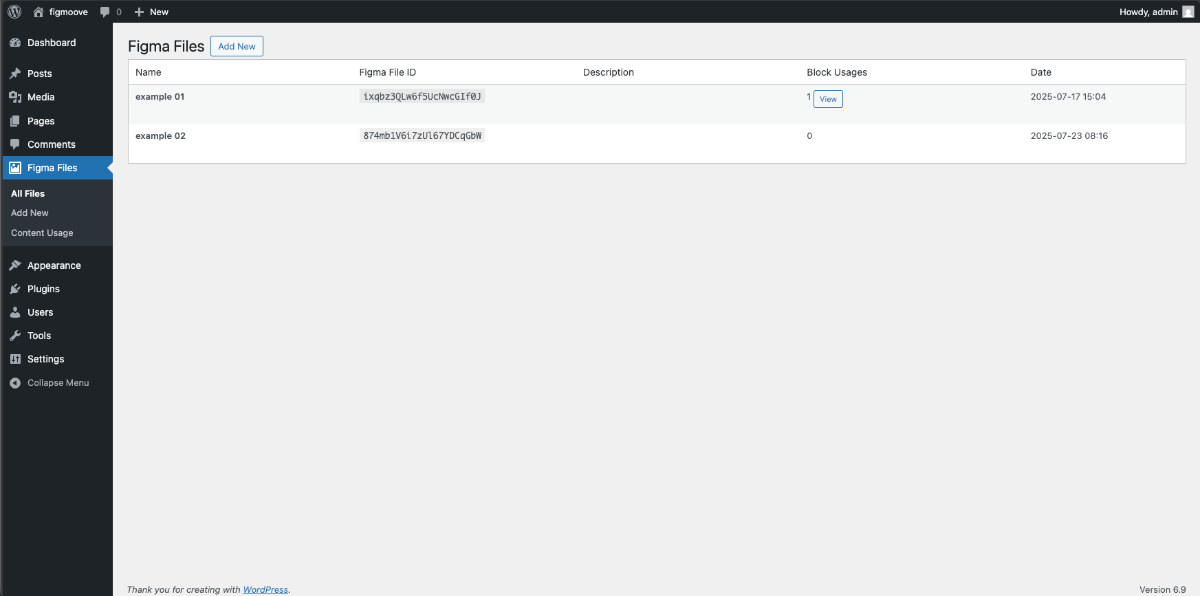
- Admin Interface: Manage multiple Figma files with their IDs and access tokens
- Content Block: Display content from Figma files, pages, and layers
- Component Status Block: Show the status of Figma components
- Database Tracking: Track block usages for content synchronization
- REST API: Endpoints for fetching Figma data
- Automatic Sync: Scheduled content synchronization with Figma
Configuration
Adding Figma Files
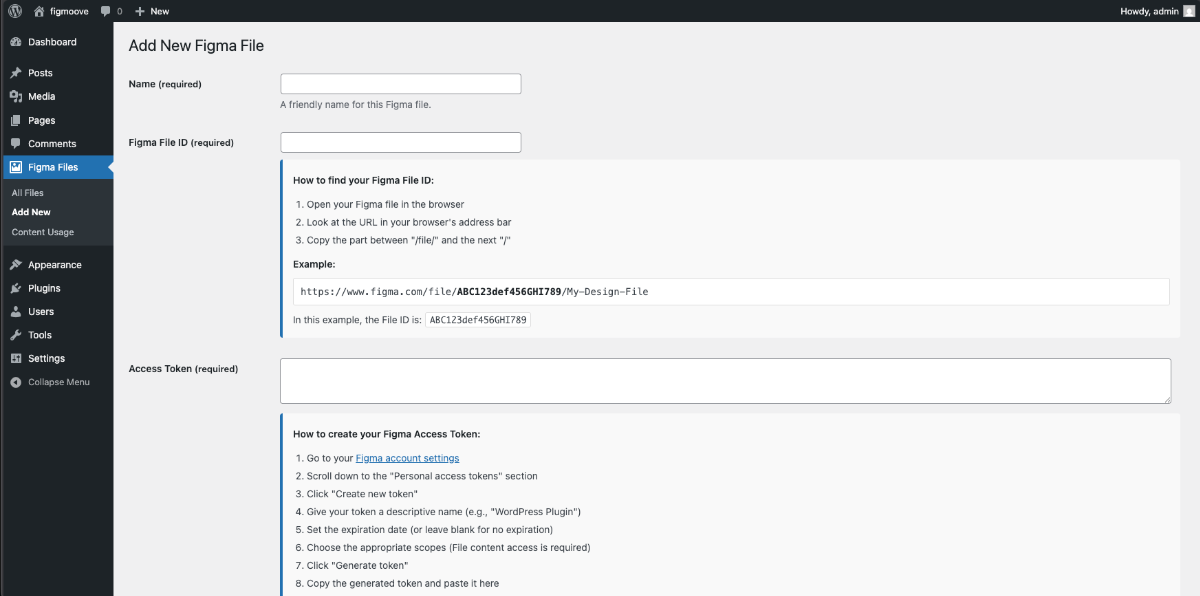
- Navigate to Figma Files > Add New in your WordPress admin
- Fill in the required information:
- Name: A friendly name for your Figma file
- Figma File ID: The file ID from your Figma URL (the part after
/file/) - Access Token: Your Figma personal access token
- Description: Optional description for the file
Getting a Figma Access Token
- Go to your Figma account settings
- Scroll down to “Personal access tokens”
- Click “Create new token”
- Give it a name and copy the token
- Use this token in the plugin settings
Using the Blocks
Figma Content Block
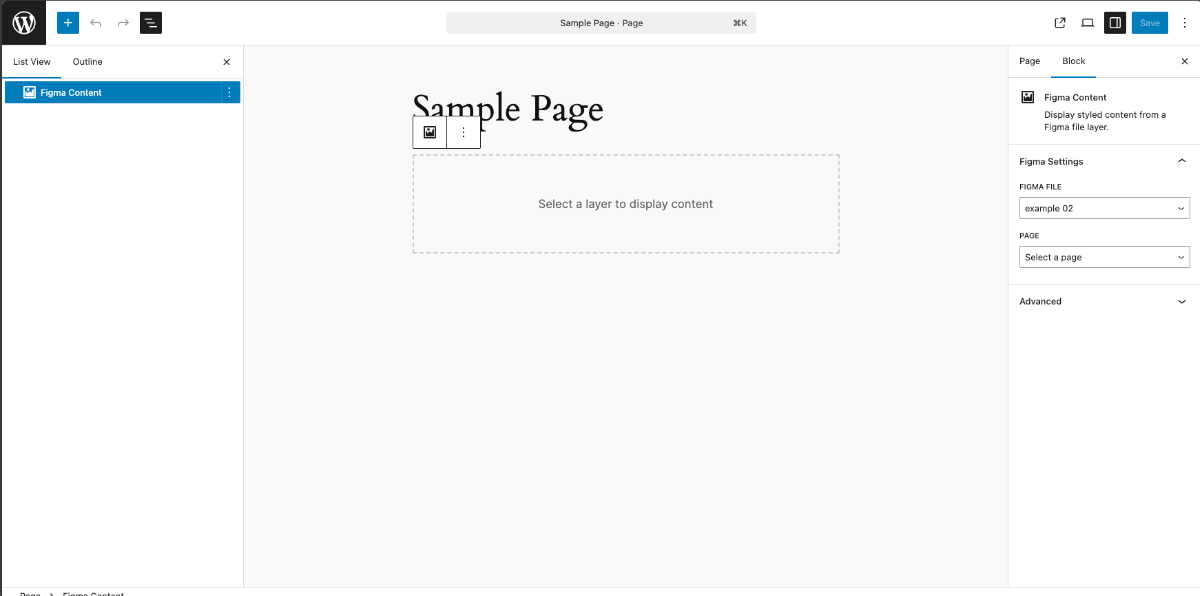
- Add a new “Figma Content” block to your post/page
- In the block settings:
- Select a Figma file from the dropdown
- Choose a page from the file
- Optionally select a specific layer
- Configure display options (texts, colors, images)
- The block will display a preview in the editor and render the content on the frontend
Figma Component Status Block
- Add a new “Figma Component Status” block to your post/page
- In the block settings:
- Select a Figma file from the dropdown
- Configure what information to display (last modified, version, thumbnail)
- The block will show the component status information
Block Attributes
Content Block Attributes
figmaFileId: The Figma file IDpageId: The page ID within the filelayerId: The layer ID within the pageblockId: Unique identifier for the blockshowTexts: Whether to display text contentshowColors: Whether to display color informationshowImages: Whether to display image references
Component Status Block Attributes
figmaFileId: The Figma file IDcomponentId: Specific component ID (optional)showLastModified: Whether to display last modified dateshowVersion: Whether to display version informationshowThumbnail: Whether to display thumbnail image
REST API Endpoints
The plugin provides REST API endpoints for fetching Figma data:
GET /wp-json/figmoove/v1/files– Get all configured filesGET /wp-json/figmoove/v1/files/{file_id}/pages– Get pages from a fileGET /wp-json/figmoove/v1/files/{file_id}/layers– Get layers from a fileGET /wp-json/figmoove/v1/files/{file_id}/content– Get content from a nodeGET /wp-json/figmoove/v1/files/{file_id}/component-status– Get component statusPOST /wp-json/figmoove/v1/sync-content– Manually sync content
Content Synchronization
The plugin automatically tracks block usages and synchronizes content:
- Block usages are saved to the database when posts are saved
- Content is cached to improve performance
- A scheduled task runs hourly to sync content from Figma
- Manual sync can be triggered via the REST API
Database Tables
The plugin creates two database tables:
wp_figmoove_files– Stores Figma file configurationswp_figmoove_block_usages– Tracks block usages for synchronization
Requirements
- WordPress 5.0+
- PHP 7.4+
- Active internet connection for Figma API access
Development
File Structure
`
figmoove/
├── figmoove.php # Main plugin file
├── includes/
│ ├── class-database.php # Database operations
│ ├── class-admin.php # Admin interface
│ ├── class-api.php # API functionality
│ └── class-blocks.php # Block registration
├── assets/
│ ├── js/
│ │ ├── blocks.js # Block editor JavaScript
│ │ └── frontend.js # Frontend JavaScript
│ └── css/
│ ├── blocks.css # Frontend styles
│ └── blocks-editor.css # Editor styles
└── README.md
`
WordPress Coding Standards
This plugin follows WordPress coding standards and best practices:
- Proper sanitization and validation
- Security nonces for form submissions
- Prepared statements for database queries
- Proper enqueuing of scripts and styles
- Internationalization support
Support
For support and feature requests, please contact the plugin author.
License
This plugin is licensed under the GPL v2 or later.
Installation
- Upload the plugin files to the
/wp-content/plugins/figmoovedirectory - Activate the plugin through the ‘Plugins’ screen in WordPress
- Go to ‘Figma Files’ in the admin menu to configure your Figma files
Screenshots
For developers
Is this your plugin? Show off the numbers.
Add a live badge to your site, docs or GitHub README. It updates on its own — no account needed.
Best FigMoove – Content for Figma alternatives
All blocks plugins →





FAQ
FigMoove – Content for Figma: quick answers
Straight answers, pulled from live WordPress.org data.
Live data from WordPress.org · checked Oct 1, 2026
Is FigMoove – Content for Figma free?
Yes. FigMoove – Content for Figma is free to download and use from the official WordPress.org plugin directory.
Is FigMoove – Content for Figma safe to use in 2026?
FigMoove – Content for Figma shows warning signs in 2026 — compare the alternatives below before installing. It runs on 10+ sites and was last updated 9 months ago, and scores 38/100 on our health check.
How many websites use FigMoove – Content for Figma?
FigMoove – Content for Figma is active on 10+ WordPress websites and has been downloaded 1,222 times since it launched in January 2026. It was downloaded 196 times in the last 30 days.
Does FigMoove – Content for Figma work with WordPress 7.1?
FigMoove – Content for Figma is officially tested up to WordPress 6.9.9, while the latest release is 7.1.2. It may still work, but try it on a staging site first.
What PHP version does FigMoove – Content for Figma need?
FigMoove – Content for Figma requires PHP 7.4 or higher. Most hosts run PHP 8.x today, so it works on any modern WordPress hosting.
When was FigMoove – Content for Figma last updated?
The latest version, 1.2.9, was released on January 12, 2026 (9 months ago).
Who makes FigMoove – Content for Figma?
FigMoove – Content for Figma is developed and maintained by cownected.
What are the best alternatives to FigMoove – Content for Figma?
The most popular alternatives to FigMoove – Content for Figma are Spectra Legacy (1M+ installs), Kadence Blocks (600K+ installs) and Extendify (500K+ installs).
Powered by PageForge
Want thousands of pages that rank like these? Build them in an afternoon.
This directory runs on the same engine as PageForge. Turn any spreadsheet, CSV or API into thousands of fast, SEO-ready WordPress pages — with schema, internal links and AI-written copy baked in.
- CSV, Google Sheets & API data sources
- AI content, schema & internal links per page
- Works with Elementor, Gutenberg, Yoast & Rank Math
- Free on WordPress.org — no credit card


