


Fast User Switching
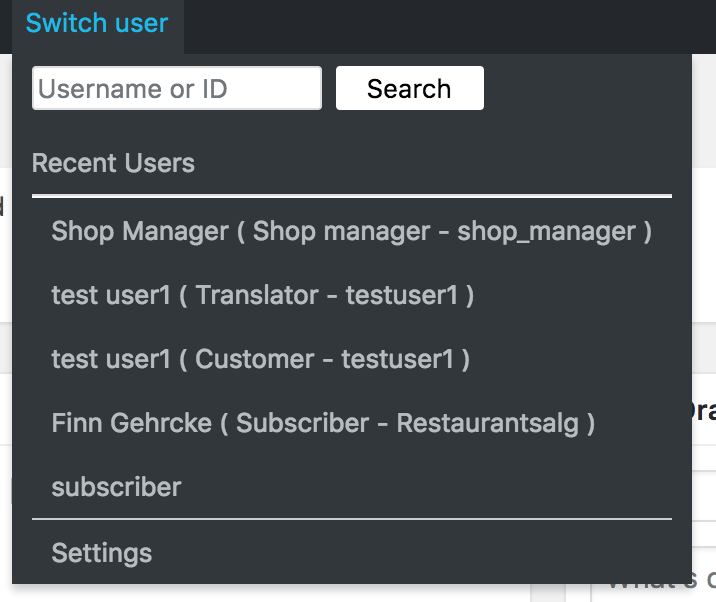
Fast user switching between users and roles directly from the admin bar - switch from a list or search for users/roles by id, username, email, etc.

Consider an alternative
Fast User Switching shows warning signs in 2026 — compare the alternatives below before installing. It runs on 1K+ sites, is rated 4.1/5 and was last updated 2 years ago, and scores 38/100 on our health check.
- No update in over a year
- Only tested up to WordPress 6.5 (latest is 7.1)
How does it stack up?
Side-by-side on installs, updates, ratings & support



Daily downloads
Download spikes usually follow a new release — each site that auto-updates counts as a download.
Rankings
Where Fast User Switching stands todayWordPress.org search rankings
Live position in the plugin search, top 100| Keyword | Position |
|---|---|
| admin | >100 |
| switch | >100 |
| switching | #26 |
| user | >100 |
| users | >100 |
Version adoption
Share of active sites per release.
Rating breakdown
★★★★★★★★★★ 4.1 from 9 reviews
About Fast User Switching
From the official readme · v1.4.10Description
Fast user switching between users and roles directly from the admin bar – switch from a list or search for users/roles by id, username, email, etc.
🚀👥 **Fast User Switching: Navigate Between Users and Roles!** 👥🚀
Are you tired of the hassle of logging in and out to test different user roles or handle content on behalf of others? Say hello to the time-saving Fast User Switching plugin! With Fast User Switching, you can effortlessly switch between users and roles directly from the admin bar, making user management and content creation a breeze! 💨💻
Fast User Switching is your secret weapon for efficient user management, content creation, and user role testing. Whether you’re a developer, content creator, or agency, this plugin ensures a seamless workflow that saves time and boosts productivity! 🚀💼
Empowering Features:
👉 Effortless User and Role Switching: You can effortlessly switch between users and roles with just a few clicks, all directly from the admin bar. No more tedious logging in and out!
👉 User/Role Search Functionality: Find users and roles instantly! Fast User Switching allows you to search for users/roles by ID, username, email, and more, ensuring quick access to the desired profile.
👉 Customizable Role Selection: Access settings to select roles that are allowed to switch users. By default, only administrators can switch users, but you have the flexibility to customize this to suit your specific requirements.
🔒 Seamless Return to Your User: Worried about getting back to your own user? Fear not! To return to your original user, simply log out. A log-out link is conveniently available in the black top menu, top right, within the profile submenu.
👥 Effective User Impersonation: Experience content creation like never before! When you impersonate a user, you will be effectively logged in as that user, acquiring the same rights – perfect for testing user permissions and handling content on behalf of others.
💼 Practical for Consultants and Copywriters: Streamline your client work! Fast User Switching proves practical for consultants, agencies, and copywriters who need to create and edit content for various customers. Say goodbye to the complexity of juggling multiple accounts!
🛍️💕 So why wait? Get the Fast User Switching plugin and unlock a world of possibilities! 🛍️💕
If you have any questions or need further assistance, our support team is always available to help. 🙌📞 Feel free to reach out to us, and let’s embark on this exciting journey together! 🚀🌟
🔌Our other plugins:
➡️ Add a MailPoet 3 signup field to your Contact Form 7 forms.
Link: Add-on Contact Form 7 – MailPoet 3
➡️ Submit your MailPoet 3 newsletter as your customer’s checkout from WooCommerce.
Link: Add-on WooCommerce – MailPoet 3
➡️ Easily switch between users and roles from the admin bar – add users or roles from a list or search by ID, username, email address, etc.
Link: Fast User Switching
➡️ Automatic mail bounce handling for MailPoet 3 to handle bounce emails easily when using your own SMTP server.
Link: Bounce Handler MailPoet 3
➡️ Create MailPoet 3 newsletter subscribers from Gravity Form entries.
Link: Add-on Gravity Forms – MailPoet 3
➡️ Create MailPoet 3 newsletter subscribers from Gravity Form entries.
Link: Add-on Gravity Forms – MailPoet 3
Installation
- Upload the ‘fast-user-switching’ folder to the ‘/wp-content/plugins/’ directory.
- Browse to your WordPress admin control panel, and activate the plugin through the ‘Plugins’ menu.
- Go to the ‘Users’ list and press Impersonate.
Frequently asked questions
There is no Impersonate link in the Users list
Only administrators can see the link – or other users who have the “add_users” capability added (only admins by default).
How do I get back to my own login?
Log out and you are back, the plugin remembers your original login, and returns you to your usual login.
Changelog
There are no additional steps required, simply upgrade from the WordPress plugins screen.
Screenshots


For developers
Is this your plugin? Show off the numbers.
Add a live badge to your site, docs or GitHub README. It updates on its own — no account needed.
Best Fast User Switching alternatives
All admin plugins →




FAQ
Fast User Switching: quick answers
Straight answers, pulled from live WordPress.org data.
Live data from WordPress.org · checked Sep 27, 2026
Is Fast User Switching free?
Yes. Fast User Switching is free to download and use from the official WordPress.org plugin directory.
Is Fast User Switching safe to use in 2026?
Fast User Switching shows warning signs in 2026 — compare the alternatives below before installing. It runs on 1K+ sites, is rated 4.1/5 and was last updated 2 years ago, and scores 38/100 on our health check.
How many websites use Fast User Switching?
Fast User Switching is active on 1K+ WordPress websites and has been downloaded 24,503 times since it launched in September 2017. It was downloaded 432 times in the last 30 days.
Does Fast User Switching work with WordPress 7.1?
Fast User Switching is officially tested up to WordPress 6.5.12, while the latest release is 7.1.2. It may still work, but try it on a staging site first.
What PHP version does Fast User Switching need?
Fast User Switching requires PHP 7.0 or higher. Most hosts run PHP 8.x today, so it works on any modern WordPress hosting.
When was Fast User Switching last updated?
The latest version, 1.4.10, was released on January 30, 2025 (2 years ago).
Who makes Fast User Switching?
Fast User Switching is developed and maintained by Tikweb Management.
What are the best alternatives to Fast User Switching?
The most popular alternatives to Fast User Switching are Loginizer (1M+ installs), Redux Framework (900K+ installs) and Admin Menu Editor (300K+ installs).
Powered by PageForge
Want thousands of pages that rank like these? Build them in an afternoon.
This directory runs on the same engine as PageForge. Turn any spreadsheet, CSV or API into thousands of fast, SEO-ready WordPress pages — with schema, internal links and AI-written copy baked in.
- CSV, Google Sheets & API data sources
- AI content, schema & internal links per page
- Works with Elementor, Gutenberg, Yoast & Rank Math
- Free on WordPress.org — no credit card


