


Cool FormKit Lite – Advanced Form Builder for Elementor
Contact form addon for Elementor. Create forms in Elementor Free or extend Elementor Pro forms with conditional logic, country code and extra fields.

Safe pick
Yes — Cool FormKit Lite is a safe, well-maintained plugin to use in 2026. It runs on 20K+ sites, is rated 4.6/5 and was last updated 4 days ago, and scores 92/100 on our health check.
- Proven at scale on 20K+ active sites
- Loved by users — 4.6/5 from 26 reviews
- Actively developed — last update 4 days ago
- Tested with the latest WordPress (7.1)
- Momentum — downloads up 80.8% vs the previous 30 days
How does it stack up?
Side-by-side on installs, updates, ratings & support



Daily downloads
Download spikes usually follow a new release — each site that auto-updates counts as a download.
Rankings
Where Cool FormKit Lite stands todayWordPress.org search rankings
Live position in the plugin search, top 100| Keyword | Position |
|---|---|
| contact form | >100 |
| elementor | #34 |
| elementor form | #12 |
| elementor form builder | #11 |
| form builder | #18 |
Version adoption
Share of active sites per release.
Rating breakdown
★★★★★★★★★★ 4.6 from 26 reviews
About Cool FormKit Lite
From the official readme · v2.7.13Description
Cool FormKit is an advanced contact form builder for Elementor. It provides a form widget for Elementor Free and also extends the default Elementor Pro form widget with additional fields and smart features.
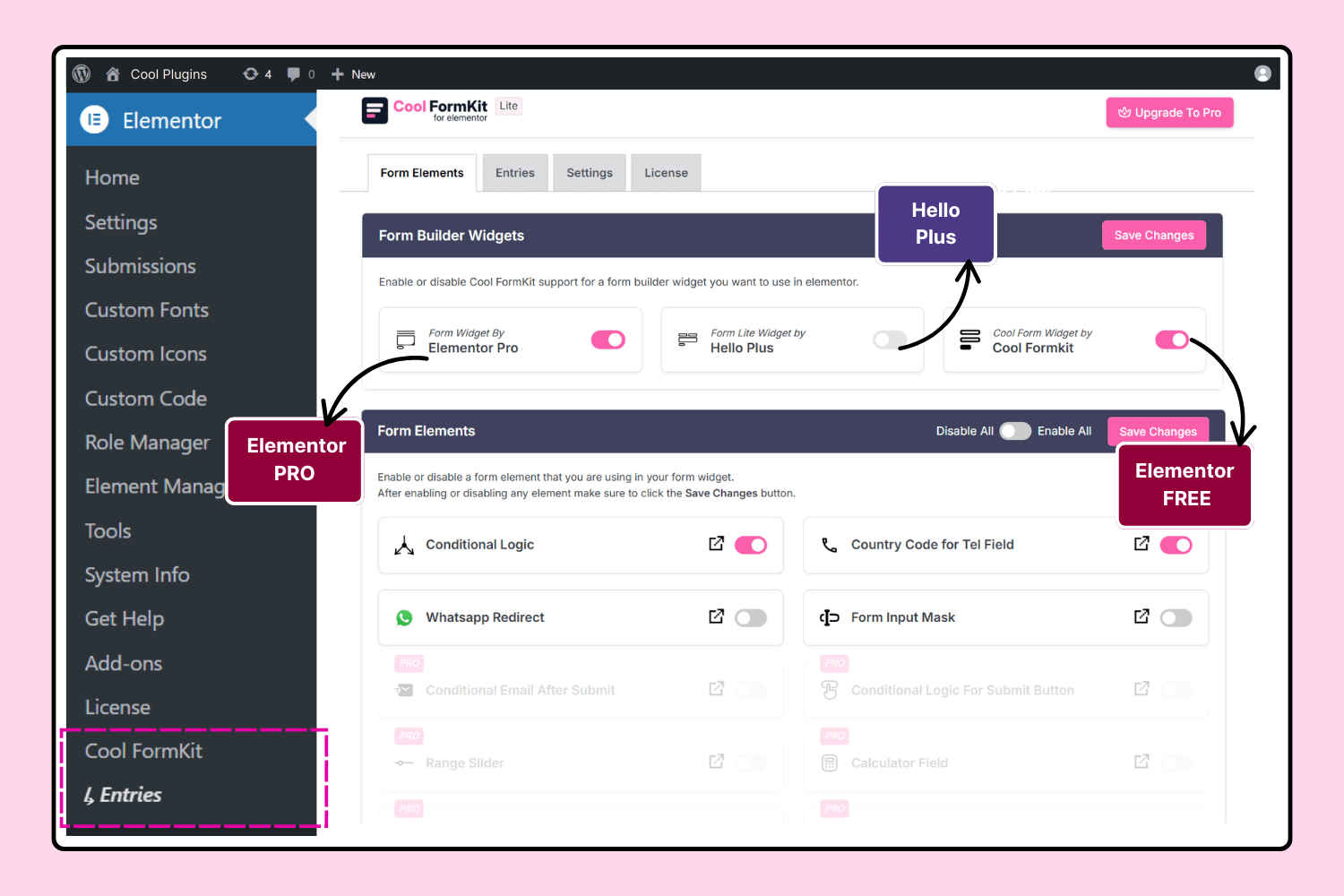
If you already use Elementor Pro, you can extend default Elementor form widget using Cool FormKit (aka coolformkit) to unlock advanced features. For example, you can enhance phone fields with a Country Code and apply Conditional Logic to show or hide fields dynamically based on user input. You can also add a Range Slider for interactive input, a Signature Field for collecting e-signatures, or a Calculator Field for creating instant estimates and quotes. Means aside from building simple contact forms, Cool FormKit helps you create advanced forms in Elementor.
Not just that — if you are using the Hello Plus plugin with its form widget, Cool FormKit also extends it with the same advanced options, making it a truly all-in-one form builder for Elementor Free, Pro, and Hello Plus.
With Cool FormKit, you can create contact forms, registration forms, booking forms, feedback forms, survey forms, calculator forms, and more — all with a drag-and-drop form builder and no coding required. It makes building forms in Elementor fast, flexible, and user-friendly.
Cool FormKit Lite Features
- Form Widget for Elementor Free: Build forms directly in Elementor Free with a drag-and-drop contact form widget.
- Form Extender for Elementor Pro: Already using Elementor Pro forms? Extend them with extra options like conditional logic and country code.
- Form Extender for Hello Plus: Create forms with the Hello Plus form widget and extend them with advanced fields and logic.
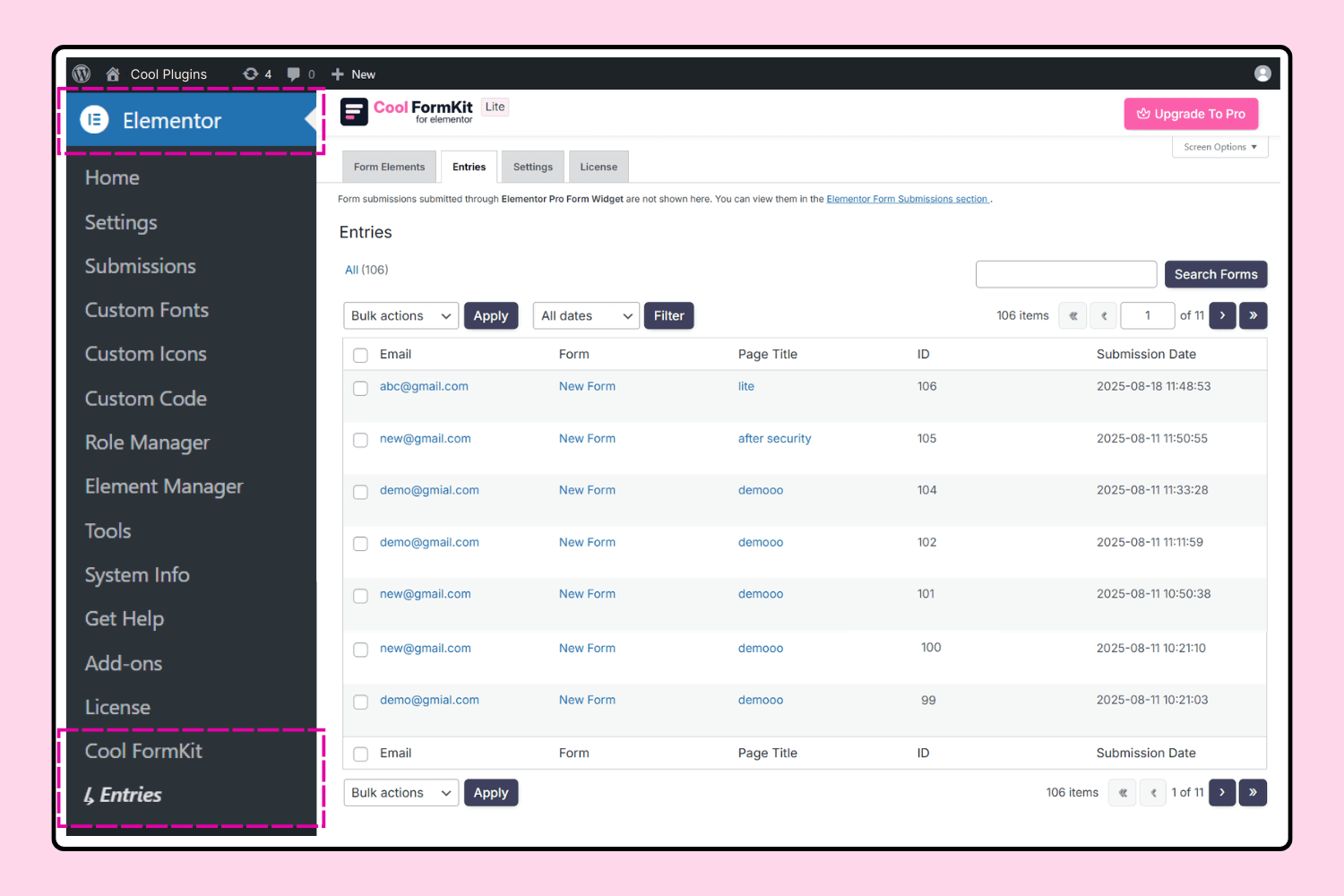
- Save Form Entries: Automatically save form submissions in your WordPress dashboard for records management.
- WhatsApp Redirect Form: Redirect users to WhatsApp after submitting a form — perfect for instant lead follow-ups.
- Conditional Fields: Show or hide fields dynamically based on other field values for smarter forms.
- Country Code Field: Add an international country code dropdown with flags inside the
Tel field. - Form Input Masks: Help users enter properly formatted data like dates, phone numbers, and credit cards.
Cool FormKit Premium Features
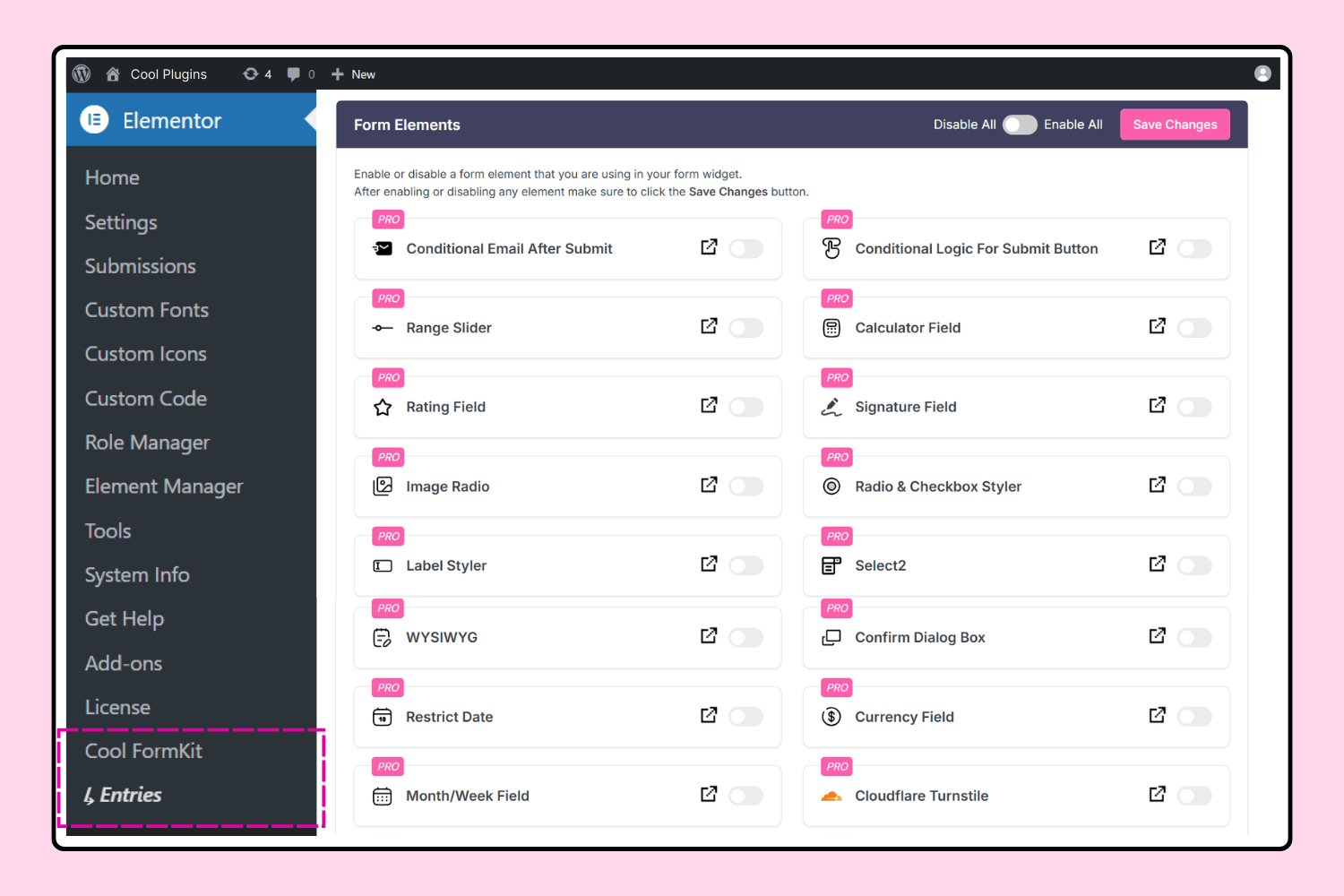
- Range Slider: Add interactive range sliders to capture numeric values in a visual way.
- Signature Field: Let users sign electronically with a responsive signature pad.
- Rating Field: Collect star ratings and feedback in your Elementer forms.
- Select2 Field: Enhance dropdowns with search, AJAX, and multi-select options.
- Checkbox & Radio Styles: Apply modern styles on checkboxes and radio buttons.
- Image Radio Field: Replace boring radio buttons with images as selectable options.
- Toggle Field: Add toggle switches for on/off style selections.
- Cloudflare Turnstile: Protect your forms with Cloudflare Turnstile security.
- hCaptcha: Add hCaptcha verification to Elementor forms for anti-spam security.
- Country & State Field: Add a Country + State selector in Elementor form.
- WYSIWYG Field: Insert a rich-text editor field so users can enter formatted content.
- Calculator Forms: Create calculators like BMI, EMI, and Interest Calculator directly in Elementor 👉 Examples: BMI Calculator, EMI Calculator, Interest Calculator
- Spam Protection: Secure your Elementor forms by blocking submissions that contain restricted or spam words in form fields.
- Smart Conditional Logic: Apply advanced conditional logic in Elementor forms to trigger automatic workflows like:
Cool FormKit – Exclusive Features for Elementor Pro Forms
-
Frontend Post Submission Forms: Enable users to submit content from the frontend and instantly create WordPress posts. 👉 Watch Demo
-
Hide Form After Submission & Show Custom Message: Hide the form after successful submission and show a custom success message. 👉 Watch Demo
More Form Extensions For Elementor
Using the default Elementor form builder widget from Elementor Pro?
Now enhance your Elementor forms with these lightweight form addons developed by Cool Plugins.
-
Conditional Fields for Elementor Form
Add advanced if/else logic to your forms. Show, hide, enable, or disable fields dynamically depending on user selections. -
Country Code for Elementor Form Telephone Field
Insert an international country dial code dropdown with flags into phone fields. Ensure visitors always enter valid, well-formatted phone numbers. -
Form Input Masks for Elementor Forms
Apply flexible input masks on form fields like phone, date, credit card, and more so that users enter data in the correct format every time.
More Addons for Elementor You’ll Love
Cool Plugins team has also built several other popular addons that extend Elementor with unique design and functionality options.
-
Timeline Widget for Elementor: Showcase your history, milestones, or company story in modern vertical or horizontal timeline layout in Elementor.
-
Events Widgets for Elementor: Display The Events Calendar upcoming events in grid, list, or carousel layouts styled beautifully in Elementor editor.
-
AutoPoly – AI Translation for Polylang: Automatically translate Elementor pages with AI. Create multilingual websites quickly using Polylang + AutoPoly.
-
LocoAI – Auto Translate for Loco Translate: Instantly translate WordPress plugins and themes with AI with One-click.
-
Loop Grid Extender for Elementor Pro: Supercharge Elementor Pro loop grids with support for ACF repeater fields and advanced taxonomy filters.
Use of 3rd Party Services: This plugin connects to the Cool Plugins feedback server only for optional usage data sharing and voluntary feedback submission (for example, during plugin deactivation). Data is transmitted solely after explicit user consent. No hidden tracking is performed, and no frontend visitor or site user data is collected. For more details, please review our Data Usage Policy, TOS, and Privacy Policy
and this plugin uses Google reCAPTCHA v2 and v3 to protect forms from spam. it may collect device and interaction data per Google’s Privacy Policy. It also includes the intl-tel-input library, distributed under the MIT License.
Disclaimer
Cool FormKit is an independent product developed by Cool Plugins. It is not affiliated with, endorsed, or sponsored by Elementor. Elementor is a registered trademark of Elementor Ltd. All references to Elementor in this plugin are strictly for descriptive purposes, to indicate that it works as an addon/extension for the Elementor page builder.
Installation
-
Install the Plugin
- Go to your WordPress admin dashboard → Plugins → Add New.
- Search for Cool FormKit Lite and click Install Now.
- Or upload the ZIP file by clicking Upload Plugin and selecting the downloaded plugin ZIP.
- You can also install manually by uploading the unzipped folder to /wp-content/plugins/ using FTP.
-
Activate the Plugin
- After installation, go to Plugins → Installed Plugins.
- Find Cool FormKit Lite and click Activate.
-
Create or Extend Elementor Forms
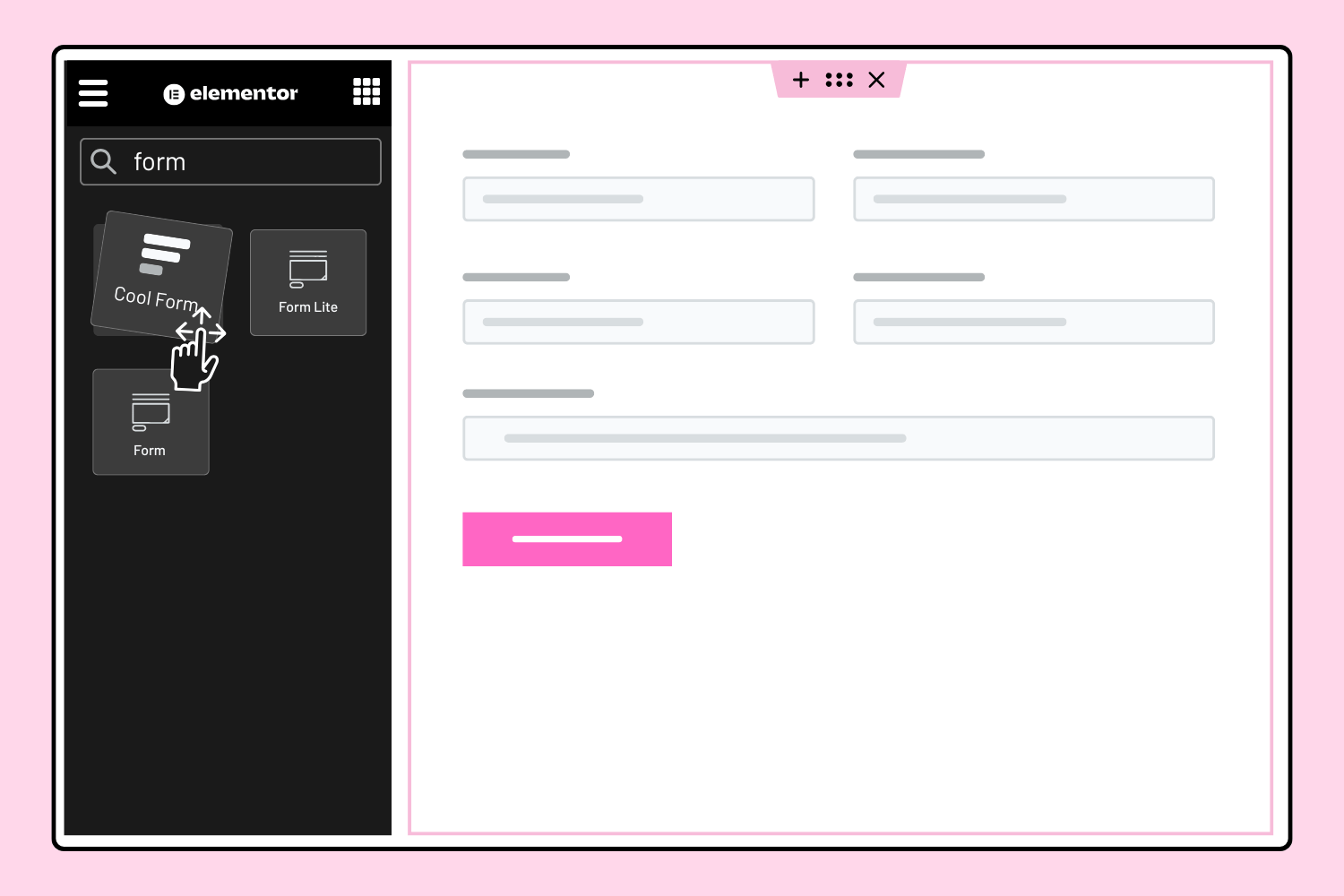
- If you use Elementor Free, search for the Cool Form widget in the Elementor editor. Drag and drop it to build forms like contact forms, booking forms, or surveys with advanced options.
- If you use Elementor Pro, open the form created via default Form widget and you’ll see extra features added by Cool FormKit, such as apply conditional logic on fields or enable country code dropdown in Tel fields.
- If you use the Hello Plus form lite widget, Cool FormKit will extend it with similar enhancements.
For advanced usage, visit the Cool FormKit Documentation.
Changelog
This release introduces a drag-and-drop form builder for Elementor Free users. It also improves compatibility, optimizes code efficiency, and rebrands the plugin as Cool FormKit Lite.
2.7.13 – 2026-11-17
- Fixed: Step field conditional logic info text.
2.7.12 – 2026-11-10
- Fixed: Unstyled Theme Builder Header/Footer in the Elementor editor.
2.7.11 – 2026-11-04
- Improved: Processing order of field values and shortcodes in the Email action.
2.7.10 – 2026-10-29
- Improved: Frontend DOM element rendering for conditional fields.
- Tested up to: Elementor 4.3.5 and Elementor Pro 4.3.2.
2.7.9 – 2026-09-28
- Improved: Validation of Elementor field attributes.
2.7.8 – 2026-09-21
- Fixed: WhatsApp Redirect
%break%line breaks not preserved in the redirect URL. - Fixed: Extra spacing when WhatsApp Message used both editor line breaks and
%break%.
Screenshots
For developers
Is this your plugin? Show off the numbers.
Add a live badge to your site, docs or GitHub README. It updates on its own — no account needed.
Best Cool FormKit Lite alternatives
All contact form plugins →





FAQ
Cool FormKit Lite: quick answers
Straight answers, pulled from live WordPress.org data.
Source: WordPress.org
Is Cool FormKit Lite free?
Yes. Cool FormKit Lite is free to download and use from the official WordPress.org plugin directory.
Is Cool FormKit Lite safe to use in 2026?
Yes — Cool FormKit Lite is a safe, well-maintained plugin to use in 2026. It runs on 20K+ sites, is rated 4.6/5 and was last updated 4 days ago, and scores 92/100 on our health check.
How many websites use Cool FormKit Lite?
Cool FormKit Lite is active on 20K+ WordPress websites and has been downloaded 337,166 times since it launched in April 2020. It was downloaded 22,679 times in the last 30 days.
Does Cool FormKit Lite work with WordPress 7.1?
Yes. The developer has tested Cool FormKit Lite up to WordPress 7.1.5, the latest release. It requires WordPress 6.2 or newer.
What PHP version does Cool FormKit Lite need?
Cool FormKit Lite requires PHP 7.4 or higher. Most hosts run PHP 8.x today, so it works on any modern WordPress hosting.
When was Cool FormKit Lite last updated?
The latest version, 2.7.13, was released on November 17, 2026 (4 days ago).
Who makes Cool FormKit Lite?
Cool FormKit Lite is developed and maintained by Cool Plugins.
What are the best alternatives to Cool FormKit Lite?
The most popular alternatives to Cool FormKit Lite are Contact Form 7 (10M+ installs), Akismet Anti-spam: Spam Pro… (5M+ installs) and WPForms (5M+ installs).
Powered by PageForge
One template and a spreadsheet. A real page for every search.
PageForge turns each row of a CSV into a WordPress page with its own title, URL, SEO fields and schema, built on the layout you already designed. Free on WordPress.org.
- CSV and XLSX, plus Google Sheets on Professional and Enterprise
- Its own title, URL, SEO fields and schema for every page
- Works with the block editor, Elementor, Divi and Avada
- Free on WordPress.org, no credit card