


ExertPro FAQ AI for WooCommerce
AI FAQ Generator & FAQ Schema for WooCommerce Products.

Use with caution
ExertPro FAQ AI for WooCommerce works, but test it on a staging site before relying on it in 2026. Was last updated 3 months ago, and scores 49/100 on our health check.
- Small user base (<10 active installs)
- Very few reviews so far
How does it stack up?
Side-by-side on installs, updates, ratings & support



Daily downloads
Download spikes usually follow a new release — each site that auto-updates counts as a download.
Rankings
Where ExertPro FAQ AI for WooComm… stands todayWordPress.org search rankings
Live position in the plugin search, top 100| Keyword | Position |
|---|---|
| AI | >100 |
| faq | >100 |
| Product FAQ. | >100 |
| schema | >100 |
| woocommerce faq | >100 |
About ExertPro FAQ AI for WooCommerce
From the official readme · v1.0.0Description
ExertPro FAQ AI for WooCommerce automatically generates contextual, SEO-friendly FAQ sections for your WooCommerce product pages using leading AI providers. Each FAQ set is output with valid FAQPage JSON-LD schema markup to help your products appear in Google rich results.
Supported AI Providers:
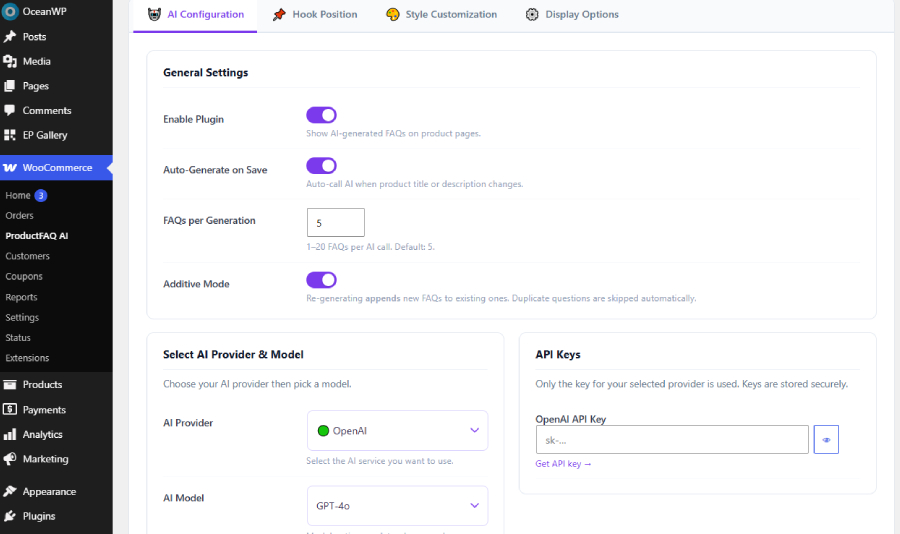
* OpenAI — GPT-4o, GPT-4o Mini
* Google Gemini — Gemini 1.5 Pro, Gemini 1.5 Flash
* Anthropic Claude — Claude 3.5 Sonnet, Claude 3 Haiku
* xAI Grok — Grok 3, Grok 3 Mini
* Moonshot Kimi — moonshot-v1-8k, moonshot-v1-32k
Key Features:
* One-click AI FAQ generation per product
* Additive mode: re-generate appends new FAQs without replacing existing ones
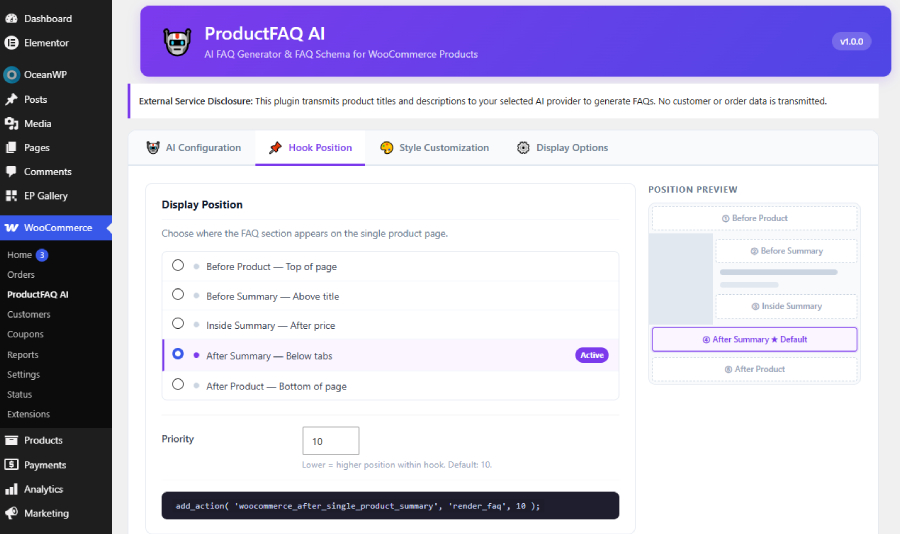
* 5 display hook positions on single product pages
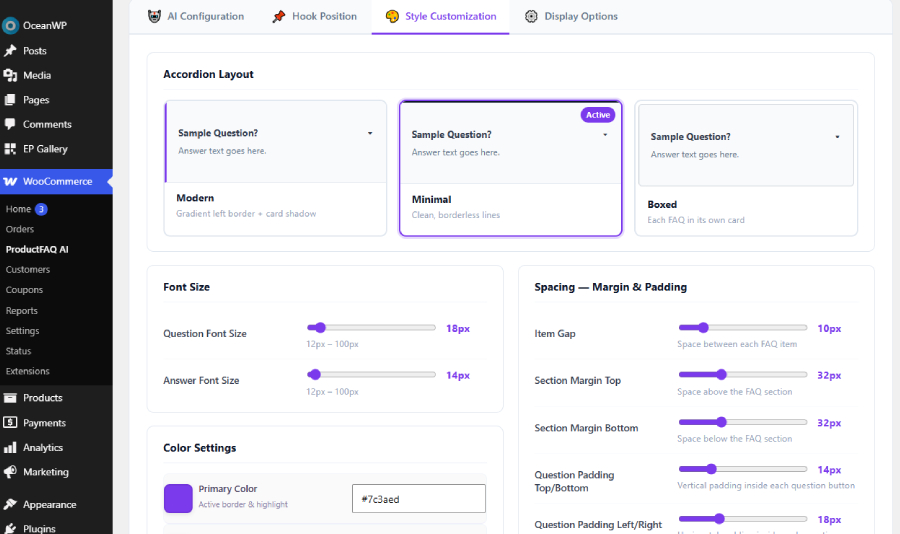
* 3 accordion styles (Modern, Minimal, Boxed)
* Full colour, font size, and style customisation
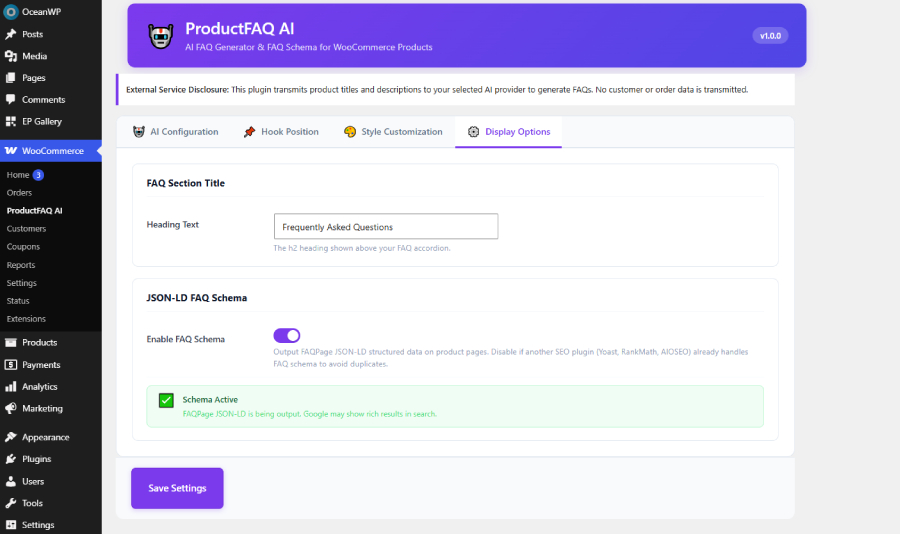
* FAQPage JSON-LD schema auto-output
* Manual override & inline FAQ editor in product meta box
* Secure API key storage with show/hide toggle
* Rate limiting on AJAX generation requests
* Auto-generate on product save (when content changes)
External Services
This plugin connects to third-party AI APIs. By using this plugin you agree to the terms and privacy policies of the AI provider(s) you select.
Data transmitted: Product title and description only.
Data NOT transmitted: Customer data, order data, payment data, or any personally identifiable information.
OpenAI
- Endpoint: https://api.openai.com/v1/chat/completions
- Privacy Policy: https://openai.com/policies/privacy-policy
- Terms of Use: https://openai.com/policies/terms-of-use
Google Gemini
- Endpoint: https://generativelanguage.googleapis.com/
- Privacy Policy: https://policies.google.com/privacy
- Terms of Use: https://policies.google.com/terms
Anthropic Claude
- Endpoint: https://api.anthropic.com/v1/messages
- Privacy Policy: https://www.anthropic.com/privacy
- Terms of Use: https://www.anthropic.com/legal/terms
xAI Grok
- Endpoint: https://api.x.ai/v1/chat/completions
- Privacy Policy: https://x.ai/privacy-policy
- Terms of Use: https://x.ai/terms-of-service
Moonshot Kimi
- Endpoint: https://api.moonshot.cn/v1/chat/completions
- Privacy Policy: https://www.moonshot.cn/privacy
- Terms of Use: https://www.moonshot.cn/terms
WordPress.org SVN Assets
For contributors submitting to the WordPress.org plugin repository:
Plugin branding assets (banners, icons, screenshots) must be committed
to the SVN /assets/ directory at the repository root — NOT inside the
plugin zip. See wp-org-assets/README-SVN.txt for details.
Installation
- Upload the
exertpro-faq-aifolder to/wp-content/plugins/. - Activate the plugin through the Plugins menu in WordPress.
- Go to WooCommerce → ExertPro FAQ AI for WooCommerce to configure.
- Enter your API key for the AI provider you want to use.
- Select your preferred model and click Save Settings.
- Open any product and click Generate FAQs with AI.
Frequently asked questions
Do I need an API key?
Yes. You must supply your own API key from at least one supported AI provider.
Is any customer data sent to AI providers?
No. Only the product title and description are transmitted.
Can I edit the generated FAQs?
Yes. Use the FAQ List editor inside the product meta box to edit, add, or remove FAQs manually.
What is Additive Mode?
When enabled, re-generating FAQs appends new items to existing ones instead of replacing them. Duplicate questions are automatically skipped.
Does this work with WooCommerce HPOS?
Yes. The plugin declares compatibility with WooCommerce High-Performance Order Storage.
Can I change the FAQ display position?
Yes. The Hook Position tab lets you choose from 5 positions on the product page with a visual mockup preview.
Changelog
Initial release.
1.0.0
- Initial release.
- Support for OpenAI, Google Gemini, Anthropic Claude, xAI Grok, Moonshot Kimi.
- Additive FAQ mode, 3 accordion styles, FAQPage JSON-LD schema.
- Visual hook position selector with product page mockup.
- Full colour and font size customisation.
Screenshots
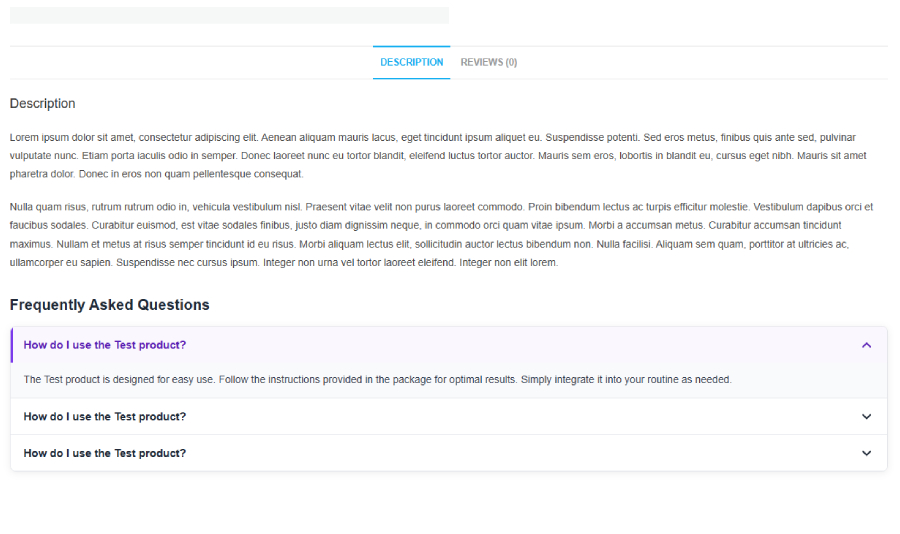
For developers
Is this your plugin? Show off the numbers.
Add a live badge to your site, docs or GitHub README. It updates on its own — no account needed.
Best ExertPro FAQ AI for WooCommer… alternatives
All AI plugins →





FAQ
ExertPro FAQ AI for WooCommerce: quick answers
Straight answers, pulled from live WordPress.org data.
Live data from WordPress.org · checked Oct 4, 2026
Is ExertPro FAQ AI for WooCommerce free?
Yes. ExertPro FAQ AI for WooCommerce is free to download and use from the official WordPress.org plugin directory.
Is ExertPro FAQ AI for WooCommerce safe to use in 2026?
ExertPro FAQ AI for WooCommerce works, but test it on a staging site before relying on it in 2026. Was last updated 3 months ago, and scores 49/100 on our health check.
How many websites use ExertPro FAQ AI for WooCommerce?
ExertPro FAQ AI for WooCommerce is active on <10 WordPress websites and has been downloaded 243 times since it launched in June 2026. It was downloaded 64 times in the last 30 days.
Does ExertPro FAQ AI for WooCommerce work with WordPress 7.1?
ExertPro FAQ AI for WooCommerce is officially tested up to WordPress 7.0.6, while the latest release is 7.1.2. It may still work, but try it on a staging site first.
What PHP version does ExertPro FAQ AI for WooCommerce need?
ExertPro FAQ AI for WooCommerce requires PHP 7.4 or higher. Most hosts run PHP 8.x today, so it works on any modern WordPress hosting.
When was ExertPro FAQ AI for WooCommerce last updated?
The latest version, 1.0.0, was released on June 30, 2026 (3 months ago).
Who makes ExertPro FAQ AI for WooCommerce?
ExertPro FAQ AI for WooCommerce is developed and maintained by ExertPro.
What are the best alternatives to ExertPro FAQ AI for WooCommerce?
The most popular alternatives to ExertPro FAQ AI for WooCommerce are Elementor Website Builder (10M+ installs), All in One SEO (2M+ installs) and AI Agent by SiteGround (1M+ installs).
Powered by PageForge
Want thousands of pages that rank like these? Build them in an afternoon.
This directory runs on the same engine as PageForge. Turn any spreadsheet, CSV or API into thousands of fast, SEO-ready WordPress pages — with schema, internal links and AI-written copy baked in.
- CSV, Google Sheets & API data sources
- AI content, schema & internal links per page
- Works with Elementor, Gutenberg, Yoast & Rank Math
- Free on WordPress.org — no credit card


