



Event Tickets Manager for WooCommerce
Enable this event WordPress plugin to create event-based products. With features like The events calendar, Check-in management, Recurring events, Event locations, and more, you can manage everything with ease.

Safe pick
Yes — Event Tickets Manager for WooCo… is a safe, well-maintained plugin to use in 2026. It runs on 1K+ sites, is rated 4.7/5 and was last updated 2 weeks ago, and scores 90/100 on our health check.
- Loved by users — 4.7/5 from 32 reviews
- Actively developed — last update 2 weeks ago
- Tested with the latest WordPress (7.1)
How does it stack up?
Side-by-side on installs, updates, ratings & support



Daily downloads
Download spikes usually follow a new release — each site that auto-updates counts as a download.
Rankings
Where Event Tickets Manager for W… stands todayWordPress.org search rankings
Live position in the plugin search, top 100| Keyword | Position |
|---|---|
| event booking | #25 |
| event schedule | #15 |
| tickets | #10 |
| wordpress calendar | #98 |
| zoom integration | #15 |
Version adoption
Share of active sites per release.
Rating breakdown
★★★★★★★★★★ 4.7 from 32 reviews
About Event Tickets Manager for WooCommerce
From the official readme · v1.5.9Description
Enable this event WordPress plugin to create event-based products. With features like The events calendar, Check-in management, Recurring events, Event locations, and more, you can manage everything with ease.
WordPress event plugin can quickly create and manage events on your website. You can create both real and virtual events as well as selling tickets on your WooCommerce stores. This WordPress tickets plugin is capable of easy event creation and its management, displaying your event’s live location over product page, letting you conveniently set the event recurring date and time for any event, easy check-in process by using a QR Code and various other enticing features that will satisfy all your event management needs.
Go for the Premium WooCommerce event Plugin if you are seeking for the additional features like Google meet integration, Zoom integration, Google map integration, event alerts, display your events on multiple location, recurring [daily, weekly and monthly] events, show organizer/attendees details, share events on facebook, track ticket status etc.
This plugin is one of the excellent WordPress events plugin, merchants can manage their entire process from WooCommerce store and be their own boss.
🧐Want to explore more???
Visit our 👇️
Documentation | Plugin Demo | Contact Us
WORDPRESS EVENT PLUGIN’S KEY FEATURES INCLUDE:
1) External CSS Field
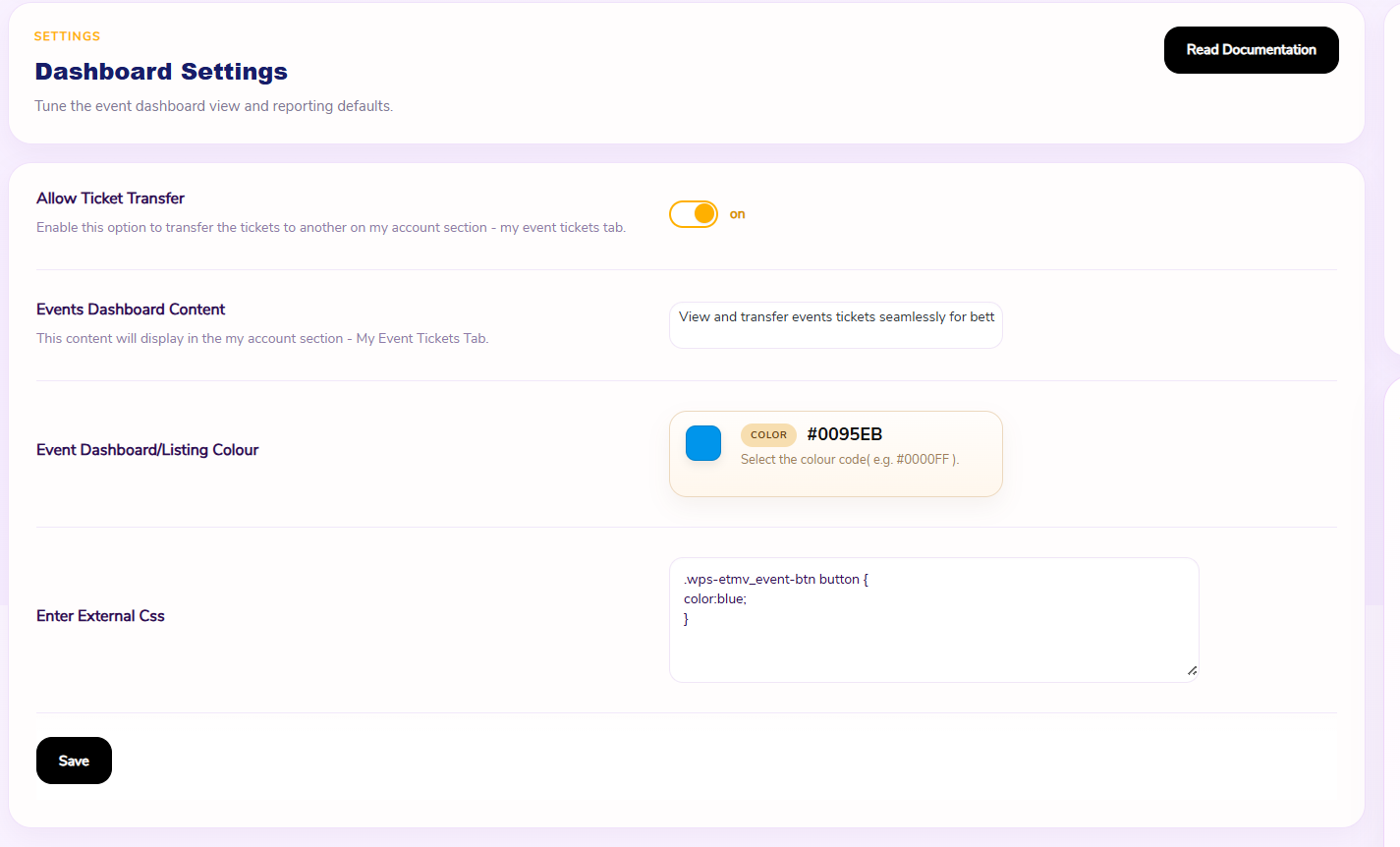
Merchants will get a dedicated field in the WooCommerce event tickets plugin settings where they can enter their own external CSS stylesheets. This allows store owners the ability to customize the appearance of event tickets, event pages, and templates without editing the plugin files or using inline styles.
2) Event Date Offset
This functionality of the WooCommerce events plugin allows you to set a buffer period before and after the event begins. This is useful for accommodating setup or wrap-up time for admins, offering early access, or providing a grace period around the official event duration.
3) Enhanced Event Tickets Tab for Users:
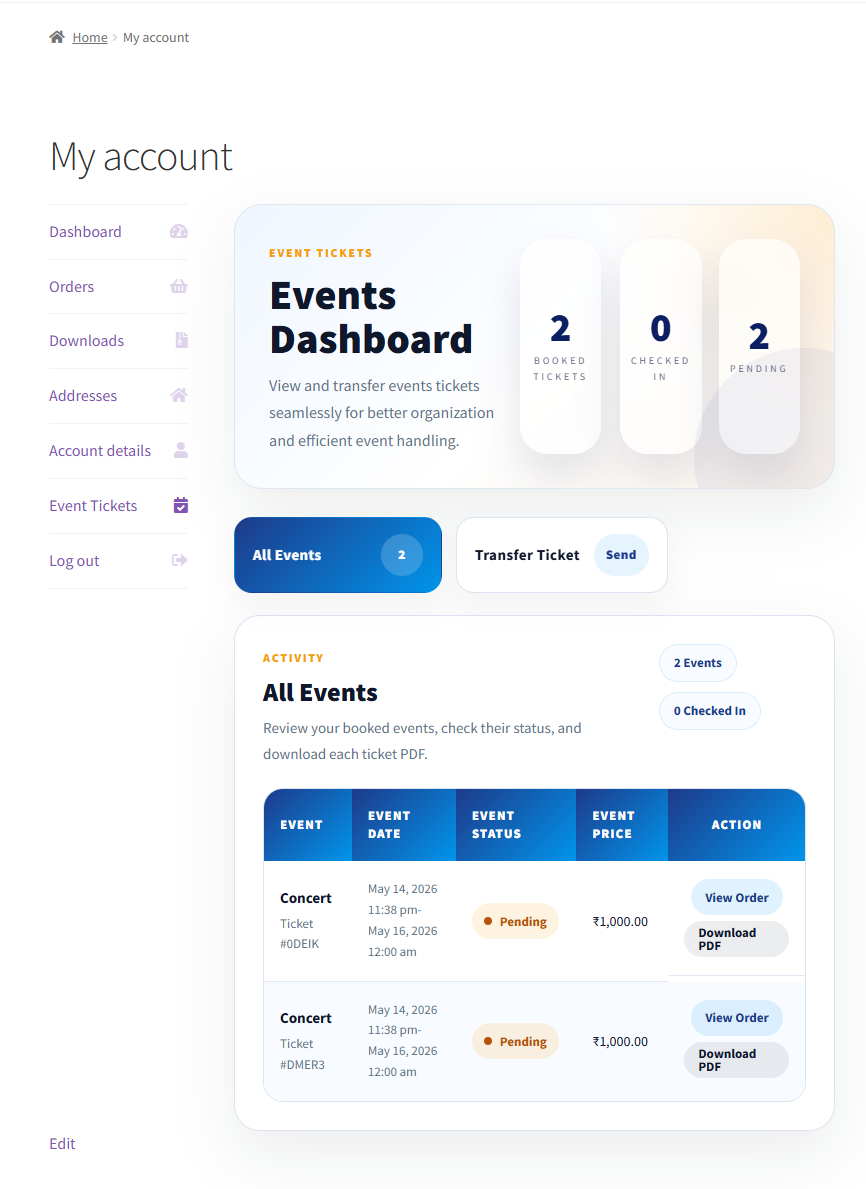
The events tickets tab has been enhanced to cater to users’ requirements, booking events on your platform. Customers can view all past and future events, transfer tickets, and view/download PDF tickets. All the elements of the event tickets dashboard are dynamic, so the admins can customize the name and colour to meet the standards of their online event platform. The admin can also change the colour for the event listing page to match the colour of the event dashboard. This will help you maintain the uniformity across your online event store.
4) Event Sharing:
The admin can allow their customers to share the listed events on different platforms by sharing the link of the single event page, customers can share it with their friends and family.
5) Template Customization:
The merchants can customize the event ticket templates, wherein they can hide/show the details of their customers on the tickets. This allows them to safeguard the details of their customers.
6) Custom Fields:
The administrator can utilize this setting to add custom fields to any specific event products. The catch here is that – you have the premium version you can add as many fields as you like, but with the free WordPress events plugin, merchants can add only two custom fields.
7) Set Price for Specific User Type:
Set the price on the user type and add/remove the base price. WordPress events feature allows you to create user types like adult, child, teacher, and student. After the enhancement, customers can easily purchase tickets for different user types at the same time.
NOTE: The admin can add only two user types if you have the free version of the WooCommerce events plugin.
8) Transfer Ticket PDF:
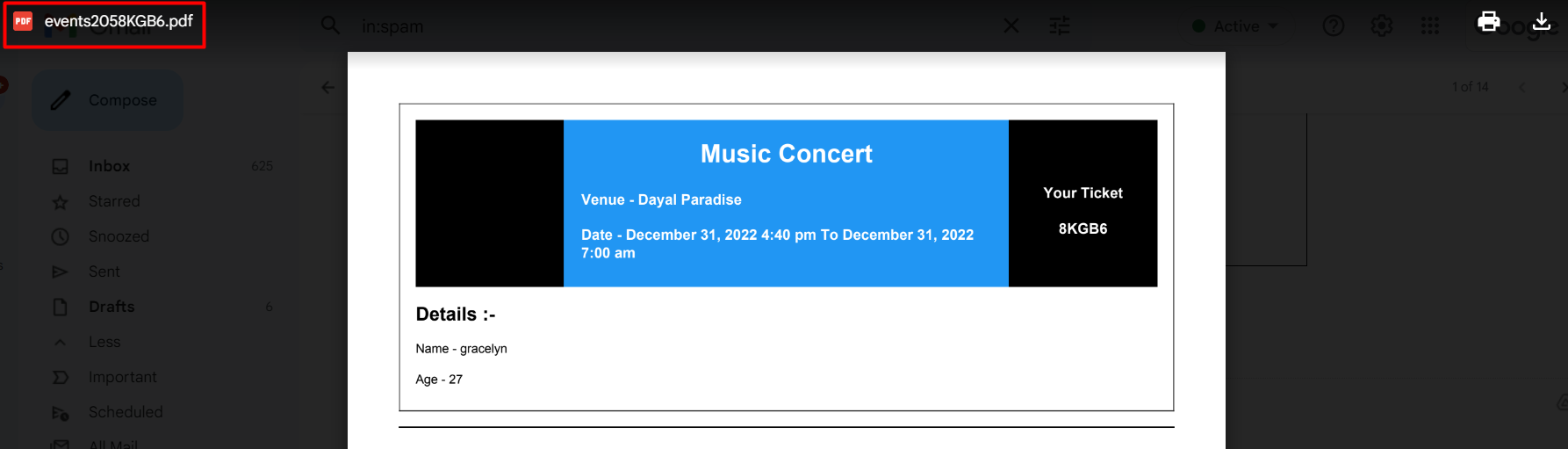
The Event Calendar plugin allows you to transfer your tickets for an event along with an email with attached PDF tickets. This is a hassle-free transfer process for event tickets that builds customer loyalty.
9) Email Reminder Before Event:
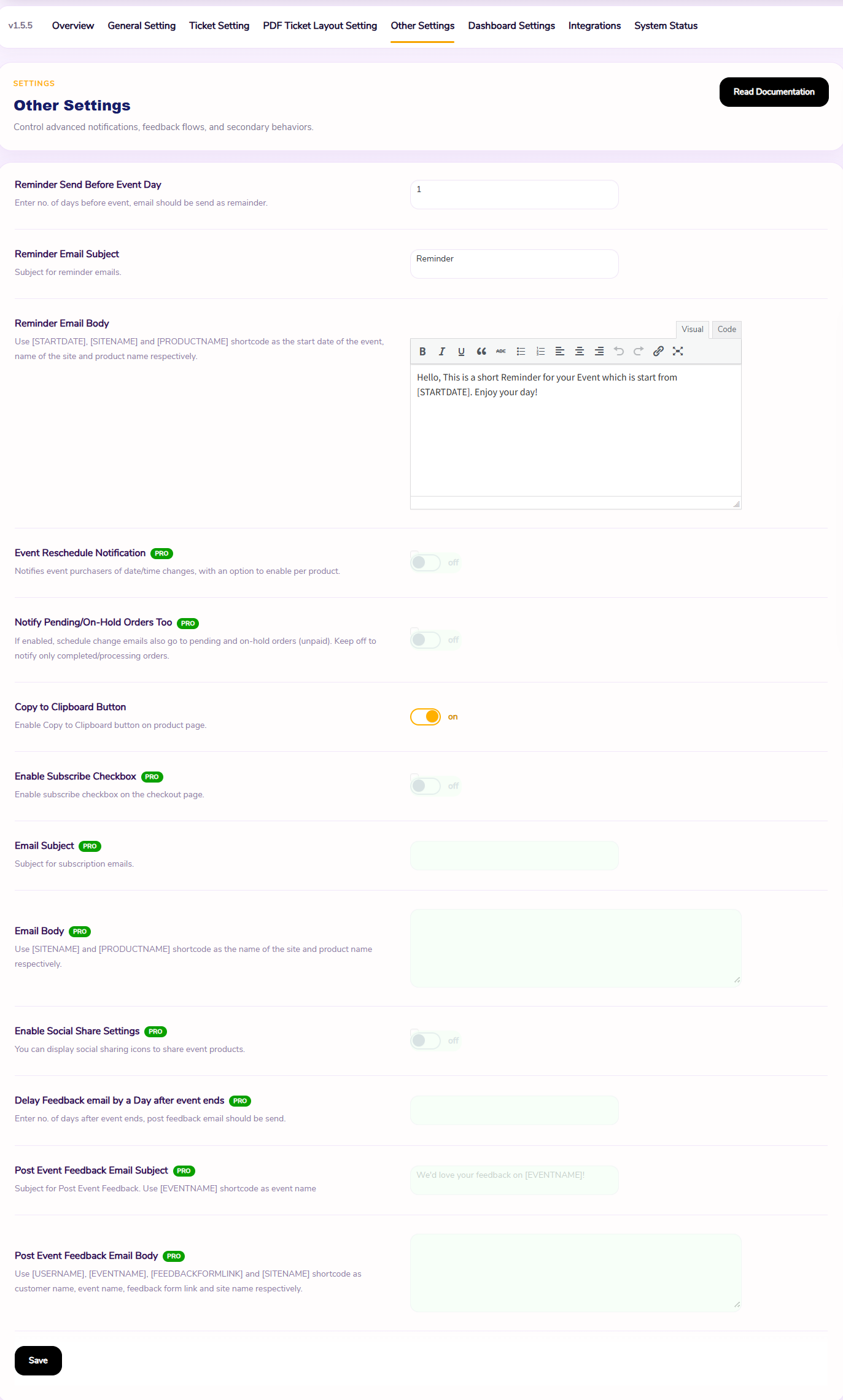
WooCommerce events plugin, merchants are allowed to send an email reminder to their customers before an event to notify customers that the event will start or x no. of days left to the event. Marketers can customize the content for the mail as per the requirements of your online event-organizing company. Admins can utilize shortcodes to customize the start date, site name, and product name.
10) Recurring Event:
By utilizing this feature of WooCommerce Event Tickets Manager, the admins can set the recurring settings for a particular event daily. The admins can now also set a particular time slot for recurring events.
11) Barcode Scanning For WordPress Event Ticket:
The admins can utilize this WordPress event plugin to provide the customers with a safe and secure experience. The unique ticket code can now be shown in the form of a scannable barcode. This helps the admins to prevent any fraudulent activities.
NOTE: The admins can only enable the Barcode Scanning feature when the Check-in QR Code feature is disabled.
12) Enable/Disable Shipping Charges:
With WordPress Event Tickets Plugin, the admins get a chance to decide whether they want a certain event/item to have shipping charges inclusive or not. They get a chance to enable/disable the shipping charges.
13) My Event Tab in the My Account Section:
This event calendar WordPress plugin allows a separate section for the users to see their personal orders and to list the purchased tickets of the client. Customers can check their purchased events in the “My Events” tab in the “My Account” section to give their customers a more personalized experience.
14) Hide/Remove Expired Event:
WordPress event plugin removes the expired event from the account to keep your customers updated. Removed events can be recovered from the Trash section. Expired Event is permanently deleted when you clear your trash section.
15) WordPress Event Ticket Stock Management:
This WordPress events plugin uses the default WooCommerce event ticket stock system to show customers the number of available event tickets. The merchant can manage the stock of the tickets from the admin panel. You can also see how many event tickets are sold and track if you are running out of stock with the help of a WordPress event calendar.
16) Set Location For Events With Google Maps:
The events WordPress plugin provides a high-level view of your offline events with Event Manager WordPress by showing the exact location of events to the user in the front end. The plugin is integrated with Google Maps and lets WooCommerce store owners show the live location of the events on their store.
17) Download WooCommerce Event Tickets As PDF:
The WooCommerce Event Tickets Manager allows the customer to download the WooCommerce event tickets as PDFs for offline use. When customers buy event tickets for an event from your WooCommerce store they send an email with a PDF attachment of the ticket. The customers can also download the ticket from the My Account tab.
18) WordPress Events Calendar:
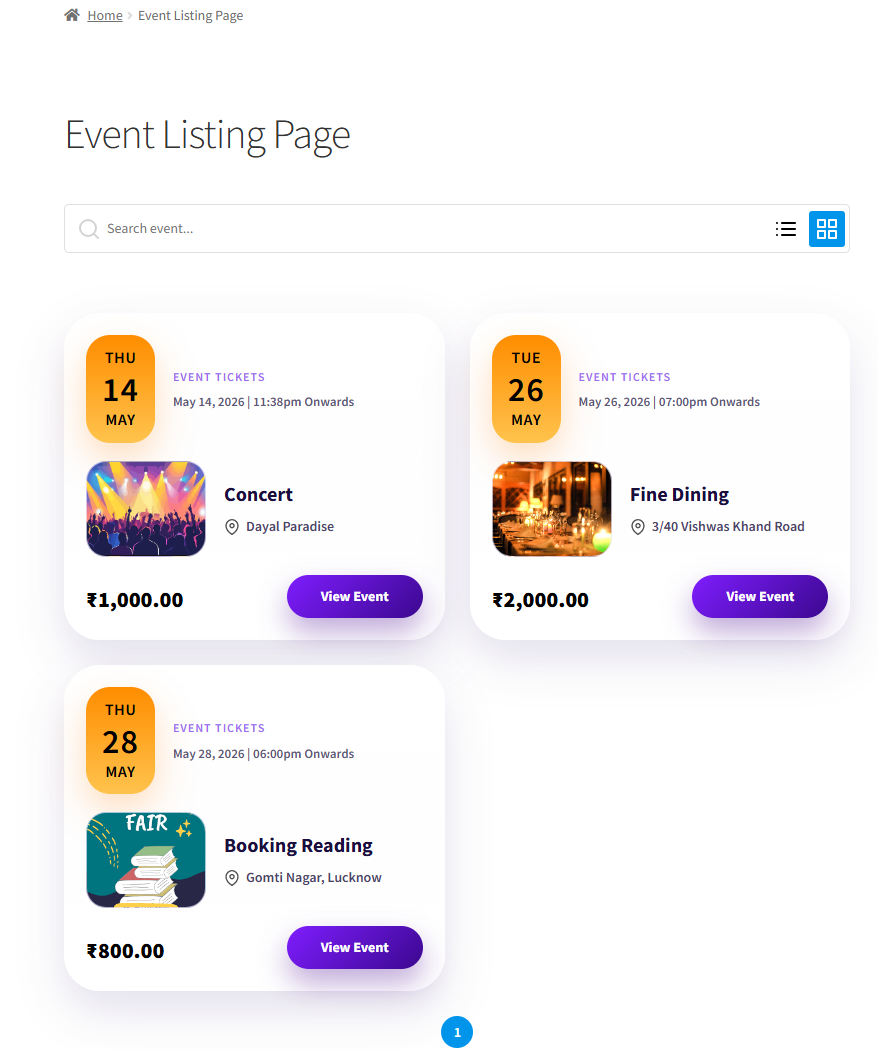
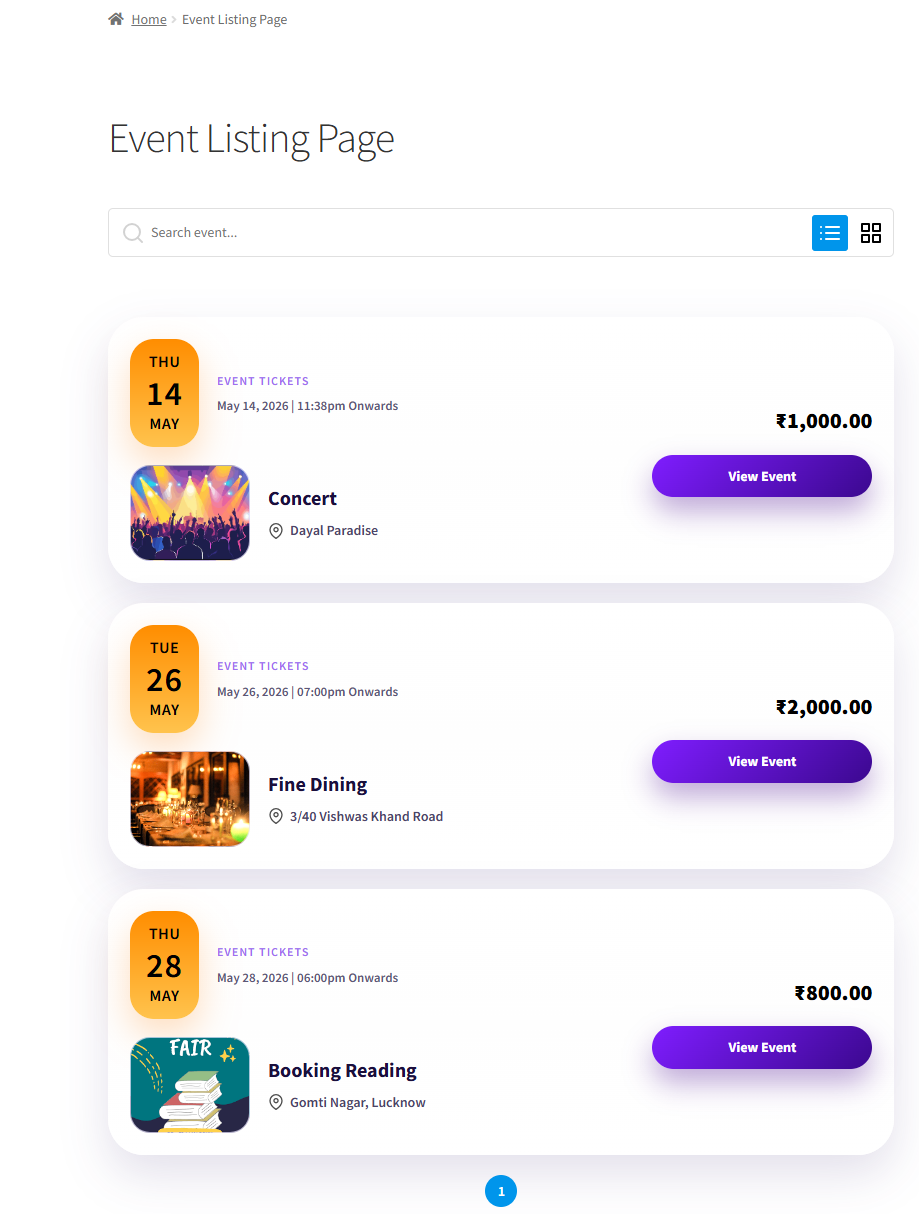
This WordPress Events Calendar plugin comes with an interactive calendar widget. The widget shows your customers the names of upcoming, past, and present ongoing events in a list or grid.
19) Edit Your Ticket Content With A Breeze:
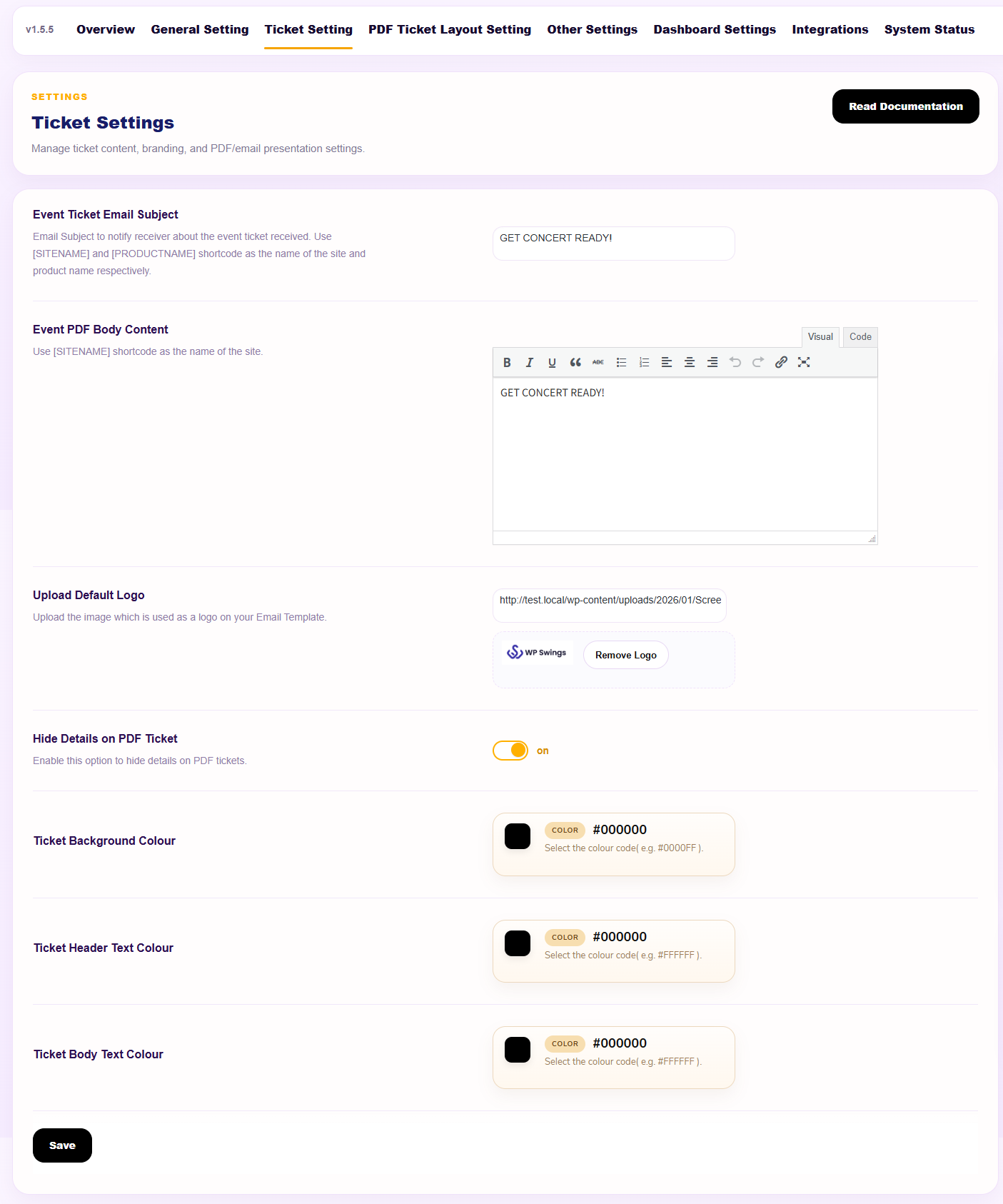
The Event tickets Plugin gives merchants an easy-to-use editor to update the content of the tickets mailed to customers. You can very easily edit the subject and the main body of your WooCommerce event tickets. The editor also lets you use the shortcode to insert the name of your site in emails.
20) Validate Event Check-in Using Emails:
The users must use the email address from which they received the event ticket. By entering the email addresses users can validate their check-in for the events they plan to participate in by enabling the WordPress event tickets.
LIVE DEMO OF WORDPRESS EVENTS PLUGIN:
Event Features Live Preview
- See The Events’ Live Location Feature in Action – WordPress events plugin Demo.
- Allow Your Customers To Share Your Events On Facebook – WordPress events plugin Demo.
- Set The Price Based On The User Type – WordPress events plugin Demo.
WITH THIS WORDPRESS EVENT MANAGER YOU CAN:
- Provide the customers with a secure experience – scannable barcodes containing the unique ticket code.
- Track the check-in status of attendees using the WordPress calendar plugin.
- Allow the customers to validate their check-ins using emails.
- The Event Tickets Manager Plugin supports multisite compatibility.
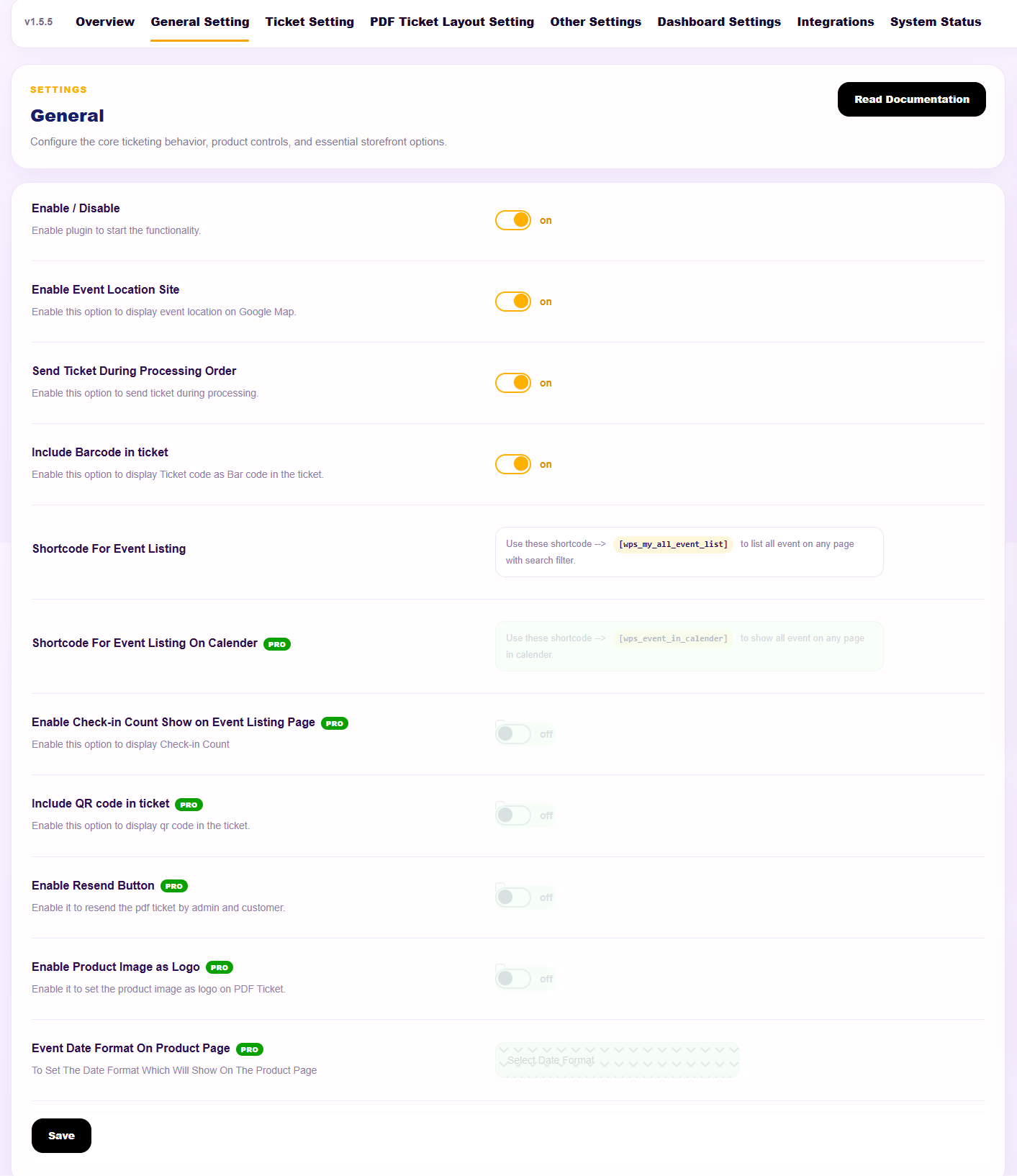
- Enables the admin to show the list of events over different pages using shortcodes.
- Show the event location to customers at the front end.
WORDPRESS EVENT MANAGER PLUGIN COMPATIBILITIES:
- WordPress tickets plugin is compatible with Gutenberg Block, allowing the merchants to easily utilize shortcodes to add different elements to different pages.
- WordPress Events Plugin is compatible with WPML multilingual support.
- Compatibility of Mautic Integration that offers a complete management solution for your WooCommerce events data.
- WordPress Calendar Plugin is now Compatible with Direct Checkout for WooCommerce, which simplifies the checkout process.
- WooCommerce event ticket system is now compatible with Ultimate Gift Cards for WooCommerce and Gift Cards For WooCommerce Pro
- The event ticket system is now compatible with the Wallet System for WooCommerce, enabling the customers to utilize the negative balance to shop.
FEEL EMPOWERED WITH EVENTS MANAGER PRO
1) Zoom Integration: Admin can host different events/sessions on Zoom’s platform.
2) WhatsApp Integration: Allowing merchants to send their customers ticket details and event notifications via WhatsApp messages.
3) Google-Meet Integration: Admin can allow customers and participants to attend online events through the G-Meet link.
4) Stay Updated Via Event Alerts: Admins can keep their customers updated. Customers can notify them about upcoming events using the “Subscribe” button.
5) Display Multiple Locations: Display multiple locations for a single event. There is no limit on the locations, you can list as many locations as you like.
6) Set Recurring Events: Admins can set the recurring date for any event very conveniently; events can recur daily, weekly, or monthly.
7) QR Codes For Seamless Check-Ins: The WooCommerce Event Tickets plugin allows customers an easy check-in process by using a QR Code.
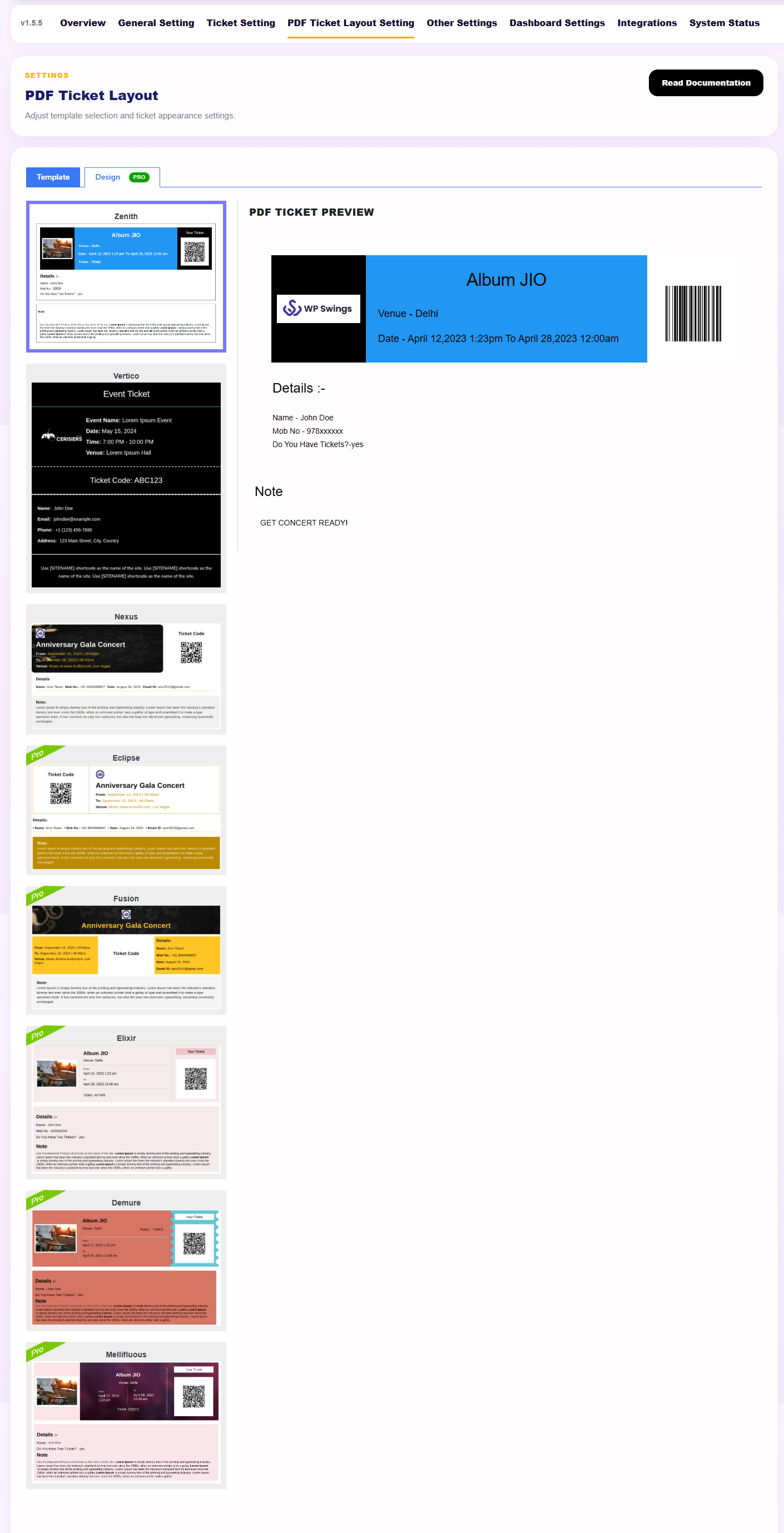
8) Fully Customizable PDF Tickets: Offers fully customizable PDF tickets. This allows the users to create event tickets the way they want.
9) Multiple Layouts for Tickets PDFs: Allows users to select from multiple layout options for ticket PDFs when creating and managing events.
TAKE ADVANTAGE OF EXCLUSIVE FEATURES OF THE WORDPRESS EVENTS PLUGIN:
The Events Calendar plugin lets the merchant add events as WooCommerce products and create ticketing websites with WordPress.
See What Garden Rock Music Band is Saying About The WordPress Event Plugin:
Perfect customer service by WP Swings; the plugin works as expected; and the service from WP Swings is great! See Event Tickets Manager Case Study
Additional Useful Content
- How To Sell WooCommerce Event Tickets
- Video – WordPress Events Plugin: How To Create Recurring Events
- Video – WordPress Event Tickets Manager Tutorial
- Video – How To Create a Ticketing and Appointment
- Video – How To Add Events On WordPress Website?
SUPPORT
If you need support or have questions, kindly use our online chat window here or connect with us to Generate a ticket
If our documentation doesn’t contain the solution to your problem, you can visit the WP Swings Forums Community
Create and Revamp Your Store with WooCommerce Services
Get huge discounts on event ticket management – Get More Offers
Installation
Automatic installation
Automatic installation is the easiest option as WordPress handles the file transfers itself and you don’t need to leave your web browser. To do an automatic install of the plugin, log in to your WordPress dashboard, navigate to the Plugins menu, and click Add New.
In the search field type “Event Tickets Manager for WooCommerce” and click Search Plugins. Once you’ve found our Event Tickets Manager for WooCommerce plugin you can view details about it such as the point release, rating, and description. Most importantly, of course, you can install it by simply clicking “Install Now”.
Manual installation
The manual installation method involves downloading our Event Tickets Manager for WooCommerce and uploading it to your web server via your favorite FTP application. The WordPress codex contains instructions on how to do this here.
Updating
Automatic updates should work like a charm; as always though, ensure you backup your site just in case.
Frequently asked questions
How do you display the interactive calendar widget?
You can search for a widget and there you will get the option of an Event Ticket Manager widget simply add it. And there you will get the settings to list view for event or calendar view you can choose it according to your need.
Can we display the event location on the tickets and product page?
Yes, the WordPress Event Manager Plugin provides the exact location of events to the user on the product page and tickets as the plugin is integrated with Google Maps.
How are the Tickets sent to the customer with the Events plugin?
Tickets will be sent to the customer via email with a pdf attachment.
Can The Customer Download Tickets for offline use?
Yes, with the help of the Event Tickets Manager plugin customers can download the tickets in PDF format. Also when the customer purchases an event the downloadable PDF file is mailed to the customer.
How many payment gateways does the Event Tickets Manager for WooCommerce plugin support?
The event ticket manager supports all the WooCommerce payment gateway for Example PayPal, Stripe, Direct bank transfer, and Check payment.
Can we translate the plugin text and string into other languages in the WordPress event calendar?
Yes, Since the Event tickets manager supports WPML you can translate the strings and text of our extension into other languages.
How can we track the check-ins for any event?
In order to track the check-ins for your event trace the following path: Dashboard>>WooCommerce>>Events.
My question is not listed
Please visit the WP Swings knowledge base for more detailed documentation and support
Changelog
New: Compatibility with WooCommerce 11.1.0 and WordPress 7.1 Enhancement: Event Product Listing Page Design - Event Card UX Enhancement: Event Calendar UI/UX Improvements (High Priority) New: Quick Event Preview New: PHP 8.3 Compatibility Audit & Fixes
1.5.9 – Released on 15 September 2026
- New: Compatibility with WooCommerce 11.1.0 and WordPress 7.1
- Enhancement: Event Product Listing Page Design – Event Card UX
- Enhancement: Event Calendar UI/UX Improvements (High Priority)
- New: Quick Event Preview
- New: PHP 8.3 Compatibility Audit & Fixes
1.5.8 – Released on 14 Auguest 2026
- New: Compatibility with WooCommerce 11.0.1 and WordPress 7.0.4
1.5.7 – Released on 14 July 2026
- New: Compatibility with WooCommerce 10.9.4 and WordPress 7.0.1
- Fixes: An issue where the QR code check-in functionality was not working as expected.
- Fixes: Resolved a compatibility issue that prevented updates to other WooCommerce products when the plugin was active.
- Fixes: JavaScript errors in Event Tickets Manager 1.5.6 / Pro 2.3.3 on WordPress 7.0, WooCommerce 10.8.1, and PHP 8.4.
- Fixes: Fixed an issue where the General settings fields disappeared from the Product Settings page after a product was marked as an event and saved.
- Fixes: Corrected a problem that prevented events from displaying all associated tickets after the event product name was changed.
- Fixes: Resolved pagination issues that caused filtered event results to reset and display all events instead of maintaining the selected filters.
- Fixes: Fixed an issue where ticket status updates were not synchronized correctly when events were Canceled, ensuring accurate order and ticket management.
1.5.6 – Released on 8 May 2026
- New: Vulnerability update
- Enhancement: Security fixes
1.5.5 – Released on 6 May 2026
- New : Compatibility With Latest WP (6.9.4) and WC (10.7).
- Enhancement : Plugin Optimization.
- Enhancement : UI/UX update.
1.5.4 – Released on 3 April 2026
- New : Compatibility with latest WP (6.9.4) and WC (10.6.2).
- Fix: PatchStack-Vulnerability-Issues.
Screenshots
For developers
Is this your plugin? Show off the numbers.
Add a live badge to your site, docs or GitHub README. It updates on its own — no account needed.
Best Event Tickets Manager for Woo… alternatives
All event booking plugins →





FAQ
Event Tickets Manager for WooCommer…: quick answers
Straight answers, pulled from live WordPress.org data.
Live data from WordPress.org · checked Oct 2, 2026
Is Event Tickets Manager for WooCo… free?
Yes. Event Tickets Manager for WooCo… is free to download and use from the official WordPress.org plugin directory. The developer also sells premium add-ons or a Pro version with extra features.
Is Event Tickets Manager for WooCo… safe to use in 2026?
Yes — Event Tickets Manager for WooCo… is a safe, well-maintained plugin to use in 2026. It runs on 1K+ sites, is rated 4.7/5 and was last updated 2 weeks ago, and scores 90/100 on our health check.
How many websites use Event Tickets Manager for WooCo…?
Event Tickets Manager for WooCo… is active on 1K+ WordPress websites and has been downloaded 71,081 times since it launched in April 2021. It was downloaded 1,680 times in the last 30 days.
Does Event Tickets Manager for WooCo… work with WordPress 7.1?
Yes. The developer has tested Event Tickets Manager for WooCo… up to WordPress 7.1.2, the latest release. It requires WordPress 6.7 or newer.
What PHP version does Event Tickets Manager for WooCo… need?
Event Tickets Manager for WooCo… requires PHP 7.4 or higher. Most hosts run PHP 8.x today, so it works on any modern WordPress hosting.
When was Event Tickets Manager for WooCo… last updated?
The latest version, 1.5.9, was released on September 15, 2026 (2 weeks ago).
Who makes Event Tickets Manager for WooCo…?
Event Tickets Manager for WooCo… is developed and maintained by WP Swings.
What are the best alternatives to Event Tickets Manager for WooCo…?
The most popular alternatives to Event Tickets Manager for WooCo… are Quick Event Manager (1K+ installs), Event Monster (600+ installs) and Calenso Booking Integration (100+ installs).
Powered by PageForge
Want thousands of pages that rank like these? Build them in an afternoon.
This directory runs on the same engine as PageForge. Turn any spreadsheet, CSV or API into thousands of fast, SEO-ready WordPress pages — with schema, internal links and AI-written copy baked in.
- CSV, Google Sheets & API data sources
- AI content, schema & internal links per page
- Works with Elementor, Gutenberg, Yoast & Rank Math
- Free on WordPress.org — no credit card


