



Awesome Event Booking
You can now easily create events, accept bookings and manage these with the powerful Awesome Event Booking plugin.

Consider an alternative
Awesome Event Booking shows warning signs in 2026 — compare the alternatives below before installing. It runs on 30+ sites, is rated 5/5 and was last updated 2 years ago, and scores 34/100 on our health check.
- Small user base (30+ active installs)
- Very few reviews so far
- No update in over a year
- Only tested up to WordPress 6.7 (latest is 7.1)
How does it stack up?
Side-by-side on installs, updates, ratings & support



Daily downloads
Download spikes usually follow a new release — each site that auto-updates counts as a download.
Rankings
Where Awesome Event Booking stands todayWordPress.org search rankings
Live position in the plugin search, top 100| Keyword | Position |
|---|---|
| bookings | >100 |
| event booking | >100 |
| events | >100 |
| reseller | #39 |
| woocommerce | >100 |
Version adoption
Share of active sites per release.
Rating breakdown
★★★★★★★★★★ 5 from 2 reviews
About Awesome Event Booking
From the official readme · v2.8.5Description
A powerful and FREE event management plugin for WordPress
You can now easily create events, accept bookings and manage these with the powerful Awesome Event Booking plugin.
Main features:
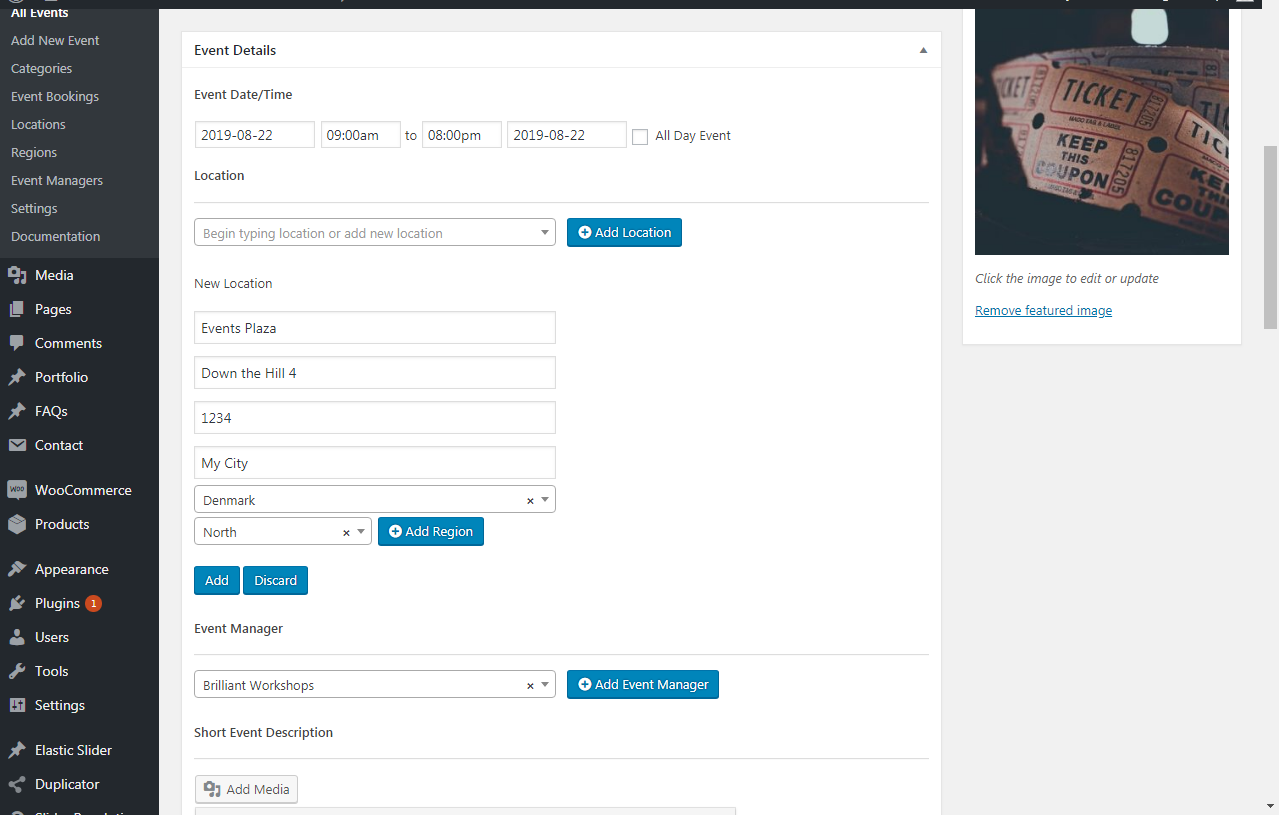
- Create events with date, time, price, max attendants, location and region.
- Nice display of the events via dropdown.
- Fully responsive view.
- QuickSimple booking form.
- Manage bookings via backend.
- Bulk move bookings from one event to another.
- A wide range of extensions available.
Flexible display of the events
Categorize the events and display the events on pages by category, region and date using our shortcode tool.
Re-use venues and organizers
You will probably be using the same venues and event organizers over and over again, so we have made sure, that once you have created these, they can be re-used for future events.
Fully Responsive
The events are nicely displayed on both desktops, laptops, tablets and smartphones. Each view is fully responsive, making sure that visitors can book your events from anywhere.
Our Cool extensions:
See all of our cool extensions here.
Installation
-
Log into your WordPress admin dashboard and search for ‘Awesome Event Booking’ in ‘Plugins’ – ‘Add new’
-
Activate the plugin through the ‘Plugins’ screen in WordPress
-
That’s it. Your new Event Booking menu has been added as a main menu to the admin. So go to ‘Events’.
Changelog
2.8.5
- Fixed some vulnerability issue in the plugin.
2.8.4
- Fixed some known bugs and compatibility related to event sign up.
2.8.3
- New Addon plugin introduced – Email/SMS Template Addon.
- With Email/SMS Template Addon, event organizers can create and manage custom email and SMS templates for each event.
2.8.2
- Introduced a new, visually appealing event listing layout.
- Each event card is now expandable for a more interactive user experience.
- Clicking on an event card reveals additional event details dynamically.
- The optimized event listing structure to ensure smoother transitions and animations.
2.8.1
- Minor fixes and updates.
2.8.0
- Added new feature to Allow multiple bookings with the same email or restrict to only one booking per event.
- If disabled the multiple bookings, the error message can be modify from settings.
Screenshots




For developers
Is this your plugin? Show off the numbers.
Add a live badge to your site, docs or GitHub README. It updates on its own — no account needed.
Best Awesome Event Booking alternatives
All bookings plugins →




FAQ
Awesome Event Booking: quick answers
Straight answers, pulled from live WordPress.org data.
Live data from WordPress.org · checked Oct 1, 2026
Is Awesome Event Booking free?
Yes. Awesome Event Booking is free to download and use from the official WordPress.org plugin directory.
Is Awesome Event Booking safe to use in 2026?
Awesome Event Booking shows warning signs in 2026 — compare the alternatives below before installing. It runs on 30+ sites, is rated 5/5 and was last updated 2 years ago, and scores 34/100 on our health check.
How many websites use Awesome Event Booking?
Awesome Event Booking is active on 30+ WordPress websites and has been downloaded 12,644 times since it launched in August 2018. It was downloaded 174 times in the last 30 days.
Does Awesome Event Booking work with WordPress 7.1?
Awesome Event Booking is officially tested up to WordPress 6.7.9, while the latest release is 7.1.2. It may still work, but try it on a staging site first.
What PHP version does Awesome Event Booking need?
Awesome Event Booking requires PHP 7.0 or higher. Most hosts run PHP 8.x today, so it works on any modern WordPress hosting.
When was Awesome Event Booking last updated?
The latest version, 2.8.5, was released on March 26, 2025 (2 years ago).
Who makes Awesome Event Booking?
Awesome Event Booking is developed and maintained by AwesomeTOGI.
What are the best alternatives to Awesome Event Booking?
The most popular alternatives to Awesome Event Booking are Events Manager (60K+ installs), WP Events Manager (30K+ installs) and WP Simple Booking Calendar (20K+ installs).
Powered by PageForge
Want thousands of pages that rank like these? Build them in an afternoon.
This directory runs on the same engine as PageForge. Turn any spreadsheet, CSV or API into thousands of fast, SEO-ready WordPress pages — with schema, internal links and AI-written copy baked in.
- CSV, Google Sheets & API data sources
- AI content, schema & internal links per page
- Works with Elementor, Gutenberg, Yoast & Rank Math
- Free on WordPress.org — no credit card


