



EuroNur Editorial Markers
Mark posts and pages with color-coded editorial markers, dashboard counts, role controls, history, restore points, and legacy migration tools.

Solid choice
EuroNur Editorial Markers is a solid plugin choice in 2026, with a few things worth checking first. It runs on 20+ sites and was last updated 4 weeks ago, and scores 67/100 on our health check.
- Actively developed — last update 4 weeks ago
- Tested with the latest WordPress (7.1)
- Small user base (20+ active installs)
- Very few reviews so far
How does it stack up?
Side-by-side on installs, updates, ratings & support



Daily downloads
Download spikes usually follow a new release — each site that auto-updates counts as a download.
Rankings
Where EuroNur Editorial Markers stands todayWordPress.org search rankings
Live position in the plugin search, top 100| Keyword | Position |
|---|---|
| admin | >100 |
| editorial workflow | #27 |
| markers | #48 |
| posts | >100 |
| status | >100 |
Version adoption
Share of active sites per release.
About EuroNur Editorial Markers
From the official readme · v3.4.2Description
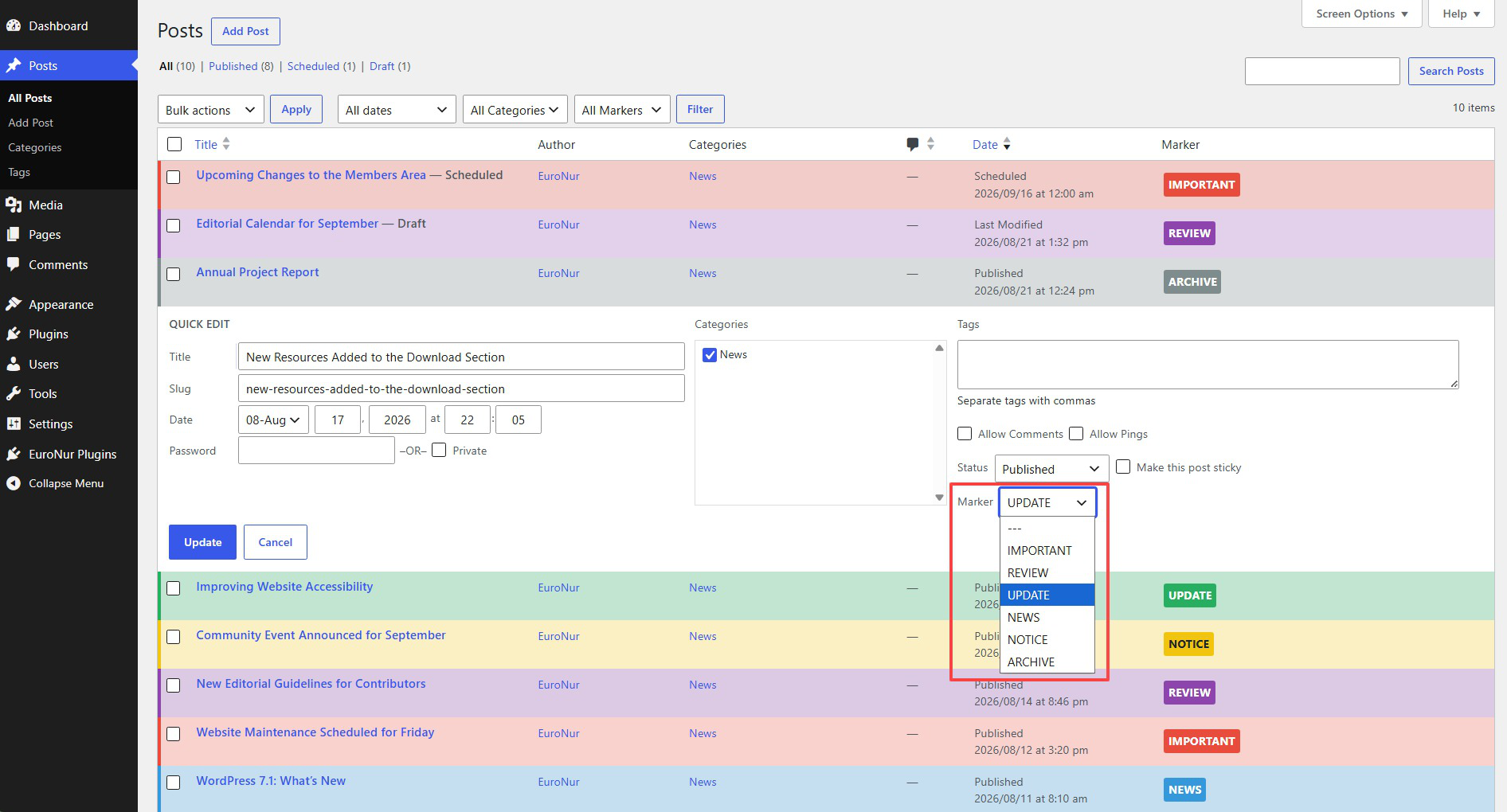
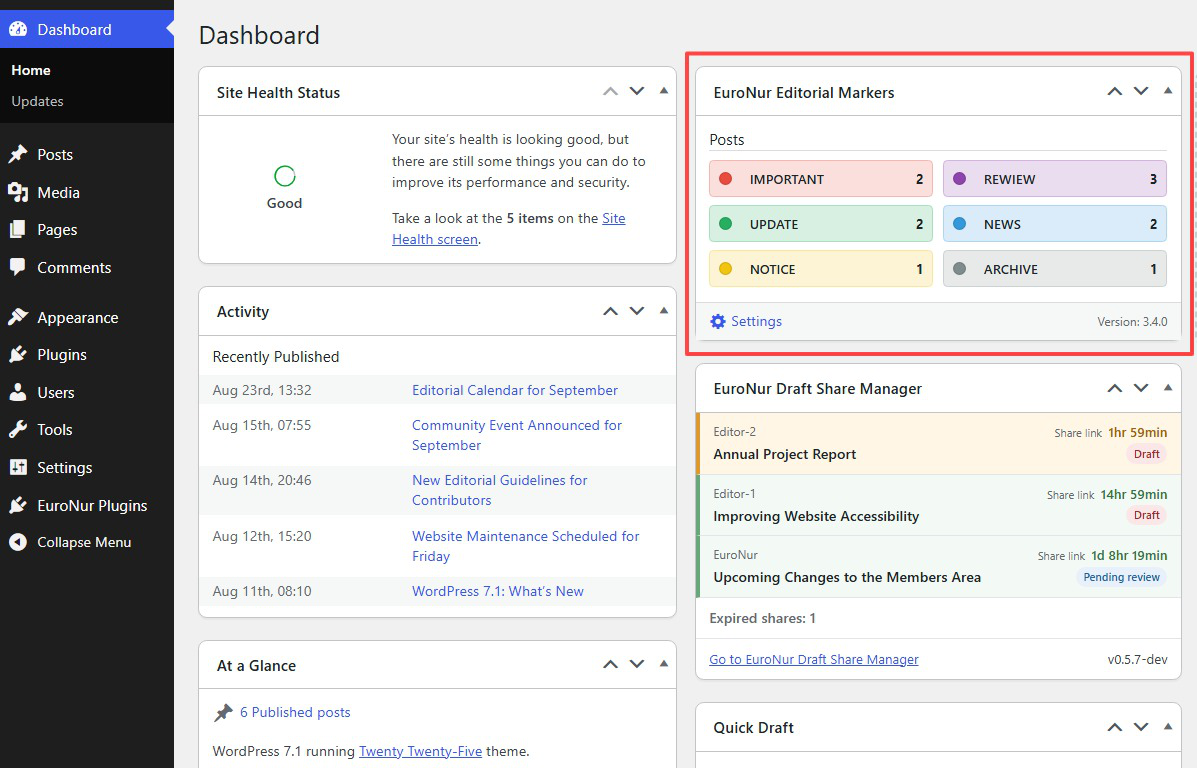
EuroNur Editorial Markers adds color-coded editorial markers to the WordPress administration area. Markers can be assigned to posts, pages, and selected custom post types and are visible in post lists, edit screens, quick edit, bulk edit, and an optional Dashboard widget.
EuroNur Editorial Markers is a GPL-based continuation of Mark Posts by Michael Schoenrock and Sven Hofmann. It preserves compatibility with the established marker workflow while adding its own administration, safety, migration, and recovery features.
Features
- Create markers with custom background and text colors.
- Reorder markers by drag and drop.
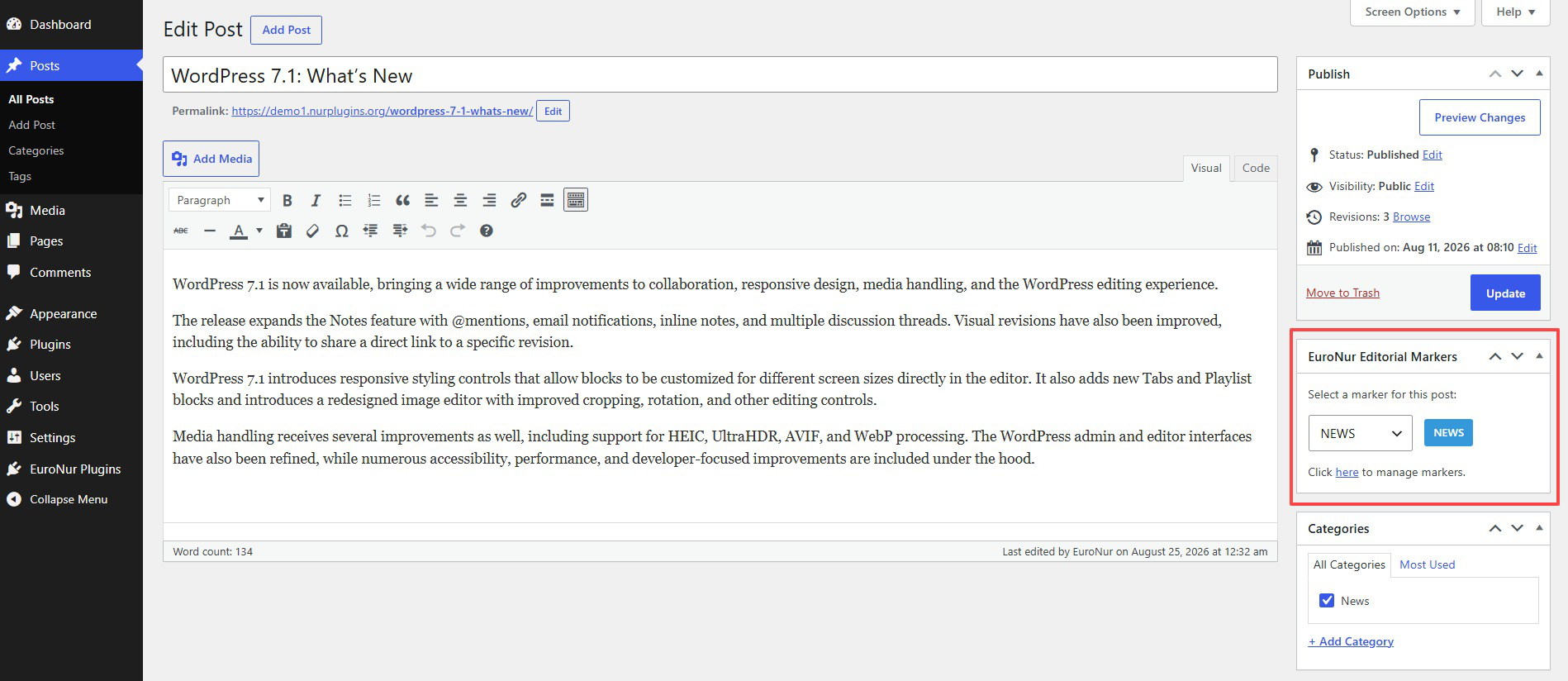
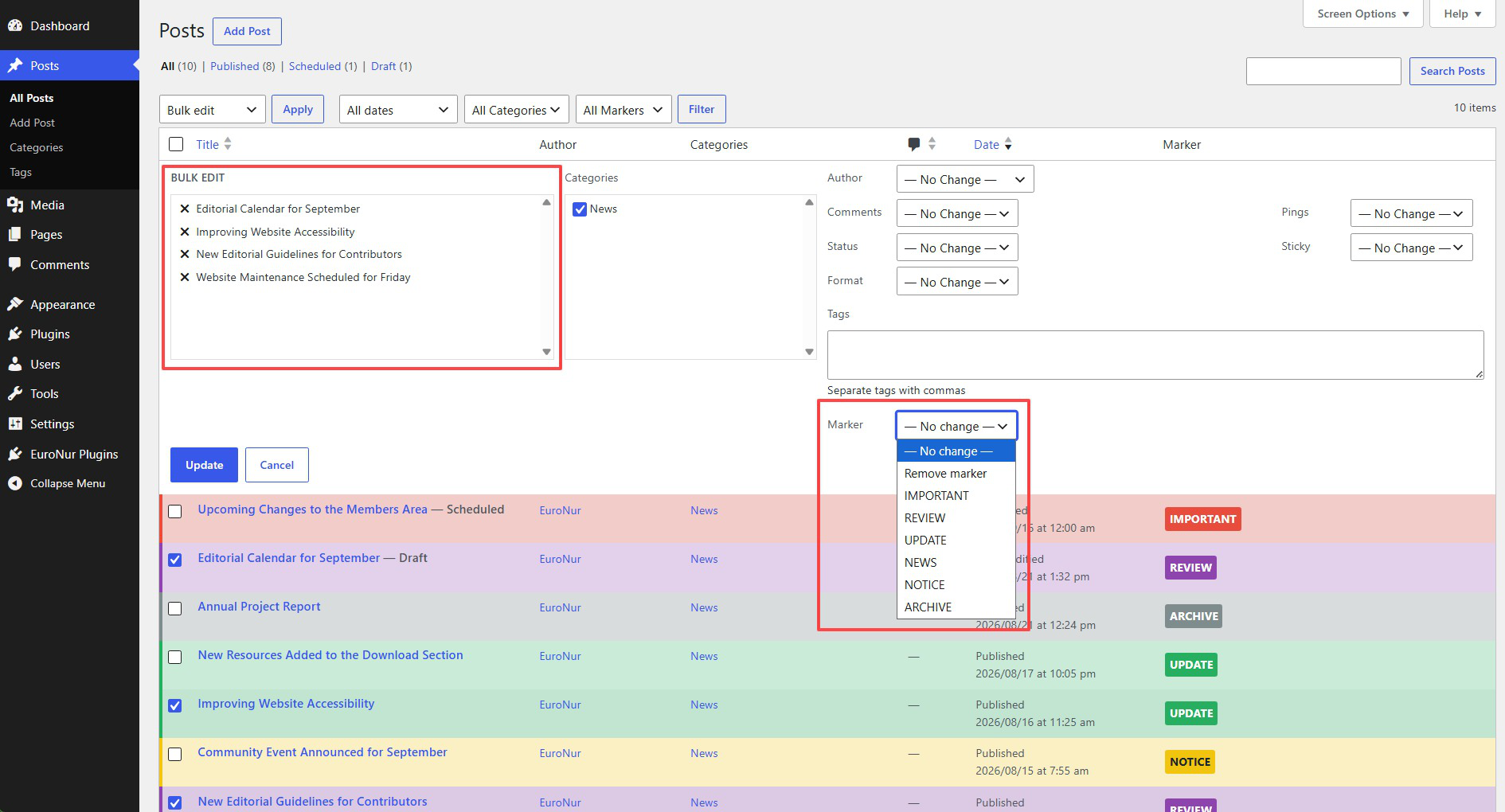
- Assign markers from the editor, quick edit, and bulk edit.
- Enable markers only for selected post types.
- Dashboard widget with compact marker usage counts.
- Control which user roles can view the Dashboard widget.
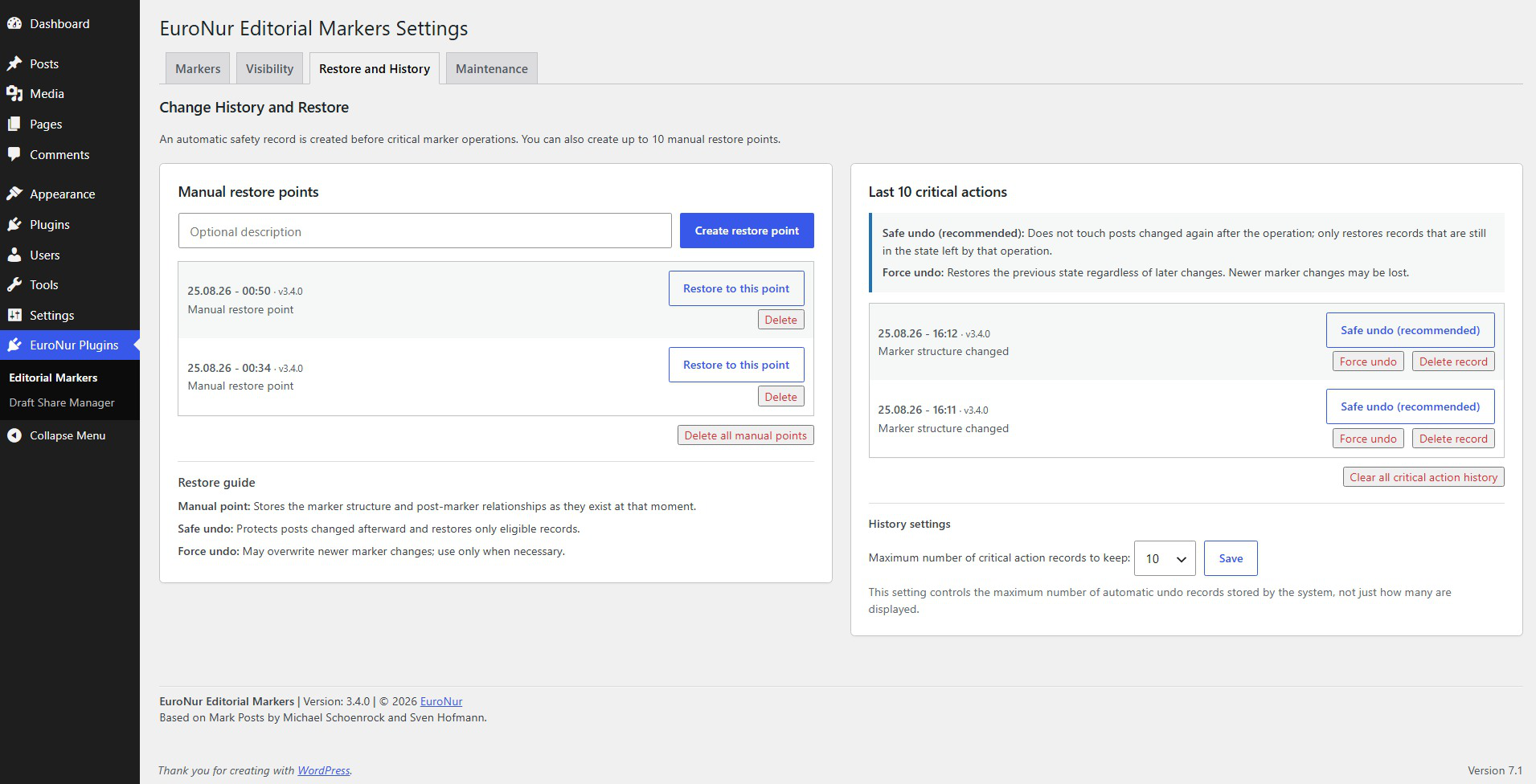
- Manual restore points for marker structures and post-marker relationships.
- Automatic undo history for critical marker operations.
- Safe and forced undo modes with clear warnings.
- Configurable automatic history retention.
- Repair and migration tool for sites migrating from Mark Posts.
- Optional cleanup of plugin data when the plugin is permanently deleted.
Migration from Mark Posts
If your site currently uses Mark Posts, deactivate it first but do not delete it yet. Then activate EuroNur Editorial Markers and run EuroNur Plugins > Editorial Markers > Maintenance > Check / Repair Legacy Mark Posts Data once.
After the scan completes, verify your markers and Dashboard counts. The inactive Mark Posts plugin can then be removed. EuroNur Editorial Markers does not require Mark Posts files to operate.
If the site never used Mark Posts, the legacy repair scan is not required.
Credits
EuroNur Editorial Markers is maintained by EuroNur and is based on the Mark Posts plugin by Michael Schoenrock and Sven Hofmann. Their copyright and license notices are preserved in the source distribution.
Installation
- Install and activate EuroNur Editorial Markers.
- Open EuroNur Plugins > Editorial Markers.
- Create or adjust your markers under Markers.
- Select the supported post types and Dashboard roles under Visibility.
- If migrating from Mark Posts, run the legacy data scan once under Maintenance.
Frequently asked questions
How is EuroNur Editorial Markers related to Mark Posts?
EuroNur Editorial Markers is a GPL-based continuation of Mark Posts. It preserves compatibility with the established marker workflow while providing additional administration, safety, history, restore, and migration features.
Do I need Mark Posts installed?
No. If you are migrating an existing site, keep Mark Posts inactive while you run the migration/repair scan and verify the result. You can then remove it.
What is the difference between a manual restore point and automatic history?
A manual restore point stores the marker structure and post-marker relationships at a moment you choose. Automatic history is created around critical marker operations and is intended for undoing those specific actions.
What does Safe Undo do?
Safe Undo avoids overwriting posts that were changed again after the recorded action. Force Undo restores the recorded state even when newer marker changes exist, so it should be used only when necessary.
Does deactivating the plugin delete my markers?
No. Deactivation does not delete plugin data. Permanent cleanup is controlled separately in the Maintenance settings and is applied only when the plugin itself is deleted through WordPress.
Where can I find documentation and support?
Visit https://www.nurplugins.org/euronur-editorial-markers/ for project information and documentation. Support is also available through the official WordPress.org support forum.
Changelog
Fixes the empty Markers settings screen on fresh installations with no existing markers.
3.4.2
- Fixed the Markers settings screen on fresh installations with no existing markers, so the add-marker and appearance controls remain available.
3.4.1
- Improved marker appearance controls with configurable width and font size, live preview, and optimized handling of long marker names.
- Improved marker display consistency across post lists, settings, the post editor, and the Dashboard widget.
- Minor maintenance and documentation improvements.
3.4.0
- Renamed the plugin from EuroNur Mark Posts to EuroNur Editorial Markers to establish a distinct project identity.
- Prepared EuroNur Editorial Markers for public distribution on WordPress.org.
- Converted user-facing source strings to English and standardized the
euronur-editorial-markerstext domain. - Prepared the plugin for WordPress.org language packs and GlotPress-based translations.
- Internationalized repair/migration progress messages, Dashboard labels, settings screens, and plugin footer text.
- Updated WordPress.org metadata, documentation, FAQ, installation notes, credits, and migration guidance.
- Preserved all marker data, settings, restore points, history, ordering, visibility rules, and migration state during upgrade.
- Isolated EuroNur runtime classes, constants, and helper functions with EuroNur-specific names to prevent PHP symbol collisions during migration from Mark Posts.
- Added a shared EuroNur Plugins administration menu and removed WordPress’s duplicate mirrored parent submenu entry.
- Added safe paused mode when Mark Posts is active, preventing runtime collisions and resuming automatically after it is deactivated.
- Added migration-safe defaults for Dashboard visibility while preserving existing site settings.
- Added live marker preview in the post editor without page reloads or AJAX requests.
- Added a shared contrast fallback so legacy markers without saved text colors remain readable across administration screens.
- Updated administration links and tab routing for the shared EuroNur Plugins menu.
- Updated compatibility metadata for WordPress 7.1.
- Fixed marker delete and assign-all action redirects so completed actions return to the Markers tab with a status message.
- Modernized Multisite new-site initialization to use the current WordPress site-initialization hook.
3.3.1
- Refined public plugin metadata and project documentation.
- Standardized release information and public-facing project references.
- Completed additional packaging and distribution housekeeping.
3.3.0
- Completed a full security-hardening and release review.
- Converted destructive marker actions to POST requests protected by administrator capability checks and dedicated WordPress nonces.
- Added server-side marker existence checks and enforced
mark_posts_marker_limitrestrictions against request tampering. - Fixed a legacy marker-limit array validation issue in the inherited codebase.
- Hardened marker names and colors against stored XSS with stricter sanitization and output escaping.
- Prevented lower-privilege Dashboard users from receiving administrator aggregate counts through shared cache data.
- Added stricter validation for post types, roles, marker IDs, colors, arrays, repair AJAX requests, and uninstall cleanup.
- Added clear migration guidance explaining when the inactive Mark Posts plugin can be removed safely.
3.2.9
- Improved marker usage wording, including natural usage counts such as “5,072 posts” and a clear unused-marker state.
- Rewrote the legacy repair tool description to identify it explicitly as a migration/repair utility for Mark Posts data.
- Clarified that the legacy migration scan is normally a one-time task and is unnecessary on fresh EuroNur Editorial Markers installations.
Screenshots



For developers
Is this your plugin? Show off the numbers.
Add a live badge to your site, docs or GitHub README. It updates on its own — no account needed.
Best EuroNur Editorial Markers alternatives
All admin plugins →




FAQ
EuroNur Editorial Markers: quick answers
Straight answers, pulled from live WordPress.org data.
Live data from WordPress.org · checked Sep 29, 2026
Is EuroNur Editorial Markers free?
Yes. EuroNur Editorial Markers is free to download and use from the official WordPress.org plugin directory.
Is EuroNur Editorial Markers safe to use in 2026?
EuroNur Editorial Markers is a solid plugin choice in 2026, with a few things worth checking first. It runs on 20+ sites and was last updated 4 weeks ago, and scores 67/100 on our health check.
How many websites use EuroNur Editorial Markers?
EuroNur Editorial Markers is active on 20+ WordPress websites and has been downloaded 246 times since it launched in August 2026. It was downloaded 172 times in the last 30 days.
Does EuroNur Editorial Markers work with WordPress 7.1?
Yes. The developer has tested EuroNur Editorial Markers up to WordPress 7.1.2, the latest release. It requires WordPress 6.0 or newer.
What PHP version does EuroNur Editorial Markers need?
EuroNur Editorial Markers requires PHP 7.4 or higher. Most hosts run PHP 8.x today, so it works on any modern WordPress hosting.
When was EuroNur Editorial Markers last updated?
The latest version, 3.4.2, was released on August 30, 2026 (4 weeks ago).
Who makes EuroNur Editorial Markers?
EuroNur Editorial Markers is developed and maintained by EuroNur.
What are the best alternatives to EuroNur Editorial Markers?
The most popular alternatives to EuroNur Editorial Markers are Loginizer (1M+ installs), Redux Framework (900K+ installs) and Admin Menu Editor (300K+ installs).
Powered by PageForge
Want thousands of pages that rank like these? Build them in an afternoon.
This directory runs on the same engine as PageForge. Turn any spreadsheet, CSV or API into thousands of fast, SEO-ready WordPress pages — with schema, internal links and AI-written copy baked in.
- CSV, Google Sheets & API data sources
- AI content, schema & internal links per page
- Works with Elementor, Gutenberg, Yoast & Rank Math
- Free on WordPress.org — no credit card


