


Eezz FX Payout Estimator for WooCommerce
Estimate WooCommerce payout amounts in a target currency after payment fees, withdrawal costs and FX spread.

Use with caution
Eezz FX Payout Estimator for Wo… works, but test it on a staging site before relying on it in 2026. Was last updated 4 months ago, and scores 49/100 on our health check.
- Small user base (<10 active installs)
- Very few reviews so far
How does it stack up?
Side-by-side on installs, updates, ratings & support



Daily downloads
Download spikes usually follow a new release — each site that auto-updates counts as a download.
Rankings
Where Eezz FX Payout Estimator fo… stands todayWordPress.org search rankings
Live position in the plugin search, top 100| Keyword | Position |
|---|---|
| admin | >100 |
| currency | >100 |
| exchange rate | >100 |
| payout | #71 |
| woocommerce | >100 |
About Eezz FX Payout Estimator for WooCommerce
From the official readme · v1.3.1Description
Eezz FX Payout Estimator for WooCommerce is an admin-only WooCommerce tool for cross-border store owners who want a clearer estimate of how much money may remain after payment processing fees, withdrawal fees and exchange-rate spread.
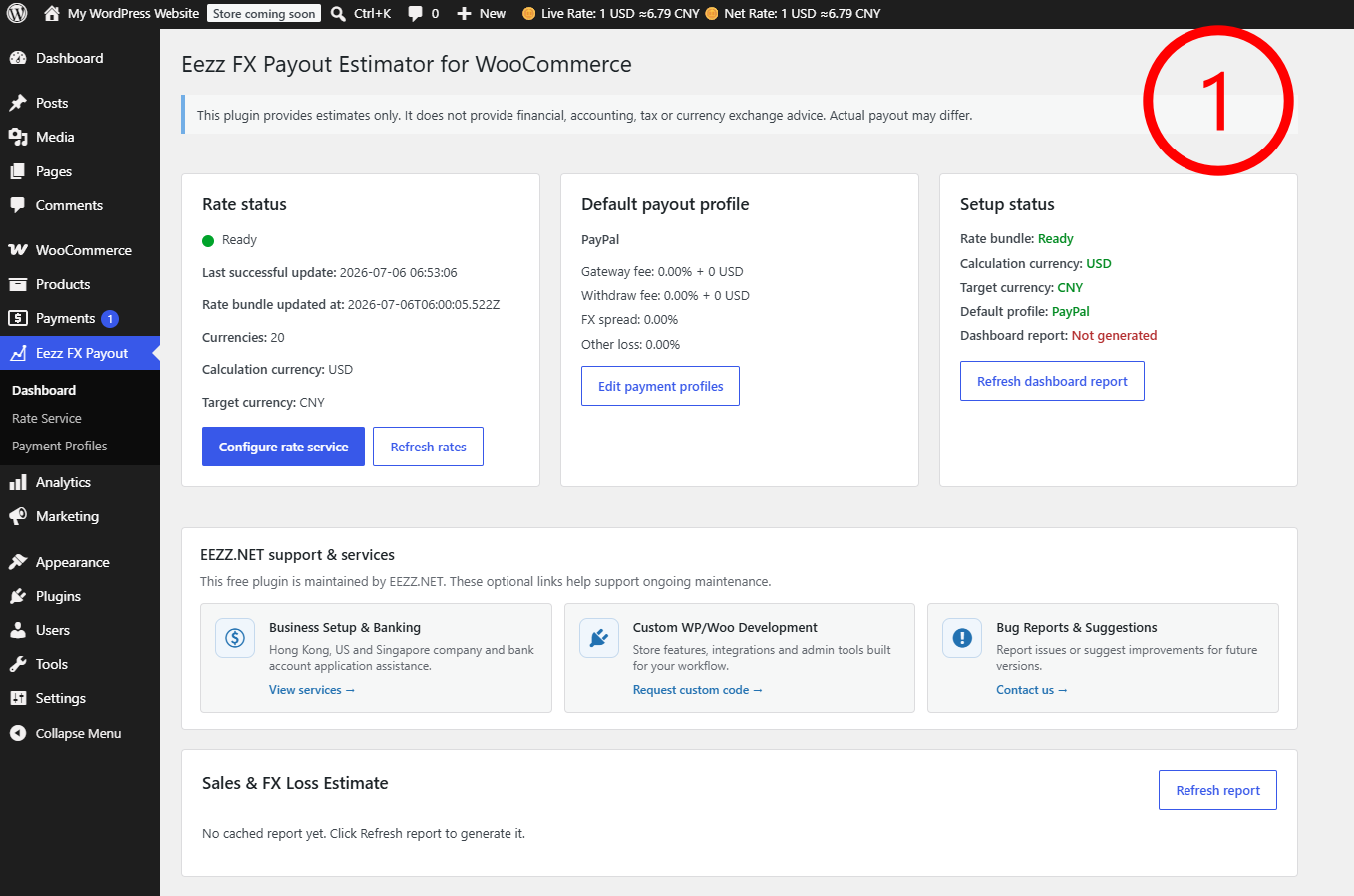
Many WooCommerce stores sell in one currency but review their final payout in another currency. For example, a store may price products in USD, JPY or EUR, while the business owner wants to estimate the final amount in CNY or another target currency. Eezz FX Payout Estimator for WooCommerce helps administrators compare the live exchange rate, estimated net rate, payment profile fees and expected target-currency payout.
The plugin is designed for store administration and decision support. It does not change checkout prices, product prices, order totals, payment gateway behavior, tax calculations or frontend currency display.
Rates are downloaded from the configured rate service by WP-Cron and stored locally. Product helpers, order estimates, dashboard reports and exchange-rate charts use cached local data so the plugin does not need to request remote rate data on every admin page load.
This plugin provides estimates only. It does not provide financial, accounting, tax, legal or currency exchange advice. Actual payouts may differ because payment providers, banks and exchange services may use their own fees, rates, timing rules and settlement policies.
External services
This plugin downloads exchange-rate data from the following remote services:
-
Exchange-rate bundle service.
- Service URL: configurable via the Rate Service setting (default: https://api.840156.xyz/)
- What is sent: The plugin makes an HTTP GET request from the WordPress site server to download a public rate bundle file (bundle/flcw-rates-v1.json). No order, product, customer, administrator, or payment data is sent by the plugin. As with any HTTP request, the remote service may receive technical request metadata such as the site server IP address, request time, requested URL, and User-Agent string.
- Terms of service: https://eezz.net/terms-of-service/
- Privacy policy: https://eezz.net/privacy-policy/
-
USD/CNY exchange-rate chart service.
- Service URL: https://rmb.840156.xyz/
- Endpoints used: /api/v1/flcw/usd-cny.json, /rates/usd-cny.json, /api/v1/usdcny/history.json, /api/v1/usdcny/dashboard.json
- What is sent: The plugin makes HTTP GET requests from the WordPress site server to download public USD/CNY exchange-rate data. No order, product, customer, administrator, or payment data is sent by the plugin. As with any HTTP request, the remote service may receive technical request metadata such as the site server IP address, request time, requested URL, and User-Agent string.
- Terms of service: https://eezz.net/terms-of-service/
- Privacy policy: https://eezz.net/privacy-policy/
Data from these services is cached locally in the WordPress database. The plugin does not communicate with any other remote services by default.
If an administrator changes the Rate Service base URL, the WordPress site will request exchange-rate data from the configured service chosen by that administrator.
Third-party libraries
This plugin includes Chart.js 4.5.1 for rendering admin exchange-rate charts.
Chart.js is distributed under the MIT License.
Project website: https://www.chartjs.org/
Source code: https://github.com/chartjs/Chart.js
Main Features
- Configure a rate service base domain and refresh exchange-rate data from the WordPress admin.
- Select a Calculation Currency for store prices, order amounts and fixed fees.
- Select a Target Currency for payout estimates, reverse pricing and dashboard reports.
- Store the rate bundle locally and refresh it by WP-Cron or manual refresh.
- Validate the rate bundle before it is used by product, order and dashboard estimates.
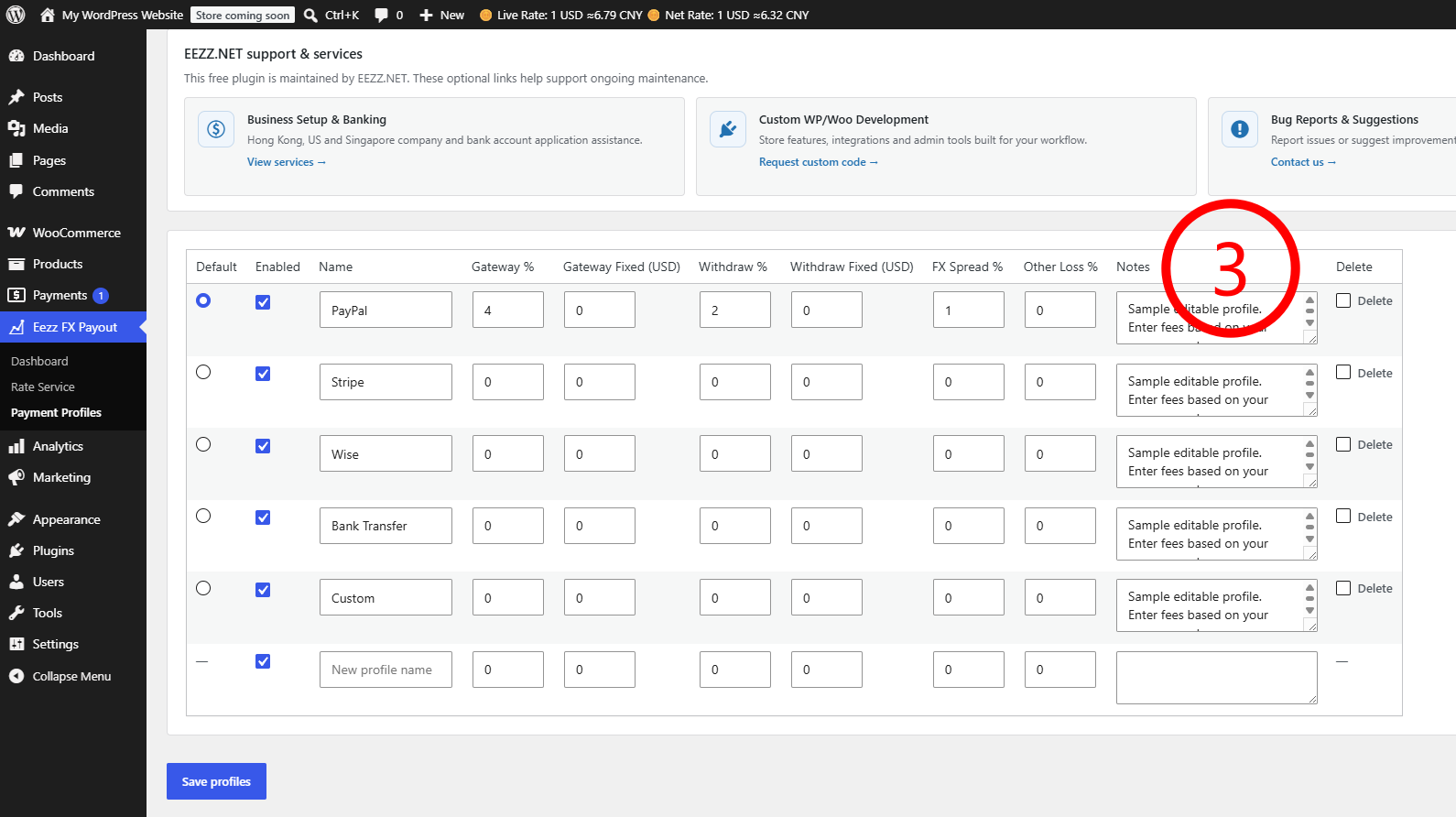
- Create editable payment profiles for PayPal, Stripe, Wise, bank transfer or custom payout methods.
- Set one default payment profile for estimates.
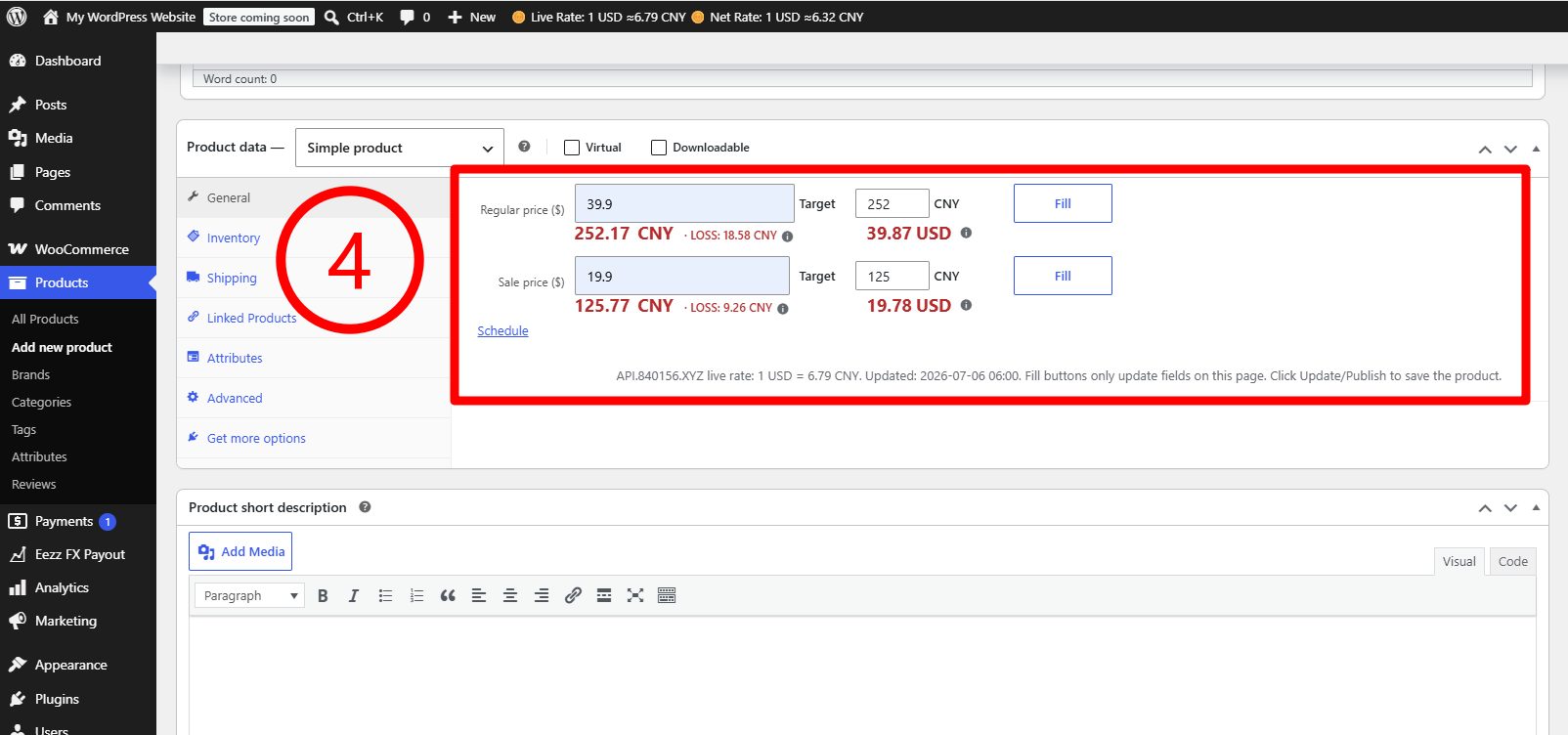
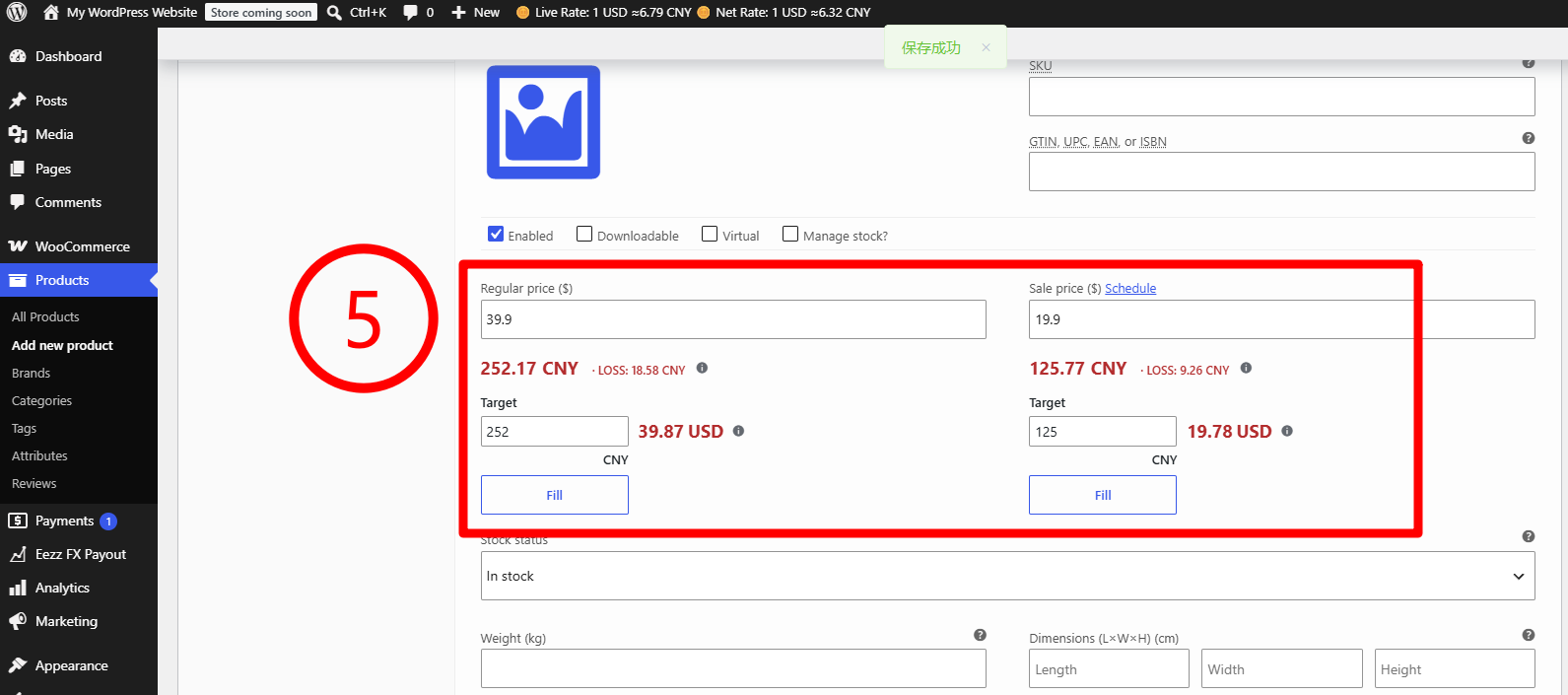
- Estimate product and variation payouts directly inside WooCommerce product editing screens.
- Use reverse pricing helpers to estimate the store price required for a target-currency payout amount.
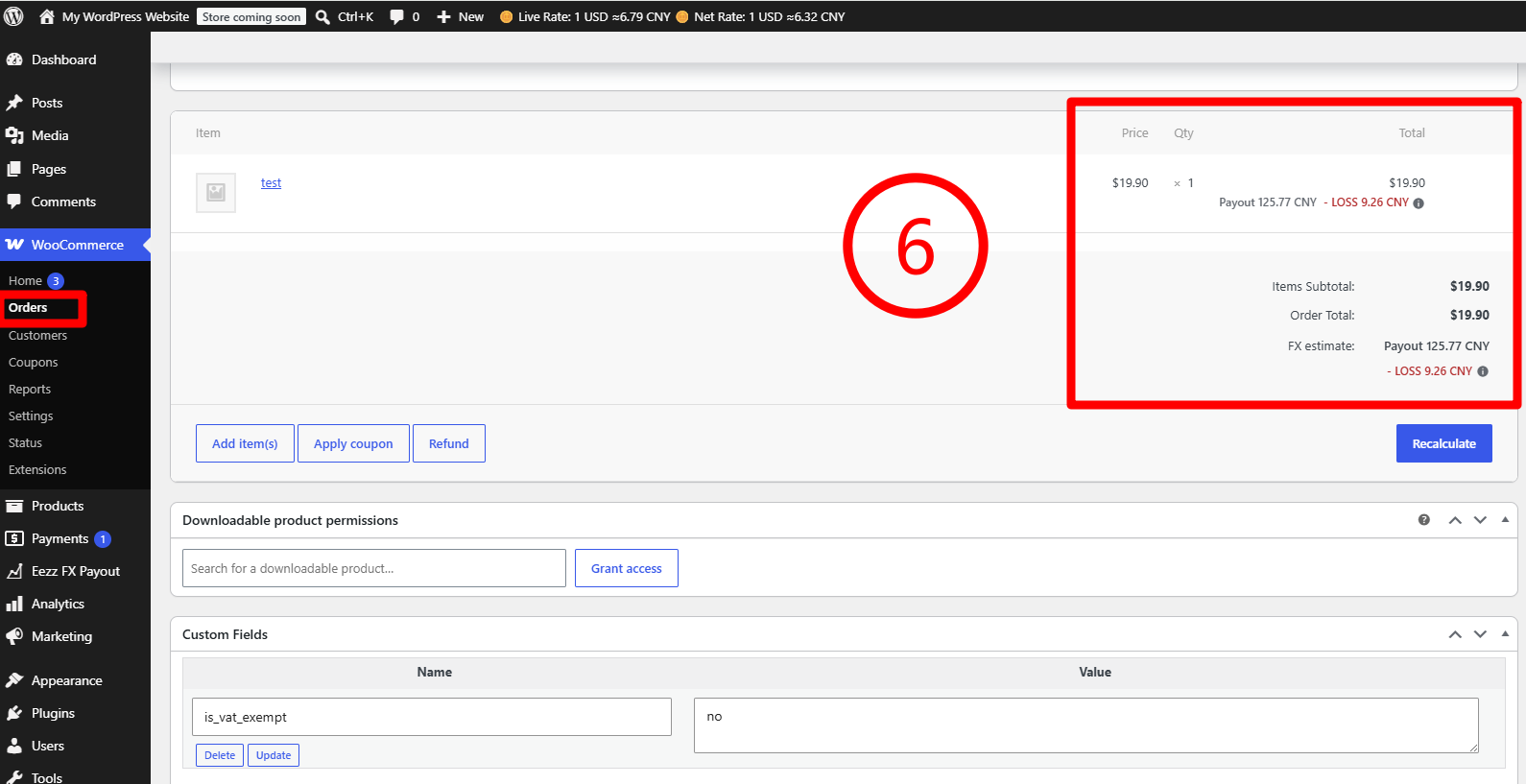
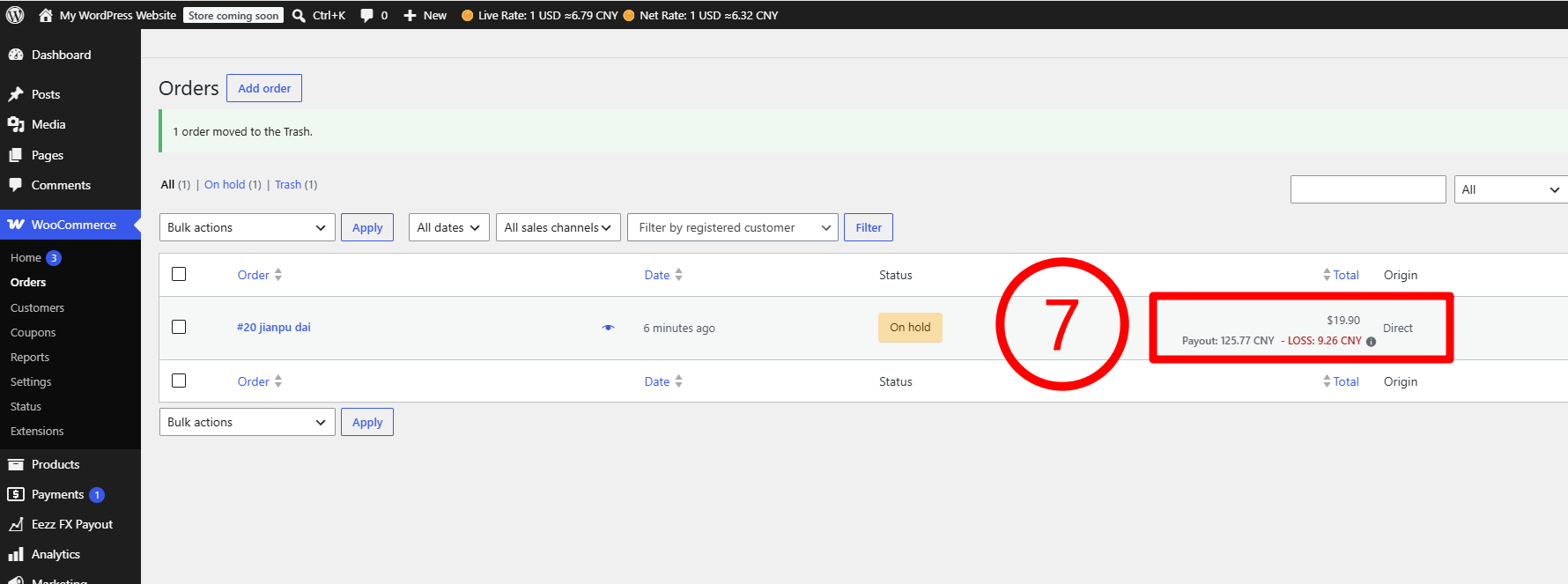
- Show order payout estimates in the WooCommerce order edit screen using the current cached rates.
- Display dashboard summaries for recent sales, estimated payout and estimated FX/payment loss.
- Show a global admin bar summary for Live Rate and Net Rate for authorized administrators.
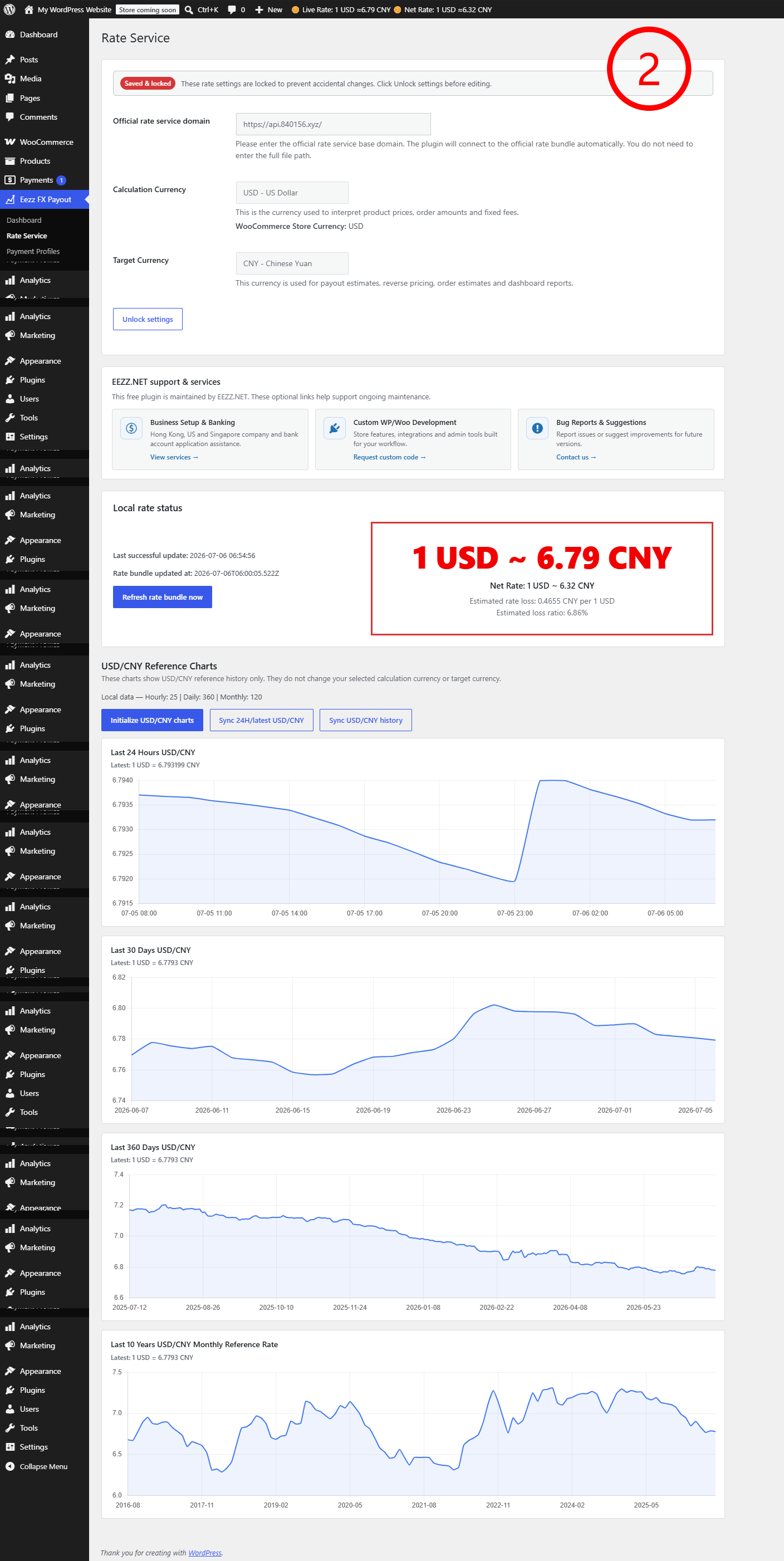
- Display live-rate and estimated net-rate loss information on the Rate Service page.
- Display USD/CNY exchange-rate charts for short-term and historical reference.
- Include HPOS compatibility declaration.
How It Works
Eezz FX Payout Estimator for WooCommerce uses four main settings:
-
Calculation Currency
This is the currency used to interpret product prices, order amounts and fixed fees. In most stores, this should match the WooCommerce store currency. -
Target Currency
This is the currency used for payout estimates, reverse pricing, order estimates and dashboard reports. -
Rate Service
This is the base domain used to download the public exchange-rate bundle. The plugin stores the validated bundle locally. -
Payment Profiles
A payment profile describes the estimated cost of a payout channel, such as percentage fees, fixed fees, withdrawal fees or exchange-rate spread. The default profile is used by product helpers, order estimates and dashboard summaries unless another profile is selected in a supported admin screen.
The plugin then combines the cached exchange-rate data with the selected payment profile to estimate how much target currency may remain after fees and spread.
Getting Started
After activation, open Eezz FX Payout in the WordPress admin menu and complete these steps:
- Open Rate Service.
- Enter the official rate service base domain.
- Choose the Calculation Currency.
- Choose the Target Currency.
- Save the settings.
- Refresh the rate bundle.
- Open Payment Profiles.
- Create or edit a payment profile for your payout channel.
- Choose a default payment profile.
- Open a WooCommerce product or order to review payout estimates.
The Rate Service settings area may be locked after saving to help prevent accidental changes. Use Unlock settings before editing the rate service domain or currency settings again.
Product Price Helpers
On supported WooCommerce product edit screens, the plugin can display payout estimates beside product price fields. Administrators can use these estimates to understand how a product price may convert into a target-currency payout after payment profile costs.
The reverse pricing helper can also estimate the store price required to reach a desired target-currency payout amount. This is only an estimate and does not automatically change the product price unless an administrator chooses to copy or fill a calculated value.
Order Estimates
On WooCommerce order edit screens, the plugin can estimate target-currency payout values using current cached rates and the selected or default payment profile. These estimates are for administrative reference and do not change the order total, order currency, payment status or accounting records.
If an order currency is different from the selected Calculation Currency, the plugin may skip or label the estimate to avoid misleading results.
Dashboard Reports
The Dashboard summarizes recent store activity and estimated payout loss using cached local data. Reports are designed to help administrators review patterns and possible FX/payment loss, not to replace accounting reports.
Dashboard data may be cached for performance. If currency settings or payment profiles change, the plugin clears relevant report cache where needed.
Exchange-Rate Charts
The plugin stores selected exchange-rate history locally and can show short-term and historical chart views for reference. Historical rates are for reference only. They may not match the exact rate used by a payment provider, card network, bank or payout service at settlement time.
Important Notes
- Eezz FX Payout Estimator for WooCommerce is an admin-only tool.
- It does not add frontend checkout currency conversion.
- It does not modify WooCommerce product prices automatically.
- It does not modify WooCommerce order totals.
- It does not replace payment gateway reports.
- It does not guarantee actual payout amounts.
- It does not provide financial, accounting, legal, tax or currency exchange advice.
Privacy
Eezz FX Payout Estimator for WooCommerce does not upload order, product, customer or administrator data.
The plugin downloads a public exchange-rate bundle from the configured rate service and stores validated rate data locally. It does not register public REST endpoints for customer data, does not add frontend advertising and does not send WooCommerce order data to the rate service.
EEZZ.NET support links
This plugin displays a small static support and services card on its own plugin admin pages. The card contains optional links to EEZZ.NET business setup services, WordPress/WooCommerce custom development, and plugin feedback/contact pages.
The card does not load remote advertising scripts, does not load remote advertising images, does not track impressions or clicks, and does not add promotional links to the public frontend of the site.
Installation
- Upload the plugin directory to
/wp-content/plugins/, or install it from the WordPress admin if distributed through WordPress.org. - Activate the plugin.
- Make sure WooCommerce is installed and active.
- Open Eezz FX Payout from the WordPress admin menu.
- Configure Rate Service settings.
- Refresh the rate bundle.
- Configure Payment Profiles.
- Review product, order and dashboard estimates from the admin screens.
Frequently asked questions
Does this plugin change checkout prices?
No. The plugin does not change checkout prices, product prices, cart totals, order totals, payment gateway behavior or frontend currency display.
Does this plugin convert currencies for customers?
No. Eezz FX Payout Estimator for WooCommerce is an admin-only estimation tool. It is not a frontend currency switcher or multi-currency checkout plugin.
Does this plugin provide exact payout amounts?
No. It provides estimates based on cached rates and payment profile settings. Actual payouts may differ because payment providers, banks and exchange services may apply their own rates, fees and settlement timing.
What is the Calculation Currency?
The Calculation Currency is the currency used to interpret product prices, order amounts and fixed fees. In most cases it should match the WooCommerce store currency.
What is the Target Currency?
The Target Currency is the currency used for payout estimates, reverse pricing, order estimates and dashboard reports.
What are Payment Profiles?
Payment Profiles are editable fee models for payout methods such as PayPal, Stripe, Wise, bank transfer or a custom method. A profile can include estimated percentage fees, fixed fees, withdrawal costs and exchange-rate spread.
Does the plugin upload my store data?
No. The plugin does not upload order, product, customer or administrator data. It only downloads a public exchange-rate bundle from the configured rate service. See the External services section for details.
Can I use this for accounting or tax filing?
No. The plugin provides estimates for store administration and pricing reference only. Use official payment provider reports, bank statements and professional advice for accounting or tax decisions.
Changelog
1.3.1
- Renamed plugin to Eezz FX Payout Estimator for WooCommerce for distinctive WordPress.org identification.
- Changed plugin slug and text domain to eezz-fx-payout-estimator.
- Removed direct <script> output from PHP in compliance with WordPress.org Plugin Review guidelines.
- Replaced inline scripts with WordPress enqueue APIs (wp_add_inline_script).
- Updated Chart.js to 4.5.1.
- Added External services documentation to readme.txt with service endpoints, data disclosure, terms and privacy links.
- Removed unused admin resource cards and related assets.
- Updated all remote request User-Agent strings to the new plugin name.
- Sanitized error messages to exclude remote URLs from admin-facing output.
- General WordPress.org Plugin Check compliance improvements.
1.3.0
- Added Rate Service setting lock state to reduce accidental changes after saving.
- Improved plugin admin guidance text.
- Improved WordPress.org Plugin Check compatibility for custom exchange-rate table queries.
- Improved exchange-rate repository caching for local chart and status queries.
- Updated minimum WordPress requirement to 6.5 for modern database placeholder support.
1.2.9
- Fixed USD/CNY chart sync result handling so partial latest sync is no longer shown as full success.
- Cleared stale chart sync errors after fully successful chart synchronization.
- Improved USD/CNY chart labels, latest-rate display, and tooltip source details.
- Improved admin capability fallback when WooCommerce is inactive.
- Cleaned chart sync schedules and locks on uninstall/deactivation.
1.2.8
- Improved WordPress.org Plugin Check compliance for internationalization and output escaping.
- Added plugin license header metadata.
- Updated readme Tested up to value.
- Improved admin input sanitization where applicable.
- Kept Simple Product and Variation pricing layouts unchanged.
1.2.7
- Improved rate freshness checks by using a UTC timestamp instead of local time strings.
- Added clearer rate status labels such as Ready, Needs refresh, Stale and Not ready.
- Displayed zero net-rate values as 0.00 instead of 0.
- Kept Admin Bar Live Rate and Net Rate display unchanged.
- Kept Simple Product and Variation pricing layouts unchanged.
1.2.6
- Fixed Net Rate display when estimated payout is zero.
- Avoided misleading success notices when a rate refresh is already running.
- Aligned product editor rate formatting with the admin rate summary.
- Updated feature descriptions for Admin Bar and Rate Service rate summaries.
- Kept Simple Product and Variation pricing layouts unchanged.
Screenshots
For developers
Is this your plugin? Show off the numbers.
Add a live badge to your site, docs or GitHub README. It updates on its own — no account needed.
Best Eezz FX Payout Estimator for… alternatives
All admin plugins →




FAQ
Eezz FX Payout Estimator for WooCom…: quick answers
Straight answers, pulled from live WordPress.org data.
Live data from WordPress.org · checked Oct 21, 2026
Is Eezz FX Payout Estimator for Wo… free?
Yes. Eezz FX Payout Estimator for Wo… is free to download and use from the official WordPress.org plugin directory.
Is Eezz FX Payout Estimator for Wo… safe to use in 2026?
Eezz FX Payout Estimator for Wo… works, but test it on a staging site before relying on it in 2026. Was last updated 4 months ago, and scores 49/100 on our health check.
How many websites use Eezz FX Payout Estimator for Wo…?
Eezz FX Payout Estimator for Wo… is active on <10 WordPress websites and has been downloaded 230 times since it launched in July 2026. It was downloaded 60 times in the last 30 days.
Does Eezz FX Payout Estimator for Wo… work with WordPress 7.1?
Eezz FX Payout Estimator for Wo… is officially tested up to WordPress 7.0.7, while the latest release is 7.1.3. It may still work, but try it on a staging site first.
What PHP version does Eezz FX Payout Estimator for Wo… need?
Eezz FX Payout Estimator for Wo… requires PHP 7.4 or higher. Most hosts run PHP 8.x today, so it works on any modern WordPress hosting.
When was Eezz FX Payout Estimator for Wo… last updated?
The latest version, 1.3.1, was released on July 7, 2026 (4 months ago).
Who makes Eezz FX Payout Estimator for Wo…?
Eezz FX Payout Estimator for Wo… is developed and maintained by eezznet.
What are the best alternatives to Eezz FX Payout Estimator for Wo…?
The most popular alternatives to Eezz FX Payout Estimator for Wo… are Loginizer (1M+ installs), Redux Framework (900K+ installs) and Admin Menu Editor (300K+ installs).
Powered by PageForge
Want thousands of pages that rank like these? Build them in an afternoon.
This directory runs on the same engine as PageForge. Turn any spreadsheet, CSV or API into thousands of fast, SEO-ready WordPress pages — with schema, internal links and AI-written copy baked in.
- CSV, Google Sheets & API data sources
- AI content, schema & internal links per page
- Works with Elementor, Gutenberg, Yoast & Rank Math
- Free on WordPress.org — no credit card


