


Easy Hide Admin Menu Items
Simplify your WordPress admin experience effortlessly. Declutter menus, streamline workflow.

Solid choice
Easy Hide Admin Menu Items is a solid plugin choice in 2026, with a few things worth checking first. It runs on 1K+ sites, is rated 5/5 and was last updated 2 days ago, and scores 70/100 on our health check.
- Actively developed — last update 2 days ago
- Momentum — downloads up 372.8% vs the previous 30 days
- Only tested up to WordPress 6.9 (latest is 7.1)
How does it stack up?
Side-by-side on installs, updates, ratings & support



Daily downloads
Download spikes usually follow a new release — each site that auto-updates counts as a download.
Rankings
Where Easy Hide Admin Menu Items stands todayWordPress.org search rankings
Live position in the plugin search, top 100| Keyword | Position |
|---|---|
| admin menu | #8 |
| customization menu | #10 |
| dashboard | >100 |
| hide menu | #13 |
Version adoption
Share of active sites per release.
Rating breakdown
★★★★★★★★★★ 5 from 14 reviews
About Easy Hide Admin Menu Items
From the official readme · v1.4.1Description
Easy Hide Admin Menu Items is a plugin designed for the convenience of using the WordPress admin panel by hiding unnecessary menu items. On some websites, the admin panel can become cluttered with various menus and settings, and Easy Hide Admin Menu Items is intended to help users easily customize their administrative space.
Why is it convenient?
On some websites with numerous plugins and extensions, the admin panel can become confusing due to an excess of menus. Easy Hide Admin Menu Items allows you to easily hide the items you don’t need, providing cleanliness and convenience in usage.
Plugin Settings
In our plugin, you can locate the settings within the following menu:
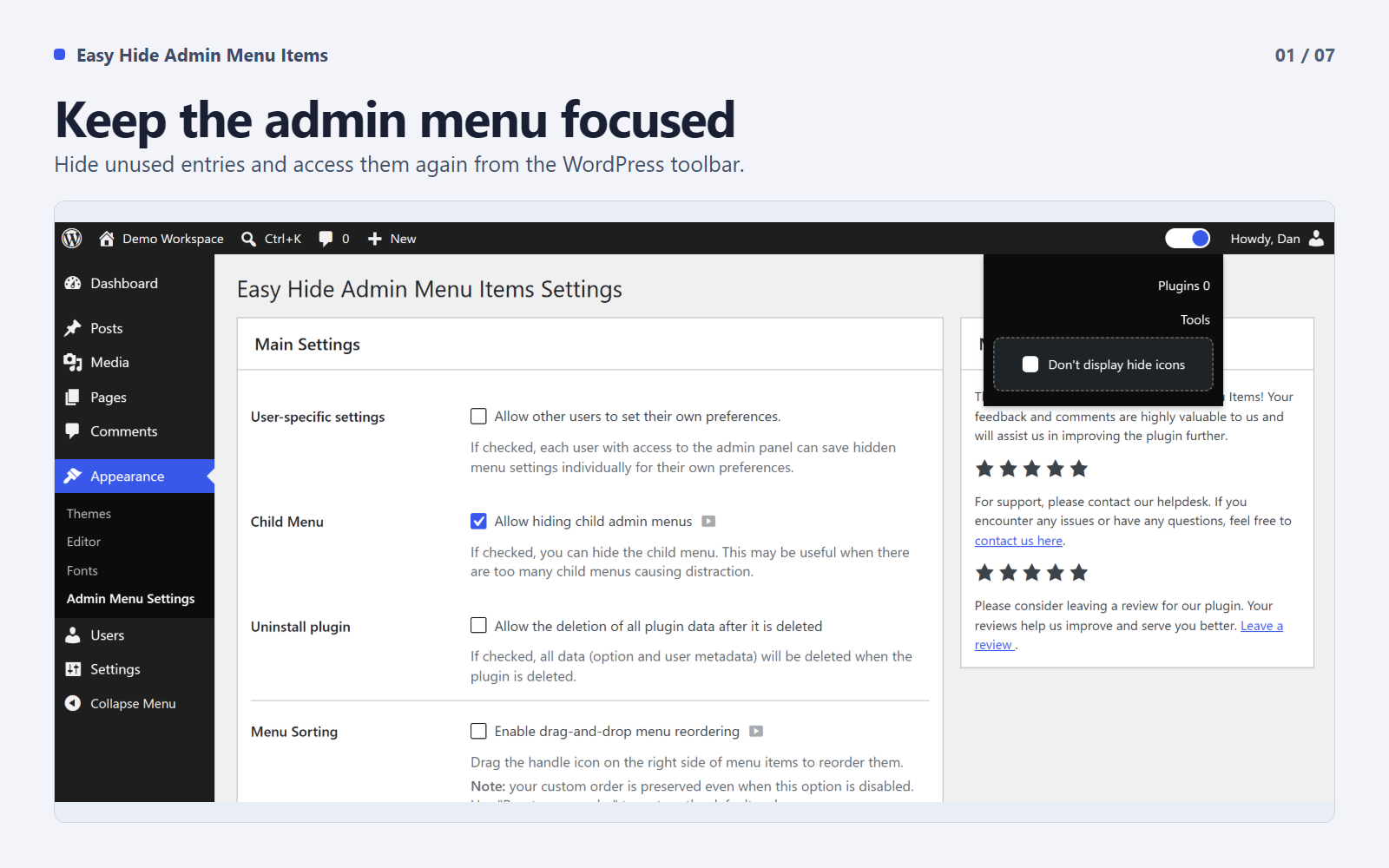
Appearance → Admin Menu Settings
Within this menu, you’ll find the settings for our plugin.
Additional Description
Easy Hide Admin Menu Items offers a seamless solution for customizing your WordPress admin panel to suit your preferences. With the settings conveniently located under Appearance → Admin Menu Settings, you have the power to tailor your admin experience effortlessly.
Key Features:
- Instant Menu Concealment: Upon activation, the plugin allows you to immediately hide menus, ensuring instant application of your customization choices.
- Child Menu Hiding: Enable the option to hide child menus, providing a cleaner and more focused navigation experience.
- Global or User-Specific Settings: Choose between global settings for all users or empower each user to personalize their admin menu visibility.
- Global Settings: Changes apply to everyone. If the admin hides a menu, it’s hidden for all users.
- User-Specific Settings: Each user can customize their menu visibility individually.
Enhance your WordPress admin panel experience by effortlessly managing menu items and optimizing the interface according to your specific needs. Experience a clutter-free and user-friendly environment with Easy Hide Admin Menu Items.
Experimental Features in 1.4.0
These features are available under Appearance → Admin Menu Settings. They are marked as experimental and your feedback is welcome.
- Menu Sorting: Drag-and-drop reordering of admin menu items. A handle icon appears on hover — grab it to move items up or down. Your custom order is saved per user or globally depending on your settings. Disabling this option preserves your saved order.
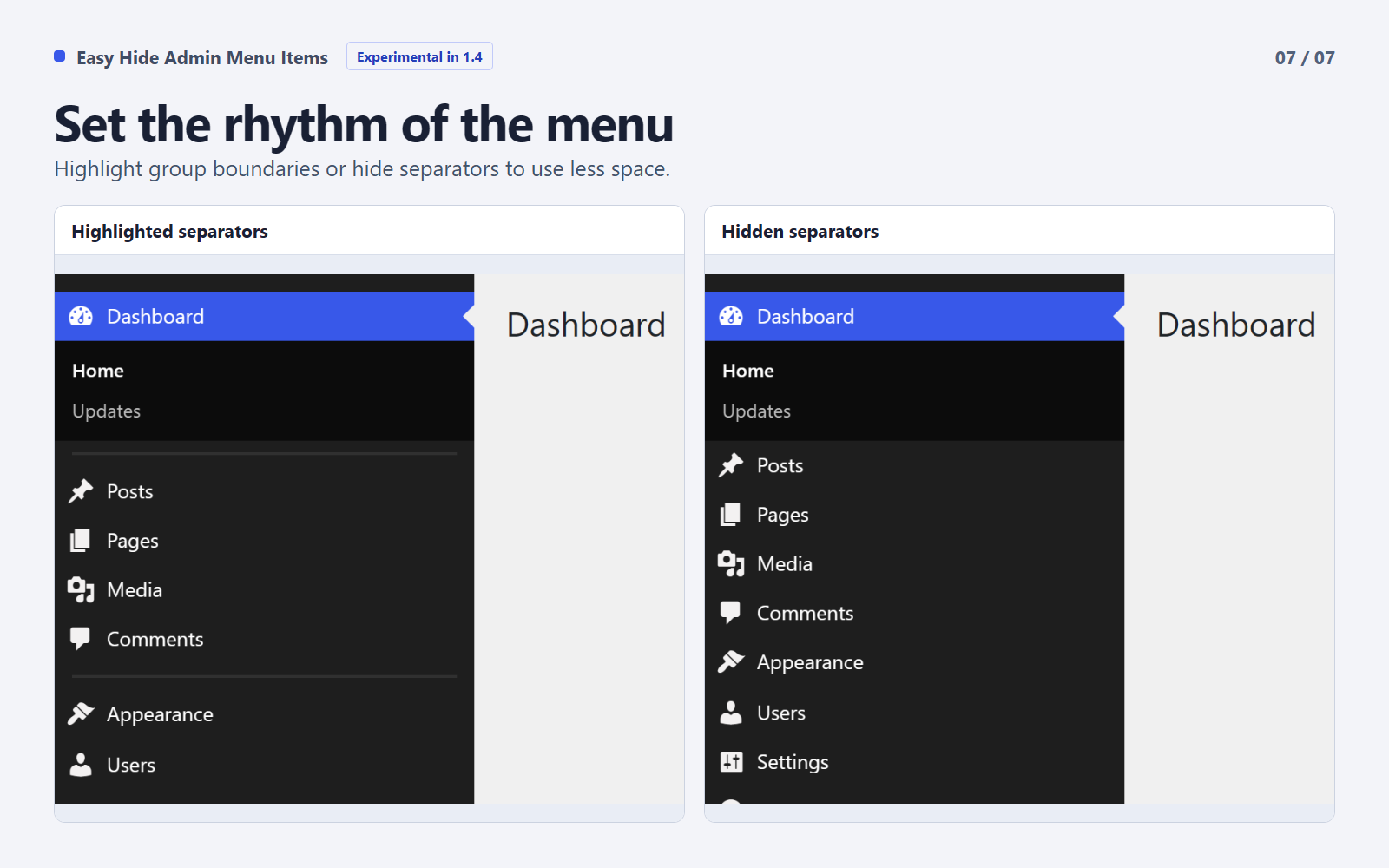
- Menu Separators: Control the visibility of separator lines between menu groups. Choose to hide them completely or highlight them for better visual separation.
- Sidebar Width: Resize the expanded desktop menu by dragging its edge or using the width slider. The standard folded and mobile layouts are preserved.
Installation
You can install this plugin in two ways:
-
Installation via Uploader:
- Download the plugin archive and extract it.
- Upload the
easy-hide-admin-menu-itemsfolder to thewp-content/plugins/directory on your server. - Activate the plugin through the “Plugins” section in the WordPress admin panel.
-
Installation from Repository:
- Log in to your WordPress admin panel.
- Go to the “Plugins” section and select “Add New”.
- Enter the
EHAMIkey for simplified searching in the search bar. - Click the “Install” button next to the “Easy Hide Admin Menu Items” plugin.
- After the installation is complete, activate the plugin.
Changelog
1.4.1
- Shortened Russian labels, buttons, and help text for a clearer admin interface.
1.4.0
- Added experimental drag-and-drop sorting for the WordPress admin menu.
- Added experimental sidebar resizing for the expanded desktop menu.
- Added experimental controls to hide or highlight menu separators.
- Added Slovak localization and updated Russian translations.
- Restricted shared menu changes to users with the manage_options capability.
- Kept personal menu visibility, order, and width separate between users.
- Fixed saved sidebar widths overriding the folded and mobile layouts.
- Aligned the icons in the review notice buttons.
- Updated the WordPress.org gallery with seven screenshots.
- Restored PHP 7.0 compatibility and corrected the review AJAX callbacks.
1.3.9
- Tested on WordPress 6.9.
1.3.8
- Tested on WordPress 6.6
1.3.7
- Tested with WordPress 6.5.
- Tested with PHP 8.3.
1.3.6
- Links in the hidden menu bar are now clickable.
- Added a setting to disable hiding icons.
- Updated project description.
- Performed testing for inaccuracies in the plugin.
- FIX: Corrected interface display issue for editors.
- FIX: Resolved saving error in user_meta for the last menu item.
Screenshots


For developers
Is this your plugin? Show off the numbers.
Add a live badge to your site, docs or GitHub README. It updates on its own — no account needed.
Best Easy Hide Admin Menu Items alternatives
All admin menu plugins →




FAQ
Easy Hide Admin Menu Items: quick answers
Straight answers, pulled from live WordPress.org data.
Live data from WordPress.org · checked Nov 17, 2026
Is Easy Hide Admin Menu Items free?
Yes. Easy Hide Admin Menu Items is free to download and use from the official WordPress.org plugin directory.
Is Easy Hide Admin Menu Items safe to use in 2026?
Easy Hide Admin Menu Items is a solid plugin choice in 2026, with a few things worth checking first. It runs on 1K+ sites, is rated 5/5 and was last updated 2 days ago, and scores 70/100 on our health check.
How many websites use Easy Hide Admin Menu Items?
Easy Hide Admin Menu Items is active on 1K+ WordPress websites and has been downloaded 11,601 times since it launched in February 2024. It was downloaded 1,584 times in the last 30 days.
Does Easy Hide Admin Menu Items work with WordPress 7.1?
Easy Hide Admin Menu Items is officially tested up to WordPress 6.9.11, while the latest release is 7.1.4. It may still work, but try it on a staging site first.
What PHP version does Easy Hide Admin Menu Items need?
Easy Hide Admin Menu Items requires PHP 7.0 or higher. Most hosts run PHP 8.x today, so it works on any modern WordPress hosting.
When was Easy Hide Admin Menu Items last updated?
The latest version, 1.4.1, was released on November 14, 2026 (2 days ago).
Who makes Easy Hide Admin Menu Items?
Easy Hide Admin Menu Items is developed and maintained by campusboy.
What are the best alternatives to Easy Hide Admin Menu Items?
The most popular alternatives to Easy Hide Admin Menu Items are Admin Menu Search (3K+ installs), My Wp Brand (2K+ installs) and Wider Admin Menu (2K+ installs).
Powered by PageForge
Want thousands of pages that rank like these? Build them in an afternoon.
This directory runs on the same engine as PageForge. Turn any spreadsheet, CSV or API into thousands of fast, SEO-ready WordPress pages — with schema, internal links and AI-written copy baked in.
- CSV, Google Sheets & API data sources
- AI content, schema & internal links per page
- Works with Elementor, Gutenberg, Yoast & Rank Math
- Free on WordPress.org — no credit card


