



Advanced Menu Manager Pro – Built for Content-heavy WordPress Sites to Add, Filter, Lock, and Edit Menus Easily
Create and manage menus of any size of your content-heavy wordpress blogs and websites. Simplified search and new comprehensive layout.

Solid choice
Advanced Menu Manager Pro is a solid plugin choice in 2026, with a few things worth checking first. It runs on 400+ sites, is rated 3.7/5 and was last updated 2 months ago, and scores 72/100 on our health check.
- Small user base (400+ active installs)
How does it stack up?
Side-by-side on installs, updates, ratings & support


Daily downloads
Download spikes usually follow a new release — each site that auto-updates counts as a download.
Rankings
Where Advanced Menu Manager Pro stands todayWordPress.org search rankings
Live position in the plugin search, top 100| Keyword | Position |
|---|---|
| admin menu | #87 |
| menu revision | #9 |
| menu shortcode | #40 |
| menus | #50 |
| nav menu | #32 |
Version adoption
Share of active sites per release.
Rating breakdown
★★★★★★★★★★ 3.7 from 22 reviews
About Advanced Menu Manager Pro
From the official readme · v3.2.0Description
Are you looking for an easier way to manage the complex menu navigation of your wordpress website?
Advance Menu Manager for WordPress makes it simpler for website admins to effectively create and manage menu for content-heavy wordpress blogs and websites.
When the site has hundreds of menu items, it becomes complex task to add new item, drag to top etc. This plugin helps you to improve productivity while effectively managing the menus.
Pro Plugin Demo : View Demo
Features:
- You can view, add, edit and manage your pages and posts to make your job easier.
- Easy search option of page/posts specially when you have hundreds of pages/posts.
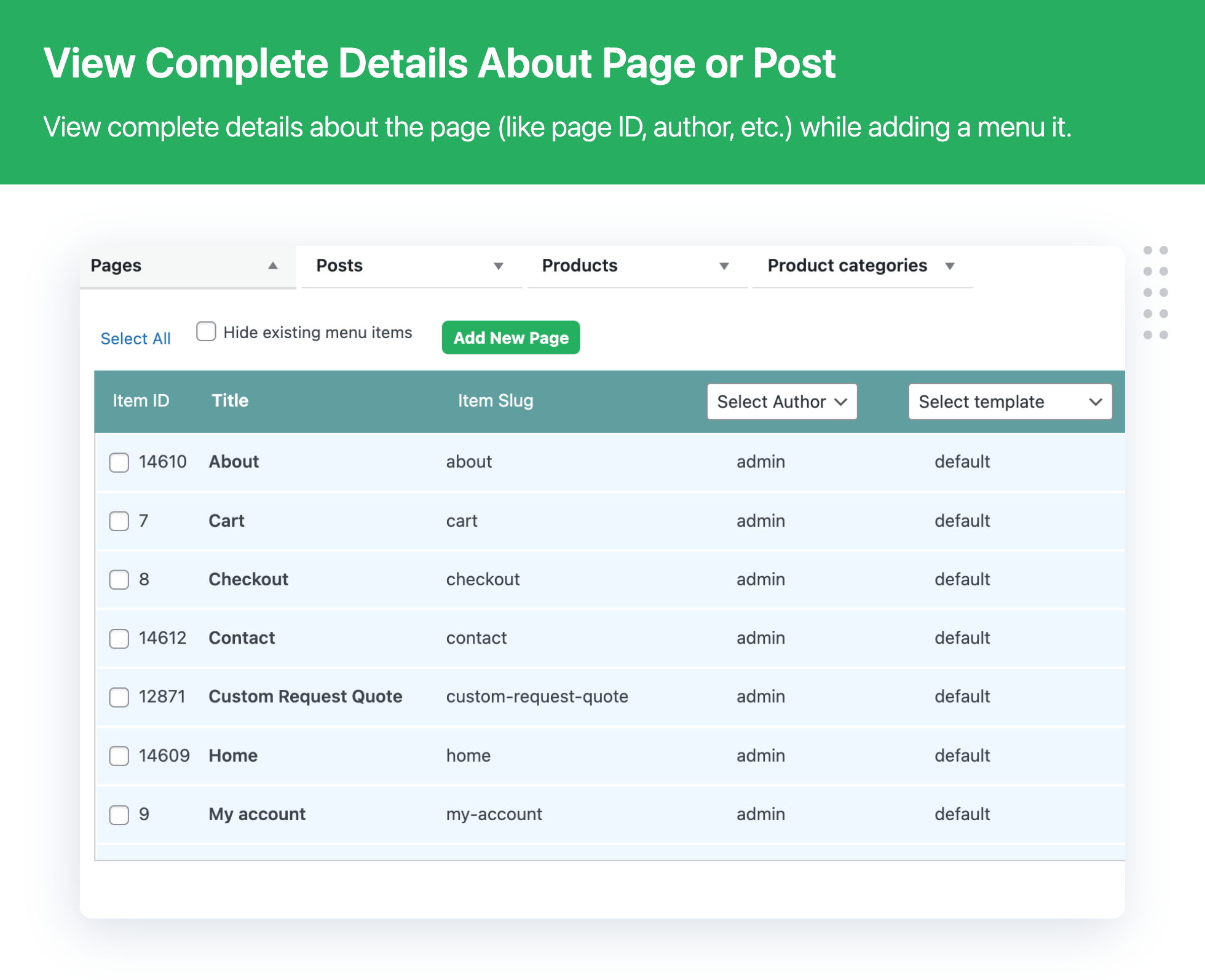
- Detailed view of pages/posts including page id, slug, author name, template names etc.
- Filter pages/posts which are already there in your menu.
Advance Menu Manager Pro version:
Need even more features? upgrade to Advance Menu Manager Pro and get all the features available in Advance Menu Manager’s premium version.
- Track, compare, restore all your changes with Menu Revisions
- The Advance Menu Manager plugin keeps a revision for each change you have made in your menu. Also, it allows you to compare your current menu with a revision in the past. So, in case you made a mistake while editing the menu, you do not need to worry. You can always restore your entire menu back from previously stored revisions
- Put the menu anywhere on your site/blog with short-code
- Use this feature to copy your menu structure. Just copy and paste the code in the page/post where you require. The same menu shall appear in that page/post.
- Menu Lock Functionality
- Using this feature you can lock particular Menu for other users. This feature can be handy when you want to restrict other admin users from editing the main navigation of your site. If you have many admin users on your WordPress site, and you want sure that not everyone can edit the main menu. Only selected users can change the main menu. In that case, you can utilize the Menu Lock Functionality.
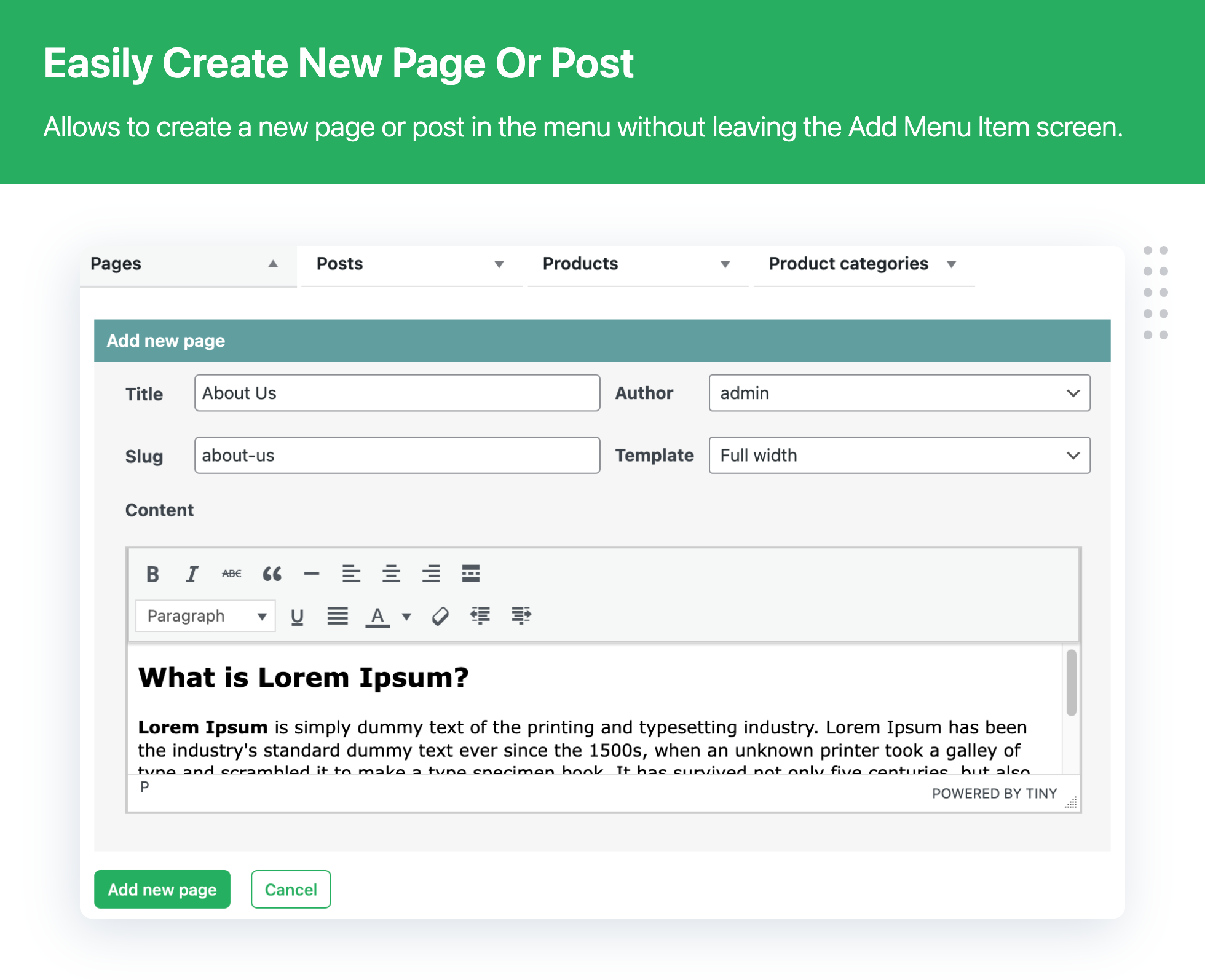
- Create new pages within the menu without leaving your add menu item screen.
- You can edit whole page/post from the menu.
- You can see view page / post attributes
EXPLORE OUR OTHER PLUGINS TO SUPERCHARGE YOUR WEBSITE:
👉 Premium WooCommerce Plugins list
- Flat-rate shipping plugins for WooCommerce
- WooCommerce Extra Fees Plugin
- Hide Shipping Method For WooCommerce
- Product Attachment For WooCommerce
- Blocker – Prevent Fake Orders And Blacklist Fraud Customers
- Category Banner Management for Woocommerce
- Product Finder For WooCommerce
- Mass Pages Posts Creator For WordPress
- Conditional Discount Rules For WooCommerce Checkout
- WooCommerce Checkout For Digital Goods
Installation
- Upload
Advance-Menu-Managerto the/wp-content/plugins/directory. - Activate the plugin through the Plugins menu in WordPress.
- Update Menu item using below interface.
Appearance >> advance menu manager
Usage
1) A Custom-built User Interface:
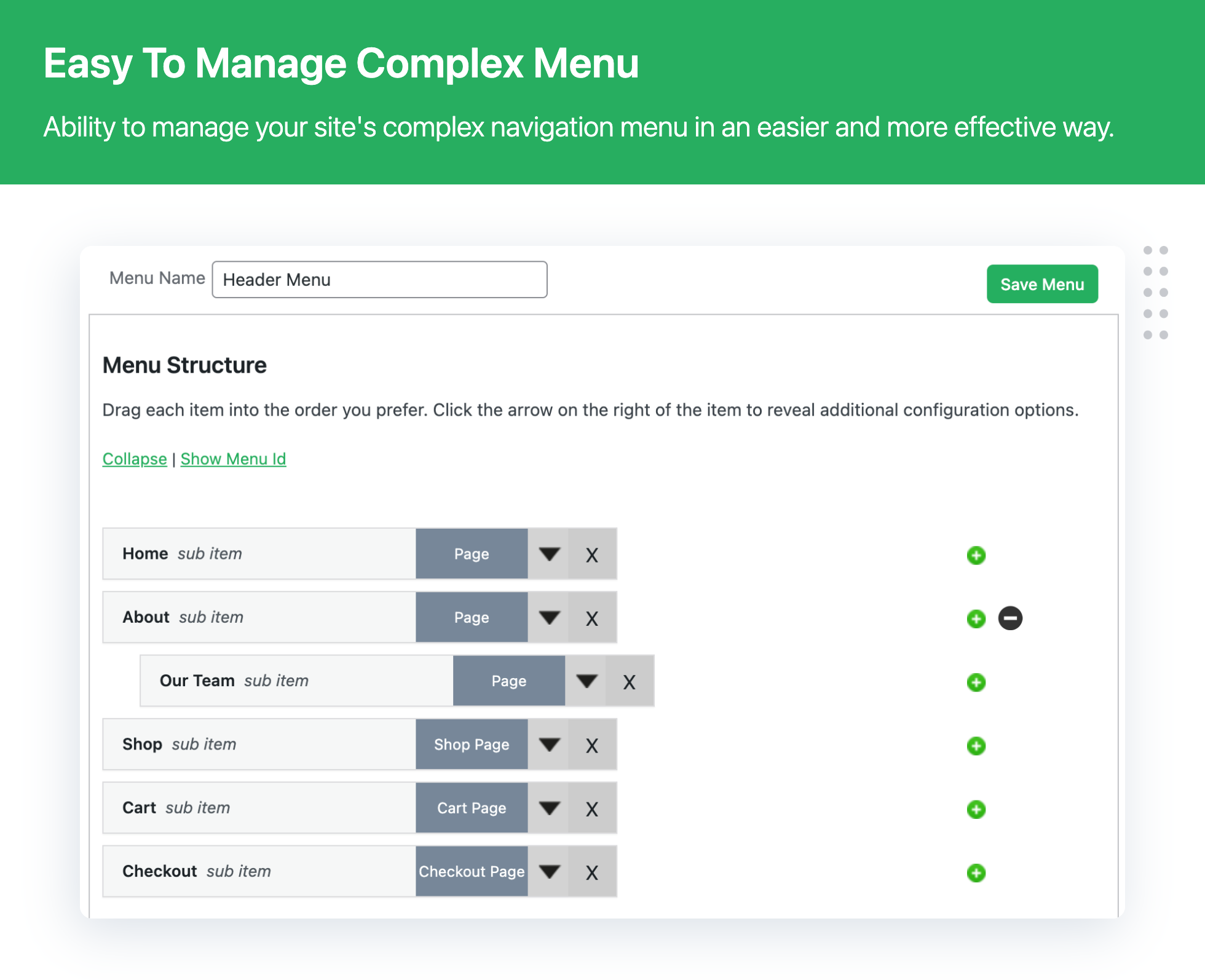
With hundreds of pages in your menu, you need a tailored UI that offers a complete view of menu, the parent pages and their child (sub-items). AMM has that user-interface. Besides offering a complete picture of your menu, the clutter-free UI also allows you to view, add, edit and manage your pages and posts to make your job easier.
2) Add pages/posts parallely:
Besides allowing you to get a comprehensive view of your menu and its sub items, the plugin helps you add menu items and sub-items parallely. This apart, the plugin also helps the user to create and add new pages/posts without going back and forth as is the case with the default WP menu feature.
3) Make no mistake while searching files:
The default search option in WordPress Menu does not offer a detailed look. This increases the chances of selecting a wrong page, leading to task repetition. AMM offers complete view of pages you have searched ensuring you select the right page.
4) See Menu Item ID:
The default WordPress Menu does not provide a quick look into whether a particular menu item is a page or a post. Besides, you also cannot know what the item id is. The AMM id equipped with this functionality to show you complete details in a single user interface to save your time and efforts.
5) Hide existing menu:
The plugin also offers you a functionality to hide existing menu items when you want to add pages/posts to your current menu. This helps you save time and avoid confusion.
6) Manage attributes for a menu item:
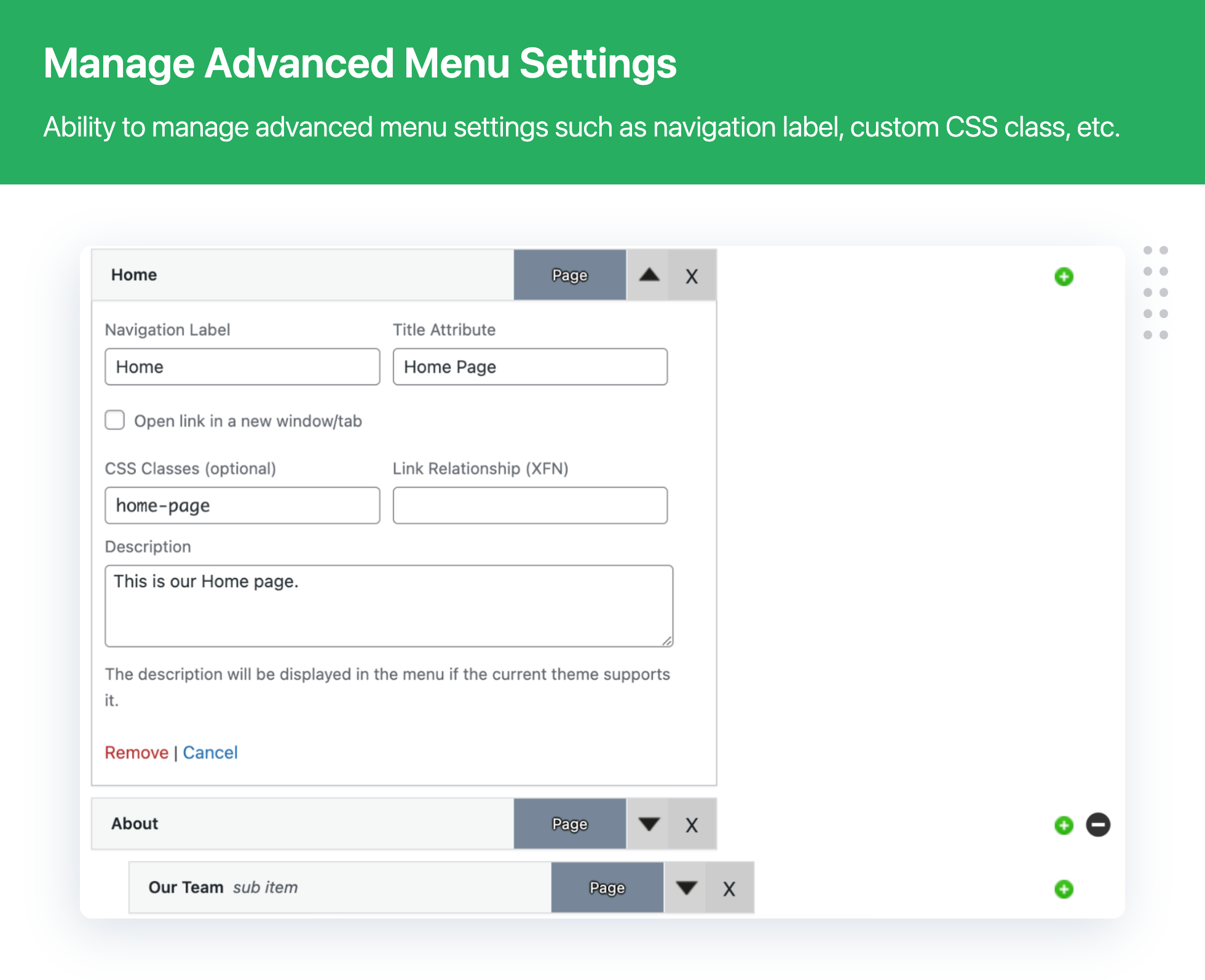
Manage a particular menu item snavigation label, title attribute, CSS classes, Link relationship and description from here.
7) Other features you will love:
-> Manage and delete pages from a single interface, no going to open menu detail content.
-> Add tags to pages/posts and category
-> Insert custom links as per your needs
-> Add a menu item as a child category without going back and forth.
-> Easy to use page/post search functionality so that you know you have selected the correct file.
-> Hide/show a parent item's sub-category.
Frequently asked questions
Q. How to manage a large number of restaurant menu items in WordPress?
ANS: With Advance Menu Manager For WordPress plugin, You can easily manage restaurant menu in the WordPress.
Q. How do you manage large menu hierarchies in WordPress?
ANS: When the site has hundreds of menu items, it becomes a complex task to add new item, drag to top etc. But Advance Menu Manager For WordPress plugin helps you to improve productivity while managing the menus. You can easily manage menu by expanding and collapse Menu item trees This display shows the number of children a menu item has at a glance. Collapse Will hide a number of child menu items.
Q. Is it possible to create menu item beetween two menu item?
ANS: Yes, It is possible, just click on the green plus sign to add a menu item parallely where ever you want.
Changelog
3.2.0 – 16-07-2026
- [New] Added menu item visibility controls based on users’ login status and assigned roles
- [Bug Fix] Minor bug fixes related to the pagination issues when managing menu items
- [Bug Fix] Minor bug fixes related to the issues when searching for menu items
- [Enhancement] Added support for syncing classic menus with the Navigation block in Full Site Editing themes
- [Enhancement] Compatible with WordPress 7.0.x
3.1.3 – 18-12-2025
- [Bug Fix] Minor bug fixes related to the tab selection issue during the add menu items
- [Bug Fix] Minor bug fixes related to the plugin footer text
- [Bug Fix] Minor bug fixes related to the plugin string translation
- [Enhancement] Compatible with WordPress 6.9.x
3.1.2 – 31-12-2024
- [Bug Fix] Quick fixes related to the security vulnerability
- [Enhancement] Compatible with WordPress 6.7.x
3.1.1 – 17-09-2024
- [Bug Fix] Minor bug fixes related to plugin activation
3.1.0 – 05-08-2024
- [Enhancement] Plugin UI enhancement
- [Enhancement] Compatible with WordPress 6.6.x
3.0.8 – 25-4-2024
- [Enhancement] UI enhancement
- [Enhancement] Compatible with WordPress 6.5.x
Screenshots

For developers
Is this your plugin? Show off the numbers.
Add a live badge to your site, docs or GitHub README. It updates on its own — no account needed.
Best Advanced Menu Manager Pro alternatives
All admin menu plugins →





FAQ
Advanced Menu Manager Pro: quick answers
Straight answers, pulled from live WordPress.org data.
Live data from WordPress.org · checked Sep 28, 2026
Is Advanced Menu Manager Pro free?
Yes. Advanced Menu Manager Pro is free to download and use from the official WordPress.org plugin directory.
Is Advanced Menu Manager Pro safe to use in 2026?
Advanced Menu Manager Pro is a solid plugin choice in 2026, with a few things worth checking first. It runs on 400+ sites, is rated 3.7/5 and was last updated 2 months ago, and scores 72/100 on our health check.
How many websites use Advanced Menu Manager Pro?
Advanced Menu Manager Pro is active on 400+ WordPress websites and has been downloaded 49,695 times since it launched in April 2016. It was downloaded 251 times in the last 30 days.
Does Advanced Menu Manager Pro work with WordPress 7.1?
Advanced Menu Manager Pro is officially tested up to WordPress 7.0.6, while the latest release is 7.1.2. It may still work, but try it on a staging site first.
What PHP version does Advanced Menu Manager Pro need?
Advanced Menu Manager Pro requires PHP 7.2 or higher. Most hosts run PHP 8.x today, so it works on any modern WordPress hosting.
When was Advanced Menu Manager Pro last updated?
The latest version, 3.2.0, was released on July 16, 2026 (2 months ago).
Who makes Advanced Menu Manager Pro?
Advanced Menu Manager Pro is developed and maintained by Dotstore.
What are the best alternatives to Advanced Menu Manager Pro?
The most popular alternatives to Advanced Menu Manager Pro are Admin Menu Search (3K+ installs), Wider Admin Menu (2K+ installs) and My Wp Brand (2K+ installs).
Powered by PageForge
Want thousands of pages that rank like these? Build them in an afternoon.
This directory runs on the same engine as PageForge. Turn any spreadsheet, CSV or API into thousands of fast, SEO-ready WordPress pages — with schema, internal links and AI-written copy baked in.
- CSV, Google Sheets & API data sources
- AI content, schema & internal links per page
- Works with Elementor, Gutenberg, Yoast & Rank Math
- Free on WordPress.org — no credit card


