


Dragons Print-Hint
The plugin prints a hint text

Consider an alternative
Dragons Print-Hint shows warning signs in 2026 — compare the alternatives below before installing. It runs on 10+ sites and was last updated 17 years ago, and scores 23/100 on our health check.
- Small user base (10+ active installs)
- Very few reviews so far
- No update in 17 years
- Only tested up to WordPress 2.8 (latest is 7.1)
How does it stack up?
Side-by-side on installs, updates, ratings & support


Daily downloads
Download spikes usually follow a new release — each site that auto-updates counts as a download.
Rankings
Where Dragons Print-Hint stands todayWordPress.org search rankings
Live position in the plugin search, top 100| Keyword | Position |
|---|---|
| comment | >100 |
| copyright | >100 |
| hint | >100 |
| license | >100 |
| >100 |
Version adoption
Share of active sites per release.
About Dragons Print-Hint
From the official readme · v0.4.1.1Description
There are several reasons to print some hints on your posts. These hints will never been seen on the screen, but you want it to show on paper.
Feature-List:
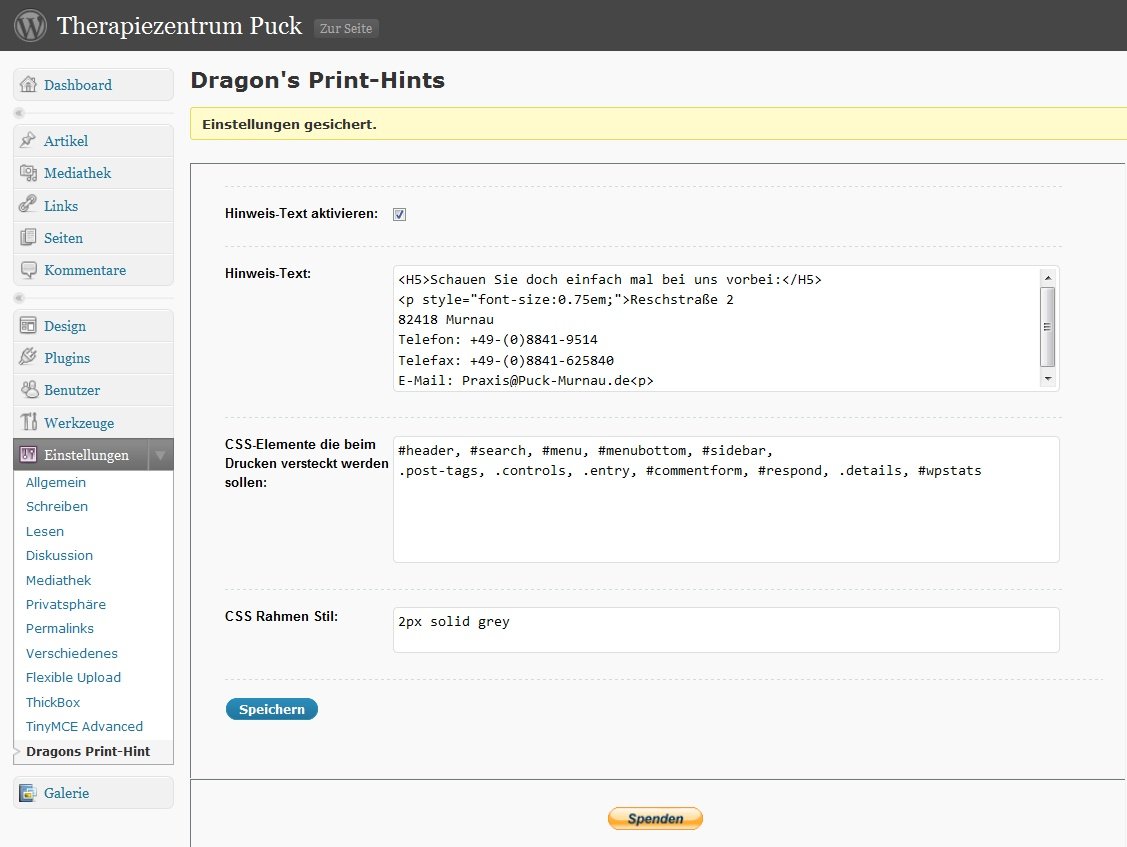
- Definition of a hint text, only appearing on printouts.
You can use any html tag that can be placed within<p> ... </p>to format your hints. - Comfortable definition of hint text via admin settings panel.
- Hiding user defined areas of posts / pages – see Example 3 in Arbitrary section
- ShortTag [PrintHint] for free definition of post-blocks show only on screen/print output
- Definition of CSS classes (.classname) in a comma separated list. These classes don’t appear on printouts.
- Definition of CSS IDs (#idname) in a comma separated list. These IDs don’t appear on printouts.
- Style definition for printout border frame
- Multilanguage Support: English, Deutsch, Russian already implemented
The plugin hooks into the_content filter. The the_excerpt filter hook is used to remove the hint from displaying on search result page.
*Scenarios*
You want to show a text only online?
[PrintHint show_on=”screen”] … appears only on screen … [/PrintHint]
You want to show a text only on printout?
[PrintHint show_on=”print”] … appears only on printouts … [/PrintHint]
*Hint*
Beware of the closing tag [/PrintHint] as well as the parameter show_on, they are REQUIRED!
If you don’t apply the parameter or give them a wrong argument, the block content will not be displayed, anyway.
Removing the whole border css style from config page will activate the default style defined in fdrag_phi_print.css
Arbitrary section
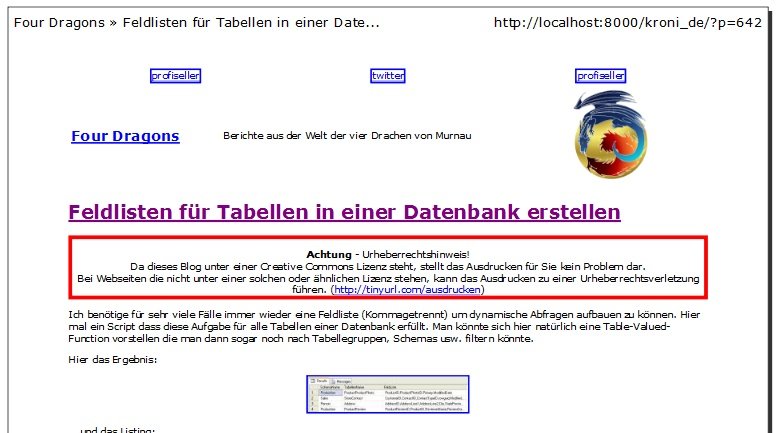
Example 1: Hint-Text
<center><b>Achtung</b> - Urheberrechtshinweis! <br>
Da dieses Blog unter einer Creative Commons Lizenz steht,
stellt das Ausdrucken für Sie kein Problem dar. <br>
Bei Webseiten die nicht unter einer solchen oder ähnlichen Lizenz stehen,
kann das Ausdrucken zu einer Urheberrechtsverletzung führen.</center>
Example 2: CSS Class/ID hiding
#header, #top, #footer, #bottom, #sidebar,
.commentheader, #commentform
Example 3: Hide some portion of a post / page while printing
Within the post define an area with a userdefined and no more referenced ID.
This ID don’t have to be defined within any CSS stylesheet. It’s just for Dragons Print-Hint.
.. some content of your post
<div id="RemoveOnPrint"> ... here is some content of the post ... </div>
.. some more content of your post
If you define this ID (#RemoveOnPrint) in the “hide css blocks” list (remember: comma separate more then one value)
you can see the post with all content but while printing the div tag with id=”RemoveOnPrint” ist hidden.
Example 4: Using shortcodes
If there are areas within your post to explicitly hide/show on screen/print output,
you can use the shortcode
[PrintHint show_on="screen|print"] .... [/PrintHint].
Show graphical link only online, on printouts show the URL instead.
Here is my post text

   [PrintHint show_on="screen"]<a href="some url"><img src="myImage" /></a>[/PrintHint]

   [PrintHint show_on="print"]http://myUrl[/PrintHint]<br>

   and here is the rest of the text.
The Parameter show_on can be used to define the apperance of the content between the shortcode tags.
If you define show_on=”screen” the content part will only be shown an screen outputs.
Otherwise, the show_on=”print” parameter will show the hint only on printouts.
Remark: If you dont’t use the ‘show_on’ parameter or forget to close the shortcode tag, there will be no output!
= Example 5: Using your own border style for print-hint
Just enter the border attributes (see http://www.w3schools.com/css/pr_border.asp for usage example)
without the semicolon. e.g. 5px solid red
Installation
- Unzip
DragonsPrintHint.zipto the/wp-content/plugins/directory - Activate the plugin through the ‘Plugins’ menu in WordPress
- Customize the hint text in admin panel settings menu
- Verify your text within the print preview of your browser
Changelog
0.2
- Remove hint text in search results.
- therefore there is no hint if you print the results!
0.3
- Changed the file structure (css moved to subfolder)
- Added functionality for hiding CSS classes / ids while printing
0.3.1
CSS subfolder was not deployed with 0.3. Generating new version with css subfolder.
0.3.2
- FIXED: Remove PrintHint on RSS-Feeds (Excerpt/Content)
- FIXED: Directory structure was wrong in systems which was case sensitive
- NEW: Insert base support for I18N
0.3.3
- NEW: Insert Multilanguage support: English, Deutsch
- FIXED: Display Excerpt with own filter function allows the 55 words output now
- IMPROVED: More standardized Constants for path definitions
- IMPROVED: Added init action for initializing and initialize option on activation
0.3.4
- NEW: Added russian language file
Russian translate by: Fat Cow (http://www.fatcow.com)
Screenshots
For developers
Is this your plugin? Show off the numbers.
Add a live badge to your site, docs or GitHub README. It updates on its own — no account needed.
Best Dragons Print-Hint alternatives
All comment plugins →





FAQ
Dragons Print-Hint: quick answers
Straight answers, pulled from live WordPress.org data.
Live data from WordPress.org · checked Oct 1, 2026
Is Dragons Print-Hint free?
Yes. Dragons Print-Hint is free to download and use from the official WordPress.org plugin directory.
Is Dragons Print-Hint safe to use in 2026?
Dragons Print-Hint shows warning signs in 2026 — compare the alternatives below before installing. It runs on 10+ sites and was last updated 17 years ago, and scores 23/100 on our health check.
How many websites use Dragons Print-Hint?
Dragons Print-Hint is active on 10+ WordPress websites and has been downloaded 3,152 times since it launched in June 2009. It was downloaded 47 times in the last 30 days.
Does Dragons Print-Hint work with WordPress 7.1?
Dragons Print-Hint is officially tested up to WordPress 2.8.4, while the latest release is 7.1.2. It may still work, but try it on a staging site first.
When was Dragons Print-Hint last updated?
The latest version, 0.4.1.1, was released on August 28, 2009 (17 years ago).
Who makes Dragons Print-Hint?
Dragons Print-Hint is developed and maintained by Kronester.
What are the best alternatives to Dragons Print-Hint?
The most popular alternatives to Dragons Print-Hint are AnyComment (5K+ installs), DCO Comment Attachment (5K+ installs) and Bulk Delete Comments (5K+ installs).
Powered by PageForge
Want thousands of pages that rank like these? Build them in an afternoon.
This directory runs on the same engine as PageForge. Turn any spreadsheet, CSV or API into thousands of fast, SEO-ready WordPress pages — with schema, internal links and AI-written copy baked in.
- CSV, Google Sheets & API data sources
- AI content, schema & internal links per page
- Works with Elementor, Gutenberg, Yoast & Rank Math
- Free on WordPress.org — no credit card


