


AnyComment
AnyComment is blazing-fast commenting plugin based on React for WordPress.

Consider an alternative
AnyComment shows warning signs in 2026 — compare the alternatives below before installing. It runs on 5K+ sites, is rated 4.8/5 and was last updated 4 years ago, and scores 34/100 on our health check.
- Loved by users — 4.8/5 from 156 reviews
- No update in 4 years
- Only tested up to WordPress 5.9 (latest is 7.1)
How does it stack up?
Side-by-side on installs, updates, ratings & support



Daily downloads
Download spikes usually follow a new release — each site that auto-updates counts as a download.
Rankings
Where AnyComment stands todayWordPress.org search rankings
Live position in the plugin search, top 100| Keyword | Position |
|---|---|
| ajax comments | >100 |
| comment | >100 |
| comment moderation | >100 |
| comments | >100 |
| Comments SEO | >100 |
Version adoption
Share of active sites per release.
Rating breakdown
★★★★★★★★★★ 4.8 from 156 reviews
About AnyComment
From the official readme · v0.3.6Description
AnyComment is blazing-fast commenting plugin base on React for WordPress.
It stands for simplicity & speed. We value feedback, so if you have any failures or suggestions – please let us know in support forum or GitHub!
You can simply switch without any migrations from the following plugins:
– Jetpack
– wpDiscuz
– Disqus
– Cackle
– Hypercomments
– Vuukle
Resources
Demo
Feel free to use this demo page. Every time new version is released, demo plugin will be updated as well, so you always see the latest version.
Get Started
In order to start, you need:
- Install plugin
- Choose social networks you prefer
- Configure social networks you need (we have guides English & Russian to help you with this)
- You are good to go!
And good new is AnyComment is free & no dependency on third party services, all comments stored in your database.
Features
- All comments stored in your own database. We reuse native comment’s table, so all of the default WordPress functionality comes out of the box.
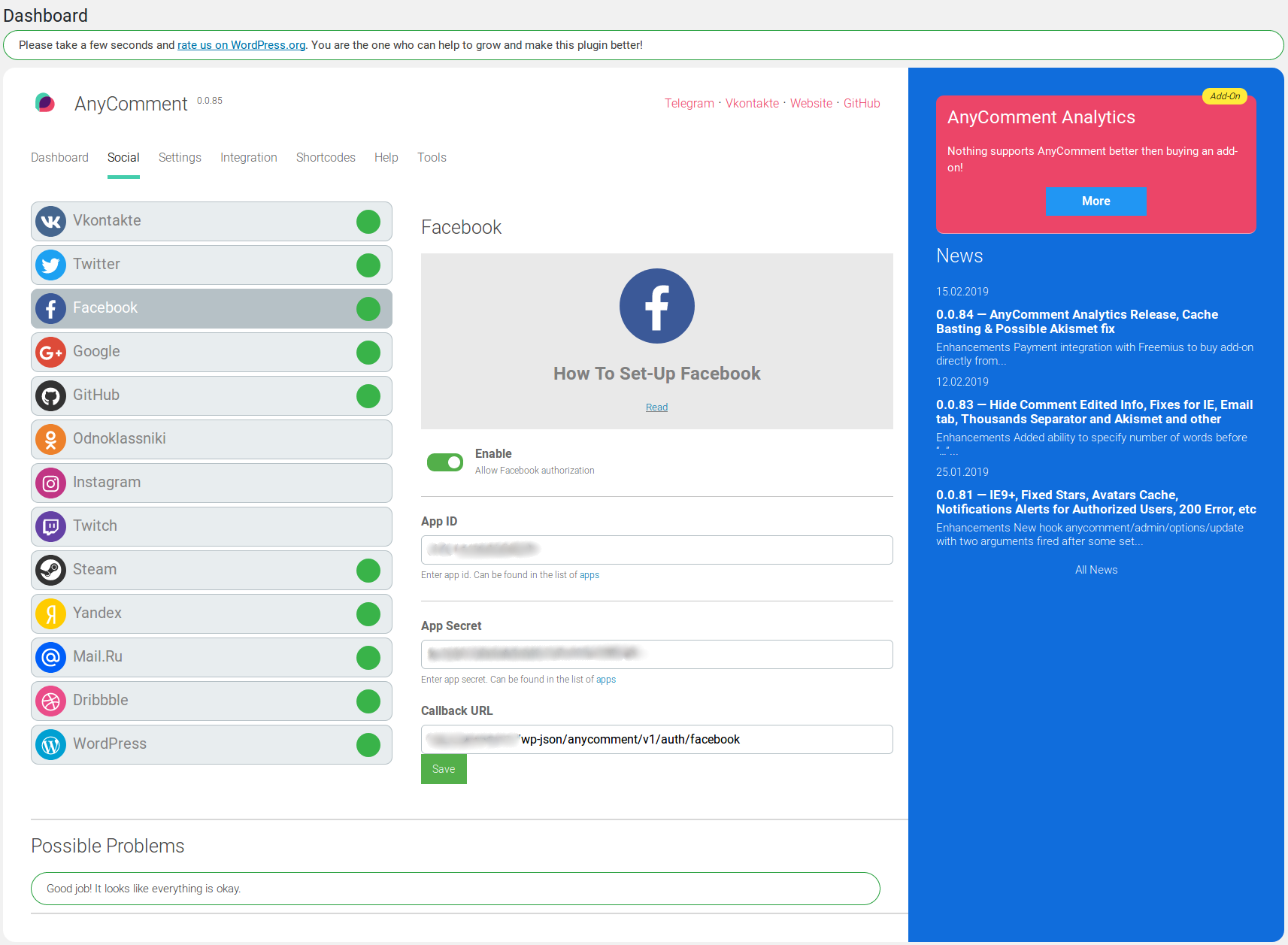
- Social network authorization via Facebook, VK, Twitter, Google, Odnoklassniki, GitHub, Twitch or Dribbble
- SEO Indexing
- Ability to switch to cloud version
- Ability to define who can leave comment: guests only, with social authorization or both
- Ability to upload files (define allowed extensions, limit, who can upload, etc)
- When user leaves a tweet link in the comment, plugin can embed it as external Twitter widget (can be disabled)
- Ability to customize design
- Blazing-fast comments based on React & WordPress REST API
- Alert notification in comment area when new comment was added
- Notifications about new comment reply
- Notifications about new comment to administrator
- Ability to specify comma-separated list of words to be used to hold comments for moderators
- Ability to have bold, italics, underline, quotes, links or clear formatting. Each type can be disabled separately or the whole toolbar together
- Image and video URLs as attachment (control via admin)
- GDRP compliant, ability to provide
Privacy Policylink, so users know how their data processed and used (when not provided, no checkbox will be shown to users) - Social avatars shown globally
- Likes (see likes count per comment/user in admin)
- Ability to rate (1-5 stars) page in comments (1-5 stars)
- Edit/delete comments when you are the owner or have moderate permission(s) directly in client area
- Assign default group for users who authorize via social network
- See user’s social profile URL in admin
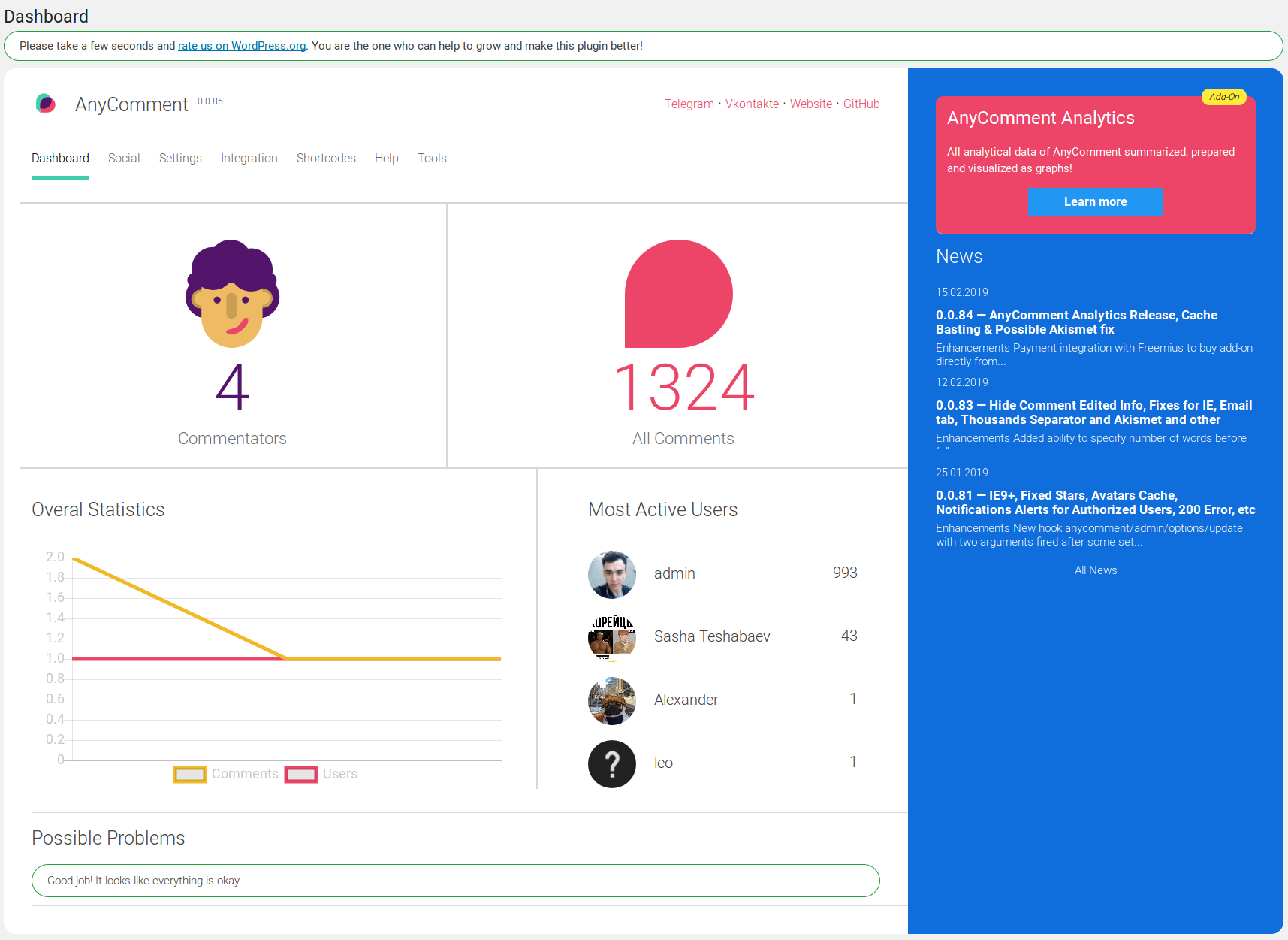
- Simple & informative dashboard with graphs to display number of comments over number of users who were engaged in the conversation per certain period & most active users
- Get latest plugin update news directly in the dashboard, don’t miss a thing
Integrations
- Akismet to fight spam messages
- WP Mail SMTP to set-up SMTP server
- WP User Avatar to upload global or personal avatar
- reCAPTCHA to fight spam messages
- BuddyPress when somebody sends comment with “@” sign + username.
TODO features
- Option: ability to specify thanks message and/or page when user left his first comment, #88
- Option: when user does not have email after registration via social, ask for it somewhere in the comments again
- Option: notify moderators about new comments, #77
- Option: embed Instagram photos, #115
- Option: embed Instafeed, #116
- Ability to choose comment to make it sticky at the very top of all comments, #76
- Add checkbox to subscribe to new replies, #73 (now it is mandatory)
- Option: Ability to ban user or by IP address, #70
- Support more languages
- Code highlighting
- Markdown support
- Add more guides on how to set-up certain services, Google SMTP, Amazon SES, etc
- Cross sharing of comments, when user posts a comment, duplicate it on their wall
- Add Yahoo as authorization option
- More widgets to be added on the page (sidebar, custom pages, etc)
- Special moderator panel integrated into custom AnyComment pages (for easy comment moderation)
- More statistics and analytics…
- And a lot more…
Frequently asked questions
Installation Instructions
Install via WordPress admin panel directly (or download plugin and upload into the /wp-content/plugins/ directory) Activate it from Plugins section in admin panel Go to preferred social media and register to get API access (API key, secrets, etc) Specify required API details in special social network settings Enable comments in Generic settings to replace native comments Go to some post and try to authorize using any of the enabled social networks and leave a comment!
What social networks does AnyComment support?
So far we support the following: Facebook Twitter Google Vkontakte Odnoklassniki GitHub Twitch Dribbble Yandex Mail.Ru Steam
Can I contribute?
Yes you can! Join in on our GitHub repository
Comment form does not load or gives an error?
AnyComment uses WordPress’ REST API. Please confirm two things: You WordPress is 4.7 or higher (this is when WordPress introduced REST API) Going to http://yourdomain.com/wp-json/ SHOULD NOT redirected to http://yourdomain.com or it give 404 Not Found page For the first step – just upgrade WordPress, it is good idea anyways. For the second, check for plugins which make “optimization” of website. Most of them disable REST API. For example, Clearfy has option “Disable Rest API”. Having this option “On” will fail to load comments in AnyComment. Not yet working? Use one the links mentioned in the…
Why Do Socials Ask For Privacy Policy link?
It is now one of the requirements to have Privacy Policy link on your website due to GDRP regulation. AnyComment is GDRP compliant. You can read more about General Data Protection Regulation on Wikipedia. Read guide on how to create “Privacy Policy” page: – English version – Russian version
Why Does Facebook Require HTTPs?
From some recent time, Facebook now required website to have HTTPs connection in order to work with their API and we cannot do anything about it. Most of the hosting providers support single button-like installation of SSL certificate, so it should not be that difficult. It could only be difficult for website who have HTTP only and hight traffic as transfer to HTTPs can cause some traffic lose.
Changelog
0.3.6 – 14.05.2022
Fixes:
- Fixed infinite redirect on social login
0.3.5 – 04.05.2022
Fixes:
- Fix improvements for CVE-2021-24838
0.3.4 – 03.05.2022
Fixes:
- Fixed open redirect issue reported in CVE-2021-24838
0.3.3 – 21.04.2022
Fixes:
- Fixed dashboard graph when data wasn’t displaying
0.3.2 – 07.04.2022
Fixes:
- Minimal WordPress version now 4.7 instead of 4.4
0.3.1 – 04.04.2022
Fixes:
- Fixed incompatibility with PHP 5.6
Screenshots


For developers
Is this your plugin? Show off the numbers.
Add a live badge to your site, docs or GitHub README. It updates on its own — no account needed.
Best AnyComment alternatives
All ajax comments plugins →


FAQ
AnyComment: quick answers
Straight answers, pulled from live WordPress.org data.
Live data from WordPress.org · checked Sep 27, 2026
Is AnyComment free?
Yes. AnyComment is free to download and use from the official WordPress.org plugin directory.
Is AnyComment safe to use in 2026?
AnyComment shows warning signs in 2026 — compare the alternatives below before installing. It runs on 5K+ sites, is rated 4.8/5 and was last updated 4 years ago, and scores 34/100 on our health check.
How many websites use AnyComment?
AnyComment is active on 5K+ WordPress websites and has been downloaded 98,485 times since it launched in June 2018. It was downloaded 362 times in the last 30 days.
Does AnyComment work with WordPress 7.1?
AnyComment is officially tested up to WordPress 5.9.18, while the latest release is 7.1.2. It may still work, but try it on a staging site first.
What PHP version does AnyComment need?
AnyComment requires PHP 5.4 or higher. Most hosts run PHP 8.x today, so it works on any modern WordPress hosting.
When was AnyComment last updated?
The latest version, 0.3.6, was released on May 14, 2022 (4 years ago).
Who makes AnyComment?
AnyComment is developed and maintained by Alexander.
What are the best alternatives to AnyComment?
The most popular alternatives to AnyComment are Comments – wpDiscuz (60K+ installs), Simple Comment Editing (2K+ installs) and FluentComments (700+ installs).
Powered by PageForge
Want thousands of pages that rank like these? Build them in an afternoon.
This directory runs on the same engine as PageForge. Turn any spreadsheet, CSV or API into thousands of fast, SEO-ready WordPress pages — with schema, internal links and AI-written copy baked in.
- CSV, Google Sheets & API data sources
- AI content, schema & internal links per page
- Works with Elementor, Gutenberg, Yoast & Rank Math
- Free on WordPress.org — no credit card


