


DraftSync Lite
Self-hosted collaborative draft editor for WordPress with autosave, comments, version history, and publishing sync.

Use with caution
DraftSync Lite works, but test it on a staging site before relying on it in 2026. Was last updated 5 months ago, and scores 49/100 on our health check.
- Small user base (<10 active installs)
- Very few reviews so far
How does it stack up?
Side-by-side on installs, updates, ratings & support



Daily downloads
Download spikes usually follow a new release — each site that auto-updates counts as a download.
Rankings
Where DraftSync Lite stands todayWordPress.org search rankings
Live position in the plugin search, top 100| Keyword | Position |
|---|---|
| collaboration | >100 |
| drafts | >100 |
| editor | >100 |
| gutenberg | >100 |
| writing | >100 |
About DraftSync Lite
From the official readme · v1.0.0Description
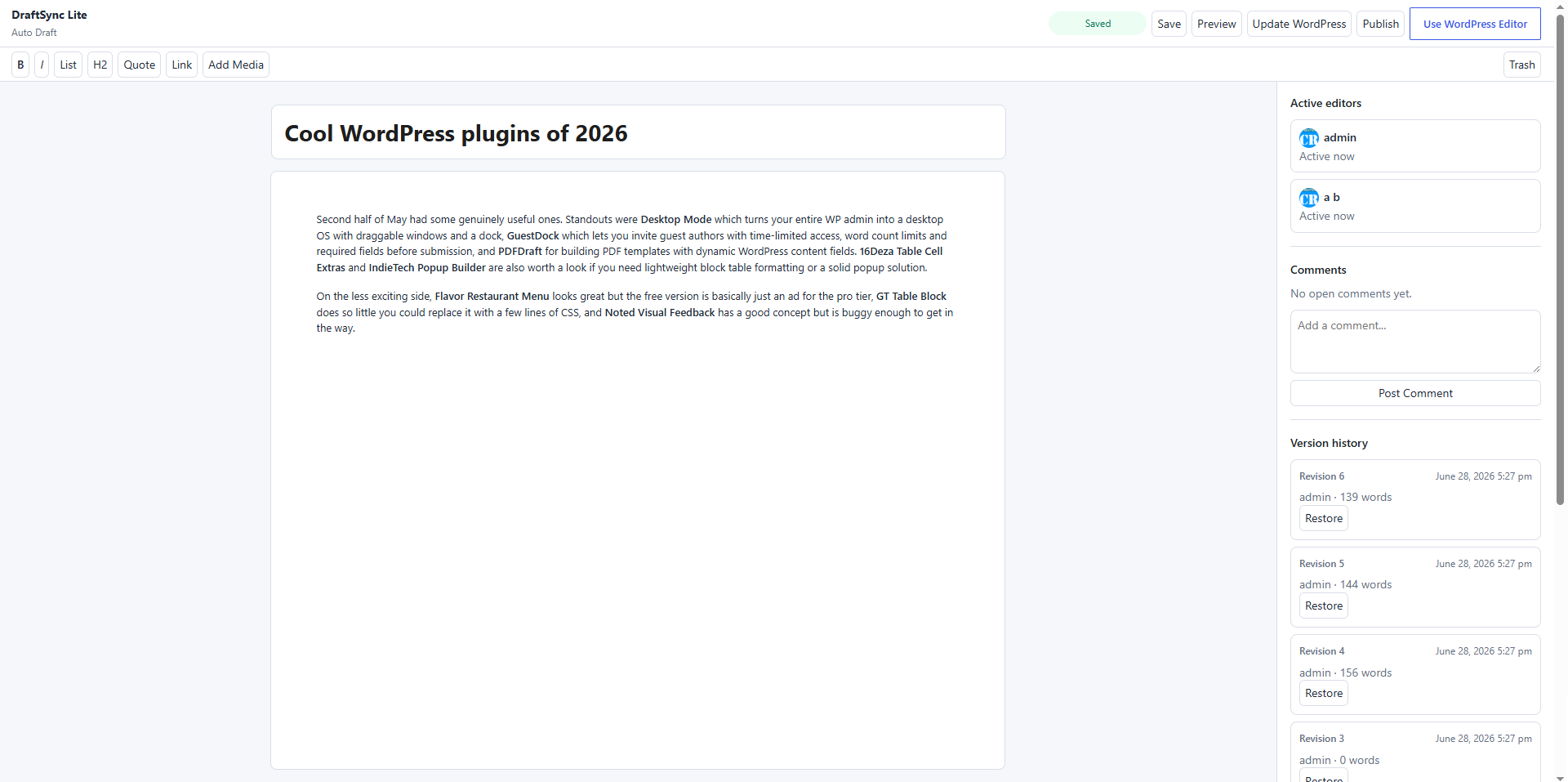
DraftSync Lite gives WordPress authors a local writing workspace for posts, pages, and selected public post types. It runs inside your WordPress installation and stores draft content, comments, version history, and active editor presence as WordPress post metadata.
The free plugin is complete on its own and does not ship premium modules. Users who can edit a post in WordPress can open the DraftSync Lite editor for that post.
Lite features
- Standalone local editor launched from the block editor panel, post metabox, or post list row actions.
- Autosave and manual save with revision conflict detection.
- Local version history with restore.
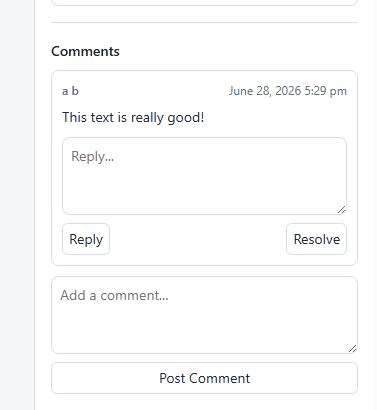
- Basic comment threads for editors who already have WordPress edit access.
- Active editor presence.
- Preview, update WordPress, publish, and move-to-trash actions guarded by WordPress capabilities.
- Per-post switch between DraftSync Lite and the normal WordPress editor.
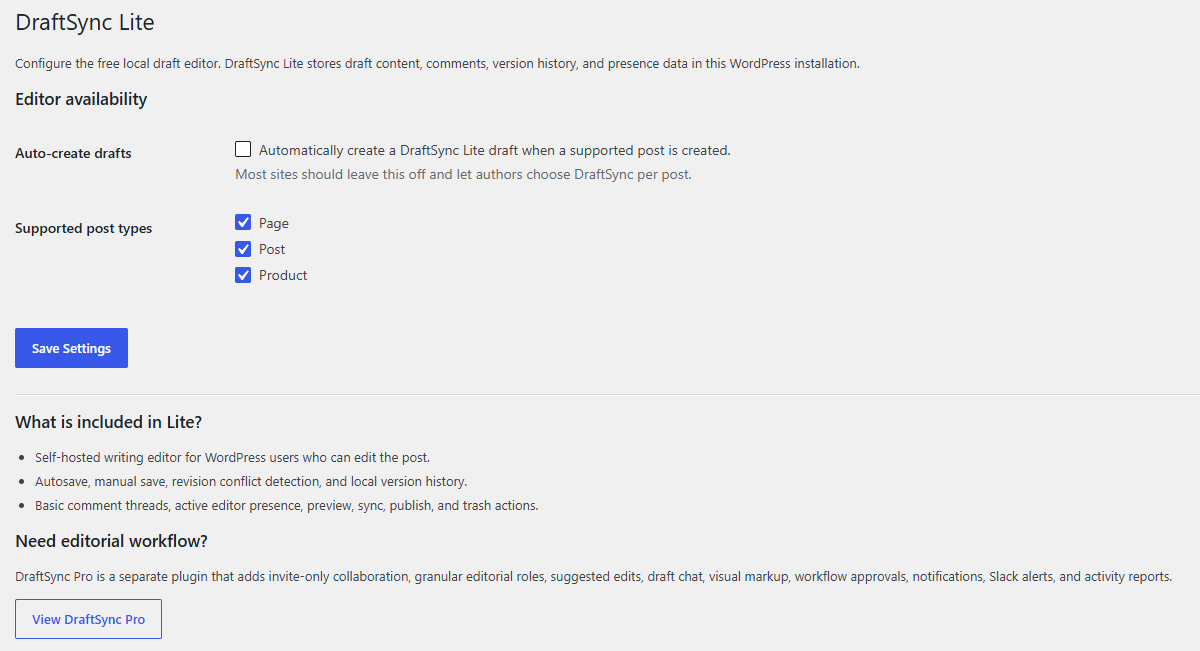
- Admin setting for supported post types and optional automatic draft creation.
Upgrade path
DraftSync Pro is a separate plugin sold outside WordPress.org. It adds advanced editorial workflow features such as invite-only drafts, granular DraftSync roles, suggested edits, draft chat, visual markup, workflow approvals, notifications, Slack alerts, and activity reports.
Check DraftSync Pro on WPBay.
DraftSync Lite remains fully functional without the Pro plugin.
Installation
- Upload the plugin folder to
/wp-content/plugins/. - Activate DraftSync Lite from the Plugins screen.
- Go to Settings > DraftSync Lite and choose the supported post types.
- Open a post in the block editor and use the DraftSync Lite panel to create or open a local draft.
Screenshots
For developers
Is this your plugin? Show off the numbers.
Add a live badge to your site, docs or GitHub README. It updates on its own — no account needed.
Best DraftSync Lite alternatives
All collaboration plugins →




FAQ
DraftSync Lite: quick answers
Straight answers, pulled from live WordPress.org data.
Source: WordPress.org
Is DraftSync Lite free?
Yes. DraftSync Lite is free to download and use from the official WordPress.org plugin directory.
Is DraftSync Lite safe to use in 2026?
DraftSync Lite works, but test it on a staging site before relying on it in 2026. Was last updated 5 months ago, and scores 49/100 on our health check.
How many websites use DraftSync Lite?
DraftSync Lite is active on <10 WordPress websites and has been downloaded 302 times since it launched in June 2026. It was downloaded 61 times in the last 30 days.
Does DraftSync Lite work with WordPress 7.1?
DraftSync Lite is officially tested up to WordPress 7.0.9, while the latest release is 7.1.5. It may still work, but try it on a staging site first.
What PHP version does DraftSync Lite need?
DraftSync Lite requires PHP 7.4 or higher. Most hosts run PHP 8.x today, so it works on any modern WordPress hosting.
When was DraftSync Lite last updated?
The latest version, 1.0.0, was released on June 28, 2026 (5 months ago).
Who makes DraftSync Lite?
DraftSync Lite is developed and maintained by CodeRevolution.
What are the best alternatives to DraftSync Lite?
The most popular alternatives to DraftSync Lite are BuddyPress Docs (6K+ installs), Peter’s Post Notes (3K+ installs) and WP Document Revisions (2K+ installs).
Powered by PageForge
One template and a spreadsheet. A real page for every search.
PageForge turns each row of a CSV into a WordPress page with its own title, URL, SEO fields and schema, built on the layout you already designed. Free on WordPress.org.
- CSV and XLSX, plus Google Sheets on Professional and Enterprise
- Its own title, URL, SEO fields and schema for every page
- Works with the block editor, Elementor, Divi and Avada
- Free on WordPress.org, no credit card