


Download List Block with Icons
Use a Gutenberg Block to manage a download list with file type specific icons. No configuration is necessary.

Solid choice
Download List Block with Icons is a solid plugin choice in 2026, with a few things worth checking first. It runs on 400+ sites, is rated 5/5 and was last updated 2 months ago, and scores 78/100 on our health check.
- Tested with the latest WordPress (7.1)
- Small user base (400+ active installs)
- Needs PHP 8.2 or newer
How does it stack up?
Side-by-side on installs, updates, ratings & support



Daily downloads
Download spikes usually follow a new release — each site that auto-updates counts as a download.
Rankings
Where Download List Block with Ic… stands todayWordPress.org search rankings
Live position in the plugin search, top 100| Keyword | Position |
|---|---|
| block | >100 |
| download | #17 |
| icons | #23 |
| list | #28 |
Version adoption
Share of active sites per release.
Rating breakdown
★★★★★★★★★★ 5 from 7 reviews
About Download List Block with Icons
From the official readme · v4.1.3Description
Use a Gutenberg Block to manage a download list with file type specific icons. No configuration is necessary. The Block can be used immediately after installation.
Features
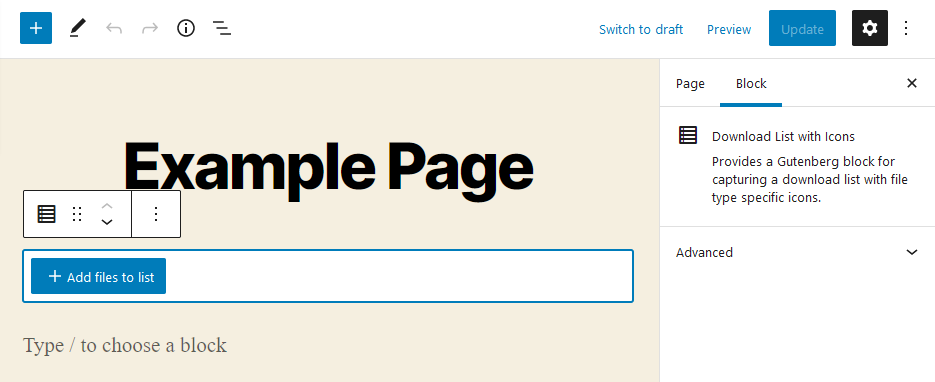
- Choose files from media library
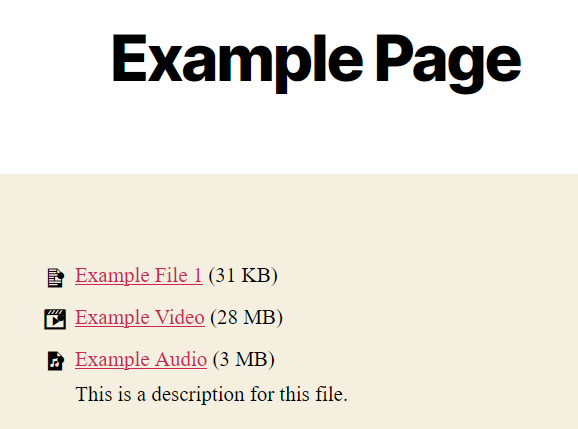
- Output chosen files as list with file-type-specific icon, download-link, title, size and description from media library
- Ships with multiple iconsets (Bootstrap-Icons, Dashicons, FontAweSome-Icons, Themify-Icons)
- Drag & Drop sorting for the list
- Remove files from list
Supports
- Display of file size, description and icon can be switched on and off
- Choose what link should be published: direct link or attachment page
- Choose an iconset for each Block; manage custom icons in unlimited lists
- Usage of multiple hooks to change or add icons to shipped iconsets
- Sort list by title or filesize with one click
- The Block can be used in widgets
- Set colors, typography and borders for each Block
- Use External files in media library if you want to link to external files
The development repository is on GitHub.
Installation
- Upload “download-list-block-with-icons” to the “/wp-content/plugins/” directory.
- Activate the plugin through the “Plugins” menu in WordPress.
- Add the Download List Block to the post or page where you want to show the download list. Choose the file(s) you wish to present.
Frequently asked questions
Where do I enter the description of a file?
The description stored at the file in the Media Library itself is used as the description. You can edit it in 2 ways: Open the file in the Media Library for editing. There you will find the field “Description”. Enter the desired description here. Or open this editing mask via the pencil at the file in the block you have created. You can also add a custom title and description for each file used only by the Block of this plugin.
Is there a limit to the amount files?
No, there are no restrictions.
Can I use the block in my theme?
The block can basically be used in any theme that supports Gutenberg blocks. If this is the case for your theme, you have to ask your theme developer.
Can I add my own icons?
Yes, you can manage your custom iconsets in WordPress-backend.
No icon is displayed at a file. Why?
The file will probably have a file type that does not follow the WordPress standard and is therefore not included in our plugin. You have 2 options: Use the iconset specific hook “downloadlist_*_icons” to add the list of icons. Check beforehand with the developer of your chosen icon set if the icon you want is included there. Use another icon set, which supports the file type if necessary.
Does the plugin also support Elementor or other PageBuilders?
No. The plugin is intended solely for the Gutenberg editor and will not be extended to other PageBuilders.
Changelog
Nothing else to consider when updating this plugin.
4.1.3
- Optimized capability checks
- Optimized sanitization of entered data
- Updated dependencies
- Fixed error if custom icon is added without a selected file type
- Removed now unsued function to dismiss a notices, now handled by easy-transients-for-wordpress
Screenshots

For developers
Is this your plugin? Show off the numbers.
Add a live badge to your site, docs or GitHub README. It updates on its own — no account needed.
Best Download List Block with Icons alternatives
All block plugins →





FAQ
Download List Block with Icons: quick answers
Straight answers, pulled from live WordPress.org data.
Live data from WordPress.org · checked Sep 26, 2026
Is Download List Block with Icons free?
Yes. Download List Block with Icons is free to download and use from the official WordPress.org plugin directory.
Is Download List Block with Icons safe to use in 2026?
Download List Block with Icons is a solid plugin choice in 2026, with a few things worth checking first. It runs on 400+ sites, is rated 5/5 and was last updated 2 months ago, and scores 78/100 on our health check.
How many websites use Download List Block with Icons?
Download List Block with Icons is active on 400+ WordPress websites and has been downloaded 15,463 times since it launched in January 2022. It was downloaded 229 times in the last 30 days.
Does Download List Block with Icons work with WordPress 7.1?
Yes. The developer has tested Download List Block with Icons up to WordPress 7.1.2, the latest release. It requires WordPress 6.0 or newer.
What PHP version does Download List Block with Icons need?
Download List Block with Icons requires PHP 8.2 or higher. Most hosts run PHP 8.x today, so it works on any modern WordPress hosting.
When was Download List Block with Icons last updated?
The latest version, 4.1.3, was released on August 9, 2026 (2 months ago).
Who makes Download List Block with Icons?
Download List Block with Icons is developed and maintained by threadi.
What are the best alternatives to Download List Block with Icons?
The most popular alternatives to Download List Block with Icons are Spectra Legacy (1M+ installs), Breadcrumb NavXT (800K+ installs) and PDF Embedder (300K+ installs).
Powered by PageForge
Want thousands of pages that rank like these? Build them in an afternoon.
This directory runs on the same engine as PageForge. Turn any spreadsheet, CSV or API into thousands of fast, SEO-ready WordPress pages — with schema, internal links and AI-written copy baked in.
- CSV, Google Sheets & API data sources
- AI content, schema & internal links per page
- Works with Elementor, Gutenberg, Yoast & Rank Math
- Free on WordPress.org — no credit card


