



Di Blocks – Awesome WordPress Blocks for Gutenberg Editor
Di Blocks is specially designed for new WordPress editor also knows as Gutenberg editor. It allows bloggers, professionals, or businesses to design their own creative blocks using Gutenberg Editor.

Consider an alternative
Di Blocks shows warning signs in 2026 — compare the alternatives below before installing. It runs on 1K+ sites, is rated 5/5 and was last updated 6 years ago, and scores 34/100 on our health check.
- Very few reviews so far
- No update in 5 years
- Only tested up to WordPress 5.6 (latest is 7.1)
How does it stack up?
Side-by-side on installs, updates, ratings & support



Daily downloads
Download spikes usually follow a new release — each site that auto-updates counts as a download.
Rankings
Where Di Blocks stands todayWordPress.org search rankings
Live position in the plugin search, top 100| Keyword | Position |
|---|---|
| block | >100 |
| blocks | >100 |
| editor blocks | >100 |
| gutenberg blocks | >100 |
| wordpress blocks | >100 |
Version adoption
Share of active sites per release.
Rating breakdown
★★★★★★★★★★ 5 from 1 reviews
About Di Blocks
From the official readme · v1.0.7Description
Di Blocks is specially designed for new WordPress editor also knows as Gutenberg editor. It allows bloggers, professionals, or businesses to design their own creative blocks using Gutenberg Editor.
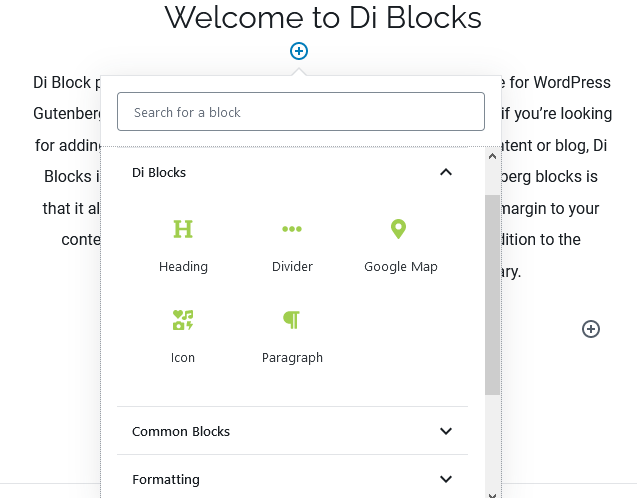
It allows you to add regular blocks with more advance controls. You can apply possible styles to any block like heading, paragraph, divider, Google map, icon etc. Di Blocks is very flexible to use and designed by Di Themes. The main aim of Di Blocks is to provide customization with ease. You can create a perfect WordPress web page using it. You don’t need any hectic coding knowledge to use this plugin. It’s just a one-click insertion.
Di Blocks plugin allows you to add animations, insert 440+ cool icons, and design the heading of your page in your own way. Di Blocks provide greater user control over the page-designing process.
Di Block plugin is a useful tool that has all these features and more for WordPress Gutenberg editor. So if you don’t want your content to get lost and if you’re looking for adding some cool animation tricks or visual effects to your content or blog, Di Blocks is best fit for you.
Another important aspect of this Gutenberg blocks is that it also provides spacing options to give proper padding and margin to your content. Therefore, Di Block plugin seems to be an integral addition to the overwhelming library of plugins in the WordPress library.
List of available Blocks
Heading Block
Heading is the most important part of any web page. It must look attractive to attain the impression of a visitor. Di Blocks helps you to customize the design of heading in a very attractive way. You can set the heading tag, colors, typography, spacing, border, animation and much more.
Icon Block
You can use 440+ cool icons, where you want without any hassle. Di Blocks plugin adds all the Font Awesome icons in managed icon category so you can find and add your favorite icon quickly. it also adds advance options to style the icon like icon name, size, rotate, colors, spacing, border, animation and more.
Paragraph Block
An effective paragraph is usually designed in a very appropriate way. It must look beautiful so readers can be engaged with it. Di Blocks typography feature helps you to design beautiful paragraphs. You can use different types of fonts, transform text to upper case, and set line spacing. Paragraph block also allows to use animation effects.
Google Map Block
We know how much your physical store matters to you. We consider this and give you space to embed Google map on your web page. Moreover, you can change its frame size, add padding and margin according to your design, and add animations.
Divider Block
Divider block is very useful, when we need to separate two blocks. Divider block provides styled horizontal line which divide your block contents. it also allows to display styled icon in the center, left and right. it also allows to display icon in the center, left or right of your divider.
Button Block
Display a button on the web page with advance style options. it also supports icon, so user can display font awesome icon before or after the button text.
More awesome blocks are coming soon….
Installation
Traditional Installation
- Go to: Plugin > Add New menu.
- Here, search for ‘Di Blocks’
- Now click on ‘Install’ and then ‘Activate’
Manual Installation
- Download plugin zip file from : https://wordpress.org/plugins/di-blocks/
- Open Dashboard of your WordPress website.
- Open: Plugins > Add New > Upload Plugin > Browse… (select downloaded zip file) > Install Now
- Now simply activate plugin.
Changelog
Normal updates
1.0.7
- Checking WP 5.6 compatibility
1.0.6
- Fix: 5.5 check and fixes
1.0.5
- New: Button block
- Fix: Divider block
1.0.4
- New: Divider block
1.0.3
- Added: Border to heading block
- New: Paragraph block
1.0.2
- Fixed: Class prefix
Screenshots

For developers
Is this your plugin? Show off the numbers.
Add a live badge to your site, docs or GitHub README. It updates on its own — no account needed.
Best Di Blocks alternatives
All block plugins →





FAQ
Di Blocks: quick answers
Straight answers, pulled from live WordPress.org data.
Live data from WordPress.org · checked Sep 28, 2026
Is Di Blocks free?
Yes. Di Blocks is free to download and use from the official WordPress.org plugin directory.
Is Di Blocks safe to use in 2026?
Di Blocks shows warning signs in 2026 — compare the alternatives below before installing. It runs on 1K+ sites, is rated 5/5 and was last updated 6 years ago, and scores 34/100 on our health check.
How many websites use Di Blocks?
Di Blocks is active on 1K+ WordPress websites and has been downloaded 36,028 times since it launched in June 2020. It was downloaded 291 times in the last 30 days.
Does Di Blocks work with WordPress 7.1?
Di Blocks is officially tested up to WordPress 5.6.21, while the latest release is 7.1.2. It may still work, but try it on a staging site first.
What PHP version does Di Blocks need?
Di Blocks requires PHP 5.6 or higher. Most hosts run PHP 8.x today, so it works on any modern WordPress hosting.
When was Di Blocks last updated?
The latest version, 1.0.7, was released on December 14, 2020 (6 years ago).
Who makes Di Blocks?
Di Blocks is developed and maintained by Di Themes.
What are the best alternatives to Di Blocks?
The most popular alternatives to Di Blocks are Spectra Legacy (1M+ installs), Breadcrumb NavXT (800K+ installs) and PDF Embedder (300K+ installs).
Powered by PageForge
Want thousands of pages that rank like these? Build them in an afternoon.
This directory runs on the same engine as PageForge. Turn any spreadsheet, CSV or API into thousands of fast, SEO-ready WordPress pages — with schema, internal links and AI-written copy baked in.
- CSV, Google Sheets & API data sources
- AI content, schema & internal links per page
- Works with Elementor, Gutenberg, Yoast & Rank Math
- Free on WordPress.org — no credit card


