


DevtasksUp – ClickUp integration
The plugin integrates ClickUp into admin for streamlined task management. Add API key for full access: create tasks, leave comments, view priority.

Solid choice
DevtasksUp – ClickUp integration is a solid plugin choice in 2026, with a few things worth checking first. It runs on 30+ sites, is rated 5/5 and was last updated 1 month ago, and scores 70/100 on our health check.
- Tested with the latest WordPress (7.1)
- Small user base (30+ active installs)
- Very few reviews so far
How does it stack up?
Side-by-side on installs, updates, ratings & support



Daily downloads
Download spikes usually follow a new release — each site that auto-updates counts as a download.
Rankings
Where DevtasksUp stands todayWordPress.org search rankings
Live position in the plugin search, top 100| Keyword | Position |
|---|---|
| admin | >100 |
| ClickUp | #1 |
| clients | >100 |
| integration | >100 |
| task management | #64 |
Version adoption
Share of active sites per release.
Rating breakdown
★★★★★★★★★★ 5 from 2 reviews
About DevtasksUp – ClickUp integration
From the official readme · v1.3.1Description
Unlock effortless task organization with the ClickUp plugin’s seamless integration into your admin. Simply configure your account with an API key and watch as task creation, comment writing, and task prioritization become a breeze. Ideal for developers to customize for their clients, ensuring direct and efficient task delegation.
The options for this plugin include:
- Integration of ClickUp into the admin
- Configuration using an API key on your account
- Task creation
- Create task and create custom fields if configured (supports 13 types of fields)
- Comment writing
- Viewing the most important aspect of a task
- Customization by developers for their clients
- Direct task delegation from the client to the developer.
- Multiple workspace support with real-time switching
The helper libraries plugin uses the following:
Notes:
- In order for the plugin to work correctly, it must be configured from an admin account
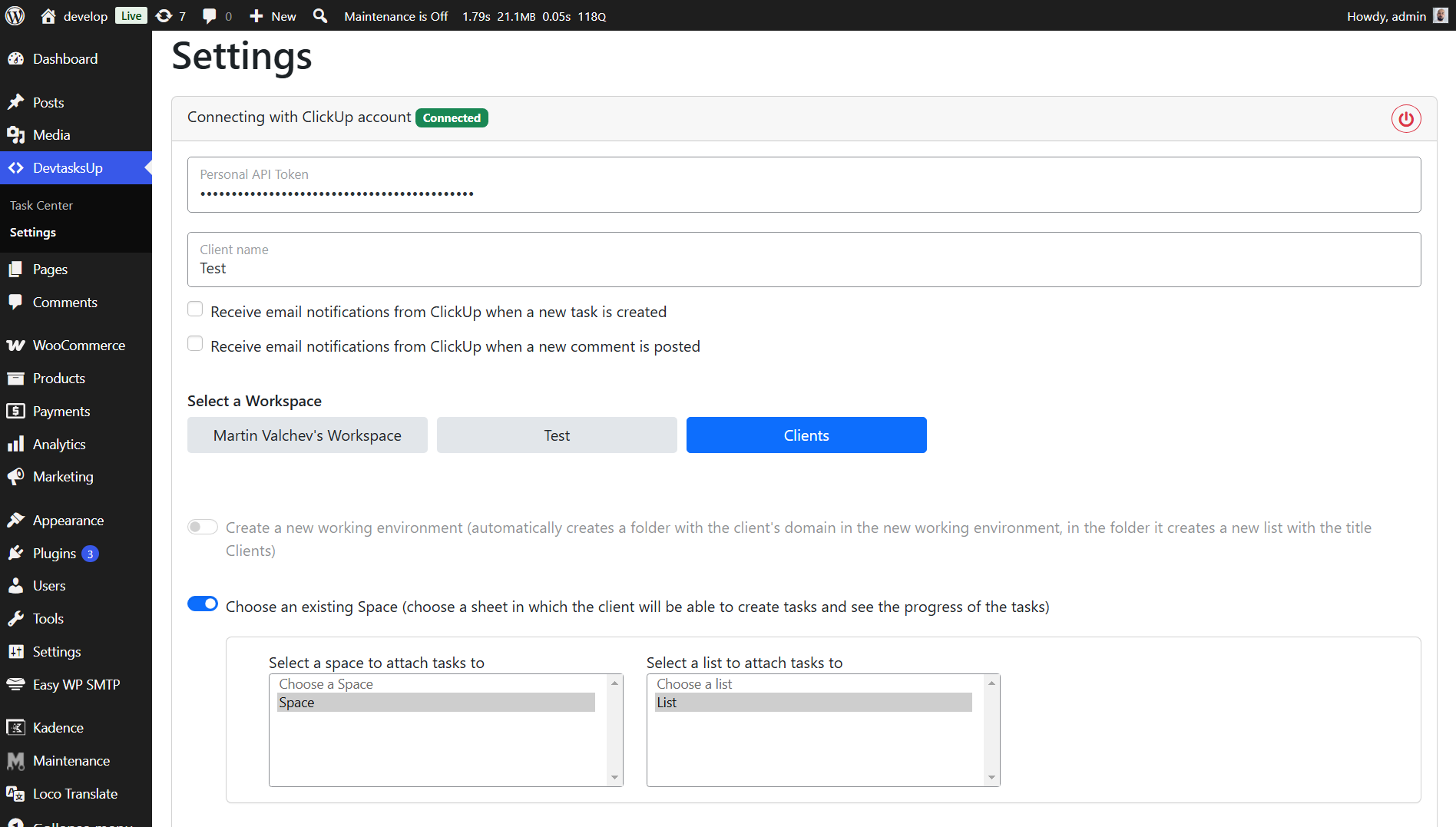
- The corresponding Api key must be filled in, upon successful connection, it is mandatory to choose whether you want to configure it in a new environment or in a current one
- If you want to use custom fields, they must be configured from Click Up, if they are configured, the field option will be displayed when you create a task
- You can now select and switch between multiple workspaces in real-time
- The plugin automatically resets configuration when switching workspaces to prevent conflicts
Installation
To install this plugin:
- Install the plugin through the WordPress admin interface, or upload the plugin folder to /wp-content/plugins/ using ftp.
- Activate the plugin through the ‘Plugins’ screen in WordPress. On a Multisite you can either network activate it or let users activate it individually.
- Go to WordPress Admin > DevtasksUp > Settings
Frequently asked questions
What is the plugin?
The plugin is an integration of the task management platform, ClickUp, into the admin.
How do I configure the plugin?
You can configure the plugin by adding an API key to your account.
What tasks can I perform with this plugin?
You can create tasks, write comments, and view the most important aspects of a task.
Who is this plugin suitable for?
This plugin is ideal for developers who want to set it up for their clients and delegate tasks directly.
Does it support custom fields to Click up?
Yes, it supports 13 types of fields: * URL Custom Field * Dropdown Custom Field * Email Custom Field * Phone Custom Field * Date Custom Field * Short Text Custom Field * Long Text Custom Field * Number Custom Field * Money Custom Field * Emoji (Rating) Custom Field * Label Custom Field * Attachment Custom Field * Checkbox Custom Field
Can I use multiple workspaces?
Yes, you can select and switch between multiple workspaces in real-time.
Changelog
Added multiple workspace support with real-time switching and automatic configuration reset when changing workspaces. Automatic migration from previous versions - your existing settings will be preserved and enhanced with workspace selection.
1.3.1
- Fix: Fixed issue with API errors after disconnecting from ClickUp
- Fix: Improved error handling when workspace is deleted from ClickUp
- Added: Automatic reset of configuration when API token is removed
- Added: Automatic detection of deleted workspaces with fallback to first available workspace
- Improvement: Better validation of API token and List ID before making API calls
- Improvement: Enhanced error handling for all ClickUp API endpoints
- Improvement: Added additional translations for workspace management
Release date: March 11, 2025
1.3.0
- Added: Multiple workspace support with real-time switching
- Added: Ability to select different workspaces and automatically reset configuration
- Added: Real-time space loading when switching workspaces
- Added: Automatic migration from previous versions
- Added: Mutual exclusion between workspace creation and selection options
- Added: Auto-refresh of workspaces list when loading settings page
- Improvement: Better API integration with ClickUp workspaces
- Improvement: Enhanced user experience when configuring workspaces
- Improvement: Improved settings page UI – only shows API token field when token is invalid
- Improvement: Added validation for API token field with visual feedback
- Improvement: Responsive workspace selector with Bootstrap button styling
- Fix: Fixed issue with empty List ID causing API errors
- Fix: Improved error handling for API requests
- Fix: Workspaces created in ClickUp now appear automatically when refreshing the settings page
- Tested with WordPress 6.7.2
Release date: March 10, 2025
1.2.7
- Added: New donate link
- Tested with WordPress 6.7
Release date: November 19, 2024
1.2.6
- Fix: Bug with session
Release date: May 09, 2024
1.2.5
- Fix: Problem with status when create task
Release date: April 10, 2024
1.2.4
- Improvement: Loading tasks with AJAX
- Tested with WordPress 6.5
Release date: April 3, 2024
Screenshots


For developers
Is this your plugin? Show off the numbers.
Add a live badge to your site, docs or GitHub README. It updates on its own — no account needed.
Best DevtasksUp alternatives
All admin plugins →




FAQ
DevtasksUp – ClickUp integration: quick answers
Straight answers, pulled from live WordPress.org data.
Live data from WordPress.org · checked Sep 30, 2026
Is DevtasksUp – ClickUp integration free?
Yes. DevtasksUp – ClickUp integration is free to download and use from the official WordPress.org plugin directory.
Is DevtasksUp – ClickUp integration safe to use in 2026?
DevtasksUp – ClickUp integration is a solid plugin choice in 2026, with a few things worth checking first. It runs on 30+ sites, is rated 5/5 and was last updated 1 month ago, and scores 70/100 on our health check.
How many websites use DevtasksUp – ClickUp integration?
DevtasksUp – ClickUp integration is active on 30+ WordPress websites and has been downloaded 2,776 times since it launched in February 2023. It was downloaded 83 times in the last 30 days.
Does DevtasksUp – ClickUp integration work with WordPress 7.1?
Yes. The developer has tested DevtasksUp – ClickUp integration up to WordPress 7.1.2, the latest release. It requires WordPress 5.3 or newer.
What PHP version does DevtasksUp – ClickUp integration need?
DevtasksUp – ClickUp integration requires PHP 7.4 or higher. Most hosts run PHP 8.x today, so it works on any modern WordPress hosting.
When was DevtasksUp – ClickUp integration last updated?
The latest version, 1.3.1, was released on August 21, 2026 (1 month ago).
Who makes DevtasksUp – ClickUp integration?
DevtasksUp – ClickUp integration is developed and maintained by Martin Valchev.
What are the best alternatives to DevtasksUp – ClickUp integration?
The most popular alternatives to DevtasksUp – ClickUp integration are Loginizer (1M+ installs), Redux Framework (900K+ installs) and Admin Menu Editor (300K+ installs).
Powered by PageForge
Want thousands of pages that rank like these? Build them in an afternoon.
This directory runs on the same engine as PageForge. Turn any spreadsheet, CSV or API into thousands of fast, SEO-ready WordPress pages — with schema, internal links and AI-written copy baked in.
- CSV, Google Sheets & API data sources
- AI content, schema & internal links per page
- Works with Elementor, Gutenberg, Yoast & Rank Math
- Free on WordPress.org — no credit card


